Specs are compiled from manufacturer listings and verified buyer reviews and can change over time — please confirm the key details on the product page before buying.
Buying an Xbox One arcade stick is really two purchases in one: the parts inside it, and the connection that makes the console accept it. Most sticks that claim Xbox One support actually ask you to plug a real Xbox controller into a USB slot before they work, which is fine at a desk and annoying on a living-room floor. The picks below are sorted by what they actually do for you — lever or leverless, wired or wireless, stock parts or room to swap them.
This guide is built by comparing the manufacturers’ published specifications and the patterns across verified customer reviews, so you get each pick’s real strengths and trade-offs instead of marketing spin.
You will see which stick is wireless and which needs a controller tethered nearby, which one opens up for modding and which one is sealed, and where a lever beats a button-only layout in a real match. Every recommendation here starts from the same question: will this Xbox One Arcade Stick still feel right after a hundred ranked sets, not just on day one.
Top Picks


How To Choose An Xbox One Arcade Stick
The first thing to settle is compatibility, and it catches more buyers than any other spec. Several sticks in this category list Xbox One support but require a wired Xbox or PS4 controller plugged into their USB port to authorize the connection. That works, but it means a second controller lives permanently on your lap or coffee table. A stick that lists Xbox One as a straight compatible device, or one that is officially licensed, skips that step.
Lever or leverless buttons
A lever stick uses a ball-top or bat-top joystick for directions, which is what most arcade veterans grew up with. A leverless controller replaces the stick with buttons you press for up, down, left, and right. Leverless layouts register directional inputs without a diagonal to slip through, while a lever gives you the physical swing and grip feedback that feels natural if you learned on cabinets.
Stock parts and the mod question
Sanwa Denshi buttons and joysticks are the arcade-standard components, and a stick that ships with them gives you a familiar feel on day one. If you plan to tinker, look for a chassis that opens — a removable top plate, accessible internals, or hot-swappable switches. A sealed stick is fine until a button goes soft, and then it is a closed box.
Weight, size, and where it sits
A heavy stick stays put during a hard reversal; a light one can slide across your desk mid-match. The trade-off is travel. A stick weighing over 7 pounds is a stay-at-home tournament unit, while a slim leverless panel slips into a backpack. Match the weight to whether the stick lives on one desk or moves every week.
Wired versus wireless
Wired USB is the safe default for tournament play, since it removes any drop-out question. Wireless options add convenience in a living-room setup, and a battery rating in hours tells you roughly how long between charges. For competitive play, most players still run the cable.
Side-by-Side Comparison
| Model | Best For | Layout | Connection | Buttons | Amazon |
|---|---|---|---|---|---|
| 8BitDo Arcade Stick for Xbox★ Best Overall | Wireless living-room play | Lever | 2.4G wireless or USB | 8 | Amazon |
| ONEED Haute42 S16 LeverlessBudget Champion | Compact leverless on a budget | Leverless | USB | — | Amazon |
| MAYFLASH F500 FLATMost Versatile | All-button flat panel | All-button flat | USB | 14 | Amazon |
| MAYFLASH F300 Elite | Modding with Sanwa parts | Lever | USB | 9 | Amazon |
| Razer Atrox for Xbox One | Tool-free internals access | Lever | USB | 10 | Amazon |
| HORI Fighting Stick alpha | Easy-open maintenance | Lever | USB | — | Amazon |
| Nacon Daija | Sanwa feel with profiles | Lever | USB-A to USB-C | 17 | Amazon |
| Turtle Beach Victrix Pro KO | Tournament leverless travel | Leverless | USB-C | 16 | Amazon |
Detailed Reviews
1. 8BitDo Arcade Stick for Xbox Series X|S and Xbox One (White)
Our pick — 4.5+★ from 850+ verified ratings; the strongest balance of quality and price.
The one cordless stick that never asks you to tether a controller.
This is the only pick here that carries an official Xbox license and connects wirelessly, which together solve the two headaches that dog this category. The license means no authorization workaround; the 2.4G receiver (a small USB dongle that pairs the stick to the console) means no cable across your floor. Owners put it through both an Xbox and a PC without complaint on the same desk, and the review pages back that up — it holds 4.5+ stars across 860+ ratings, the strongest score-and-volume combination on this list.
Inside, you get 8 buttons and a lever, plus a 3.5mm audio jack (a standard headphone port) with its own volume control, so you can plug in a headset without routing sound through the TV. 8BitDo’s Ultimate Software lets you remap buttons, and dedicated fast-mapping and profile buttons on the chassis let you switch setups without a computer. Battery life is rated at 30 play hours on a 4-hour charge.
At 2250 g the stick sits solidly without needing a clamp, so it stays put on your lap during a match. That is heavier in hand than the Turtle Beach Victrix Pro KO at 2.7 pounds. The buttons are the other thing to know going in: it ships with 8, while the MAYFLASH F500 FLAT fits 14. So if you play a game that wants extra macro buttons, the flat panel gives you more real estate. For a lever player who mostly wants to sit on the couch and fight, those are easy trade-offs.
What earns it the top slot
- Officially licensed and wireless, so no controller needs to be plugged in to authorize it
- 3.5mm audio jack plus volume control for headsets on the fly
- 30 play hours on a 4-hour charge
- Button mapping and profile switching from the chassis itself
Where it runs out of room
- 8 buttons versus 14 on the MAYFLASH F500 FLAT, so less macro room
- Heavier than the Victrix Pro KO at 2250 g, so it stays on one desk
Made for: A living-room Xbox player who wants a lever stick that just turns on and pairs.
Look past it if: You need a bank of extra buttons or a slim panel for weekly travel.
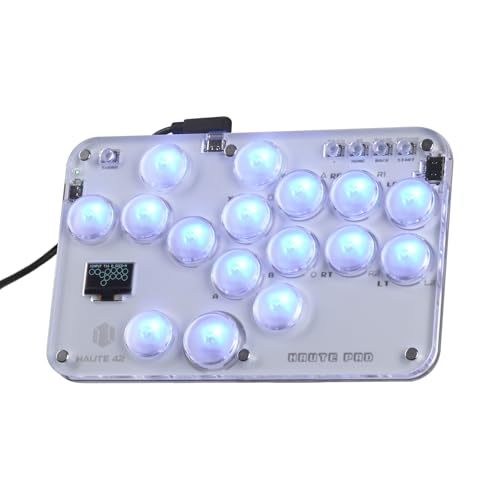
2. ONEED Haute42 S16 Leverless Controller
An acrylic-panel leverless board that lets you swap switches without a soldering iron.
If you are leverless-curious and do not want to spend tournament money on an experiment, the Haute42 S16 is the entry point. Hot-swappable sockets (the switch pops out and a new one clicks in, no soldering) mean you can try different Kailh Crystal switches until the feel suits you, and the low-profile mechanical keys register a press without much travel. The removable acrylic top plate is clear enough to hold a printed art insert, and the RGB lighting is customizable from the board.
You get flexibility, but you give up wireless freedom. This is a USB-only board, and unlike the 8BitDo above, there is no 2.4G dongle (a small USB plug that connects wirelessly) or battery inside. It also uses 6mm button caps (the small plastic toppers that change how the press feels under your finger). The package includes a spare switch, a puller, and anti-slip pads, so you are set up to tinker on day one.
The honest catch here is support volume rather than hardware. The board lists Xbox One in its compatible devices, but the maker also points PS4 and PS5 connection questions to a support site, which tells you the console dance can take a minute to sort out. That is the cost of an entry-tier leverless board — you get the layout and the modding freedom, and you do the setup homework yourself.
Best value on the list: A hot-swappable leverless board with a clear acrylic face and RGB, at the lowest tier of this group.
Plan for: A USB-only wired setup and a little patience with the first console pairing.
Your move: Grab this if you want to test leverless inputs and swap switches on a budget.
Not your board: You play wirelessly or want a pre-authored console adapter in the box.
3. MAYFLASH F500 FLAT Fight Stick
A flat all-button panel built like a spare-parts drawer for your hands.
The F500 FLAT is the odd shape on this list, and that is its selling point. It is a flat all-button controller — no joystick, just a low slab of buttons — measuring 14.17 x 9.06 x 1.97 inches and carrying 14 buttons. That is a 75% button-count lead over the 8BitDo’s 8, and it puts more macro and shortcut options right under your fingers. Its flat footprint also means it lies low on a desk rather than rising up like a lever stick chassis.
MAYFLASH built it for modding. It accepts Sanwa Denshi buttons, and the clear acrylic top plate comes off so you can print a custom art insert from the company’s template. Owners consistently describe it as sturdy and heavy, and the weight is doing real work — a flat panel with this much surface area would otherwise slide during a quick input. Turbo with adjustable speed settings rounds out the feature list, and headsets can output both background music and online chat on the Xbox consoles.
One workaround you must know about, because it is not optional: to use this on Xbox One, Xbox Series S/X, or Xbox 360, a wired Xbox or PS4 controller has to be plugged into the F500 FLAT’s own USB slot. That means a real second controller sits on your lap. Compared with the Razer Atrox, which measures 4.96 x 14.96 x 10.31 inches, this one is far flatter and easier to store — but the Atrox needs no donor controller.
The flat-panel argument
- 14 buttons, well past the 8 on the 8BitDo
- Sanwa-compatible and the top plate lifts for custom art
- Turbo with multiple speed settings
- Headsets output music and chat on Xbox
The condition you must accept
- Needs a wired Xbox or PS4 controller plugged into the stick for Xbox play
- No onboard joystick, so it will not suit lever players
Pick this one if: You want maximum buttons and a flat deck that accepts custom art and Sanwa parts.
Skip the hassle if: Keeping a donor controller plugged in at all times sounds like a deal you would not make.
4. MAYFLASH F300 Elite Arcade Stick
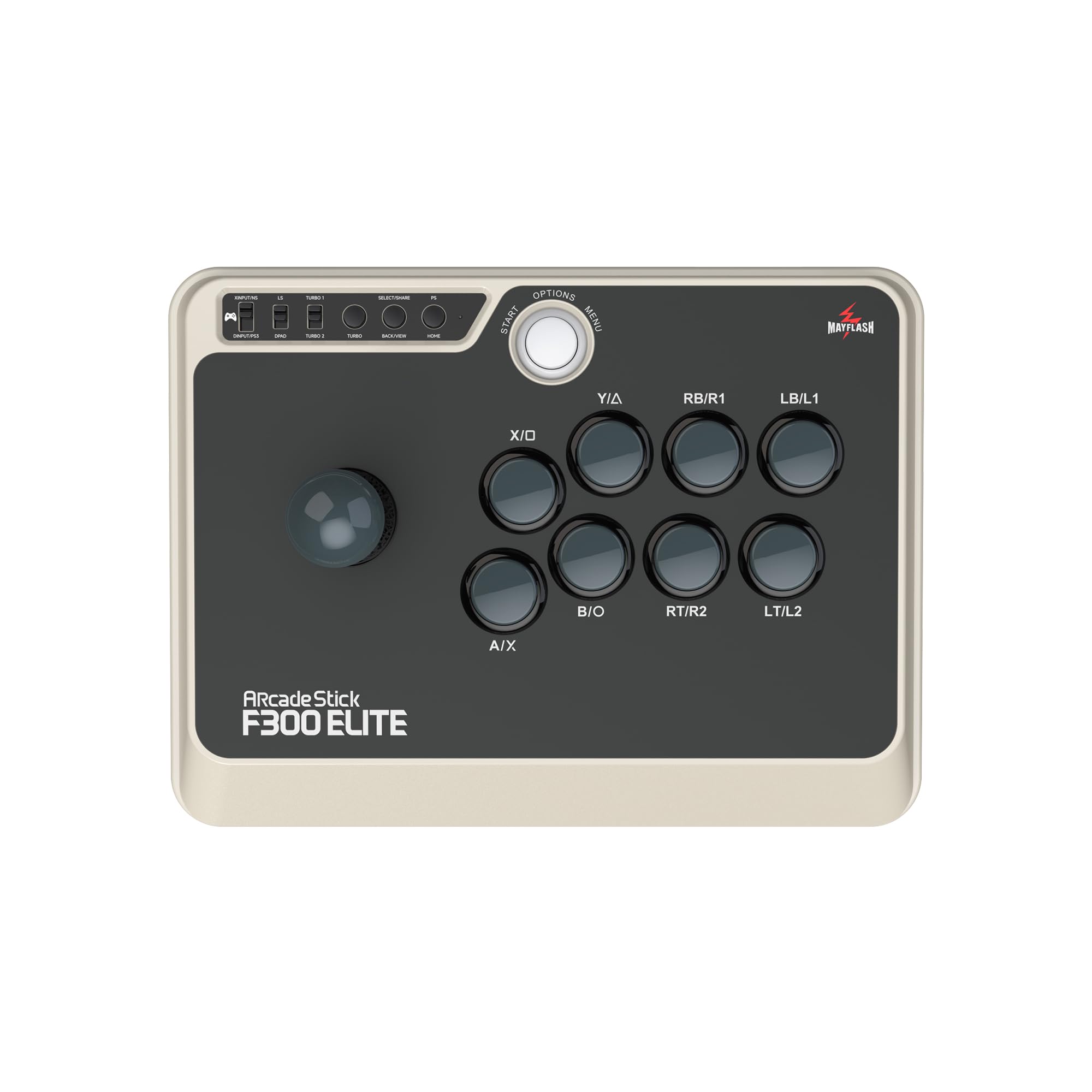
Sanwa buttons and a joystick from the start, with the lid off for anyone who wants to keep going.
This is the stick for the player who already knows they will change something. It ships with Sanwa buttons and a Sanwa joystick, so the feel is arcade-familiar before you touch a screwdriver. Then the inside opens up, letting you swap the joystick and buttons to suit your playstyle — the exact thing most entry sticks make difficult. It measures 11.81 x 8.86 x 2.2 inches and carries 9 buttons.
What people respond to most is simply how well made it feels. Quality is the aspect buyers bring up most often by a wide margin, and the stick’s solid, even weight comes up repeatedly as part of that impression. It is a weight that keeps the base planted during inputs rather than being something you notice carrying.
Here is where an honest note belongs. MAYFLASH’s own reviews are split on reliability and button responsiveness — a chunk of the feedback suggests some units need attention over the long haul. That does not make it a bad stick; it makes it a stick for someone comfortable opening the lid, which this chassis is designed to allow. Buyers who want a sealed-and-forget unit should look at the officially licensed 8BitDo instead. Compatibility is broad, covering Xbox One, Xbox Series X, PS4, PS3, Switch, Windows, macOS, Steam Deck, and Android.
Why it holds a spot: Sanwa hardware at the stock level plus an accessible interior, and it plays nicely across nearly every console you own.
The fair caveat: Mixed reports on long-term button responsiveness mean this suits a tinkerer more than a plug-and-forget player.
Right match: You plan to swap parts and want Sanwa feel from day one.
Wrong match: You want zero maintenance and a single console handshake.
5. Razer Atrox for Xbox One
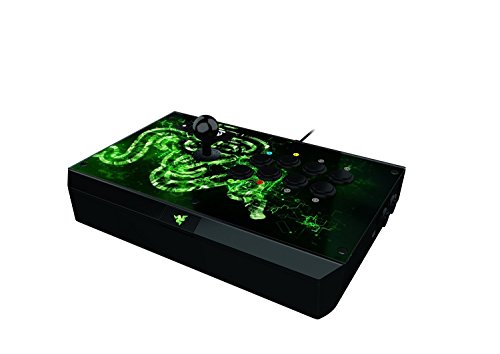
A lever stick with a hidden drawer for your cable, screwdriver, and spare buttons.
The Atrox is the biggest stick in this group, and it carries the weight to prove it. At 3320 g it outweighs the 8BitDo at 2250 g, and its dimensions run 4.96 x 14.96 x 10.31 inches, making it noticeably more of a fixed piece of furniture than a portable board. What you get for that bulk is a tournament-style build: 10 Sanwa buttons, an 8-way joystick, and a chassis that opens without tools so you can customize the stick and buttons freely.
Modding is where this stick shines brightest. Customizability is the aspect owners praise most, and the design backs it up — press the button, the top panel lifts, and the whole interior is exposed. There is also a genuinely clever touch: an internal compartment with dedicated slots for the detachable screw-lock cable, a screwdriver, and two extra buttons, so your spares travel with the stick.
The serious follow-up question is console support. Buyer feedback flags that it does not work with all Xbox One games, which is a meaningful caveat for a stick branded for the console. Tournament mode does let you deactivate the Start, Back, and Xbox One Guide buttons to prevent accidental pauses, and durability holds up well over time. Weight the compatibility reports carefully before committing — this is a stick for players who will verify their specific game works, not one to buy blind.
Built for the modder
- Top panel opens without tools for direct access to the joystick and buttons
- Internal storage for the cable, a screwdriver, and two spare buttons
- Tournament mode disables the Start, Back, and Guide buttons
- 10 Sanwa buttons and an 8-way joystick
Check before you commit
- Compatibility with particular Xbox One games is a reported concern
- At 3320 g it is a fixed-desk stick, not a travel piece
Built for: Tinkerers who want the lid off and spares stored inside the case.
Hold off if: Your game library is unconfirmed — verify support before buying.
6. HORI Fighting Stick alpha for Xbox

The chassis pops open in seconds, so maintenance never means a screwdriver hunt.
HORI’s alpha earns its place on one clear strength: the whole chassis opens for easy maintenance and customization. Most sticks hide their internals behind screws; this one is designed to be opened routinely, so swapping a part or cleaning a button is a quick job rather than an afternoon project. The top housing artwork is also swappable, letting you change the look without changing the stick.
Feature density is solid for the tier: assignable buttons, a Share button, a Profile button, and Key Lock Mode (which disables buttons you do not want pressed mid-match). It is officially licensed by Microsoft for Xbox Series X|S, Xbox One, and Windows 10, so console handshake is settled. Build quality and ease of use are the things owners talk about most positively.
Where opinion divides is heft. Some like that it is light and easy to move; others find it too light for hard play, and value comes under the same split. There is no published item weight in the spec sheet, so you are going on the balance of feedback rather than a number. If you want a heavy fixed-desk stick, the Razer Atrox’s 3320 g is the safer reference point; if you want something you can open and carry, the alpha is the fit.
Why players keep it open
- Chassis opens for maintenance and customization
- Officially licensed by Microsoft for Xbox Series X|S, Xbox One, and Windows 10
- Assignable buttons, Share, Profile, and Key Lock Mode
- Top housing artwork swaps out
Weigh this before buying
- Lightweight build divides opinion — some find it too light for heavy inputs
- Value perception is mixed at this tier
Go for it when: Easy access to the internals and a licensed Xbox badge top your list.
Choose differently when: You want a heavy base that will not budge on a desk.
7. Nacon Daija Arcade Fight Stick for Xbox

Pro-level Sanwa feel with a textured palm rest and 17 mappable buttons.
The Daija is the most feature-stacked lever stick here: 17 buttons, Sanwa joystick and action buttons, and official licensing for Xbox Series X|S, Xbox One, and Windows 10 and 11. That button count is the highest on the list, giving you more room for macros than the 8BitDo’s 8 or the 10 on the Razer Atrox. At 7.7 pounds it stays planted, and the textured palm rest gives your wrists a stable anchor over long sessions.
Nacon built this one with competitive players, and the details show it. You get full button mapping through its Xbox/PC software, game profiles you can switch between, a 3.5mm audio jack for a competition headset, and two different joystick heads so you can pick between a ball-top and bat-top feel. A lock function prevents accidental button presses during intense fights, and three faceplate options let you change the look. The box includes a 3-meter detachable USB-A to USB-C cable and two customization tools.
The one thing to watch is the faceplate finish. Some feedback notes the plexiglass scratches easily, so if you keep the stock faceplate, treat it like a phone screen. That is a cosmetic caution on an otherwise sturdy build, not a reason to look elsewhere — but worth knowing before you toss the stick in a bag with keys.
what separates it: 17 buttons and full software mapping, so you can assign any function to any button. It also uses Sanwa hardware (a well-known Japanese brand of arcade parts) and a swappable joystick head.
One small caution: The plexiglass faceplate is prone to scratching, so protect it in transit.
Your stick if: You want Sanwa feel and the largest button count on this list for macro-heavy play.
Try another if: You want a faceplate you can toss in a bag without worrying about scratches.
8. Turtle Beach Victrix Pro KO Leverless Fight Stick

A slim, all-button esports panel with hot-swappable Cherry MX switches and 16 mappable buttons.
This is the leverless stick built for a bag. It is 0.88 inches tall at its thickest point, 13.2 inches wide, and weighs 2.7 pounds — the lightest leverless option here and far slimmer than a lever chassis like the Nacon Daija. Sixteen moveable and mappable buttons use hot-swappable Cherry MX Speed Silver RGB switches, so you can change the feel of any press without a soldering iron. A 3-meter braided USB-C cable handles the connection with response times tuned for competition.
The Leverless layout is the draw. Owners describe the button-only directional scheme as removing the diagonal-slip a lever sometimes introduces. RGB light rings around each button are customizable from the stick itself or from the Victrix Control Hub software. Turtle Beach also lists this stick as a recipient of the 2024 Best Tech Product award from the EVO Awards, and it is tuned for titles like Street Fighter 6, Guilty Gear, and TEKKEN 8.
The trade-off is that it is wired, with no wireless option. That is an intentional choice for a tournament stick, since most serious play is wired anyway, but it does mean a cable in your setup. It is also the heaviest-hitting tier of this list, so it is a considered purchase rather than an impulse buy. If leverless is your style and you play on the go, this is the focused match.
Why leverless regulars rate it
- 0.88-inch slim chassis at 2.7 pounds — the easiest to pack here
- 16 hot-swappable Cherry MX Speed Silver switches
- Per-button RGB adjustable on the stick or in software
- Tuned for Street Fighter 6, Guilty Gear, and TEKKEN 8
Know this before you buy
- Wired USB-C only — no wireless option
- Leverless layout, so lever veterans will be relearning inputs
Made for: A tournament or travel player committed to leverless inputs and quick switch swaps.
Skip past it if: You play on a joystick and want that lever swing back.
Know the Specs
Lever vs leverless
A lever stick uses a joystick for directions, usually ball-top or bat-top. A leverless stick replaces the joystick with separate directional buttons. Leverless layouts tend to make directional inputs register cleanly, because there is no diagonal to slip through. Lever sticks give you the physical swing and grip that cabinet-trained players rely on.
Sanwa parts
Sanwa Denshi is the arcade-standard brand for buttons and joysticks, and a stick that ships with Sanwa hardware feels familiar to arcade veterans from the start. Some sticks here are Sanwa-compatible rather than Sanwa-loaded, meaning you can swap in genuine parts later. If you plan to customize, look for a chassis that opens and either ships with Sanwa or accepts it.
Hot-swappable switches
Hot-swap means the mechanical switch behind a button pops out and a new one clicks in without soldering. That lets you tune the feel of the press — Cherry MX Speed Silver switches, for instance, register quickly — and replace a worn switch without sending the whole stick in. On leverless boards, hot-swap is the feature that makes long-term ownership sustainable.
Xbox compatibility and the donor controller
Not every stick with “Xbox One” in its listing connects directly. Some require a wired Xbox or PS4 controller plugged into the stick’s USB port to authorize the connection; that controller acts as a bridge the console accepts. An officially licensed stick avoids this step. If wireless matters, ensure the stick lists Xbox One as a straight compatible device or has an Xbox wireless mode.
Button count
The number of buttons determines how much macro and shortcut room you have. Most fighting games only need the standard attack buttons, but some players use extras for training modes or combos. Higher counts — the 8BitDo’s 8 versus the Nacon’s 17 — give more flexibility at the cost of a busier layout that can be harder to learn.
Weight and portability
A heavier stick resists sliding during hard inputs; a lighter one is easier to carry to a weekly local. Sticks in this group range from a few pounds to over 7.7 pounds. Decide whether the stick lives on one desk or moves between venues. For a fixed setup, weight is stability. For travel, a slim leverless panel wins.
Common Questions
Will an Xbox One arcade stick work on the Xbox Series X or S?
Why does my arcade stick need a controller plugged in to work?
Is a leverless stick better than a joystick for fighting games?
How long does the 8BitDo battery last on a charge?
Can I swap the buttons and joystick on these sticks?
What does Turbo do on an arcade stick?
Do these sticks have a headphone jack for chat?
How much does stick weight matter for fighting games?
Can I use a stick on PC as well as Xbox?
The Bottom Line
The winner is the 8BitDo Arcade Stick for Xbox because it solves the two biggest pain points at once: official licensing removes the donor-controller workaround, and the 2.4G wireless mode means no cable across the floor. If you want a flat panel with more buttons and a Sanwa-ready deck, the MAYFLASH F500 FLAT is the one to reach for — just keep a wired controller nearby. And if leverless travel play is your priority, the Victrix Pro KO packs 16 hot-swappable switches into a 0.88-inch chassis you can drop in a bag.
If you are not sure which style you prefer, start with the budget-friendly Haute42 S16 leverless board and a cheap lever stick, try both, and then commit to the one that feels right in your hands.
How we choose
We do not accept paid placement. Every pick is matched to a real buyer and a real use-case; we do not hands-on test units.
Sources
Specifications: manufacturer listings and product documentation. Review insights: verified customer reviews, as of November 2026. Pricing: not shown on this page (it changes often); check the current price via the retailer link.
As an Amazon Associate, Tactical Gear Guy earns from qualifying purchases. This does not affect which products we feature.