Specs are compiled from manufacturer listings and verified buyer reviews and can change over time — please confirm the key details on the product page before buying.
You want the feel of a pen on paper and the convenience of a searchable file, and you do not want to carry both. That is exactly what a digital writing notepad does — you write by hand, and the page either wipes clean with a button or lands in your cloud drive as a PDF. Here is the short answer before you scroll: buy a pressure-sensitive LCD board if you just want to scribble and wipe, and buy a tablet-class notepad if you need your handwriting saved, searched and shared.
This guide is built by comparing the manufacturers’ published specifications and the patterns across verified customer reviews, so you get each pick’s real strengths and trade-offs instead of marketing spin.
Some of these pads keep every stroke for a button-press erase, others capture your handwriting onto an actual screen. The picks below cover both, and each one is here because it does its own job well — the trick is matching the pad to how you actually take notes. My breakdown of the best digital writing notepad separates the wipe-clean scratchpads from the file-saving tablets so you pick once.
Top Picks

How To Choose The Best Digital Writing Notepad
Before you compare brands or sizes, decide one thing: do you need your words to survive? A wipe-clean LCD board is a scratchpad — great for lists, math, and quick diagrams, and gone the second you hit the erase button. A screen-based notepad stores your handwriting as a file you can open later. Answer that first and half the field disappears.
Does the pad keep your writing or wipe it?
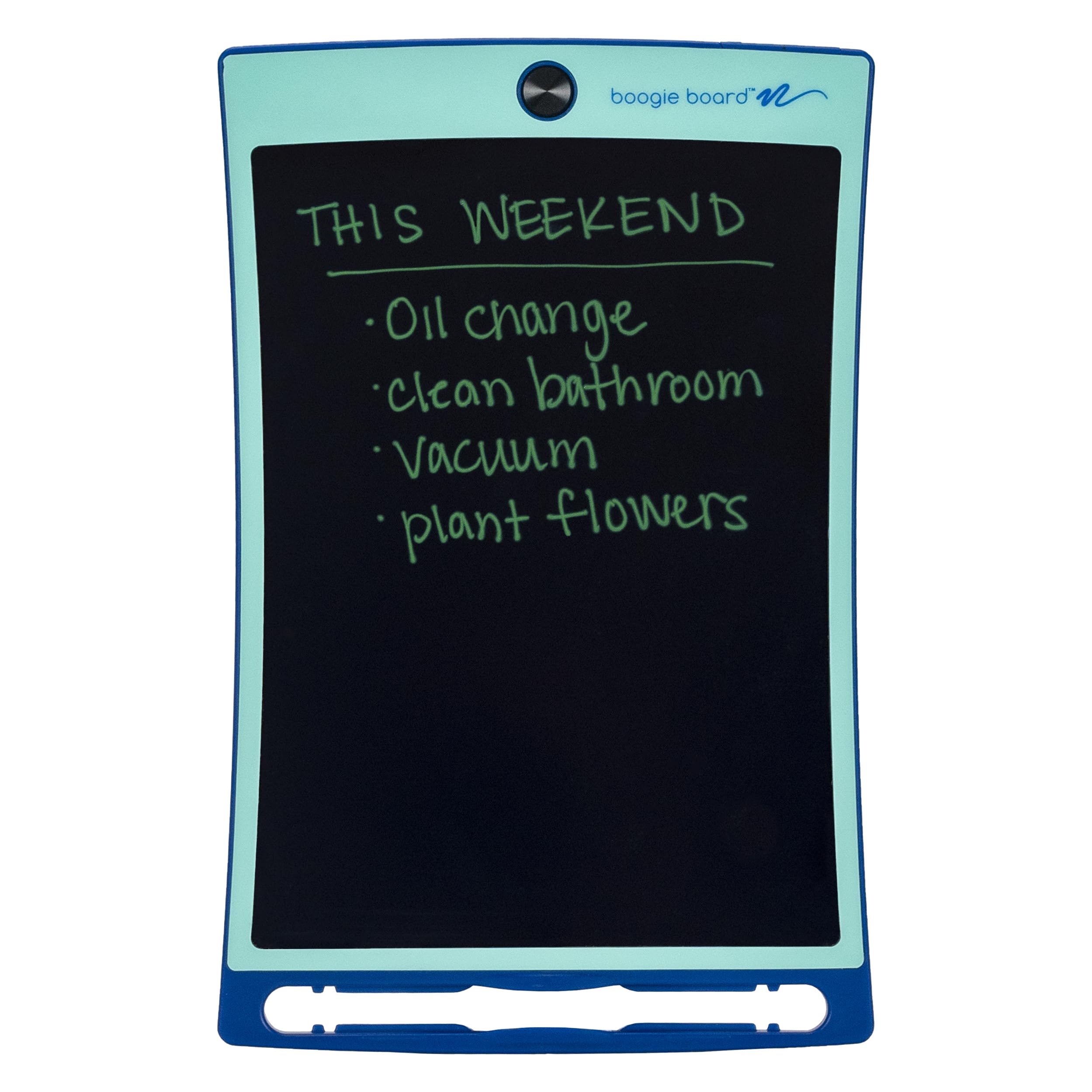
Boogie Board-style boards are the digital equivalent of a whiteboard you keep on your desk. You write with a stylus or a fingernail on a pressure-sensitive LCD (a screen that only needs pressure, no power to the pen), and a single button clears the whole surface. Nothing is stored. That is perfect for a shopping list or a phone-call doodle, and useless if the thought needs to reach your laptop.
App-based and e-ink notepads sit on the other side. These either capture your strokes as vector lines and beam them to a phone app, or they are full Android and e-ink tablets that run a real note-taking app. If you want to search your handwriting, export a PDF, or keep months of meeting notes, you are shopping in this half of the field.
What the stylus spec actually tells you
A pen with more pressure levels makes a bigger difference than a bigger screen for most writers. Pressure sensitivity (measured in levels — 4096 and 16K show up in this list) is what decides whether a light stroke stays thin and a heavy one goes bold. If you only print in block capitals, this matters less. If you sketch, annotate, or shade, it matters a lot.
Readability, glare, and what a screen needs
E-ink screens (the Kindle-style display that looks like paper and draws almost no power) are gentle on the eyes but need a front light to be readable in a dim room. LCD screens are bright and colorful but reflect glare. Some pads use an etched-glass LCD to fake the paper texture — a clever compromise that also narrows the viewing angle.
Side-by-Side Comparison
| Model | Best For | Display / Surface | Storage or Erase | Stylus | Amazon |
|---|---|---|---|---|---|
| Boogie Board Jot 8.5″★ Best Overall | Quick lists and wipe-clean scribbles | 8.5″ pressure-sensitive LCD | Instant one-button erase | Included stylus | Amazon |
| Rocketbook Core ExecutiveBest Paper Feel | Paper lovers who want PDFs | 6 x 8.8″ reusable paper, 36 pages | Wipe with damp cloth, app scans | Pilot Frixion pen included | Amazon |
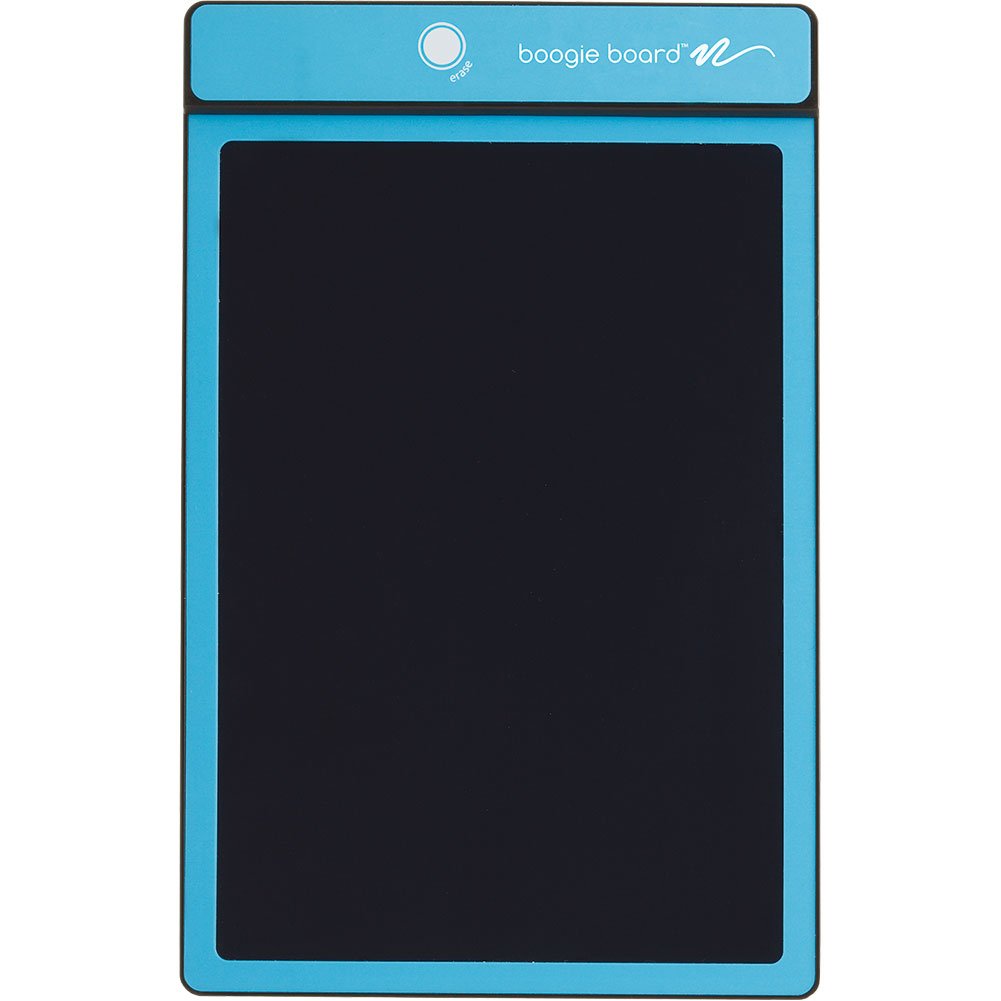
| King Jim Boogie Board BB-1GXBuilt For Long Use | Long-life no-fuss scratchpad | 8.5″ LCD (7.2 x 4.9″ writing area) | About 50,000 erases | Stylus | Amazon |
| HUION Note | Real paper plus a digital copy | No screen — A5 paper, 7.35×5.5″ active area | App storage, offline sync | Battery-free pen | Amazon |
| TCL NXTPAPER 11 Gen 2 | Notes plus entertainment in one | 11″ 2K LCD, 1920 x 1200, 60Hz | 128GB, expandable to 1TB | 4096-pressure T-PEN stylus | Amazon |
| BOOX Go Color 7 Gen II | Color e-ink reading and notes | 7″ Kaleido 3, 300 ppi B/W | 64GB, microSD slot | Active Stylus InkSense (sold separately) | Amazon |
| XPPen Magic Note Pad | Eye-friendly writing on Android | 10.95″ AG nano-etched LCD, 90Hz | 128GB | X3 Pro Pencil, 16K sensitivity | Amazon |
| Kindle Scribe 32GB (Like-New) | Reading plus a serious notebook | 10.2″ glare-free, 300 ppi, front-lit | 32GB, AI note tools | Premium Pen included, no charging | Amazon |
| Kindle Scribe 64GB (Newest) | Big-screen distraction-free writing | 11″ glare-free, front light | 64GB | Pen included, built-in eraser | Amazon |
Detailed Reviews
1. Boogie Board Jot Reusable Writing Tablet, 8.5″
Our pick — 4.5+★ from 5,500+ verified ratings; the strongest balance of quality and price.
An 8.5-inch pressure-sensitive LCD scratchpad that wipes clean with one button press.
The Boogie Board Jot earns the top spot because you never think about erasing: it is a pressure-sensitive LCD (a screen that reacts to how hard you press) that you write on with the included stylus, or even a fingernail. There is no software, no pairing, and no charging routine in the way. You pick it up and it works — so a note by the phone behaves like a notepad, not a gadget.
Built-in back magnets and a stylus kickstand keep it on a fridge or propped on a desk. At 8.5 inches wide and tall, it fits a counter or a nightstand, and built-in magnets on the back let it stick to a fridge or a filing cabinet. The stylus doubles as a kickstand to prop the board at an angle while you work. Those two details separate a pad you use from one that ends up in a drawer. It is also rated for kids ages 4 and up, so a family can hand it over without worry.
Appearance (489) is the aspect buyers single out most — this is a genuinely good-looking object, and the Bahama Blue shell is why it reads as a desk accessory rather than a gadget.
Here is the honest trade-off, and it is a big one for anyone expecting permanence. This board does not store anything — a button press and the page is gone. That is the point of the design, but it also means the Jot cannot replace a notebook you need to refer back to. Beyond that, the long-term record on this specific model is uneven: the screen losing its ability to fully erase and the unit failing within months both surface repeatedly in owner feedback, and durability is the concern that shows up most after erasability. Treat it as a brilliant disposable-feeling scratchpad, not a heirloom.
What earns its keep
- No charging, no app, no setup — write the moment you pick it up
- One-button instant erase clears the whole 8.5″ surface
- Built-in back magnets and a stylus kickstand for desk use
- Crisp, legible strokes with no bleed on the LCD
Where it asks patience
- Nothing is saved — the page is gone the moment you erase
- Long-term full erase and unit lifespan are the recurring gripes
- Single-use CR2 battery will need replacing eventually
Go for it if: you want a paperless grocery list, math scratchpad, or kid-proof doodle board that needs zero maintenance.
Know before you click: if you need to keep or search your notes, this is the wrong tool — you want an app-based or e-ink notepad further down.
2. Rocketbook Core Reusable Smart Notebook, Executive 6×8.8
36 pages of reusable paper you write on with a Pilot Frixion pen, scanned to Google Drive or OneNote by the app.
The Rocketbook Core refuses the trade between paper feel and digital files. It is a spiral notebook with 36 pages of genuine reusable paper in the Executive 6 x 8.8 inch size, and you write on it with the included Pilot Frixion Pen the way you have written since school. The app handles capture: scan a page with your phone and it uploads straight to Google Drive, Dropbox, or OneNote.
The smart part is in the page layout. The college-ruled sheets carry Smart Titles and Smart Tags, so you can name a page and route it to a specific cloud destination before you ever scan it. Combined with the scratch-resistant cover and the tighter spiral binding on this improved Core model, it is a genuinely usable daily notebook rather than a novelty. If the note-taking is the point and the syncing should stay invisible, this is the smoothest version of that.
The compromise is the wet cloth. Wiping a whole page clean takes a damp cloth and a little time, so this is not a quick-erase pad — it is a write-and-wipe cycle. Some owners also report smudging between the frixion ink and the page surface, and a few find the paper quality falls short of what they hoped for. Sized for a backpack or briefcase rather than a desk, it suits the notes you want to keep and modest for the ones you don’t.
What makes it click: the 6 x 8.8″ Executive footprint slides into a bag, and a single scan turns a handwritten page into a shareable file with no retyping.
The wet-cloth hitch: cleaning pages takes a damp cloth, so don’t buy it expecting instant button-press erasing like an LCD board.
Reach for this if: you love writing on real paper but hate retyping meeting notes — the cloud upload does the boring part.
Look elsewhere if: you want one-tap erasing or a stylus with pressure levels; this is pen-on-paper, not a screen.
3. King Jim Electronic Memo Pad Boogie Board 8.5″ BB-1GX
A 3.87-ounce, 0.13-inch-thick LCD memo board rated for roughly 50,000 button-press erases.
If the lifespan worry you had on the Jot bothers you, the King Jim BB-1GX answers it with one number: approximately 50,000 erases. That is the company’s rated count for how many times you can clear this board, which tells you it was built to be written on daily for a long time. It is a straightforward no-app, no-sync LCD memo pad — you write with the stylus, you press erase, you start fresh.
The physical details are tuned for a desk or a bag. It weighs 3.87 ounces and is a mere 0.13 inches thick, so it disappears into a folder or against a wall. The actual writing area is 7.2 x 4.9 inches inside the 8.5-inch LCD, which is enough room for a to-do list, a phone number, or a quick calculation. The blue ABS/PC plastic body is utilitarian rather than pretty, and that is clearly on purpose.
The flip side of that plainness: there is no storage, no cloud copy, and no app — press erase and yesterday’s note is gone. There is also less buyer feedback to lean on here than on the more popular boards, so you are mostly trusting the rated erase count and the spec sheet. If you want a long-life simple memo pad and nothing else, it fits; if you want notes you can retrieve, keep reading.
Longevity by the number: the approximately 50,000-erase rating and 3.87-ounce weight make it a genuine daily beater that vanishes onto a wall or into a slim folder.
Not a keeper: there is no save and no sync — the surface clears completely, so treat it as a scratchpad only.
Fits you if: you want a thin, light, long-rated memo pad for quick notes and nothing more.
Skip if: your notes need to be searchable or shareable later — this board keeps nothing.
4. HUION Note Digital Notebook with Real-Time Sync

A battery-free pen on a real A5 notepad, with every stroke captured as vector lines in the Huion Note app over Bluetooth 5.0.
The HUION Note runs 18 hours per full charge, so it turns actual paper into a digital file and still lasts all day. You write on the included A5 notepad (50 pages) with a battery-free pen, and the writing surface underneath captures every stroke as vector lines (clean, scalable lines rather than a photo). It pushes them to the free Huion Note app over Bluetooth 5.0. The tactile feel of real paper never leaves, which is the whole pitch.
What it does beyond the surface is the reason to consider it. It records audio synced to your handwriting, so you can replay what was being said when you wrote a line. It supports offline storage, then syncs later. One-click shares as images, PDF, or MP4. Swap the inner pages for the panel in the box, connect it to a PC, and it becomes a drawing tablet. Those extra modes turn a single notebook into a small productivity kit. Quality is the aspect buyers praise most here — it feels well made in the hand.
The catch sits in the same place as its promise: the writing surface is a no-screen pad, so everything lives in the app. Connectivity is Bluetooth-based and not everyone has a smooth pairing experience, and drawer-artists report the writing performance is not tuned for serious sketching. It charges, it needs the app to be useful, and the 433g body plus the pen sleeve is a little more to carry than a bare notebook. It is a clever tool, not a frictionless one.
Wins worth noting
- 18 hours of use per charge with roughly 30 days standby
- Audio recording synced to the exact stroke you drew
- Doubles as a drawing tablet when connected to a PC
Honest catches
- No screen — the app is required to see or share anything
- Bluetooth pairing is uneven for some users
- Writing performance is mixed for serious drawing
The right buy when: you want the pen-on-paper ritual and a searchable, shareable file in the same notebook, with audio to back up your notes.
Think twice when: you sketch for a living or want a screen-less workflow with zero app fuss.
5. TCL NXTPAPER 11 Gen 2 Android Tablet, 8+128GB
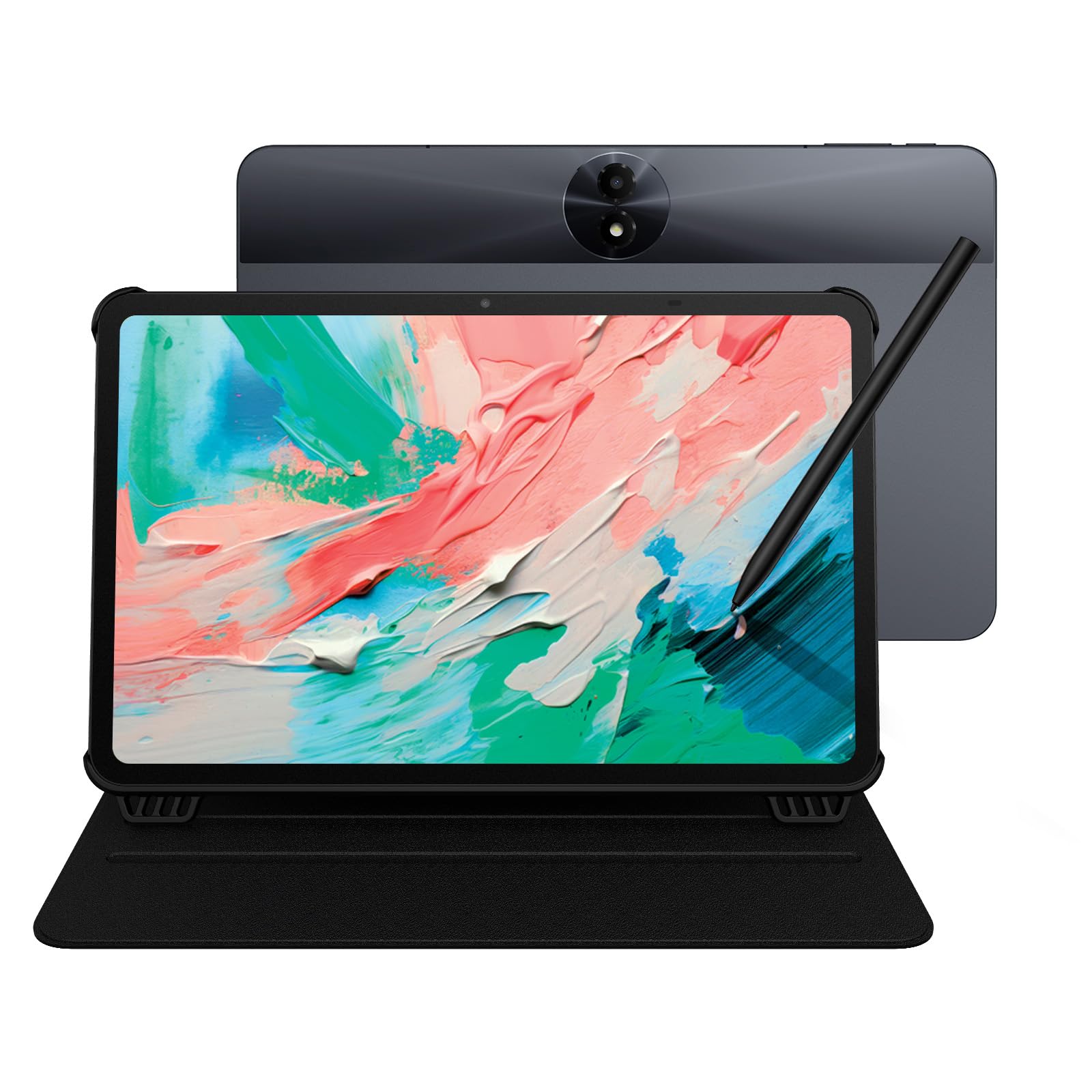
An 11-inch Android 15 tablet with a 4096-pressure T-PEN stylus for notes and a 2K screen for video.
Where the HUION Note hides your work in an app and the Boogie Board erases it, the TCL NXTPAPER keeps everything on a proper screen. That screen is an 11-inch 2K panel at 1920 x 1200 with 60Hz refresh (it redraws 60 times a second, so scrolling stays smooth). The 4096-pressure-level T-PEN stylus makes a light stroke thin and a heavy one bold. That pairing of a large high-res canvas and real pressure input is what you notice first, and it makes this the pick for someone who wants one device for notes, reading, and streaming.
The 8000mAh battery is the headline for all-day users — it is built to run through a full day of study or work, with 18W PD fast charging when it runs dry. Inside is a MediaTek Helio G80 processor with 8GB + 8GB RAM and 128GB of storage expandable to 1TB, running Android 15. The NXTPAPER display itself adds TÜV-certified low blue light, anti-glare coating, and DC dimming for flicker-free viewing, plus three display modes you switch between for reading, sketching, and video. Device quality is what owners rate highest, and the matte finish is a running favorite.
Two honest notes. This is a regular LCD tablet, not e-ink, so the eye-comfort features reduce glare and blue light but do not give you the paper-quiet look of a Kindle-style screen. It also has a 60Hz refresh, which is fine for note-taking but the least animated part of the package. For the writer who wants a real tablet that happens to be great for handwriting, the balance holds.
Why it earns Best All-Rounder: the 4096-pressure T-PEN stylus plus a 128GB 11″ tablet covers notes and Netflix on the same charge.
The compromise: it is an LCD, not e-ink — the anti-glare and blue-light work is real, but it still reads as a bright screen, not paper.
Buy it for: a single tablet that takes pressure-sensitive handwritten notes, reads comfortably, and plays video on an 8000mAh battery.
Don’t buy it for: a glare-free paper-only reading experience — that’s the Kindle Scribe’s department.
6. BOOX Tablet Go Color 7 Gen II E Ink Notepad

A 6.9-ounce, 7-inch Kaleido 3 color e-ink notepad running Android 13 — with the InkSense stylus sold separately.
The Go Color 7 Gen II slips into a coat pocket or a small bag at about 195g (6.9 oz) and only 0.25 inches thin. Its 7-inch Kaleido 3 display is a color e-ink panel rated at 4096 colors, with 1680 x 1264 resolution that works out to 300 ppi in black and white and 150 ppi in color. E-ink means it looks like paper and sips power, and the color layer means your notes and highlights aren’t stuck in monochrome.
Under that panel is an octa-core CPU, 4GB of RAM, 64GB of storage with a microSD slot, and Android 13 with support for third-party apps. Front light with warm and cold adjustment (CTM) lets you read in bed, and a G-sensor handles auto-rotation. There are page-turn buttons, a USB-C port, a speaker, and a microphone. It is the smallest true writing device on this list, and the only one offering color on an e-ink surface.
The one you have to plan for: the active InkSense stylus is not in the box, so add it to the budget before you commit. Color e-ink also carries the technology’s built-in trade-off — a darker, grayer screen than any LCD, which the maker openly acknowledges. Reading and note-taking in good light are fine, but if you expect LCD brightness or a wide viewing angle, you’ll be disappointed. This is a reader’s device first.
The pocketable e-ink writer: 300 ppi black-and-white text at 195g makes it the lightest serious option here.
Read the fine print: the stylus is a separate purchase, and color e-ink looks dimmer than LCD — that’s the technology, not a fault.
The pick for: a commuter or reader who wants color e-ink in the smallest writing device here, and will happily buy the stylus.
Pass if: you want the pen in the box or need LCD-grade brightness and a wide viewing angle.
7. XPPen 3-in-1 Color Digital Notebook 10.95″ Magic Note Pad

The X3 Pro Pencil’s 16K pressure sensitivity on a 10.95-inch AG nano-etched LCD that cuts glare and adds paper texture.
For pure writing experience, the XPPen Magic Note Pad leads on a single spec: the X3 Pro Pencil, powered by the X3 Pro smart chip (PD04D), offers 16K pressure sensitivity. That is the highest sensitivity figure in this whole list, and it is what lets a soft nib change line thickness and color depth based on how hard you press. Owners consistently describe the writing surface as feeling like real paper with a nearly frictionless texture — the closest approximation of pen-on-page on an LCD.
The 10.95-inch AG nano-etched display is equipped with TCL NXTPAPER 3.0 technology and cuts up to 95% of ambient light interference. A 90Hz refresh rate means no page-turn lag or ghosting as you write, and it covers 16.7 million colors at 400 nits. The X-key switches between Monochrome LCD, Light Color, and Nature Color modes with one press, so the same pad can be a stark writing surface or a full-color canvas. It carries a TÜV SÜD low blue light certification for the eye-sensitive.
The honest limits are real. It is a normal Android tablet, not e-ink, and the etched glass that creates the paper feel is deliberately narrow in viewing angle — you want to look at it head-on. The 8000mAh battery is paired with a 20W charger, and Android 14 wants you to avoid running many apps at once. But the writing itself is the star, and no LCD here comes closer to paper.
Where it wins
- 16K pen sensitivity — the most detailed pressure response in this lineup
- Three display modes with one-press color switching
- 90Hz screen keeps writing crisp with no page-turn ghosting
What to weigh
- Narrow viewing angle by design — best viewed straight on
- Need to avoid running too many apps at once
- It’s an LCD, not e-ink, if that paper look matters to you
Right for: note-takers and sketchers who want the most sensitive stylus and a near-paper texture on an LCD.
Wrong for: side-by-side reading or wide-angle sharing — the etched glass asks you to face it straight on.
8. Like-New Amazon Kindle Scribe 32GB with Premium Pen

A reader’s tablet that also happens to be an excellent pen-on-paper notebook.
The screen number that matters here is 300 ppi on a 10.2-inch glare-free, front-lit display — the same clarity regular Kindle readers rely on, now with a pen. The Premium Pen needs no setup and no charging, so you start writing the moment you unpack it. And the whole device is built on purpose for reading and writing: no notifications, no social media, nothing to pull you out of the page. Functionality is what the review pages praise most, and the writing feel is right behind it.
What separates this from a plain notebook is the built-in AI. It converts messy handwriting into readable font, summarizes your notes, and changes the length and tone of a summary — all on the device. Active Canvas lets you write directly on a book’s page, then expand or collapse the margin to make room. You can import documents and PDFs through Send to Kindle and mark them up on the page, which is the closest thing to a paperless annotation workflow on this list. On a single charge it reads for months and writes for weeks.
Worth knowing: this is a Like-New refurbished unit, tested and certified to look and work like new, and it ships with the same limited warranty as a new device in an Amazon-branded box. Reading is its home turf.
Why readers and writers both like it: a 10.2″ 300 ppi front-lit page plus a pen that never needs charging makes it the coziest writing device on the list.
One caveat: it’s a Like-New refurbished unit, so you get a tested, certified device and a generic box instead of a fresh-buy unboxing.
The one for you if: you read a lot and want a distraction-free pen notebook with AI that tidies up your handwriting.
Best to look past if: you want a tablet that streams and multitasks — this one is deliberately one-track.
9. Amazon Kindle Scribe 64GB (Newest Model), 11″ Display
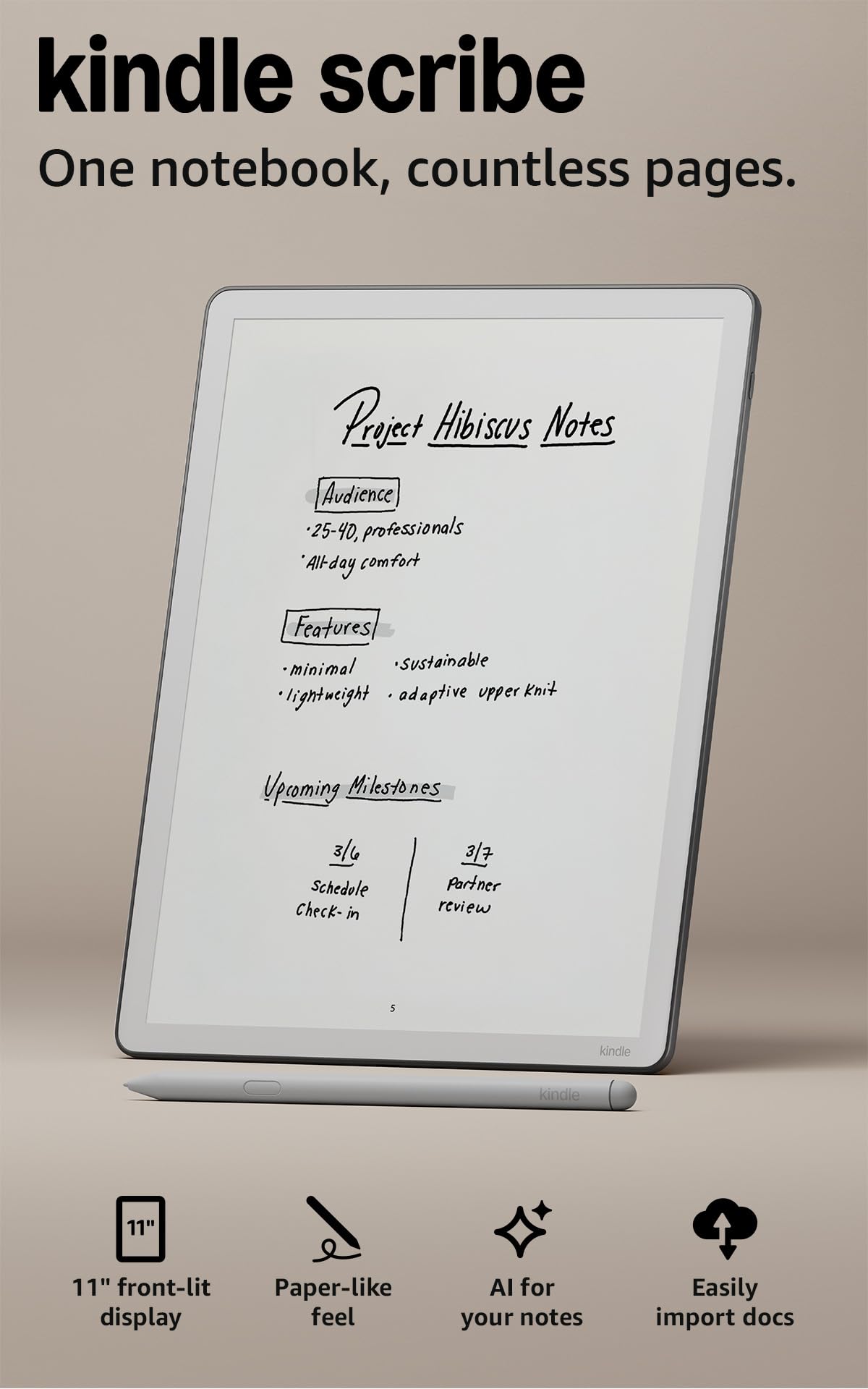
The biggest, thinnest Scribe yet — a full-size page for people who write in longhand.
Size is the headline: an 11-inch glare-free display with a front light, in a body just 5.4mm thin and 400g light. That larger canvas is the reason to choose this over the 10.2-inch model — more room for margin notes, diagrams, and the long lists you actually write out. The screen automatically adapts its brightness to your lighting, with a warmth control for night reading. Device quality is what owners rate highest, with the writing feel a close second.
The pen is the quiet luxury here — it never needs charging, and it has a built-in eraser plus a shortcut button for tools like the highlighter. The textured surface and responsive display deliver a pen-on-paper feel from the first stroke. The built-in notebook handles the note-taking, while the AI tools find information, answer questions about what you’ve written, and generate summaries. Imports from Google Drive or Microsoft OneDrive can be marked up and exported as PDFs, and notebooks can go to Microsoft OneNote to edit anywhere. You can also jot between the lines of a Kindle book as the text shifts to make room.
The catch here is expectation, not hardware. This is a 64GB dedicated writing-and-reading machine — no distracting apps, no video, no social feeds — and at the largest size in this list, it wants a desk or a structured bag, not a jacket pocket. It is the biggest investment here, and it rewards the person who plans to write and read daily. If you mostly want quick scribbles and phone calls, the simpler pads at the top of this list are a better match.
The big-page advantage: 11″ of glare-free canvas at 5.4mm thin and 400g keeps longhand notes comfortable without hand fatigue.
Know the trade: 64GB and a dedicated-purpose device means room for thousands of documents but zero app distractions — this is not a tablet replacement.
Pick this one if: you write longhand every day and want the biggest, thinnest Scribe with 64GB of room for documents and books.
Consider smaller if: you carry your notepad in a pocket or need a more budget-friendly first step.
Know the Specs
Pressure sensitivity (levels and K)
Pressure sensitivity is how finely a stylus reads how hard you press. A 4096-level pen or a 16K-sensitivity pencil (16,000-odd gradations) is what lets a light stroke stay thin and a firm one go wide and dark. If you only print block capitals, this barely matters. If you sketch or annotate densely, it’s the single biggest driver of how natural the pen feels.
E-ink vs LCD vs etched glass
E-ink (the Kindle-style paper display) is gentle on the eyes and needs a front light to be seen in a dim room. LCD is bright and colorful but reflects glare. An etched-glass LCD sits in between — an LCD with a roughened surface that creates paper texture and cuts glare, at the cost of a narrower viewing angle. Each is a different compromise; none is simply better.
Erase count on reusable pads
Reusable LCD boards carry a rated number of erases — the BB-1GX is listed at about 50,000. That figure tells you how many times the button-clear cycle is expected to work, not how many pages you can save. If you want a pad you write on daily without worrying about it dying, check this number first.
Storage and cloud sync
Two kinds of “storage” appear on this list: built-in memory on a tablet (128GB, 64GB, 32GB, or expandable up to 1TB) and app-based cloud sync where a scan lands in Google Drive, Dropbox, or OneNote. Pick the one that matches how you retrieve your notes — onboard for on-device reading, cloud for sharing across devices.
Common Questions
What is the difference between a digital writing notepad and a regular tablet?
Does a Boogie Board or LCD memo pad save my notes?
Can a reusable notebook like the Rocketbook really be wiped and reused?
Do I need to buy a stylus separately for the BOOX Go Color 7?
How long does the battery last on these notepads?
Is color e-ink dimmer than a normal tablet screen?
Can I transfer my handwritten notes to Google Drive or OneDrive?
Is a Kindle Scribe good for note-taking or just reading?
What does a TÜV-certified low blue light display actually mean?
Can I use an e-ink notepad outdoors in bright sun?
The Bottom Line
For the everyday job of writing something down and clearing it again, the Boogie Board Jot is the best digital writing notepad in this list — no setup, no charging routine, and a button that clears the whole page. Buyers back that call too, at 4.5+ stars across thousands of ratings, though the short-life grip means you should treat it as a scratchpad, not a diary. If you want your handwriting to survive and sync, the HUION Note turns a real A5 pad into shareable files with 18 hours of use per charge. And if you want one device for notes, reading, and a proper screen, the TCL NXTPAPER 11 Gen 2 is the all-rounder to reach for. The one nudge worth taking: the Kindle Scribe 64GB gives you the largest writing canvas in this lineup at 11 inches — if longhand is your daily ritual, it is the pick that will earn its place on your desk.
How we choose
We do not accept paid placement. Every pick is matched to a real buyer and a real use-case; we do not hands-on test units.
Sources
Specifications: manufacturer listings and product documentation. Review insights: verified customer reviews, as of November 2026. Pricing: not shown on this page (it changes often); check the current price via the retailer link.
As an Amazon Associate, Tactical Gear Guy earns from qualifying purchases. This does not affect which products we feature.