Specs are compiled from manufacturer listings and verified buyer reviews and can change over time — please confirm the key details on the product page before buying.
Your ROG Ally X is a handheld gaming PC that costs real money, and one clumsy moment or one weak dock can ruin the whole setup. The right accessories split into two jobs: a case that survives your bag, and a dock that turns the console into a desk-and-TV machine. This guide covers both, with picks matched to how you actually play.
This guide is built by comparing the manufacturers’ published specifications and the patterns across verified customer reviews, so you get each pick’s real strengths and trade-offs instead of marketing spin.
You will see which cases survive a bag stuffed with a charger and cable, and which dock keeps a 4K screen running at high frame rates. Every pick below is matched to the ROG Ally X, so you can stop guessing.
Top Picks
How To Choose The Best Xbox ROG Ally X Accessories
Start by deciding where your console spends most of its life. If it lives in a backpack, a case is the accessory that earns its place first. If it lives on a desk or under a TV, a dock changes how you use the machine far more than any sleeve will.
Case depth: the spec that separates two very different bags
A slim case holds the bare console and nothing else. A dual-layer bag adds a second compartment for your charger, cable, and a power bank. The JSAUX dual-layer bag lists 2 compartments; the slim JSAUX lists 1 compartment. Neither bag wins outright — the dual-layer suits flights and daily charger carry, the slim suits a charger kept in a separate pouch. A dual-layer bag is right if you fly or carry a charger everywhere. A slim case is right if your charger stays in a separate pouch.
Shell material and joystick protection
Felt exteriors are the common choice here, sometimes layered over a reinforced laminated shell. More important than the shell is whether the interior has raised zones or grooves around the sticks. Those cutouts stop the thumbsticks from being pressed sideways in your bag — the usual cause of a drifted stick.
Screen protection: hardness versus adhesion
A tempered glass protector with 9H hardness (a scratch and impact rating on a scale where 9H is the top pencil-hardness grade) shields the display from keys and coins in a bag. Installation, not hardness, is where most protectors fail. Alignment frames cut the fiddly part, but edge adhesion is where protectors live or die — a curved or dusty edge is what lifts a corner.
Docks: match the port count to your desk, not to the spec sheet
Count the ports you actually use before buying. A dock with an HDMI port, ethernet, and a few USB-A ports covers a keyboard, mouse, and a display. A 14-port dock is for a full desktop with card readers and multiple screens. Refresh rate matters too: 4K@144Hz and 4K@120Hz are both high-refresh output modes, and both need an HDMI 2.1 capable monitor to show their full output.
Side-by-Side Comparison
| Model | Best For | Type | Key Spec | Weight | Amazon |
|---|---|---|---|---|---|
| JSAUX Dual-Layer Case BG0136★ Best Overall | Carrying charger and cables | Dual-layer case | 2 compartments | 450 g | Amazon |
| amFilm OneTouch Screen ProtectorInstall Ease Pick | Keeping the display scratch-free | Tempered glass | 9H hardness, 2 pack | — | Amazon |
| ButterFox Large Carry CaseTravel Hauler | Travel with a power bank | Hard case with stand | 2 compartments | 1 lb | Amazon |
| JSAUX Slim Case BG0135 | Minimalist daily carry | Slim hard case | 1 compartment | — | Amazon |
| JSAUX PC0111 ModCase | Grip and stand in one shell | Modular protective case | Detachable front cover | 0.43 kg | Amazon |
| Skull & Co. GripCase Bundle | Long sessions with better grip | Soft grip case + bag | Textured grips, stand | 0.63 kg | Amazon |
| iVANKY 8-in-1 Dock | Desk setup with one screen | 8-in-1 dock | 4K@144Hz, 100W PD | — | Amazon |
| tomtoc Slim Case | Thin bag, hard protection | Slim hard case | STD-810H drop test | 254 g | Amazon |
| iVANKY 14-in-1 RGB Dock | Full desktop with RGB | 14-in-1 dock | 4K@120Hz, 100W charge | — | Amazon |
Detailed Reviews
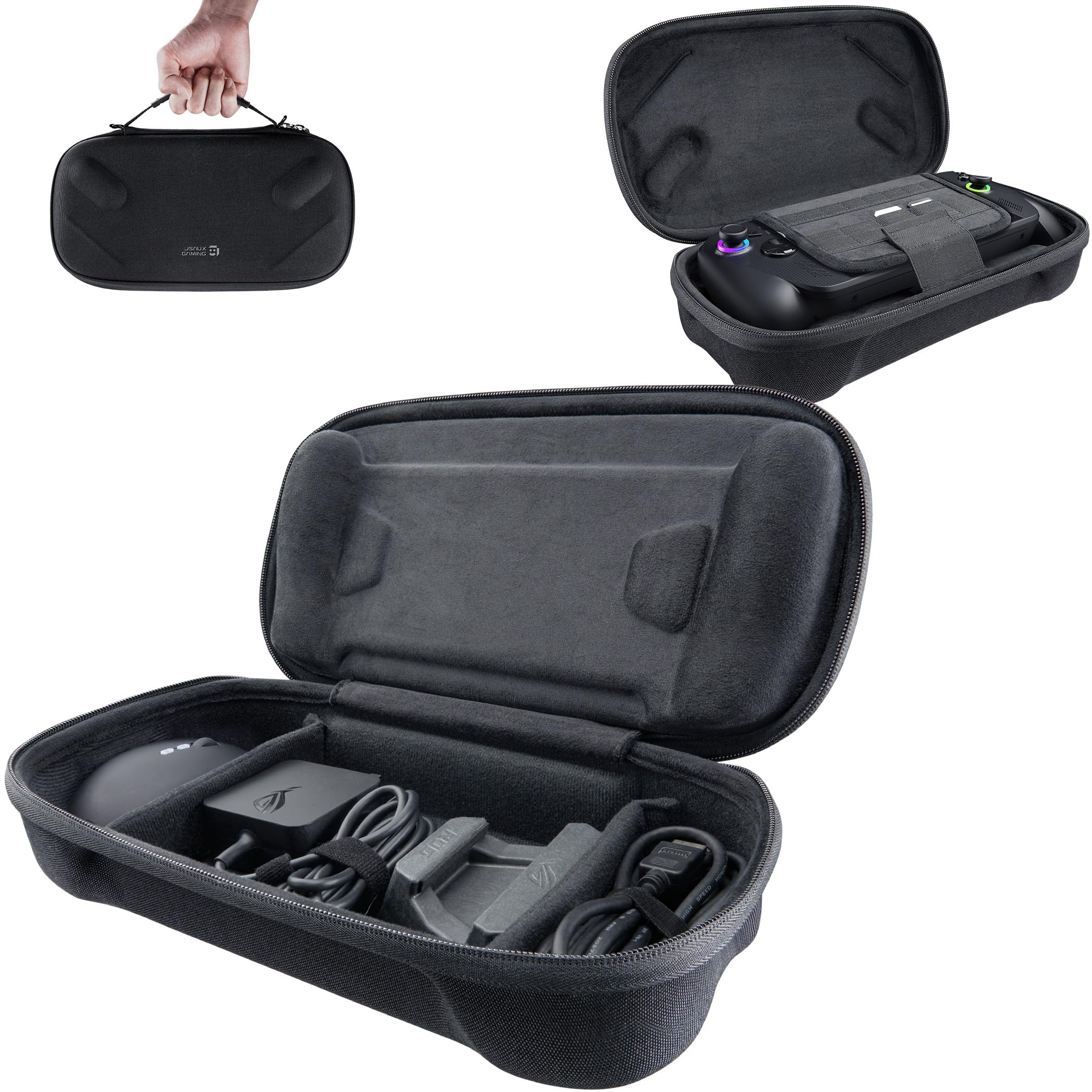
1. JSAUX Carrying Case ROG Xbox Ally
Our pick — 4.5+★ from 550+ verified ratings; the strongest balance of quality and price.
The two-story bag that swallows your charger, cables, and card collection without bulging.
Two compartments is the whole pitch, and it is the reason this case sits at the top. The top layer cradles the console; the bottom layer takes the original charger, the original stand, an HDMI cable, a USB-C cable, and earphones. That is a complete travel kit in one bag. The felt outer shell, reinforced laminated layer, and stitched fabric detailing handle the scratches and knocks of daily carry.
Inside, a soft lining plus a hook-and-loop strap holds the console steady, and raised zones sit over the joysticks so they do not take pressure in transit. Dedicated slots take your SD and microSD cards, which matters when you carry a library on removable storage. It is a shoulder-strap bag rather than a wrist-pouch, so it behaves more like a small messenger than a sleeve. For scale, the ButterFox below lists the same 2 compartments — this one simply adds the shoulder strap and the card slots.
What wins people over is the design work, and the fit follows close behind. The bag takes the ROG Ally X20 even with a dbrand Killswitch case on, and there is real room left for accessories. One honest note from the maker: the case can carry a faint smell from new materials and sealed packaging, so air it out for a while before a trip. That is a packaging quirk, not a defect.
Where this bag earns its keep
- Two separate compartments keep charger, cables, and console apart instead of scratching each other
- Holds the Ally X20 with a dbrand Killswitch case still fitted
- Raised joystick zones and a hook-and-loop strap stop the console shifting
- Dedicated SD and microSD slots for a removable game library
The trade-offs to weigh
- At 450 g it is a shoulder bag, not a pocketable sleeve
- New-material smell fades but needs airing first
Go for it if: you travel with a charger, cables, and cards and want all of it in one strap-on bag.
Think twice if: you want a slim sleeve for a bare console — the JSAUX slim model below is the leaner call.
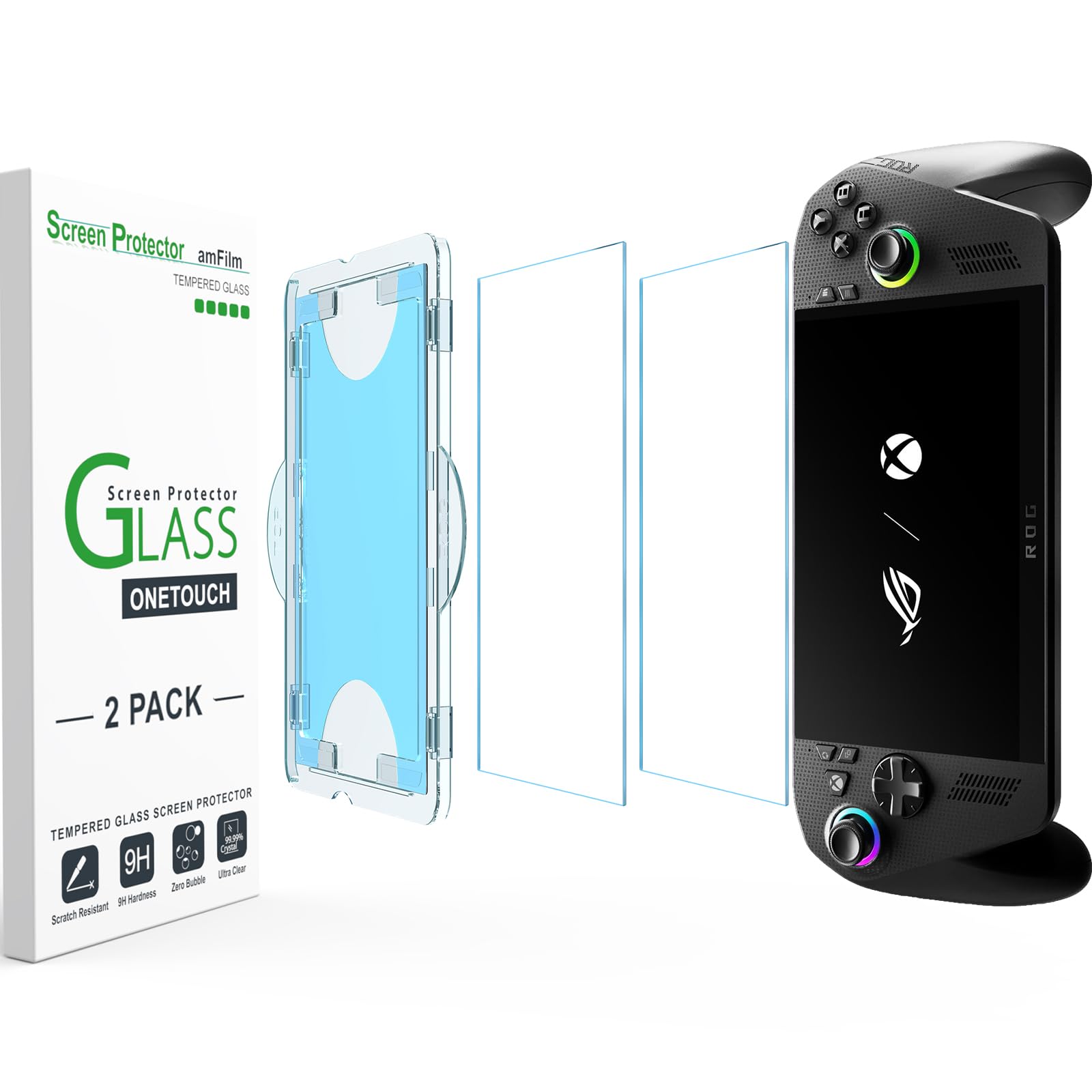
2. amFilm OneTouch Screen Protector ROG Xbox Ally
A protector that installs itself in half a minute, so the alignment anxiety disappears.
Glass protectors fail on installation far more often than on protection. That is why the 30-second auto-alignment kit here is the headliner: a frame positions the glass for you so you are not chasing a dust-free, straight fit by hand. The glass itself is tempered with 9H hardness — the top grade on the pencil-hardness scale — to resist keys, coins, and the general grit that rides in a bag.
The coating is the second story. It is described as hydrophobic (it repels water) and oil repellent, aimed at keeping fingerprints from sweat and oil off the display while you play. The finish is glossy, and the pack includes 2 protectors in the box so a botched first attempt is not a disaster. At 8” long by 4” wide, the glass is sized to the console’s screen rather than a phone.
Ease of application is what buyers talk about most, with the protection itself a close second — and the protector is reported to sit barely noticeable on the display. The honest caveat sits at the edges: adhesion and air bubbles are the two friction points, so clean the screen carefully and press the borders down. If you are careful on the first install, the 30-second frame does its job.
The install wins: the alignment frame turns a fiddly job into a quick one, and 2 protectors per pack gives you a practice run.
Edge care is the catch: bubbles and edge adhesion are the recurring friction, so prep the glass surface properly before you lay it down.
Pick this one if: you want the display covered without a tense install session.
Look elsewhere if: you already run a screen-covering case and would be doubling up.
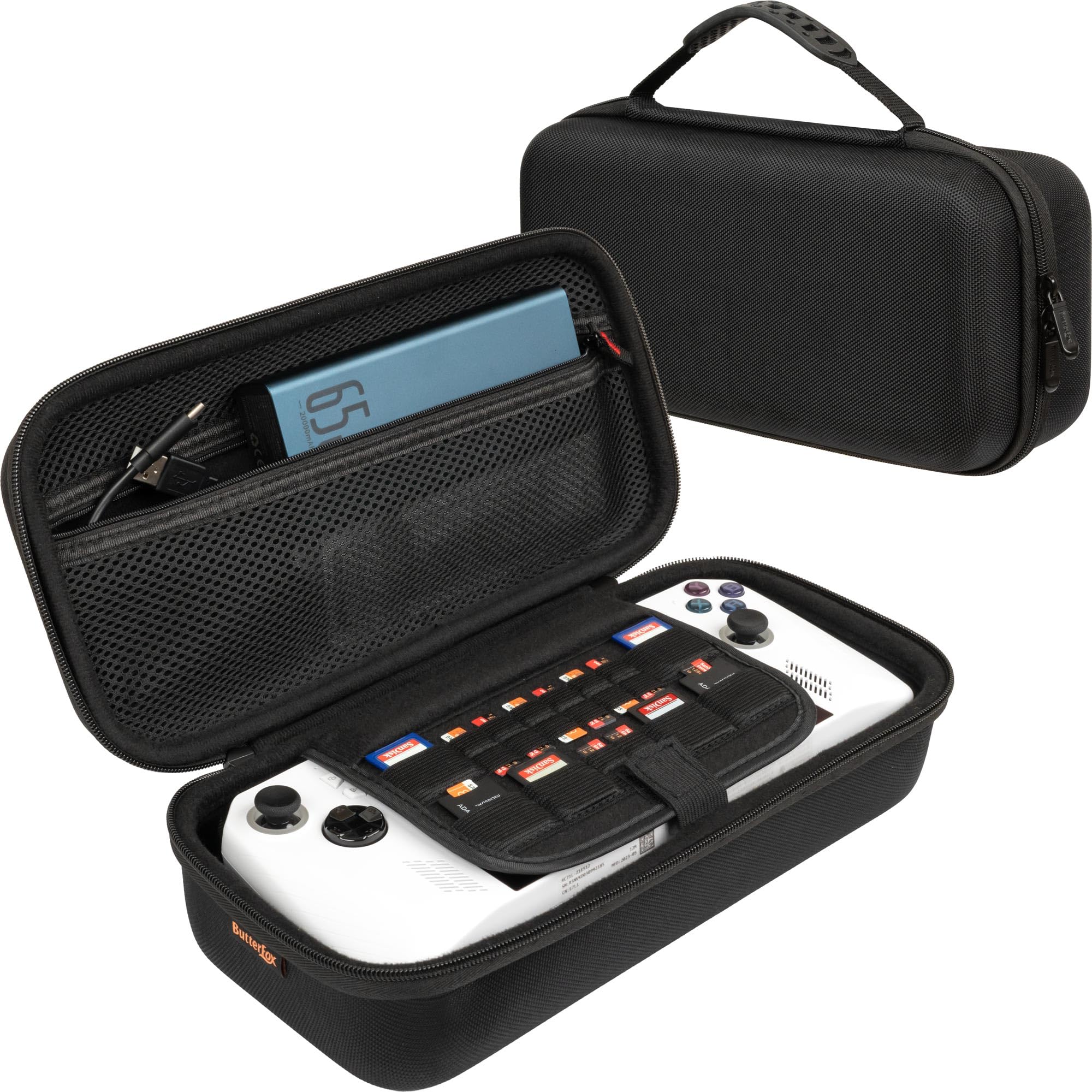
3. ButterFox Large Carry Case ASUS Rog Ally
The case with a built-in stand, so your console has somewhere to sit when you stop.
Most cases just carry the console. This one gives it a viewing angle too — the lift strap doubles as an adjustable stand, so you can prop the Ally X up on a hotel desk. The molded construction fits the console snugly while leaving room around the trigger buttons, so nothing gets pinched shut.
The accessories pocket is where this gets genuinely large: it takes the ASUS charging dock, a 65W power bank, a slim mouse, and an HDMI cable. Note the charger detail — the US stock charger fits, but a UK charger does not. A lift strap lets you pull the console out without grabbing the thumbsticks. Match that against the slimmer JSAUX bags: measured length runs 11.61” and width 6.5”, so this is the roomier of the two on both counts. If you want a truly thin sleeve rather than a travel bag, that extra room is wasted space.
Quality is the thing buyers praise most here, with fit right behind it. It reads sturdy and protective in hand, and the stand option reportedly works as intended. The honest trade-off is size: this is a bag, not a pouch, and it is meant to be packed rather than pocketed.
The stand is the differentiator: a hard case that doubles as a viewing stand solves hotel-room gaming without extra gear.
Sized for packing: large accessories pocket and a molded fit, at 1 lb and 11.61” long — great for a suitcase, a lot of bag for a pocket.
Reach for it when: you want a stand, a power bank, and a charger all in one hard-shell bag.
Skip the bulk if: you only ever need to carry the console itself.
4. JSAUX Carrying Case BG0135

A one-compartment shell built for a bare console and nothing else.
This is the bag for the person who throws the console in a backpack and moves. The maker describes it as lighter than typical EVA cases, which is a claim worth stating plainly rather than treating as fact. The shell combines felt with a reinforced laminated layer, and the soft lining holds the console with a hook-and-loop strap. Raised zones protect the sticks, and a wrist strap plus a smooth zipper keep it fast to open and carry.
One compartment, and that is a deliberate design choice. The maker states it is for the bare console only, with no extra room for protective shells, adapters, or stands. If you have already fitted a grip case to your Ally X, this bag will not close over it. Compare it against the dual-layer JSAUX above, which offers 2 compartments and takes a Killswitch case — this is the pocket-friendly model, that one is the travel kit.
Fit and build quality are what buyers speak well of, and the case reportedly takes Dbrand Killswitch cases in real-world use. The internal flap that covers the screen and pins the handheld down is the detail that keeps things still. A faint new-material smell is possible out of the sealed packaging; air it out and it fades.
What it does beautifully
- Minimal footprint slides into a backpack without a bulge
- Hard shell with a screen flap and joystick-friendly interior
- SD and microSD slots keep a memory card or two on hand
Where it stops short
- One compartment means no charger, cable, or stand carried with it
- Not for a console that already wears a protective grip shell
- Not compatible with the ROG Xbox Ally X20 (2026)
Best matched to: commuters and minimalist packers carrying a bare console.
Not the one for: anyone who travels with a charger and power bank — step up to the dual-layer bag.
5. JSAUX PC0111 ModCase ROG Ally X

A shell that changes how the console feels in your hands, not just how it survives a bag.
Grip is the reason to consider this one. The PC-ABS and silicone build wraps the Ally X, adds a back case with its own metal stand, and brings a front cover for when the console is idle. The TPU edge wrap (a flexible rubberised border) soaks up impact, and the face cover means the screen is shielded during backpack storage. Four SD card slots sit inside the face cover, which is a neat place for game saves.
You get extra add-ons later thanks to a modular slider on the back — a mounting rail for other compatible JSAUX add-ons such as a cooling fan. Fit is the honest caveat here: some buyers report trouble lining the case up with a standing dock, so check your dock before you commit. Check the compatibility line too — this fits the ROG Ally X (2024) only, and it does not fit the ROG Xbox Ally or ROG Xbox Ally X (2025 model). Confirm your model before buying.
Quality and grip are what buyers rate most highly, and the case is described as sturdier than expected with a premium feel in hand. It looks good and protects well in daily use. At 0.43 kg it adds real heft, which is the trade for that grip and stand.
Built for feel: the textured back and edge wrap turn a slippery handheld into something you can hold for hours, with a metal stand for tabletop play.
Fit is the question: dock compatibility is where opinions split, and this is strictly a 2024 Ally X part.
For the grip-seeker: if your hands cramp on a bare Ally X, this is the shell that changes that.
Check first: your dock and your exact model year, because both matter for this case.
6. Skull & Co. GripCase Bundle for ROG Ally X 2024

A soft grip shell and a felt-lined bag sold together, so protection and carry arrive as one kit.
The GripCase sits on the console as a soft, textured wrapper designed to add friction so your hands stay put during long sessions. A stand built into the back props the console firmly on a tabletop, and there is a cutout sized for most third-party docks so you do not have to strip the case to plug in. The shoulder-button design is revised specifically to stop finger pinching.
Sold alongside it is a slim carrying case with a soft felt interior — the sort of lining that feels nice the moment you open the zip. The bag has room for the console even with Skull & Co. Convex stick caps fitted. It is EVA construction and listed as not water resistant, so treat it as a soft shell for the bag rather than a waterproof vault. At 0.63 kg for the bundle, it is the heavier of the grip kits here.
Quality is the strongest signal, with fit close behind it. Buyers describe a premium feel and a sleek look, and the grip design is credited with letting the Ally stand up on its own. The set is easy to slip on and off, which is the difference between a case you use daily and one you leave in a drawer.
The pairing is the point: grip case plus carry bag in one bundle, with a stand that lets the console sit upright.
Not a hard-shell kit: EVA construction and no water resistance — good for a backpack, not for a rain-soaked commute.
Choose this if: you want a softer, grippier feel and a matching bag without buying twice.
Pass if: you need a rigid hard shell — the tomtoc below fills that role better.
7. iVANKY 8-in-1 Docking Station ROG Xbox Ally X

The dock that turns a handheld into a single-monitor desktop with a wired network.
Eight ports, one of which is an HDMI 2.1 output running at 4K@144Hz — a high-resolution, high-refresh signal that needs an HDMI 2.1 monitor to show its full output. Add 1Gbps Ethernet for a stable wired link, three 5Gbps USB-A ports for peripherals, and a fast-charge USB-C port, and you have a desk setup in one block. The box includes joystick caps to protect the controls from wear.
Power is delivered up to 100W PD (Power Delivery, the USB-C charging standard), with 65W going to the ROG Ally and 45W to the Steam Deck. That means less downtime between sessions. There is a 30W Turbo Mode, but it carries a condition: update the BIOS to version 323 first for compatibility. The maker also advises updating the dock’s own firmware to avoid HDMI mirroring issues on an extended display. Do that before you judge the dock.
Functionality is the thing buyers like most — it does the job it advertises. On ports, there is a split: the connections cover the essentials, but a display port cable is not included, so plan for that if your monitor needs one. The 24-month warranty with free replacement service softens the risk of an early fault.
Ports and power that earn the desk space
- 4K@144Hz over HDMI 2.1 for high-refresh displays
- 1Gbps Ethernet beats a shaky wireless link for online play
- Up to 100W PD charging keeps the console topped up
- 24-month warranty with free replacement service
Setup homework required
- 30W Turbo Mode needs BIOS version 323
- Firmware update recommended before extended display works cleanly
- A display port cable is not in the box
Made for: a one-screen desk with a wired mouse, keyboard, and Ethernet line.
Be ready to: update BIOS and dock firmware before you plug in and play.
8. tomtoc Slim Case ROG Xbox Ally X

A 254 g hard shell that survived a military drop test and still slips into a sling bag.
The spec that matters here is the STD-810H military drop test (a standardized drop-test regime used to certify gear against knocks). A reinforced hard shell sits beneath the exterior, so a tumble from a desk or a squeeze in a suitcase stays a scare rather than a repair. It is listed at 254 g — light enough to forget in a bag, which is the point of a slim case.
Slimness comes from a recessed area over the joysticks, which the maker states trims the profile compared with brick-like EVA cases. Inside, a velvety soft lining and grooves protect the screen while stopping the sticks from being pressed accidentally — a quiet way of protecting your battery life and joystick integrity. Against the ButterFox travel bag, this is the slim sleeve of the two — the pack-light option.
Case quality is what buyers praise most, with fit second. The feel is sturdy and well-made, and the slim profile squeezes easily into a sling. A built-in pocket holds SD cards and a cleaning cloth. The YKK zipper and odorless high-density felt round out a build that reads more premium than its slim silhouette suggests.
Protection without bulk: the receded joystick area and hard inner shell keep it thin, while the 254 g weight keeps it out of mind in a bag.
Strictly a sleeve: there is no room for a charger or a power bank, so pair it with a separate pouch for those.
Perfect for: a commute bag where the console gets jostled and you want a proven shell around it.
Not for: packing a charger and dock alongside — the ButterFox is built for that job.
9. iVANKY 14-in-1 RGB Docking Station ROG Xbox Ally X
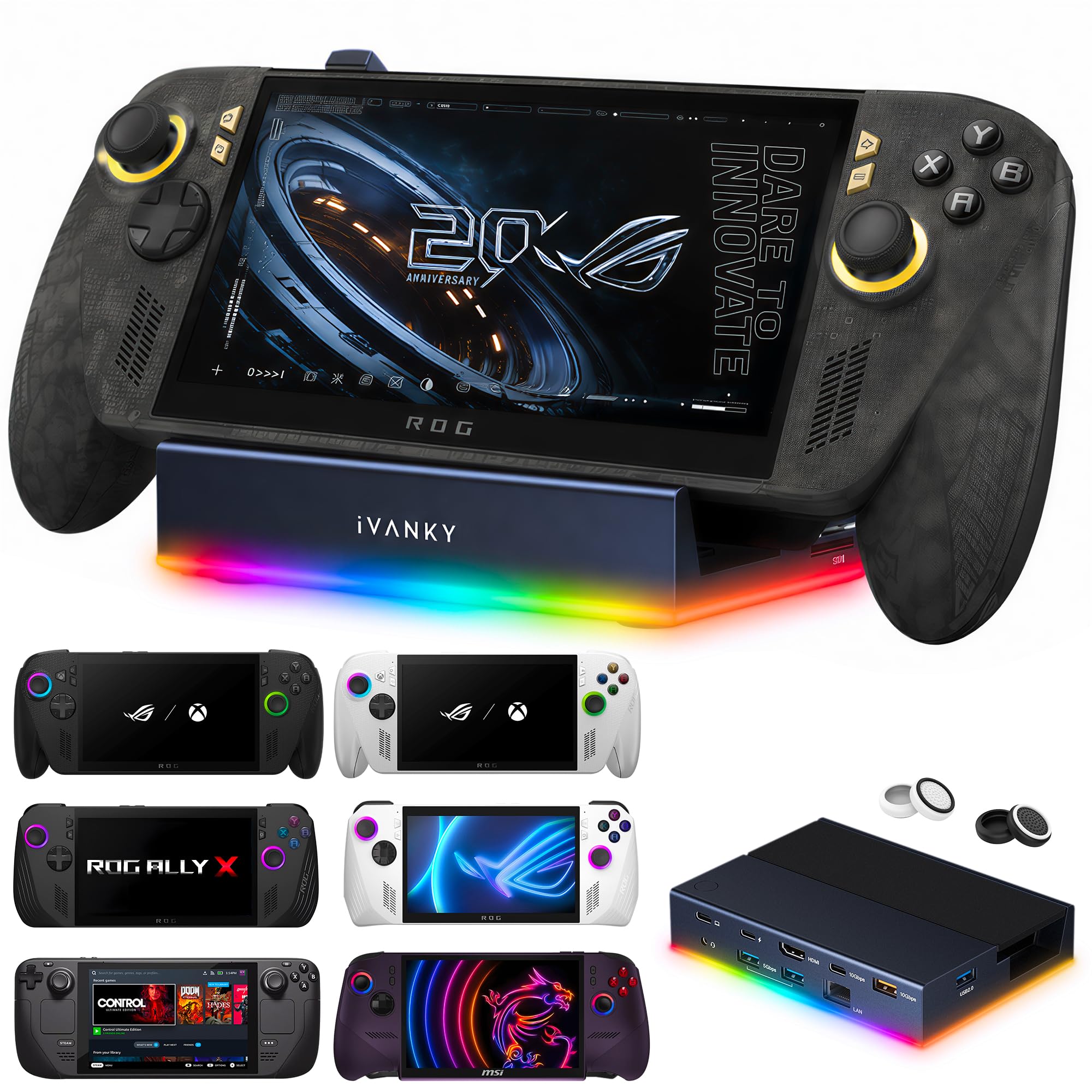
Fourteen ports, seven RGB modes, and a foldable stand that keeps the vents clear.
This is the dock for someone building a full desktop around the console. Fourteen ports are listed, with 7 USB ports total and a single HDMI output running at 4K@120Hz over HDMI 2.1. It adds SD and TF card slots, 10Gbps USB 3.2, and 1Gbps Ethernet — the connections a card-reading, file-shuffling desk setup needs. Up to 100W power delivery feeds the console, with the maker noting Steam Deck tops out at 45W, the ROG Ally at 65W, and the Legion Go at 85W.
The dual-foldable stand is a smarter detail than it sounds. It is shaped so the rear panel does not block the console’s cooling vents, which matters when the dock is running for hours. There are seven RGB lighting modes — Direct, Breathing, Rainbow Wave, Spectrum Cycle, Race Cycle, and Stacking — and they can sync with other RGB gear. Like the 8-in-1 above, it needs a firmware update to avoid HDMI mirroring issues on an extended display.
Functionality earns the strongest praise, with the dock described in glowing terms. Reliability is the honest split: some units work exactly as advertised, while some report issues — so buy from a seller with a clear return path. The 24-month warranty with free replacement service covers you if a unit misbehaves.
Ports for a real workstation: 10Gbps USB 3.2, 7 USB ports, SD and TF slots, plus 1Gbps Ethernet and 100W charge.
Reliability is the coin flip: plenty of docks work flawlessly and a few do not, so lean on the 24-month warranty if yours has a bad day.
The right dock if: you want a multi-peripheral desk with card readers and RGB lighting in one unit.
Go smaller if: you just need one screen and a mouse — the 8-in-1 covers that with fewer ports to manage.
Know the Specs
Hardness rating (9H)
Screen protector hardness is graded on the pencil-hardness scale, where 9H is the hardest. A 9H tempered glass protector resists scratches from keys and coins in a bag. Hardness protects against scratches, not against a deliberate drop onto a hard edge, and installation quality still decides whether the glass stays put.
HDMI 2.1 and refresh rate
The refresh rate is how many times per second the image redraws — measured in hertz (Hz). A dock quoting 4K@144Hz or 4K@120Hz outputs a high-resolution, high-refresh signal. To see that output, your monitor needs HDMI 2.1 and must support the resolution and refresh rate. A slower cable or an older display will knock the signal down.
Power Delivery (PD) wattage
PD is the USB-C charging standard, and wattage is the rate at which power flows. A dock listing up to 100W PD can feed a device that draws that much, but the maker notes different caps: 65W to the ROG Ally, 45W to the Steam Deck, and 85W to the Legion Go. Check your console’s own draw before assuming the full wattage goes to it.
Drop-test standards (STD-810H)
STD-810H is a standardized durability test regime used to certify gear against drops and knocks. A case that passes it has been built to survive a fall from desk height. It is a useful marker of shell strength, but it is no substitute for sensible handling — no case guarantees protection from every angle.
Common Questions
Will a ROG Ally X case fit if I already have a grip case on the console?
Do these accessories work with the ROG Ally X20 (2026)?
Will the JSAUX PC0111 ModCase fit the 2025 Xbox ROG Ally X?
Why does my dock show a mirrored display instead of extending to a second screen?
Is 4K@144Hz better than 4K@120Hz on these two docks?
Will a screen protector make gameplay feel slower or laggy?
How much weight does a grip case add to the console?
Do the carry cases have room for a power bank and charger?
Can I charge the console through the dock while I play?
What are the SD card slots inside these cases actually for?
The Bottom Line
For most people building out a xbox rog ally x accessories kit, the winner is the JSAUX Dual-Layer Case BG0136, because two compartments let you carry the charger, cables, and cards without scratching the console. If you play on a desk or a TV, grab the iVANKY 8-in-1 Dock for its 4K@144Hz HDMI and 1Gbps Ethernet. And for thin, drop-tested protection in a sling bag, the tomtoc Slim Case is the one to reach for.
If you want the fuller desk setup with card readers and RGB lighting, the iVANKY 14-in-1 RGB Dock is the step up — just keep the warranty in reserve, because reliability is where the docks split.
How we choose
We do not accept paid placement. Every pick is matched to a real buyer and a real use-case; we do not hands-on test units.
Sources
Specifications: manufacturer listings and product documentation. Review insights: verified customer reviews, as of November 2026. Pricing: not shown on this page (it changes often); check the current price via the retailer link.
As an Amazon Associate, Tactical Gear Guy earns from qualifying purchases. This does not affect which products we feature.