Specs are compiled from manufacturer listings and verified buyer reviews and can change over time — please confirm the key details on the product page before buying.
You want one box that talks to your Zigbee sensors and your Z-Wave locks at the same time, and keeps running when the internet blinks out. The four hubs below all carry both radios, so the real question is how much of your automation stays on your own property instead of a manufacturer’s server. The Aeotec, sold as a SmartThings hub, leans on the cloud and a big app store. The Hubitat and the Homey Pro run your routines on the hardware sitting in your hallway. The Ezlo slots in between on price but not on polish.
This guide is built by comparing the manufacturers’ published specifications and the patterns across verified customer reviews, so you get each pick’s real strengths and trade-offs instead of marketing spin.
I compared what each hub actually ships with: the radios inside, whether routines survive an outage, and how many brands each one claims to support. The crowd favorite is the Aeotec at 4.0+ stars across 2,000+ ratings, though its cloud-first design is the reason some buyers move on. Below you will find how to choose the best Zigbee and Z-Wave hub without paying for the wrong kind of simplicity.
Top Picks

How To Choose The Best Zigbee and Z-Wave Hub
Both Zigbee and Z-Wave are mesh radios, meaning every mains-powered device in your home can pass a signal along to the next one. A hub that carries both radios, plus Matter for the newer gear, is the difference between one app and four. Start by counting the devices you already own, because the hub that supports the most brands is not always the hub that supports yours.
Local versus cloud control
A local-first hub runs your automations on the box itself. When the internet goes down, your porch light still comes on at dusk and your lock still opens for the family. Cloud-dependent hubs send every command out to a server and back, which is why they feel sluggish during a router reset. If your routines matter, check whether the maker states local processing plainly.
Which radios are actually inside
Zigbee 3.0 is the current standard and pairs far more reliably than the older Zigbee versions. Z-Wave 800 Series is the newer chip, and it typically reaches further and uses less power than the modules before it. Matter is the cross-brand standard that lets a hub pick up devices from other ecosystems. Infrared and Bluetooth Low Energy, or BLE, let you control things like a TV or a Bluetooth tracker — useful extras, not essentials.
Antennas, range, and a dense house
An external antenna dedicated to each radio gives a stronger signal than an internal one, and that matters once you pass a couple of dozen devices. In a large home with thick walls, the hub’s own radio reach decides whether your far-end sensor stays paired. Place the hub central, not tucked in a metal cabinet.
Subscriptions and app ecosystems
Some hubs are free forever; others bundle their best automations behind a paid tier. Read the platform’s own terms before you buy, because the price on the box is not the price over five years. The flip side is that a big app store means more ready-made drivers for oddball brands you already own.
Side-by-Side Comparison
All four carry both Zigbee and Z-Wave. The three columns that actually decide your purchase are the radios on board, whether the automations run locally, and how big a household the hub is built to cover.
| Model | Best For | Protocols | Local Processing | Footprint | Amazon |
|---|---|---|---|---|---|
| Aeotec Smart Home Hub★ Best Overall | Big-brand integration and voice control | Zigbee, Z-Wave Plus, Matter, Wi-Fi | Many automations run locally | 1.1 lb | Amazon |
| Hubitat Elevation C-8 Pro | Smart-home builders who want zero cloud | Zigbee 3.0, Z-Wave 800 Series, Matter, Bluetooth | Runs on the hub, no subscription | 2.56 oz | Amazon |
| Homey Pro (Early 2023) | Multiple ecosystems in one household | Zigbee, Z-Wave Plus, Wi-Fi, BLE, Infrared, Matter, Thread | Processes everything on-device | 1.43 lb | Amazon |
| EzloPlus | Mixed-brand setups on a middle budget | Zigbee, Z-Wave, RF, Wi-Fi via Alexa and Google | Not stated | — | Amazon |
Detailed Reviews
1. Aeotec Smart Home Hub
Our pick — 4.0+★ from 2,000+ verified ratings; the strongest balance of quality and price.
The one that puts your existing Alexa and Google speakers in charge of Zigbee and Z-Wave gear.
The Aeotec is the safest first buy for most homes because it is the hub that already speaks the language of everything in your house. It carries Zigbee and Z-Wave Plus alongside Matter and Wi-Fi, so your older door sensor and your new Matter bulb live under the same roof. Setup runs through the SmartThings app on Android, iOS, or iPadOS, and you can hardwire it over Ethernet or let it ride your Wi-Fi. At 1.1 pounds it is a small white puck you set beside the router and forget about.
What makes it the crowd favorite is the breadth of integrations — thousands of compatible devices from the major brands, with Alexa and Google Assistant picking up the commands by voice. SmartThings has been pushing more of its automations onto the hub itself, so routines run faster and keep working when the connection wobbles. That is the difference between a light that responds on the first tap and one that waits on a cloud round trip. It weighs 1.1 pounds, against 1.43 pounds for the Homey Pro and 2.56 ounces for the Hubitat.
The honest catch is that this is a platform-first hub, not a tinkerer’s hub. Some automations still lean on SmartThings’ cloud, so a full outage can stall the smarter routines even though the basics keep running. Getting it onto your network is also the recurring complaint — the pairing flow is smooth for some homes and stubborn for others, and a hub that will not join the Wi-Fi is the most frustrating thing in this category. Once it is online, though, the voice control and the brand coverage do the heavy lifting for you.
What earns it the top slot
- Zigbee, Z-Wave Plus, Matter and Wi-Fi in one box, so you are not buying adapters
- Thousands of compatible devices across the big lighting, comfort and energy brands
- Ethernet or Wi-Fi setup, plus Alexa and Google Assistant voice control
- Many automations now run locally for snappier response
What to plan around
- The pairing flow is the weak point — leave time for a stubborn first connection
- Cloud reliance on some routines means a full outage can stall the clever stuff
- Designed for use in North America
Buy this one if: you already own Alexa or Google speakers and want one app to rule your Zigbee and Z-Wave gear.
Think again if: you want every single routine to survive an internet blackout without exception — the Hubitat below is built for exactly that.
2. Hubitat Elevation C-8 Pro Smart Home Hub
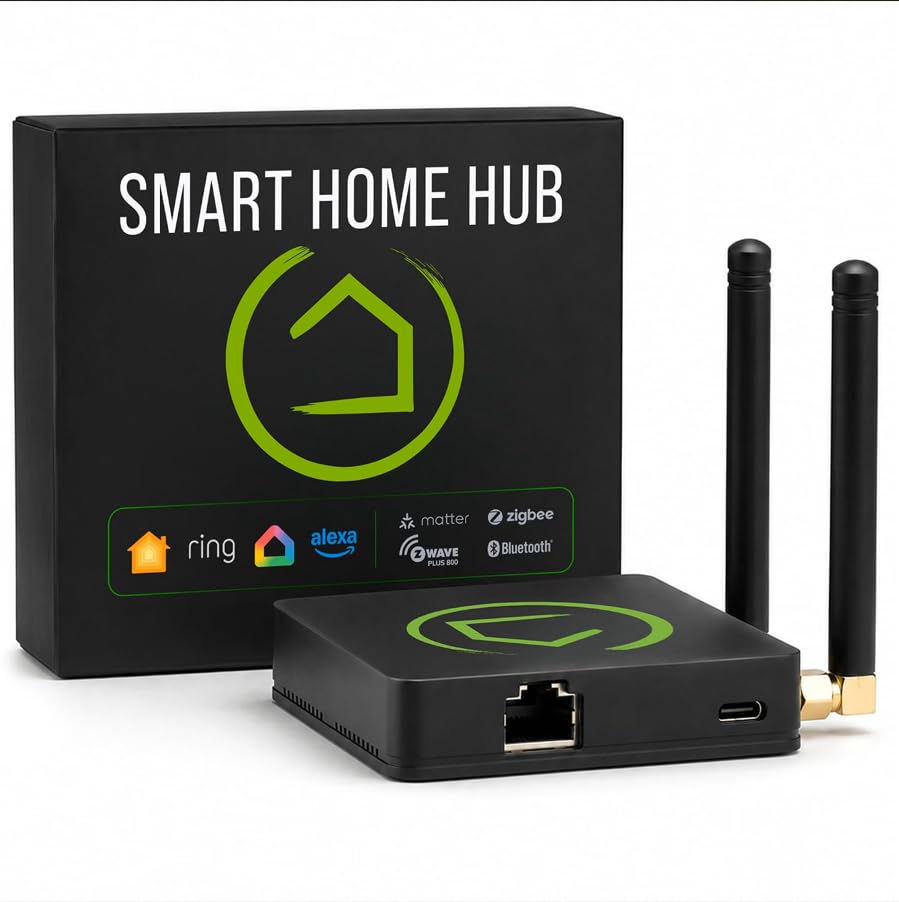
The 2.56-ounce box that runs your locks and lights on its own hardware when the internet dies.
Here is the spec that matters most in this whole roundup: the C-8 Pro runs your automations on the hub itself rather than on a remote server. When your internet goes down, your lights, locks, thermostats and routines keep working. That local-first design is uncommon at this level, and it is why the Hubitat appeals to people who have been burned by a cloud outage at the worst moment. It also means device data stays at home, which is a privacy point that matters if you have cameras on the same network.
The radio package is unusually complete for the size. You get Matter 1.5, Z-Wave 800 Series with Long Range, Zigbee 3.0 and Bluetooth in one hub, so existing devices stay compatible without extra bridges. Two dedicated external antennas — one for Z-Wave, one for Zigbee — extend the wireless reach in larger or device-dense homes. That antenna arrangement is the difference between a sensor at the back of the garage staying paired and dropping off the Z-Wave mesh. The hardware footprint here is genuinely small; at 2.56 ounces and 2.95 x 3.23 x 0.67 inches it disappears behind a router. The Homey Pro, by comparison, measures 5.04 x 5.04 x 1.57 inches — noticeably more shelf real estate for the same job.
This is not a plug-and-play appliance, and it does not pretend to be. Setup is approachable with step-by-step documentation, but the real power sits in the Rule Machine, which lets you build multi-condition logic across lighting scenes, geofenced arrivals and layered security. There is also an AI-assisted routine builder that suggests automations based on your connected devices. No subscription is required for full platform functionality, and the platform has been updated continuously since 2018. Versatility is the thing people rave about — one box controlling devices across Zigbee, Z-Wave and Matter without a monthly fee. Expect to spend an evening learning it.
Where it wins: local processing plus two dedicated antennas means routines survive an outage and the mesh holds in a big house — both things a cloud hub struggles with.
Fair warning: the learning curve is real. If you want a hub that sets itself up in ten minutes and never asks you to read a rule engine, this is not that hub.
The right call for: anyone who has already got a smart home built out and wants it to work offline, permanently.
Look past it if: you would rather trade some control for a guided setup wizard — the Aeotec above is friendlier.
3. Homey Pro (Early 2023)

Seven radios in one box, for the household running Zigbee, Z-Wave, Thread and Infrared gear side by side.
Count the radios, because this is the widest net on the list. Homey Pro packs Wi-Fi, Zigbee, Z-Wave Plus, Infrared, Bluetooth Low Energy, Matter and Thread into a single hub — seven technologies, more protocols than any other hub in this roundup. That Infrared radio means you can point it at a TV, an air conditioner or a set-top box and bring an older remote into the same app. Thread matters if you are building out a newer Matter-over-Thread network. And because it all lives on one device, you are not juggling four separate apps to turn your lights off at night.
Everything is processed on-premise. Your data is stored on the Homey Pro itself, with cloud dependency minimalized, so the private household data that would otherwise leave the house stays home. The Homey Flow engine is the charm here: you build automations in the phone app, switch the entire house off with one button, or play music when you arrive, all without touching a scripting language. The Advanced Flows in the web app go deeper for anyone who wants layered conditions. It is officially compatible with Siri, Alexa and Google Home, so whichever assistant you already talk to keeps working.
The brand coverage is the headline. Homey Pro works with over 50,000 devices from more than 1,000 brands, reaching from Sonos to Philips Hue to Aqara, TP-Link, iRobot, Ecobee and IKEA. An open platform means new devices get added constantly through both Official and Community-built Homey Apps. The physical build is a 1.43-pound unit measuring 5.04 x 5.04 x 1.57 inches, against 1.1 pounds for the Aeotec and 2.56 ounces for the Hubitat.
What can bite you is the price of entry and the patience it asks for. Some devices pair through community-built apps rather than an official one, and those can lag behind a manufacturer’s firmware update. Not every one of those 1,000 brands is going to behave identically. The reward is a hub that handles almost anything you throw at it.
Strongest for: a mixed-brand home with a TV, a few Aqara sensors and a voice assistant or two, where one app for all of it is the goal.
Skip the premium if: you only run Zigbee bulbs and a couple of Z-Wave locks — the Aeotec covers that for less.
4. EzloPlus Smart Home Hub
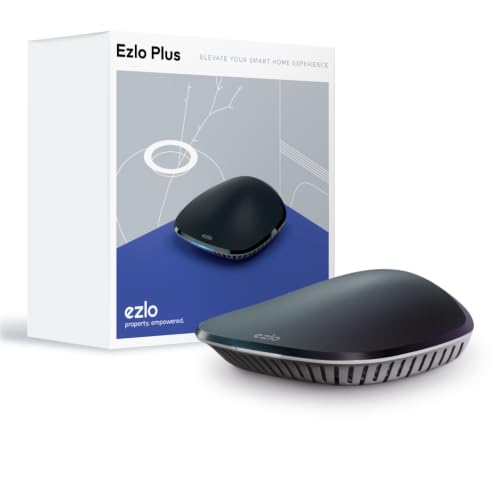
A mid-priced hub that handles Zigbee, Z-Wave and RF itself and reaches Wi-Fi gear through Alexa or Google.
The EzloPlus takes a different route to covering your smart home. Its own radios handle Zigbee, Z-Wave and RF devices, and it picks up thousands of Wi-Fi devices through your Amazon Alexa or Google Assistant rather than fighting them. That means your existing Wi-Fi bulbs and plugs do not need a second bridge — the assistant already speaks to them. Setup is a wired affair: you run the included Ethernet cable to your router and follow the in-app guide, and you need a router with an available Ethernet port to make it work. The black enclosure and compact footprint keep it quiet on a shelf.
The software is the part to think about. Ezlo runs MiOS, which the maker calls the first operating system for property — a single layer to mix devices and brands and control them from the web or the phone, anywhere. Full control extends to doorbells, sensors, lights, cameras and locks from most manufacturers. Voice control through Alexa and Google Assistant works on top of that, so you can say the command instead of opening an app. If a device does not work from the start, Ezlo offers to integrate it for you, which is a rare promise in this category.
The real catch is reliability, and it is the most-discussed topic on this hub. Reports of devices not connecting and Alexa integration dropping recur, and the hub’s quality feedback splits between working well and working badly. Some units need resetting more often than feels reasonable. It is worth knowing that Ezlo is actively building its platform, but this is the pick with the widest spread of owner experience. Buy it for the integration freedom, not for a hands-off appliance.
The value angle: Zigbee, Z-Wave and RF radios plus Wi-Fi gear via Alexa or Google, with an in-app guide that most people get through on the first try.
Read this first: connectivity is the weak point. If your setup depends on rock-solid uptime, the Hubitat’s local processing is the safer bet.
Worth it when: you have a mix of Z-Wave, Zigbee and Alexa-linked Wi-Fi gear and want one app to see it all without paying the top-tier price.
Hold off if: you need a hub that runs your whole home reliably every single day — this one asks for more patience.
Know the Specs
Local Processing
This means the hub runs your automations on its own hardware, not on a manufacturer’s server. The payoff is simple: your routines keep firing during an internet outage, and commands land without a round trip to the cloud. The Hubitat and Homey Pro both work this way. A cloud-first hub like some Aeotec modes still works, but lean on the internet and the smarter routines pause with it.
Zigbee 3.0 and Z-Wave 800 Series
These are the two mesh radio generations worth checking. Zigbee 3.0 pairs more reliably than older Zigbee versions. Z-Wave 800 Series is the newer chip with Long Range support, and it delivers improved reliability and mesh stability. Both are backward-compatible with the hundreds of sensors, bulbs and locks already in your home, so the newer radio is a range and consistency upgrade, not a reason to replace your devices.
Matter and Thread
Matter is the cross-brand standard that lets a hub pick up devices built for other ecosystems, so you are not locked into one manufacturer. Thread is the low-power network that Matter devices often run on. A hub that lists both is ready for the gear you buy next year, not just the gear in your house today.
Antennas and Mesh Reach
Dedicated external antennas — one for Z-Wave, one for Zigbee — give a stronger, cleaner signal than an internal one, and that matters in a large home or a house with many devices. When signals compete for airtime, a stronger radio keeps the far-end sensor paired. Place the hub central and away from metal to get the most out of whatever antennas it has.
Common Questions
Do I need a hub if my Zigbee and Z-Wave devices already came with one?
Will a Zigbee-only sensor work with a Z-Wave hub?
What happens to my smart home when the internet goes down?
Is Matter replacing Zigbee and Z-Wave?
Do I need a subscription to use these hubs?
How many devices can a dual-protocol hub handle?
Will a hub work with my Alexa, Google or HomeKit setup?
Why does one hub need two antennas?
Can two hubs run in the same house?
Do these hubs need to be wired to the router?
The Bottom Line
For most homes, the zigbee and z-wave hub winner is the Aeotec Smart Home Hub, because it covers Zigbee, Z-Wave Plus and Matter with simple voice control and the widest brand support. The crowd backs it too — 4.0+ stars across 2,000+ ratings. If you want your routines to run entirely on your own hardware — no cloud, no subscription, two external antennas — the Hubitat Elevation C-8 Pro is the one to reach for. And if your household mixes ecosystems and you want the broadest radio net on the market, the Homey Pro earns its place. Whichever you choose, buy the hub with the radios you already own, not the one with the longest feature list.
How we choose
We do not accept paid placement. Every pick is matched to a real buyer and a real use-case; we do not hands-on test units.
Sources
Specifications: manufacturer listings and product documentation. Review insights: verified customer reviews, as of November 2026. Pricing: not shown on this page (it changes often); check the current price via the retailer link.
As an Amazon Associate, Tactical Gear Guy earns from qualifying purchases. This does not affect which products we feature.