Specs are compiled from manufacturer listings and verified buyer reviews and can change over time — please confirm the key details on the product page before buying.
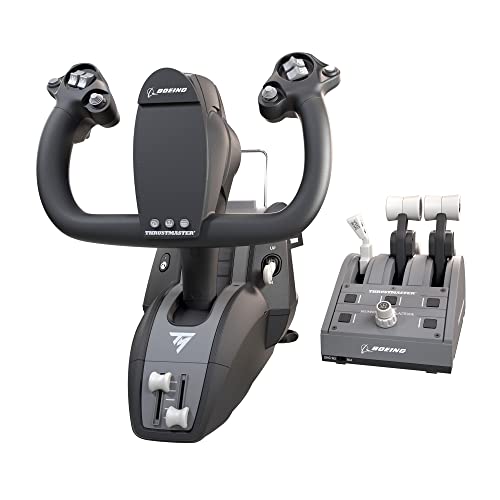
Buying an Xbox flight yoke is mostly a question of what you want to feel under your hands. If you want the closest thing to an airliner column, the Thrustmaster TCA Yoke Pack Boeing Edition is the one to pick — it is the only yoke in this round-up that ships with a matching throttle quadrant. If you would rather have everything built into one desk unit, the Turtle Beach VelocityOne is the other serious answer. Both fly Microsoft Flight Simulator on Xbox; the difference is how they feel and how they clamp to your desk.
This guide is built by comparing the manufacturers’ published specifications and the patterns across verified customer reviews, so you get each pick’s real strengths and trade-offs instead of marketing spin.
Two of these yokes are Boeing-licensed replicas of the 787 column and one is a universal system with its own trim wheel. Below you will find the specs that actually change how a flight sim feels on your desk. Every yoke below is confirmed Xbox-compatible, so the choice depends on column feel, buttons and whether a throttle ships in the box.
Top Picks
How To Choose The Best Xbox Flight Yoke
Decide first if you want a yoke or a flight stick. A yoke is the column-and-wheel control an airliner uses. A flight stick is the joystick a fighter jet uses. Both work on Xbox, but they suit different kinds of flying. If you spend your evenings in Microsoft Flight Simulator running airliner routes, a yoke is the more natural match.
Check the Xbox label before anything else
A lot of yokes sold online are PC-only. Plug one into an Xbox Series X and nothing happens. Look for the console models listed in the specs — Xbox Series X, Xbox Series S, or Xbox One. Both Thrustmaster units here list Xbox Series X|S support, and the Turtle Beach unit lists Xbox One, Series S and Series X. That is the line to check before you fall for a nice-looking cockpit photo.
Decide if you want the throttle in the box
Some yokes are just the column. Others ship with a throttle quadrant — the lever block that controls engine power, plus flaps, speed brake and trim. A built-in quadrant saves you a second purchase and a second USB slot. The Thrustmaster TCA Yoke Pack Boeing Edition includes one; the Turtle Beach VelocityOne also builds throttle levers, a trim wheel and rudder controls into the same unit.
Look at how the column moves
The feel of the yoke is the whole point of buying one. The two Thrustmaster units use a pendular mechanism with 8.3 inches (21 cm) of travel, which mimics the swing of a real Boeing Dreamliner column. The Turtle Beach unit uses a 180-degree yoke handle rotation with a non-contact hall effect sensor — a magnetic sensor that reads position without parts rubbing together. Pick the pendular swing for airliner immersion and the 180-degree handle rotation for a lighter, more compact desk footprint.
Plan for where it sits
These are big pieces of kit, so measure your desk first. The Turtle Beach VelocityOne measures 19.01 x 7.2 x 19.5 inches and clamps to the desk with a secure clamping system. The Thrustmaster TCA Yoke Boeing Edition Flight Sim Controller measures 12 x 14 x 12 inches and sits on its own base. If your desk is shallow, check the depth before ordering either.
Side-by-Side Comparison
| Model | Best For | Action Buttons | Yoke Travel | Throttle Included | Amazon |
|---|---|---|---|---|---|
| Thrustmaster TCA Yoke Pack Boeing Edition★ Best Overall | Airliner flying with a full throttle quadrant | 35 | 8.3-inch pendular | Yes, quadrant included | Amazon |
| Thrustmaster TCA Yoke Boeing Edition Flight Sim Controller | Yoke-first setups on a tighter desk | 18 | 8.3-inch pendular | No, yoke only | Amazon |
| Turtle Beach VelocityOne Flight Universal Control System | One-box setup with trim, throttle and rudder | 26 | 180-degree rotation | Yes, built-in quadrant | Amazon |
Detailed Reviews
1. Thrustmaster TCA Yoke Pack Boeing Edition
Our pick — 4.0+★ from 500+ verified ratings; the strongest balance of quality and price.
The full airline cockpit in a box, throttle quadrant and all.
The 8.3-inch (21 cm) travel on a suspended PENDUL_R column is the number that sells this yoke. That travel is what makes the column swing like a real Boeing 787 yoke instead of snapping back like a spring-loaded stick, and it is the sensation you notice on every hand-flown approach. It is also the only yoke here that arrives with a throttle quadrant in the box, and that quadrant carries an autopilot panel for altitude, airspeed and heading.
The button count is where the separation gets real. This one carries 35 action buttons versus 18 on the standalone Thrustmaster yoke below — nearly twice the surface area for trim, gear, flaps and views. Both yokes share the same 8.3-inch pendular travel, so the extra buttons and the included quadrant are what you are really paying extra for. If you fly airliners in Microsoft Flight Simulator on Xbox, that is a fair trade.
The honest catch is the one Thrustmaster has across both units: metal internals under a shell that some owners read as plasticky in the hand. Treat that as a feel note rather than a fault — the internal yoke structure is 100% metal and the base carries the weight to prove it. Plan for the footprint too, because this is a base-mounted unit rather than something that clamps tight to a thin desk. This is the pick when you want the closest thing to a Dreamliner column on an Xbox.
Why it earns the top spot
- 8.3-inch pendular travel that mimics a real 787 column
- Throttle quadrant with Boeing autopilot controls included in the box
- 35 action buttons for trim, gear and views without reaching for a keyboard
- Adjustable yoke springs so you can dial the resistance to your taste
- 100% metal internal yoke structure for balanced weight
What to weigh before buying
- The shell feel draws mixed reactions against the metal internals
- Takes up real desk space as a base-mounted unit
- Four swappable levers mean a short setup session before your first flight
Best fit for: Xbox airliner pilots who want a throttle quadrant and autopilot panel in the same box as the column.
Think twice if: your desk is shallow — the base needs room behind the column.
2. Thrustmaster TCA Yoke Boeing Edition Flight Sim Controller

Same Dreamliner swing, smaller footprint, fewer buttons.
What you get here is the identical 8.3-inch (21 cm) pendular travel as the pack above, in a box that measures 12 x 14 x 12 inches instead of 18.43 x 14.17 x 17.91 inches. That size gap is the reason to pick this one — the standalone yoke takes up noticeably less desk and is easier to tuck into a corner when the flight is over. You still get the adjustable spring tension and the magnetic technology on the main axes.
The compromise lands on buttons and accessories. You get 18 action buttons rather than 35, and no throttle quadrant in the box — so this is the yoke-only route. It also pairs with Thrustmaster TFRP or TPR rudder pedals sold separately, which is the natural way to add rudder control later. If you already own a throttle or fly with the on-screen one, none of that is a loss.
Where it needs an honest caveat is the shell. The internal structure is metal and the feel under hand is solid, but the plastic finish splits opinion in a way that shows up most strongly among the people who expected a full metal exterior. The 2 additional axes and magnetic technology still make this a precise column for takeoffs, landings and aerobatics. Pick this one when the 8.3-inch pendular feel matters more to you than a throttle block.
Yoke-only trade-off: You get the same 8.3-inch pendular column as the pack, with no throttle quadrant and 18 buttons instead of 35 — so budget for pedals or a throttle later.
The finish question: Metal internals sit under a shell that reads as plastic to some hands; it is a look-and-feel point, not a control one.
Worth it when: you want the Boeing pendular column without paying for a throttle quadrant you may not use.
Look elsewhere if: you have no throttle at all — the pack above is the more complete single purchase.
3. Turtle Beach VelocityOne Flight Universal Control System
One clamped unit that covers yoke, throttle, trim and rudder.
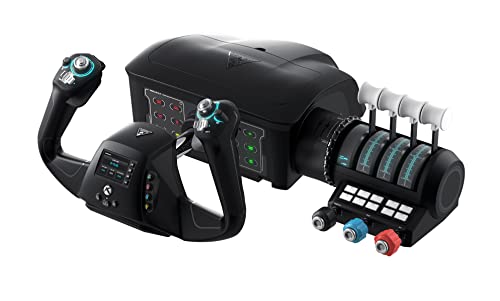
The 180-degree yoke handle rotation is the headline here, read by a non-contact hall effect sensor — a magnetic sensor that tracks the handle without parts touching. That is a different physical feel from the 8.3-inch pendular swing on the two Thrustmaster units: you turn a handle a half-circle rather than push and pull a suspended column. The VelocityOne also builds in what the others sell separately, with a throttle quadrant, a dedicated pitch trim wheel and rudder and brake controls at your fingertips.
The all-in-one approach is backed by numbers. Twelve analog axes, two POV switches and two 4-way HAT switches give you a lot of mapping headroom, and a full-colour flight management display walks you through setting the thing up. It also has a secure clamping system, which suits a desk you would rather not permanently surrender. At 19.01 x 7.2 x 19.5 inches it is the widest unit here, so check your desk depth before committing.
What wins people over is plainly the flight simulator compatibility across Microsoft Flight Simulator 2020 and 2024 on Xbox and Windows. The recurring gripe is the shell — some find it well built, others read it as cheaply made, and that split is the main reason to try one before you commit if you can. The 3,000+ ratings make it the most-reviewed yoke here, and the 4.0+ score holds steady. The VelocityOne is the yoke to pick when you want yoke, throttle, trim and rudder in one clamped unit.
Everything in one frame: Throttle quadrant, trim wheel and rudder controls are built in, so you are not hunting for extra modules or USB slots.
Setup help built in: The full-colour flight management display and the clamping system make the first setup session shorter than you would expect.
Build expectations: The shell splits opinion; the feel under hand is the one thing worth testing in person.
Reach for this if: you want one clamped unit to cover the whole cockpit instead of stacking modules.
Consider the alternative if: you specifically want the Boeing pendular column feel — that is a Thrustmaster trait, not this one.
Know the Specs
Pendular travel versus handle rotation
A pendular mechanism suspends the yoke column so it swings through an arc, which is how an airliner column moves. The two Thrustmaster units here use that design with 8.3 inches (21 cm) of travel. A handle-rotation yoke turns the wheel itself through 180 degrees, which reads as a different motion. Both read position precisely; the choice is about which motion matches the aircraft you fly.
Hall effect sensors explained
A hall effect sensor reads the position of the yoke with magnets, so no parts rub together as you move it. The benefit is that the control stays smooth over time without the wear you get from physical contacts. The Turtle Beach VelocityOne uses one on its yoke handle, and both Thrustmaster units use magnetic technology on their main axes.
Action buttons and axes
An axis is a continuous control — pitch, roll, throttle — while a button is a single press. More buttons mean less reaching for a keyboard mid-flight, which is why the TCA Yoke Pack Boeing Edition carries 35 against 18 on the standalone yoke. Twelve analog axes on the VelocityOne covers throttle, prop, mixture and trim in one unit.
Clamping versus base-mounted
A clamped yoke grips the edge of your desk and can be removed after a session. A base-mounted yoke sits on its own weighted platform and stays put. The VelocityOne uses a secure clamping system; the Thrustmaster units sit on their bases. If your desk is shared, clamping lets you lift the yoke off between sessions instead of leaving a weighted base parked there.
Common Questions
Will these yokes work with an Xbox Series S as well as a Series X?
Do I need rudder pedals to fly properly with these yokes?
What does a pendular mechanism actually feel like compared with a joystick?
Is the Thrustmaster TCA Yoke Pack Boeing Edition worth the extra over the standalone yoke?
Can I use the Turtle Beach VelocityOne throttle levers with a different yoke?
How much desk space do these yokes take up?
Are the swappable throttle levers on the TCA Yoke Pack difficult to change?
Will these yokes work with Microsoft Flight Simulator 2024 as well as 2020?
What are the extra axes on the Turtle Beach VelocityOne used for?
Do I need to configure a yoke in the simulator before flying?
The Bottom Line
The winner for most Xbox sim pilots is the Thrustmaster TCA Yoke Pack Boeing Edition because it delivers the 8.3-inch pendular column and a throttle quadrant with an autopilot panel in a single purchase. If desk space is tight and you already own a throttle, the standalone Thrustmaster TCA Yoke Boeing Edition gives you the same pendular travel in a smaller frame. And if you would rather clamp one unit to the desk and cover yoke, throttle, trim and rudder together, the Turtle Beach VelocityOne Flight Universal Control System is the one to reach for. The VelocityOne has the most owner reviews here, but the TCA Yoke Pack wins on what ships in the box: the column plus a throttle quadrant with autopilot panel.
How we choose
We do not accept paid placement. Every pick is matched to a real buyer and a real use-case; we do not hands-on test units.
Sources
Specifications: manufacturer listings and product documentation. Review insights: verified customer reviews, as of November 2026. Pricing: not shown on this page (it changes often); check the current price via the retailer link.
As an Amazon Associate, Tactical Gear Guy earns from qualifying purchases. This does not affect which products we feature.