Specs are compiled from manufacturer listings and verified buyer reviews and can change over time — please confirm the key details on the product page before buying.
If your smart lights stop responding the moment your internet drops, you bought the wrong protocol. Z-Wave devices talk to each other on their own radio band through a hub, not through a cloud server, so the lights still work when the router sulks. This guide covers the Z-Wave controllers and devices that actually earn their place in a wall box or a USB port — and the ones that will fight your hub instead of helping it.
This guide is built by comparing the manufacturers’ published specifications and the patterns across verified customer reviews, so you get each pick’s real strengths and trade-offs instead of marketing spin.
Z-Wave devices fail at setup, not at the radio. The real hurdles are hub pairing, neutral wires, and picking a chip generation your controller can talk to. Below are the specs that decide whether a device pairs on the first try — so you can choose the z-wave smart home devices that fit your existing hub and the wiring already in your wall.
Top Picks


How To Choose Z-Wave Smart Home Devices
Before you buy any Z-Wave device, ask one question: what hub do I already own, and does this device officially support it? A Z-Wave dimmer with a nice touch panel is useless if your controller cannot recognize it. Start with that check, then work through the four decisions below.
Confirm your hub is a real Z-Wave hub
A smart speaker is not a Z-Wave hub, no matter what the box photo suggests. You need a controller with a Z-Wave radio inside — the device listings here name SmartThings, Hubitat, Home Assistant, HomeSeer, Vera, Wink, Ring, and 2GIG, plus the Zooz Z-Box Hub. If your hub is not on a product’s own compatibility list, that product will not be recognized correctly. Several picks below state this outright in their documentation, which is a rare and useful piece of honesty.
Understand chip generation before you compare features
The chip generation inside a Z-Wave device sets how far its signal travels and how fast it talks to the rest of your network. The 800-series chip appears across several picks here and adds S2 authenticated security plus SmartStart, which is a pairing shortcut that lets the hub add a device with less manual button-pressing. The 700-series chip appears on others. Both work fine; just know that Long Range features only activate if your hub supports them too.
Check for a neutral wire on anything wired
Wired switches and controllers need a neutral wire in the box to power themselves. If your wall box is old and has only a hot wire and a load wire, a wired device under consideration here will not power up. The battery-powered picks exist exactly for those boxes — they stick to a wall or sit in a switch plate with no wiring at all.
Decide if you want a controller or an accessory
A USB stick turns a computer, Raspberry Pi, or Home Assistant box into a Z-Wave hub. A switch, plug, lock, or thermostat is an accessory that needs an existing hub. Buying a plug before you own a hub is the most common beginner mistake in this category, and it produces a device that powers a lamp but answers to nothing.
Side-by-Side Comparison
| Model | Best For | Chip Series | Hub Required | Power Source | Amazon |
|---|---|---|---|---|---|
| Zooz ZEN32 800LR Scene Controller★ Best Overall | Multi-button scene control in a wall box | 800 series | Yes (Z-Wave hub) | 120 V wired (neutral required) | Amazon |
| Leviton Decora Smart Plug DZPA1-2BWSimplest Start | Plug-in lamp and appliance control | — | Yes (SmartThings or Wink) | Plug-in, 120 VAC | Amazon |
| Zooz ZEN34 Remote & Scene ControllerWire-Free Odd Spot | Wire-free switch anywhere | 800 series | Yes (Z-Wave hub) | CR2032 battery | Amazon |
| SONOFF Z-Wave 800 Dongle Plus | Building a Home Assistant hub | 800 series (EFR32ZG23) | No — it is the radio | USB | Amazon |
| Aeotec Z-Stick 7 Plus | Raspberry Pi or PC Z-Wave gateway | 700 series | No — it is the radio | USB | Amazon |
| Minoston MP21Z Mini Plug | Compact plug with range extending | 800 series | Yes (Z-Wave hub) | Plug-in, 15A 125 VAC | Amazon |
| Home Assistant Connect ZWA-2 | Home Assistant users who want official hardware | 800 series | Yes — Home Assistant | USB | Amazon |
| Kwikset HomeConnect 620 | Keyless entry on a Z-Wave network | 700 series Long Range | Yes (Z-Wave hub) | 4x AA batteries | Amazon |
| Honeywell T6 Pro Z-Wave Thermostat | Z-Wave heating and cooling control | — | Yes (SmartThings, Vera, HomeSeer) | 3x AA batteries | Amazon |
Detailed Reviews
1. Zooz 800 Series ZEN32 Scene Controller
Our pick — 4.5+★ from 300+ verified ratings; the strongest balance of quality and price.
Four little buttons and one big one, turning a plain wall switch into a scene board.
It takes the top spot because one wall box gives you five programmable buttons, not just a light switch. The main button can drive a 120 V fixture rated up to 150 W for LEDs, and the four remote buttons below it fire off scenes or other devices with one press. That means “Away” mode on the way out the door and everything-off before bed, both from a physical switch your family already knows how to use. It supports both Z-Wave Long Range and the traditional mesh, on the 800-series chip, with S2 authenticated security and SmartStart pairing.
This switch fits into tight boxes more easily than most smart switches because Zooz removed the side tabs and kept the body 1.1 inches deep. That depth matters in cramped old work boxes, where a deeper switch body will not seat. It also handles a 3-way circuit without an add-on switch, as long as a neutral wire is present — rewire both boxes per the manual diagram. The current rating is 15 A, and it carries ETL certification for North American safety standards.
Here is the honest catch, and Zooz says it plainly on the listing: your smart speaker is not a Z-Wave hub, and a basic Z-Wave system may lack the scene-programming support this device needs. It is officially supported on SmartThings (with a custom driver), Hubitat, Home Assistant, and HomeSeer, and it works best with the Z-Box Hub. If your controller is not on that list, do not buy it. What wins people over on the review pages is exactly what the specs imply — the press, hold, and double-tap depth that turns one button into several actions, and a setup that goes quickly with a supported hub. This one is the crowd favorite here at 4.5+ stars across 300+ owners.
What actually earns the top slot
- Five programmable buttons from one wall box — the main switch plus four scene triggers
- Handles a 3-way circuit with no add-on switch when a neutral is present
- 800-series chip with S2 security, SmartStart pairing, and Long Range support
- 1.1-inch depth and no side tabs for shallow, crowded boxes
Where it will trip you up
- Neutral wire required — check the box before you order
- Basic Z-Wave hubs cannot program scenes on it; SmartThings needs a custom driver
- Cap is 150 W for LEDs, so plan fixture wattage accordingly
Fits like a glove if: you run Home Assistant, Hubitat, HomeSeer, or SmartThings and have a neutral wire waiting in the box.
Walk away when: your hub is not on that supported list — Zooz is direct about this, and it will not be recognized correctly.
2. Leviton Decora Smart Plug, Z-Wave, DZPA1-2BW
No electrician, no neutral wire, no wall box — just a lamp that obeys your phone.
If you rent or do not want to open a switch box, this plug is the easiest way into Z-Wave. It provides a 15 A, 120 VAC NEMA 5-15R grounding receptacle — a standard three-prong outlet for a lamp or appliance — and it is Z-Wave Plus certified, so it needs a hub like SmartThings or Wink to do anything smart. Alexa voice control works if you have a Z-Wave hub and an Alexa device, both sold separately.
Load ratings matter more than most people realize here. Leviton rates this one for LED and CFL up to 600 W, incandescent, fluorescent, and halogen up to 1800 W, and ½ HP motor loads. There is also protected memory that keeps the ON/OFF status through minor power fluctuations. Read the load limits before you plug in a space heater or a big motor — those numbers are your ceiling. Leviton has been making home electrical gear since 1906 and supports the plug with a 5-year limited warranty.
What buyers notice first: build quality and pairing. It connects cleanly to SmartThings and Wink2 hubs, and a manual control button on the outside of the case lets you skip the app. Buyers praise quality most in feedback, with connectivity right behind it.
The honest friction: reliability is the mixed note — a small share of buyers report one failing early, and Alexa compatibility is not universal in their experience, so treat the hub path as the one that matters. The relay also clicks audibly when it switches.
Reach for this if: you want lamp control today with zero wiring and you own a SmartThings or Wink hub.
Think twice if: you were counting on Alexa to talk to it directly without a Z-Wave hub in the chain.
3. Zooz 800 Series ZEN34 Remote Control
Sticks to a wall, runs on a coin cell, and answers a gap in your switch layout.
Every home has a spot that begs for a switch and has no wiring to feed one — a garage entry, the top of the basement stairs, the far side of a bedroom. This is the device for that. It runs on a CR2032 coin battery, mounts to a regular switch box or sticks to any flat surface via a magnetic base, and reports up to 250 feet of range on traditional mesh. On the 800-series chip it also supports Z-Wave Long Range, which the listing describes as connectivity up to 1300 feet when your hub supports it.
The paddles work like remote control buttons — press to trigger a scene or turn other devices on and off. The pairing situation is the same rule as the ZEN32 above: supported on the Z-Box Hub (recommended), HomeSeer, Hubitat, and Home Assistant, and a smart speaker will not do the job. Five physical buttons are on the unit.
Compatibility wins people over here — it is the most-discussed topic in feedback by a wide margin, ahead of build quality and connectivity. Owners note how quickly it comes together and how naturally it looks like an ordinary wall switch. The trade-off is battery life, which gets mixed reports: a coin cell is a coin cell, and heavy scene use drains it faster than a wired device would. The magnetic attachment also draws mixed notes — the magnet holds, but it is not a screw.
Why it earns its place: five buttons and a magnet solve the un-wired corner of a house without an electrician, and the 250-foot mesh range covers most single-family layouts. Supports 12 actions in SmartThings per the listing detail on scene depth.
What you trade: a CR2032 you will replace on a schedule, and a mount that is magnetic rather than mechanical.
Made for: the room with no switch and no easy path to one, on a hub that supports scene programming.
Not for: anyone who wants to set it and never touch it — the battery is the one thing that will pull you back.
4. SONOFF Z-Wave 800 Dongle Plus (Dongle-PZG23)
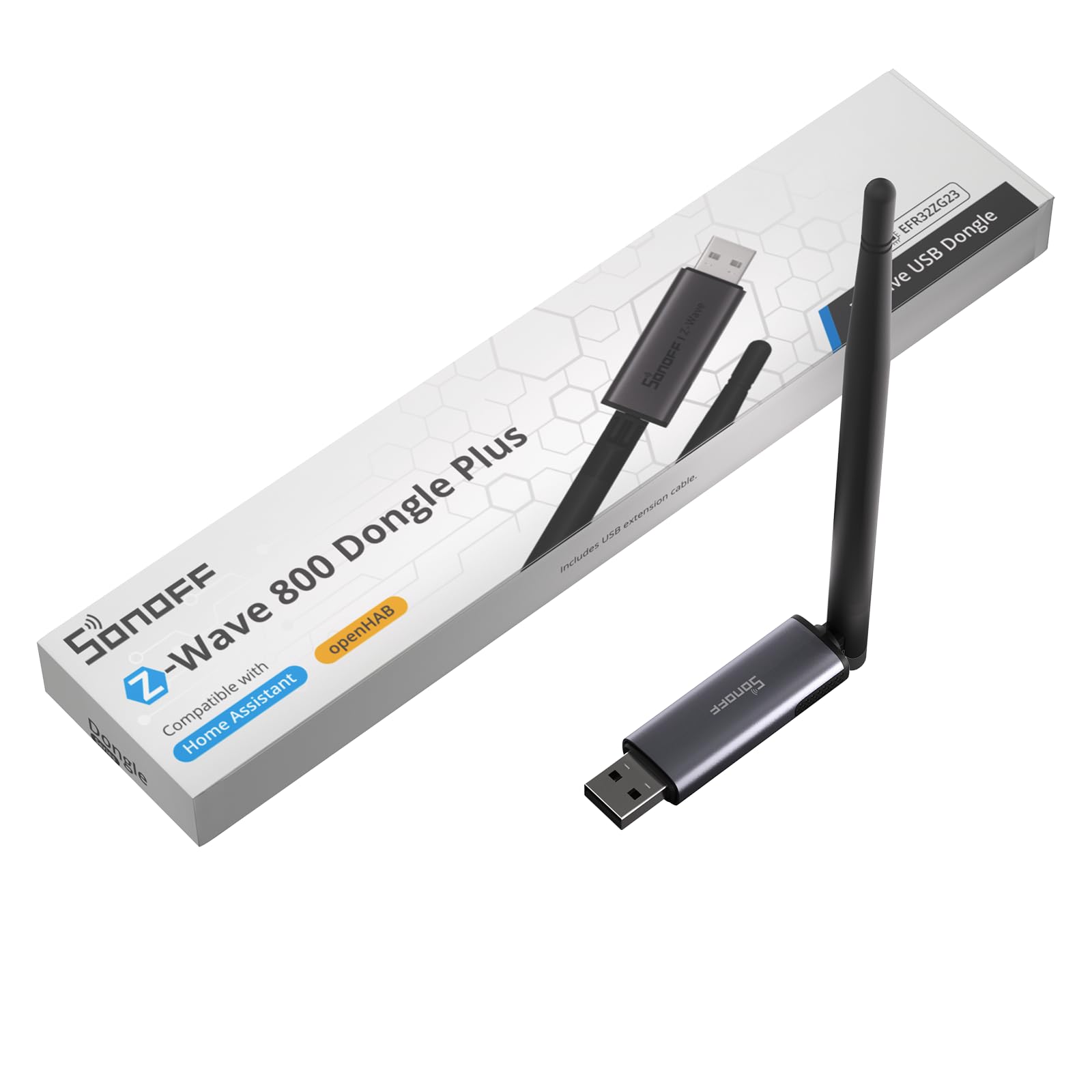
A USB stick that turns a spare computer into the brain of your whole Z-Wave network.
If you already run Home Assistant or openHAB, you do not need a hub box at all — you need a radio, and this is a good one. It runs the 800-series EFR32ZG23 chip with S2 Security, and SONOFF pairs that with a 2dBi external antenna on an adjustable mount to steady the signal. Z-Wave Long Range is supported for direct point-to-point communication with distant devices, which is the feature that matters if your devices sit at opposite ends of a long house.
Setup is a plug-in job: it goes into a USB port and talks to mainstream open-source platforms. SONOFF also includes a USB extension cable, and that is not filler — moving the stick off the back of a crowded PC or Pi keeps it away from electromagnetic interference from the machine itself. The listed compatibility spans Linux builds including Debian, Ubuntu, and Linux Mint, macOS from Sierra onward, and Windows 10 or 11. Item weight is 0.07 kg, light enough that a cable can dangle freely.
One limit to know before you order: this dongle speaks Z-Wave only. No Zigbee, no Thread. If you plan to run mixed-protocol devices off one stick, this is not that product. Among the feedback, compatibility is what gets called out most, and the descriptions line up with the listing — it works with ZwaveJS, Home Assistant, and Linux, including long-range devices.
Pick it up if: you are assembling a Home Assistant or openHAB box and want an 800-series radio with a real external antenna.
Keep looking if: you need one stick for Zigbee and Thread as well — this one is Z-Wave exclusive by design.
5. Aeotec Z-Stick 7 Plus

The old-hand USB stick that turns a Raspberry Pi into a Z-Wave gateway.
This is the 700-series option, and for a lot of Home Assistant and Indigo 7 users it is the familiar one. It works with Raspberry Pi, Windows, Mac, and Linux to create a Z-Wave hub, and it carries Aeotec’s Gen7 and 700-series technology with SmartStart and S2 security on board. No software is included — you supply the platform, and the stick becomes the radio your software talks to.
The numbers Aeotec publishes are measurable: wireless transmission up to 250% further in open space and an 18% faster CPU. Those are Aeotec’s published figures, not an independent lab test, but they explain why Pi builders still buy the Gen7 stick. It weighs 3.5 g, so it will not stress a USB port.
Take this fit note seriously: reliability is the highest-volume topic in feedback for this stick, and it splits both ways — some units work flawlessly for years, others arrive and never talk to the network. Setup and device compatibility also get mixed reports, with Home Assistant generally positive but not universal. That pattern is less a defect story than an instruction to pair it and test it inside the return window. If yours pairs, it is a solid performer; performance feedback is consistently positive.
The case for it: 700-series Gen7 hardware with SmartStart and S2, an 18% faster CPU, and 250% further open-space transmission — proven on Raspberry Pi builds.
The case against rushing: mixed setup and reliability reports mean you should pair it and add a couple of devices the day it arrives, not a month later.
Best matched to: Pi and PC builders on Home Assistant or Indigo 7 who want a 700-series stick with a track record.
Less ideal if: you want the newest chip generation — the ZEN32 and SONOFF picks above run 800-series silicon instead.
6. Minoston MP21Z Mini Z-Wave Plug with Repeater

A plug so small it does not block the second outlet — and it repeats signal too.
Two things make this plug worth a look. First, it is genuinely mini — the body measures 1.73 inches deep by 1.89 by 1.89, which is the difference between using one wall outlet and losing the other. Second, it doubles as a built-in repeater: the 800-series chip with S2 security and SmartStart also extends wireless coverage up to 1300 feet when your hub supports Long Range. That makes it a mesh repeater as well as a lamp switch.
It handles a 15 A, 125 VAC grounded load, which covers lamps and small appliances comfortably. No wiring — it plugs in and pairs to your hub for ON/OFF control. Schedule it to turn on or off at set times and you can shave electricity use on things you forget to switch off, and it combines with other devices for scenes. Z-Wave frequency is 908.42MHz, and it is FCC and ETL listed. The package includes two outlets and a manual, and the body is polycarbonate.
The catch is on the hub side, and it is a real one. It works with SmartThings, Vera, Wink, Fibaro, HomeSeer, Ring, 2GIG, and Hubitat with a device-type change. Alexa and Google Assistant work only through a Z-Wave certified hub — and it cannot connect directly to Echo Plus. Connectivity draws mixed feedback overall: it pairs easily with a Hubitat C-8, but some report it losing connection afterward. Owners do warm to the compact size and the value.
Suits you if: you run Hubitat, SmartThings, or Ring and want a small socket that also strengthens your mesh.
Heads up first: the Echo Plus shortcut does not exist here — a certified Z-Wave hub has to be in the chain.
7. Home Assistant Connect ZWA-2
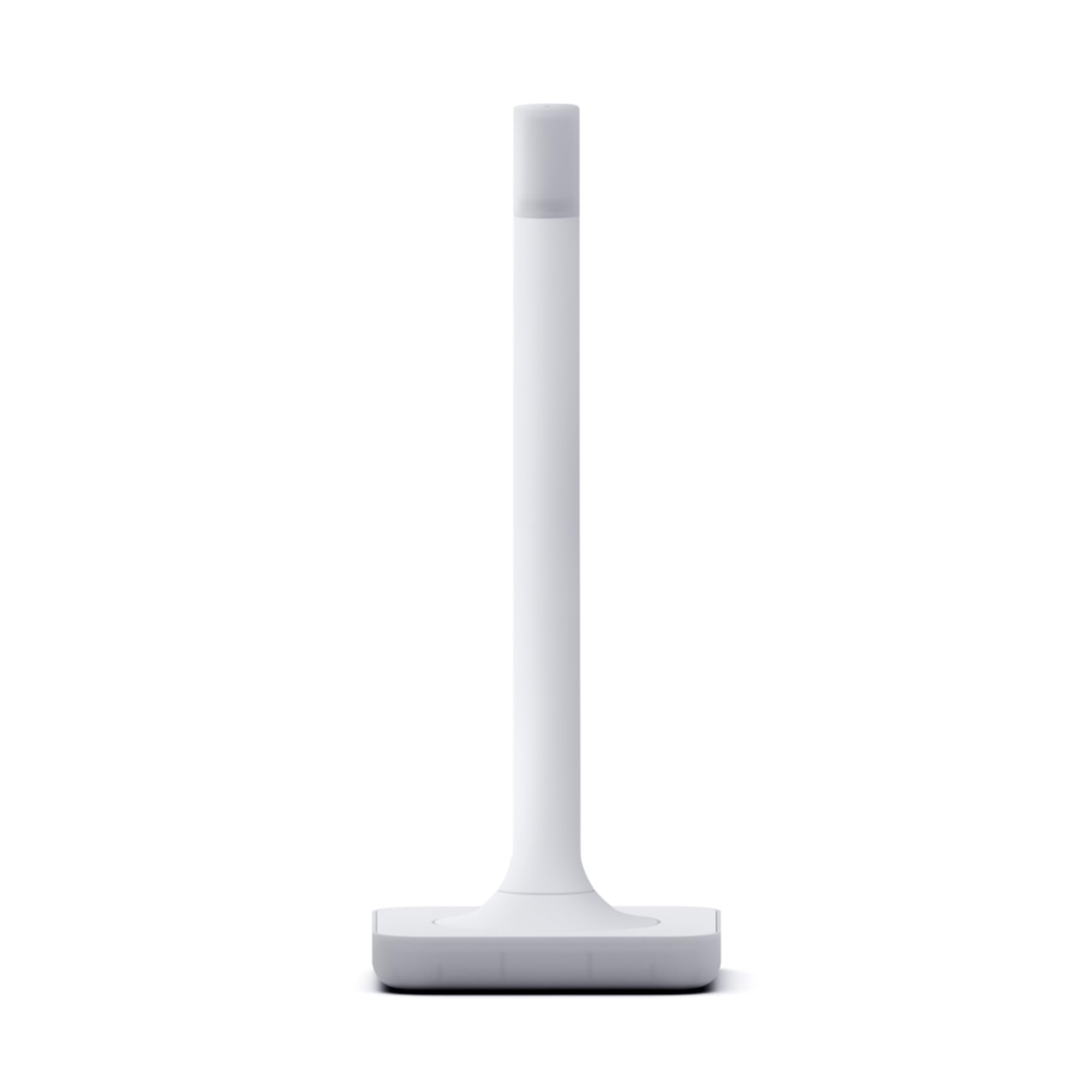
An antenna shaped like a candle, built by the team that makes the software.
This is a radio for Home Assistant and nothing else — and that focus is the whole pitch. It is built by Nabu Casa, the team behind Home Assistant and Z-Wave JS, so the pairing wizard and one-click firmware updates are designed by the same people who wrote the software you are running. Inside is the latest 800-series chipset, and it supports Z-Wave and Z-Wave Long Range connectivity. The antenna and base are tuned to Z-Wave’s frequency so the pair work together to reach further.
Two practical details stand out. Migration from most other adapters can be done in a couple of clicks, which is the difference between an afternoon of re-pairing every device and a short changeover. And a 4.9-foot USB cable comes in the box, giving you room to set the antenna up on a shelf rather than behind a metal-backed desk. The case is injection molded and styled to look at home on a table; it even lights up softly like the candle it resembles.
Performance comes through strongest in feedback, with ease of use right next to it. The range improvement is the tangible one — owners say it reaches every location in a house — and they call setup easy. There is a small size-related gripe if you want something invisible; this piece is deliberately a decorative object. It is the strongest pure-hardware pick here for a Home Assistant household, at 4.5+ stars across 200+ owners.
The real advantage: official hardware from the Home Assistant team means migration measured in clicks, not re-pairing, plus the 800-series chipset and Long Range support.
Who should not bother: if your controller is anything other than Home Assistant, this antenna is not aimed at you.
It clicks for: committed Home Assistant users who want the cleanest migration path and the strongest stated range in this lineup.
The single caveat: it is on display, not hidden — a candle-shaped object has to earn its place on your shelf.
8. Kwikset HomeConnect 620 Z-Wave Long Range Keypad Smart Lock
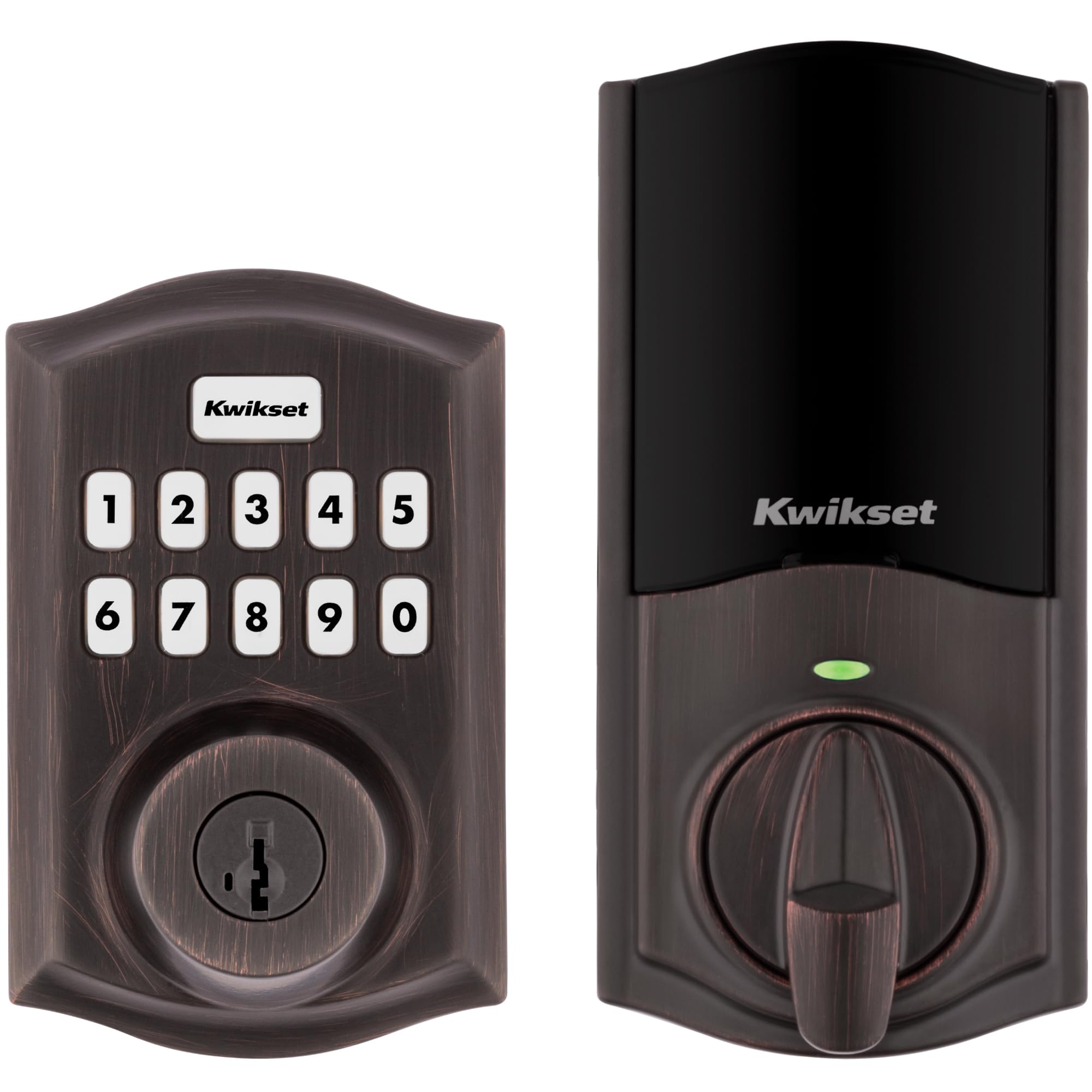
A touchscreen deadbolt that hands out 250 codes and locks itself behind you.
A keypad deadbolt on your Z-Wave network means the front door opens without a key. This is a keypad deadbolt in Venetian Bronze over a metal body, with a back-lit touchscreen for code entry and one-touch lock for the way out. It uses 700-series Z-Wave Long Range, which the listing describes as a direct connection to a compatible hub with coverage throughout the home, and it adds S2 encryption plus SmartStart for pairing.
The code management is the standout spec: up to 250 user codes plus one programming code that lets you edit or delete as needed. That covers an extended family, a cleaner, and a dog walker with codes left over. Auto-lock can be scheduled to close the deadbolt itself every 30 seconds, 1 minute, 3 minutes, 5 minutes, or 10 minutes, which quietly removes the “did I lock it” loop from your evening.
Battery life is listed at a minimum of 12 months on 4x AA alkalines, which are included in the box. The recurring honest note on this model is that a hub is required and sold separately — without one, it is simply a keypad lock, not a smart lock. Owners speak well of the appearance and the Ring connectivity, and the key function gets the most praise. It is the lowest scorer in this lineup at 4.0+ stars, which for a mechanical device with a keypad and a motor is a fair reflection of how much can go wrong — but most of it does not.
The right buyer: a household with a Z-Wave hub that wants long-range coverage and a pile of temporary codes for guests.
Pair it with forethought: 4x AA batteries are your clock — plan the swap before the lock decides for you.
9. Honeywell TH6320ZW2003 T6 Pro Series Z-Wave Thermostat
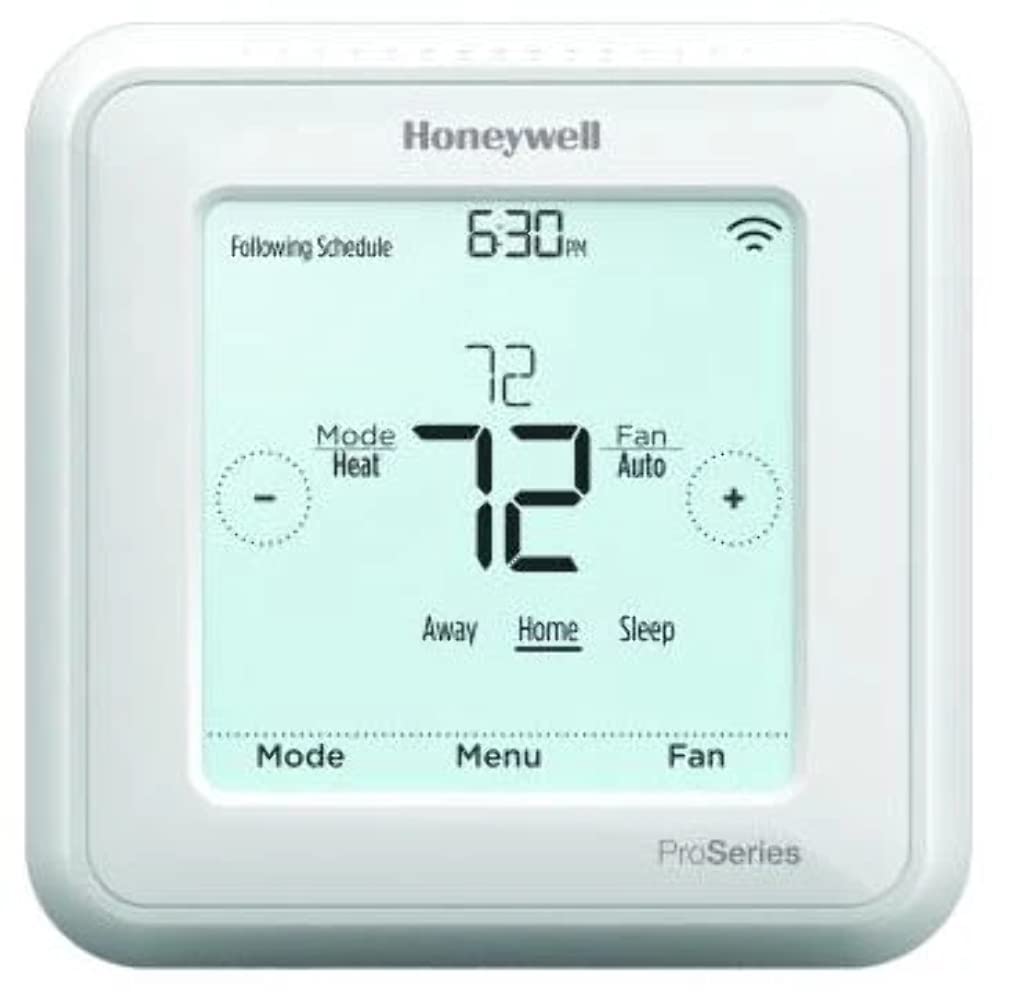
The Z-Wave thermostat that finally lets your hub run the heat and the AC.
Plenty of smart thermostats speak Wi-Fi and nothing else, which is exactly what makes this one interesting — it talks Z-Wave to SmartThings or Vera and skips the cloud entirely. It is programmable, uses a touch screen, and learns your heating and cooling cycle. You can set a minimum cool and maximum heat temperature to stop anyone in the house from overshooting the setpoint. The box includes the thermostat, an installation guide, mounting hardware, a cover plate, and 3x AA batteries.
The body is white, weighs 1.6 ounces, and mounts at a compact size — 4.09 inches across, which will not swallow a hallway wall. Setup leans on the same rules as the rest of this list: a Z-Wave hub is what makes it smart.
Functionality and installation are where it performs best in owner experience — the thing it does, it does well, and it goes on the wall without drama, working with HomeSeer in particular. The honest part is the connectivity split: it is a Z-Wave part through and through, and the repeated frustration on the review pages is expectation that it should also work over Wi-Fi. It does not. Temperature control and programming also divide opinion, so budget a little patience for the schedule menu rather than expecting a two-minute setup.
Best quality: a real Z-Wave thermostat that keeps working with your hub when the internet does not — plus learning logic and a min-cool/max-heat guardrail.
Honest limitation: schedule programming takes patience, and anyone assuming Wi-Fi control is going to be disappointed.
Worth it for: SmartThings, Vera, or HomeSeer users who want heating and cooling on the same Z-Wave mesh as the lights.
Not the pick if: you expect app control over Wi-Fi with no hub — that is simply not this device.
Know the Specs
Chip generation and Z-Wave Long Range
The number on a Z-Wave chip — 700-series or 800-series — tells you how current the radio inside the device is. Newer chips tend to transmit further and add features like S2 authenticated security (a pairing method that keeps a device’s traffic encrypted from the moment it joins) and SmartStart (a shortcut that adds a device to your hub with less button-pressing). Long Range is a separate mode that some chips support; it only activates when your hub supports it too. One certified Long Range device does not upgrade a network on its own — the hub has to be on board.
Neutral wire, load rating, and where a device gets power
A wired switch or controller needs a neutral wire in the box to power its own electronics. No neutral, no power-up — this is the most common reason a Z-Wave switch install stalls. Load rating is the ceiling on what you can switch: a 15 A, 120 VAC rating is a normal lighting circuit, and LED fixtures often cap lower than incandescent. Battery-powered devices sidestep the whole question; a coin cell or a set of AAs means no wiring, at the cost of a battery swap on a schedule.
Hub requirements and the compatibility list
Many Z-Wave accessories are supported on a named set of hubs and nothing else. That naming is not marketing — the device uses specific command classes that a hub either understands or does not. If a listing says it is supported on SmartThings, Hubitat, Home Assistant, and HomeSeer, treat every other controller as unverified. The same rule applies in reverse: a smart speaker is not a Z-Wave hub, and a phone app alone will not run a Z-Wave network.
Z-Wave frequency and why it matters
Z-Wave devices use their own dedicated radio frequency — 908.42MHz on the models here — which is separate from your Wi-Fi band. That is why Z-Wave tends to push through thick walls and crowd less than a busy 2.4GHz Wi-Fi band. It also means the network needs no router to function once the hub is running.
Common Questions
Do I need a Z-Wave hub to use any of these devices?
Will a Z-Wave switch work in an old house without a neutral wire?
Is a smart speaker a Z-Wave hub?
Does Long Range work if my hub is an older model?
Can I run Zigbee and Thread devices off the SONOFF Z-Wave dongle?
How do I move my Z-Wave network from one USB stick to another?
How many user codes can the Kwikset HomeConnect 620 hold?
Will a Z-Wave thermostat control my AC over Wi-Fi?
What is S2 security and why does it matter?
Why do some Zooz devices say they only work with certain hubs?
The Bottom Line
For most people, the strongest all-rounder for z-wave smart home devices is the Zooz ZEN32 800LR — five buttons, 3-way support with no add-on switch, and an 800-series chip for a switch that does far more than switch. If you do not have a hub yet, the Home Assistant Connect ZWA-2 gives you the radio and a migration path built by the people who write the software. And for a -wiring start, the Leviton Decora Smart Plug plugs in and pairs without touching a wall box.
The one nudge worth acting on: check your hub against the supported list before anything else, because that single line on the spec sheet decides whether a great device becomes useful or becomes a return.
How we choose
We do not accept paid placement. Every pick is matched to a real buyer and a real use-case; we do not hands-on test units.
Sources
Specifications: manufacturer listings and product documentation. Review insights: verified customer reviews, as of November 2026. Pricing: not shown on this page (it changes often); check the current price via the retailer link.
As an Amazon Associate, Tactical Gear Guy earns from qualifying purchases. This does not affect which products we feature.