Specs are compiled from manufacturer listings and verified buyer reviews and can change over time — please confirm the key details on the product page before buying.
You want a tiny board that runs the same software as your desktop — Windows, Ubuntu, Docker, ROS — without the compatibility headaches that come with ARM hardware. That narrows things fast. These four x86 single board computers each run a real Intel-class processor, and the differences between them come down to three things: how much RAM and storage you get, how the board expands, and how it handles heat when it runs for days. Below, each pick is matched to the job it actually does best, so you can stop reading spec sheets and start soldering.
This guide is built by comparing the manufacturers’ published specifications and the patterns across verified customer reviews, so you get each pick’s real strengths and trade-offs instead of marketing spin.
Some of these boards ship with a licensed Windows install already activated, while others leave the OS to you, and that single difference changes both the setup work and the job each board suits. Keep that in mind as you read, because the right x86 sbc board is the one that matches the project on your bench today.
Top Picks

How To Choose The Best X86 SBC Board
Shopping by processor name alone is the classic first-time mistake. Two boards can carry the same Intel chip and behave nothing alike, because the RAM, the storage, the cooling, and the expansion slots decide what the board can actually do once your project grows. Pick the job first, then the RAM, storage, cooling, and slots that job needs.
Start with the software you need to run
An x86 board runs standard desktop operating systems natively, which is the whole reason to pick one over an ARM board. If you need Visual Studio, full Ubuntu with Docker, ROS/ROS2, or a licensed Windows install, an x86 board saves you from hunting down ARM-compatible builds of every tool. Some boards here arrive with Windows already installed and activated; others ship without a product key, so you supply and license the OS yourself. Decide if you want a pre-activated Windows install or will license the OS yourself before you compare boards.
Count the RAM and storage you get on board
RAM is soldered on nearly every board in this category, so the number you buy is the number you live with. Eight gigabytes handles compiling, edge vision work, and a desktop environment at once. Sixteen gigabytes is the number to want if you plan to run several virtual machines, containers, or a media server that also does other jobs. On-board eMMC storage (the built-in flash chip) covers the operating system; an M.2 slot is what lets you add a fast NVMe drive later.
Look hard at the expansion slots
Expansion separates a hobby board from a small server. A full PCIe 3.0 x4 slot accepts a network card, an NVMe adapter, a graphics card, or an AI accelerator, and it runs at far lower latency than a USB adapter. Dual M.2 slots let you add storage and a wireless card side by side. Native SATA ports let you attach hard drives directly instead of through USB, which matters if you are building a NAS. List your planned add-ons — NVMe drive, network card, hard drives — and check each one against the board’s actual slots before you buy.
Plan for heat and for always-on duty
These boards run warm under sustained load, and a fan is not a luxury when a board compiles code or serves files around the clock. Several picks here ship with an active cooling fan in the box. For a sealed enclosure or 24/7 duty, prioritize an included fan and continuous-operation design over a higher boost clock.
Side-by-Side Comparison
| Model | Best For | Processor | RAM / Storage | Expansion | Amazon |
|---|---|---|---|---|---|
| LattePanda 2 Alpha 864s (B07ZHCQC6M)★ Best Overall | Robotics and AI edge builds | Intel Core i5-8200Y, up to 3.9GHz | 8GB RAM / 64GB eMMC | Dual M.2 (M Key + E Key), Arduino Leonardo coprocessor | Amazon |
| LattePanda 2 Alpha 864s Win11 Pro (B07J9PPVSS) | Plug-in-and-code Windows projects | Intel Core i5-8200Y, 1.3GHz to 3.9GHz | 8GB RAM / 64GB eMMC | eDP touch panel connector, dual 4K via HDMI and USB-C | Amazon |
| ZimaBoard 2 1664 | Always-on NAS and homelab | Quad-core, up to 3.6GHz | 16GB DDR5 / 64GB eMMC | PCIe 3.0 x4, dual SATA, dual 2.5GbE | Amazon |
| LattePanda V1.0 4G/64GB | Learning x86 on a budget | Intel Cherry Trail Z8350 Quad-Core, up to 1.92GHz | 4GB RAM / 64GB eMMC | Arduino-compatible coprocessor, Wi-Fi antenna included | Amazon |
Detailed Reviews
1. LattePanda 2 Alpha 864s x86 SBC
One board that runs full Windows and drives your servos without a second microcontroller.
This is the pick that ends the two-board juggling act. The Intel Core i5-8200Y dual-core processor bursts to 3.9GHz and pairs with 8GB of RAM, so full Windows 11 Pro and Ubuntu both run natively — no ARM emulation layer, no hunting for a compatible build of your compiler. At 0.41 kg it stays light enough to tuck into a robot chassis or a sealed enclosure, and it holds the top score here at 4.5+ stars across 10+ ratings.
The built-in Arduino Leonardo (ATmega32u4) coprocessor is the feature owners single out. That is a small separate chip sitting on the same board that handles sensors, servos, and GPIO pins while the main processor crunches algorithms. You skip the external microcontroller and the wiring between the two, which is exactly the hassle that stalls a robotics build halfway through. For ROS and ROS2 prototyping — lightweight SLAM mapping, 2D and 3D navigation, OpenVINO edge vision — the board is built to be the single brain rather than one of three.
Expansion is where it pulls ahead of the V1.0 below. Two M.2 slots sit on board: an M Key for an NVMe or SATA SSD, and an E Key for USB2.0 or UART add-ons. That M Key slot supports an external graphics card for AI acceleration, which is a genuine upgrade path most boards this size cannot offer. Dual-band Wi-Fi at 2.4G and 5G, Bluetooth 4.2, Gigabit Ethernet, and three USB 3.0 ports round out connectivity, and dual 4K output runs through HDMI and USB-C with a dedicated eDP connector for a touch panel.
What earns it first place
- Core i5-8200Y to 3.9GHz with 8GB RAM runs Windows 11 Pro and Ubuntu natively
- Arduino Leonardo coprocessor handles sensors and GPIO without extra hardware
- Dual M.2 slots, including NVMe storage and eGPU support for AI work
- Dual 4K output plus an eDP connector for touch panels and HMI builds
- Active cooling fan included for stable sustained operation
Where it asks more of you
- 8GB of soldered RAM is the ceiling — no upgrade path if your containers grow
- No native SATA ports, so spinning up a NAS needs an adapter
- The higher price tier puts it above the V1.0 as a first learning board
Built for: robotics, ROS work, and edge AI where one board has to run the OS and drive the hardware at the same time.
Look past it if: you need to attach bare hard drives directly — the ZimaBoard’s native SATA is the better fit.
2. LattePanda 2 Alpha 864s with Win11 Pro Activated (8GB/64GB)

The same i5 brain, shipped with a licensed Windows install and the power brick already in the box.
Buy the 864s and you are buying convenience as much as silicon. Windows 11 Pro comes pre-installed and activated, so the board boots into a working desktop instead of a licence prompt. The shipping list is complete in a way that matters on day one: the board, an active cooling fan, and a 45W PD power adapter all arrive together. Compare that with buying a board and then chasing down the right power supply, and the appeal of this version becomes clear.
The specs read identically otherwise — Intel Core i5-8200Y dual-core running from 1.3GHz up to 3.9GHz, Intel UHD Graphics 615 built into the processor, and 8GB of RAM with 64GB of eMMC storage. The whole package draws just 8W, which is the number to note if your project runs off a battery or lives inside a sealed enclosure where heat has nowhere to go. Ubuntu remains fully supported alongside Windows, and the maker publishes installation documentation for both.
The list of jobs the maker points this board at is broad: edge computing, vending machines, advertising displays, industrial automation, and robotics control. If you fall into any of those and want to spend your first evening writing code rather than installing an operating system, this version removes a real step. It is the higher-tier buy of the two Alpha boards — you are paying a premium for the activation and the included adapter, not for more horsepower.
Sharpest trick up its sleeve: a licensed Windows 11 Pro install plus a 45W PD adapter in the same box turns a bare board into a bootable desktop with no extra purchases.
The trade-off worth knowing: the hardware ceiling is the same 8GB of RAM as the board above, so if you would rather install Linux yourself, that version leaves you in the same place for less outlay.
Reach for this if: you want to plug in, boot, and start building, and Windows 11 Pro is the environment your tools live in.
Choose differently if: you are Linux-first and own a suitable PD supply — the non-activated Alpha gets you the same silicon without the premium.
3. ZimaBoard 2 1664 x86 Home Server
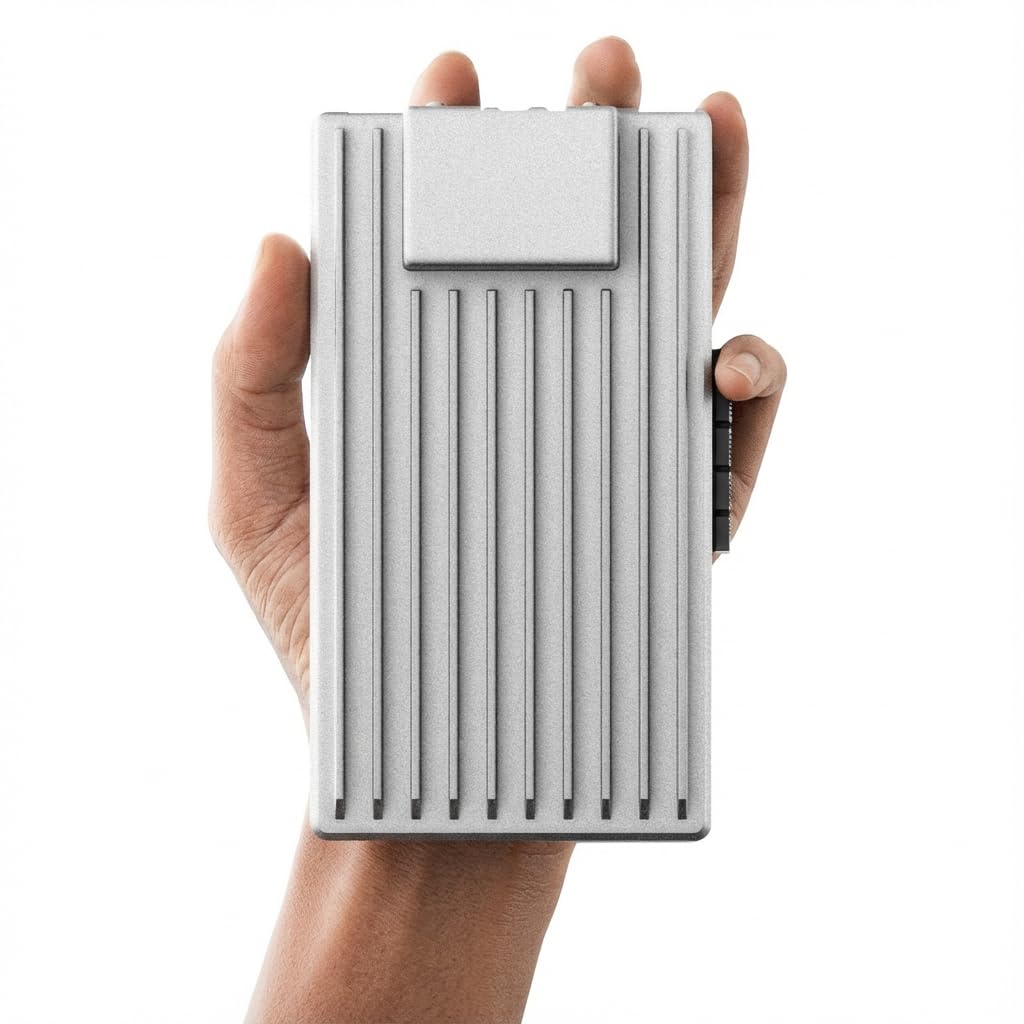
Built to sit in a closet for years, not to drive a robot across the floor.
Sixteen gigabytes of DDR5 memory and a quad-core processor running up to 3.6GHz put this board in a different conversation than the small robotics picks. That memory ceiling is the whole point: it is the headroom you need to run several containers, a media server, and a firewall side by side without the board choking. The other three picks cap at 8GB or 4GB, and none of them ship with DDR5. The 64GB of eMMC holds the operating system only — real storage comes from the drives you attach.
Attaching drives is where it separates itself. A full PCIe 3.0 x4 slot takes a 10GbE network card, an NVMe adapter, a graphics card, or an AI accelerator at low latency, which is a far cry from the USB workarounds common on tiny boards. Native dual SATA ports connect hard drives and SSDs directly for a DIY NAS. Dual 2.5GbE Ethernet ports move data fast between machines on your network. The maker lists a 6 gigabits-per-second data transfer rate, and the package includes a 12V/5A power adapter, cooling fan, and SATA Y cable.
ZimaOS comes preinstalled — a private cloud dashboard with automatic backups, P2P downloads, and a plug-in library the maker puts at 500+. You are not locked in: TrueNAS, Proxmox, Debian, Ubuntu Server, pfSense, OpenWrt, and Linux containers all run here, so a Plex server, Pi-hole, firewall, or Docker lab is a reinstall away. The tinkering ceiling is what owners value most on a board you will reconfigure a dozen times. The honest catch is boot reliability, which lands mixed in owner feedback — a small share of units misbehave at startup. The package comes with a 2-year warranty and 24/7 technical support, which is how you handle that if it happens to you.
The case for it: 16GB DDR5, a real PCIe 3.0 x4 slot, dual SATA, and dual 2.5GbE make this the only pick here that behaves like server hardware instead of a big microcontroller.
Where a buyer should pause: startup reliability is the split opinion in owner reviews, and 64GB of eMMC means you should budget for drives on day one.
Your board if: you are building a NAS, homelab, router, or Docker host that stays powered on and needs drives and network cards attached natively.
Not your board if: you want to drive motors and read sensors — the LattePanda’s Arduino coprocessor does that job far more directly.
4. LattePanda V1.0 4G/64GB x86 Development Board

The cheapest way onto x86 with an Arduino chip beside it, if you can live with 4GB of RAM.
For a first x86 board, the V1.0 asks the least of your wallet and still gives you the thing that matters: a real Intel processor running Windows or Linux natively. The Cherry Trail Z8350 quad-core tops out at 1.92GHz and pairs with 4GB of RAM and 64GB of eMMC. Those are modest numbers next to the i5 boards above, but they are enough to learn the platform, run a desktop, and prototype a project without emulation headaches. At 3.68 ounces the board itself is genuinely light.
The Arduino-compatible coprocessor carries over from the Alpha line, so you can still program hardware and expand the board without adding a separate microcontroller. The box includes the board, printed safety precautions, and a Wi-Fi antenna. The maker positions it directly as a Raspberry Pi alternative, and the hardware backs that up on paper — the appeal is the native x86 software support you do not get from an ARM board.
Build quality is the strongest theme in owner feedback and the board’s biggest source of goodwill. Boot behavior is the split — most boards behave, but a share stop working within about a week, and heat comes up as the recurring knock. Those are real reports, not universal ones, and they are the reason this sits at 3.5+ stars rather than higher. Treat it as a learning board with a clear ceiling: if your project needs sustained heavy compiling or 24/7 duty, the i5 Alpha will serve you better.
Why it still earns a slot: it is the most affordable entry into native x86 with an Arduino-compatible chip onboard, and the build quality is what buyers single out as its strength.
The one thing to weigh: 4GB of RAM and 1.92GHz are the floor of this group, and the heat plus a share of boot failures are the trade-offs that come with the lower tier.
Get it when: you are learning x86 on a tight budget and want the Arduino coprocessor without paying Alpha money.
Step up instead when: your project runs long hours or heavy builds — the added RAM and cooling of the i5 models earn their keep there.
Know the Specs
Processor and Clock Speed
The processor decides which software runs and how fast it finishes. A board like the LattePanda 2 Alpha uses an Intel Core i5-8200Y that bursts to 3.9GHz, which handles compiling and edge vision work. The V1.0’s Z8350 runs to 1.92GHz — fine for learning, slower under load. Clock speed alone does not tell the whole story; core count and RAM matter just as much, so read them together rather than chasing the highest number.
RAM and eMMC Storage
RAM (the working memory) is soldered to these boards, so you cannot add more later. 4GB covers a desktop and light prototyping; 8GB handles compiling and a full OS; 16GB of DDR5 is the headroom a multi-service server needs. eMMC is the built-in flash holding the operating system — 64GB appears across all four picks here. Add an NVMe drive through an M.2 or PCIe slot when you need real storage for files and projects.
Expansion — M.2, PCIe, and SATA
Expansion slots determine what the board becomes later. An M.2 M Key slot takes an NVMe or SATA SSD for fast storage. A PCIe 3.0 x4 slot, found on the ZimaBoard, accepts network cards, drive adapters, graphics cards, and AI accelerators at low latency. Native SATA ports let you attach hard drives directly. USB adapters can do some of this, but they run slower and less reliably — plan your add-ons against the slots a board actually has.
The Arduino Coprocessor Explained
An Arduino coprocessor is a small separate chip on the same board that drives sensors, servos, and GPIO pins while the main processor handles the heavy work. On the LattePanda boards this is an Arduino Leonardo (ATmega32u4) on the Alpha and an Arduino-compatible chip on the V1.0. It means you do not need a second microcontroller and the wiring between them, which simplifies robotics and IoT builds considerably.
Common Questions
What actually makes a board x86, and why does it matter?
Will a board with Windows preinstalled still run Linux?
Do I need a separate microcontroller for robotics work?
Can I add a hard drive to these boards for a NAS?
How much RAM do I really need for compiling and Docker?
Do these boards run hot, and do they include a fan?
What power supply does the Win11 Alpha need?
Can I attach a graphics card to any board here?
Is the cheaper LattePanda V1.0 good enough as a first x86 board?
How does the ZimaBoard compare to a Mini PC for a homelab?
The Bottom Line
For most people building around an x86 sbc board, the winner is the LattePanda 2 Alpha 864s because it runs full Windows and Linux on an i5-8200Y and still drives sensors and servos through its own Arduino coprocessor — one board for the operating system and the hardware at once. If a licensed Windows install and a 45W PD adapter in the box save you real setup time, the Win11 Pro Alpha is the version built for that. And for an always-on NAS, router, or Docker host where native SATA, dual 2.5GbE, and a PCIe 3.0 x4 slot matter more than a robot chassis, the ZimaBoard 2 1664 is the board to reach for.
How we choose
We do not accept paid placement. Every pick is matched to a real buyer and a real use-case; we do not hands-on test units.
Sources
Specifications: manufacturer listings and product documentation. Review insights: verified customer reviews, as of November 2026. Pricing: not shown on this page (it changes often); check the current price via the retailer link.
As an Amazon Associate, Tactical Gear Guy earns from qualifying purchases. This does not affect which products we feature.