Specs are compiled from manufacturer listings and verified buyer reviews and can change over time — please confirm the key details on the product page before buying.
You want your Xbox 360 gameplay captured at 1080p 60fps without a smeared, juddering picture. The quick answer: buy a capture card that handles 1080p at 60fps over USB 3.0 and has a real pass-through so your TV stays lag-free while you play. Skip the standalone recorders if Twitch or OBS is your goal, because the two are not the same job. This guide splits the two by job.
This guide is built by comparing the manufacturers’ published specifications and the patterns across verified customer reviews, so you get each pick’s real strengths and trade-offs instead of marketing spin.
Below you’ll find the honest split between streaming cards and standalone recorders, so you can choose the right xbox 360 video capture card without buying twice.
Top Picks

How To Choose The Best Xbox 360 Video Capture Card
The first fork in the road is simple. Do you want to stream to OBS or Twitch, or do you just want a clean file on a USB stick? That one answer rules out every standalone recorder — or every streaming card — before you read another spec.
Streaming card versus standalone recorder
A streaming card plugs into your PC over USB and shows up as a webcam source, so OBS, Twitch, YouTube, and VLC all see it. A standalone recorder writes straight to a USB flash drive or external hard drive and skips the PC entirely — and it will not work with OBS, VLC, or YouTube at all. If your plan is “record the campaign to watch later,” a standalone recorder that writes to a USB drive is fine. If your plan is “go live” on Twitch or OBS, you need the streaming type.
Why USB 3.0 and 60fps matter for the 360
The Xbox 360 puts out 720p or 1080p depending on the title and cable, and fast shooters and racers look smeared at 30fps. A card that captures YUY2 at 1080p 60fps (YUY2 is an uncompressed color format that keeps the picture crisp) gives you the smoothness viewers expect. That bandwidth needs a USB 3.0 port — a USB 2.0 port will choke it down.
Pass-through keeps your gaming screen lag-free
Loop-out, also called pass-through, sends the HDMI signal back out to your TV or monitor. You play on that screen in real time while the PC records in the background. Without it, you’re playing on a delayed software preview window, which ruins timing-based games.
Side-by-Side Comparison
| Model | Best For | Capture Rate | Interface | Works With OBS | Amazon |
|---|---|---|---|---|---|
| Swudloe C7-01 (4K Pass-Through)★ Best Overall | All-round streaming and recording | 1080p 60fps | USB 3.0 | Yes | Amazon |
| OREI VC-1080Zero-Lag Pick | Zero-delay play on a TV | 1080p 60fps | USB 3.0 | Yes | Amazon |
| Fifine AmpliGame V3 | Streamers who want RGB flair | 1080p 60fps | USB 3.0 Type A | Yes | Amazon |
| MYPIN HD Game Recorder | No-PC recording to USB drive | 1080p | USB | No | Amazon |
| AGPTEK HD Game Capture | HDMI and AV input recording | 1080p | USB | No | Amazon |
Detailed Reviews
1. Capture Card for Nintendo Switch
Our pick — 4.0+★ from 600+ verified ratings; the strongest balance of quality and price.
The pocket-sized pick that treats your old console like a modern streaming rig.
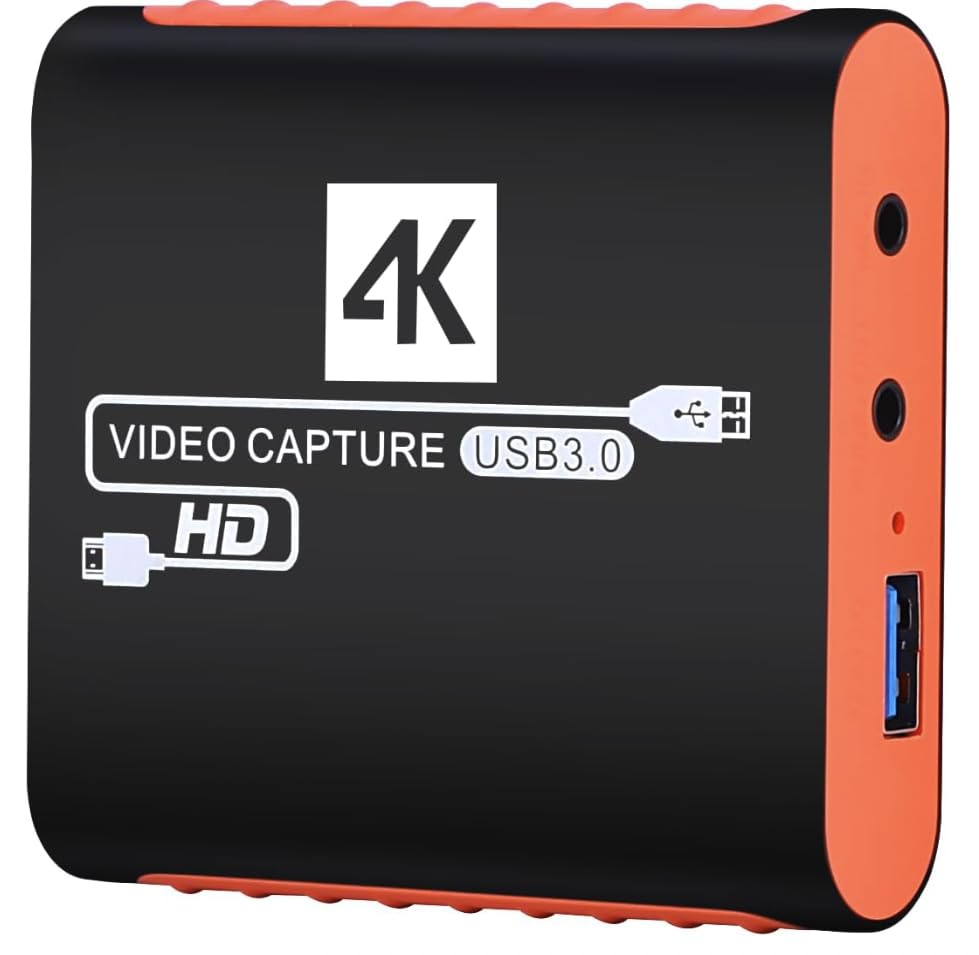
This is the card to buy if you want one box that does streaming and recording without fuss. It runs a real USB 3.0 protocol chipset — not a USB 2.0 board with a 3.0 sticker — and captures YUY2 at 1080p 60fps. In plain terms, YUY2 sends uncompressed color data over USB 3.0, so fast turns and muzzle flashes stay smooth instead of smeared. The Xbox 360 sits on its compatibility list right alongside the PS3, PS4, PS5, Xbox One, Wii, Switch, DVD players, and DSLR cameras.
Its trick is the 4K@30Hz input and 4K@30Hz zero-latency pass-through. You plug the 360 in, the card sends a clean picture back out to your TV so you play with no delay, and the PC captures at the same time. Captured video tops out at 1080p 60fps, and the HDMI output maxes at 4K 30fps. A 3.5mm mic input takes a headset or microphone for commentary. One honest limit: it does not record party chats, so your squad’s voices won’t land in the file.
The footprint is where it wins casually — the compact shell slips behind a console or into a laptop bag. Owners consistently describe a plug-and-play experience where the card is recognized automatically, no drivers, no external power supply. OBS picks up both audio and video without a fight. That plug-and-play reliability is why it sits at the top of this list.
What earns it first place
- True USB 3.0 YUY2 capture at 1080p 60fps for smooth gameplay
- 4K@30Hz pass-through keeps your TV picture lag-free while recording
- Plug-and-play — no drivers, no external power
- Works across Windows, Mac OS, Linux, and Android
- 3.5mm mic-in for live commentary
Where it asks you to compromise
- Capture is capped at 1080p 60fps — the 4K is pass-through only
- Party chat is not recorded through the card
Buy this if: you want a single card for Twitch, OBS, or YouTube and you play on a TV.
Think twice if: you need 4K recording or in-game voice chat in the file.
2. OREI 4K@30Hz HDMI Video Capture Card
Built for the player who refuses to game on a delayed OBS preview window.
If you play competitive matches and want your TV picture untouched, the OREI leans hard into that. The built-in HDMI loop-out shows your gameplay in real time while the PC records, so your reactions stay honest. It captures 1080p at 60Hz over USB-A from HDMI sources, and it lists the Xbox 360 among supported consoles, alongside the PS5, PS4, Xbox One, Wii U, Switch, DSLRs, and set-top boxes. It accepts 4K 60Hz (4:2:0) or 4K@30Hz input.
The setup leans on OBS. The card shows up as a webcam, you approve the source, and you’re capturing — no external power required. A 3.5mm TRS microphone input lets you lay voice over the game, and a 3.5mm stereo headphone out lets you hear it. It runs on Windows 7/8/10, Linux, and macOS 8 or later, and it ships with the card and a USB-A cable behind a 1-year warranty. The capture quality is the part buyers single out with praise.
Be realistic about the PC you’re feeding. OREI recommends at least an Intel i5-3400 or better with an NVIDIA GT630-class graphics card and 4GB of RAM. On a laptop, it wants an Intel i7-3537U or higher. Pair it with a weaker machine and the smooth capture can stumble, which is the honest trade-off here. Fed the right hardware, it delivers.
Where the value lands: a true loop-out for lag-free play, a warranty, and a mic plus headphone jack, all in a slim shell.
The catch to plan for: it asks more of your computer than the budget cards, so check your processor before you commit.
Reach for this if: zero-delay gaming on a TV is the whole point of your setup.
Look elsewhere if: your PC is older or you’re on a tight machine.
3. Fifine AmpliGame Video Capture Card

A desk centerpiece that captures 60fps and lights up your stream.
The Fifine is the pick for a streamer who wants the gear to look the part. It delivers 1080P/60FPS over USB 3.0 and adds a 4K/30FPS HDMI loop-out for zero-latency gameplay while you record. But the headline is the 9 RGB modes — a bit of flair that makes your setup feel intentional. This is the physically largest card of the group; the 4.24 x 2.8 x 1.21-inch body has real desk presence.
Connectivity is generous: HDMI output, LINE IN, and a headset port for teammate chat. It’s plug-and-play, starts capturing with the included USB and HDMI cables, and needs no driver install. It works with Windows and Mac PCs and pairs with OBS, YouTube, Discord, and Twitch. Fifine recommends using the original USB cable for best performance — a small but real detail.
Here’s the honest part buyers should weigh. Video quality feedback is genuinely split — some streamers get crisp 1080p at 60fps, others find it falls short. If you go this route, verify your cable and settings on the first run. The mic port and the RGB cues are what make it feel like an upgrade over a plain black box, but it pays to set expectations on the picture.
The draw for streamers
- 1080P/60FPS capture with a 4K/30FPS loop-out
- 9 RGB modes for a styled desk
- LINE IN and a headset port for commentary and chat
- Plug-and-play with included USB and HDMI cables
Set your expectations here
- Video quality results split between crisp and underwhelming
- The biggest footprint of the group at 4.24 x 2.8 x 1.21 inches
Choose it when: your stream aesthetic matters as much as the capture feed.
Pass if: you want the smallest possible box on a tight desk.
4. 1080P HDMI Video Capture Card HD Game Recorder

Press once, record to a USB stick, skip the computer entirely.
This is a different animal from the streaming cards, and that’s the point. The MYPIN records 1080P video straight to a USB flash drive or external hard drive — no PC in the chain at all. That makes it the pick for someone who just wants to capture the old 360 campaign and share it later. One-button recording starts and stops with a press, and it supports up to 128G on a USB drive and 2TB on a hard drive (MBR partition).
It’s the heaviest unit on the list at 0.39 kg, so it’s a stay-at-home box rather than a pocket carry. A microphone input takes a 3.5mm TRS headset for commentary, though it doesn’t capture party chat. Compatibility reaches the Xbox 360, Xbox One, PS4, set-top boxes, and DVD or Blu-ray players. Simplicity is its whole argument — it’s about as simple as it gets to operate.
Now the part that matters. This version does not support live streaming, so it will not work with OBS Studio, VLC, or YouTube. If your goal is a Twitch channel, this is the wrong tool — buy a streaming card instead. It’s also listed with a 3.5+ star rating, so it’s a compromise pick, not a star. Buy it for what it is: a straightforward recorder for keeping footage on a drive.
Who it clicks with: someone who wants 1080P footage on a USB drive with zero software steps.
What rules it out: no OBS, no VLC, no live streaming — this is recording only.
It fits: offline archiving of 360 gameplay on a flash drive.
Not it if: you plan to broadcast live anywhere.
5. AGPTEK HD Game Capture Video Capture 1080P

The only pick here that also takes older AV cables from a legacy console.
Here’s where the AGPTEK stands apart. It accepts both HDMI and AV input, so you can record from an HDMI 360 or from an older console over a component-style connection — no other card in this group covers that second input. It records full HD 1080p to a USB drive or hard drive, supporting up to 128G on USB (FAT32 or NTFS) and 2TB on a hard drive, and it works with USB 2.0 or USB 3.0 flash drives. A 3.5mm TRS mic input adds your voice while you play, across both HDMI and AV.
It’s a larger unit at 5.9 x 3.1 x 4.1 inches, so it takes up shelf space. The build comes with an HDMI cable, a component video adapter, and a DC adapter. It carries a 12-month warranty. HD captures are its strong suit, and it’s straightforward to operate.
Notice what it deliberately lacks. This version does not stream to any device, so it’s not an OBS card. Firmware realities have surfaced too — recording can fail on some attempts, and audio can drop out. If live streaming is the mission, AGPTEK points buyers to a different version. Use this one as a legacy-friendly recorder, and plan a backup plan for the footage you care about most.
Why legacy owners like it
- Both HDMI and AV input for older consoles
- 1080p recording to USB or hard drive up to 128G / 2TB
- Mic input across both HDMI and AV
- 12-month warranty
What to watch
- No live streaming — not an OBS card
- Some recording and audio reliability quirks reported
Best for: the collector with AV-era gear who records clips, not streams.
Not aimed at: anyone who wants to broadcast to Twitch.
Know the Specs
Capture rate (1080p 60fps vs 1080p)
A card rated 1080p 60fps records 60 full frames every second, which keeps fast action smooth. A card listed only as “1080P” often settles for a lower frame rate, and playback can look choppy. For shooters and racers on the 360, the 60fps figure is the one to check.
USB 3.0 vs USB
USB 3.0 moves data fast enough to carry uncompressed 1080p 60fps video. A card listed as plain “USB” may run on the slower USB 2.0 standard and can’t keep up with that stream. Match the card to a USB 3.0 port on your computer for smooth capture.
Pass-through and loop-out
Pass-through sends the live picture back out to your TV or monitor. You play on that screen with no delay while the computer records. A loop-out rated 4K@30Hz handles a 4K signal; the capture itself still tops out lower.
Standalone recording to USB
Some cards skip the computer and write files straight to a USB flash drive or hard drive. They’re simple to run but won’t stream to OBS or YouTube. Check the drive limit — 128G on USB and 2TB on a hard drive are common figures here.
Common Questions
Does an Xbox 360 need a special capture card?
Why won’t my capture card work with OBS?
Do I need a USB 3.0 port for 1080p 60fps?
What is HDMI pass-through and why does it matter?
Can I record party chat with these cards?
Streaming card vs standalone recorder — which do I buy?
How much storage does a recorder support?
Why does my capture card’s video quality look poor?
Can I play on my TV while the card records?
Does the Xbox 360 output 1080p?
The Bottom Line
For most people hunting a xbox 360 video capture card, the winner is the Swudloe C7-01 — a real USB 3.0 YUY2 chip that captures 1080p at 60fps, with 4K pass-through so your TV keeps up. If zero-delay play and a warranty are your priorities, the OREI VC-1080 earns its place. And if you just want files on a USB drive with no computer involved, the MYPIN recorder fits that job — as long as you skip the streaming dream.
How we choose
We do not accept paid placement. Every pick is matched to a real buyer and a real use-case; we do not hands-on test units.
Sources
Specifications: manufacturer listings and product documentation. Review insights: verified customer reviews, as of November 2026. Pricing: not shown on this page (it changes often); check the current price via the retailer link.
As an Amazon Associate, Tactical Gear Guy earns from qualifying purchases. This does not affect which products we feature.