Specs are compiled from manufacturer listings and verified buyer reviews and can change over time — please confirm the key details on the product page before buying.
If you are building or reviving an X79 or X99 machine, the cooler is the part that decides whether your chip runs calm or cooks. LGA 2011 and LGA 2011-3 boards use a wider mounting pattern than mainstream Intel sockets, so a cooler that looks great in the photos may simply not bolt down. Every pick below was checked for that socket support first, then judged on heat pipe count, fan airflow and how much room it leaves around your RAM.
This guide is built by comparing the manufacturers’ published specifications and the patterns across verified customer reviews, so you get each pick’s real strengths and trade-offs instead of marketing spin.
You will see tall dual-tower air coolers, short low-profile blocks for cramped cases, and one liquid option for the heaviest loads. Each entry names who it really suits. Here is the honest read on the best x79 x99 cpu cooler choices you can bolt onto that older board.
Top Picks


How To Choose The Best X79 X99 CPU Cooler
The first thing to settle is the socket. X79 boards use LGA 2011 and X99 boards use LGA 2011-3, and both need a cooler whose mounting kit lists 2011 or 2011-3. A cooler built only for LGA 1700 or AM5 will not line up with the wider holes, no matter how good its heatsink is. Check that line on the box before anything else.
Mounting: the make-or-break number
Look for 2011 in the compatibility list, and read the fine print. Some coolers list 2011 but only fit the square mounting version, or only one revision of the board. The 230W Cuifati model, for example, is built for the version B 2011 board and is not meant for version A or version C. That detail matters more than any fan spec, because a cooler that will not mount is a cooler you cannot use.
Heat pipes and tower height
Heat pipes are the copper tubes that pull warmth off the CPU and spread it into the fins. More pipes usually means more heat can move, and six pipes is the common count in this group. Tower height is the trade-off. A tall dual tower with two 120mm fans moves a lot of air, but it also needs a wide case. A 45mm low-profile block fits a small case but has less metal to work with.
Airflow and noise
Airflow, measured in CFM, tells you how much air a fan pushes in a minute. Noise, measured in dB, tells you how loud it is. A fan rated around 25 dB is quiet enough that you will not notice it over a case fan. A 35 dB fan is noticeably louder. Bigger airflow and lower noise are both good, and the specs on each pick show where each one lands.
Side-by-Side Comparison
| Model | Best For | Heat Pipes | Max Fan Speed | Rated TDP | Amazon |
|---|---|---|---|---|---|
| Thermalright Peerless Assassin 120★ Best Overall | Best all-round X79/X99 air tower | 6 × 6mm | 1500 rpm | 245 W | Amazon |
| LGA 2011 CPU Cooler 230W (Cuifati)Budget Fit | Cheap direct-fit 2011 replacement | — | 2000 rpm | 230 W | Amazon |
| upHere Dual Tower 6 Heat PipeWide Fit | Wide socket support on a budget | 6 | 1650 rpm | — | Amazon |
| upHere H45K6 Low Profile | Mini ITX / tight clearance builds | 6 × 6mm | 2800 rpm | 150 W | Amazon |
| upHere H85K6 Low Profile 120mm | Low-profile with a bigger fan | 6 × 6mm | 1800 rpm | — | Amazon |
| upHere Dual 120mm 6.22″ Cooler | High airflow quiet tower | 6 × 6mm | 1650 rpm | — | Amazon |
| Thermalright Peerless Assassin 120 Black | Blacked-out premium air build | 6 × 6mm | 1500 rpm | — | Amazon |
| ID-COOLING FROSTFLOW X 240 Snow | Heavy loads on a 240mm radiator | — | 1800 rpm | — | Amazon |
Detailed Reviews
1. Thermalright Peerless Assassin 120 CPU Air Cooler
Our pick — 4.5+★ from 450+ verified ratings; the strongest balance of quality and price.
The dual tower that treats a hot X99 chip like a mild task
The Peerless Assassin 120 is the pick most X79 and X99 builders end up with, because it combines a real cooling headroom number with a mounting kit that lists 2011 and 2066. It carries a 245W TDP rating, which is the amount of processor heat the cooler is built to shed and the highest figure in this group. The dual tower design handles that with two 120mm PWM fans pushing 66.17 CFM of airflow. In plain terms, that is more air movement than the small low-profile coolers here can manage.
What wins people over is the cooling result. Buyers report CPU temperatures dropping sharply after the swap, and cooling is the most-praised aspect in reviews. Build quality and easy installation come up right behind it. The fin stack gets a cutout for RAM so tall memory modules still clear. Noise stays at 25.6 dB or lower, which keeps the system quiet enough to sit through a long work session without a fan drone.
The thing to weigh is size. At 157mm tall, it needs a case wide enough to close the side panel, and the size and mounting notes are the mixed spots in the feedback. An offset asymmetric layout lets it sit over the first graphics card slot, which helps on a crowded X99 board. The crowd favorite sits at 4.5+ stars across 400+ ratings, and that lead over most of the group is earned on cooling first.
Where it wins
- 245W TDP rating leads this whole group of coolers
- 66.17 CFM across two 120mm fans for real airflow
- Quiet at 25.6 dB or below
- Cutout fins keep tall RAM clear
- Mounting kit lists 2011 and 2066
Where it asks for room
- 157mm height needs a wide case
- Dual tower is bulky and close to the GPU on tight boards
Reach for this if: you have a standard-width case and want the strongest air cooling for an X79 or X99 chip without going liquid.
Think twice if: your board is a compact form factor that leaves little side-panel room, since 157mm of tower has to go somewhere.
2. LGA 2011 CPU Cooler 230W TDP (Cuifati)
A small block aimed straight at X99 and built to fit that socket
This is the most direct match for a 2011 board in the whole list, because its name is the socket. It is built for the 2011 motherboard of version B and gives a 230W TDP figure. The single 90mm fan spins up to 2000 rpm and pushes 48 CFM of airflow, which is enough for a normal work chip but not for heavy overclocking. Noise sits at 22 dB, one of the quieter figures here, helped by the hydraulic bearing (a sleeve that runs the fan smoothly with little wear).
Where it makes its case is simplicity. A 3-pin connector plugs straight into the board, so setup is quick. It also takes up little room, with a small 3.5″L x 1″W x 3.5″H footprint compared to the tall towers that need a wide case. Owners mention the 90mm fan keeps temperatures down as expected and call it good value. The hydraulic bearing is rated to a 50,000-hour lifespan.
The catch is the version limit. It is meant for version B boards and not version A or version C, so check which revision your 2011 board is before you order. If yours is not version B, the mounting will not line up and nothing else about the cooler helps. For version B owners who want a small, quiet, low-power cooler and nothing more, it does the job cheaply.
The honest read: this is the cheap direct-fit option for a version B 2011 board. The 22 dB fan and 50,000-hour bearing rating suit a quiet office or home X99 build, and the 90mm form slips into tighter frames.
What to check first: confirm your board is version B. It is a fit question, not a quality one, and it is the whole reason to buy or skip this cooler.
Best matched to: a version B 2011 board with a modest chip and a small case where a 90mm block fits and a twin tower would not.
Not for: version A or version C boards, or anyone chasing big overclock numbers on a hot chip.
3. upHere Dual Tower CPU Cooler, 6 Heat Pipes
Six pipes, two towers, and a RAM-friendly shape for older boards
The upHere dual tower is here because of its long compatibility list. It names LGA 2011 and 2066 among its Intel sockets, so an X79 or X99 board is covered. Six heat pipes carry heat off the processor, and dual 120mm PWM fans spin up to 1650 rpm while staying at 25 dB or below. It also keeps RAM free, which is a real help on a four-stick X99 setup with tall heat spreaders.
The standout feedback is about fit and value. As owners put it: “The product fits cases well and offers excellent value, with one customer noting it accommodates 4 sticks of Corsair Vengeance Pro RGB RAM.” That is the scene a lot of X99 builders know, where a big cooler steals the first memory slot. This one is built to leave the memory alone. Buyers also report temperatures dropping sharply with the dual 120mm fans staying quiet under load.
Setup is meant to be easy, with a design that installs without pulling the existing fan off first. The dual tower shape still takes up width, so measure your case before you commit. But if you want six pipes and two fans on a 2011 board without fighting your RAM, this is a strong middle pick with more socket options than most here.
What stands out
- Lists 2011 and 2066 among its Intel sockets
- Leaves RAM clear for four-stick kits
- 25 dB or lower noise
- Installs without pulling the fan
Worth knowing
- Dual tower still needs case width
- No listed TDP figure to compare against the towers above
Pick it if: your X99 board is packed with four RAM sticks and you need a tower that steps around them.
Look past it if: your case is narrow, since the twin tower footprint has to clear the side panel.
4. upHere H45K6 Low Profile CPU Cooler
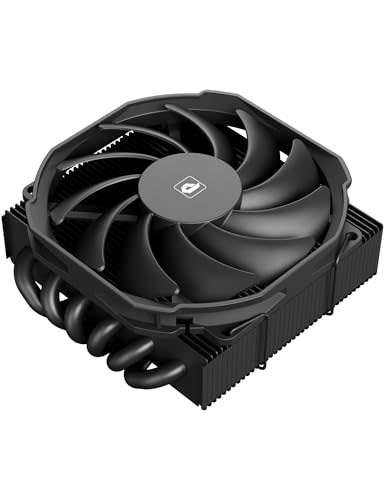
A 45mm block for the small case that cannot take a tower
At 45mm tall, this cooler is the one for a tiny Mini ITX build, where a 157mm tower simply will not go. It still packs six Φ6mm heat pipes, which are six copper tubes, and a 150W TDP rating to move heat away. The slim 90mm PWM fan spins between 800 and 2800 rpm and pushes 35.34 CFM of airflow at 27 dB or below. Compare that airflow with the Peerless Assassin’s 66.17 CFM: this model moves less air because it is built for space, not for maximum cooling.
The fan speed is high, up to 2800 rpm, which is faster than the 1500 rpm twin towers here can spin. That is the trade a short block makes, using a quicker small fan to make up for less metal. The design also promises 100% RAM clearance regardless of heat spreader height, plus a tool-free install meant to finish in under five minutes.
This is where honesty matters. The compatibility notes show mixed results, and there is a known issue: some customers note it will not mount on Intel 2011, which is exactly the socket X79 and X99 use. So confirm the mounting kit covers your 2011 revision before you buy, not after. For a small case that fits it and a board it supports, the cooling works well and fits, but the 2011 fit is the one thing to verify.
The tight-case answer: a 45mm block with six heat pipes and a 150W rating that gets real cooling into a case no tower can fit.
The 2011 caution: some reviewers point out the 2011 mount does not work, so check the socket kit against your board revision first.
Suits: a Mini ITX or slim case build where 45mm is the ceiling and you have confirmed the 2011 mounting.
Opt out if: you cannot verify the 2011 fit, or if your case has room for a taller tower that cools with less fan speed.
5. upHere H85K6 Low Profile CPU Cooler, 120mm Fan

The low-profile step-up: a 120mm fan on an 85mm body
Here is the middle ground between a tower and a 45mm block. This upHere stands 85mm tall and pairs six Φ6mm heat pipes with a larger 120mm fan that spins to 1800 rpm. That is a shorter body than the 157mm Peerless Assassin, so it fits more cases, but taller than the 45mm model, so it cools with a bigger, slower fan. It lists Intel LGA 2011/2066 and AMD AM5/AM4/AM3 among its sockets, so both X79 and X99 boards are named.
It is built for low-profile cases but steps beyond the smallest ones, covering ATX, Micro ATX, Mini-ITX and E-ATX per the maker. The direct heat pipe contact area is 30mm, and PWM control adjusts fan speed on the fly. RAM clearance is 100%, so memory fits without obstruction, and the fan installs without being removed first. Cooling is the strong point: owners describe Ryzen 7 7700X chips running much cooler in low-profile cases with the 120mm fan staying quiet.
What it will not do is match a full dual tower for raw cooling headroom, because 85mm of metal is not 157mm. Noise is not listed as a dB figure here, so treat the quiet reputation as the guide rather than a number. For an X79 or X99 board in a case too tight for a tower but with room above 45mm, this fits the gap neatly.
Why it earns a spot
- 85mm height fits cases a tower cannot
- 120mm fan moves more air than the 45mm model’s 90mm
- Listed 2011 and 2066 support
- Full RAM clearance
Limits to expect
- Less cooling headroom than a dual tower
- No dB figure listed to compare noise directly
Choose it when: your case is too shallow for a 157mm tower but has more than 45mm of clearance, giving you the bigger fan and full RAM access.
skip it if: a standard tower fits, since a taller twin tower moves more heat.
6. upHere Dual 120mm CPU Air Cooler, 6.22″ Height

The airflow leader of the towers, and it stays under the noise line
This is the tower for someone who wants the most air movement for the least noise. Two 120mm fans push 68.2 CFM, which is the highest airflow figure among the air coolers here, above the Peerless Assassin’s 66.17 CFM. Six 6mm heat pipes and dual towers handle the heat transfer, and a 30mm direct contact area sits right on the chip. Noise stays below 26 dB(A) even at the top speed of 1650 rpm. That combination of high airflow and low noise is the reason it made the list.
The socket list covers LGA 2011 and 2066 as well as AMD AM5/AM4/AM3, so X79 and X99 boards are named. It keeps tall RAM clear and installs without removing the motherboard or memory. There is a 4-pin power port running at 12V to match most boards. Shoppers say it holds a 9700X at 42-45C at idle, a steady idle figure that shows it keeps light loads cool and quiet.
The 6.22″ height means it needs a case tall enough to close the lid, so measure first as you would with any dual tower. For a quiet X79 or X99 workstation where fan drone gets on your nerves, the airflow-to-noise balance here is the reason to pick it over the cheaper single-fan options.
The number that sells it: 68.2 CFM of airflow with noise below 26 dB(A), the best airflow-to-noise pairing among the air coolers here.
The check: a 6.22″ tower needs a wide case, so confirm clearance before the build.
Made for: a quiet X79 or X99 machine where you want strong airflow without fan noise creeping up.
Rule it out if: your case is short, because a 6.22″ tower will not close inside it.
7. Thermalrlght Peerless Assassin 120 Black
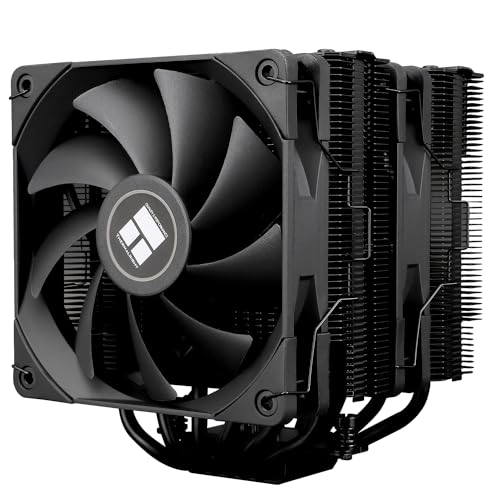
The blacked-out twin tower with the updated heat pipe tech
This is the same Peerless Assassin shape as the top pick, finished in black and running the newer AGHP 4.0 heat pipe technology. AGHP is Thermalright’s name for a design that keeps the pipes working well whether you mount the cooler upright or flat, since heat pipes can lose efficiency against gravity. Six 6mm copper pipes are soldered to a copper base, and two TL-C12B fans push 66.17 CFM at 1500 rpm. Noise is 25.6 dB or below, matching the standard version.
The build add-ons are what you pay extra for. It uses an SS2 install system with a metal pressure plate on the heatsink, which is meant to press more evenly on the CPU for better contact. The fin stack has cutouts for RAM so modules still fit. The black finish also suits a dark build. The listing names 2011 and 2066 support, so X79 and X99 boards are covered. For an AM4 or AM5 board, note it uses the motherboard’s own built-in backplate, which is not included.
The catch is a matter of patience, not performance. If you want the same cooling as the top pick in a cleaner black look with the updated pipe tech, this is the version to grab. If setup time matters most, the standard model is the simpler install.
What you get up top: the proven dual tower cooling with AGHP 4.0 pipes, an SS2 mounting system, and a metal pressure plate for tight CPU contact.
The fine print: the AM4/AM5 install relies on your board’s own backplate, and the black finish takes a little more care to keep clean.
For the builder who: wants the top cooling formula in a black finish and does not mind a few extra setup steps for the pressure plate and update.
Stay with the standard: if a quicker install and the plain silver look matter more than the black finish.
8. ID-COOLING FROSTFLOW X 240 Snow AIO

The liquid-cooled route for an X99 chip that runs hot all day
When air cooling is not enough, this all-in-one liquid cooler takes over. An AIO moves heat with liquid instead of metal fins and a fan. It runs a 240mm radiator with two 120mm PWM fans pushing 76.16 CFM of airflow, the highest figure in this whole group, and spins up to 1800 rpm. It lists Intel LGA 2066 and 2011 among its sockets, so both X79 and X99 boards are supported. White LED lighting on the pump and fans is the visual draw for a light-themed build.
Cooling is the reason to buy it. Reviewers praise cooling above all else, and buyers describe temperatures staying below 60°C under load. Installation is praised right behind it, with clear instructions for placing the radiator and pump. As a water cooler it moves more heat than any of the air towers here, and that headroom is real for a hot X99 chip under long sustained loads.
The honest side is the mixed feedback. Noise is split between some finding it very quiet and others hearing it loud at first, and there are a few durability reports of failure after a couple of months alongside many that keep going. That is the trade for a low-cost liquid cooler. If you want the strongest cooling and can accept a little more variance, the radiator here delivers. If you want a no-moving-parts install you set once, an air tower is the calmer path.
What it brings
- 76.16 CFM of airflow, the highest here, across two 120mm fans
- Names 2011 and 2066 support
- Straightforward install with clear instructions
- White LED lighting for a light-themed build
What varies
- Noise described as very quiet by some, loud at first by others
- A liquid cooler carries a pump that air towers do not
- 240mm radiator needs a mounting spot in your case
The liquid move: choose it when your X99 chip runs hot under lasting loads and you want the most airflow, plus a white LED look.
Think air instead if: you want the simplest, longest-life install with no pump and no noise variance.
Know the Specs
TDP rating (in watts)
TDP is the amount of processor heat a cooler is built to shed, measured in watts. A higher number means it can handle a hotter chip. The Peerless Assassin 120 lists 245W, the Cuifati 230W, and the 45mm upHere 150W. If you overclock or run heavy loads, aim for a higher figure. If you run a standard work chip, a lower one can be enough. Think of it as the cooler’s heat ceiling before the CPU starts to run warm.
Airflow (CFM) and noise (dB)
Airflow, in CFM, is how much air a fan pushes per minute. Noise, in dB, is how loud it is. The ID-COOLING radiator leads at 76.16 CFM, the upHere dual 120mm tower follows at 68.2 CFM, and the smaller 90mm fans sit lower. For quiet builds, a fan at 25 dB or lower is easy to live with. A 35 dB fan is louder. More CFM usually means more cooling, but fan size and speed decide the noise.
Heat pipes and tower height
Heat pipes are the copper tubes that carry heat off the CPU into the fins. Six of them is the common count in this group, and more pipes generally means more heat moved. Tower height decides what fits. A 157mm dual tower needs a wide case. An 85mm block fits most cases. A 45mm block goes into the tightest Mini ITX builds. Taller towers cool more but need space, so measure your case before you pick.
Socket support for LGA 2011
X79 uses LGA 2011 and X99 uses LGA 2011-3, so the mounting kit must name 2011 or 2011-3. Some coolers also list a version letter, like the Cuifati’s version B limit. A cooler built only for 1700 or AM5 will not fit. The Peerless Assassin and several upHere models list 2011 and 2066. Always check that line first, because no fan spec makes up for a cooler that will not bolt down.
Common Questions
Will a standard LGA 1700 cooler fit my X99 board?
What is the difference between LGA 2011 and 2011-3?
Is a dual tower air cooler better than a low-profile cooler for X99?
Will a big air cooler block my RAM on a four-stick X99 board?
How tall a cooler can fit in a Mini ITX case?
Do I need liquid cooling for an overclocked X99 chip?
What does 245W TDP mean on a CPU cooler?
Why do some coolers list a version B 2011 board only?
Is 25 dB quiet enough for a bedroom PC?
Can I use a 240mm AIO and an air tower on the same X99 build?
The Bottom Line
For most X79 and X99 builds, the x79 x99 cpu cooler winner is the Thermalright Peerless Assassin 120 because its 245W rating and 66.17 CFM airflow cool a hot 2011 chip with room to spare, and its mounting kit names the socket. If you want the same cooling in a black finish with the newer AGHP 4.0 pipe tech, grab the Peerless Assassin 120 Black. For a small case, the upHere H85K6 fits where a tower cannot, and if your X99 chip runs hot all day, the ID-COOLING FROSTFLOW X 240 brings the extra liquid headroom.
How we choose
We do not accept paid placement. Every pick is matched to a real buyer and a real use-case; we do not hands-on test units.
Sources
Specifications: manufacturer listings and product documentation. Review insights: verified customer reviews, as of July 2026. Pricing: not shown on this page (it changes often); check the current price via the retailer link.
As an Amazon Associate, Tactical Gear Guy earns from qualifying purchases. This does not affect which products we feature.