Specs are compiled from manufacturer listings and verified buyer reviews and can change over time — please confirm the key details on the product page before buying.
Your Series X is a sealed black tower that pulls hot air up and out the top with one fan. When a shelf, cabinet, or closed door blocks that airflow, the console gets loud and the frame rate can dip. An add-on fan sits outside the console and pushes or pulls more air across the vents. The right one drops the exhaust temperature without drowning out your game. Below you’ll find the nine models worth considering, what each one actually does well, and which one fits your setup.
This guide is built by comparing the manufacturers’ published specifications and the patterns across verified customer reviews, so you get each pick’s real strengths and trade-offs instead of marketing spin.
The picks below split into three jobs: fans that sit on top, fans built into a stand, and full docks that cool and charge at once. Every one of them plugs into the console’s own USB port, so there is no extra wall adapter to hunt down. Keep reading to find the best Xbox Series X Fan for how you actually play.
Top Picks


How To Choose The Best Xbox Series X Fan
The Series X vents straight up through the round grille on top, so anything sitting over that grille changes how the console breathes. A fan that pulls air up and away from the top fights the console’s own airflow the least. A fan that sits underneath and pushes air into the bottom vents helps too — the Series X draws cool air in around its base. Match the mount style to whether your console stands upright or lies flat, and you’re most of the way there.
Where the fan sits changes everything
A top-mounted unit covers the round exhaust grille and drives hot air upward, away from the console. A bottom stand mounts the console vertically on top of the fans and feeds the intake. Both work, but you can only use a bottom stand if your console stands upright, and a top fan needs the grille free of clutter. Measure your shelf clearance before you pick a mount style.
Auto mode versus manual speed
Auto mode uses a temperature sensor — a small chip that reads how hot the exhaust air is — and ramps the fan up only when needed. That keeps the noise down during light use and cools hard during long sessions without you touching anything. Manual mode gives you a fixed low, medium, or high speed you pick yourself. If you game in a shared room, auto mode keeps the fan quiet until the exhaust actually heats up.
What the extra USB ports actually do
Most of these fans borrow power from the console’s rear USB port and hand back two or three extra ports for controllers, headsets, or a phone. Pay attention to which ports move data and which only charge — a data port is the one you want for a controller or a headset dongle. On nearly every model here, the ports go dead when the console is fully off, because they draw from the console itself.
Side-by-Side Comparison
| Model | Best For | Mount Style | Top Fan Speed | Extra USB Ports | Amazon |
|---|---|---|---|---|---|
| KOVA LED Display Auto Cooling Fan★ Best Overall | Set-and-forget cooling | Top mount | Auto + manual, 3 speeds | 2.0 USB hub | Amazon |
| Raryars Cooling FanMost Airflow | Max airflow on a budget | Vertical stand | 5300 rpm | 3 USB ports | Amazon |
| Iesooy 3-Level Cooling FanQuiet Operator | Quiet three-speed control | Bottom stand | 1800–2000 rpm | 3 USB 2.0 ports | Amazon |
| TanReginal Smart Cooling Fan | Dust protection bundle | Top mount | Up to 2200 rpm | 2 USB 3.2 ports | Amazon |
| Mcbazel Wall Mount | Wall-mounted setups | Wall mount | Up to 2100 rpm | 1 USB 3.0 + 2 USB 2.0 | Amazon |
| MENEEA RGB Cooling Fan | Sliding dust cover + lights | Top mount | Auto + manual, 3 speeds | 2 USB ports | Amazon |
| MENEEA Auto Cooling Fan (White) | Light-coloured setups | Top mount | Auto + manual, 3 gears | 1 USB 3.0 + 1 USB 2.0 | Amazon |
| MENEEA RGB Charging Stand | Cooling plus controller charging | Vertical stand | Side-mounted fan | 2 USB ports | Amazon |
| MENEEA Auto Cooling Fan Charge Stand | All-in-one station | Top fan + charge base | Auto + manual, 3 speeds | Rear USB ports | Amazon |
Detailed Reviews
1. Auto Cooling Fan Xbox Series X
Our pick — 4.5+★ from 900+ verified ratings; the strongest balance of quality and price.
The fan that reads your console’s temperature out loud and decides the speed for you.
What makes the KOVA the pick of the bunch is the display on top: it shows the console’s live temperature in Fahrenheit or Celsius, and the fan handles the rest without you touching a button. Cross 96.8℉ (36℃) and it drops into Low. Between 107.6℉ and 118.4℉ it steps to Medium, and above 118.4℉ it runs full tilt. That is the whole idea — a fan that only works hard when your console is actually hot, so a quiet backlog of indie games stays quiet.
The makers quote 0.1°F accuracy on that readout, and the screen lets you watch the temperature fall after the fan kicks in. You can flip the display to Celsius by pressing the fan button twice. Prefer to take charge? Drop it into manual mode and pick your own low, medium, or high. It’s the crowd favorite too — 4.5+ stars across 900+ ratings, with the automatic behaviour winning the most affection.
Around the back of the appeal, there’s a 2.0 USB hub that charges controllers and headsets at 5V/2A while you play, plus a headset hook with silicone pads to keep your cans off the desk. At 0.36 kg it sits lightly on the grille. The nine lighting presets — seven colors plus two dynamic effects — hold their setting after a three-second press to save. The honest catch: everything draws from the console’s own USB, so the lights and the hub go dark when the Xbox is fully off.
What earns it the top slot
- Live temperature display with a stated 0.1°F accuracy, so you can watch the readout fall
- Three temperature-triggered auto speeds (Low, Medium, High) start at 96.8℉ so normal play stays quiet
- Manual overrides and a saved RGB preset across 9 light modes (7 colors plus 2 dynamic effects)
- 2.0 USB hub feeds controllers and headsets at 5V/2A mid-session
Points worth knowing first
- Lights and USB ports only run while the console is awake
- Auto mode means you give up picking the speed yourself unless you switch to manual
- Top-mount fans need the round exhaust grille kept clear of other gear
Reach for this if: you want cooling that adjusts itself and a temperature readout you can glance at mid-match.
Think twice if: you want a fan that runs at a fixed speed with no auto logic.
2. Raryars Cooling Fan for Xbox Series X with 3 USB Port
Two fans spinning at 5300 rpm.
Its twin fans hit a maximum rotational speed of 5300 rpm (revolutions per minute — how fast the blades spin) against the Iesooy’s 2000 rpm. It does that with no temperature sensor and no auto logic — just a pair of fans running hard whenever the console is on. The makers pitch it for heavy games and long sessions. The DC 5V draw (5 volts of power) comes straight from the console’s USB port with no separate power brick.
That brute-force approach sounds like noise, and to a degree it is: the stated noise level is 30 db, which is a steady hum you’ll notice in a quiet room. It’s also compact, at 5.91″L x 3.94″W x 1.18″H versus the Iesooy’s 8.27″L x 7.87″W x 2.36″H, so it tucks under a low shelf. The body mixes plastic and metal. And when you’re not sure it’s helping, the honest truth is that airflow does the talking, not a gauge — there’s no readout to confirm the temperature drop.
You also get three USB ports back for controllers or a headset, plus the option to use it as a vertical stand for the Series X. It’s rated 4.0+ stars across 900+ ratings, and the recurring split among owners is whether the extra airflow is felt at all — some swear the console runs cooler, others reckon it doesn’t move enough air to notice. The makers back a 40-day replacement if it fails in shipping or normal use. For a bare-bones, no-fuss fan at the entry end of the lineup, it’s a straightforward pick.
Where it lands: peak blade speed and a footprint small enough for tight shelving, with three USB ports to boot.
The trade-off: it either sounds like 30 db of constant fan hum or it isn’t doing much — there’s no middle setting to soften it.
The one for you if: you want maximum spins and don’t mind a fixed speed.
Not the one if: you game late at night with others within earshot.
3. Cooling Fan for Xbox Series X with 3 Levels Adjustable Speed
A bottom-mounted fan that trades top speed for a whisper you barely notice.
The Iesooy takes the opposite approach to the Raryars: it tops out around 2000 rpm and leans on ducting rather than raw speed. Its vertical air ducts line up with the four corners of the console’s base and push air from bottom to top, feeding the intake where the Series X draws its cool air. Three touch-selected speeds — green for fast, blue for medium, orange for low, off for stop — cover light and heavy sessions. This is the pick for someone who wants the console cool without hearing about it.
Reliability is the thing that gets talked about most with this one, followed closely by how it performs day to day. The reviewers who love it tend to say it simply works. There’s colour too, with six single RGB colors plus a mixed mode, all on an independent touch switch so you can shut the lights off while the fan keeps going. On the USB front you get three extra ports: a blue 2.0 port for data, and two white 2.0 ports for charging only.
Now the honest part. Cooling performance divides opinion — some owners find it pulls the heat down, others reckon it doesn’t blow much air. There is also a stretch at the top of the 1800–2000 rpm range where the fans make themselves heard. It’s rated 4.0+ stars across 300+ ratings, so most buyers are clearly happy, but if you’re expecting a dramatic temperature drop, set the bar at “a subtle assist” rather than a storm. The body measures 8.27″L x 7.87″W x 2.36″H, so measure your shelf first.
what separates it: bottom-fed airflow that aligns with the console’s own intake corners, so it works with the Series X rather than against it.
The honest caveat: at the high setting the fans do become audible, and the cooling gain splits opinion rather than settling it.
Best matched to: a player who leaves the console standing and wants quiet background cooling with a data port for a headset.
Look elsewhere if: your console lies flat, or you want the temperature read out to you.
4. Smart Cooling Fan Xbox Series X
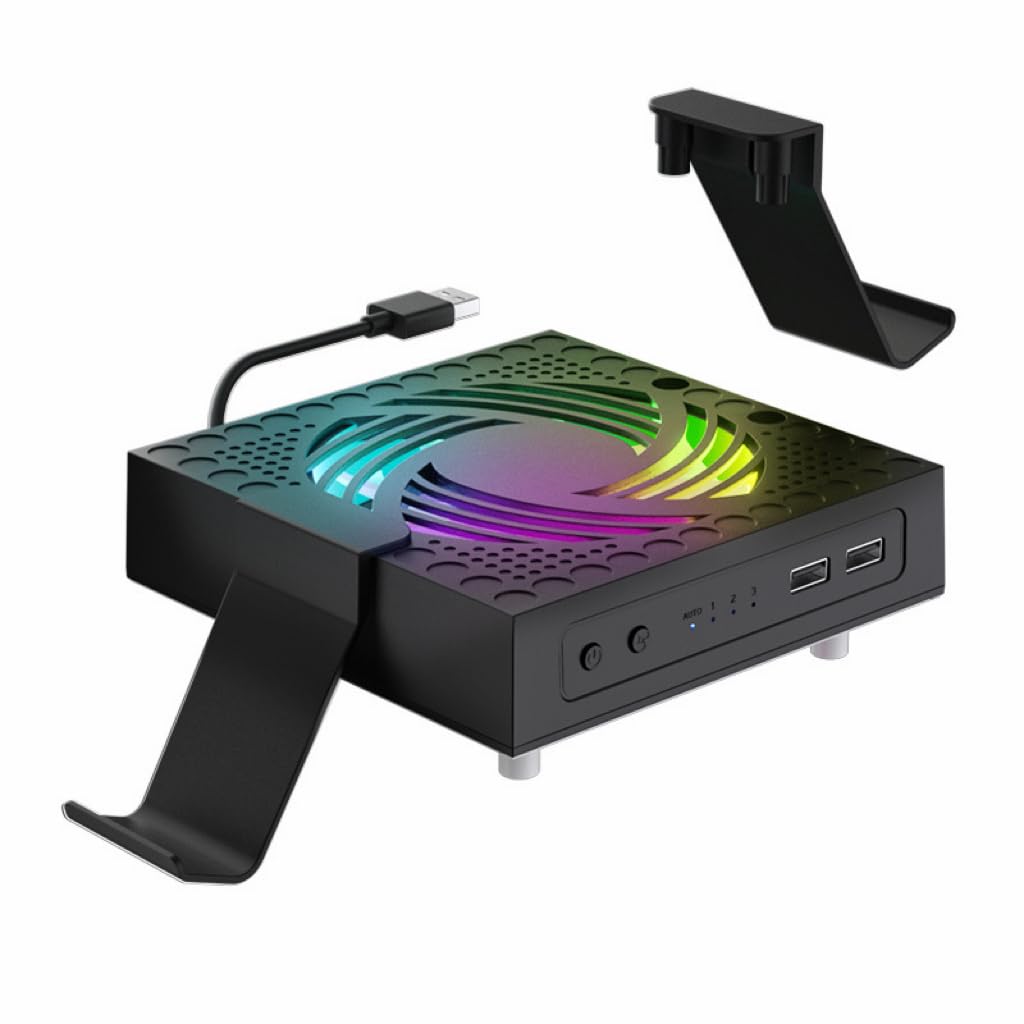
A cooling fan that doubles as a dust-sealing kit for the whole console.
Most fans here do one job. The TanReginal does two: it cools, and it arms your console against dust. The cooling half is a one-touch auto mode that switches on when the console reaches 104°F/40°C and shuts off when it drops — no buttons to babysit while you’re mid-match. The speeds run Low, Medium, and High up to 2200 rpm, and the nine-blade hydraulic bearing design is built to keep the noise almost inaudible.
The dust half is what makes it different. Two sets of dustproof mesh filters and eight custom dust plugs cap every vent and port, which matters if the console sits in a pet-friendly room or near a high-traffic doorway. Add two USB 3.2 ports for controllers or headsets and a dual stand that holds a controller and a headset, and the bundle fills out nicely. Setup takes minutes with no tools: fan on top, stands on, mesh in, plugs pushed home.
The kit also throws in four pairs of height-boosting joystick caps with different textures for better grip. Where it falls short is proof of cooling — there’s no temperature screen, so you trust the auto mode and carry on. The RGB lighting switches on and off with a long press for anyone who’d rather game in the dark. If dust is as big a worry as heat, its mesh filters and eight port plugs make it the pick.
The double act: auto cooling from 104°F/40°C joined to a full dust-sealing kit with mesh filters and eight plugs — a rare two-in-one.
What’s missing: no temperature display, so you’ll never see the numbers behind the auto mode.
Pick it up if: your console lives around pets, carpet, or a busy room and dust is as big a worry as heat.
Pass it by if: you want a digital readout proving the fan is working.
5. Mcbazel Wall Mount for Xbox Series X with Cooling Fan

The only pick here that gets the console off the shelf and onto the wall.
If floor space is the enemy, the Mcbazel solves the problem by mounting the Series X vertically against the wall, with dual fans sitting under the console and drawing air through the mount. The fans run at three touch-selected speeds up to 2100 rpm, and both speed and lighting change with a touch — no app, no remote. It’s rated 4.5+ stars across 200+ ratings, and easy installation is the part that gets the most praise.
The ABS body is rated to 10kg, and there are three removable hooks for controllers and a headset. One USB 3.0 port handles data transfer while two USB 2.0 ports top up controllers, a headset, or a phone. A note in bold from the maker: the fan, lighting, and ports all draw from the console, so none of them run while it’s asleep or off. And it’s cut for the Series X body alone — the Series S has a different shape and won’t seat correctly. The controller cradles do take both Series S and Series X pads, so a mixed household can still use the holders.
The RGB light bar runs several colors and effects, with a touch to switch it off — a genuine plus in a bedroom where a glowing shelf is a nuisance. The stability picture is more mixed, with owners split on how securely it holds the console. Screws come in the box, but the maker themselves advise using wall anchors suited to your wall rather than driving into plasterboard alone. Get the mounting right and this is the tidiest setup on the list.
Why owners rate it: installation is the standout, and the snap-in fit of the Xbox into the mount is the moment that wins people.
The one snag: the hardware is only as good as the wall behind it — skip the anchors at your peril.
Built for: a wall-mounted station where controllers and a headset hang under the console.
Wrong pick if: you own a Series S, or your console needs to stay on a desk.
6. RGB Cooling Fan Xbox Series X

A sliding dust cover that seals the console — then slides open to speed the cooling.
The MENEEA’s party piece is the sliding cover on top: closed, it keeps dust and spills off the console and doubles as a shelf for your pad; open, it lets hot air escape faster. That flexibility is genuinely useful. Underneath, the built-in smart chip reads the temperature and picks the fan speed for you, starting in auto mode and running three speeds without a button press. When you switch to fan speed by hand, the touch switch cycles medium (blue), high (orange), and off.
The lighting runs seven RGB modes — running lights, water running lights, breathing lights, and four solid colors of red, green, blue, and cyan. A separate light switch cycles through the effects or turns them off, and a three-second long press saves your favourite. Cooling is what wins people over most here, and the layout suits a console stood upright or laid flat under the TV. There are two more USB 2.0 ports, one for data and one for charging, plus two sets of dust covers and a set of silicone port plugs to keep grit out of the HDMI and USB openings.
Two things to flag. Noise splits opinion — some find it super quiet, others find it a touch noisy at higher speeds. And the remote control behaviour is mixed, so don’t count on fine-tuning from across the room. It’s rated 4.0+ stars across 500+ ratings, which says the majority are content with the trade. Where it feels weakest is when you want to know the actual temperature — the smart chip keeps that to itself.
The clever bit: a sliding cover that doubles as a dust lid and a play surface, then opens up when the fans need room to breathe.
The honest bit: noise and the remote both land in mixed territory, and the smart chip never tells you the temperature it’s reading.
Worth grabbing if: you want lights, a screen-covering dust lid, and port plugs in one box.
Skip if: you want a numeric temperature readout or a silent fan.
7. Auto Cooling Fan Dust Proof Xbox Series X

The white-finish version of the MENEEA fan, for consoles that don’t hide on a dark shelf.
If your setup leans light, this is the box for you: the same auto-and-manual cooling brain as the black MENEEA, wrapped in a white shell. The fan runs in auto mode by default, reading the exhaust temperature and adjusting its three gears on its own. Switch to manual and the touch control steps through medium (blue), high (orange), and off, with a three-second long press to power down.
The light strip offers six solid colours plus two mixed modes, all on an independent touch switch — so you can change the mood without disturbing the fan speed. The dust work is the same as its darker sibling: two sets of covers for the console and a set of silicone plugs that slot into the USB and HDMI ports without tools. Down at the back sit a blue USB 3.0 port for data transfer and a white 2.0 port that only charges controllers, phones, or a desk lamp.
It’s rated 4.5+ stars across a smaller pool of ratings, so it hasn’t been in as many homes as the others — a fair sign that it’s a newer or more niche finish rather than a weak product. The maker’s own note is the one to remember: when the console is working, lift the fan’s dust cover off to speed heat dissipation. Line up the two holes under the cover before you press it back down, or it won’t seat. Do that and you’ve got a tidy, quiet-ish top cooler that happens to match a pale desk.
Reasons it earns a place
- White body to match a light-coloured setup
- Auto mode from power-on, with manual override across three gears
- USB 3.0 data port plus a separate charging port
- Dust covers and silicone plugs included for the console’s own ports
Where it gives ground
- No temperature display to confirm the auto mode is working
- Dust cover must be removed during play, so it’s not a set-and-forget lid
- Smaller ownership pool than its black sibling
Made for: a light-toned desk or entertainment unit where a black cooler would stand out.
One thing to plan for: you’ll be lifting the dust cover off each time you play.
8. RGB Charging Stand Xbox Series X

One upright stand that cools the console, charges two pads, and holds ten discs.
Six jobs in one tower: cooling fan, dual controller charger, headset stand, ten disc slots, RGB lighting, and an extra USB port. The MENEEA packs two 1400mAh rechargeable batteries that fully charge two controllers in 3.5 hours, so you never run a pad flat mid-match. The fan mounts on the side rather than underneath, and the metal base has four vents cut for the Series X to let hot air out the top without blocking the console’s own airflow. It’s rated 4.5+ stars across 500+ ratings, with build quality leading the praise.
The lighting runs 15 effects — seven monochrome and eight adjustable — with a memory function that saves your pick after a three-second long press. There are two USB ports: one links to the console, the other charges a keyboard, phone, or tablet. The charger stops when the console is off, though sleep mode will still charge. The smart chip inside guards against over-current, over-voltage, and over-heat while the pads sit on the dock.
Two caveats worth knowing. The charger only works with the batteries MENEEA supplies, so your own battery packs won’t charge on this dock. And the fit divides opinion — a few owners find the controller seating fussy. Since the batteries are the ones in the box, that’s usually the point where you simply keep the pair it came with. For a console that lives on a shelf and two controllers that need a home, it tidies the whole corner into one tower.
Where it shines: build quality and the sheer volume of things it holds — two pads, ten discs, a headset, and the console itself.
Where it asks a favour: the dock only charges the batteries in the box, so third-party packs are out.
Go for it if: you’re tired of controllers dying and discs stacking up on the TV unit.
Look at a plain fan if: you already have a charging solution or use your own batteries.
9. Auto Cooling Fan Charge Stand Xbox Series X
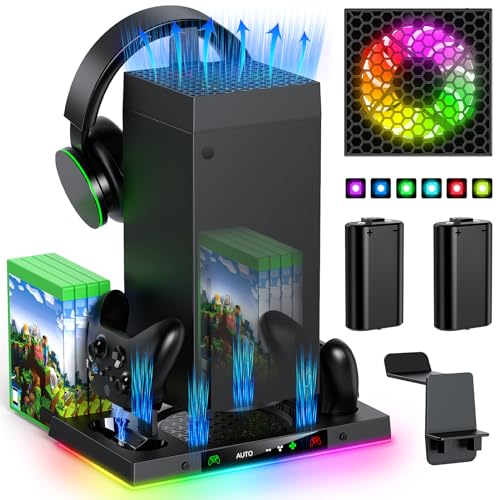
The full command centre: top fan, charge dock, disc storage, and card slots in one.
This is the most complete unit on the list. A top fan handles auto and manual cooling, a charge station with two rechargeable batteries keeps pads topped up, and the base stores eight game discs and two expansion cards. The fan starts in auto mode by default, with the AUTO light on, and after five seconds the temperature sensor decides whether to keep running. Once the console reaches 36 degrees Celsius, the fan kicks in. Switch to manual and you get three speeds: low, medium, high.
The charge dock draws its power from the console through a cable. A red indicator shows while charging and green when full. But it only charges the Xbox Series X original battery or the battery in the box, not a third-party pack. There’s a quirk to know: the fan only works when it’s connected to the charging stand via the Type-C port (a small oval USB connector) at the back. The charge station itself has no fan, though it does have four air intakes. And the lights on the charge stand stay on even when the fan is switched off.
The 15 RGB light modes run from solid reds and greens to cyans and mixed effects, with a brief press to cycle and a three-second hold to save your setting. The rear USB ports support both data and charging. Customers find it easy to set up and like the look, with quiet operation among the wins. It carries 4.5+ stars across 500+ ratings. For someone who wants the entire gaming corner organised into one footprint, this is the fullest answer on the list.
Why it tops the pile on features
- Everything in one footprint: top fan, charge dock, headset stand, 8 disc slots, 2 expansion card slots
- Auto mode from power-on, engaging at 36 degrees Celsius, with three manual speeds
- 15 RGB modes with a memory function
- Rear USB ports handle both data and charging
The catches in the small print
- The fan only runs when it’s hooked to the charging stand through the Type-C port
- The dock charges only the original battery or the one in the box
- The stand’s lights stay on even when the fan is off
The right call for: a player who wants one device to cool, charge, and house the whole kit.
Go simpler if: you just want airflow — the extra bits only pay off if you’ll use them.
Know the Specs
RPM (Revolutions Per Minute)
This is how many times the fan blades spin in a minute — think of it as how hard the fan works. Higher RPM usually moves more air, but it can also mean more noise. The Raryars sits at 5300 rpm, while the Iesooy runs 1800–2000 rpm. Neither number alone tells you which cools better; the design of the ducts and where the fan sits matter too. For a quiet room, a 2000 rpm fan aligned with the console’s intake often beats a 5300 rpm fan blowing against it.
Auto Versus Manual Mode
Auto mode uses a temperature sensor to decide when to spin and how fast. On the KOVA, that starts at 96.8℉ (36℃); on the MENEEA charge stand, at 36 degrees Celsius. Manual mode gives you three fixed speeds you set yourself. Auto is easier to live with day to day because it idles quietly through light use and only ramps up under load. Manual gives you direct control if you’d rather run the fan flat-out on a hot afternoon.
Common Questions
Will an Xbox Series X fan make my console quieter or louder?
Can I use these fans with the Series X lying flat instead of standing up?
Do these fans need a separate power adapter?
What is the difference between a top cooling fan and a bottom cooling stand?
Will the extra USB ports on these fans pass data or only charge?
Do these cooling fans work with the Series S?
Can I leave the fan running all night?
Do the RGB lights drain power from the console?
Is a fan with a dust cover better than one without?
The Bottom Line
The winner for most people is the KOVA LED Display Auto Cooling Fan, because it reads the console’s temperature out loud and decides the fan speed for you — no buttons, no guessing. If you want a high-speed fan, the Raryars is rated at 5300 rpm and takes up almost no shelf space. And for a setup that cools, charges two pads, and stores your discs in one upright tower, reach for the MENEEA Auto Cooling Fan Charge Stand.
How we choose
We do not accept paid placement. Every pick is matched to a real buyer and a real use-case; we do not hands-on test units.
Sources
Specifications: manufacturer listings and product documentation. Review insights: verified customer reviews, as of November 2026. Pricing: not shown on this page (it changes often); check the current price via the retailer link.
As an Amazon Associate, Tactical Gear Guy earns from qualifying purchases. This does not affect which products we feature.