Specs are compiled from manufacturer listings and verified buyer reviews and can change over time — please confirm the key details on the product page before buying.
You want a robot kit your kid will actually finish building — not one that ends up back in the box after twenty frustrated minutes. The short answer: the Sillbird 5-in-1 Remote Control Kit is the safest first buy for ages 8 and up, because 596 pieces spread across five separate builds means your child starts easy and levels up instead of hitting a wall. Below, nine kits are broken down by who each one truly fits, from a no-tools toddler workshop to a programmable tank that runs on Scratch.
This guide is built by comparing the manufacturers’ published specifications and the patterns across verified customer reviews, so you get each pick’s real strengths and trade-offs instead of marketing spin.
Assembly difficulty is the single biggest reason a robot kit gets abandoned, so every pick here is graded on it. A screen-free afternoon project and a first taste of real programming are both covered in this breakdown of the world robots worth your money.
Top Picks

How To Choose The Best World Robots
Most robot kits fail at the same place: the build. A kit can list hundreds of pieces and still be a dead end if the instructions are murky or the first model is too hard. Pick the wrong one and you are the one sitting on the floor at 9 p.m. hunting a missing screw.
Start with the build difficulty, not the piece count
A kit with 596 blocks that splits into five models lets a child start on the easy build and graduate to the hard one. A kit with 30 models but a single difficulty level can feel repetitive or overwhelming. Look for the phrase “different difficulty level” in the listing — that is a real sign the maker thought about the learning curve.
Decide if you want snapping or screwing
Block kits snap together with no tools, which suits younger kids and keeps the build moving. Bolt-and-tool kits use a real screwdriver or toy drill and build hand strength, but small screws are a genuine frustration point on kits that use them. Match the method to your child’s patience, not their age number.
Know how it is powered before you buy
Kit power falls into four camps: rechargeable USB batteries, plain AA batteries you supply, sunlight via a solar panel, and a battery backup for cloudy days. Every option has a cost in either money or downtime. Rechargeable kits here list up to 40 minutes of run time per charge, so check whether the battery is included before you buy.
Remote or app — pick by how your kid plays
A handheld remote is instant and needs no phone. A Bluetooth app adds coding modes like path-drawing and gyroscope driving, which is where real programming starts. If your child is a hands-on racer, the remote is enough. If they like figuring out how things work, the app is the reason to pay more.
Side-by-Side Comparison
| Model | Best For | Models to Build | Age Range | Power Source | Amazon |
|---|---|---|---|---|---|
| Sillbird 5-in-1 Remote Control Kit★ Best Overall | First build that grows with them | 5 | 8 years and up | Rechargeable | Amazon |
| Tsomtto 6-in-1 Robotics Kit SetBest Value | Six quick projects on a budget | 6 | Kid | Not listed | Amazon |
| Yutin 5-in-1 Robot Car KitScreen-Free Pick | Family science afternoons | 5 | 8 – 14 years | Solar and battery | Amazon |
| Wesfuner 30-in-1 Solar Robot Kit | Most builds for the money | 30 | 8 – 13 years | Solar and AAA battery | Amazon |
| Thames & Kosmos Hydraulic Boxing Bots | Two-player robot battles | 2 | 8 years and up | No battery required | Amazon |
| Educational Insights Design & Drill Robot Workshop | Preschool tool play | Build your own | 36 months – 6 years | Two AA batteries | Amazon |
| Sillbird 3-in-1 RC Race Car Kit | Kids who want speed | 3 | 8 years and up | Rechargeable | Amazon |
| Apitor 6-in-1 Coding Robot | Learning to code through play | 6 | 7 – 12 years | Three AA batteries | Amazon |
| Makeblock mBot Ranger | Serious young programmers | 3 | 10 years and up | Six AA batteries | Amazon |
Detailed Reviews
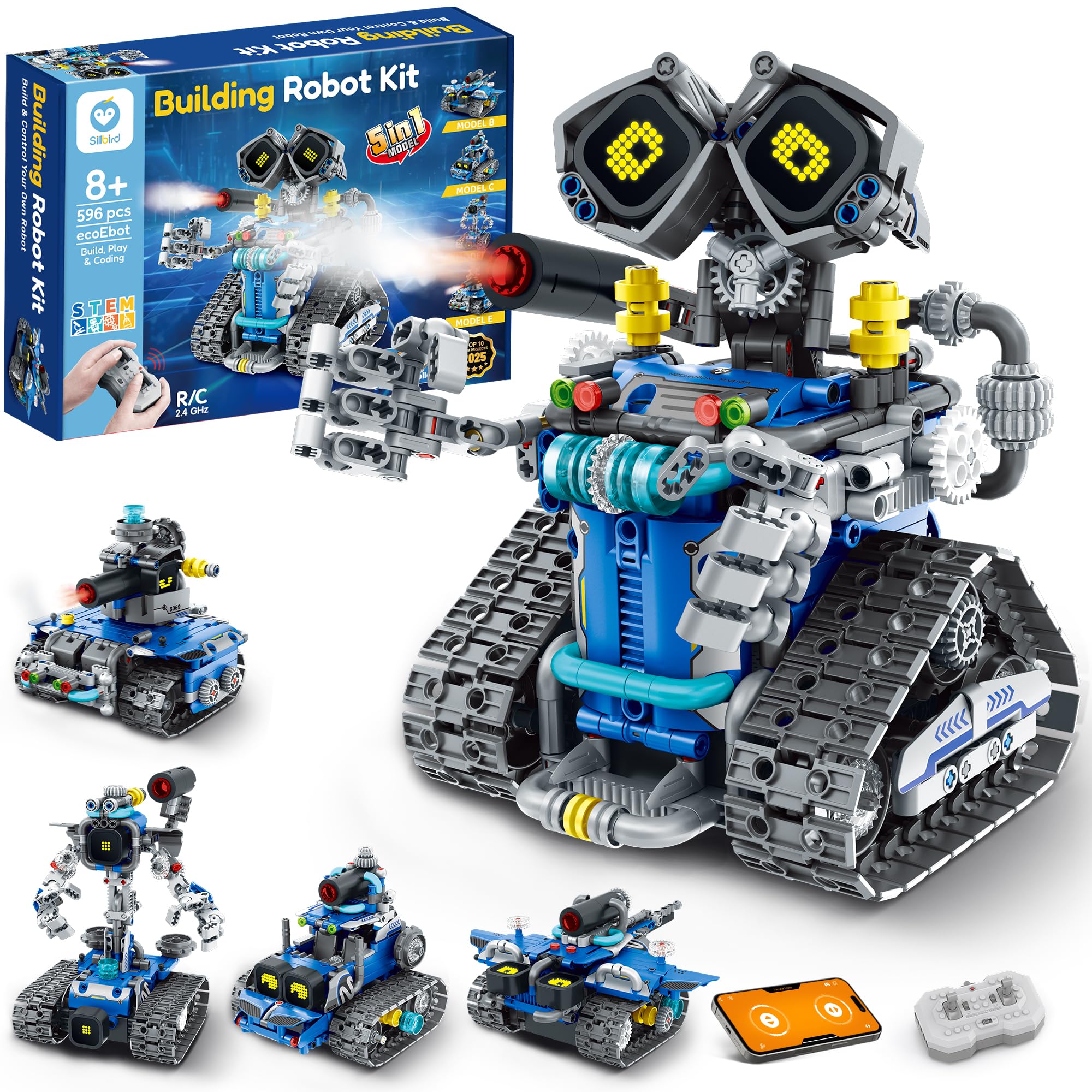
1. Sillbird STEM Robot Building Kit with Remote Control
Our pick — 4.5+★ from 950+ verified ratings; the strongest balance of quality and price.
Five builds, 596 blocks, and a mist-spraying robot with LED eyes that change expression.
The number that decides this one is five: 596 blocks that split into five separate models — robot, tank, car and more — each rated at its own difficulty level. That means your eight-year-old can start with the simple build and work up instead of drowning on page one. It is the closest kit here to one that grows with your child.
Play factor is where this thing earns its place. The digital LED eyes shift expressions, there are sound effects, and a mist-spray feature that activates with a little water. You drive it by handheld remote or switch to the Bluetooth app for coding. A built-in rechargeable battery gives up to 40 minutes per charge, so you skip the weekly AA run. The 7 x 8 x 6 inch footprint is small enough to sit on a shelf between sessions.
Assembly is the honest split point. Some families build it in a happy afternoon; others find it fiddly and finish it over several sittings. The same is true of the electronics — most units run exactly as shown, but a small number have acted up, which is why this sits as a great first kit rather than a guaranteed flawless one. Treat the build itself as half the fun and the trade-off disappears.
What buyers rave about
- Five separate models with graded difficulty keep a builder busy for weeks
- LED expression eyes, sound effects and a mist-spray feature add real personality
- Built-in rechargeable battery gives up to 40 minutes of play per charge
- Remote and Bluetooth app control cover both hands-on and coding play
Where to set expectations
- The build is slow for less patient kids and rewards adult help early on
- Requires the app for full coding features — the free play is remote-only
Reach for this if: you have an 8-to-14 year old who wants a robot with personality, not a science fair display piece.
Hand the remote elsewhere if: your child gives up fast on multi-hour builds — start with a smaller kit first.
2. Tsomtto STEM Kits for Kids Robotics Kit Set
Six robots in one box — reptile bot, bubble machine, fiber lamp, sliding plane and more.
Six build it once, done-in-an-afternoon projects is exactly what a nine-year-old wants before committing to a long kit. This set packs a reptile robot, a balance car, a bubble machine, a fiber lamp and a sliding plane, plus one more — each a quick win that ends with something visibly working. If your goal is to find out whether your kid even likes robotics, this is a low-risk experiment.
The screwdriver and step-by-step manual are included, so there is no extra tooling to buy. It suits ages 8 to 12 well, though the box itself states a recommended age back to 36 months, which tells you the small parts are the main thing to watch with younger siblings. Built models are genuinely small and quick; this is a kit for sampling mechanics, not for a child who wants one hero robot to keep.
The main trade-off here is the same one almost every kit in this price bracket shares: the small screws. A child who struggles with screwdriver control will need you to pre-thread them. The upside is you get six separate chances to learn that skill instead of one long build that goes badly on day one.
The case for six projects: each build finishes in a session and produces a working toy, which builds confidence faster than one large kit ever could.
Where it stops: the models are small sample builds — there is no single robot here built to be a long-term plaything.
Best fit: the family testing whether a child actually likes building before spending on a bigger set.
Think twice if: your kid is past screws and wants one complex hero robot from the first page.
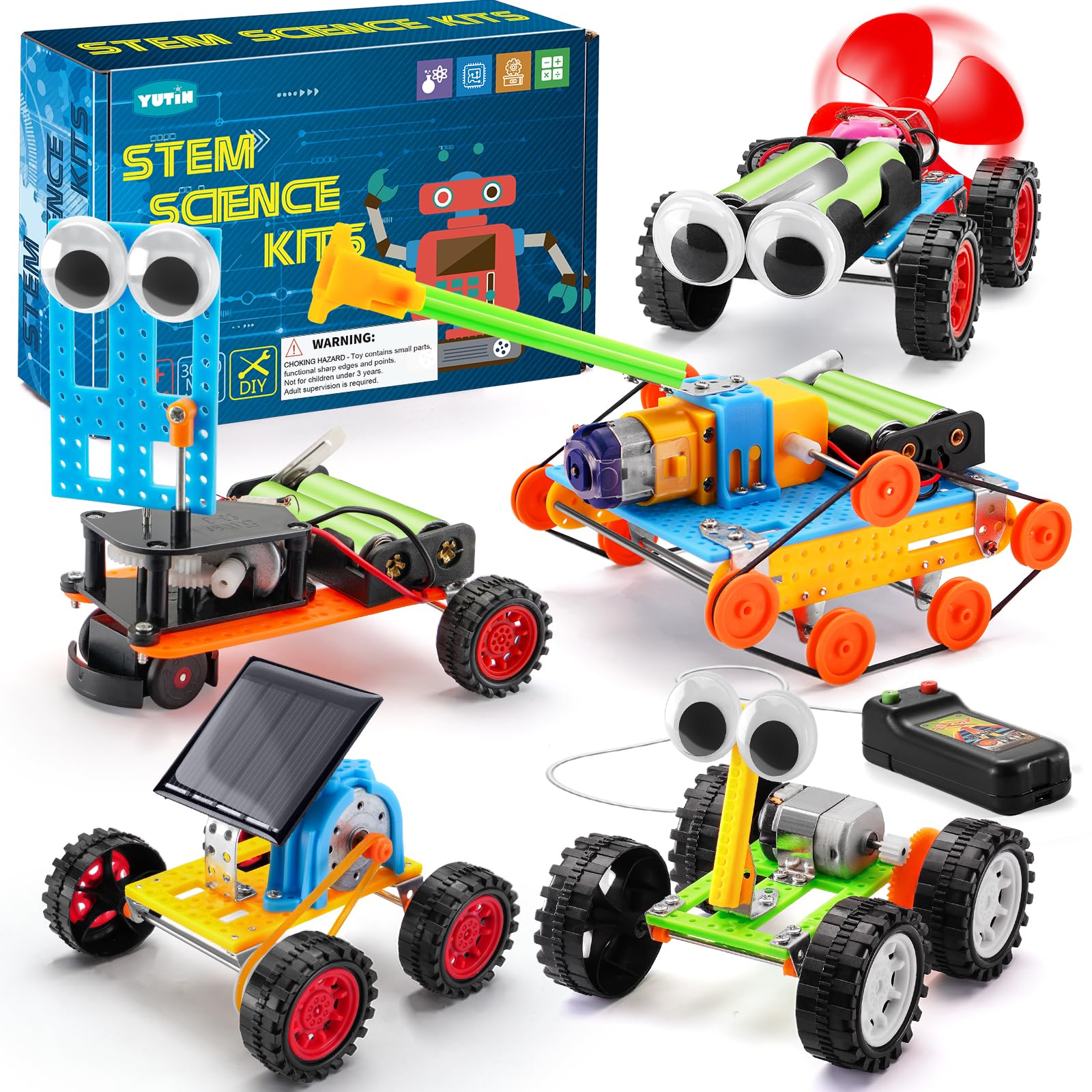
3. Yutin Robot STEM Kits for Kids Age 6-8 8-10
Five cars, two of them powered by the sky — a solar car and a wind car in one box.
Two of the five builds here run on free energy: a solar powered car and a wind powered car. The other three — an obstacle avoidance robot, a tank and a wire-controlled car — round out a set that teaches different drive mechanics with each model. That makes it the best pick for a rainy afternoons-plus-sunny-backyard rotation, because the solar car only performs in real light.
At 0.38 kg the box is light enough to carry to a grandparents’ house or a classroom, and the 3.15 inch cube packaging slides into a bag. Instructions are included and written for 8 to 12 year olds, with the manufacturer noting that under-eights need adult help. That honesty is useful: this is a kit that runs best as an adult-and-child project, and it says so up front.
What wins people over here is build quality — the pieces feel solid, not flimsy, which matters when a car is going to be dropped repeatedly. Set against that, a few of the finished vehicles need careful alignment to actually move well, and assembly splits opinion: some families find it easy, others slow. Budget patience for the first build and the rest go smoother.
Self-powered appeal: solar and wind car builds teach real energy basics with nothing to plug in.
Realistic expectation: the solar car runs on actual sunlight, so cloudy-day play uses the other three models.
Pick this for: a family that wants a together-project with an adult on hand, delivering five distinct drive mechanics.
Steer away if: your kid wants to build solo from minute one — the first vehicle rewards help.
4. Wesfuner 30-in-1 Solar Robot Building Kit

Thirty robots from 243 pieces is the best value-per-build in this lineup — and it counts.
Compare the 30 build options on this kit with the 5 from the Yutin car set, and the gap is obvious: this one takes 243 pieces and turns them into 30 different robots. That is a whole summer of builds from one box. For a gift you want to land, that number does most of the convincing. It is the pick that most often becomes a “big hit” gift for a kid who loves building and designing.
It runs on two power modes. In sun, the solar panel drives it. When the light drops, you drop a AAA battery into the robot head and keep playing indoors — the battery is not included, so buy those with it. The upgraded mechanics include a new tank and engineering vehicle shape, two replaceable heads, an enlarged solar panel, and a tighter track design aimed at solving the parts-falling-off problem earlier versions had.
The catch is the build itself. Thirty models means thirty sets of instructions to follow, and where some families breeze through, others find a tough build slowed by unclear steps. The 8 to 13 year old target range is about right; younger builders will need help. Expect one or two designs to be trickier than the rest, and start with the simplest shape until your child learns the parts.
Why it stands out as a gift
- 30 robot designs from 243 pieces — by far the most builds per box here
- Solar panel plus a AAA backup for indoor, cloudy-day play
- Upgraded track design and two replaceable heads
- Non-toxic ABS plastic parts built to survive repeated assembly
Worth knowing first
- Battery not included — the indoor mode needs a AAA you supply
- Some assembly steps are less clear, so a first build benefits from an adult nearby
Buy it when: you want maximum build variety for a birthday gift and are happy to sit alongside for the first session.
Skip if: you need a single simple robot for a younger child — the 30-model scope is a lot at once.
5. Thames & Kosmos Hydraulic Boxing Bots
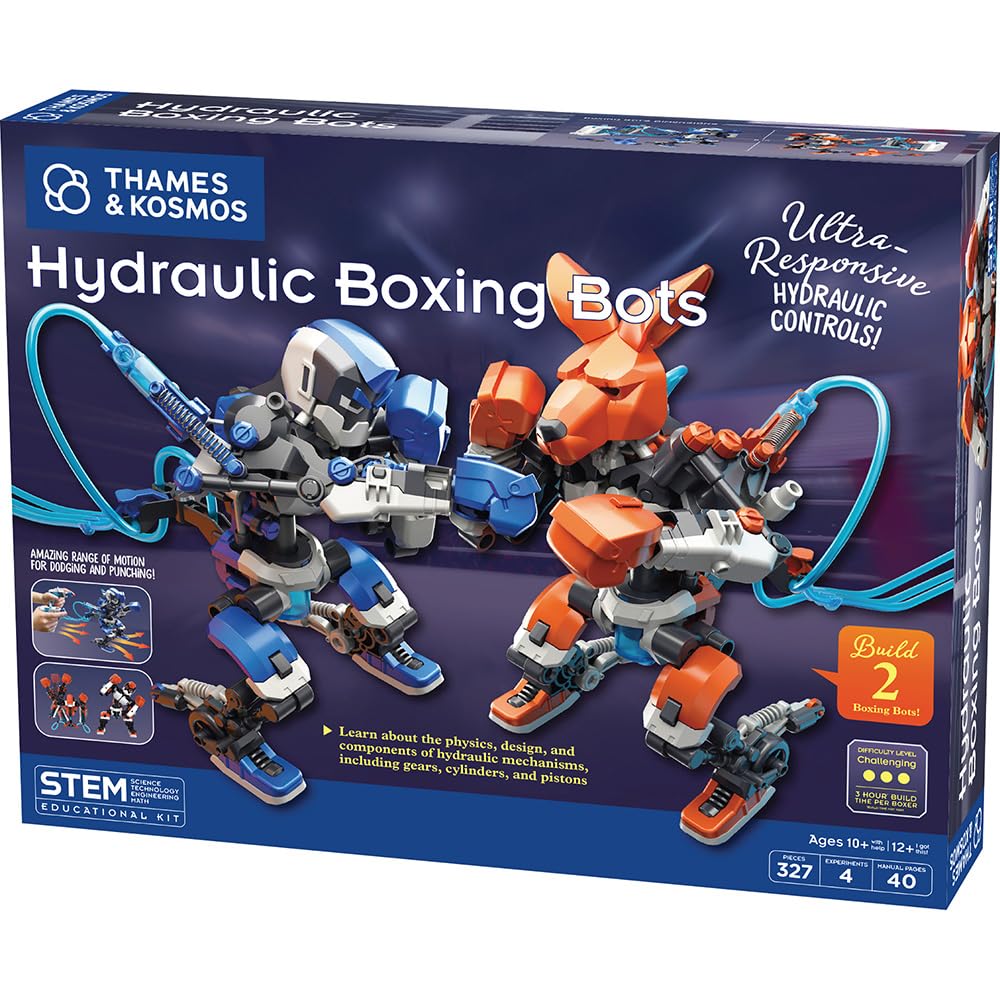
Two boxing robots powered by water — and a scoreboard so a friend can actually fight back.
Here is the one kit in this group that needs no battery at all: the boxing bots run on hydraulics, meaning water pushed through cylinders and pistons. You pour in water, the upper and lower body move independently, and the bots dodge, jab and punch with accuracy. It teaches gears, cylinders and pistons by putting them in your hands instead of on a worksheet. For the kid who asks “how does it actually work,” this answers that question physically.
Build two bots plus the scoreboard and you have a two-player game, not a solo toy — that scoreboard is the difference between a model and an activity. The 1.8 pound box pairs well with a sibling or a friend. Kids often end up teaching the science behind it to whoever will listen, which is the best sign a kit did its job.
The honest trade-off is time. The complexity here is real: it takes a lot of time to complete, even though the instructions themselves are clear. Expect this to be a multi-session build, and don’t start it an hour before a birthday party. Build the two bots on a rainy weekend and the payoff is a game that keeps getting played.
Why two is better than one: a pair of bots plus a scoreboard turns quiet building into a competitive two-player game.
The time cost: a slow, multi-sitting build — plan the hours before you hand over the box.
Made for: siblings or friends who will actually battle, and a builder who likes to know how the mechanism works.
Not the one if: you want a completed robot in one sitting — this build runs long.
6. Educational Insights Design & Drill Robot Workshop

A working toy drill and 32 bolts for the preschooler who has no business near a real one.
Kids too young for 400-piece robotics get their own version here: a kid-friendly drill with a Phillips bit, a screwdriver, a gear socket bit, 32 bolts and 26 interchangeable pieces. They tighten and loosen real bolts with a real tool — which is the actual thrill of engineering — and end up with a robot they configured themselves. It is the age-appropriate entry point in this lineup by a wide margin.
The age range is the key stat: 36 months to 6 years, from a brand whose parent company is Learning Resources. That is a proper preschool tool kit, not a robotics kit your five-year-old will stall on. Seven gears and a sticker sheet round out the customization, so every build looks a little different. The 9.6 x 11.3 x 3.5 inch set stores in its own case with the tools inside.
The one thing to plan for is batteries: it runs on two AA cells, which are not included. Build quality is the standout here — the drill and bolts are built to survive toddler-level force. A few families have noted wear over heavy use, which for a toy this thoroughly used is the normal cost of a preschooler’s favorite object.
Real tool, real skill: tightening and loosening bolts teaches fine motor control with a tool that is safe for small hands.
Batteries not in the box: two AA cells are required before the drill will run.
Choose this when: the child is 3 to 6 and you want a first construction kit with a working tool rather than a model.
Move along if: your kid is 7 or older — they will outgrow the build options in a week.
7. Sillbird 3-in-1 RC Race Car Robot Building Kit
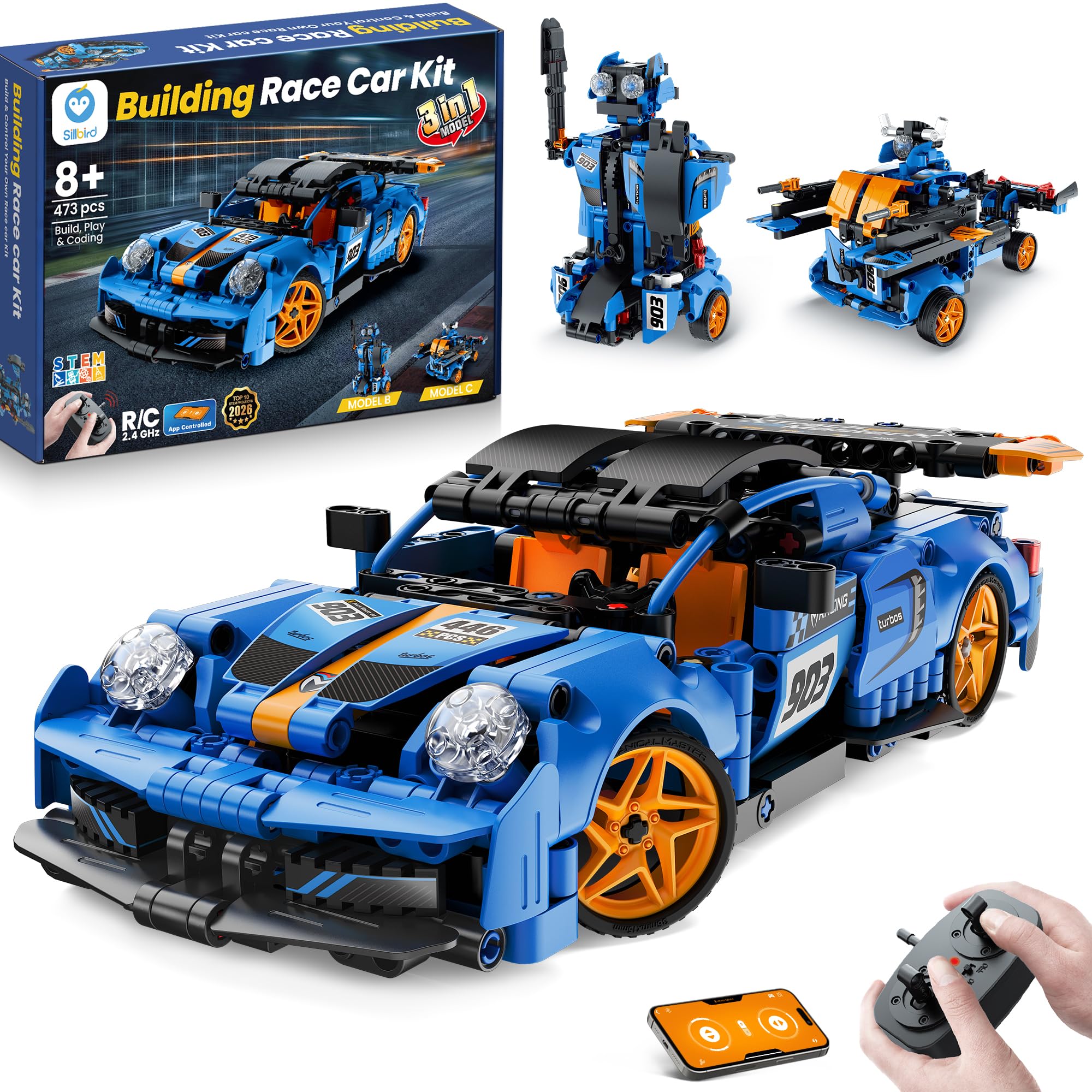
A 473-piece sports car with a drive motor, a steering motor and an oversized rear wing.
Two motors are what separate this from a rolling model: a drive motor and a steering motor work together for smooth movement and responsive handling. The sporty shell includes an oversized rear wing and doors that open, so the finished car looks like something. Then you drive it by remote, or connect the Bluetooth app for coding, gyroscope and path-drawing modes. Three models come from the 473 pieces, so a racer today and a robot later.
This is the pick for a child who wants speed, not a science project. The rechargeable battery supports extended playtime on a single charge, so the car is not grounded waiting on batteries. Assembly is graded across the three models, which helps a first-time builder ease in before tackling the hardest one.
Set your expectations on the manual, though. Instructions are where this kit draws the most criticism — unclear step drawings are the usual culprit — and it is not the right pick for a younger child to build alone. An adult or an older sibling on the first build fixes most of it. The payoff car, once it is running, is genuinely fun and holds up well.
What earns the spend
- Drive and steering motors deliver real responsive handling, not just rolling
- Rechargeable battery keeps play going without a battery run
- Three models from 473 pieces, from easy to advanced
- Oversized rear wing and openable doors give it genuine shelf appeal
The build caveat
- Instructions are the weakest link — plan to help on the first assembly
- Not a solo build for a younger child; pair up for the hardest model
Right for: an 8+ kid who wants a car that drives well and looks fast, with coding waiting in the app.
Wrong pick for: a child building entirely alone — the manual needs a second pair of hands early on.
8. Apitor STEM Coding Robot Toy 6-in-1 Building Kit

An icon-based coding app and a 360-degree stunt robot that snaps together with no screws.
No screws, no tools — 480 blocks snap together, which means a build session starts without a search for a screwdriver. This is the starter kit for a kid who wins the motorized build but loses interest on the mechanical one. Six models come from one control module with two high-speed motors and two multicolor LED lights, so the character changes with each shape. It is a focused pick, not a broad one.
The coding is the real reason to choose it. The app uses icon blocks to teach loops, variables and problem-solving one model at a time, and four Bluetooth control modes — dual-motor, single-motor, gyro and path — give a hands-on feel before the code. The robot moves left, right, forward, backward and pulls 360-degree stunts. This is the difference between driving and understanding why the thing turns.
Two things to plan around. It needs three AA batteries, which are not included. And the app does the heavy lifting on instructions, so you need a phone or tablet to open up the full experience. Neither is a dealbreaker; they are simply the parts of the kit that are outside the box.
Tool-free building: snapping 480 blocks without a screwdriver keeps momentum on the build.
App-first, battery second: a tablet for the app and three AA cells before the robot will move.
Point this at: a 7-to-12 year old curious about coding who wants results without a long mechanical build.
Hold back if: you want a kit that works fully without a phone — the app carries the instructions.
9. Makeblock mBot Ranger 3 in 1 Coding Robot Building Kit

Scratch and Arduino, a self-balancing bird, and a tank that runs on rock or carpet.
Two programming languages in one kit is the headline: Scratch for visible block coding, and Arduino for when your kid wants real line-by-line code. The three models change personality entirely — a Land Raider tank for all terrains, a Nervous Bird that trembles to keep itself balanced, and a Dashing Raptor three-wheeled racer. That range makes it the most advanced package here.
The hardware is what you are paying for. The Me Auriga mainboard carries an ultrasonic sensor, a line-tracking sensor, two light sensors, a gyroscope sensor, 12 RGB LEDs, a buzzer, a temperature sensor and a Bluetooth module. Metal parts and grip-friendly tracks mean it handles outdoor ground and carpet. Every one of those modules is something your child can program, not just watch. It runs on six AA batteries or a lithium pack, neither included.
The honest note: the electronics are the most-discussed part of this kit, and not all of it is praise. Some builds need patience to keep everything running smoothly, and Bluetooth connectivity has been the recurring weak point. The value conversation goes both ways too — owners appreciate the programming depth but some feel the package is priced high for what remains a kit. If your kid is serious about code, that depth is worth it; if not, a simpler kit delivers the same joy.
Deepest coding kit here
- Scratch and Arduino support lets a beginner grow into real programming
- Me Auriga board with ultrasonic, line-tracking, gyro, temperature and light sensors
- Three distinct robots from one set — tank, self-balancing bird and racer
- Metal parts and grip tracks suit both indoor floors and rough ground
Where it asks for patience
- Bluetooth connectivity is the point that needs the most care
- Batteries and lithium pack both sold separately, which adds hidden cost
Worth it for: a 10+ year old who wants to write real code and control a machine with it.
Look elsewhere if: the goal is a quick build-and-play toy — the depth here is the whole point.
Know the Specs
Piece count versus model count
A kit with 596 pieces that builds five models gives a child several starts, each with its own learning curve. A kit with 30 designs from 243 pieces teaches the same parts in new combinations. High piece count alone is not a quality mark — model variety and graded difficulty matter more. Check which number the listing advertises, because it tells you what kind of kit it is.
Power: solar, battery or rechargeable
Rechargeable batteries give continuous play from one charge, so no battery run. AA-powered kits need cells you supply, which matters if they are the only way to play. Solar kits run free in sunlight and need a battery backup for cloudy days. Think about where your child will actually use the robot — a sunny yard suits solar, a rainy-day living room does not.
What “app-controlled coding” means
An app over Bluetooth adds modes a handheld remote cannot: path-drawing, gyroscope driving and block-based coding. That is how a child learns that a loop or a variable changes what the robot does. The remote alone is immediate and works without a phone. A full coding kit usually ships as the higher-tier option because the app is the extra feature you are paying for.
Sensors and what they do
Sensors are the robot’s eyes. A line-tracking sensor reads a painted path, an ultrasonic sensor spots an obstacle at a distance, and a gyroscope keeps the bot balanced. More sensors mean more programming possibilities, but also more to learn. For a young first builder, one or two sensors is plenty — match the sensor count to your child’s attention span.
Common Questions
What age is right for a first robot building kit?
Do I need to buy batteries separately?
Can a solar robot kit work indoors?
Is a remote control or an app better for a kid’s robot?
How long does a rechargeable robot kit run on one charge?
Are the plastic parts safe for young kids?
What is the difference between Scratch and Arduino?
How hard are these kits to assemble?
Can two kids play with one robot kit at the same time?
Do robot kits need a phone or tablet?
The Bottom Line
For most families, the safest buy in this lineup is the Sillbird 5-in-1 Remote Control Kit, because five models from 596 pieces give your child a graded path from easy to hard, plus a robot with LED expressions and a mist-spray feature to keep them coming back. If you want the most builds for a birthday gift, grab the Wesfuner 30-in-1 with its 243 pieces and 30 designs. And for a kid ready to write real Scratch or Arduino code, the Makeblock mBot Ranger is the one to reach for, with its Me Auriga board loaded with sensors.
One last thing worth knowing before you decide: the Sillbird has the longest track record of the kits here, which is why it takes the top spot for a first buy. Get that one if you want a sure start; get the Wesfuner if volume of builds is the goal.
How we choose
We do not accept paid placement. Every pick is matched to a real buyer and a real use-case; we do not hands-on test units.
Sources
Specifications: manufacturer listings and product documentation. Review insights: verified customer reviews, as of November 2026. Pricing: not shown on this page (it changes often); check the current price via the retailer link.
As an Amazon Associate, Tactical Gear Guy earns from qualifying purchases. This does not affect which products we feature.