Specs are compiled from manufacturer listings and verified buyer reviews and can change over time — please confirm the key details on the product page before buying.
You have a good microphone, and your laptop has no XLR jack. That is the whole problem, and most of these cables solve it in one direction only — audio flows from the XLR end into your USB-C port, never the other way around. The pick that gets it right most reliably is the CableCreation XLR Female to USBC cable, because it does exactly one job, is braided, and is backed by a two-year warranty. Below you get eight options sorted by what each one actually does, from plain recording cables to a full inline audio interface with phantom power.
This guide is built by comparing the manufacturers’ published specifications and the patterns across verified customer reviews, so you get each pick’s real strengths and trade-offs instead of marketing spin.
Some of these cables carry a built-in converter chip, some are pure one-way signal paths, and one is a proper interface in a cable-sized shell. Knowing which of those you need before you plug in is the difference between a clean take and a dead session, so this breakdown of the best XLR to USB-C options keeps the connectors and the chips straight.
Top Picks


How To Choose The Best XLR to USB-C Cable
The first thing to understand is direction of travel. Every plain cable on this list moves audio from the XLR end into your phone, tablet or laptop. None of them send sound out to a speaker through that XLR connector. If you need to feed a mixer or powered speaker from your phone, you want a dual-XLR output cable instead, and there is one further down.
Match the XLR connector gender to your gear
A microphone output is almost always a male 3-pin XLR, so the cable end that meets it is female. That is why most recording cables here are described as XLR female to USB-C. The CIXUN dual cable is the exception — it has two male XLR plugs for going out to a mixer or speaker input. Check your mic or your destination before you buy, because the wrong gender simply will not seat.
Decide if you need phantom power built in
Dynamic mics like a standard stage handheld usually work straight off the cable. Condenser mics need 48V phantom power to run at all, and a plain cable supplies none of it. Several listings state plainly that you must add an external 48V supply for condensers. The Pyle adapter is the one unit here that generates +48V itself with a switchable on/off toggle, so a condenser plugs straight in.
Check the conversion chip and sample rate
These cables contain a small digital-to-analog chip that turns the mic’s electrical signal into something your device can record. Most on this list run 16-bit at 44.1 KHz, which is standard CD-quality recording. Two options go further: the AuxLink cable runs up to 96 KHz, and the CIXUN dual cable claims 32-bit/384 KHz. Higher numbers give you more headroom to edit, but only if your recording software and your ears can use it.
Plan your cable run before you buy
Length decides where you can stand or sit while recording. The compact options run 3.3 feet, which keeps you right at the desk. The Devinal and SZLliyxs cables stretch to 10 feet, so you can back away from the laptop and still hold a mic. If you record alone at a desk, short is tidier. If you record a second person or play an instrument, the longer run matters.
Side-by-Side Comparison
| Model | Best For | Length | Sample Rate | Phantom Power | Amazon |
|---|---|---|---|---|---|
| CableCreation XLR Female to USBC★ Best Overall | Plug-and-play phone recording | 3 ft | 44.1 KHz | No — external 48V needed | Amazon |
| Devinal USB-C to XLR 10 FTBest Value | Long runs with strain relief | 10 ft | 44.1 KHz | No — external 48V needed | Amazon |
| SZLliyxs XLR to USB C 10FTBudget Champion | Long cable on a tight budget | 10 ft | 44.1 KHz | No — external 48V needed | Amazon |
| HUALEU USB C to XLR + 3.5mm | Recording plus headphone monitoring | 3.3 ft | 20 KHz frequency response | No — some condensers need external 48V | Amazon |
| CIXUN USB C to Dual XLR Male | Sending audio out to a mixer | 6.6 ft | 384 KHz | Not applicable — output cable | Amazon |
| Pyle XLR to USB-C Audio Interface | Condenser mics with no extra gear | Cable included, adapter body 4.96 in long | 192 KHz | Yes — switchable +48V | Amazon |
Detailed Reviews
1. CableCreation XLR Female to USBC Recording Cable
Our pick — 4.0+★ from 150+ verified ratings; the strongest balance of quality and price.
A shielded 16-bit / 44.1 KHz cable that turns a mic into a USB-C recording input with no driver install.
The CableCreation is the pick for anyone who wants to plug a mic into a phone, tablet or MacBook and start recording immediately. It carries a male USB-C plug on one end and a female 3-pin XLR on the other, so it meets a standard mic output directly. Inside sits a 16-bit / 44.1 KHz converter chip, which is the same resolution as a CD — plenty for voice, podcasts and speech, and more than enough for most home recording. The braided polypropylene jacket keeps it flexible in a bag rather than stiff and kinked.
This cable earns its spot with shielding that keeps hum out of your recordings. Oxygen-free copper shielding (copper with impurities removed so the signal stays clean) and two separate audio wires inside stop the buzz that cheap unshielded leads pick up. Buyers report build quality as the standout, and it comes up again and again in feedback. The 3-foot run keeps a desk tidy, and plug-and-play means no driver install on Windows, macOS, iOS, Android, Linux or Unix — you plug in and record. It also carries a two-year low-maintenance warranty, which is unusually generous for a cable in this class.
The catch is direction and power. This cable moves audio from the XLR end to the USB-C end only, and it will not work in reverse. If you pair it with a condenser mic you must add an external 48V phantom power supply, because the cable supplies none. At 3 feet, this is a desk cable — if you need to stand back with a mic, the Devinal 10-foot option is the better reach.
Why this one leads
- 16-bit / 44.1 KHz converter chip built in for clean digital capture
- Oxygen-free copper shielding with two separate audio wires to cut interference
- Two-year low-maintenance warranty and braided jacket that survives a bag
- Works across Windows, macOS, iOS, Android, Linux and Unix with no driver
Where it stops short
- 3-foot length suits a desk only, not standing or stage work
- Condenser mics need an external 48V supply — none here
- One-way transmission only; cannot send audio out through the XLR end
Reach for this if: you record into a USB-C phone, tablet or laptop at a desk and want a shielded cable that just works.
Look elsewhere if: your mic is a condenser needing 48V, or you want more than 3 feet of reach.
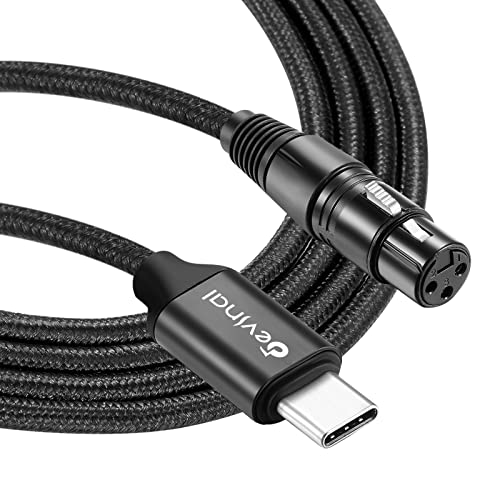
2. AuxLink XLR to USB C Cable 6ft Nylon Braided
A 10-foot braided cable with a spring strain relief at the plug, so it flexes at the bend point instead of splitting.
You get room to move here: at 10 feet, the Devinal reaches more than three times the length of a 3.3-foot compact cable, so you can step back from the laptop and still hold a mic. A 16-bit / 44.1 KHz converter chip (it turns the analog mic signal into digital audio at CD-style quality) handles the signal. The build is the real standout — a classic nylon braid, oxygen-free copper conductors, 1.6 PVC insulation (a plastic layer that protects the wires), a high-density stranded copper shield, and a cotton woven mesh inside. The braided cover plus the spring at the input plug means the cable flexes rather than snaps at its weakest point.
Build quality is what owners notice most, and it earns the most Favorable mentions of any aspect on this listing. It recognizes a wide spread of gear: iMac, MacBook, iPad Pro 2018, Samsung Note 8/9, Galaxy S8/9/10, Surface, Google Pixel 2 through 3XL, Chromebook, Dell, Acer, Huawei and Lenovo. Dynamic mics work straight off the cable, and most recording software picks it up without complaint.
There is a compatibility split here you should weigh. Some owners mention it does not cooperate with a Shure SM7B, and audio quality draws divided opinions. Condenser mics need a phantom power supply, and the cable will not work with game consoles such as Xbox. If your mic is a demanding broadcast dynamic, this is a “test it early” purchase rather than a guaranteed one.
What earns the praise
- 10-foot length gives real freedom of movement while recording
- Cotton woven mesh, dense copper shield and spring strain relief at the plug
- Very wide device compatibility across Mac, Samsung, Pixel and Chromebook
What to weigh first
- Compatibility is mixed — some report it will not work with a Shure SM7B
- Audio quality opinions are divided on this listing
- No game console support and no phantom power included
Go long if: your recording takes you away from the desk and you want strain relief where the cable bends most.
Think twice if: you run a Shure SM7B — that pairing is where the mixed reports cluster.
3. SZLliyxs XLR to USB C Cable, 10FT
A 10-foot nylon-braided cable rated for 10,000+ bends, with the same 16-bit / 44.1 KHz chip as the CableCreation.
Length-for-money is where this one lands. You get a full 10-foot run — matching the Devinal above for reach — with a nylon braid rated for over 10,000 bending cycles. The braid adds tensile strength and abrasion resistance, and it cuts the twisting and tangling that plagues loose bare cables. A 16-bit / 44.1 KHz converter chip handles the digital side, same resolution as the CableCreation and Devinal. It also comes with a 12-month warranty covering replacement.
Device support is broad rather than narrow: iMac, MacBook, iPad Pro 2018, Samsung Note 8/9, Galaxy S8/9/10, Surface, Google Pixel 2 through 3XL, Chromebook, Dell, Acer, Huawei and Lenovo. It records into Android phones and PCs alike, and it is pitched for both stage and studio use. Dynamic mics run straight off it.
The limitations are the same family as its peers. Condenser mics need phantom power from elsewhere. There is no game console support — the listing names Xbox specifically. And it is a one-way cable: XLR audio in, USB-C out, nothing back the other way. Treat it as a desk-to-floor cable for a long run to a laptop, not a stage rig built to take a stomping.
Best for: someone who needs maximum cable length on the smallest spend and records with a dynamic mic into a phone or PC.
Know the limit: no phantom power and no console support, so a condenser or a gaming setup needs a different cable.
4. HUALEU USB C to XLR Female Mic Cable with 3.5mm Stereo Out
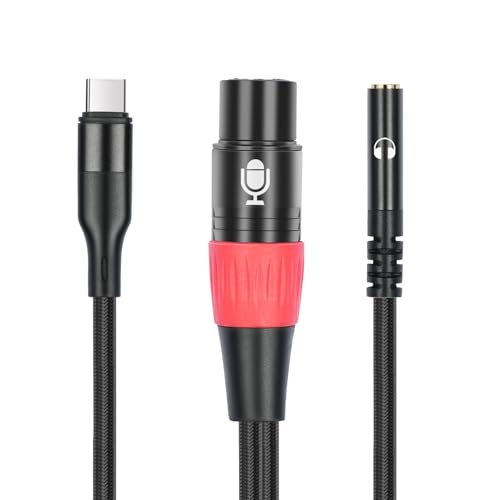
A third 3.5mm stereo port for headphones or active speakers, so you can monitor your voice while the mic records.
Almost every other cable here gives you one connection. This gives you three. There is the USB-C plug into your device, the female 3-pin XLR to your mic, and a third 3.5mm (1/8″) female port for headphones, a power amplifier or active speakers. That third port is the reason to choose it: you can plug in headphones and hear your own voice in real time instead of guessing at your level. A built-in decoding chip and a dual-layer shielding design around oxygen-free copper conductors keep the signal clean.
Compatibility runs across smartphones, tablets, desktop computers, and iPhone 15 through iPhone 15 Pro Max, plus Huawei Mate 60 series, Pixel 4 through 6. Dynamic mics plug straight in. Condenser mics work too, but the listing notes some need an external 48V power supply, so confirm before you rely on it. The cable ships at 3.3 feet, which keeps the whole setup at desk level.
One thing to check before buying: the 3.5mm end is a stereo output port, so it feeds headphones or speakers rather than taking a line input. If you need to pull a signal into the phone from a mixer or instrument, this is not that cable. It also assumes a USB-C port on your device with no separate headphone jack needed.
The three-port advantage: a mic input, a device connection and a headphone output in one lead is what makes this useful for podcasters and solo voice work who need to hear themselves.
Check the direction: the 3.5mm jack sends audio out to headphones or active speakers; it is not a line-in for feeding a mixer.
Made for: podcasters and voiceover work where you want headphones plugged in while the mic records into a USB-C phone or tablet.
Look past it if: your condenser mic needs 48V it cannot supply, or you wanted a long cable run.
5. CIXUN USB C to Dual XLR Male Cable 32Bit/384Khz, 6.6FT
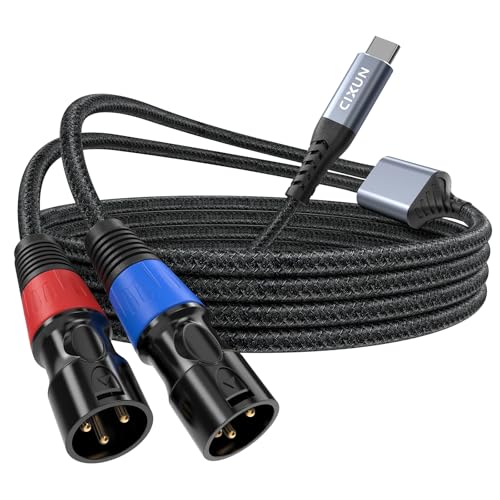
Output only: stereo audio from a USB-C phone or tablet out through two male XLR plugs into a mixer or powered speaker.
Read the direction before anything else, because this cable is the odd one out. It takes audio from a USB-C phone, tablet or laptop and sends it out through two male XLR plugs, red for the right channel and blue for the left. That makes it the pick for feeding a mixer, powered speaker or amplifier from a phone. If your goal is getting a mic into a laptop, this is the wrong tool — it does not support audio input at all.
The specification sheet is the most ambitious here. Inside sits a 32-bit/384 kHz DAC with a 105 dB signal-to-noise ratio, which is genuinely high-resolution conversion. A high-purity tin-plated copper core runs through dual shielding — an inner graphene-PVC layer plus an outer oxygen-free copper braided mesh — to keep the left and right channels from bleeding into each other. Nylon braiding on the outside takes 20,000+ bend tests, and the whole cable weighs 110 g. At 6.6 feet, it gives you twice the reach of the 3.3-foot compact cables.
Owner feedback is the caution here. Compatibility is the positive thread, with reports of it working well with iPads and soundboards. Build quality and sound quality are both mixed, and some report overheating issues, so treat this as an output cable to test carefully. The listing also notes it should not go into a mixer’s mic input or another non-stereo port, which can distort the sound.
The high-res draw: 32-bit/384 kHz conversion with a 105 dB signal-to-noise ratio and channel-separated dual shielding is the most capable spec on this list for sending audio out to a mixer.
The heat caveat: overheating has surfaced in feedback, so keep an eye on it during longer sessions rather than leaving it running unattended.
Buy it for: piping stereo audio from a USB-C phone or tablet into a mixer or powered speakers during a rehearsal or small show.
Not the cable for: recording a microphone into your computer — this one is output only, so reverse the job in your head before you order.
6. Pyle XLR to USB-C Audio Interface with 48V Phantom Power
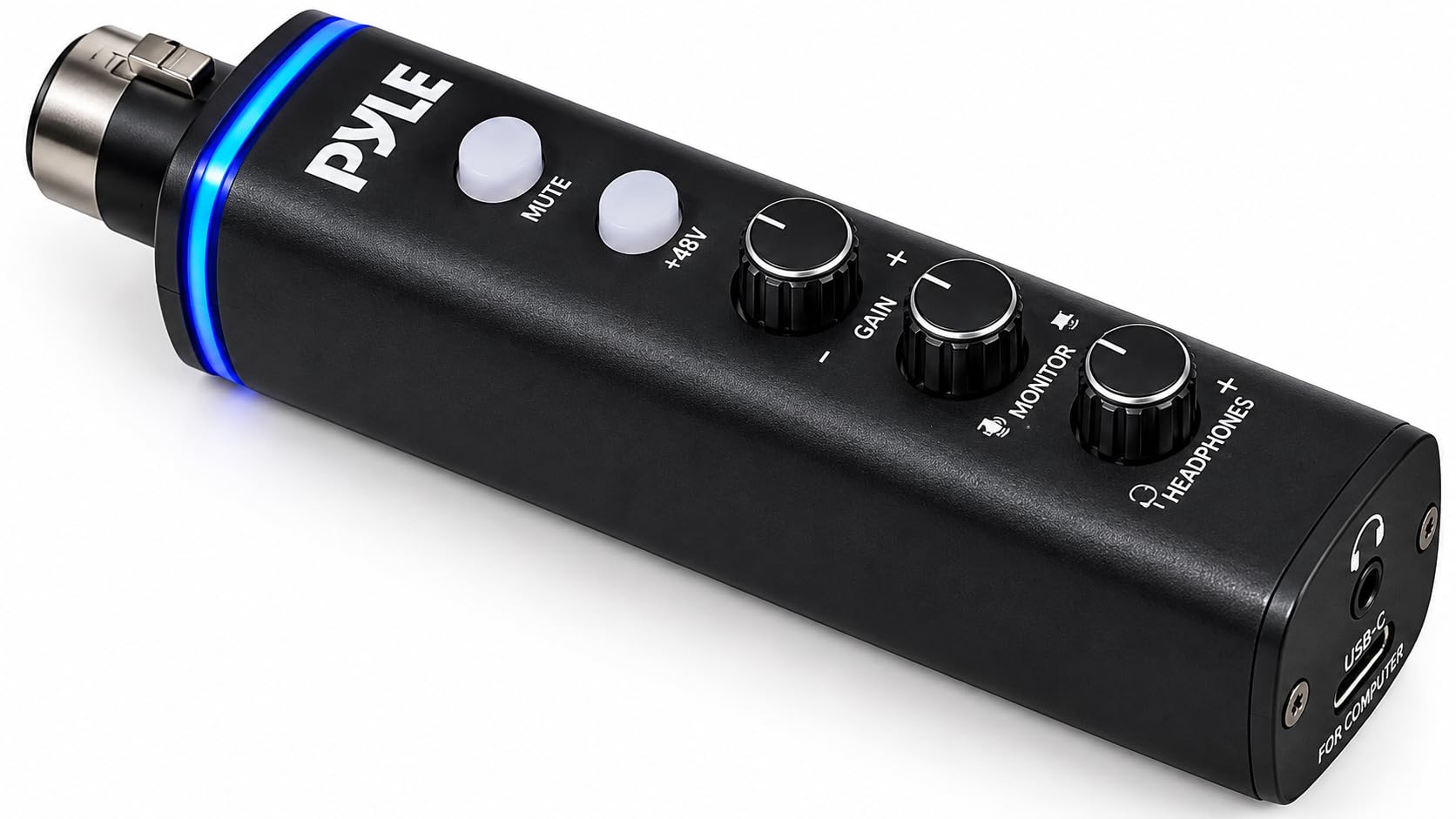
An inline audio interface with switchable +48V phantom power, 60 dB of preamp gain and a 1/4″ Hi-Z instrument input.
This is the only unit here that solves the condenser mic problem outright. It generates its own switchable +48V phantom power, so a condenser microphone plugs straight in with no external supply and no separate preamp. A built-in 60 dB preamp brings even a low-output dynamic mic up to a clean, usable level, and 24-bit/192 kHz conversion captures the detail. There is also a 1/4″ Hi-Z input for plugging a guitar or bass in direct.
Around the body sit the controls that make it feel like a real interface. One-touch hardware mute with an LED status light cuts your mic instantly, which is faster than finding a mute button mid-stream. Separate gain and headphone volume knobs let you set your input and your monitoring independently. It is Class-compliant and driver-free on Windows, macOS and Linux, bus-powered from your computer’s USB port, and it ships with both a USB-C cable and a USB-A adapter for older machines.
What wins people over here is sheer quality, and it is far and away the strongest aspect across its feedback, with value for money close behind. Streaming and XLR mic compatibility both draw praise. The honest caveat: sound quality gets some mixed notes, including reports of low hum, and the volume control draws divided opinions. At 192 kHz and with real gain control, it is a serious desk piece rather than a throw-in-the-bag cable.
Where it pulls ahead of the cables
- Built-in switchable +48V phantom power runs condenser mics with no extra gear
- 60 dB of preamp gain and 24-bit/192 kHz conversion for clean, full-level recording
- Hardware mute with LED plus separate gain and headphone knobs
- Driver-free on Windows, macOS and Linux, bus-powered with a USB-A adapter included
What to keep in mind
- Sound quality draws some mixed notes, including reports of low hum
- The volume control gets divided opinions
- Bigger and heavier than a plain cable, weighing 150 g as a desk piece
Where it wins: anyone running a condenser mic who wants phantom power and real gain control without buying a separate interface.
What you accept: a larger desk-bound body rather than a slim cable, and slightly divided views on the volume control.
Know the Specs
Sample Rate and Bit Depth
A recording’s sample rate is how many times per second the chip captures the sound, in kilohertz (KHz). Bit depth is how much detail it holds at each snapshot. Most cables here run 16-bit at 44.1 KHz, which is standard CD-quality audio — clean and clear for voice and podcasts. Higher numbers like 96 KHz, 192 KHz or 384 KHz give you more headroom to edit and process, but only if your recording software and your use case can actually benefit from it. For a talking-head video or a voice memo, 44.1 KHz is more than enough.
Phantom Power and Mic Type
Dynamic microphones generate their own signal and usually work straight off a plain cable. Condenser microphones need +48V phantom power to run at all — a small electrical feed that most plain XLR-to-USB-C cables do not supply. That is why several listings here state plainly that you must add an external 48V supply for condensers. Only the Pyle adapter generates it itself, with a switchable on/off toggle so you can turn it off for a dynamic mic that does not need it.
Common Questions
Will this cable let me plug my XLR microphone into my iPhone 15?
Can I use a condenser microphone with a plain XLR to USB-C cable?
Why does my XLR to USB-C cable only work in one direction?
Is a 3.3-foot or a 10-foot cable better for recording?
Do I need to install a driver to use these cables?
My phone only has a headphone jack, not USB-C — will these work?
What does the built-in conversion chip actually do?
Will the cable work with a Shure SM7B microphone?
Can I plug headphones into these cables to monitor my voice?
Will an XLR to USB-C cable work with a game console?
The Bottom Line
For most people, the xlr to usb-c winner is the CableCreation XLR Female to USBC because it does the one job reliably — a shielded 16-bit / 44.1 KHz cable with a braided jacket and a two-year warranty, at a length that suits desk recording. If you want more cable reach, the Devinal 10 FT stretches three times as far as the compact picks. And if you run a condenser mic that needs its own power, the Pyle audio interface is the one to reach for — the only unit here that generates +48V itself (phantom power, the voltage a condenser mic needs to run) with real gain control. Before you spend on any of them, know exactly which direction your audio needs to travel, because that single detail decides whether a cable does the job or sits in a drawer.
How we choose
We do not accept paid placement. Every pick is matched to a real buyer and a real use-case; we do not hands-on test units.
Sources
Specifications: manufacturer listings and product documentation. Review insights: verified customer reviews, as of November 2026. Pricing: not shown on this page (it changes often); check the current price via the retailer link.
As an Amazon Associate, Tactical Gear Guy earns from qualifying purchases. This does not affect which products we feature.