Specs are compiled from manufacturer listings and verified buyer reviews and can change over time — please confirm the key details on the product page before buying.
You already know the feeling: the meeting starts, everyone else looks sharp, and your face arrives as a soft gray smudge. The fix is usually not a new laptop — it is a dedicated webcam with low-light correction and a built-in noise-canceling mic. Below you get nine zoom-ready cameras sorted by what they actually solve, from a simple candy-colored plug-and-play puck to a 4K unit that physically pans to follow you around the room.
This guide is built by comparing the manufacturers’ published specifications and the patterns across verified customer reviews, so you get each pick’s real strengths and trade-offs instead of marketing spin.
What matters most is matching the camera’s light handling and field of view to your actual room, not chasing the biggest number on the box. Every unit here runs on a plain USB connection and works with the major meeting apps, so the real differences come down to light handling, focus behavior, and microphone quality. Here is the honest breakdown of the best Zoom computer camera for your desk, your lighting, and the way you actually work.
Top Picks


How To Choose The Best Zoom Computer Camera
A webcam for video calls has one job above all others: keep your face sharp and correctly colored in ordinary room light. Resolution gets the headlines, but sensor size and low-light correction decide whether you look natural or washed out on a Tuesday morning call.
Resolution is the ceiling, not the result
1080p means 1920 pixels across the frame — enough for a clean head-and-shoulders shot in a Zoom grid. 4K goes far beyond that, and it pays off if you record, stream, or crop in tight. On a standard call most platforms compress the video anyway, so a well-lit 1080p camera can beat a badly placed 4K one.
Sensor size and low-light handling beat megapixels
Cameras with a large sensor gather more light per pixel, which is why low-light correction and HDR (high dynamic range, which balances a bright window against a dark room) matter more than raw megapixels. Sit facing a window and half of these cameras suddenly look twice as good.
Focus behavior and field of view
Autofocus keeps you sharp if you shift in your chair, but it can also hunt — briefly drifting out and back — when the scene is busy. Field of view decides how much of the room comes with you: a narrower view hides a messy desk, a wider one fits a second person or a whiteboard.
Side-by-Side Comparison
| Model | Best For | Max Resolution | Connection | Notable Extra | Amazon |
|---|---|---|---|---|---|
| Logitech Brio 100★ Best Overall | Everyday calls on a budget | 1080p (1920 pixels) | USB-A | Slide privacy cover | Amazon |
| NexiGo N930AFMost Trusted | Reliable all-rounder | 1080p at 30fps | USB | Autofocus + privacy cover | Amazon |
| EMEET C960Best For Exams | Exam proctoring and desk setups | 1080p (1920 pixels) | USB | Included tripod, 6.7–18.5 in | Amazon |
| Acer 4K Webcam | Sharp 4K on a mid budget | 4K UHD (2160 pixels) | USB-C to A | All-metal body, PDAF | Amazon |
| EMEET C60E Dual | Streaming and demos | 4K (8 mp) | USB 2.0 Type-A | Dual lens, 11x zoom, remote | Amazon |
| Anker PowerConf C200 | Dim rooms and small offices | 2K (1440 pixels) | USB | Selectable 65°/78°/95° view | Amazon |
| OBSBOT Tiny 3 Lite | Presenters who walk around | 4K at 30fps / 1080p at 120fps | USB | AI tracking, triple-mic array | Amazon |
| Insta360 Link 2 | Group calls and whiteboards | 4K UHD (3840×2160) | USB | PTZ movement, gesture control | Amazon |
| Logitech MX Brio | Creators and 4K streaming | 4K at 30fps / 1080p at 60fps | USB-C | Show Mode tilt, manual controls | Amazon |
Detailed Reviews
1. Logitech Brio 100 Full HD 1080p Webcam – Rose
Our pick — 4.5+★ from 600+ verified ratings; the strongest balance of quality and price.
The no-fuss puck that makes a bad-lit call look normal again.
Your first Zoom call of the day usually happens in a room with one window and one dull ceiling bulb. The Brio 100 is built around that exact situation. It shoots Full HD 1080p — 1920 pixels across the frame — which gives you a clean head-and-shoulders image in a gallery view. Logitech’s RightLight software brightens the picture by up to 50% versus previous-generation Logitech webcams, the brand claims. In practice, the shadow side of your face stops looking like a black hole.
Setup is a single USB-A cable and nothing else. It works with Microsoft Teams, Zoom and Google Meet without a driver install, which is why the crowd favorite here holds 4.5+ stars across 600+ ratings — a genuinely rare score at the entry level. The slide cover is the detail owners actually live with: you push a little shutter across the lens and the camera is visibly blocked, so nobody has to trust a software toggle. The mic is built in, so you can take a call without hunting for the headset.
The body is made with a minimum of 34% post-consumer plastic, and it comes in fun colors if you want the thing to match your desk rather than hide behind your monitor. At 2.65 ounces it will not pull a laptop lid over. The honest limit: there is no autofocus and no 4K here, so if you plan to record content or crop the frame in tight, the Acer’s 2160 pixels give you far more room to work. For meetings, though, this is the one to buy without thinking twice.
Where it quietly wins
- RightLight lifts brightness up to 50% versus older Logitech webcams, so dim rooms stay usable
- Sliding privacy shutter is physical and instant, not a menu setting
- Plug-and-play on Teams, Zoom and Google Meet with one USB-A cable
The honest ceiling
- Fixed focus and 1080p only — no crop room for recording or streaming
- Built-in mic is fine for calls but not a broadcast-quality pickup
Buy it if: you take meeting calls at a desk and want the picture fixed today, with no software to learn.
Think twice if: you need 4K or autofocus for recording — step up to the Acer or Anker instead.
2. NexiGo N930AF Webcam with Microphone for Desktop, Autofocus
The one that has quietly become the default desk camera for a huge number of remote workers.
If you want the safest possible call camera, this is it — the sheer volume of people running it daily on Zoom, Webex, Teams and Jitsi tells you the basics are right. It captures 1080p at 30fps from a two megapixel CMOS sensor, with autofocus that starts working from 7 cm away and can be switched to manual focus if you prefer to lock a point. The 6.5 ft (2 m) USB cord is the practical detail most listings skip — you can reach a tower under the desk or a wall port without an extension.
The folding clip mounts on a monitor, laptop, tripod or a flat surface, so it travels in a bag without a case. A privacy cover comes in the box and shields the lens from dust as well as from anyone watching. The noise-canceling mic does the routine job of trimming room hum, which is why it handles Zoom, FaceTime and live-streaming duty without a separate microphone.
Here is the trade-off worth knowing before you buy: the autofocus is the split opinion on this camera. Some find it quick and reliable, others see the picture shift and hunt on a busy background. If your calls sit in a static, tidy room it rarely shows up. Paired with the enormous owner base, that makes it the low-risk pick for office work — just do not expect the 4K crop room of the Acer, which offers 2160 pixels against this camera’s 1080.
What actually sells it: a 2 m cable, a folding mount and software support on Windows, macOS, Linux, Chrome OS and Ubuntu — the compatibility list is longer than most rivals bother with.
Reach for this if: you want a proven camera with a long cable and real software controls, and you sit in one place all day.
Look elsewhere if: a busy background that keeps the focus moving would drive you mad.
3. EMEET C960 Webcam with Tripod, 1080P Webcam with Mic
The only camera here that stands on its own legs — literally.
Proctored online exams have a specific set of demands: the camera has to see you and your desk, sit stable, and not fall off a laptop lid. The C960 answers that with a bundled tripod that adjusts from 6.7 to 18.5 inches, so 6.7 inches frames a close-up call and 18.5 inches gets a full-body shot for exam or presentation rules. The head swivels a full 360° and works in portrait or landscape. That is why it keeps turning up in school and exam setups.
The camera side is 1080p (1920 pixels) with a 90° wide-angle view sized for small to medium meetings, and two built-in noise-canceling microphones that filter background noise. Automatic low-light correction plus color and exposure adjustment keep the image usable in a dim dorm room. The tripod’s 1/4-inch screw also fits phones, cameras and action cams — a phone holder is not included, but the stand itself is multi-purpose.
The split opinion on this one is image quality: plenty of buyers get a clean, sharp picture, while others find it flat in poor light. The wide 90° view is a double edge — it fits a second person easily, but it also shows more of your room than a narrower lens would. If you mostly need height, stability and a wide framing for exams and group calls, it earns its place; if you want cinematic depth, the Insta360 Link 2 is in a different league.
Best fit: students and home-office users who need the camera improve and steady, not handheld on a laptop screen.
Second thoughts: the wide 90° frame and mixed low-light results mean tidying the background is on you.
4. Acer 4K Webcam
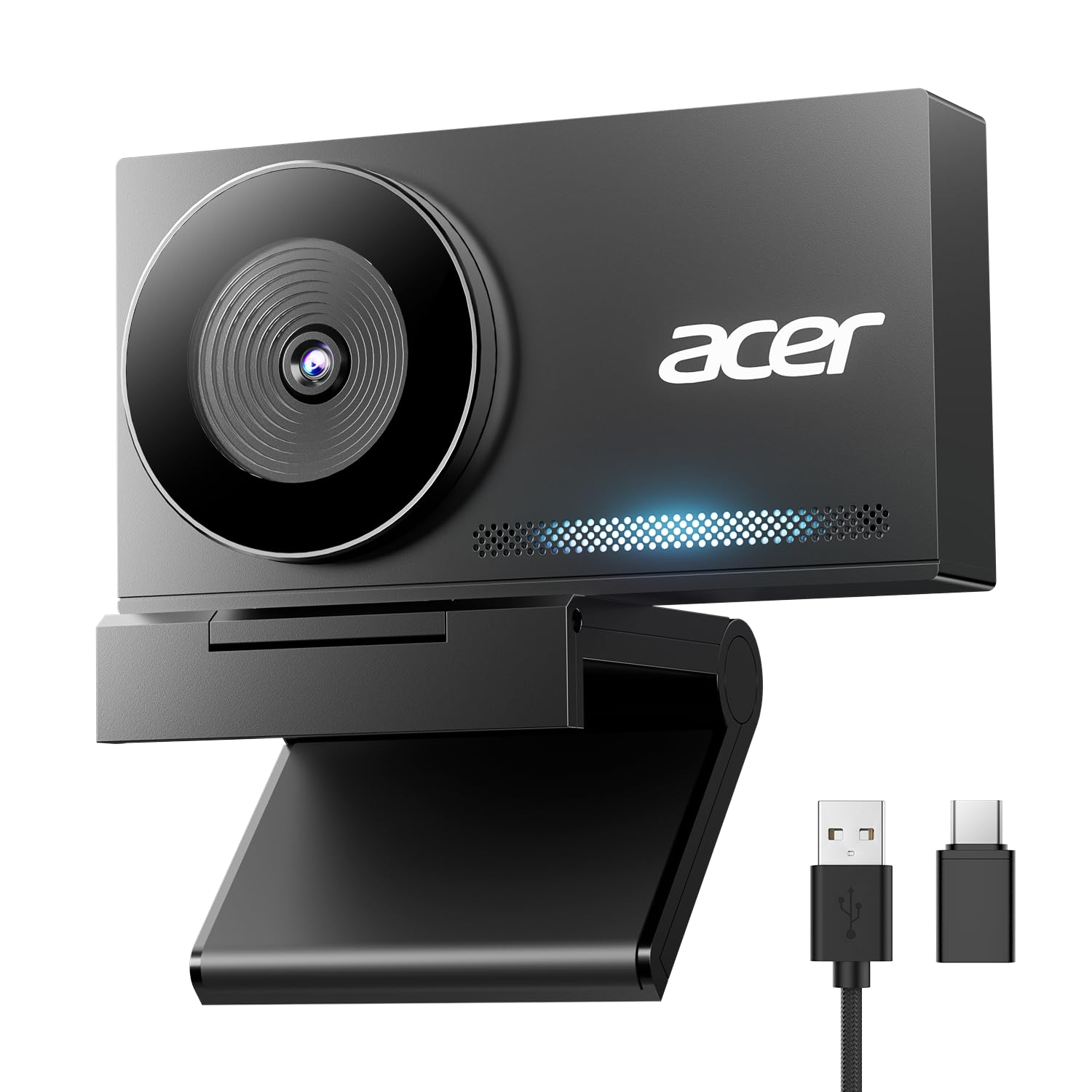
A metal-bodied 4K camera that undercuts most of the premium field.
The numbers make the case first: this shoots 2160 pixels of video against the NexiGo’s 1080 — double the horizontal detail — and still shots at 4 megapixels against the NexiGo’s 2. A large Sony 1/2″ CMOS sensor sits behind that lens, gathering more light per pixel so low-light calls look brighter and more balanced rather than grainy. For anyone who records, streams or presents slides while on camera, that extra resolution is the difference between a soft talking head and a crisp one.
What owners notice in the hand is the build. The body is CNC-machined aerospace-grade aluminum with a sandblasted matte finish, and the all-metal shell helps heat dissipate during long sessions. A magnetic cover with 12 built-in magnets snaps over the lens for privacy. Phase Detection Autofocus (PDAF — a focus method that reads distance faster than contrast-based systems) keeps the frame locked without visible hunting. Dual digital mics pick up your voice from up to 2.5 meters while trimming keyboard clicks and ambient hum.
At 57 grams and roughly the size of a pair of earbuds, it slips into a laptop bag for co-working days. The catch is the connection: it runs over USB-C to A, and while a USB-A to USB-C adapter is in the box, older machines without USB-C ports need that adapter in the chain. It also leans on your computer for storage and file handling. Still, the sharpest image at this mid-tier price is not a close call.
Why it stands out
- 2160 pixels of 4K video and a 4 mp still count — double the NexiGo on both measures
- Aerospace-grade aluminum unibody with sandblasted finish and 12-magnet privacy cover
- PDAF autofocus plus dual mics reaching 2.5 meters
Worth knowing
- USB-C to A cable means older laptops need the included adapter
- No onboard recording — all files live on your PC or Mac
Pick this when: you want real 4K detail and a metal build without paying flagship money for it.
skip it if: your laptop has no USB-C port and you would rather not deal with an adapter.
5. EMEET C60E Dual-Camera 4K Webcam for Streaming
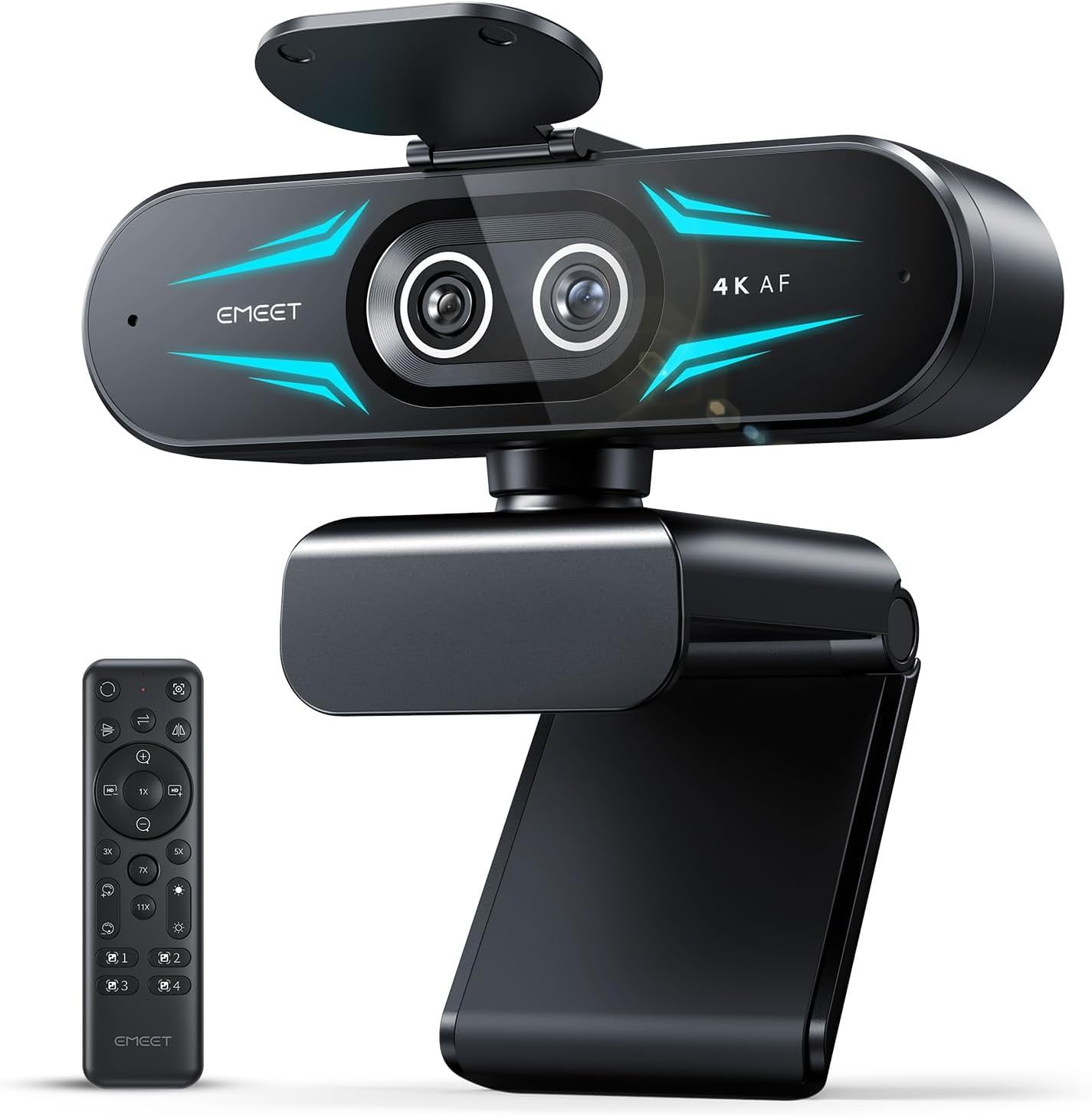
Two lenses on one body, so you can cut from wide room shot to close-up without moving the camera.
Most webcams give you one framing and you adjust your chair. This one splits the job in half: a gray wide-angle lens handles panoramic scenes and the people and background in them, while a blue telephoto lens delivers close-ups at a recommended distance of 13.8 inches. Both share a 1/2.8″ CMOS 4K sensor, and you switch between full-scene and detail views on the fly. For product demos, teaching and remote meetings where you point at things, that is a genuinely different tool.
Then there is the zoom. It runs smooth from 1x to 11x hybrid zoom, with stepped points at 3x, 5x and 7x along the way, and PDAF autofocus holds it steady as you go. A remote and the EMEET STUDIO software let you adjust zoom, brightness, focus and RGB lighting without leaning over the camera. One spec to file away: zoom is not supported in 4K, 60FPS or YUY2 modes, so pick your mode before a shoot.
The RGB lighting across the dual-eye front is functional as well as decorative — colors signal active status and help you find the camera in a dark studio. Two omnidirectional mics capture clear audio within a 9.8 ft radius, and a 1/4-inch tripod mount is built in. Picture quality on this one is the thing owners agree on, with clear 4K video and controls that feel borrowed from a pricier class. The honest note: all that flexibility assumes you will actually use the remote and software, which is a learning curve a plain plug-and-play puck never asks of you.
The real sell: a wide-plus-telephoto pair and an 11x zoom on a single USB 2.0 mount is closer to a small studio rig than a webcam.
Where it asks more: the two control paths mean setup and habit-building before your first serious stream.
Choose it for: streaming, teaching and demos where you want both a room shot and a tight product close-up.
Pass on it if: you take plain talking-head calls and would never touch the zoom or the remote.
6. Anker PowerConf C200 2K Webcam for PC/Laptop/Mac

Built for the home office where the overhead light is always somehow behind you.
2K is the awkward middle that turns out to be the smart buy: 1440 pixels of video starts well above entry-level 1080 and stays clear of the 4K price jump. That means faces render with real detail in a Zoom tile without asking your laptop to push a huge stream. Anker’s low-light correction is the headline for anyone working in a room with a single window — the image stays crisp in dim settings without extra lamps or a ring light. It is a rare case where “good in bad light” is the actual spec.
The framing controls are the detail that separates this from cheaper options. You pick from 65°, 78° or 95° fields of view through software, so you can tighten in on your face for a formal call or widen out to include a second person or a whiteboard without moving furniture. Dual mics use AI noise cancellation to keep your voice clean over background noise, and an integrated cover slides over the lens between calls.
One honest wrinkle: autofocus is the split opinion on this camera, and the adjustability and color settings also draw mixed notes. Most sessions it locks on and stays there, but a busy background can make it drift. The upside is that this is one of the more configurable cameras in its class, and the picture quality is what dominated the satisfaction scores across a very large owner base. For an office with tricky light, this is the sensible, adjustable choice.
The practical wins
- Low-light correction keeps faces crisp where entry-level cams go grainy
- 65°, 78° or 95° software view for framing a solo call or a second person
- Dual mics with AI noise cancellation and a sliding privacy cover
The fine print
- Autofocus can drift on a busy background, and some settings are subjective
- Stops at 2K — no 4K crop room like the Acer
the balance: a dim home office where you want clean 2K video and control over how much of the room shows.
Wrong turn if: you need 4K for recording and cannot tolerate an occasional refocus.
7. OBSBOT Tiny 3 Lite AI-Powered Spatial Audio 4K Webcam
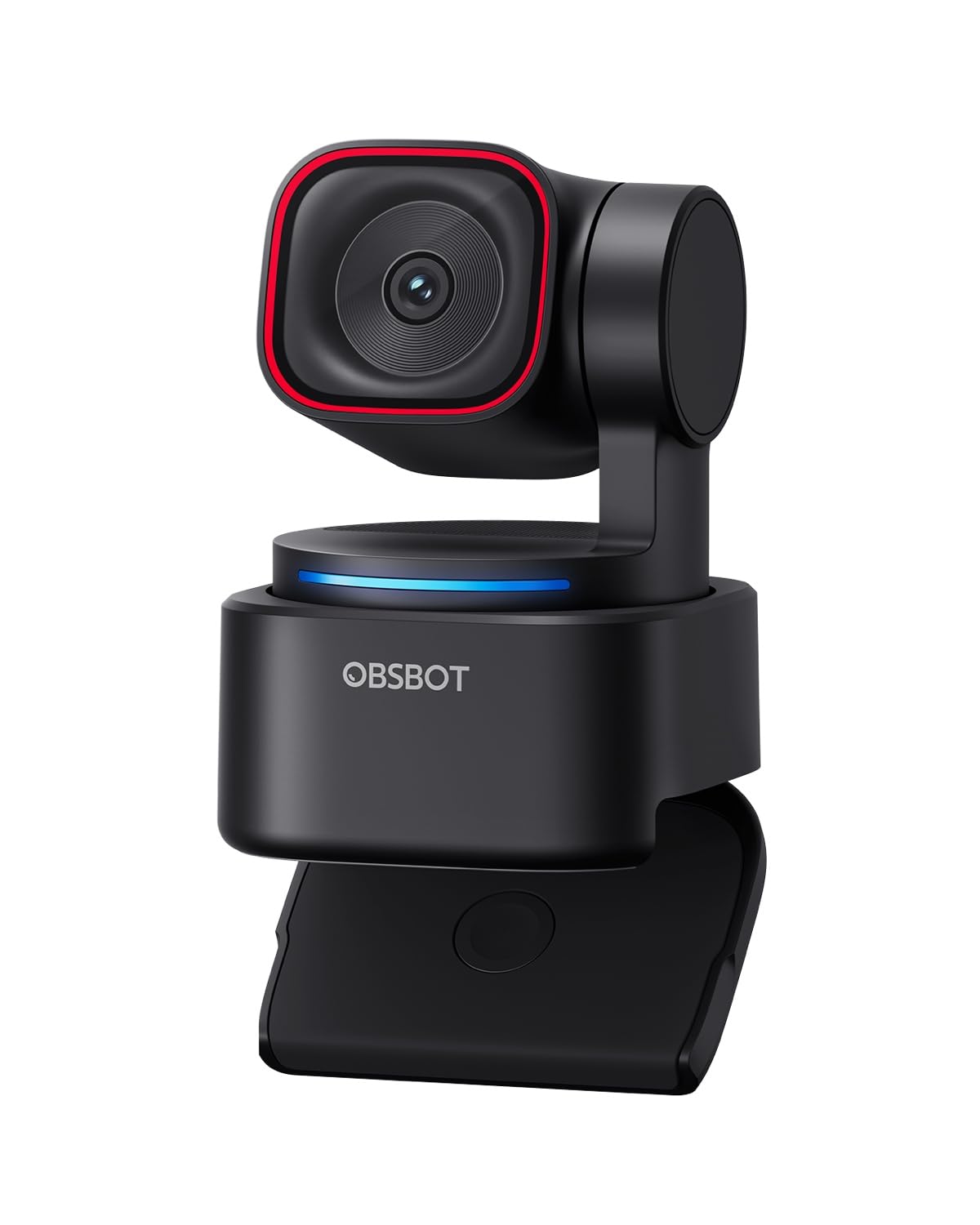
A camera on a motor that gets up and follows you around the room.
If you talk with your hands or pace while presenting, a fixed camera turns you into a disappearing head. The Tiny 3 Lite physically moves. Its AI Tracking 2.0 can lock onto a single person, a whole group, or over 200 types of objects, then keep the frame where it should be. The hardware shrank too — 48% smaller and 34% lighter than its predecessor, with a more powerful 1/2″ CMOS inside that small shell. That is the kind of shrink that lets it ride on top of a laptop without tipping it.
The imaging holds up: 4K at 30fps or 1080p at 120fps for slow motion, with PDAF autofocus, a wide ISO range of 100–6400 and HDR for low-light balance. The triple-mic array pairs an omnidirectional pickup for the whole room with two MEMS directional mics that pinpoint voices, feeding five audio modes for different rooms. You can also wake it, zoom or switch presets with a voice command or a hand gesture.
The trade-off is software. This camera leans hard on the OBSBOT Center app for beauty mode, background blur, teleprompter and pro calibrations, and that dependence bites when the app misbehaves. Buyers report reliability and software as recurring friction points, and some connectivity reports show up too. When it works, the tracking is the feature you will not want to give up; if you want a camera that just opens and works, stay with a plug-and-play unit.
What earns it a place: real PTZ tracking plus a 1/2″ sensor and five audio modes is a presenter’s kit, not a desk cam.
The catch to plan around: the app is central to its best features, and a software hiccup can interrupt a session.
Made for: teachers, presenters and anyone who moves around and wants to stay in frame hands-free.
Not for: buyers who want zero setup and never want to open a companion app mid-week.
8. Insta360 Link 2 PTZ 4K Webcam with AI Tracking and HDR

A 4K camera that pans, tilts and knows when to look away.
This is the highest-scoring camera in the whole group, and the reason is the combination rather than any single number. A 1/2″ sensor delivers balanced, true-to-life 4K with HDR and strong low-light handling, and Phase Detection Autofocus (PDAF) focuses fast enough to head off blurry frames. AI tracking then pans and tilts the body itself to follow you or a small group, so a whiteboard walk or a standing presentation stays framed without anyone touching the mount.
Small conveniences add up over a working week. Gesture control starts AI tracking or auto framing, zooms, or flips on Whiteboard Mode with a hand wave, and the Link Controller app on your phone does the same remotely. DeskView, Whiteboard and 4K Portrait modes cover the odd case where you need to show paper or a screen. The AI noise-canceling mic trims background noise, and Privacy Mode tilts the lens down automatically after 10 seconds of inactivity — or on demand.
Two hardware notes belong in your buying decision: it is not compatible with ARM-based Windows systems, and Windows Hello Face Recognition does not work with it. If you log in with your face, that is a real daily cost. For everyone else, the physical movement plus the 1/2″ sensor is the difference between a camera that watches and a camera that follows.
Why it earns the top score
- PTZ body physically follows you and your group with AI tracking
- 1/2″ sensor with HDR and PDAF keeps 4K crisp in mixed light
- Gesture and phone control, plus auto-tilt privacy after 10 seconds idle
Before you mount it
- No ARM-based Windows support and no Windows Hello face login
- Learn the gesture set or the app before your first call
Worth the step up: if you present standing, share a room with colleagues, or use a whiteboard, the motorized framing pays for itself in every call.
Check first: an ARM Windows laptop or a Windows Hello login routine rules this one out.
9. Logitech MX Brio 4K Webcam

The one you reach for when the meeting is really a recording.
Some cameras are built for a talking head; this one is built for someone who cares about the frame. It shoots 4K at 30fps or drops to 1080p at 60fps for smoother motion when you are on the move. The sensor carries 70% higher pixel count than its predecessor, which is the reason faces keep their detail under harsh window light. Auto exposure, auto white balance, noise reduction and autofocus handle the routine work, and when you want control you get manual ISO, shutter speed, tone and white balance.
Dual microphones with noise reduction and beam forming (which points pickup toward your voice) use AI to trim background noise, so you can present without a separate mic. The detail nobody expects: tilt the camera down and Show Mode points the lens at your desk, so notes and sketches go straight to the call instead of through a second device. The built-in USB-C cable is part of the body, which is tidy but fixes the cable to the camera.
The honest split is between this and the OBSBOT or Insta360: those cameras move themselves to follow you, while the MX Brio stays put and asks you to frame the shot. If you sit still and stream, that is fine and the manual controls give you more say over the look. If you want to walk and talk, you are paying for the wrong feature.
The case for it: 4K at 30fps, 1080p at 60fps, manual ISO and shutter, and Show Mode give a creator real control on camera.
Point it at a desk: streamers, presenters and anyone who shares paper or sketches mid-call.
Different tool: if you need the camera to follow your movement, look at the tracking picks instead.
Know the Specs
Resolution vs. sensor size
Resolution counts pixels across the frame — 1920 for 1080p, 2160 for 4K — while sensor size measures the physical light-gathering area, such as the 1/2″ sensors here. A bigger sensor helps in dim rooms; more pixels help when you crop or record. Look at both, not just the headline number.
Autofocus and field of view
Autofocus keeps your face sharp as you shift, and PDAF versions read distance faster than older contrast systems. Field of view, measured in degrees (65°, 78°, 90°, 95°), sets how much of your room shows. Narrow hides clutter; wide fits a second person or a whiteboard.
Common Questions
Will any of these webcams work with Zoom on a Mac?
Do I need 4K for a normal Zoom meeting?
How does autofocus affect a Zoom call?
What field of view is best for a small home office?
Can a webcam microphone replace my headset?
Does a privacy cover really matter?
Is 1080p at 60fps better than 4K at 30fps?
Will a webcam mount on my monitor without a tripod?
Do these cameras need drivers or extra software?
The Bottom Line
For most people, the zoom computer camera that solves the problem on day one is the Logitech Brio 100 — Full HD 1080p, RightLight brightening up to 50% and a physical slide cover in a 2.65-ounce puck. If your room has dodgy light and you want adjustable framing, the Anker PowerConf C200 adds 2K video and 65°/78°/95° views. Want a metal 4K body at mid-tier value, the Acer 4K Webcam is the sharp one. And if you walk around while presenting, the Insta360 Link 2 pans and tilts to keep you in frame. Any of the nine will get you out of the gray-smudge club.
How we choose
We do not accept paid placement. Every pick is matched to a real buyer and a real use-case; we do not hands-on test units.
Sources
Specifications: manufacturer listings and product documentation. Review insights: verified customer reviews, as of November 2026. Pricing: not shown on this page (it changes often); check the current price via the retailer link.
As an Amazon Associate, Tactical Gear Guy earns from qualifying purchases. This does not affect which products we feature.