Specs are compiled from manufacturer listings and verified buyer reviews and can change over time — please confirm the key details on the product page before buying.
The honest answer: a third-party Xbox pad is worth buying only if its sticks use Hall Effect sensors, which resist the drift that ruins ordinary analog sticks. The PowerA Advantage Wired Controller is the one to beat here — it pairs those anti-drift sticks with two back buttons, three trigger settings, and official Xbox licensing. Everything else on this list depends on whether you value extra buttons, wireless freedom, or a lower price.
This guide is built by comparing the manufacturers’ published specifications and the patterns across verified customer reviews, so you get each pick’s real strengths and trade-offs instead of marketing spin.
Start with the sticks, the first thing to fail on a cheap pad, then match the rest of the features to the games you play. Here is the practical breakdown of the xbox 3rd party controller market and which pads genuinely hold up.
Top Picks

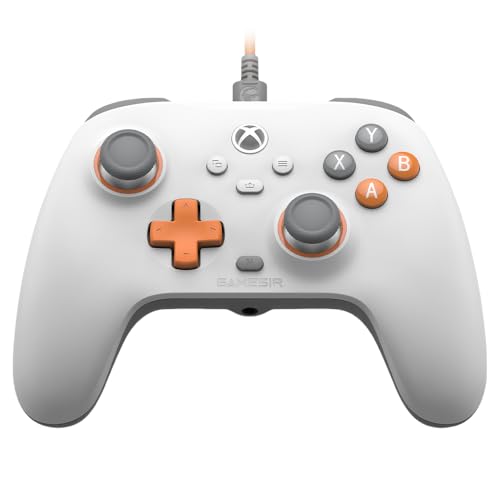

How To Choose The Best Xbox 3rd Party Controller
The most common mistake is buying on looks or button count while ignoring the sticks. Analog sticks use the same part every time you push them, and over months that contact wears into the drift where your character creeps on its own. Hall Effect sticks replace that contact with magnets, so there is nothing to wear down — that single choice is the biggest difference between a pad that lasts and one that doesn’t.
Sticks first, everything else second
Hall Effect is the term to look for in the spec sheet. Some pads go further with TMR sticks (a newer magnetic design the makers say uses less power), and adjustable stick tension lets you go from a light pull for fast aiming to a firmer feel for racing. If a listing doesn’t name its stick technology, assume it uses ordinary contact-based sticks.
Do you need back buttons?
Two to six extra buttons you can map mid-game let you jump, crouch, or ping without lifting your thumbs off the sticks. That matters most in fast competitive shooters. If you mostly play single-player adventures, you can skip back buttons and save the complexity.
Triggers and connections
Trigger locks or micro-switch triggers shorten the pull so you fire sooner in shooters, while linear triggers keep full travel for throttle control in racing games. On connection, a wired pad needs no batteries and never drops its link, while a wireless pad frees you from the cable but adds a charging routine.
Side-by-Side Comparison
| Model | Best For | Stick Tech | Connection | Extra Buttons | Amazon |
|---|---|---|---|---|---|
| PowerA Advantage Wired★ Best Overall | Best all-round value | Hall Effect | USB-C wired | 2 mappable | Amazon |
| GameSir T7 WiredBudget Ace | Budget drift-free pick | Hall Effect | USB wired | — | Amazon |
| Hyperkin DuchesSRetro Replica | Retro feel, modern sticks | Hall Effect | USB wired | — | Amazon |
| Hyperkin The Competitor | Symmetrical layout fans | Hall Effect | USB wired | 2 programmable rear | Amazon |
| FLYDIGI Vader 5S | Tuners and tinkerers | Hall Effect, adjustable tension | Wired | 6 remappable | Amazon |
| 8BitDo Ultimate 3-mode | Wireless with a dock | Hall Effect | 2.4G / Bluetooth / USB | 2 pro back paddles | Amazon |
| GameSir G7 Pro | Fast wireless all-rounder | TMR | 2.4G / Bluetooth 5.3 / USB-C | 4 programmable | Amazon |
| ASUS ROG Raikiri II | Premium PC crossover | TMR | 2.4GHz / Bluetooth / USB-C | 4 programmable rear | Amazon |
| Nacon Revolution X Unlimited | Deep physical tuning | Hall Effect | 2.4GHz / Bluetooth / wired | 6 mappable | Amazon |
Detailed Reviews
1. PowerA Advantage Wired Controller
Our pick — 4.5+★ from 450+ verified ratings; the strongest balance of quality and price.
The pad that squeezes pro-grade features into a friendly price and still nails the basics.
Hall Effect thumbsticks are the headline, and they’re the reason to buy. These are magnetic sensors with no rubbing contact inside, so the slow creep of stick drift that kills ordinary pads should never develop. For anyone who has watched a character wander on its own mid-match, that is the whole pitch right there.
Then PowerA stacks on the extras. Two mappable buttons on the back can be programmed mid-game without dipping into system settings, and the three-position trigger locks let you shorten the pull for shooters or run full travel in racers. Dual rumble motors and impulse triggers (small motors that buzz the triggers themselves) add the tactile kick, and there’s a 3.5 mm headset jack for party chat. It’s officially licensed, works across Xbox Series X|S, Xbox One, and Windows 10/11, and carries a 2-year limited warranty.
The catch is reliability over the long haul. A minority of buyers report units failing within a few weeks, so keep your receipt and lean on that two-year warranty. At 9.92 ounces it has real heft, which some hands love and lighter-grip players may find chunky. skip it if you insist on wireless — this is a USB-C cable-only pad.
Why this earns top spot
- Hall Effect sticks resist the drift that ruins ordinary analog sticks
- Two mid-game mappable back buttons plus three-way trigger locks
- Officially licensed, with impulse triggers and a 3.5 mm headset jack
- Backed by a 2-year limited warranty
Where it gives ground
- Wired USB-C only, so no couch-from-afar freedom
- At 9.92 ounces it is on the heavier side
- A small share of units fail early — keep the warranty handy
Grab this one if: you want anti-drift sticks and back buttons without paying premium prices — it’s the balanced default.
Steer clear if: a cable trailing across the room is a deal-wrecker for you, or you need to play untethered.
2. GameSir T7 Wired Controller
Drift-free sticks rated for 5 million cycles, priced to make you double-check the label.
The number that defines the T7 is 5 million cycles — that’s how long GameSir rates its Hall Effect sticks, which use non-contact magnetic sensing so the rubber never grinds one spot down. Pick it up and it plugs and plays over USB into Xbox Series X|S, Xbox One, or Windows 10/11. No pairing, no batteries.
It also punches above its class on feedback. Four rumble motors — one in each handle and one in each trigger — deliver a punchier feel than most budget pads manage. The laser-textured surface on the handles, bumpers, and triggers keeps your grip steady during marathon sessions, and a 3.5 mm audio jack handles headset chat. Hall Effect triggers stay smooth through an even pull, which helps in racers where throttle control matters.
Your real trade-offs here are size and long-term robustness. This is a substantial pad at 380 g and 5.51 inches wide, versus the Hyperkin The Competitor at 200 g, so smaller hands will feel the bulk. Owners mention mixed durability: some describe months of solid use, while others find it fragile sooner than expected. Weigh both against how much you’ll actually save.
The value math: Hall Effect sticks, four rumble motors, and a headset jack at the entry tier is rare value, and the drift-free control is the real reason to look here.
Reach for this if: you want the anti-drift upgrade on a tight budget and game mostly at a desk or near the console.
Look elsewhere if: you have small hands or need a pad that keeps going through years of rough use.
3. Hyperkin DuchesS Wired Controller
A modern remake of the old Controller S, with drift-free sticks hiding inside the nostalgia.
If the modern Xbox pad never quite sat right in your hands, the DuchesS is built around the old Controller S form factor. Hyperkin has fitted it with Hall Effect sticks for zero-drift accuracy and modern ergonomics, then added dynamic impulse triggers for the rumble feedback. It’s officially licensed for Xbox Series X|S, Xbox One, and Windows 10/11.
Owners connect with it on comfort — the shape and weight are what win people over. What stands out from the feedback is how good it feels to hold, with the shell molding to your hands rather than digging into your fingers. There’s also a Share button for Xbox Series X|S to grab clips, plus a headset jack for audio.
Two honest snags. The Back and Start button placement splits opinion — many find it intuitive, while others think it’s oddly positioned, so if you rely on those buttons mid-game it’s worth a closer look. And it’s a wired USB pad: there’s no wireless option despite what you might expect from the word “replica.” At 243 g it stays light enough for long sessions.
Just confirm the Back/Start layout suits your hand before committing.
Pick it if: you miss the Controller S feel and want modern sticks inside that familiar body.
Pass if: you depend on Back/Start in fast fights, or you refuse to be tethered by a cable.
4. Hyperkin The Competitor Wired Controller
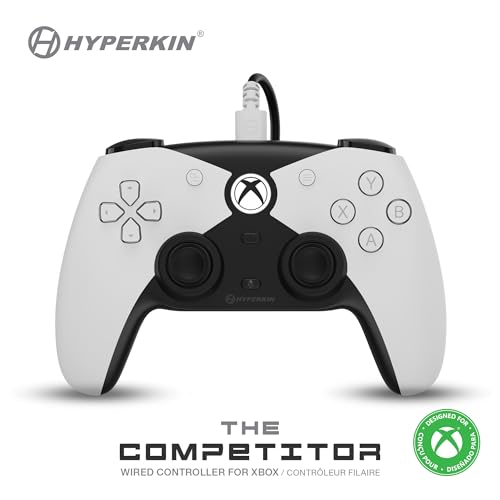
Both sticks on one level, feather-light in hand, with a see-through D-pad that glows with attitude.
Symmetrical analog sticks — both sitting level rather than offset — are the defining choice on The Competitor. Fans of that layout find them balanced for ambidextrous control, and the Hall Effect sensors mean no drift creeps in. The futuristic shell adds a translucent traditional D-pad and four precision action buttons for accurate inputs.
Weight is where it surprises you. At 200 g versus the GameSir T7’s 380 g, so it feels like a feather in hand during long sessions. Two programmable rear buttons give you on-the-fly remaps for a competitive edge, and officially licensed status keeps it sorted for Xbox Series X|S, Xbox One, and PC.
The worthwhile caveat is layout preference. Symmetrical sticks are a taste, and if you’re used to the offset Xbox arrangement your thumbs need re-training. Otherwise this is a light, tuned pad for the price.
What it brings
- Symmetrical Hall Effect sticks for ambidextrous control
- Light 200 g body for long sessions
- Two programmable rear buttons for quick remaps
- Officially licensed across Xbox and PC
Where it asks something of you
- Symmetrical layout demands a re-learning period
- 15 buttons is on the lean side versus 18 on the DuchesS
It suits you if: symmetrical sticks are your comfort zone and you want a light pad with anti-drift sensors.
Think twice if: you need the offset Xbox feel, which this deliberately steps away from.
5. FLYDIGI VADER 5S Wired Controller
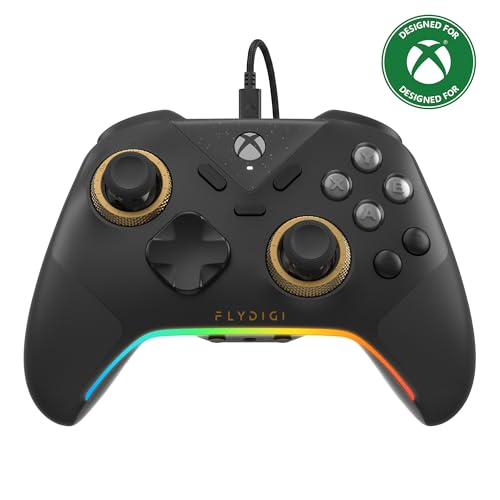
The pad that lets you physically dial stick tension from 40gf to 100gf without opening any software.
Most controllers lock you into one stick feel. The Vader 5S lets you physically dial stick tension from 40gf (gram-force — a measure of how hard you must pull) up to 100gf on the fly. Go light for flick-shots in FPS games and tight for smooth steering in racing games. That single adjustment is why tinkerers gravitate here.
Under the hood the Hall Effect sticks deliver ultra-precise control with no deadzone, and the triggers switch between micro-click for fast firing and Hall Effect linear for throttle control. Four motors — in both triggers and grips — make recoil and road feel land in your hands. You also get 6 remappable buttons via the rear and shoulder, plus in-game tweaks for vibration, profiles, and volume so you never pause the match.
What owners rave about is the build — it feels like a pro controller at a fraction of that reputation, and the mouse-click buttons get special mention. The trade-offs: it’s a wired pad only, and at 450 g it’s the heaviest on this list, so weaker hands will feel the weight over sessions. Think of it as a desk-and-couch pad, not a featherweight.
The tinkerer’s choice: adjustable tension plus dual trigger modes make it the most configurable pad here for the money — just budget for its 450 g heft and a wired setup.
This is your pad if: you love fine-tuning stick feel and trigger response for different genres.
Skip the tuning if: you want set-and-forget simplicity — the option list here is deep by design.
6. 8BitDo Ultimate 3-mode Wireless Controller

A wireless collector’s pad that lives in its own charging dock and rarely needs a cable.
Wireless is the whole point of the 8BitDo Ultimate, and it goes about it three ways. Connect to Xbox or Windows PC over 2.4G (a private wireless link) or wired USB, or pair to Apple and Android devices over Bluetooth. That flexibility covers a lot of ground for someone who switches between console and phone.
The integrated charging dock is the nicest touch — set the pad down and it tops up, then reconnects the moment you lift it. Hall Effect sticks and triggers keep drift away, and impulse trigger vibration works on Xbox and Windows. You also get 2 pro back paddles, a golden metal tactile D-pad, and 3 custom profiles for different games.
This is a limited 40th Anniversary edition, officially licensed by Xbox and Rare Ltd., so collectors should know it’s a niche finish rather than a different pad underneath. It’s excellent on feedback and connectivity, and owners find it comfortable and worth the premium. Just note the vibration feedback only activates on Xbox and Windows — not the Apple or Android modes.
The wireless advantages
- 2.4G, Bluetooth, and wired in one pad
- Integrated dock keeps it charged and ready
- Hall Effect sticks and triggers resist drift
- 2 pro back paddles plus 3 custom profiles
Worth knowing
- The 40th Anniversary finish is limited and niche
- Impulse trigger vibration is Xbox/Windows only
Made for you if: wireless freedom plus a dock that charges with zero thought is what you’re after.
Not for you if: you need full rumble across every device you own, Bluetooth platforms included.
7. GameSir G7 Pro Wireless — Wuchang: Fallen Feathers Edition
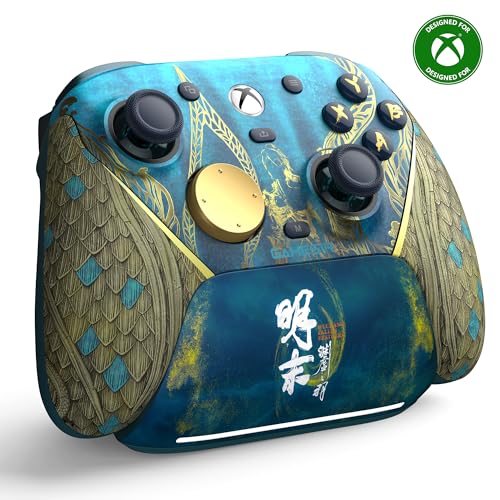
GameSir’s first wireless Xbox pad, packing a 1200mAh battery, a charging station, and TMR sticks.
A 1200mAh battery tucked inside a smart charging station is what makes the G7 Pro a genuine wireless play. Set it down and it charges, and the station even has a storage compartment for the wireless receiver so it doesn’t get lost. That’s a battery-and-dock system built for people who hate hunting for a cable.
The sticks here use GameSir’s Mag-Res TMR design — a magnetic hybrid the maker says blends the precision of traditional sticks with the durability of Hall Effect. A 1000Hz polling rate (how often the pad reports to the console per second) keeps inputs snappy. Hall Effect analog triggers give smooth control, and holding M+LT/RT flips into Hair Trigger Mode for rapid fire in shooters. Tri-mode connectivity covers 2.4G, Bluetooth 5.3, and USB-C.
What wins people over is the feel — the grip texture keeps the pad planted during play, and four programmable buttons give you the competitive edge. It’s a well-liked pad across the board. The main note is that the Wuchang edition is a specific themed finish, so if you wanted a plain shell you’ll want the standard version instead.
The wireless all-rounder: 1200mAh with a dock, TMR sticks, and a 1000Hz link make it the smoothest do-everything pick — the themed finish is the only thing that narrows it.
Go for it if: you want fast wireless play across Xbox, PC, and Android without charging anxiety.
Look at the standard version if: the Fallen Feathers trim isn’t your taste.
8. ASUS ROG Raikiri II Xbox Wireless Gaming Controller
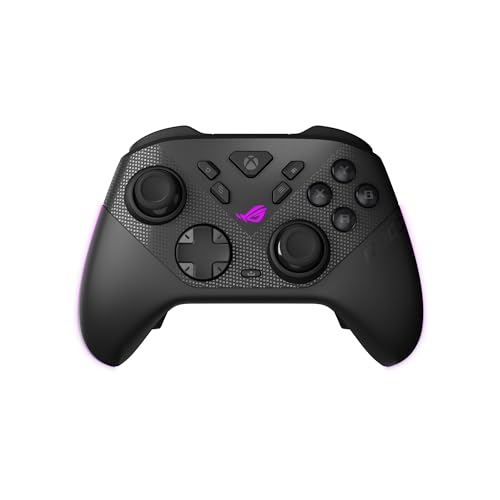
A PC-first pad with a travel case, a charging stand, and two sets of stick caps in the box.
The Raikiri II is built for the player who lives across PC and ROG Xbox Ally. Tri-mode connectivity (2.4GHz wireless, Bluetooth, and USB-C) gets you onto PC, and it’s certified for Xbox over USB-C and 2.4GHz RF. A 1000Hz polling rate keeps latency low in both wired and 2.4GHz modes, with ROG SpeedNova backing up the wireless link.
On battery, it’s rated for at least 30 hours of 2.4GHz play per charge — with RGB lighting, audio, and vibration off. That last part is the honest fine print: turn the extras back on and you’ll charge more often. Anti-drift TMR joysticks carry the precision load, and dual-mode triggers switch between micro-switch short travel and TMR sensor full travel. Four programmable rear buttons round it out, and the included protective case lets you charge the pad while it’s still inside.
Where it needs caution is build consistency. Some owners find it solid while others describe it as flimsy, and connection drops come up enough to be worth knowing before you buy. The 4.0+ rating reflects that mixed experience. Treat it as a premium crossover pick for PC-heavy setups, not a pure console-first choice.
The honest read: excellent on paper with a genuine 30-hour rating and premium accessories, but the connectivity gripes and build inconsistency mean it’s best for tinkerers who value PC flexibility over console simplicity.
For you if: you split time between PC and Xbox and want the case-and-stand package included.
Not ideal if: you want rock-solid simplicity — connection stability is its known soft spot.
9. Nacon Revolution X Unlimited Precision Wireless Controller

Over 60 customization combos and an LCD screen for setting things up right on the pad.
If you like building a controller to your exact hand, the Revolution X Unlimited is a playground. You get a 4-way and 6-way D-pad, 3 sets of weights, 3 sets of joystick heads, and 2 sets of joystick rings — the maker counts more than 60 combinations in total. An LCD screen on the pad lets you map buttons, program, and mix audio without a computer.
Hall Effect technology on both joysticks and triggers resists drift, and instant-adjustable micro-switch triggers give ultra-reactive inputs. Four vibration motors — two in the hands and two in the triggers — bring the haptics. On PC, latency drops to 1ms wired and 2ms wireless, with a gyroscope that can simulate a joystick or the D-pad. A charging station is included, and battery life is rated up to 10 hours.
What wins people over is the ergonomics — owners find it comfortable with clean, drift-free dead zones, and the customization depth draws people in. The two worthwhile caveats: connectivity is a known split, with some reporting perfectly stable links and others hitting issues; and its overall rating sits at the lower end of this group, so weigh the tuning depth against that.
The customization champion: 60-plus physical combinations and an on-pad screen make this the most tweakable controller here, and the Hall Effect internals back it up — just expect to spend some time dialing it in.
Suited to: tinkerers who want to physically reshape the pad and remap six buttons to their own setup.
Best avoided by: anyone who wants plug-in-and-play simplicity, since the tuning is the whole draw.
Know the Specs
Hall Effect vs TMR sticks
Hall Effect sticks use magnetic sensing so no parts rub together, which keeps the drift away as the pad ages. TMR sticks are a newer magnetic design the makers say uses less power and holds precision, with anti-drift performance. Either way, both are a step up from ordinary contact strips that wear over time.
Polling rate
Polling rate is how many times per second the pad sends your inputs to the console — 1000Hz means 1,000 checks per second, which reduces the delay between your thumb and what happens on screen. That low latency matters most in fast shooters where every frame counts.
Trigger modes and locks
Trigger locks or micro-switch triggers shorten the pull distance so you fire sooner. Linear triggers keep full travel for controlling throttle and braking in racing games. Some pads let you switch between modes without a restart, which is handy if you jump between genres.
Wired vs wireless
A wired pad runs off a USB or USB-C cable, needs no charging, and never drops its link. A wireless pad frees you from the cable but adds a battery — 1200mAh or a rated 30-plus hours, for example — and a charging routine. Pick wired for zero lag and no charging, or wireless for cable-free play.
Common Questions
Will a third-party controller work with my Xbox Series X?
Do Hall Effect sticks really stop stick drift?
Is a wired controller better for competitive play?
What does an officially licensed Xbox controller mean?
Can I use these controllers on PC as well as Xbox?
Do back buttons help in shooters?
How long does a wireless controller’s battery last?
Are controllers with adjustable stick tension worth it?
What’s the difference between trigger locks and linear triggers?
Do these third-party pads include a headset jack for chat?
The Bottom Line
For most people, the best Xbox 3rd Party Controller is the PowerA Advantage Wired Controller. It fights stick drift with Hall Effect sticks (magnetic sensors that don’t wear down from friction), adds two mappable back buttons and three-way trigger locks, and backs it all with a two-year limited warranty. Want wireless freedom plus a dock that keeps you charged? Reach for the GameSir G7 Pro. Crave adjustable stick tension and deep tuning? Grab the FLYDIGI Vader 5S.
Whichever you choose, buy on the sticks first — the magnetic ones here are what separate a pad that lasts from one that doesn’t.
How we choose
We do not accept paid placement. Every pick is matched to a real buyer and a real use-case; we do not hands-on test units.
Sources
Specifications: manufacturer listings and product documentation. Review insights: verified customer reviews, as of July 2026. Pricing: not shown on this page (it changes often); check the current price via the retailer link.
As an Amazon Associate, Tactical Gear Guy earns from qualifying purchases. This does not affect which products we feature.