Specs are compiled from manufacturer listings and verified buyer reviews and can change over time — please confirm the key details on the product page before buying.
You want a display built into your Xbox controller — one that shows you what profile you’re in, what your battery is doing, or who just messaged you, without alt-tabbing out of a match. Three controllers actually do that, and they take different routes to it: one has a dashboard screen you check between games, one has a small OLED you program yourself, and one doubles as a social feed. Below is which of them fits your hands and your gaming habits.
This guide is built by comparing the manufacturers’ published specifications and the patterns across verified customer reviews, so you get each pick’s real strengths and trade-offs instead of marketing spin.
A screen is only half the story here, so I also weighed connectivity, battery and stick technology on each one. These controllers are the strongest options in our best xbox controller with screen line-up, and each one suits a different kind of player.
Top Picks

How To Choose The Best Xbox Controller with Screen
Most Xbox pads never show you anything, so you have to remember which profile you loaded and guess at battery level. A screen fixes both problems, but the screen is where the money goes — so the rest of the pad has to earn its place too.
What the display actually does for you
A “Connected Command Display” is a small panel on the controller face that shows you what the pad is set to without digging into an app. That can mean profile names, audio settings, battery level, or even social notifications. Ask yourself which of those you would actually check mid-game. If the answer is “just battery”, a screen is a nice extra rather than a must-have.
How you connect changes everything
Low-latency 2.4GHz wireless is the connection competitive players want, because it skips the deliberate delay of Bluetooth. Bluetooth mode is the easiest for pairing with a laptop or phone. Wired USB-C removes the radio entirely. Some controllers offer all three — one gives you four modular face button slots, another gives you four rear buttons. Either way, check that the pad connects the way you play, and not just the way it advertises.
Stick technology and trigger stops
Drift is the slow death of a thumbstick: the analog sensor wears down and your character starts walking on its own. Hall-effect sticks use magnetic sensing instead of physical contact, which is why they tend to hold their zero point longer. Trigger stops shorten the pull of your triggers so a trigger press registers faster in shooting games.
Side-by-Side Comparison
| Model | Best For | Sticks / Buttons | Battery | Connectivity | Amazon |
|---|---|---|---|---|---|
| Turtle Beach Stealth Pivot★ Best Overall | Versatile all-rounder | Hall-Effect / 4 | 20-Hour | 2.4GHz Wireless | Amazon |
| ASUS ROG Raikiri Pro | PC-first customization | Adjustable / 4 rear | — | USB-C / 2.4GHz / Bluetooth | Amazon |
| Turtle Beach Stealth Ultra | Console-first setup | — / 8 | 30-Hour | Bluetooth | Amazon |
Detailed Reviews
1. Turtle Beach Stealth Pivot Wireless Smart Game Controller
The only pad here that physically rotates its button layout to match the game you’re playing.
This is the pick most players should start with. Its face modules rotate — you twist them into a different arrangement so the stick and D-pad sit where your hands want them for a fighting game, a shooter, or a racer. That’s a genuinely unusual piece of hardware, and it’s the reason this one beats the ROG Raikiri Pro on versatility: one pad for every genre, instead of a pad tuned for one. It weighs 300.6 g versus the Raikiri Pro’s 330 g, so the twist mechanism costs you nothing in hand fatigue.
Under your thumbs are Hall-effect sticks, which use magnetic sensing rather than physical contact so they hold their centre point far longer than a standard stick — Turtle Beach calls this AntiDrift. You get a 20-hour battery with play-and-charge capability, so a long session doesn’t have to end on a cable. Around the edge of your grip sit four mappable quick-action buttons with Pro-Aim, plus a quick-slide switch for changing settings mid-game without leaving the action. The Connected Command Display handles on-board social notifications, and the Control Center 2 app covers audio and control tuning.
Be realistic about the ergonomics. The rotating module is a real engineering trick, and the fit it produces splits people — some hands find it comfortable instantly, others need adjustment before it stops feeling awkward. The button count listed is 4, and that refers to the mappable quick-action buttons, so plan your layout around those four. Pair it with a Windows PC over the 2.4GHz low-latency link and it’s at its sharpest.
The case for the Pivot
- Rotating button modules reshape the layout per genre
- Hall-effect sticks resist drift over time
- 20-hour battery with play-and-charge support
- Display puts notifications right on the pad
Where it asks you to adjust
- Rotating module comfort divides opinion
- Four mappable buttons is fewer than the Ultra’s eight
Reach for this if: you play several genres and want one pad that rearranges itself to suit each one.
Think twice if: you want a deep bench of extra mappable buttons — the Stealth Ultra below lists eight buttons against the Pivot’s four.
2. ASUS ROG Raikiri Pro
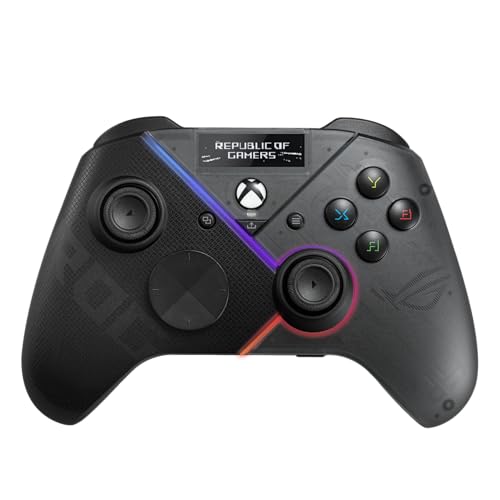
A customisable OLED face panel with an audio chip behind it, built for the desk rather than the sofa.
If the screen itself is the feature you’re buying, this is the one with the most screen to work with. The built-in OLED display takes custom animations so the pad looks like yours, shows status indicators, and lets you switch profiles on the fly without opening software.
Sound is the sleeper feature. There’s a built-in ESS DAC — a digital-to-analog converter that turns the game’s digital audio into a cleaner analog signal for your headset — plus a 3.5 mm earphone jack and a mute button on the pad. Four rear buttons can be programmed for in-game commands or on-the-fly joystick sensitivity shifts, and the left and right triggers switch between short-range and full-range modes with dead zones you can tune in Armoury Crate, ASUS’s control app.
Here’s the catch, and it’s the one that matters most: wireless here is PC only. The Bluetooth mode doesn’t give you a wireless Xbox connection, so if you pictured playing from the couch on a Series X without a cable, this isn’t that controller. The other adjustment is that everything deep — remaps, joystick sensitivity, trigger dead zones — runs through Armoury Crate rather than on the pad itself.
Screen and sound first: the OLED is the most programmable display of the three, and the ESS DAC with the 3.5 mm jack is a genuine audio upgrade over a plain pad.
skip it if you’re console-wireless: the Bluetooth that pairs with your Xbox is absent here — this one wants a USB-C cable or a PC for its 2.4GHz link.
The right pick for: PC-first players who want a programmable OLED face and a clean headset feed.
The honest limit: its wireless range stops at the PC, so an Xbox on the other side of the room needs a cable.
3. Turtle Beach Stealth Ultra Wireless RGB Gaming Controller

The longest-running pad of the three at 30 hours, with a rapid charge dock that keeps it topped up between sessions.
If a lit display draining your pad is the worry, the 30-hour rating is the answer. The battery is rated at 30 hours, and it ships with a low-profile rapid charge dock, so the pad sits on the dock between sessions instead of hunting for a cable. That’s 30 hours versus the 20-hour Stealth Pivot, and the dock means you never have to remember a cable.
The Connected Command Display on this one is the settings-and-socials panel — the manufacturer lists patented on-board social media notifications, so your feed lands on the pad instead of on your TV. You get eight buttons here against the Pivot’s four, so there’s far more surface for a custom layout. Alongside the Xbox One, Series S and Series X compatibility, this pad also lists Android and Windows as compatible devices, which widens the same pad across your desk, your console and your phone.
The honest note is build confidence, not features. Quality is the aspect people discuss most about this pad and opinion on it is genuinely split — some call it excellent, some describe quality control that misses. The A button in particular is the recurring complaint. It’s also renewed stock, so check the condition on the listing before you commit. Its strengths are concrete: a dock-fed 30-hour battery and eight buttons against the Pivot’s 20 hours and four.
What it wins on: 30 hours of rated runtime plus a rapid charge dock, and eight buttons versus four on the Stealth Pivot.
What to weigh up: the A button has drawn repeat complaints and the listing is renewed stock — read the condition notes carefully.
Choose this when: marathon sessions and a dock-first routine matter more to you than a removable battery.
Look elsewhere when: you want the safest build record of the three — the Pivot’s Hall-effect sticks make it the steadier long-term bet.
Know the Specs
Hall-Effect Sticks (Anti-Drift)
A standard thumbstick works by a wiper rubbing against a track — friction slowly wears the surface and your character begins drifting on its own. Hall-effect sticks sense position with a magnetic field instead, so no surfaces rub together. That’s the whole argument for AntiDrift on the Stealth Pivot: less mechanical wear, so the centre point holds longer and you’re not replacing the pad because you walk forward by accident.
OLED Display and Command Panels
An OLED panel (a screen whose pixels light themselves, with no separate backlight) stays readable and shows dark, high-contrast graphics. On a controller, that panel is where you read status and switch profiles. The Raikiri Pro lets you load custom animations and check indicators on it. The Stealth Pivot and Stealth Ultra use their screens as command dashboards for settings and notifications. The real question is if you want to glance down at the pad for status or keep your eyes on the game.
Trigger Stops and Trigger Modes
A trigger normally travels a long pull before it registers. Trigger stops cut that travel short, so the press lands sooner — a real benefit in shooters. The Raikiri Pro goes a step further with selectable step triggers: each trigger switches between short-range and full-range modes, and you set the dead zone in Armoury Crate. The Stealth Pivot uses adjustable trigger stops instead. Race games often prefer the long pull for throttle control, so the option to switch back matters.
Connectivity Modes and Latency
Three connection types appear across these pads. Wired USB-C is the simplest — a cable, no radio. 2.4GHz wireless uses its own dedicated radio link, which the makers describe as low-latency. Bluetooth is the easiest for pairing with different devices, but it carries more delay. The Raikiri Pro gives you all three, the Stealth Pivot works its wireless link with Windows PC, and the Stealth Ultra lists Bluetooth for its wireless connection. Pick the mode that matches the device you actually play on.
Common Questions
Will these controllers work wirelessly with my Xbox Series X?
Do I need an app to remap buttons on a controller with a screen?
How long will the battery last on the Stealth Pivot?
What is a Hall-effect stick and why does it matter?
Is the Raikiri Pro’s screen better than the Turtle Beach command display?
Can I use these controllers on a PC as well as a console?
How many extra buttons do I get for mapping?
Does the Raikiri Pro’s trigger mode change how racing games feel?
What should I check before buying the renewed Stealth Ultra?
Do the screens on these pads drain the battery faster?
The Bottom Line
For most players, the strongest xbox controller with screen is the Turtle Beach Stealth Pivot. The rotating button modules let one pad serve a shooter and a fighter and a racer, its Hall-effect sticks fight drift, and its 20-hour battery with play-and-charge keeps it in the game. If PC is where you play and you want the most programmable face panel plus a clean headset feed through the ESS DAC, the ASUS ROG Raikiri Pro is the sharper fit. And if you want the longest runtime here and a dock that keeps it topped up, the Turtle Beach Stealth Ultra earns its place — just read up on the condition and the A button before you commit.
How we choose
We do not accept paid placement. Every pick is matched to a real buyer and a real use-case; we do not hands-on test units.
Sources
Specifications: manufacturer listings and product documentation. Review insights: verified customer reviews, as of July 2026. Pricing: not shown on this page (it changes often); check the current price via the retailer link.
As an Amazon Associate, Tactical Gear Guy earns from qualifying purchases. This does not affect which products we feature.