Specs are compiled from manufacturer listings and verified buyer reviews and can change over time — please confirm the key details on the product page before buying.
Your Series X is a small, quiet box that pushes a lot of heat out of one vent on top. A clip-on cooler can either help that airflow along or quietly fight it. Every pick below mounts to the console and runs off its own USB power. So the real difference depends on how they move air, how loud they get, and what extra jobs they do while they sit there. The short answer: the KOVA auto-adjusting fan is the safest all-round buy, and the Raryars twin-fan unit is the one to grab if raw airflow is your only concern.
This guide is built by comparing the manufacturers’ published specifications and the patterns across verified customer reviews, so you get each pick’s real strengths and trade-offs instead of marketing spin.
A clip-on cooler is not a cure for a poorly ventilated shelf, so treat it as airflow support rather than a rescue device. This breakdown covers what each fan actually does, where it fits, and what it costs you in noise, which is what most buyers end up noticing first when shopping for the best Xbox Series X cooler fan.
Top Picks


How To Choose The Best Xbox Series X Cooler Fan
A cooler fan is a small accessory with one job: push more air across the console than the console’s own fan can pull on its own. Everything worth judging comes back to that. A fan that moves a lot of air loudly is a different product from a fan that moves less air quietly. Neither one is wrong — it depends on whether your Series X sits in a closed cabinet or out in the open.
Start with where the console sits
The Series X exhausts hot air straight up through the big circular vent on top, so a top-mounted cooler that aids that upward flow is working with the console. A cooler that sits underneath the console works against gravity but pulls from the bottom intakes, which is a different approach. Neither is better in the abstract — what decides it is whether your shelf has clearance above the console. A closed cabinet with an inch of headroom is where a top cooler earns its keep. A desk with open air above it is where the quieter, lower-speed options make more sense.
Understand RPM before you trust it
RPM stands for revolutions per minute — how fast the fan blades spin. Higher RPM generally means more air moved, but it also means more noise, and a fast fan with small blades can move less air than a slower fan with a wide sweep. That is why two coolers here run at 5300 rpm and 1800 rpm yet both claim to cool the console. Treat RPM as one data point, not a verdict.
Decide if you want automatic or manual control
An auto-mode cooler (one that reads the console temperature and changes its own speed) turns itself on and off with the console’s heat load. That is the difference between a fan that runs all night and one that only spins up when the console is actually hot. Manual-only coolers are simpler and cheaper but stay at whatever speed you set them to.
Side-by-Side Comparison
| Model | Best For | Max Speed | Noise Level | Extra Ports | Amazon |
|---|---|---|---|---|---|
| KOVA Auto Cooling Fan with 9 RGB Modes★ Best Overall | Hands-off auto cooling | Auto low / med / high | — | 2.0 USB hub at 5V/2A | Amazon |
| Raryars Turbo Cooling FanMost Airflow | Maximum airflow | 5300 rpm | 30 db | 3 USB ports | Amazon |
| Raryars Silent Absorb FanQuietest Pick | Quiet operation | 1800 rpm | 30 db | 2 USB ports | Amazon |
| Iesooy 3-Level Cooling Fan | Touch speed control | 2000 rpm | — | 3 USB (one data) | Amazon |
| Auto Cooling System with LED Display | Temperature readout | 2400 rpm (level 3) | — | Type-C plus USB 2.0 | Amazon |
| TanReginal Smart Cooling Fan | Complete accessory bundle | 2200 rpm | — | 2 USB 3.2 ports | Amazon |
| Mcbazel Wall Mount with Cooling Fan | Wall-mounted setups | 2100 rpm | — | USB 3.0 plus 2x USB 2.0 | Amazon |
| MENEEA RGB Cooling Fan with Dust Filter | Dust protection | 3 speed auto / manual | — | 2 USB 2.0 (one data) | Amazon |
| MENEEA Auto Cooling Fan Dust Proof | Clean white build | 3 gears | — | USB 3.0 plus USB 2.0 | Amazon |
Detailed Reviews
1. KOVA Auto Cooling Fan
Our pick — 4.5+★ from 900+ verified ratings; the strongest balance of quality and price.
It reads the console’s own temperature and decides when to start working.
This is the pick that asks the least of you. The KOVA has a real-time LED readout on top that shows your console temperature in Fahrenheit or Celsius, and — more usefully — it flips itself into action the moment the console crosses 96.8℉ (36℃). Below that it sits idle. That threshold is the whole pitch: the fan is a thermostat, not a switch.
The speed steps are tied to heat rather than to your button presses. Between 96.8℉ and 107.6℉ the fan runs low, from 107.6℉ to 118.4℉ it steps to medium, and above 118.4℉ it goes to high. If you would rather take the wheel, the fan switch lets you pick low, medium or high yourself. The screen doubles as your gauge in either mode, so you can watch the number fall as the fan works.
The extras are genuinely thought through rather than bolted on. A 2.0 USB hub at 5V/2A lets you charge a controller or headset while you play, and there is a headset hook backed with anti-slip silicone. It is also listed as 20% more compact than others, which matters on a crowded TV stand. What wins people over is the set-and-forget behavior — the LED lighting has nine presets (7 colors plus 2 dynamic effects) and holds your chosen effect after a three-second press. The catch is the one every auto-mode fan shares: it only starts when the console is already warm, so it is assistive airflow rather than instant cooling from a cold boot.
Where it earns the top slot
- Auto mode triggers at 96.8℉ (36℃) and steps speed with real temperature bands
- Live LED temperature readout in ℉ or ℃, switchable with two button presses
- 2.0 USB hub at 5V/2A plus an anti-slip headset hook on the same unit
- Nine lighting presets that survive a power cycle
Where it holds back
- Auto mode means the fan sits idle until the console is already warm
- No published RPM figure, so you cannot compare its airflow to rivals numerically
Reach for this if: you want a cooler that minds its own business and only spins when your Series X actually heats up.
Look elsewhere if: you want a fixed high-speed fan running from the moment you power on.
2. Raryars Cooling Fan for Xbox Series X with 3 USB Ports
Two fans spinning at 5300 rpm, built for the marathon crowd.
If you have ever felt the top of the Series X after four hours of a demanding game, this is the fan aimed at you. The Raryars runs two fans at up to 5300 rpm, which makes it the fastest unit on this list by a wide margin — the Raryars Silent Absorb model below tops out at 1800 rpm. It also doubles as a vertical stand, so it holds the console upright rather than just sitting on top of it.
Power comes from the console’s own USB port at DC 5V, so there is no wall adapter to find a socket for. Plug it in and it runs. The 30 db noise figure is the trade you make for that airflow, and it is a fair one for a fan moving this much air, though at 5300 rpm you will hear it in a quiet room.
The honest read on cooling here is split. Some owners see it hold the console steady, while others feel it does not push enough air to make a measurable difference — that disagreement is baked into the reviews and worth knowing before you buy. What it does offer without argument is easy installation and three USB ports on hand. There is also a 40-day replacement window if the unit arrives damaged or fails in normal use.
What the spec buys you: twin fans at 5300 rpm and a stand built into the base, powered straight from the console’s USB port.
The compromise: 30 db at full tilt is audible, and the cooling results reported by owners range from clearly effective to barely noticeable.
Best for the airflow-first buyer: pair it with an open shelf and you get the highest fan speed in this lineup.
Think twice if silence is non-negotiable: the quieter Raryars model below is the same brand’s answer to that.
3. Cooling Fan Silent Absorb
The bed-shelf answer: an absorb-type fan that pulls air through instead of blasting it.
This one takes a different route to the same goal. Instead of two fans driving air down onto the console, it uses an absorb-and-exhaust design, which the maker describes as the quietest arrangement among fans of this type. The motor tops out at 1800 rpm, against the 5300 rpm of the twin-fan Raryars above — a much gentler unit with a matching 30 db noise figure. For a bedroom or a shared living room, that lower ceiling is the point.
Buyers praise this fan most for what it does beyond cooling, and the cooling side earns its own following too. Buyers report the console sitting cooler with this on it, and the operation stays quiet enough to forget about. The top dust cover is a real addition rather than decoration. It is shaped to stop dust collecting in the exhaust area while the fan pushes heat out — the exact spot where dust builds up on a Series X.
Two USB ports are on board, and it draws its DC 5V straight from the console, so setup is plug and play. The limit to know: 1800 rpm is not a hurricane, and if your console lives in a genuinely stuffy enclosed cabinet, this fan is the polite option rather than the powerful one.
The quiet-cooling case
- Absorb-and-exhaust design keeps noise low at a 1800 rpm ceiling
- Top dust cover blocks the exact spot where dust gathers on an exhaust vent
- Plug-and-play DC 5V from the console’s USB port, no adapter needed
- Two USB ports for charging while you play
What to weigh up
- At 1800 rpm it moves far less air than the 5300 rpm twin-fan model
- Not the tool for a tight, poorly ventilated cabinet
Pick this one if: the console lives near where you sleep or sit quietly, and you want cooling without a drone.
Pass if: your setup needs serious airflow rather than gentle assistance.
4. Iesooy Cooling Fan

Three speeds on a touch switch, with LED colors that tell you which gear you are in.
The Iesooy is the most flexible fan on this list for manual control. A touch switch cycles the fan through three gears, and an LED indicator changes color to match: green, blue and orange for fast, medium and low, with off meaning stop. No app, no remote, no menu — one tap per step. The fan itself runs at 1800–2000 rpm, and the vertical air ducts are shaped to line up with the vents at the four corners underneath the console, so air moves bottom to top rather than sideways.
Lighting runs to six single colors plus one mixed color, and it has its own independent touch switch so you can change it without touching fan speed. Three USB ports are included: a blue USB 2.0 port that supports data transfer, and two white USB 2.0 ports that only charge. That distinction matters — the blue data port is the one for a controller that needs pairing, while the two white ports only charge.
Reliability is the thing that stands out in owner reports, with the fan working from the first plug-in. The honest caveat is airflow: some owners feel it does not move much air, and noise draws its share of complaints. The stated dimensions of 8.27″L x 7.87″W x 2.36″H make it one of the bulkier footprints here, so check your stand clearance before you commit.
What the touch control gets you: three fan speeds with color-coded indicators, plus separate lighting control on its own switch.
The trade-off to weigh: it is a manual fan, so cooling depends on you remembering to switch it up when the room warms.
Fits the tinkerer: you like choosing your own fan speed and lighting, and want data plus charging ports in one base.
Less suited to: a shelf with tight clearance, given its larger footprint.
5. Auto Cooling System LED Display

A screen that shows the console’s temperature and fan level, so nothing is guesswork.
The display is why you would pick this one. The LED screen on top shows your Series X temperature and which fan level is currently running, with two touch buttons for lights and fan gear. The fan has three levels — 1600 rpm at level one, 2000 rpm at level two and 2400 rpm at level three — and those nine blades are what do the moving.
Auto mode is built in. A temperature detector reads the console’s heat and adjusts the fan speed to match, so it keeps ramping as the console warms through a long session. There is also an anti-touch guard over the spinning blades, which stops fingers getting caught when you reach for the console. Lighting runs to 11 modes with seven solid colors, each changed by a short press of the light button.
The package is more complete than most: the fan, a charging cable, two silicone dust screens and eight silicone dustproof buttons. Ports are a Type-C for power in and a USB 2.0 for charging a controller. What the appearance does well is blend in, and setup is a matter of placing it and plugging in. The caveat is that cooling results are genuinely mixed — some consoles run clearly cooler, and a smaller group reports the opposite. Buy it for the live temperature readout; if maximum airflow is the goal, the 5300 rpm Raryars is the better fit.
Why the display wins
- Screen shows live console temperature and current fan level
- Three fan levels from 1600 to 2400 rpm, nine blades
- 11 lighting modes across seven solid colors on a separate touch button
- Ships with two dust screens and eight dustproof buttons
Where it falls short
- Cooling feedback from owners splits between clearly effective and not
- Lighting is described as subtle rather than a showpiece
For the data-minded: you want to see the temperature number rather than trust a label.
Skip if: you place airflow volume above having a readout at all.
6. TanReginal Smart Cooling Fan for Xbox Series X
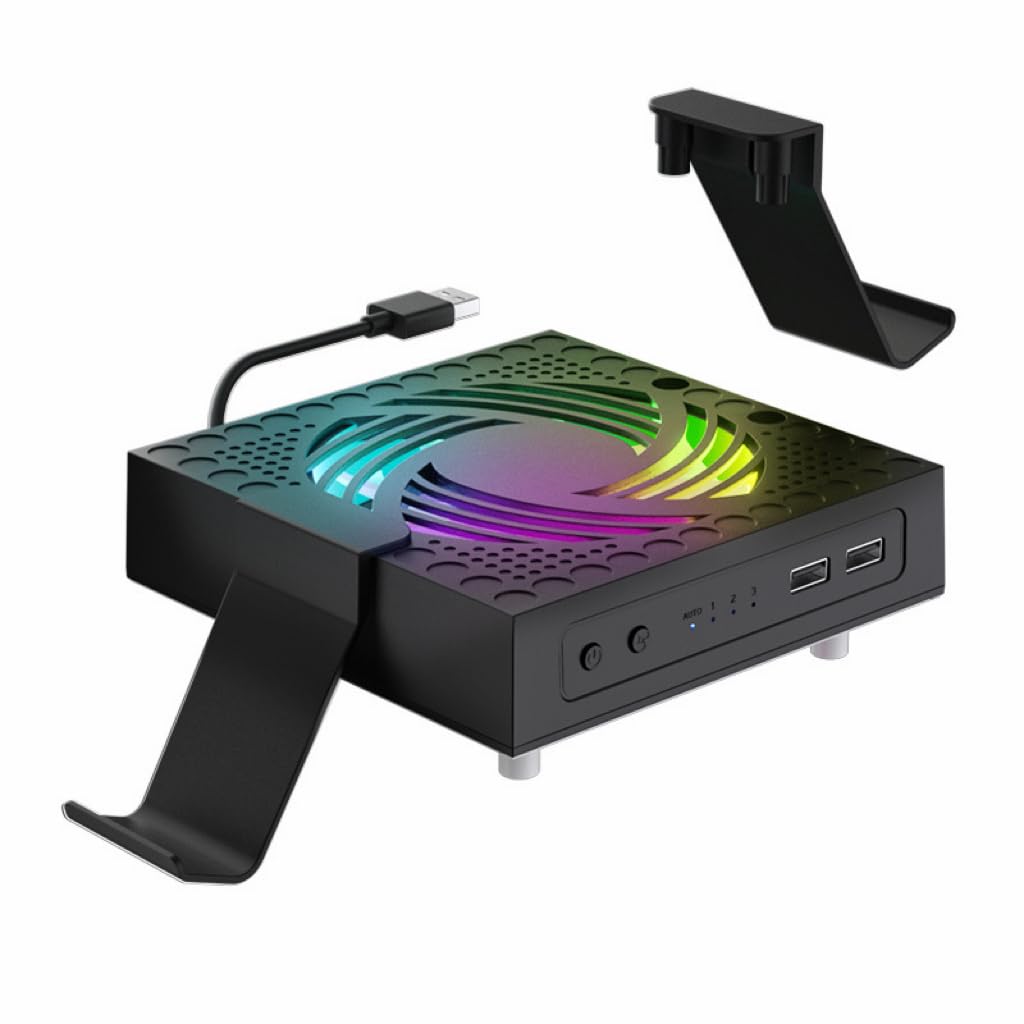
The one that treats keeping dust out as half the job, not an afterthought.
Most coolers here add a fan and call it done. The TanReginal ships with dustproof mesh filters, eight custom dust plugs that seal the console’s vents and ports, two controller and headphone stands, and four pairs of height-boosting joystick caps with different textures. If you have ever opened a console after a year in a pet-friendly room, the mesh and plugs alone justify the look here.
The fan itself is a 9-blade hydraulic bearing design running up to 2200 rpm across three speeds on a one-touch switch. Auto mode kicks in when the console reaches 104°F/40°C and shuts the fan off once temperatures drop back. Hydraulic bearings are the quieter kind, which fits with the maker’s claim of near-silent operation. Two USB 3.2 ports give you room for a controller or headset without hunting for a port on the console itself.
Setup takes minutes and no tools — fan on top, stands attached, mesh in, plugs seated. The lighting is basic RGB with an on/off press rather than layers of effects, so if a light show is your reason for buying, this is not the one. If a tidy, well-protected console is the goal, this bundle delivers it.
The bundle is the buy: dust mesh, eight plugs, dual controller stands and four sets of joystick caps arrive in the box.
Keep in mind: the lighting is switch on or off, not a multi-mode system.
Built for the dusty room: a home with pets or high traffic gets the most out of the dust kit and the three-speed fan.
Not the pick for: buyers chasing elaborate lighting effects.
7. Mcbazel Wall Mount for Xbox Series X with Cooling Fan

Screws to the wall, holds the console vertically, and cools from underneath.
This is the only pick here that changes where your console lives. The Mcbazel is a wall bracket cut to the Series X body — and to that console alone, since the Series S has a different shape and will not seat. Dual fans sit under the console and run at three touch-selected speeds up to 2100 rpm, drawing air through the mount while the console hangs vertically against the wall.
The ABS body is rated to 10kg and measures 6.89 x 6.69 x 11.22 inches, with three removable hooks for controllers and a headset. Speed and lighting are both touch-controlled — no app and no remote to lose. The RGB light bar runs several colors and effects, and a touch turns it off entirely, which is the right call for a bedroom where a glowing shelf is a nuisance.
Ports run to one USB 3.0 for data and two USB 2.0 for topping up controllers or a phone. One thing to plan for: the fan, the lighting and the ports all draw from the console, so none of them run while it is asleep or off. Screws are supplied, but use wall anchors matched to your wall type rather than driving into plasterboard alone. Easy installation is what this mount earns most credit for, though the stability has drawn some mixed comment — worth checking your wall fixing before you trust it with the console.
What makes it different
- Wall-mounted bracket frees the shelf entirely
- Dual fans at three speeds up to 2100 rpm under the console
- Three removable hooks for controllers and a headset
- Light bar can be switched fully off by touch
Before you drill
- Series X only — the Series S will not seat in it
- Fan, lights and ports all stop when the console sleeps
Made for the shelf-starved setup: it gets the Series X off the furniture and onto the wall with cooling built in.
Only if you have a Series X: the Series S will not fit this bracket.
8. MENEEA RGB Cooling Fan for Xbox Series X with Dust Filter

A sliding cover that opens to cool and closes to keep dust off the vents.
Cooling is what this fan gets credit for, and it earns that through a smart chip (a small control chip that senses temperature and sets fan speed by itself). Auto mode is the default after power-on. The indicator glows green, the fan runs at medium air speed for five seconds, then it picks one of three speeds based on the air outlet temperature. Touch the switch once for manual medium (blue light), again for manual high (orange), again to stop.
The sliding cover is the detail that makes it useful in a room with dust. Open it and heat escapes faster. Close it and you get dust and water protection plus a flat surface you can set things on. The fan design also lets you place the console horizontally or vertically, so it fits under a TV cabinet or on a desk. Seven lighting modes cover running lights, water running lights, breathing lights and four solid colors, all on an independent switch.
Two USB 2.0 ports are included — a black one for data and a white one for charging only. The box adds two sets of dust covers for the console and a set of silicone dust plugs that block the USB and HDMI ports without tools. The noise level is the split point: some owners find it very quiet, others call it a bit noisy, so it depends on how close you sit.
The case for it: auto fan speed driven by a temperature sensor, a sliding dust cover, and a base that works with the console horizontal or vertical.
Worth knowing: noise reports range from very quiet to a bit loud depending on the unit and the room.
Good match for a busy room: the sliding cover and supplied dust plugs protect the console when it is not in use.
Best avoided if: you need a whisper-quiet fan right beside your chair.
9. MENEEA Auto Cooling Fan White

The white version for a light-colored setup, with the same auto-and-manual cooling brains.
Most console coolers come in black, so the white shell here is the first thing to note. It suits a light TV unit rather than disappearing into a dark one. The cooling job underneath is the same three-gear setup as the other MENEEA fan. Auto mode is the default on power-up with a green indicator, and a touch switch steps you to manual medium (blue), manual high (orange) and then off. The chip senses temperature and sets the speed itself while in auto.
The light strip carries six single colors and two mixed colors on an independent touch switch, so lighting and fan speed stay separate. Ports are a blue USB 3.0 for data transmission and a white USB 2.0 that only charges controllers, phones or a small desk lamp. Dust control is handled by two sets of covers for the console plus a set of silicone plugs for the USB and HDMI ports, all sized to fit without tools.
One operating note worth following: when the console is working, lift the dust cover off the fan to let heat escape faster, and align the two holes under the cover when you put it back. It adds auto-speed cooling and port dust plugs without taking up much shelf space. The honest limit is airflow volume — this is a tidy, protective top fan rather than a high-RPM blaster.
Right for a white build: it keeps the dust plugs, data port and adjustable lighting without breaking the color scheme.
Not the fan for: buyers who need maximum airflow above all else.
Know the Specs
RPM and airflow
RPM is how many times a fan blade spins in a minute, and it is the easiest number to compare across coolers — even if it is not the whole story. A fan running at 5300 rpm will move more air than one at 1800 rpm, but it will also make more noise. More blades and wider blades move more air at the same RPM, which is why the nine-blade designs here trade a lower speed for a bigger sweep.
Auto mode and temperature thresholds
An auto-mode cooler reads console temperature and decides whether to run. The thresholds differ: one fan starts at 96.8℉ (36℃) and steps up through heat bands, another waits until 104°F (40°C). A lower trigger means the fan begins working sooner. Manual coolers skip the sensor and stay where you put them, which is simpler but relies on you.
USB port types
A USB 2.0 port charges slowly and can carry data; a USB 3.0 or 3.2 port moves data faster and charges quicker. On a cooler, the port labeled for data is the one for a controller that needs pairing, and the charging-only ports are fine for a headset or a phone. Check which is which before you plan your cable layout.
Dust protection
Dust is the quiet enemy of a Series X — it clogs vents and insulates heat sinks. Coolers here handle it with dust plugs for ports, mesh filters, or sliding covers that seal when the fan is idle. The ones that seal the console’s unused ports are doing the most practical work, since those openings are where dust enters between sessions.
Common Questions
Does an Xbox Series X cooler fan really help the console run cooler?
Will a Series X cooler fit if my console is horizontal?
Are these coolers powered by the console’s own USB port?
What does 5300 rpm versus 1800 rpm actually mean for cooling?
Do auto-mode fans run all the time or only when needed?
Can I charge a controller through a cooler’s extra USB ports?
Will a dust cover on a cooler restrict airflow?
Is a wall-mounted cooler a better choice than a top-mounted one?
Do these coolers work with the Xbox Series S?
The Bottom Line
For most people, the xbox series x cooler fan worth picking first is the KOVA auto-adjusting fan. It reads the console’s temperature, starts itself at 96.8℉, and packs in nine light modes plus a USB hub without asking for a wall socket. If raw airflow is your goal, the Raryars twin-fan model spins to 5300 rpm and doubles as a vertical stand — just expect more noise. And if your console lives near your bed, the quieter Raryars Silent Absorb Fan at 1800 rpm is the one to reach for. Match the fan to the space around your console — a top cooler for a tight cabinet, a quiet 1800 rpm unit for an open desk — and you will get real value out of it.
How we choose
We do not accept paid placement. Every pick is matched to a real buyer and a real use-case; we do not hands-on test units.
Sources
Specifications: manufacturer listings and product documentation. Review insights: verified customer reviews, as of November 2026. Pricing: not shown on this page (it changes often); check the current price via the retailer link.
As an Amazon Associate, Tactical Gear Guy earns from qualifying purchases. This does not affect which products we feature.