Specs are compiled from manufacturer listings and verified buyer reviews and can change over time — please confirm the key details on the product page before buying.
Here is the plain answer up front: for most players, the best WoW gaming mouse has a dozen thumb-reachable buttons, software that actually saves your macros, and a sensor that keeps up under fast camera flicks. Too few buttons leaves you reaching across the keyboard mid-fight. Too many badly placed buttons make every cast a thumb-stretch. The picks below cover both ends of that trade-off.
This guide is built by comparing the manufacturers’ published specifications and the patterns across verified customer reviews, so you get each pick’s real strengths and trade-offs instead of marketing spin.
The gap between a decent MMO mouse and a frustrating one depends on thumb-button reach and whether your macros survive a reboot. Below you will find the practical differences side by side, so you can match one to your rotation and your grip. This breakdown of the wow gaming mouse field covers what actually matters once you are deep in a raid night.
Top Picks


How To Choose The Best WoW Gaming Mouse
WoW does not ask for pinpoint headshots the way a shooter does. It asks you to fire off a dozen abilities while your thumb also steers the camera. That is the whole design brief, and it is why the button cluster on the side carries more weight than raw sensor numbers. Get the thumb cluster right and the sensor and weight matter far less.
Count your actual keybinds first
Sit in front of your action bars and count how many abilities you press in a normal fight, not in a target dummy test. If that number is around ten or twelve, a mouse with seven to twelve thumb buttons gives you room without a reach. If you run a class with a huge kit and several macros, a 16-button layout on the thumb is the safer bet. What you want to avoid is a cluster so tall your thumb has to leave its resting spot to hit the bottom row.
Check where your profiles live
Onboard memory means the mouse stores your macros and button remaps inside the device itself. That matters when you swap between a desktop and a laptop, or when your software decides to update itself before a raid. A mouse that relies on a background program for every bind can leave you with default buttons after a driver hiccup. Look for a mouse that writes your layout to the hardware once and keeps it.
Weight, shape, and grip
A mouse loaded with thumb buttons tends to carry extra bulk. If your hand is on the smaller side, a compact shell you can still grip cleanly will beat a chunky one every session. If you palm the mouse, the wide bodies with recessed finger grooves keep your hand from sliding. Some mice also ship with adjustable weights so you can tune the feel to your own swing.
Wired or wireless for raiding
A wired mouse never runs dry mid-pull, and many MMO players still want that certainty. Wireless versions have closed much of the gap, and a mouse that charges on a dock or over USB-C while you play removes most of the risk. If you go wireless, weigh the battery figure against how long your typical session runs, and remember the number usually assumes the RGB lighting is off.
Side-by-Side Comparison
| Model | Best For | Programmable Buttons | Max DPI | Connection | Amazon |
|---|---|---|---|---|---|
| UtechSmart Venus Pro★ Best Overall | All-round raid companion | 16 | 16000 | 2.4GHz wireless / wired | Amazon |
| Redragon M908 ImpactBudget Thumb Cluster | Budget thumb-cluster | 18 | 12400 | USB wired | Amazon |
| SOLAKAKA SM809 ProTop Endurance | Long battery, low cable fuss | 16 | 24000 | 2.4G / BT 5.0 / USB-C | Amazon |
| Redragon M990 | Maximum button count | 23 | 32000 | USB wired | Amazon |
| Razer Naga V2 HyperSpeed | Battery-first wireless | 19 | 30000 (Focus Pro 30K) | HyperSpeed 2.4GHz / Bluetooth | Amazon |
| Corsair Scimitar Elite Wireless SE | Precision plus streaming | 16 | 33000 | SLIPSTREAM wireless / Bluetooth / USB | Amazon |
| Razer Naga V3 Pro | Swappable layouts | 23 | 50000 | HyperSpeed 2.4GHz / Bluetooth / USB-C | Amazon |
| LTC MKM071 | Dock-charging starter | 11 | 12000 | 2.4G / Bluetooth / wired | Amazon |
Detailed Reviews
1. UtechSmart Venus Pro Wireless MMO Gaming Mouse
Our pick — 4.0+★ from 23,500+ verified ratings; the strongest balance of quality and price.
Twelve thumb buttons angled for your fingertip, and a battery that outlasts a raid week.
The UtechSmart Venus Pro earns the top spot because it solves the two problems WoW players actually hit: reaching a full hotbar and keeping the mouse alive through several sessions. It puts 16 programmable buttons on the shell, and 12 of those sit on the thumb grip. Each of those twelve is set at a different incline so your thumb tip lands on them without sliding up or down the cluster. That is the detail that separates a usable MMO pad from a row of identical slabs.
Battery is where it decisively pulls ahead of the other wireless option here. The Venus Pro is rated for 70 hours of wireless play, while the Razer Naga V2 HyperSpeed is rated at a much longer 250 hours on its 2.4GHz link and 400 hours on Bluetooth. That 70-hour figure sits well under the Solakaka’s 350 hours, so if pure battery life is your priority, the Solakaka is the one to weigh instead. For most raiders, 70 hours covers a heavy week of evenings with room to spare, and a 1000mA cell rated for more than 300 recharge cycles means the battery should hold up over years of use.
You get a fast, steady cursor for camera sweeps and precise ground-target clicks from a PixArt PMW3335 optical sensor (the chip that tracks your movement) running up to 16000 DPI (dots per inch, a measure of cursor speed) with five switchable stages and a 1000 Hz polling rate (how often the mouse reports to your PC, in times per second). What keeps it from being perfect is a mixed report on button responsiveness over time — a small share of long-term owners find the thumb keys feel less crisp after heavy use, so treat aggressive mashing with some care. The textured, sweat-resistant coating does help here: it keeps your hand planted on long fights when a lighter finish would slip.
Where it wins
- 12 thumb buttons angled individually so your fingertip finds each one
- 70 hours of wireless runtime, with a 1000mA cell rated for 300+ recharges
- 16000 DPI PixArt PMW3335 sensor with 5 stages and 1000 Hz polling
- Textured, sweat-resistant finish for long sessions
What to weigh
- Shorter runtime than the Razer Naga V2 HyperSpeed’s wireless figure
- Thumb keys can feel less crisp after very heavy mashing
- Heavier shell than the compact LTC MKM071
Built for: players who want a full hotbar under the thumb and refuse to fuss with a cable every night.
Pass if: you want the longest possible wireless runtime, in which case a battery-first model is the better fit.
2. Redragon M908 Impact RGB LED MMO Gaming Mouse
A twelve-button thumb grid with recessed grooves, for players who do not want to go wireless yet.
The M908 is the answer for anyone building a first proper MMO setup on a budget. It packs 18 programmable buttons, twelve of them clustered on the thumb, and adds five memory profiles each with its own dedicated light color so you can tell at a glance which game’s layout is loaded. You also get an eight-piece weight tuning set at 2.4g each, so you can shift the feel of the shell to your own taste without buying a different mouse.
Size is the honest catch. This is a wide body at 3.62 inches across and 175 grams on the scale, which is 72% more weight than the 102-gram LTC MKM071 and a full 0.62 inches wider than the 3-inch UtechSmart Venus Pro. If you palm a mouse and like a planted, substantial shell, that bulk reads as stability. If your hand runs small, the reach to the far edge of the thumb grid will feel like a stretch every single pull. The recessed finger grooves do help keep your hand from drifting on those long sessions.
The sensor is a Pixart PAW3327 running up to 12400 DPI, with five onboard levels and the ability to fine-tune in ±100 steps between 200 and 12400 through the software. A 1000 Hz polling rate and 30G acceleration round out the spec sheet. What wins players over is straightforward build quality for what it asks — the shell feels solid rather than hollow. The recurring gripe, and it is worth knowing before you buy, is that a slice of owners find the ergonomics and the button feel a little stiff from the start.
Where it lands: the best starting point if you want the full twelve-button thumb layout, palm-sized comfort, and a wired connection you never have to charge.
The honest limit: at 175 grams and 3.62 inches wide, small-handed players should try to feel this shape before committing.
Reach for this if: your thumb wants a dedicated column for every ability and you would rather not baby a battery.
Look elsewhere if: your hand is on the smaller side and you prefer a lighter, more compact shell.
3. SOLAKAKA SM809 Pro Gaming Mouse with 9 Side Buttons
Weeks between charges, and four swappable side plates to reshape the thumb layout.
The number that defines this mouse is 350 hours of battery life, which is far and away the longest runtime on this list — it dwarfs the UtechSmart Venus Pro’s 70 hours. That means weeks of evening raid sessions between charges, with no cable to hunt for before a pull. The 24000 DPI PAW3311 sensor is also double the 12000 DPI ceiling on the LTC MKM071, so fine sensitivity tweaks for a fast camera swing are easy to dial in.
What makes this one genuinely different is the hardware flexibility. Four magnetic side plates let you swap the grip shape and the button arrangement, so you can shift the layout to suit a different class or a different hand position. All 16 buttons are programmable, and every one of them can take a macro or remap through onboard memory. The clever part is the configuration: you remap buttons and set macros through a browser at solakakadriver.com, with no install, and the changes save straight onto the mouse. On a shared computer or a work laptop, that means your layout follows the hardware.
Triple-mode connection (2.4GHz, Bluetooth 5.0, and USB-C wired) rounds out the package, so one mouse covers a desktop, a laptop, and a tablet. The trade-off is on the thumb buttons themselves — a mixed report on button flexibility and responsiveness means a few players find the plates need a firm press or the bind feels softer than a mechanical click. Build quality is what most consistently wins people over, and the ergonomic shell fits a range of hands cleanly.
The draw
- 350 hours of battery, by far the longest on this list
- 24000 DPI PAW3311 sensor, double the LTC’s 12000
- Four magnetic side plates to reshape the layout
- Browser-based setup saves straight to onboard memory, no install
The trade
- Some players find the thumb buttons need a firm press
- Plate swapping takes a moment to learn
- RGB-off assumption behind the long battery figure
Pick this one: if you want to charge rarely and reshape your thumb cluster to match your class.
Think twice if: you insist on mechanical-feeling thumb clicks above all else.
4. Redragon M990 Wired RGB MMO Gaming Mouse

Twenty-three buttons and a fire key, for the player whose hotbars never seem to end.
If your rotation plus utility macros outnumber the keys your left hand can reach, the M990’s 23 buttons cover the overflow. It carries 23 programmable buttons, including a 16-button side array plus a dedicated fire button, so you can bind an entire rotation plus every utility without lifting your hand off the mouse. That is the highest button count in this group, matching the Razer Naga V3 Pro’s 23 and sitting clear above the 18 on both the Redragon M908 and the M913 MAX.
The sensor goes up to 32000 DPI with five redefinable levels, so you can jump between a slow, precise cursor and a fast camera sweep on the fly. The shell is aluminum-based and comes with the same eight-piece weight tuning set (2.4g each) as its siblings, letting you dial in the feel. It runs wired, which means no charging interrupts and a stable connection through a long raid. Five backlit profiles each carry their own color so your layout is easy to identify mid-fight.
The reality check is weight and hand fit. At 200 grams with a 4.81 by 3.62-inch footprint, this is the heaviest mouse here, so a fast-flick playstyle will feel the mass. It suits a palm grip and a deliberate hand, not a light fingertip flick. Owners who palm it tend to find the shape settles the wrist well and the adjustable weight makes it easy to fine-tune; if your hand runs small, the far thumb column will ask a lot of every reach.
The case for it: no other mouse here gives you a fire key plus a full sixteen-button thumb grid, so if you want to move essentially every ability onto one hand, this is the weapon.
Fit note: 200 grams and a wide footprint reward a palm grip and punish a light, flick-heavy hand.
Best for: deep-kit players who want maximum binds and a stable wired connection.
Not for: anyone chasing a featherweight feel or with a compact hand.
5. Razer Naga V2 HyperSpeed Wireless MMO Gaming Mouse

Four hundred hours on Bluetooth, for the player who hates the thought of a charging cable.
You can go weeks without charging: this mouse runs up to 400 hours on Bluetooth and 250 hours on the Razer HyperSpeed 2.4GHz link (a low-latency wireless connection). That is the longest wireless runtime of the major-brand options here — the UtechSmart Venus Pro’s 70-hour figure is a fraction of it. If you want to charge roughly once a month instead of once a week, that 400-hour figure alone justifies a look. It carries 19 programmable buttons, enough for a full MMO rotation with macros to spare, and Razer’s HyperScroll wheel switches between free-spin and tactile modes so you can blaze through a menu or scroll with precision.
The sensor is the Focus Pro 30K optical unit, which tracks accurately across a broad range of surfaces including glass — handy if your desk is not a mat-friendly surface. The mechanical switches use gold-plated contact points rated for up to 60 million clicks, so the click feel should stay consistent for a long time. The catch that keeps coming up is size and button feel: some larger-handed players find the shell too small, and a slice of buyers report thumb buttons that do not always register a press. If your hand is big, try to confirm the fit before you buy.
On the software side, the Razer Synapse app handles button remaps and macros, and the included dongle adapter lets you route the receiver closer for a more stable link. The verdict here is a battery-and-brand pick for a mid-sized hand, not a big-hand pick.
What wins people over: the runtime — 400 hours on Bluetooth and 250 on 2.4GHz is the longest wireless figure among the big brands here, and the Focus Pro 30K sensor tracks on glass.
The catch: the shell runs small for large hands, and some players find a thumb button does not always fire.
Choose this if: battery freedom is your top priority and your hand is average or smaller.
skip it if: you have wide palms and need a roomier shell to plant your thumb.
6. Corsair Scimitar Elite Wireless SE MMO Gaming Mouse

A 33,000 DPI sensor and sixteen buttons that talk directly to Elgato Stream Deck.
The Scimitar Elite Wireless SE is the pick for a player who also streams or wants their buttons to do more than cast spells. It runs a MARKSMAN S optical sensor rated to 33000 DPI, which tracks accurately and sips less power than the previous version. Sixteen programmable buttons give you a full rotation under the thumb and palm, and the shell fits large hands well — owners tend to praise how comfortably it sits in the hand and how adjustable the layout feels.
You can control your stream from the mouse itself thanks to Elgato integration, which separates it from every other mouse here. Native Stream Deck support lets you map Stream Deck functions straight onto the mouse from the Stream Deck app, and the Virtual Stream Deck integration lets those sixteen buttons act as their own mini deck for streaming, productivity, or gaming profiles. For a WoW streamer juggling overlays and scene switches between pulls, that is a genuinely useful extra layer no rival here offers.
Connectivity is flexible: SLIPSTREAM wireless gives a low-latency link on PC or Mac at 1000Hz polling, and you can drop to Bluetooth or plug in over USB-C to charge while you play. The battery is rated at 150 hours, comfortably ahead of the UtechSmart Venus Pro’s 70-hour figure and short of the Razer Naga V2 HyperSpeed’s 400-hour Bluetooth run. For WoW, that 33000 DPI accuracy mostly shows up as steady cursor placement on ground-targeted abilities.
Why it earns a premium slot
- MARKSMAN S 33k DPI sensor with efficient tracking
- Native Elgato Stream Deck mapping for stream setups
- 16 programmable buttons plus SLIPSTREAM, Bluetooth, and USB-C
- 150-hour battery and a shell that suits large hands
What you give up
- Runs shorter on battery than the Razer Naga V2 HyperSpeed
- The premium tier pushes it above the mid-range picks
- Stream integration is wasted if you never stream
The fit: a large-handed player who streams and wants a button cluster that also drives their deck.
Not the fit: a pure raider who will never touch Elgato software.
7. Razer Naga V3 Pro Wireless MMO Gaming Mouse
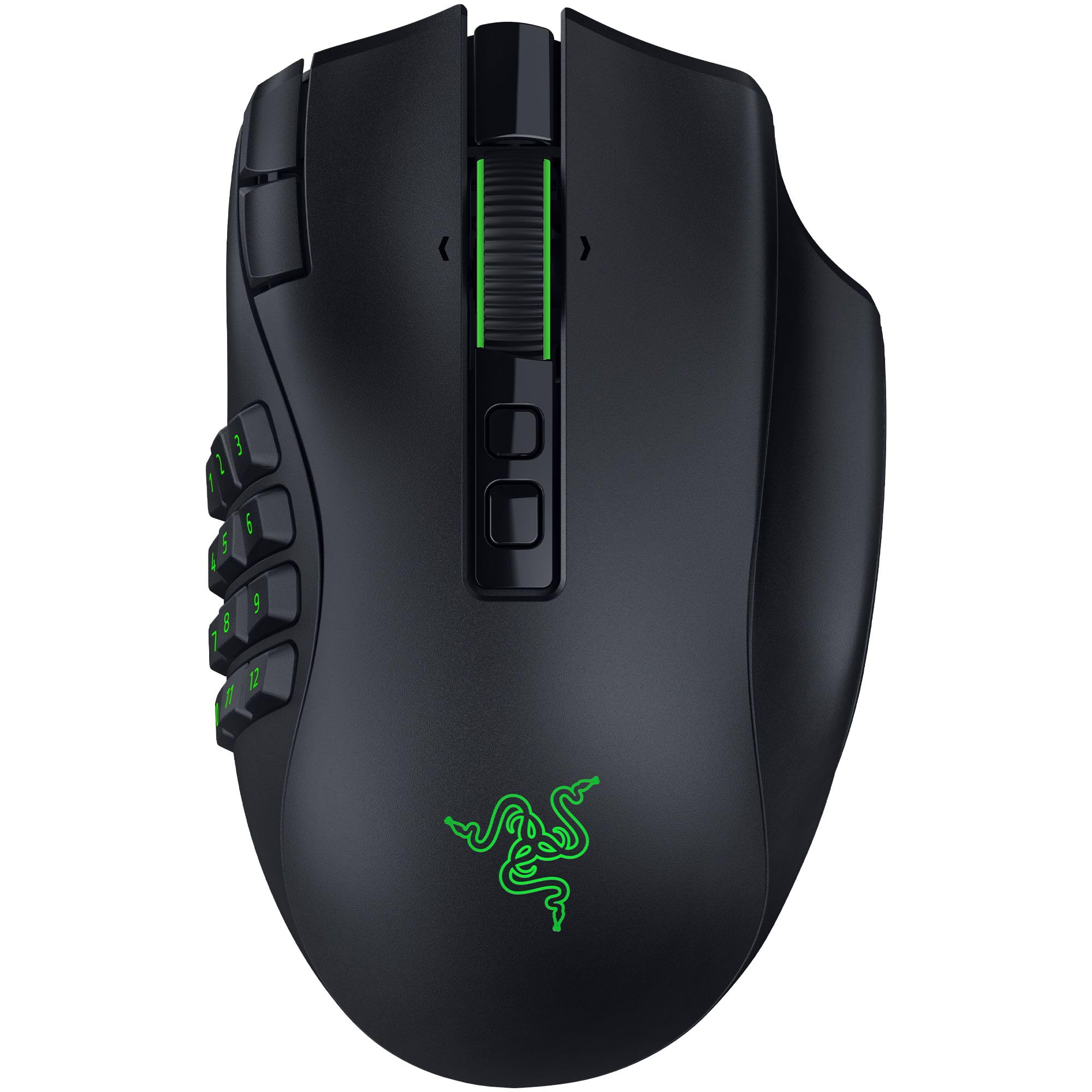
Three side plates turn one mouse into an MMO pad, a MOBA pad, or a lean FPS shape.
This is the most versatile mouse here because it refuses to be just an MMO mouse. Three swappable magnetic side plates give you 12, 6, or 2 thumb buttons, plus two quick-access edge buttons and a lockable ring-finger button. For WoW you run the twelve-button plate; switch to a shooter and drop to the two-button plate for a leaner grip. That flexibility is what makes the V3 Pro a mouse you keep on the desk across genres rather than one you swap out.
The sensor is the headline number: the Focus Pro 50K Optical Sensor Gen-3 runs up to 50000 DPI with 930 IPS and 90G acceleration, which is the highest DPI figure on this list. In practical WoW terms that mostly means smooth, accurate cursor tracking for ground-targeted abilities and no stutter when you whip the camera around. The optical switches are rated over 100 million clicks, and Razer quotes 12% lighter actuation, so each press needs a lighter touch than a standard mechanical switch — helpful in a fight where your thumb is clicking constantly.
Battery runs up to 155 hours on HyperSpeed wireless or 280 hours on Bluetooth, with USB-C charging and support for Razer’s HyperFlux V2 and Mouse Dock Pro wireless charging (sold separately). At 4.16 ounces it is easy to move around. The honest note is button reach: the added buttons are a real win, but a slice of players find some of them awkward to reach and the customization takes some getting used to. The hardware itself is the part that gets the warmest reception, so this is a pick for someone who wants to tinker with layouts across several games.
Worth it if: you play WoW and a shooter or MOBA on the same desk and want one mouse to cover all three.
Look elsewhere if: you want a fixed, familiar thumb grid and never plan to swap plates.
8. LTC MKM071 Wireless MMO Gaming Mouse
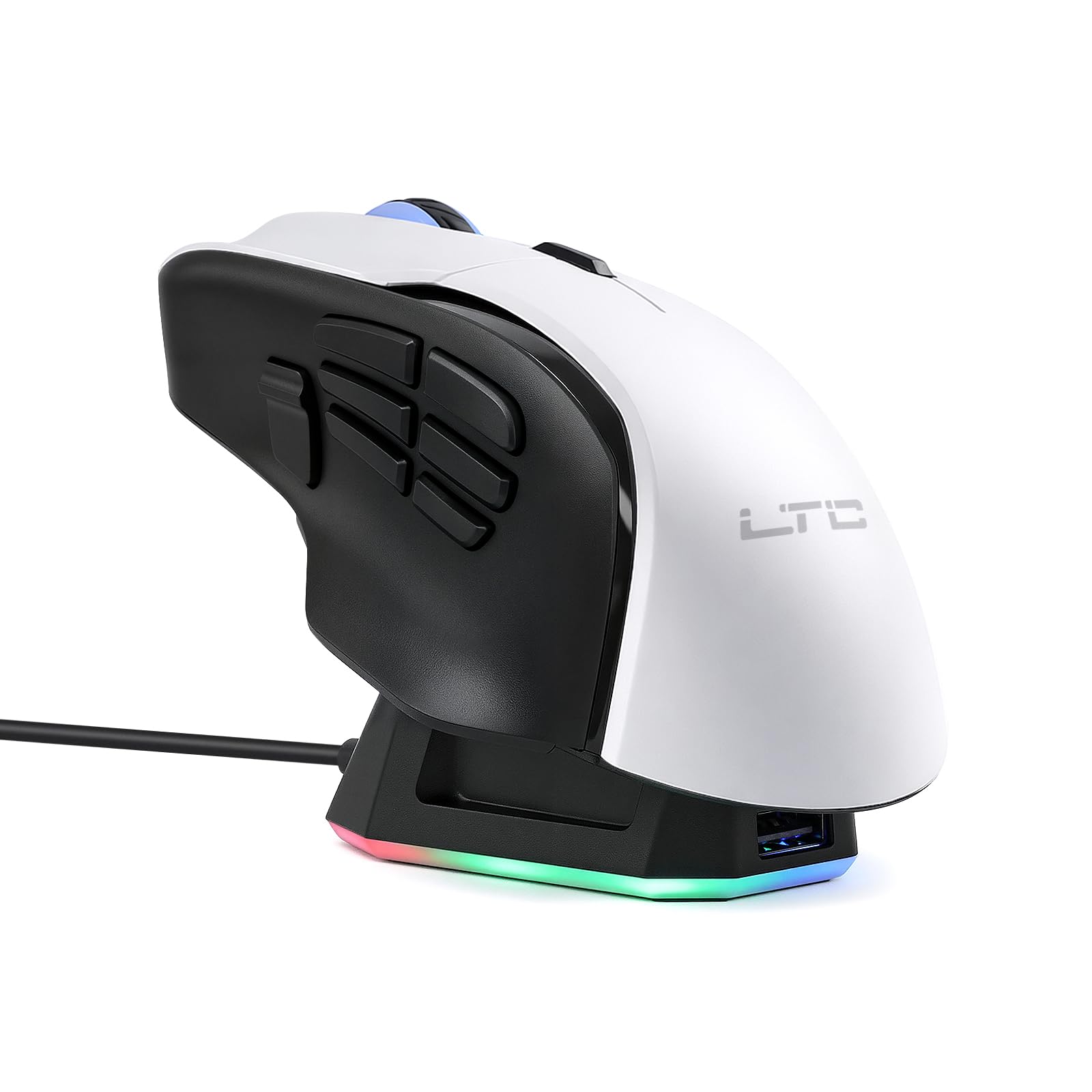
A drop-and-charge dock and a light 102-gram shell for a compact MMO starter setup.
The MKM071 makes its case on two things: a charging dock you simply drop the mouse onto, and a light 102-gram body that is far easier to move than the wide, heavy Redragon options. Eleven programmable buttons, seven of them on the side, cover a manageable rotation, and save up to five custom profiles through the software. A PAW3311 sensor runs up to 12000 DPI with six levels, and the 1000Hz polling rate keeps the clicks responsive.
You avoid hunting for a cable because the dock tops up the 600mAh battery when you set the mouse down, keeping it ready for the next session without a mid-raid scramble. Tri-mode connectivity — 2.4GHz receiver, Bluetooth, or wired — lets you move between a desktop and a laptop easily. At 102 grams it is a full 73 grams lighter than the 175-gram Redragon M908, and its 12000 DPI ceiling is half the SOLAKAKA SM809 Pro’s 24000, so if you chase extreme sensitivity this is the more modest option.
Here is the honest part: this is the entry-level pick of the group, and the feedback reflects that. Responsiveness and value are the mixed notes — some players find it fine for the money, others feel it does not fully justify itself next to more established mice. It earns its place as a low-cost way to try a dock-charging, multi-button wireless layout, not as a match for the premium pick.
The draw: an RGB charging dock and a light 102-gram shell at the entry-level end, with 2.4GHz, Bluetooth, and wired all in one.
The honest limit: the button feel and overall responsiveness draw a mixed reception, so it is a starting point rather than a final answer.
Pick this if: you want to try a dock-charging MMO mouse without committing a lot, and a light shell suits your hand.
Step up if: crisp thumb buttons matter more to you than the dock.
Know the Specs
DPI (Dots Per Inch)
DPI is how far the cursor moves for each inch you slide the mouse. A higher number means a faster cursor at the same hand movement. For WoW, a very high ceiling mostly buys you headroom for fine-tuning; you will often run it lower for steady control. The numbers here range from the LTC MKM071’s 12000 up to the Razer Naga V3 Pro’s 50000, so there is plenty of range to match your sensitivity comfort.
Polling Rate and Sensor
Polling rate is how often the mouse reports its position to the computer, measured in Hz. A 1000Hz rate means it reports a thousand times a second, which reads as a smooth, lag-free cursor. The sensor is the chip that tracks the surface — for example the Pixart PAW3327 in the Redragon M908 or the Focus Pro 30K in the Razer Naga V2 HyperSpeed, which tracks on glass. Both specs together decide how stable the camera feels in a fight.
Programmable Buttons and Onboard Memory
Programmable buttons are keys you can remap to any game command. Onboard memory is storage inside the mouse that keeps your remaps and macros without needing software open. This matters when you move between computers or your driver updates unexpectedly. A mouse that uses browser-based setup, like the SOLAKAKA SM809 Pro writing directly to device memory, can plug into any machine and keep your layout.
Battery Life and Weight
Battery figures assume the RGB lighting is switched off; a lit-up mouse drains faster. Runtimes here stretch from the LTC MKM071’s 600mAh cell up to the Razer Naga V2 HyperSpeed’s 400 hours on Bluetooth. Weight matters for how the mouse feels in your hand daily: light shells around 102 grams move easily, while heavier options near 175 to 200 grams feel planted. Neither is better — a light shell suits a fingertip flick, a heavy one suits a planted palm grip.
Common Questions
How many side buttons do I really need for WoW?
Will a WoW gaming mouse work with my laptop or Mac?
Can I keep my macros saved between gaming sessions?
Do I need a wired or wireless mouse for raiding?
What does DPI actually change in World of Warcraft?
Is a heavier mouse better for MMO play?
How long will the battery last on a wireless MMO mouse?
Can I use Stream Deck features with an MMO mouse?
Do these mice work without installing software?
What is polling rate and does it matter in WoW?
The Bottom Line
For most players, the wow gaming mouse winner is the UtechSmart Venus Pro because its twelve angled thumb buttons keep a full hotbar under your fingertip and its 70-hour wireless runtime covers a heavy week of sessions. If battery freedom is everything to you, grab the Razer Naga V2 HyperSpeed with its 400-hour Bluetooth figure. And for a large hand that also streams, the Corsair Scimitar Elite Wireless SE is the one to reach for, thanks to its 33k DPI sensor and Stream Deck mapping.
How we choose
We do not accept paid placement. Every pick is matched to a real buyer and a real use-case; we do not hands-on test units.
Sources
Specifications: manufacturer listings and product documentation. Review insights: verified customer reviews, as of November 2026. Pricing: not shown on this page (it changes often); check the current price via the retailer link.
As an Amazon Associate, Tactical Gear Guy earns from qualifying purchases. This does not affect which products we feature.