Specs are compiled from manufacturer listings and verified buyer reviews and can change over time — please confirm the key details on the product page before buying.
Buying a Z-Wave hub that speaks to Alexa sounds simple until you learn the dirty secret of this category: Alexa almost never talks to the hub directly. It talks to the brand’s cloud, which talks to the hub, which talks to your light. A hub with thin Alexa integration means voice commands that lag, fail, or vanish entirely. That cloud hop is where voice commands pick up lag or fail outright.
This guide is built by comparing the manufacturers’ published specifications and the patterns across verified customer reviews, so you get each pick’s real strengths and trade-offs instead of marketing spin.
Below you get four hubs that genuinely speak Alexa, sorted by what each one does best, plus the protocol and range facts that decide which one belongs in your home. My goal is helping you buy the right z-wave hub for alexa on the first try.
Top Picks

How To Choose The Best z-wave hub for alexa
The wrong assumption most first-time buyers carry is that any hub advertising “Alexa compatible” will behave the same. It will not. Compatibility is a checkbox; the quality of the Alexa link is what you actually live with every time you say “Alexa, turn off the kitchen.”
Check the Alexa link before the spec sheet
A hub that runs routines on its own hardware keeps working when your router blinks — that is local processing, meaning the brain sits in your house instead of a distant server. Hubs that lean hard on a cloud skill go quiet the moment your internet does. If voice control is your main reason for buying, favor a hub that combines local automation with a solid Alexa skill.
Z-Wave Plus and the 800 Series radio
Z-Wave Plus is the newer generation of the Z-Wave radio, and it adds better range and pairing checks over the original. The 800 Series is the current Z-Wave chip generation and brings a Long Range mode plus steadier mesh behavior. For a hub you plan to keep for years, insist on a Z-Wave Plus or 800 Series radio.
Protocol count versus protocol depth
Running Z-Wave, Zigbee, Matter, Thread, Wi-Fi, Bluetooth and infrared from one box means fewer bridges cluttering your cabinet. But count alone says nothing about how well each one performs. Weigh how many of your existing devices need each protocol, then check whether that radio is the modern version — not just whether it exists.
Physical footprint and antennas
A hub you tuck behind the router needs to survive that corner. Units with dedicated external antennas, one for Z-Wave and one for Zigbee, are built to push signal through walls. Smaller pucks fit anywhere but rely on internal antennas, so placement matters more.
Side-by-Side Comparison
| Model | Best For | Z-Wave Radio | Other Protocols | Footprint | Amazon |
|---|---|---|---|---|---|
| Aeotec Smart Home Hub (SmartThings V3)★ Best Overall | Alexa-led homes with mixed brands | Z-Wave Plus (V3 model only) | Zigbee, Matter, Wi-Fi, Ethernet | 1.1 lb | Amazon |
| Hubitat Elevation C-8 Pro | Local control that survives an outage | Z-Wave 800 Series with Long Range | Zigbee 3.0, Matter 1.5, Bluetooth | 2.95 x 3.23 x 0.67 in | Amazon |
| Homey Pro (Early 2023) | One hub for nearly every radio | Z-Wave Plus | Zigbee, Matter, Thread, Wi-Fi, BLE, Infrared | 5.04 x 5.04 x 1.57 in | Amazon |
| Ezlo Plus Smart Home Hub | Mixing Z-Wave and Zigbee on a budget | Z-Wave (via MiOS platform) | Zigbee, Wi-Fi devices via Alexa/Google | Plug-in hub | Amazon |
Detailed Reviews
1. Aeotec Smart Home Hub (Works as a SmartThings Hub)
Our pick — 4.0+★ from 2,000+ verified ratings; the strongest balance of quality and price.
The hub whose SmartThings platform gives Alexa the deepest routing of the four
This is the pick for the household already talking to an Echo every day. The Aeotec hub runs on the SmartThings platform, which means Alexa support is baked into one of the largest smart-home ecosystems rather than bolted on late. You say the command, SmartThings routes it, and the light answers. That routing is the whole reason this sits at the top.
The radio menu is the widest in this group at its tier: Z-Wave Plus (noted as the V3 model only), Zigbee, Matter, Wi-Fi and wired Ethernet. Matter matters here because it lets newer bulbs and plugs join without a separate bridge. Setup runs through the SmartThings app on Android, iOS or iPadOS, and you can go wired or wireless — useful if your router sits in a metal cabinet where Wi-Fi sulks.
Where it earns patience is the setup experience. Owners describe both smooth installs and rough ones, so budget an evening rather than ten minutes. Connectivity reports split the same way. Weigh that against a 4.0+ star record across 2,000+ ratings and the picture is a hub most people get working and then stop thinking about — which is exactly what you want from infrastructure.
Where it pulls ahead
- Deep Alexa integration through the SmartThings platform, with Google Home alongside it
- Z-Wave Plus (V3 model), Zigbee and Matter from one box, so mixed-brand devices share a home
- Wired Ethernet or Wi-Fi setup, giving you a stable option when Wi-Fi placement is poor
- Many automations now run locally, so routines keep firing with less cloud waiting
The honest catch
- Setup divides owners — some breeze through, others fight pairing for an evening
- Connectivity experiences vary, so a weak spot in your home may need a repeater
- Z-Wave Plus is tied to the V3 model specifically, so confirm which version you receive
Buy this if: your home already leans on Alexa and you want one hub that speaks Z-Wave, Zigbee and Matter without a second bridge.
Think twice if: you want zero-setup plug-and-play and no troubleshooting evening.
2. Hubitat Elevation C-8 Pro Smart Home Hub
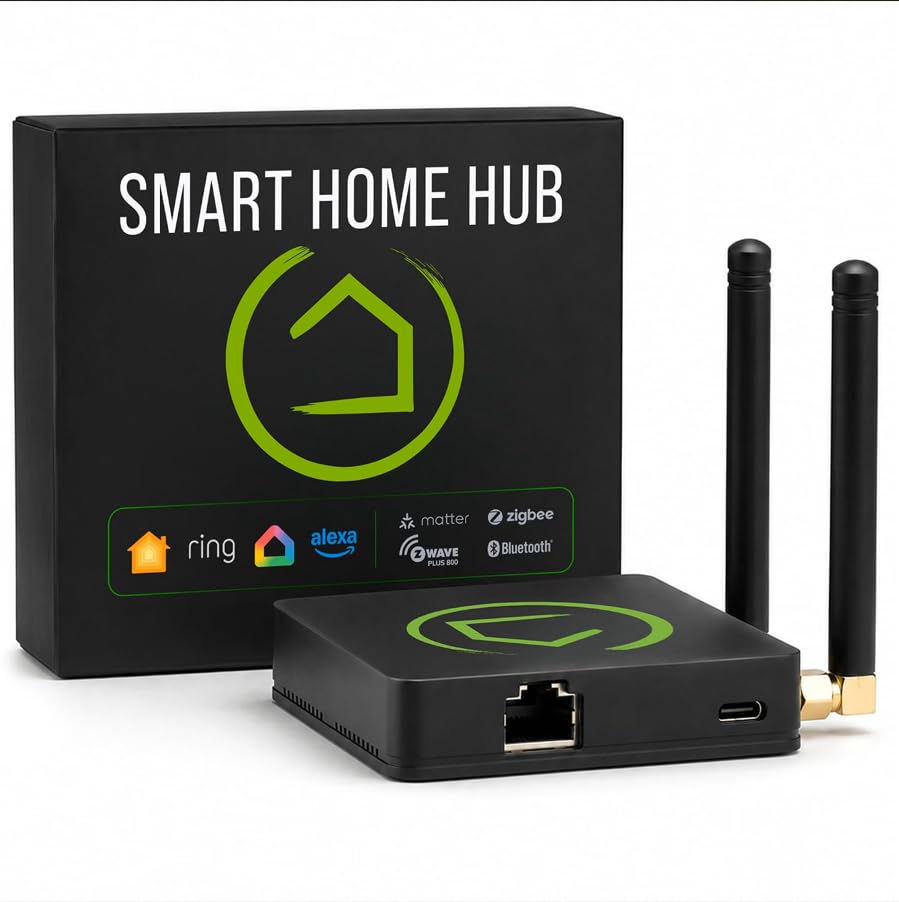
A 2.95 x 3.23 x 0.67-inch hub that keeps running automations when your internet drops
For anyone whose automations matter — door locks, thermostats, arrival routines — the C-8 Pro makes its case on one number: the automations run on the hub itself, not on a remote server. When your internet drops, the lights and locks keep obeying. That is local-first architecture: the rule engine lives on the hub, not a server.
Compare its footprint to the Homey Pro and the gap is real. The Hubitat measures 2.95 x 3.23 x 0.67 inches against the Homey Pro’s 5.04 x 5.04 x 1.57 inches, so this one tucks into a cabinet shelf far more easily. The radio list is serious too: Z-Wave 800 Series with Long Range, Zigbee 3.0, Matter 1.5 and Bluetooth, plus two dedicated external antennas — one for Z-Wave, one for Zigbee — to push signal through larger homes.
Alexa, Google Home and Apple HomeKit all connect, which is broader voice support than the Aeotec offers. The trade-off is temperament. This is a tinkerer’s hub: Rule Machine handles multi-condition logic, and the AI-assisted builder suggests routines from your connected devices, but the platform expects you to enjoy that. Households wanting a guided app will feel the learning curve.
What stands out: no recurring subscription for full platform functionality, and continuous updates since 2018 have expanded compatibility without new hardware. Add support for 1,000+ devices across 100+ brands and it scales with a growing setup.
The trade to accept: it rewards the DIY builder and frustrates the plug-and-play buyer. Its 3.5+ star standing over 400+ ratings reflects a capable product with a steeper door than most.
Reach for this if: you want automations that run without a cloud account and you do not mind building rules by hand.
Look elsewhere if: you want a guided wizard and no rule engine to learn.
3. Homey Pro (Early 2023) Smart Home Hub

Seven radios in one box for homes mixing Hue, Aqara, Sonos and Z-Wave locks
If your device drawer holds Sonos, Philips Hue, Aqara, Shelly, Yale and a stray Somfy blind, this is the hub built for that mess. Homey Pro carries Wi-Fi, Zigbee, Z-Wave Plus, Infrared, BLE, Matter and Thread — seven technologies — and processes them all on the device itself. Your data stays on the hub, and cloud dependency is kept to a minimum.
That weight has a physical cost. At 1.43 pounds it is heavier than the Aeotec hub’s 1.1 pounds, and its 5.04 x 5.04 x 1.57 inch body is bulkier than the Hubitat’s compact frame. That bulk buys the widest protocol list here and support for more than 50,000 devices from over 1,000 brands. Voice covers Siri, Alexa and Google Home, so Alexa users are not locked out of the party.
Automation happens in Homey Flow — build Flows in the phone app or Advanced Flows in the web app — and owners consistently describe it as approachable for both simple and complex routines. Energy tooling rounds it out: view real-time and historical usage, schedule around solar generation or dynamic tariffs. The honest note is that this is the priciest pick here, and its 3.5+ star record over 100+ ratings suggests some buyers expect more polish for the outlay.
Best-fit household: multi-brand homes where one hub replacing three bridges is worth real money and real shelf space.
Fair warning: Thread is here, but check Homey’s own compatibility list before assuming an unusual device pairs.
Pick this one when: consolidating every radio under a single app matters more than saving cabinet space.
Pass if: you run a simple Z-Wave-only setup where a lighter hub does the job.
4. Ezlo Plus Smart Home Hub
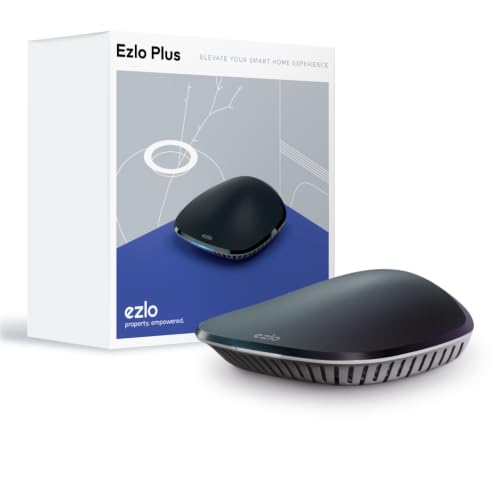
A budget route to Z-Wave and Zigbee, provided you can tolerate dropped connections
The Ezlo Plus pitches itself at the homeowner who wants both Z-Wave and Zigbee control without a premium hub bill. It runs on MiOS by Ezlo, the company’s own operating system, and it works with Alexa and Google Assistant for voice control of bulbs, locks, sensors and cameras. Setup is the bright spot — connect it to your router with the included Ethernet cable and follow the in-app guide.
Getting started is what this hub does best, and owners say so. The friction shows up afterward. The thing that surfaces most in owner feedback is connectivity: devices that refuse to join and an Alexa link that drops, which is precisely the failure a voice-first buyer cannot tolerate. Reset behavior also draws complaints, which points to a hub that wants patience.
What it does offer is real protocol reach — Z-Wave, Zigbee, and Wi-Fi devices routed through your Alexa or Google Assistant — plus an offer to integrate devices that will not connect. For a small, forgiving setup where you can troubleshoot, that is a fair entry point. For a whole-house build, it is the wrong foundation.
The appealing part: genuine Z-Wave plus Zigbee coverage and voice control through Alexa or Google Assistant, with an in-app guided setup that gets most people started.
The part to know: connectivity reliability is the recurring theme, so treat this as a starter hub for a handful of devices, not the brain of a large home.
A reasonable start if: you are testing Z-Wave on a small setup and want Zigbee in the same box.
Better to skip if: Alexa voice control is your main use — dropping integration undercuts the whole point.
Know the Specs
Z-Wave Plus and 800 Series
Z-Wave is the radio that lets your hub talk to locks, switches and sensors. Z-Wave Plus is the newer generation with better range and pairing checks. The 800 Series is the current chip generation and adds a Long Range mode plus steadier mesh behavior. A hub with an 800 Series radio, like the Hubitat C-8 Pro, generally handles a busy house with fewer dead spots than an older radio. If your home is large or device-dense, this is the spec to check first.
Local processing versus cloud
Local processing means the hub runs your automations on its own hardware instead of a remote server. The practical effect: your lights and locks keep working when the internet drops. Cloud-dependent hubs lean on the brand’s servers, so an outage stalls your routines. If you want routines that survive a dropped connection, favor local-first hubs such as the Hubitat or Homey Pro.
Alexa integration depth
“Works with Alexa” can mean a deep native integration or a thin skill that connects slowly. A hub tied to a large platform, like the Aeotec on SmartThings, usually gets smoother voice routing than one relying on a lesser skill. When voice control is your reason for buying, this depth matters more than the protocol count on the box.
Antennas and range
Range is a radio and antenna story, not a square-footage claim. The Hubitat C-8 Pro uses two dedicated external antennas, one for Z-Wave and one for Zigbee, to push signal in larger homes. The Homey Pro houses its seven radios inside a 5.04 x 5.04 x 1.57 inch body with internal antennas. Either way, placement near a central wall beats hiding the hub in a metal cabinet.
Common Questions
Does Alexa talk directly to a Z-Wave hub, or does it go through the cloud?
Will the Aeotec hub work with my existing Z-Wave locks?
What happens to my automations if the internet goes down?
Is Z-Wave Plus different from the 800 Series?
Do I need a subscription for any of these hubs?
How many devices can a Homey Pro manage?
Can I use the Hubitat with Apple HomeKit and Alexa at the same time?
Does a Z-Wave hub also need Zigbee to be useful?
What is the difference between the Aeotec and Hubitat for a first-time buyer?
The Bottom Line
For most homes already running an Echo, the winning z-wave hub for alexa is the Aeotec Smart Home Hub because its SmartThings platform carries the deepest Alexa routing alongside Z-Wave Plus, Zigbee and Matter in one box. If keeping the lights on when the internet dies is your priority, grab the Hubitat Elevation C-8 Pro for local processing and its 800 Series radio. And for a multi-brand home stacked with Hue, Aqara and Sonos, the Homey Pro is the one to reach for with its seven radios. Whichever you pick, check the Alexa skill quality before the spec sheet — that link is what you live with daily.
How we choose
We do not accept paid placement. Every pick is matched to a real buyer and a real use-case; we do not hands-on test units.
Sources
Specifications: manufacturer listings and product documentation. Review insights: verified customer reviews, as of November 2026. Pricing: not shown on this page (it changes often); check the current price via the retailer link.
As an Amazon Associate, Tactical Gear Guy earns from qualifying purchases. This does not affect which products we feature.