Specs are compiled from manufacturer listings and verified buyer reviews and can change over time — please confirm the key details on the product page before buying.
You want to write notes by hand and still have them searchable, shareable, and backed up — without lugging five paper notebooks to every lecture. The trick is knowing which tablet actually feels right under your hand, because a stylus that skips or lags turns a three-hour lecture into a fight. This guide separates the tablets that genuinely feel like pen on paper from the ones that just look like it in the photos, and it sorts every pick by what it does best for a student’s day.
This guide is built by comparing the manufacturers’ published specifications and the patterns across verified customer reviews, so you get each pick’s real strengths and trade-offs instead of marketing spin.
A note-taking tablet is a long-term purchase, so the display tech, pen feel, and file handling matter more than any single headline feature. Below you’ll find the writing tablets for students that hold up best once the novelty wears off and the real coursework starts.
Top Picks

How To Choose The Best Writing Tablets for Students
The first decision you have to make is what kind of screen you want, because that single choice shapes everything else about how you’ll use the tablet. A digital notebook with a paper-like notepad captures your handwriting with a pen and sends it to an app. A full tablet with a screen shows you your notes right on the glass. Those are two different tools, and picking the wrong one for your study habits is the most common regret.
Decide between a notepad that syncs and a screen you write on directly
A sync-style notebook like the HUION Note or the Ophaya smart pen set lets you write on real paper with a real ballpoint nib, then pushes a digital copy to your phone. The upside is the writing feel is genuinely paper because it is paper. The trade-off is you’ll always be glancing between your page and your phone to review digital edits. A screen-based tablet gives you your notes on the device itself and handles PDF markup directly, which is why most students end up there for heavy reading.
Check pressure sensitivity before you judge the pen
Pressure levels describe how many gradations of pen pressure the tablet can detect. A stylus with higher levels — 8,192 versus 4,096, for example — can register finer differences between a light stroke and a firm one, so your shading and line-weight look more natural. For plain note-taking this mostly affects how forgiving the pen feels. For sketching and diagrams, it changes the output noticeably.
Weigh battery life against how long your study day runs
E Ink tablets sip power and can run for weeks between charges. LCD and NXTPAPER panels need topping up more often, though they give you color, video, and app store access. If your schedule is back-to-back lectures with no outlet in sight, an e-paper notepad with an all-day battery is easier to live with. If you need video calls and streaming, you’ll want the screen tablet and a charger in your bag.
Look closely at file formats and offline storage
The last thing you want is notes trapped in a format you can’t open. Check that handwritten text can convert to a Word document or PDF, that you can search it by keyword later, and that the device saves your work even when the connection drops. Offline storage is genuinely useful in a basement lecture hall with no signal.
Side-by-Side Comparison
| Model | Best For | Display | Battery / Runtime | Pressure Levels | Amazon |
|---|---|---|---|---|---|
| TCL NXTPAPER 11 Gen 2★ Best Overall | All-around study + streaming | 11″ 2K (1920 x 1200) | 8000mAh | 4096 | Amazon |
| HUION NoteBest Paper Feel | Paper feel, low price | No screen (A5 paper) | 18 hours | — | Amazon |
| Ophaya 3-in-1 Smart PenBest for Lecture Capture | Audio-synced lecture notes | No screen (PU notebook) | — | — | Amazon |
| BOOX Go Color 7 Gen II | Pocketable color reading | 7″ Kaleido 3 (1680 x 1264) | 2,300mAh | — | Amazon |
| Kloudnote Slim 10.3″ | Thin e-paper note-taking | 10.3″ E Ink (1404×1872, 227ppi) | 3000mAh (up to 40 hours) | — | Amazon |
| Like-New Kindle Scribe (32GB) | Reading + writing in one | 10.2″ 300 ppi front-lit | Months reading / weeks writing | — | Amazon |
| reMarkable Paper Pure | Distraction-free focus | 10.3″ E Ink | — | — | Amazon |
| XPPen Magic Note Pad | Sketching + notes in color | 10.95″ X-Paper (1920 x 1200) | — | 16384 | Amazon |
| Penstar eNote 2 | Heavy coursework + AI tools | 10.3″ HD (2480×1860, 300 ppi) | 6500mAh (up to 4 weeks) | 8192 | Amazon |
Detailed Reviews
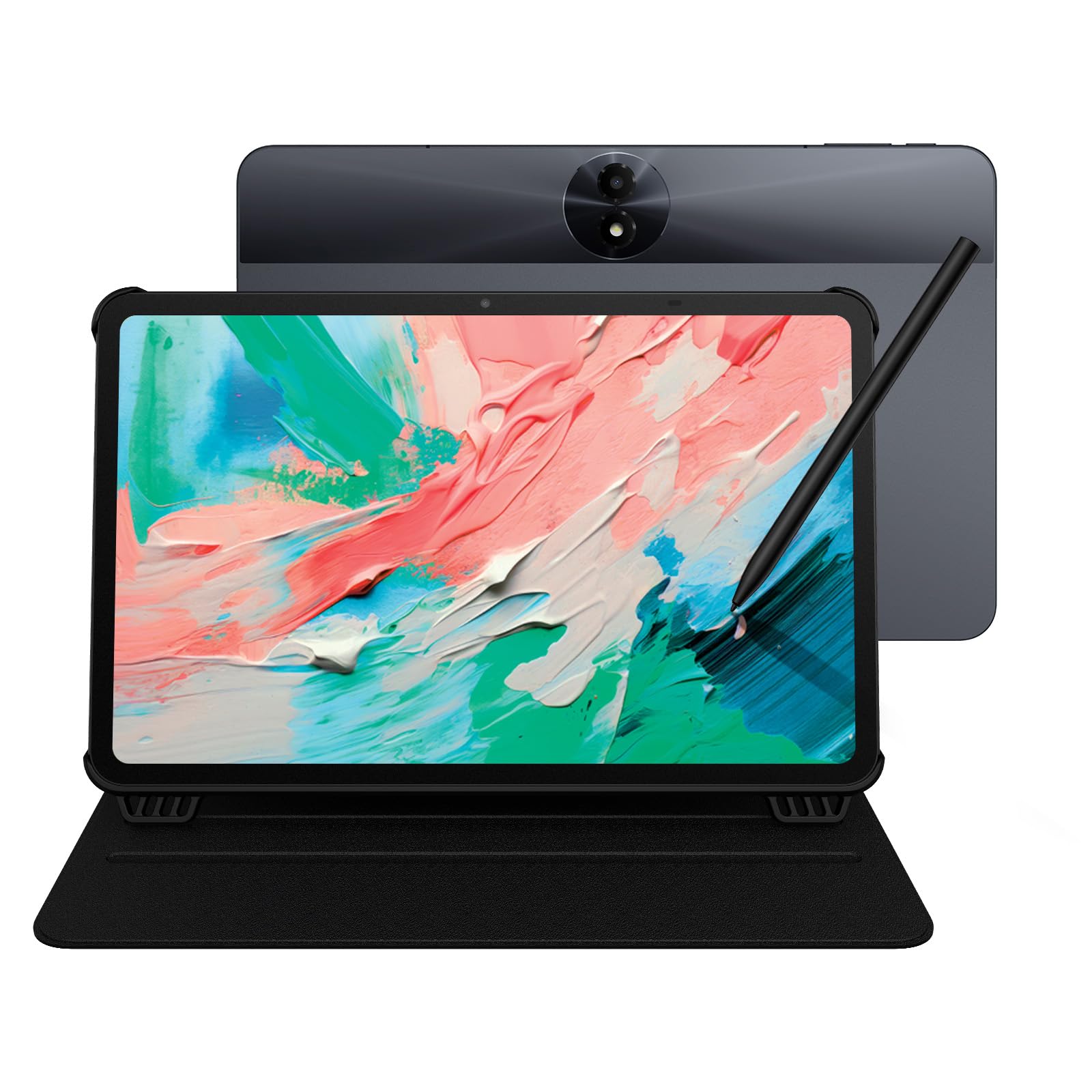
1. TCL NXTPAPER 11 Gen 2 Android Tablet
Our pick — 4.0+★ from 350+ verified ratings; the strongest balance of quality and price.
The one tablet that writes, reads, and streams without making you choose.
Most students don’t get to carry three devices, so the pick that wins is the one that does the most jobs well. This 11-inch model pairs a 2K display (1920 x 1200 pixels) with a 4,096-pressure-level T-PEN stylus, which means you can take notes, sketch a diagram, and then watch a lecture recording on the same screen. The matte anti-glare finish is what buyers keep coming back to — it reads like paper under a dorm light instead of bouncing a lamp glare into your eyes.
What wins people over is the overall build and usability, and the value holds up once you’re using it daily. The NXTPAPER 4.0 panel carries TÜV-certified low blue light and DC dimming, so the screen doesn’t flicker during a long study block, and the Eye Care Assistant nudges brightness and color temperature as your room changes. Switching into Ink Paper Mode turns it into an e-reader-style surface for extended reading, while Color Paper Mode softens saturation for art and comics. It’s the closest thing here to a single-device answer for notes, reading, and video.
The battery is an 8000mAh cell with 18W PD fast charging, and it also supports reverse charging to top up your phone or earbuds mid-day. Storage runs 128GB built-in and expands to 1TB, with a MediaTek Helio G80 processor and 8GB + 8GB RAM running Android 15. The honest catch is that performance is tuned for everyday tasks rather than heavy gaming or dense multitasking, so treat it as a study tool that also entertains, not the other way around. At 0.29 inches thick and 1.1 lbs, it slips into a tote without tugging your shoulder.
Where it pulls ahead
- Three display modes in Settings — Regular, Ink Paper, and Color Paper — let you shift from streaming to reading to sketching without a second device.
- The 4,096-level T-PEN gives you fine control for note-taking and diagrams, and the matte coating keeps reflections down.
- 8000mAh battery plus 18W PD charging, with reverse charging for your phone.
- 128GB storage expandable to 1TB, so lecture recordings and PDFs don’t crowd you out.
Worth knowing first
- The MediaTek Helio G80 is built for daily use, not demanding apps, so heavy multitasking can feel the strain.
- The 60Hz refresh rate is standard for reading and notes but won’t impress anyone expecting a gaming panel.
- You’ll want to keep the included flip cover on; the metal body resists bumps but the glass still needs care.
Reach for this if: you want one screen for note-taking, PDF reading, and the occasional lecture video, and you’d rather not juggle devices.
Think twice if: your study load leans on heavy apps or gaming, where the Helio G80 will feel like the ceiling.
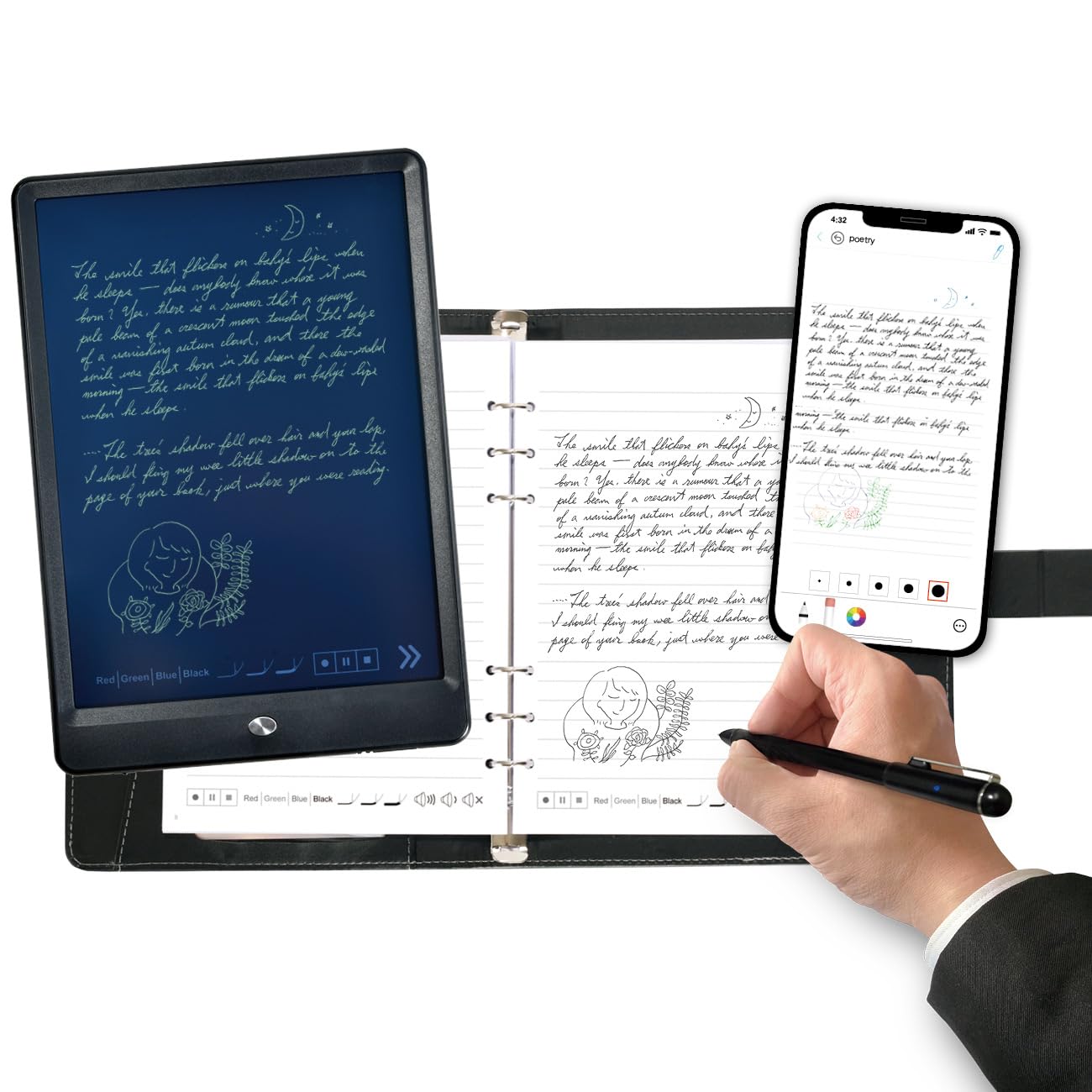
2. HUION Note Digital Notebook with Real-Time & Offline Sync
Real paper under a real pen, with a digital copy that follows you home.
If your handwriting only looks right when a ballpoint hits actual paper, this is the pick built around that instinct. You write on a standard A5 notepad (50 pages included) with a pen, and the Huion Note app captures every stroke as vector lines and pushes it to your phone or tablet over Bluetooth 5.0. The active surface area is 7.35×5.5 inches, and the whole thing measures 9.5 inches long by 7 inches wide — compact enough to sit beside a laptop on a lecture-hall desk.
The audio recording is the sleeper feature for students. Record a lecture while you write, then tap a note later to jump back to the matching audio — you get the context back without scrubbing through a two-hour file. Notes can be merged, split, or moved into groups inside the app, and you can highlight key ideas after class. You can also swap the inner pages for the included panel, plug into a PC, and use it as a drawing tablet.
What’s openly mixed is the writing performance for drawing specifically — this is a note-taker first, and detailed artwork is not its strength. Bluetooth pairing is generally quick but can wobble, and the app takes a little learning. Battery life runs 18 hours of use with roughly 30 days of standby, which covers a week of classes easily. It weighs 433 grams, so it disappears into a backpack.
Note-taker’s value: the tactile paper writing plus audio-synced notes is a combination the all-glass tablets here can’t replicate, and the included refills keep it running.
Set your expectation: treat it as a note and meeting tool rather than an art tablet — the drawing crowd on this one is split.
Best matched to: students who think best with a pen on a real page and want a searchable, shareable backup without buying a full tablet.
Look elsewhere if: you need on-screen notes, color, or serious sketching.
3. Ophaya 3-in-1 Smart Writing Pen Digital Notebook
Turn a spoken lecture into searchable text and linked audio, page by page.
This is the kit to buy when your notes only earn their keep once they’re typed, searchable, and tied to what the professor actually said. The bundle packs a smart pen, a 60-sheet PU notebook, a writing board, four ballpoint refills, two pen nibs, and a USB cable. Handwriting recognition (OCR) converts your pages into digital text you can share as a Word document, and the pen records audio while you write so a click on a note jumps you back to the matching moment.
Versatility earns the most praise here — people are using it for meetings, class, and study sessions with the same kit. Each unit measures 11.42 x 9.92 x 1.77 inches and weighs 2.4 pounds, which is on the bulky side for a notebook but comes with a sturdy aluminum enclosure. Notes can be searched by keyword, tag, or timestamp, and files export as PDF, Word, PNG, GIF, or MP4. Multiple PDF and PNG files can be combined before you share them.
Where it trips up is the software side. Some buyers find functionality and app value inconsistent, and the features are spread across formats — so you’ll want to spend a session learning the app before a big exam week. Offline storage is a real safety net when the Wi-Fi drops: write and save, then let it upload once you reconnect. It needs Android 6.0 or iOS 11 as a minimum, so an older phone may need a check first.
Underrated strength: the OCR-plus-audio pairing is genuinely how you’d want to study — read your converted notes, then hear the exact sentence they came from.
Fair warning: the app is where the experience lives or dies, and the polish is not yet on the level of a native note app.
Made for: students in lecture-heavy courses who need their handwritten pages turned into text documents and tied to recorded audio.
Not ideal for: anyone who wants a polished, single-app experience or who rarely converts notes to digital text.
4. BOOX Tablet Go Color 7 Gen II E Ink Tablet

A color E Ink reader you can hold in one hand and keep in a coat pocket.
Reading beats writing for this one, so if your study day is 70% textbooks and 30% margin notes, it earns its place. The 7-inch Kaleido 3 screen displays 4,096 colors, and resolution runs 1680 x 1264 — that’s 300 ppi in black-and-white and 150 ppi in color. Text comes out crisp enough for long reads, and the warm-and-cold front light lets you dial the tone to your room. It weighs about 195 grams and measures 6.1 x 5.4 x 0.25 inches, so it goes wherever you go.
It runs Android 13 with 4GB of RAM and 64GB of storage, and you can install third-party apps, which opens up your school reading apps and PDF viewers. The hardware has page-turn buttons, a microSD slot, and a USB-C port that also takes OTG or a headphone jack. The G-sensor rotates the screen automatically when you turn it. Note one compatibility rule before you buy: it supports an active stylus, the InkSense, which is not included in the box — an older EMR stylus will not work here.
The catch with color E Ink is the technology itself, and the vendor is upfront that this is a trait, not a defect: the screen is naturally darker and grayer than an LCD, so colors look muted. That’s the honest trade-off of a paper-like panel. Battery is a 2,300mAh cell, and ghosting can be tuned with different refresh modes. The screen earns mixed feedback here — some read its resolution as excellent, others want it brighter and sharper.
Why it suits a student bag
- 7-inch Kaleido 3 panel at 300 ppi black-and-white is genuinely sharp for textbook pages.
- Android 13 with Google Play access means your school reading apps come along.
- About 195 g and a quarter-inch thin — you will forget it’s in your bag.
The genuine compromises
- Color E Ink is naturally darker than an LCD; expect muted color, and use the front light for reading.
- The stylus is a separate purchase — the one that works here is not in the box.
- 2,300mAh is modest, so plan a nightly charge with regular app use.
Best for: heavy readers who want color covers and highlights on a paper-like screen in a pocketable size.
Not the pick if: you need a large canvas for writing pages of notes every day.
5. Kloudnote Slim 10.3″ Digital Notebook

A big e-paper canvas in a frame thin enough to slide into a folder.
The Kloudnote Slim is built for the student who wants a proper writing surface without the weight of a full tablet. It measures 5.3mm thick and weighs 390 grams, and the 10.3-inch E Ink screen runs 1404×1872 at 227 ppi. A 1.8GHz A55 quad-core processor with 2GB of RAM and 64GB of storage handles notes and reads, so it serves as both a reading tablet and a writing tablet.
Battery is a 3000mAh lithium-ion cell rated for up to 40 hours of work time. The software adds OCR and ASR (handwriting and speech recognition), document encryption, reading annotations, to-do items, recording, and one-click screen projection. It has its own AppStore plus the option to sideload apps by importing them.
Data protection is handled through Kloudnote’s cloud with 500M of free space, and it also supports Microsoft OneDrive, Dropbox, and Baidu Network Disk. This is a newer product and the software is still being updated in steps, so expect features to arrive over time rather than all at once. If you need a mature, fully-settled app ecosystem on day one, that’s the honest fit gap. If you’d rather have a large, thin, focused writing slate, this delivers that.
What stands out: the 10.3-inch paper-like canvas paired with 5.3mm thinness and up to 40 hours of work time is a study-friendly combination.
One caution: it’s a newer release with the software still evolving, so confirm the app you depend on is available before you rely on it.
Pick this if: you want a wide e-paper writing surface you can slide into a case with almost no bulk.
Say no if: you need a fully mature app ecosystem on day one.
6. Like-New Amazon Kindle Scribe (32GB) with Premium Pen

The one you can read a whole textbook on, then write in the margins.
Functionality is what carries this pick — the Kindle Scribe does reading, writing, and document markup in a single purpose-built device with no notifications or social feeds to pull you away. The 10.2-inch glare-free, 300 ppi front-lit display works indoors and out, so you can read outside between classes without a glare fight. The Premium Pen needs no setup or charging, and Active Canvas creates space for notes right on the book’s page when you start writing.
The writing experience earns genuine praise for feeling like pen on paper, which is why so many students use it for work notes and margin annotations on PDFs. You can import documents and PDFs with Send to Kindle, then mark them up page by page. Built-in AI tools convert messy handwriting into readable font, summarize your notes, and adjust length and tone — useful when you need to study from your own scribbles. It’s a refurbished unit, tested and certified to look and work like new, and it carries the same limited warranty as a new device.
Battery life is the one honest split: read for months or write for weeks on a charge, which is fine for most schedules but depends on how heavily you write. Responsiveness is another point where opinions split — it handles notes well, but it isn’t the fastest-feeling screen here, so don’t expect instant page turns like an LCD. Storage is 32GB, enough for a heavy semester of PDFs but worth checking against your reading list.
What makes it a study device
- 10.2-inch 300 ppi front-lit display with a paper-like writing feel.
- Import and mark up PDFs with Send to Kindle, then note in the margins with Active Canvas.
- Built-in AI tools summarize notes and clean up handwriting.
What it won’t do
- No color and no app store — this is a focused reading and writing tool.
- Page responsiveness is slower than an LCD tablet.
- 32GB fills fast if you store large scanned PDFs.
Best if: you read long PDFs and textbooks and want to write margin notes directly on the page.
Skip if: you need color media, browser apps, or fast page transitions.
7. reMarkable Paper Pure Digital Notebook with Marker

A screen built to disappear so your notes, not apps, get the attention.
Your pen stroke lands right where you expect it, because digital ink appears in just 21 ms (milliseconds — thousandths of a second) on the third-generation 10.3-inch display. That is faster than the blink of an eye, so your handwriting keeps up with your hand. The black-and-white panel is whiter with more contrast than earlier versions, so text stays crisp in daylight, and the whole thing weighs 360 grams (about 12.7 oz) — light enough to hold one-handed in a lecture. Dozens of note templates, a deliberately uncluttered screen, and simple navigation all point at one job: letting your thoughts flow without interruption.
Build quality is what earns trust here. The tablet feels solid in the hand, and writing on it stays close to the paper feeling. You can edit and improve ideas, turn handwritten notes into text, and organize everything with tags and folders. The reMarkable apps and plugins pull in web articles, documents, and PDFs from Google Drive, Dropbox, and Microsoft Word, and you can share notes straight from the tablet via email.
It deliberately leaves out the app store and browser. If you get pulled into scrolling, that is the feature — nothing to open but your notes. If you need a browser or a specific school app, that is the limit, and you should look elsewhere. It runs the reMarkable OS (the tablet’s own operating system) over Wi-Fi only, so plan on a sync habit rather than a push notification workflow. The honest question is if you want a focus device or a full tablet — this one is unapologetically the former.
Its reason to exist: the 21 ms ink response and high-contrast 10.3-inch display make writing feel immediate, and the distraction-free system keeps you on task.
Be clear-eyed: no app store and no browser means the school app you rely on may not be available.
Who it’s for: students who lose focus on busy tablets and want a writing-first device that stays out of the way.
Who should pass: anyone who needs third-party school apps or color.
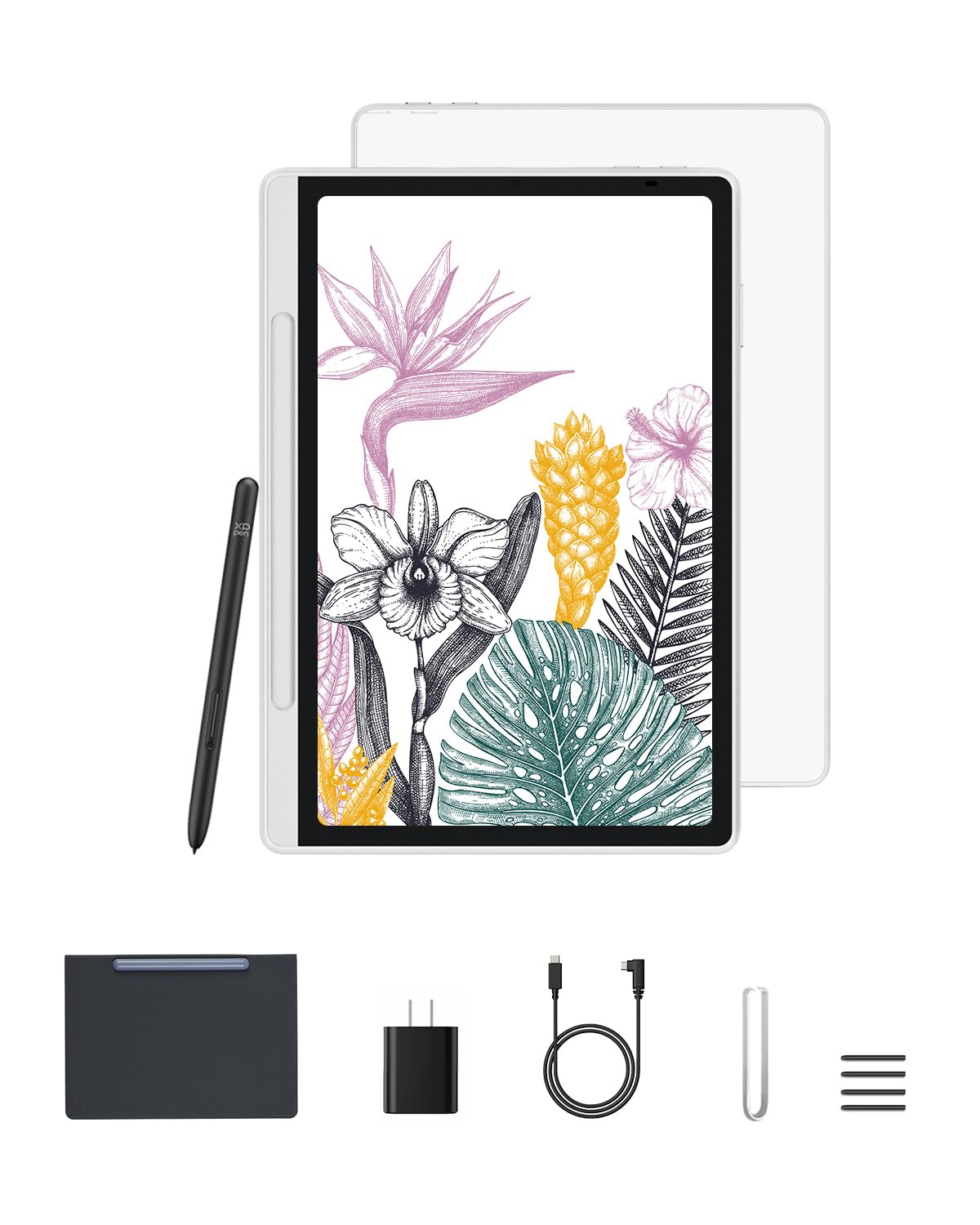
8. XPPen 10.95″ Standalone Drawing Tablet Magic Note Pad
Pressure sensitivity at 16,384 levels, on a tablet that’s ready the second you grab it.
For a design or architecture student, the pen is the story. The X3 Pro battery-free Pencil 2 reads 16,384 pressure levels, so a light stroke and a pressed stroke produce genuinely different line weight — that’s the difference between a sketch that looks mechanical and one that looks drawn. The 10.95-inch X-Paper display uses AG nano-etching to create paper-like texture and friction, which is why writing and sketching feel natural rather than slick.
The 90Hz refresh rate keeps line transitions smooth while you draw, and the panel shows 16.7 million colors in Natural Mode, so your references and color work aren’t muted. TÜV-certified low blue light and anti-glare help during long sessions. Three modes — Natural for notes, Light Color for sketching, and black-and-white for reading — let the same device shift jobs. It’s pre-installed with the XPPen Notes app, which is free for life, and it runs Android 14 so you can pull extra apps from Google Play.
At 7mm thick and 495g, it’s easy to carry, and the battery-free stylus is always ready. One thing worth knowing: the listing lists the item weight at 1.61 kg in the specs while the description says 495g, so confirm the shipped weight for your version if carry weight is critical. Responsiveness draws mixed feedback, so give it a hands-on test if you sketch fast.
Where the pen wins
- 16,384 pressure levels give you fine control over line weight and shading.
- 10.95-inch AG nano-etched surface provides real paper texture and friction.
- 90Hz refresh and 16.7 million colors in Natural Mode suit color work and PDFs.
Small print to read
- Weight is listed inconsistently between the description and the specifications — check before you rely on it for carry.
- Responsiveness gets mixed reviews, so a fast sketching workflow may want a test first.
- Running Android 14 and Google Play means app management is on you, not pre-configured.
Right for: art, design, and engineering students whose coursework blends note-taking with sketching and color work.
Wrong for: students who want a narrow note-only tool or who mainly read PDFs.
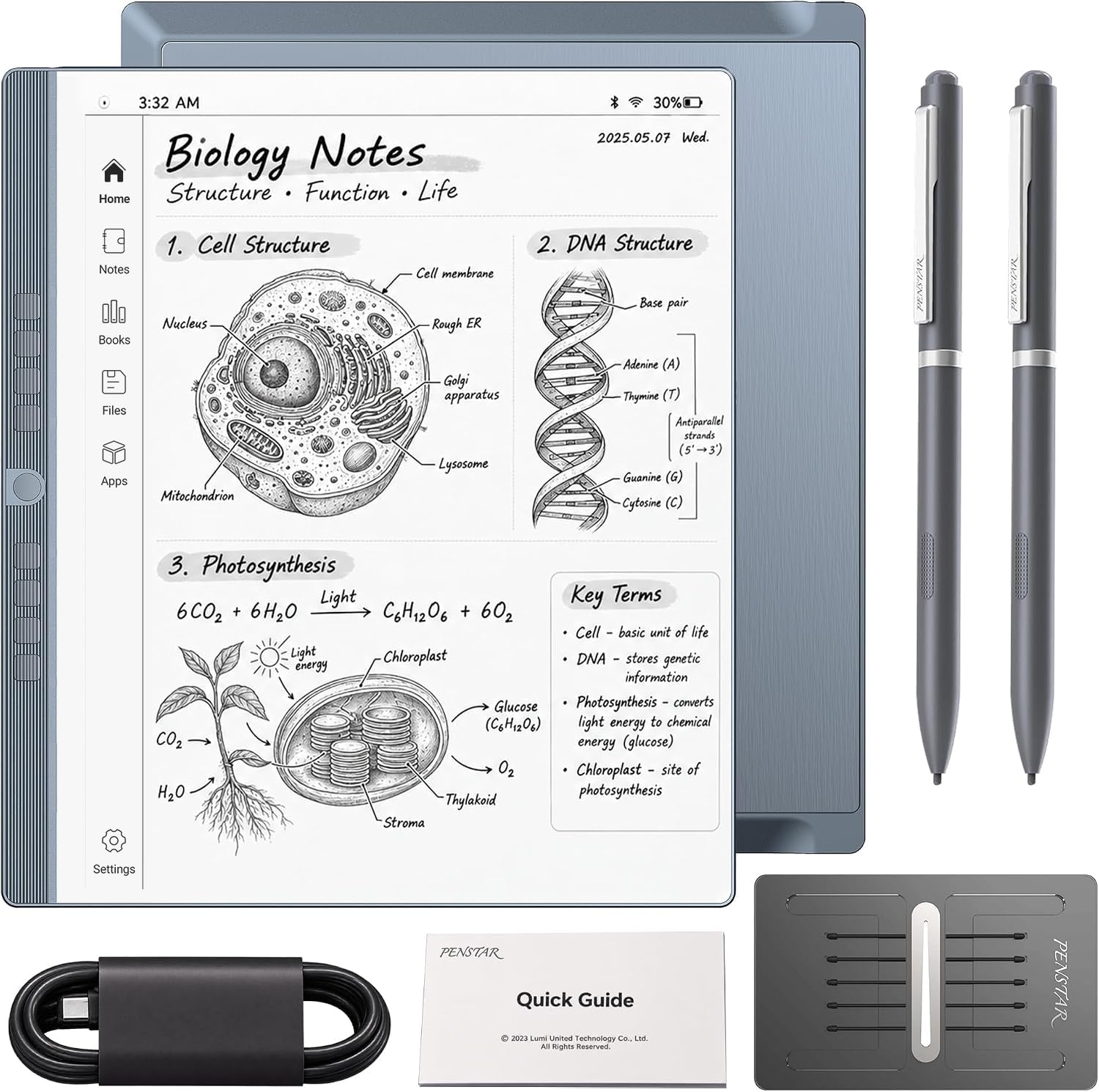
9. Penstar eNote 2 E-Ink Digital Notebook with Pen
A 300 ppi paper screen with the storage and pen control to carry a whole semester.
Storage and screen clarity are what define this pick — 128GB of ROM and a 10.3-inch HD paper-like screen at 2480×1860 (300 ppi) is a serious canvas for scanned readings and dense notation. The 8,192-level pressure-sensitive stylus needs no charging and aligns nearly perfectly with your strokes. Nine customizable buttons give you quick shortcuts, and the panel is built with fewer layers to cut the haze that usually dulls e-ink, so whites look cleaner and black text reads closer to a printed page.
The study software is where it earns the heavier price. Split the books onto two screens to read and take notes at the same time, and let the AI voice-to-text convert speech into text during a lecture. It also turns handwriting into typed text, summarizes your notes, and sorts documents into folders and tags. The hardware is an octa-core chip with 4GB of RAM, 128GB of ROM, and Android 14, and it supports over 35 file formats, including PDF, EPUB, MOBI, DOCX, and PPTX.
Battery is a 6500mAh cell rated for up to 4 weeks, and the bundle includes two B5 pens with spare nibs, a leather folio, and a charging cable. The honest split is responsiveness — the writing feel earns praise, while the speed and pen behavior draw mixed feedback, so a laggy unit isn’t unheard of. Check yours early and lean on the warranty if the pen misbehaves.
The heavy-lifting case
- 128GB storage and 4GB RAM handle a full semester of PDFs and notes.
- 8,192 pressure levels and 300 ppi screen give precise, clear handwriting.
- Split-screen reading plus AI voice-to-text is a real study aid, not a gimmick.
Before you commit
- Speed and pen behavior are the recurring mixed points — test early and use the warranty if it lags.
- It’s a bigger investment, so it suits students who’ll genuinely use the AI and split-screen tools.
- E Ink refresh means page transitions won’t feel like an LCD.
Best suited to: students juggling heavy reading and note-taking who want storage and AI tools in one paper-like device.
Consider a pass if: you want a simple, no-frills note-taker and won’t use the split-screen or AI features.
Know the Specs
Pressure levels
Pressure levels measure how many degrees of pen pressure the tablet can detect. More levels — 8,192 or 16,384 — let the pen register finer differences between a light stroke and a firm one, so handwriting and shading look more natural. For plain note-taking, a lower count like 4,096 still feels good. The difference shows up when you sketch, letter, or shade.
E Ink vs LCD and NXTPAPER
E Ink displays reflect light like paper rather than shining it at you, which makes them easy on the eyes for long reading and lets them run for weeks on a small battery. The trade-off is they look grayer and refresh slower. LCD and NXTPAPER-style panels are brighter and in color, more responsive, and better for video, but they need charging more often. Neither is better — one suits reading, the other suits a mixed day.
Handwriting recognition (OCR)
OCR stands for optical character recognition — it reads your handwritten page and converts it into typed, searchable text. That means you can search a semester of notes by keyword instead of flipping pages. Accuracy varies with handwriting style, so expect to review the converted text. Some devices pair OCR with audio recording so you can jump from a word to the moment it was spoken.
Battery, stylus, and storage
Battery specs come in two forms: milliamp-hours (mAh), which is the size of the cell, and runtime, which is how the maker says you’ll actually use it. A battery-free stylus never needs charging, which removes a daily chore. Storage in gigabytes (GB) holds your PDFs and recordings; a 32GB device suits a heavy reading list, while 128GB or expandable storage is safer if you save lecture recordings.
Common Questions
Can I use my own stylus on these writing tablets?
Do I need Wi-Fi to take notes on an e-paper notepad?
Is an E Ink tablet better than an LCD tablet for studying?
How accurate is handwriting-to-text conversion on these devices?
What’s the difference between 8,192 and 16,384 pressure levels?
Can these tablets read and mark up PDFs from my course?
How long does the battery actually last on an e-paper writing tablet?
Can I use a writing tablet with Google Meet or Zoom for online classes?
Is a refurbished Kindle Scribe a safe buy for a student?
Do these tablets work with third-party apps like OneNote or Google Drive?
The Bottom Line
For most students, the writing tablets for students winner is the TCL NXTPAPER 11 Gen 2, because it covers note-taking with its 4,096-level T-PEN, extended reading in Ink Paper Mode, and video calls through the same 11-inch 2K screen. If your handwriting only feels right on real paper, the HUION Note gives you an A5 pad and an 18-hour battery with a searchable digital copy. And for sketch-heavy coursework, the XPPen Magic Note Pad is the one to reach for, with 16,384 pressure levels and a paper-textured display.
One last thing before you decide: the TCL NXTPAPER sits at 4.0+ stars, and the Ophaya 3-in-1 set carries more ratings — but the TCL’s higher score is what keeps it in the top spot. If your budget leans tighter and you mostly read rather than write, the HUION Note quietly does the most for the least, and it is the pick to hand a first-year student who just wants to stop losing notes.
How we choose
We do not accept paid placement. Every pick is matched to a real buyer and a real use-case; we do not hands-on test units.
Sources
Specifications: manufacturer listings and product documentation. Review insights: verified customer reviews, as of November 2026. Pricing: not shown on this page (it changes often); check the current price via the retailer link.
As an Amazon Associate, Tactical Gear Guy earns from qualifying purchases. This does not affect which products we feature.