Specs are compiled from manufacturer listings and verified buyer reviews and can change over time — please confirm the key details on the product page before buying.
Your Elite Series 2 is a serious controller, and the dock under it should not be the weak link. A good Elite Series 2 dock seats the controller on its four battery contacts, tops it up in 2-3 hours, and replaces a tangle of cables with one spot on your desk. This guide covers three docks that actually fit the Elite Series 2, with the real trade-offs spelled out so you pick the one that matches how you play.
This guide is built by comparing the manufacturers’ published specifications and the patterns across verified customer reviews, so you get each pick’s real strengths and trade-offs instead of marketing spin.
Below you’ll find what separates a dock that lasts from one that wobbles, plus the exact battery contacts, amperage and fit details that decide whether your Elite Series 2 charges cleanly. Every pick here is a genuine Xbox Elite Series 2 Charging Dock option, checked for controller compatibility before it earned a spot.
Top Picks

How To Choose The Best Xbox Elite Series 2 Charging Dock
The Elite Series 2 is not a standard Xbox controller, and that single fact rules out most cheap docks. Its rechargeable battery sits behind a plate with four contact terminals in the center. A dock only works if its pins reach those four contacts, so a stand made for a plain Xbox One pad will sit there and do nothing. Confirm the listing names Elite Series 2 or Elite Series 2 Core before you buy.
Match the dock to your battery plate
A dock built for the Elite Series 2 either has a cradle cut for that controller or ships with a drop-in adapter that seats on the battery compartment. Magnetic docks pull the controller into the right spot so the pins land where they should. If a dock relies on you eyeballing the alignment every time, expect to nudge it more often.
Check the power feed, not just the dock
The dock itself is only half the charging circuit — the USB adapter feeding it matters too. One of the docks here recommends a 5V/2A USB wall adapter and warns that a weak port causes slow or intermittent charging. Others are happier plugged into your console’s own USB port. Look at what the listing asks for and make sure you have it before you set the dock up.
Decide how much desk clutter you want to solve
Some docks are a single charging cradle. Others add a headset hook, extra USB ports, or RGB lighting. If your headset already lives on a hook and your cables are managed, keep it simple. If your desk is a pile of controllers and headphones, a dock with a headset stand and passthrough USB ports earns its footprint.
Side-by-Side Comparison
| Model | Best For | Amperage | Controllers at Once | Stand / Extras | Amazon |
|---|---|---|---|---|---|
| JDGPOKOO Charger Station with RGB Headphone Stand★ Best Overall | Clearing a messy desk in one go | 2.4 A | 1 Xbox controller | RGB headset stand plus 2 USB ports | Amazon |
| HEATFUN 2-Port LED Charging Dock | Mixed-console households | 1.5 A | 2 controllers | 2 removable USB-C adapters | Amazon |
| OSTROGEAR Magnetic Charger Stand | Elite Series 2 owners who want a clean cradle | 3 A | 1 Elite Series 2 controller | Non-slip display base plus USB-C cable | Amazon |
Detailed Reviews
1. Controller Charger with RGB Headphone Stand
Our pick — 4.0+★ from 250+ verified ratings; the strongest balance of quality and price.
One dock that swallows the controller, the headset, and two loose cables at once
The slot for your Elite Series 2 is cut into the base of a headset stand, so the controller and your headphones share one small footprint on the desk. Charging runs through a built-in smart chip rated to cut off on overcharge, overheat, or a short circuit — the kind of protection that matters when the controller sits on the cradle overnight. A full top-up takes the 2-3 hours the maker quotes.
What makes this the pick with the most real-world polish is the little things. The light bar glows blue while the controller is charging and switches to green once the battery passes 80%, so you can tell at a glance whether you’re good to grab it. Press the button and the headset stand cycles through 7 RGB lighting modes to set the mood. Two extra USB ports mean you can park a keyboard, a mouse, or a second device right there instead of hunting behind the TV.
Here’s the catch worth knowing before you buy. The base has a reputation for feeling like light plastic, and the build is the one thing buyers push back on — treat the stand as a desk ornament you handle gently rather than something to toss in a bag. It also wants a 5V/2.4A feed, so the maker recommends powering it from your computer or console’s USB port to get every feature working. Charge your controller strictly with the four-contact battery plate — the dock will not talk to a battery without those four terminals.
What earns its spot
- Charging cradle and headset stand share one base, so the desk stays tidier
- 2-3 hour charge with smart-chip protection against overcharge and heat
- 7 RGB modes to set the lighting you like with one button
- Two extra USB ports for a keyboard, mouse, or charging another device
- Light flips from blue to green past 80% so you never guess the battery level
What to weigh first
- Light plastic base wants careful handling rather than rough treatment
- Needs a 5V/2.4A feed — a weak USB port can leave features short
- Charges the controller with the four-contact plate only, not other batteries
Best for: the player whose desk is a tangle of headset cable, controller cable, and a spare mouse — this one station collects all of it.
Worth a moment’s thought: if you want a dock you can knock around without a second look, the plastic shell here asks for a gentler hand.
2. Controller Charging Dock for Switch Pro
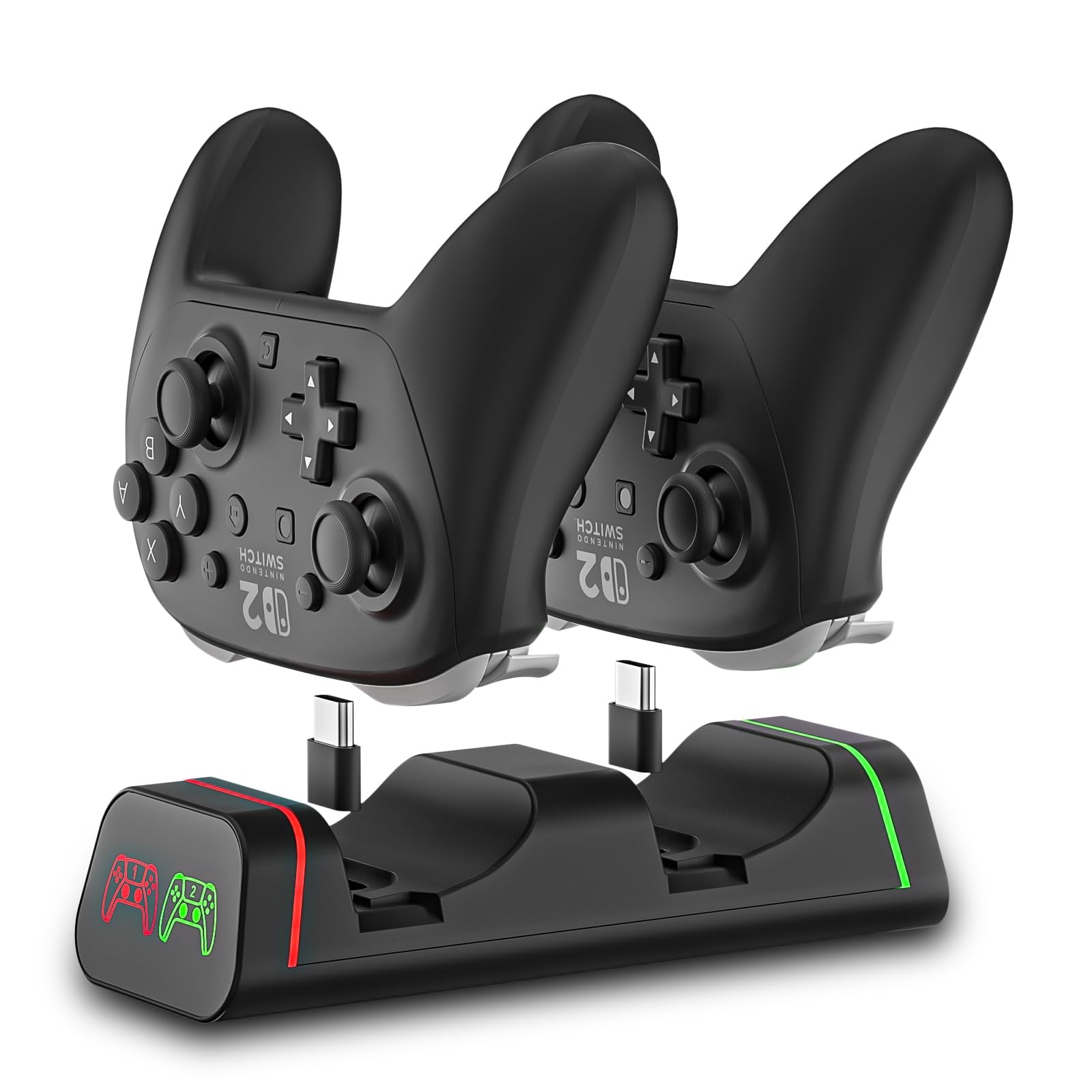
One dock for the whole shelf of controllers, if your shelf is the right shape
Two charging bays sit side by side here, and each one takes a removable USB-C adapter that seats on the battery compartment so you can drop the controller straight in. The dock lists itself as fitting Switch Pro, Switch 2 Pro, PS5, Xbox Series X|S, and Elite Series 2 — the widest reach of the three. The part that wins people over is reliability: the Switch Pro side in particular gets the most praise, and the electronics hold up as a steady daily dock rather than a novelty.
The power number is where this one parts ways with the OSTROGEAR below. This dock is rated 1.5 A, and the OSTROGEAR lists 3 A — in plain terms, the OSTROGEAR draws a stronger charging current, so if a fast top-up is your priority, that is the one to look at. Here the maker instead wants you to feed it a 5V/2A USB wall adapter (not included) for stable charging. A low-power USB port can leave the controllers charging slowly or cutting in and out.
Read the compatibility line twice before you buy, because this is where the dock gets picky. PowerA, Luna, and other third-party pro controllers are not supported — only the first-party pads listed above. Even within the supported group, fit gets mixed reactions, and the base isn’t the sturdiest thing on the market; set it on a flat, stable shelf rather than somewhere it can get bumped. If your household mixes a Switch and an Xbox under one TV, the flexibility here is worth the caution.
Two at a time: charging two controllers in one bay-pair setup is genuinely handy when a Switch Pro pad and an Elite Series 2 both need juice before a session.
Feed it properly: a 5V/2A adapter is the difference between smooth charging and the intermittent cut-outs the maker warns about.
The right desk for it: a mixed-console house where a Switch Pro and an Xbox controller need a shared home.
Pass it by if: you own a PowerA or other third-party pro controller — this dock does not speak to those.
3. Charging Station Dock for Xbox Elite Series 2
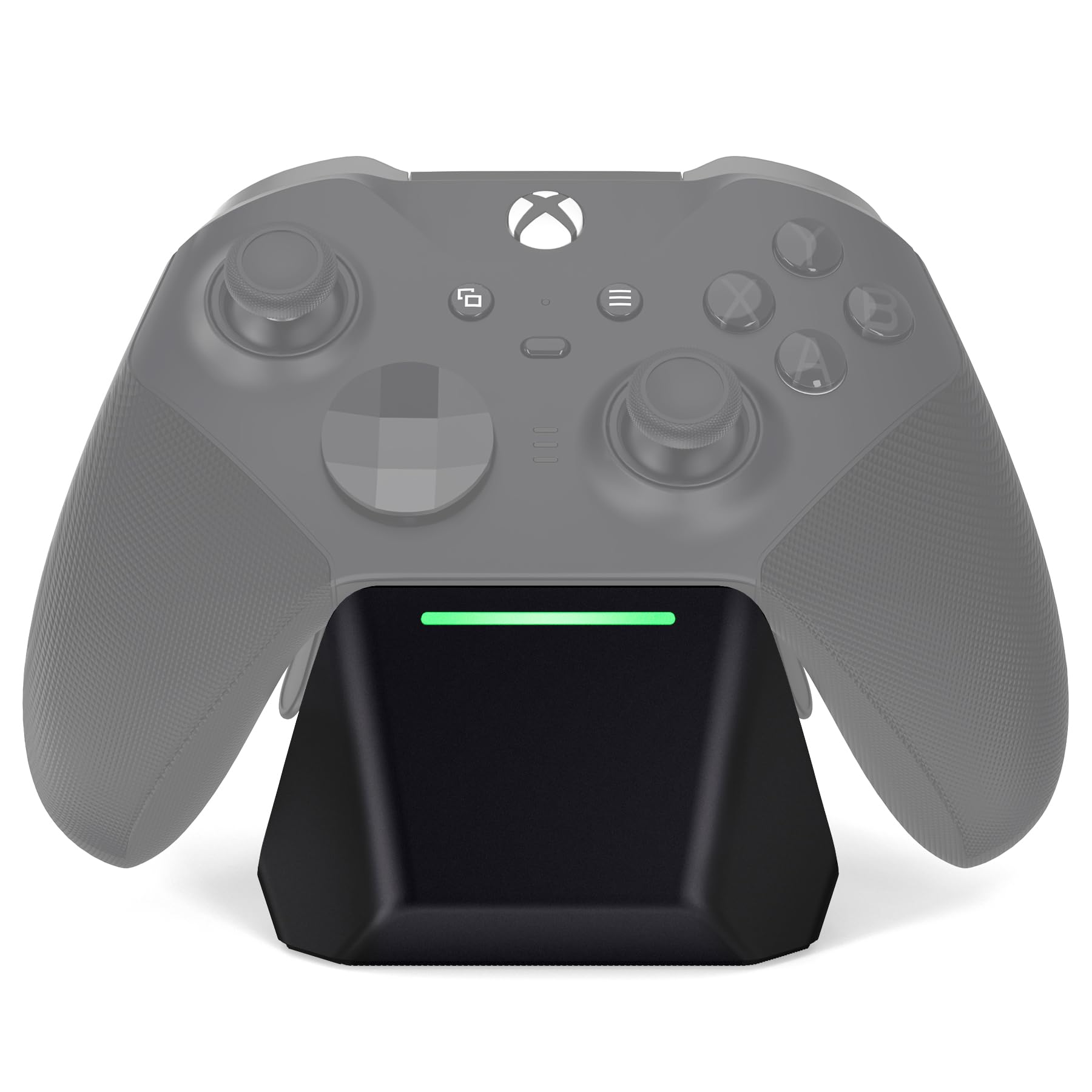
Built for exactly one controller, and it does that one job without fuss
This stand is cut for the Elite Series 2 and Elite Series 2 Core (Model 1797) and nothing else — no adapter, no guesswork about which pad fits. Built-in magnets pull the controller into place so the charging pins meet the battery plate precisely, and you can leave your back paddles on while it charges. Drop it in, walk away.
The charging performance is the top of the list for a reason. At 3 A it tops the JDGPOKOO’s 2.4 A, and beats the HEATFUN’s 1.5 A — so on the raw amperage number this is the strongest charger of the three, in a body you can leave sitting flat on the desk. The charger shuts itself off once the battery is full rather than trickling power into it all night. An LED flips color while charging and goes solid green when done, and a non-slip rubber base keeps the whole stand planted.
What you give up is flexibility. One controller, one slot — no headset stand, no spare USB ports, no second bay. If you juggle several controllers, the HEATFUN’s two bays fit that life better. The build itself earns praise for feeling solid, and the included 3.28FT/1M USB-C cable means you can power it without buying anything extra. It also weighs in at 198 g, light enough to move around the desk without being flimsy.
Where it shines: the magnetic pull lines the pins up on contact, so the dock is doing its job the moment the controller settles in — no fiddling to seat it.
The limit to weigh: it is a single-controller cradle, so it can’t double as a charging hub for the rest of your pads.
Pick it for: the Elite Series 2 owner who wants one tidy spot, magnetic alignment, and a charge that stops itself at full.
Not the fit if: you also need a Switch or PS5 controller charged from the same stand.
Know the Specs
Amperage and charge current
Amperage is the amount of electrical current the dock draws, measured in amps (A). A dock with a higher amperage rating pushes more current into the battery, which can mean a quicker top-up while the controller sits there. The listings here range from 1.5 A to 3 A. Amperage is only useful if the USB adapter feeding the dock can supply it, so check what power source the listing recommends.
The four-contact battery plate
The Elite Series 2 battery compartment has four contact terminals in the center. A charging dock’s pins need to touch those four terminals to send power to the battery. Docks that rely on adapters seat the adapter on that compartment so the pins land correctly. If your controller’s battery lacks those four contacts, a dock built for the Elite Series 2 won’t charge it — check the battery plate before you pick.
Magnetic alignment and the base
Magnets inside a dock gently pull the controller into the correct position so the charging pins meet the battery contacts without you lining them up by eye. A non-slip rubber base keeps the whole stand from sliding while the controller sits on it. Together they cut the small nudges and misfires that interrupt charging and wear at the four contacts over time.
LED status indicators
An LED on the dock tells you the charging state — blue or red while charging, green once the battery reaches full. The JDGPOKOO turns green at an 80% threshold rather than waiting for 100%, aiming to protect the battery’s long-term life. The indicator is a convenience, not a requirement, but it saves you lifting the controller off the cradle to check whether it’s ready.
Common Questions
Will this dock charge my standard Xbox One controller, or only the Elite Series 2?
Does the Elite Series 2 need its back paddles removed to charge on these docks?
What USB adapter do I need to power these charging docks?
Why won’t my dock charge if I use a low-power USB port?
Are these docks safe to leave the controller on overnight?
Will a HEATFUN dock charge my PowerA or other third-party pro controller?
What does the green light on the dock actually mean?
Can I charge two controllers at once, or just one?
Do I need to remove a protective case or back shell before docking?
Can these docks also charge my phone or headset?
The Bottom Line
For most Elite Series 2 owners, the xbox elite series 2 charging dock that earns the top spot is the JDGPOKOO Charger Station — it clears the whole desk by housing the headset, the controller, and two USB devices on one base. If you want the cleanest single-cradle experience with magnetic alignment and an automatic shut-off at full, the OSTROGEAR Magnetic Stand is the one to reach for. And if your household keeps a Switch Pro and an Xbox controller side by side, the dual-bay HEATFUN dock is your fit. Pick by what’s actually on your desk — one Elite Series 2, a mixed-console shelf, or a headset too — and check the compatibility list before you buy.
How we choose
We do not accept paid placement. Every pick is matched to a real buyer and a real use-case; we do not hands-on test units.
Sources
Specifications: manufacturer listings and product documentation. Review insights: verified customer reviews, as of November 2026. Pricing: not shown on this page (it changes often); check the current price via the retailer link.
As an Amazon Associate, Tactical Gear Guy earns from qualifying purchases. This does not affect which products we feature.