Specs are compiled from manufacturer listings and verified buyer reviews and can change over time — please confirm the key details on the product page before buying.
Buying a controller for your Xbox Series X or Series S is mostly about one question: will the sticks still track straight in a year? The picks below all work with the current Xbox consoles, and they range from a plain official pad to modular tournament hardware. If you just want the safe answer, the limited-edition DOOM pad at the top is the strongest all-rounder in this lineup.
This guide is built by comparing the manufacturers’ published specifications and the patterns across verified customer reviews, so you get each pick’s real strengths and trade-offs instead of marketing spin.
Nine controllers follow, sorted from the safest all-rounder to specialist tournament gear. Each one is checked for console compatibility first. Every pick here is a genuine Xbox Series X/S controller, so your choice depends on feel, buttons, and how much tinkering you enjoy.
Top Picks


How To Choose The Best Xbox Series X/S Controller
Check compatibility first, then work backwards. Every pad in this guide is listed as working with the Xbox Series X and/or Series S, but the connection method differs. Some use Xbox Wireless built into the console. Some ship their own 2.4GHz dongle (a small USB receiver that creates its own private wireless link). Some add Bluetooth for phones and tablets. Confirm which of those your setup supports before you fall for a shell design.
Sticks: Hall Effect versus standard potentiometer
Standard sticks use physical contact pads that wear down over time, which is what eventually produces drift — the cursor creeping on its own. Hall Effect sticks (magnetic sensors that never physically touch) are the fix, and several picks here use them or a TMR variant that GameSir and ASUS both describe as low-power and anti-drift. If you play a lot of hours, this is the single spec worth paying more for.
Polling rate and trigger travel
Polling rate is how many times per second the controller reports its position to the console, measured in Hz. A 1000Hz rate means a reading every millisecond, which shows up as tighter aiming in fast shooters. Trigger travel matters just as much — hair-trigger modes shorten the pull so your shot registers sooner, while full-travel triggers give you finer control in racing games.
Back buttons and remapping
Rear paddles let you keep your thumbs on the sticks while jumping or reloading. Some pads map them through a console app, others do it on a built-in screen. If you have never used back buttons before, start with a pad that offers them as an option rather than a requirement — they take a few sessions to get used to.
Side-by-Side Comparison
| Model | Best For | Buttons | Connectivity | Weight | Amazon |
|---|---|---|---|---|---|
| Xbox Wireless Controller DOOM | Collectors who still want a stock-feel pad | 9 | Xbox Wireless, Bluetooth, USB-C | 0.21 kg | Amazon |
| Xbox Wireless Controller – White | Households that want the plain, proven pad | 20 | Bluetooth | 1.2 pounds | Amazon |
| GameSir G7 Pro Wuchang Edition | Competitive play with a charging dock | 12 | 2.4GHz dongle, Bluetooth 5.3, USB-C | 9.6 ounces | Amazon |
| ASUS ROG Raikiri II | Long sessions and low-latency PC play | 10 | 2.4GHz RF, Bluetooth, USB-C | 9.6 ounces | Amazon |
| Nacon Revolution X Unlimited | Tinkerers who want 60+ tuning combinations | 14 | 2.4GHz RF, Bluetooth, USB-A wired | 230 g | Amazon |
| Turtle Beach Victrix Pro BFG Reloaded | Fighting-game players and module swappers | 10 | Bluetooth, USB-A, USB-C | 9.28 ounces | Amazon |
| Microsoft Xbox Core Wireless Controller 2-Pack | Two-player households | — | Xbox Wireless, Bluetooth | 1.6 pounds | Amazon |
Detailed Reviews
1. Xbox Wireless Controller DOOM
A themed pad that still behaves like the controller you already know.
Most themed controllers are a shell swap with nothing underneath. This one wears matte green armor plating with 3D silver helmet spikes and a sinister red thumbstick, yet the internals stay stock Xbox — which is exactly why it takes the top spot. You get the familiar sculpted shape, the same hybrid D-pad (a single cross that pivots for cleaner diagonal inputs), and Xbox Wireless plus Bluetooth for console, PC, and cloud play.
The build is what wins people over. The leather-like texture across the rubberized grips earns more praise than anything else on this pad, so it stays comfortable through long sessions. The Sentinel-alphabet ABXY buttons and orange left trigger give it a genuine one-of-a-kind look. It ships with the DOOM Slayer Executioner Skin downloadable content for the game, sold separately. The catch: 9 buttons is a leaner count than the fiddly tournament pads later in this list offer. There are no rear paddles or trigger stops here, so this is a look-and-feel purchase, not a competitive edge purchase. As owners put it across 600+ ratings, the design is the draw, and the 4.5+ star score backs that up.
Weight lands at 0.21 kg, which keeps it in stock-pad territory rather than the chunkier 13.12 ounces of the Carbon Black pad further down.
What earns the crown
- Genuine 3D helmet spikes and plated sheathing — it looks like nothing else on the shelf
- Leather-like rubberized grips give your palms real purchase during long sessions
- Xbox Wireless and Bluetooth cover console, PC, and cloud-enabled devices
- Includes Executioner Skin DLC for the game
Where it stays ordinary
- 9 buttons and no rear paddles — the stock layout, not a competitive one
- Limited-edition pricing draws mixed feelings on value
Reach for this if: you want a display-worthy pad that plays exactly like the standard Xbox layout with zero learning curve.
Look elsewhere if: you need trigger stops or mappable back buttons for ranked play.
2. Xbox Wireless Controller – White
The most-talked-about pad on this list, and the easiest recommendation for a shared living room.
This is the controller that has been in more Xbox households than any other pick here, and the sheer volume of feedback tells you it does the basics right. Textured grip on the shell keeps your hands planted, Bluetooth covers Windows 10 PCs and tablets alongside the console, and the white finish holds up visually. Microsoft claims up to twice the wireless range of previous Xbox One controllers, tested on an Xbox One S — useful if you sit back from the TV.
Stick drift and connection drops are the recurring gripes in the review pages, and they are worth knowing about before you buy rather than after. Treat this as a well-made mainstream pad rather than a lifelong one. The 20-button layout is broader than the DOOM edition’s 9, though the two share the same 6.91 x 5.61 x 2.76 inch footprint class.
Its real strength is availability of choice — you can grab it in colours beyond plain white, and it pairs with a Series X or Series S with no fuss.
The reason it sells: familiar shape, textured grip, Bluetooth pairing, and a wireless range the maker says doubles the older Xbox One pad.
What to know going in: drift and connectivity are the two most-discussed issues, so consider it a strong mainstream pick rather than a forever controller.
Safe bet for: a family console where one reliable white pad just needs to work every evening.
Worth a second look if: you have already worn out a standard Xbox pad and want magnetic sticks next time.
3. GameSir G7 Pro Controller
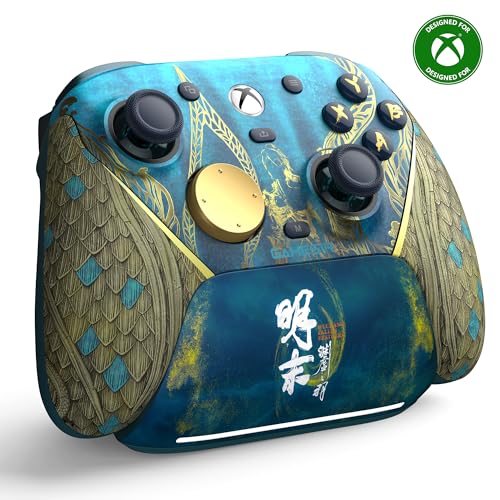
Magnetic sticks, a 1000Hz polling rate, and a dock that charges the moment you set it down.
If stick drift has already cost you a controller, this is the one to study. The G7 Pro uses GameSir’s Mag-Res TMR sticks — magnetic sensors that never physically rub, which is why they resist the wear that causes drift. The same Hall Effect approach carries over to the analog triggers, which use mechanical micro-switches for a tactile pull, plus a Hair Trigger Mode you activate by holding M+LT/RT to shorten the travel.
The 1000Hz polling rate means the pad reports its position to the console a thousand times a second, so aiming feels immediate rather than smoothed out. Four programmable buttons sit on the back. Power comes from a 1200mAh battery (a 1.2-amp-hour cell) and a smart charging station that starts topping up the moment you drop the controller in, with a built-in compartment for the wireless receiver.
Connections are split three ways: a 2.4G dongle for Xbox and PC, USB-C cable for the same, and Bluetooth 5.3 for Android. At 9.6 ounces it stays comfortable through long sessions, and it is one of the lighter full-featured pads here. The trade-off is a busier setup than a plug-and-play stock pad — you will want to read the button-mapping instructions before your first match.
Why competitive players lean in
- Mag-Res TMR sticks built to resist drift over time
- 1000Hz polling rate for near-instant input reporting
- Hair Trigger Mode shortens the pull for faster shots
- Charging dock holds the wireless receiver as well as the pad
Where it asks more of you
- More setup and mapping than a stock Xbox controller
- 4 programmable buttons take practice to use instinctively
The clear choice for: anyone who has thrown out a drifting pad and refuses to do it again.
The catch to accept: you are buying a configurable tool, not a grab-and-go pad.
4. ASUS ROG Raikiri II Xbox Wireless Gaming Controller
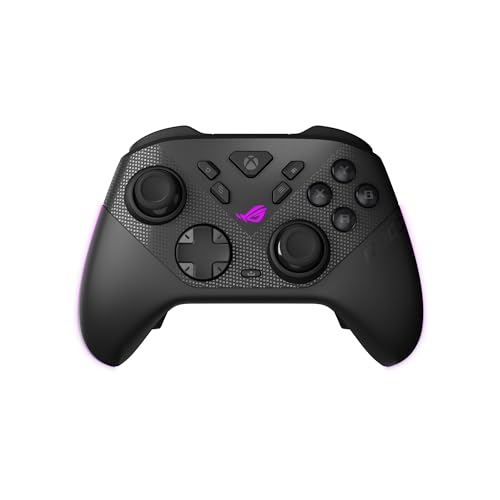
A travel case, a charging stand, and enough battery for a weekend without the cable.
Battery is the headline: ASUS quotes at least 30 hours of 2.4GHz wireless play per charge, measured with RGB lighting, audio, and vibration all off. Turn any of those back on and you will get less, so treat the figure as the ceiling rather than the norm. The 1000Hz polling rate applies in both PC wired and 2.4GHz wireless modes, with ROG SpeedNova handling the wireless side.
ASUS fits anti-drift TMR joysticks and claims they are more accurate while drawing less power than Hall Effect sticks. Four programmable rear buttons sit in an ergonomic layout, so extra actions land under your fingers without leaving the sticks. The dual-mode triggers switch between micro-switch short travel and TMR full travel. That means you can go from a snappy shooter pull to a linear racing squeeze without swapping pads. D-Pad, ABXY, bumpers, and rear buttons are all micro-switch for an instant click.
The package is genuinely complete: a portable protective case that lets you charge the controller while it is still inside, a charging stand, and two detachable joystick caps. The honest trade-off is connectivity — connection and disconnection problems are a common complaint in the review pages, so keep your receipt handy and your dongle unobstructed. A few buyers also describe the shell feel as flimsy compared to the price tier.
Battery math that matters: 30+ hours of 2.4GHz play with lighting and vibration off means you charge it weekly, not nightly.
The risk to weigh: connectivity complaints are frequent enough to plan around — test the wireless link thoroughly in your first week.
Built for: players who hate the cable and want a case-and-stand kit that works for both console and PC.
Hesitate if: a rock-solid wireless link matters more to you than trigger options.
5. Nacon Revolution X Unlimited Precision Wireless Controller

The pad for the player who treats a controller like a tuning project.
Magnetic Hall Effect sensors (magnetic parts that read stick movement without physical contact) run through both the joysticks and the triggers here. The whole point is that nothing has to be swapped to fight drift. Then the customization starts in earnest: a 4-way and a 6-way D-pad, three sets of weights, three sets of joystick heads (concave, convex, high-dome), two sets of joystick rings (medium and large), and a storage case to hold it all. That adds up to more than 60 combinations, so you can tune the feel to your own hands.
Six mappable shortcut buttons cover the back and side, and you can remap them through the Xbox and PC apps — including mapping PC keyboard keys to controller buttons. An LCD screen built into the pad handles mapping, programming, and audio source mixing on the fly. Four vibration motors (two in the handles, two in the triggers) give haptics a bit more reach than most pads. Nacon quotes 1ms wired and 2ms wireless latency, and bundles a charging station plus a 3-meter braided cable.
Ergonomics is where owners land most positively — comfortable in hand with dead zones that feel perfect from the start. The connectivity side is more of a coin flip, and stick drift still shows up in a minority of set-ups despite the magnetic hardware. One month of Xbox Game Pass Ultimate is included for new members.
What makes it a tinkerer’s pad
- Hall Effect joysticks and triggers from the factory
- 3 weights, 3 stick heads, 2 ring sizes, and two D-pad shapes in the box
- LCD screen for mapping without a PC or app
- Charging station and 3-meter braided cable included
What tinkering costs you
- Connectivity is inconsistent enough that some sets drop out
- So many parts means more to lose and more to learn
Perfect match for: the player who wants to swap stick domes and add weight to get the feel exactly right.
Not the one if: you want to unbox, pair, and play without opening a config menu.
6. Turtle Beach Victrix Pro BFG Reloaded
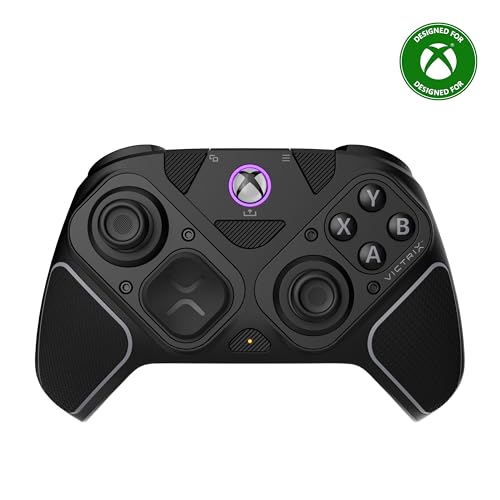
It ships with a fightpad module you can bolt on when you switch to a fighting game.
Three customizable modules, all with built-in Hall Effect technology, are the core idea. The headliner is the ergonomically enhanced 6-button fightpad module with Kailh microswitches — the six-face-button layout that fighting-game players grew up on. Alongside it you get 11 interchangeable components, 4 mappable quick-action buttons, and 5-stop Hall Effect clutch triggers with a hair-trigger mode.
There is a built-in 3.5mm audio jack with a lifetime subscription to Dolby Atmos, which is unusual at any tier. It connects wired or wirelessly, runs up to 20 hours per charge, and is officially licensed by Xbox. A carrying case and module tool are in the box, and the Victrix Control Hub companion app runs on both Xbox and PC for remapping.
At 9.28 ounces it is the lightest pick on this list, so it feels good in hand, and customization is the second thing everyone mentions. The recurring friction is the button layout. The extra fightpad buttons sit where some players expect a standard face, and trigger behavior gets mixed reactions even with the locks. If your main game is a shooter, the standard-layout pads earlier in this guide will feel more natural.
The modular advantage: 11 interchangeable components and three modules mean one pad covers fighting, racing, and standard play.
The learning curve: extra buttons in unfamiliar places take adjustment, and trigger feel divides opinion.
Best for: anyone who plays fighters seriously and wants that six-button layout built into a wireless Xbox pad.
Consider the simpler picks if: you only play shooters and want a clean face layout.
7. Xbox Core Wireless Controller 2-Pack

Two official pads in one box, which solves the couch-co-op problem in a single order.
Everything about this bundle is the standard Microsoft Core controller, doubled. Hybrid D-pad, textured grips on the triggers, bumpers, and back case, USB Type-C port, a 3.5mm stereo headset jack, and a Share button for screenshots and clips. Xbox Wireless connects to the console, and Bluetooth handles Windows 10 PCs, tablets, iOS, and Android — so both pads can hop between your Series X and a laptop.
Quality and value both land on the positive side of the review pages, helped by the built-in Microsoft warranty that covers both units as a pair. The bundle weighs 1.6 pounds total, and switch-device pairing makes it quick to move a controller from console to PC when someone wants to play elsewhere on the network.
The mixed part is functional longevity: while most buyers report smooth sailing, there are reports of a pad dying within a couple of weeks and occasional pairing trouble with a Series S. Buy it for the obvious math of two pads, and test both thoroughly while the warranty is fresh.
Why the bundle logic works
- Two official Core controllers with textured grips and hybrid D-pads
- Xbox Wireless plus Bluetooth across console, PC, and mobile
- Microsoft warranty covers the pair
What to check on arrival
- Pairing with a Series S is not always immediate
- Occasional early failures mean both pads deserve a test run
Right answer for: a two-player household or a gamer who keeps one pad on the console and one at the PC.
Skip if: you want a single pad with premium features rather than two standard ones.
8. XBOX Wireless Gaming Controller | Carbon Black
Hall Effect and TMR sticks
Standard sticks use contact pads that wear down and eventually drift. Hall Effect sticks use magnetic sensing with no physical contact, so there is nothing to wear out in the same way. TMR is a related magnetic approach that GameSir and ASUS both describe as low-power and anti-drift. If you have replaced a controller because of drift before, this is the spec to prioritize.
Connectivity types
Xbox Wireless is the console’s built-in link — no dongle needed. A 2.4GHz dongle creates its own private wireless connection, as on the GameSir and Nacon pads, and often adds range or stability. Bluetooth is the most portable option and reaches phones, tablets, and PCs. USB-C is the wired fallback and the lowest-latency route on most of these pads.
Trigger travel and hair-trigger mode
Full-travel triggers give you a long, gradual pull for racing throttle control. Hair-trigger mode shortens that pull to a click, so a shot registers the instant you tap. Several picks here switch between the two — the Nacon uses adjustable micro-switches, the Raikiri II has dual-mode triggers, and the GameSir activates it with a button hold.
Common Questions
Will an Xbox One controller work on an Xbox Series X or Series S?
How long does a wireless controller battery actually last?
What is stick drift and do Hall Effect sticks prevent it?
Do I need back buttons or paddles for Xbox gaming?
Can I plug a headset into these controllers?
Is a 1000Hz polling rate worth it on a console?
How do I remap buttons on an Xbox controller?
What range can I expect from a wireless Xbox controller?
Do these controllers work with PC as well as console?
Is a single premium controller better than a two-pack bundle?
The Bottom Line
For most people shopping for the best xbox series x/s controller, the DOOM: The Dark Ages Limited Edition is the pick. It plays exactly like the Xbox controller you already trust, and the leather-feel grips and 3D armor detailing make it the one you actually want to pick up. If drift is your reason for buying, grab the GameSir G7 Pro with its Mag-Res TMR sticks and charging dock. For fighting-game nights, reach for the Victrix Pro BFG Reloaded, because that six-button fightpad module changes what the pad can do.
One honest nudge: the white Xbox Wireless Controller carries the deepest track record here and the DOOM edition the highest score — both are safe calls if you want to stop reading and start playing.
How we choose
We do not accept paid placement. Every pick is matched to a real buyer and a real use-case; we do not hands-on test units.
Sources
Specifications: manufacturer listings and product documentation. Review insights: verified customer reviews, as of November 2026. Pricing: not shown on this page (it changes often); check the current price via the retailer link.
As an Amazon Associate, Tactical Gear Guy earns from qualifying purchases. This does not affect which products we feature.