Specs are compiled from manufacturer listings and verified buyer reviews and can change over time — please confirm the key details on the product page before buying.
Buying Xbox flight controls is really two decisions, not one. First, pick a stick or a yoke — a stick is the short upright handle you grip in one hand, while a yoke is the two-handled wheel that mimics an airliner’s steering column. Second, decide how much of a cockpit you actually want on your desk. Answer those two and every pick below is officially licensed to fly in Microsoft Flight Simulator on Xbox.
This guide is built by comparing the manufacturers’ published specifications and the patterns across verified customer reviews, so you get each pick’s real strengths and trade-offs instead of marketing spin.
For most console simmers, a stick-plus-throttle HOTAS gives you the most axes per dollar and the smallest desk footprint. If you have already committed to airliners and a dedicated corner, a yoke transforms the experience — and the picks below cover both paths, so you can narrow these Xbox Flight Controls down in a single sitting.
Top Picks


How To Choose The Best Xbox Flight Controls
Your console decides a lot of this for you. A flight stick that only lists PC support may still work through workarounds, but the officially licensed units arrive with Xbox buttons, share functions and menu navigation already mapped. That is the difference between flying in ten minutes and spending an evening mapping axes.
Stick, Yoke Or Both
A joystick is the right answer for combat, space and bush flying — you need fast, short throws in every direction. A yoke suits airliners, where you fly long, smooth, two-handed inputs and the throttle quadrant sits beside you. Yoke systems are physically larger, so measure your desk or rig before you commit.
Axes, Buttons And Sensors
Axes are the independent movement channels the game reads — pitch, roll, yaw, throttle and so on. More axes means more functions you can assign without touching the keyboard. Buttons are secondary, useful for trim, lights and gear. The sensor type matters for wear: magnetic Hall-effect sensors have no sliding contact, while a standard potentiometer design relies on constant physical resistance.
Pedals And Detachable Throttles
Rudder pedals control yaw — the left-right rotation of the nose — and they give you a far more realistic takeoff roll and crosswind landing than a twist grip. They also take floor space and add a cables-and-clutter problem. A detachable throttle lets you split the layout between your lap and a desk, which is the single most useful flexibility feature on a compact HOTAS.
Side-by-Side Comparison
| Model | Best For | Layout | Buttons | Weight | Amazon |
|---|---|---|---|---|---|
| Thrustmaster T.Flight Full Kit X | Complete starter cockpit | Stick + throttle + pedals | 14 | 5615 g | Amazon |
| Thrustmaster T.Flight Hotas One Flight Sim Edition | Flight Sim faithfuls | Stick + detachable throttle | 14 | 2050 g | Amazon |
| Turtle Beach VelocityOne Flightstick II | Button-heavy combat sims | Single stick, ambidextrous | 38 | 3.1 pounds | Amazon |
| HORI HOTAS Flight Stick | Budget Microsoft-licensed HOTAS | Stick + separate throttle | 16 | 2.59 kg | Amazon |
| Turtle Beach VelocityOne Flight Universal | All-in-one airliner cockpit | Yoke + throttle quadrant | 26 | — | Amazon |
Detailed Reviews
1. Thrustmaster T.Flight Full Kit X
Stick, throttle and pedals in one box — the full cockpit on day one.
Most flight sticks stop at the handle. This one hands you the whole chain: a joystick, a throttle you can detach and place where you want it, and a set of rudder pedals on slide rails that handle the left-right nose movement a twist grip only imitates. For Xbox Series X|S, Xbox One and PC owners who want to stop upgrading piece by piece, that completeness is the entire pitch.
The numbers back it up. You get 14 action buttons and 5 axes on the stick and throttle, plus the 3 axes on the TFRP pedal set — real yaw, brake and rudder control instead of a compromise. The joystick resistance is adjustable, so you can dial the stick between light and firm to match your hand. Thrustmaster also makes this plug-and-play with every function already mapped, which on a console is worth a lot: no profiles, no setup screens.
Here is the honest catch. At 5615 g this is a heavy, permanent-feeling rig, and the pedals need floor space plus a surface they will not slide on. Against the Flight Simulator Edition stick at 2050 g, it is a much bigger footprint in the room. The other trade-off is button count compared with Turtle Beach’s 38-input VelocityOne Flightstick II — you are buying pedals and realism here, not the widest switch count.
What earned it the top spot
- Genuine 3-axis rudder pedals included — no separate purchase to open up real yaw control
- Throttle detaches and repositions, so you can run it on a desk or on your lap
- Adjustable joystick resistance lets you set the feel your hand wants
- Plug-and-play on Xbox Series X|S, Xbox One and PC with functions pre-configured
Where it asks for room
- 5615 g of hardware and a pedal set mean a permanent footprint, not a quick pack-away
- 14 buttons is modest next to the 38-input Turtle Beach stick
- Pedals demand floor space and a non-slip surface to sit on
Take this route: if you want the whole stick, throttle and pedal chain in a single purchase and you have a fixed sim spot.
Pause first: if your setup has to fold away after every flight — the pedal footprint is the sticking point.
2. Thrustmaster T.Flight Hotas One
The console stick that already speaks Microsoft Flight Simulator’s language.
This is the same HOTAS layout as the Full Kit, minus the pedals, and it carries an official Microsoft Flight Simulator license for Xbox Series X|S and PC. If your sim is Flight Simulator and little else, that licensing is the practical reason to start here — the hardware is recognised by the title rather than fought with.
Precision comes from 10-bit accuracy across 5 axes, including a Z-axis, with 14 buttons, a quick fire trigger and a multi-directional hat switch. In plain terms, 10-bit means fine movement resolution — small stick inputs register as small aircraft inputs, which is what makes a landing roll feel smooth instead of twitchy. The throttle is removable, so it can sit on your lap or detach onto a desk, and the joystick resistance is adjustable for hand feel. Rudder control works two ways: twist the Z-axis or use the rocker lever on the throttle.
Weighing 2050 g, it is 3565 g lighter than the Full Kit’s 5615 g — a genuinely different proposition if portability or a shared desk matters. The catch is pedals. There are none in the box, and you need Thrustmaster’s TFRP set (sold separately) for true sliding rudder control. Buy this as a two-piece stick and throttle, not a complete cockpit.
Best matched to: Flight Simulator regulars who want an officially licensed stick and detachable throttle without the pedal footprint.
The trade you accept: no pedals included, and the TFRP set is a separate buy with its own S.M.A.R.T. slide system.
Reach for this if: you fly airliners and light aircraft in Flight Simulator and want the smoothest out-of-sim experience.
Look elsewhere if: you need rudder pedals in the same box — that is the Full Kit’s job.
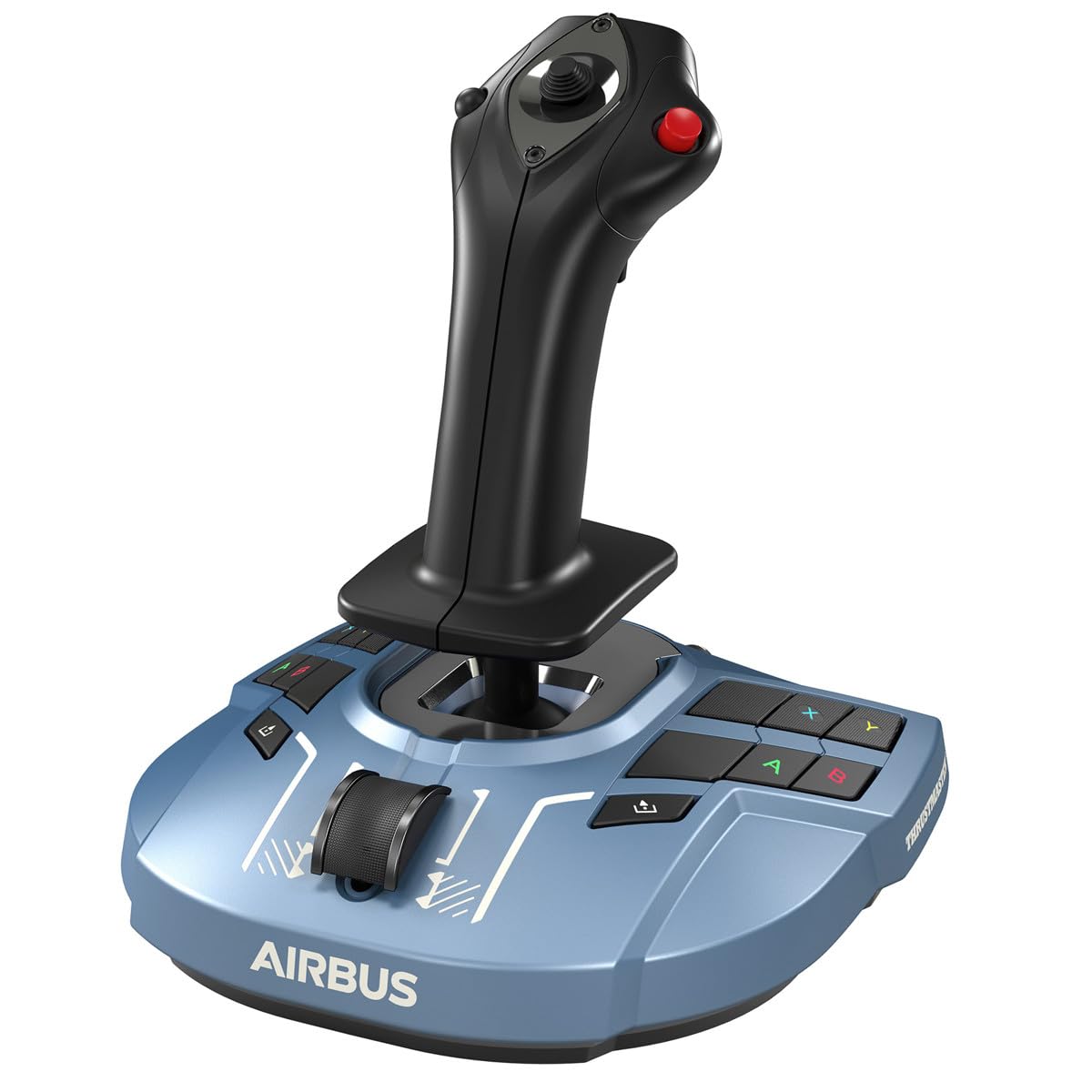
3. Thrustmaster TCA Sidestick Airbus X Edition
An Airbus A320 stick you can hold in one hand, licensed by Airbus and Xbox.
Airbus airliners do not use yokes — they fly on a sidestick, a short stick mounted to the side of the seat. This replica copies that layout and arrives officially licensed by Airbus and by Xbox Sll Kit — more than double in raw switch terms — and it means fewer trips to the settings menu to map trim, gear, lights and views.
The sensors are Hall-effect, which means the axes read a magnetic field rather than a sliding contact, so the stick does not physically wear along a track. Turtle Beach also builds in dual levers, a thumbstick and a multi-function wheel for analog control, plus an integrated rudder twist with a lock option for those who run pedals instead. The Flight Management Display shows live telemetry — flight data — right on the base, and the Flight Hangar app handles RGB and performance settings. It is officially licensed for Xbox Series X|S, Xbox One and Windows 10/11 PCs.
The issue buyers run into is game recognition. from the start some titles do not pick it up as native, so expect some mapping work per sim. At 7.48 x 8.19 x 9.92 inches and 3.1 pounds it is compact, and the ambidextrous design with adjustable wrist and thumb rests means left-handed flyers are not stuck.
What stands out
- 38 programmable inputs and 8 axes — the widest control set in this lineup
- Hall-effect sensors that read magnetically instead of by contact wear
- Flight Management Display shows live telemetry on the base
- Ambidextrous with adjustable wrist and thumb rests for left or right handed use
The real friction
- Some sims need manual mapping before the stick is recognised natively
- Flight Hangar app setup adds a step PC-free console owners may not want
- No throttle quadrant — dual levers sit on the stick base
The pick for button hounds: if your sim is combat, space or anything with a dozen systems, 38 inputs earns its keep.
Fair warning: if you want to plug in and fly with zero mapping, budget an evening for settings.
4. HORI HOTAS Flight Stick

The official Microsoft-licensed HOTAS that shows what separates a real stick from a gamepad.
HORI is the only entry here that pairs a separate joystick and throttle with Microsoft’s official Xbox licensing at the entry-level end. It works with Xbox Series X|S, Xbox One and PC, and it splits the stick and throttle into two pieces — a genuine full HOTAS layout rather than a single gamepad-style handle.
You get 16 buttons, adjustable sensitivity and advanced settings for control customisation, and an integrated headset jack so chat and game audio stay on the cockpit. It is 2.59 kg, which makes it a solid desk-mounted piece. If your only goal is moving off a gamepad and learning how a two-piece HOTAS feels, this is the cheapest licensed route.
The honest part is where it asks for patience. With lower ratings than the Thrustmaster and Turtle Beach picks, this is an entry-level design — expect more compromise in feel and refinement than the Full Kit or VelocityOne. It is the right pick for a first HOTAS on a modest budget, not for someone chasing a premium cockpit.
Where it fits: a genuine two-piece HOTAS with Microsoft licensing, 16 buttons and a headset jack for the sim pilot who wants to test the water.
What you concede: refinement and feel sit a step below the higher-rated picks in this list.
A good opening move: if you have never used a HOTAS and want the official Xbox-licensed two-piece layout to try.
Step up instead: if you already know you will stick with sims — the higher-rated Thrustmaster units give you more polish.
5. Turtle Beach VelocityOne Flight Universal Control System
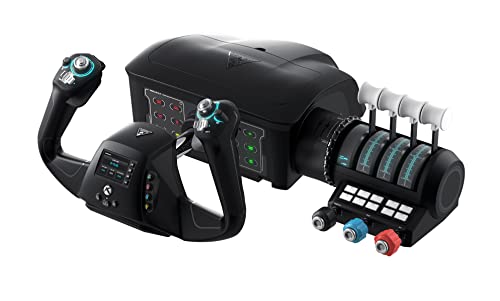
A yoke, throttle quadrant and trim wheel in one housing — airliners, not dogfights.
This is the all-in-one answer for anyone who has committed to airliners and wants the whole cockpit in a single footprint. You get a yoke handle with true-to-life 180° rotation, a modular throttle quadrant with swappable lever handles and buttons, a dedicated pitch trim wheel and integrated rudder and brake controls. That is a complete control set without a single extra purchase.
The details matter here. The yoke uses a non-contact Hall-effect sensor, so the rotation is read magnetically with no contact wear in the pivot. You get 12 analog axes, two POV switches and two 4-way HAT switches — the HAT switches being small multi-directional toggles for camera and menu work. The full-colour flight management display walks you through configuration, and a secure clamping system lets it grip a variety of home setups. It is built for Xbox and Windows titles including Microsoft Flight Simulator 2020 and 2024.
Where it demands honest expectation-setting: the yoke is the largest thing here at 19.01 x 7.2 x 19.5 inches, and the recurring concern in owner feedback is long-term build feel and reliability rather than out-of-box function. Enthusiasts tend to either love the breadth or wish the materials felt sturdier. Treat it as a system to clamp and leave in place, and size your desk accordingly.
Why it earns a premium slot: yoke, throttle quadrant, trim wheel and integrated rudder brakes all in one unit, with a 180° Hall-effect yoke and a configuration display to guide setup.
The honest caveat: build feel and reliability are the most-debated points among owners, and at 19.01 x 7.2 x 19.5 inches it takes over a desk.
Built for: the simmer who wants one bolt-down cockpit for airliner routes in Flight Simulator 2020 and 2024.
Think twice if: you fly stick-and-throttle combat sims or want to move the unit between rooms.
6. Thrustmaster TCA Yoke & Quadrant Boeing Edition Flight Pack

Common Questions
Will an Xbox flight stick work on a PC as well?
Do I need rudder pedals to fly Microsoft Flight Simulator?
What is the difference between a flight stick and a yoke?
Why do some flight sticks have Hall-effect sensors?
Can I detach the throttle from the joystick?
Is a renewed flight stick worth buying?
How much desk space does a yoke take up?
What does a flight management display do on a flight stick?
Will these flight controls work with both Xbox Series X|S and Xbox One?
How many buttons do I really need on a flight stick?
The Bottom Line
For most console simmers, the xbox flight controls winner is the Thrustmaster T.Flight Full Kit X because it hands you a stick, a repositionable throttle and genuine 3-axis rudder pedals in one box — the complete chain without a second purchase. If your sim is Flight Simulator and you want the officially licensed stick-and-throttle pair, the Flight Simulator Edition is the cleaner fit. And for a yoke-and-quadrant airliner cockpit, the TCA Yoke Pack Boeing Edition reads the room best.
One honest note before you commit: if you fly often, weigh the 10-bit axes of the Flight Simulator Edition and the Hall-effect sensors on the VelocityOne against a base stick’s potentiometers. The rest is matching the layout to your flying: a stick for combat and bush flying, a yoke for airliners.
How we choose
We do not accept paid placement. Every pick is matched to a real buyer and a real use-case; we do not hands-on test units.
Sources
Specifications: manufacturer listings and product documentation. Review insights: verified customer reviews, as of November 2026. Pricing: not shown on this page (it changes often); check the current price via the retailer link.
As an Amazon Associate, Tactical Gear Guy earns from qualifying purchases. This does not affect which products we feature.