Specs are compiled from manufacturer listings and verified buyer reviews and can change over time — please confirm the key details on the product page before buying.
Scrolling Netflix should not mean fumbling for a gamepad, and it should not mean burning through AA batteries every few weeks either. A dedicated media remote wakes the console with one press, puts play, pause and volume under your thumb, and leaves the controller charged for actual gaming. The tricky part is that Xbox media remotes vary wildly in how reliably they talk to the console, so this guide sorts the strong performers from the ones that make you press twice.
This guide is built by comparing the manufacturers’ published specifications and the patterns across verified customer reviews, so you get each pick’s real strengths and trade-offs instead of marketing spin.
Every remote below is wireless, works with Xbox One or Series X|S, and has been weighed on the things that actually matter: button count, range, backlight and battery habits. Here are the Xbox Wireless Remote picks worth your shelf space, with the honest catch on each one.
Top Picks

How To Choose The Best Xbox Wireless Remote
Buying an Xbox remote depends on how you watch. If you stream nightly in a dark room, a backlight and a reliable wake button matter more than anything on the box. If you mostly rent the odd Blu-ray, a basic infrared remote with a solid layout does the job with no fuss.
Line of sight and what “infrared” means for you
Almost every remote in this category is infrared — it fires a light beam at the console’s receiver, so the remote has to point roughly toward the Xbox. That means a coffee table that sits well to the side of your TV can cause missed presses. Range figures in the specs are quoted for open air; the practical limit is usually your arm angle.
Battery type is a hidden running cost
Most of these run on two AA or AAA batteries that are not included. A rechargeable model with USB-C charging cuts out the battery run entirely, which is worth knowing if you leave a remote on the couch for months. Decide up front if you want to swap batteries or plug in to charge.
Button count and backlight, explained plainly
A higher button count is only useful if the extra keys are the ones you reach for — volume, playback, the guide, and the A/B/X/Y face buttons. Some remotes skip some of these. Motion-activated backlighting means the buttons glow the moment you pick the remote up, which saves you squinting in a dark room on movie night.
Side-by-Side Comparison
| Model | Best For | Button Count | Maximum Range | Item Weight | Amazon |
|---|---|---|---|---|---|
| Nyko Media Remote – Xbox One | Simple nightly streaming | — | 9 meters | 1.6 ounces | Amazon |
| 8Bitdo Media Remote (Short Edition) | Most buttons, most range | 20 | 10 meters | 0.1 kg | Amazon |
| Tyadas Media Remote (Black) | Grippy texture and secure cover | 16 | 10 meters | 0.05 kg | Amazon |
| Plauduct OG Green Translucent | Full-body glow look | — | — | 1.6 ounces | Amazon |
| PDP Solis Gaming Media Remote | Rechargeable solar + USB-C | 15 | 10 feet | 3.52 ounces | Amazon |
Detailed Reviews
1. Nyko Media Remote – Xbox One
The dark gray workhorse that turns your Xbox into a proper living-room media player.
What you get here is the simplest version of the idea executed well. It powers the Xbox on and off, runs OneGuide, Netflix, Hulu Plus, Amazon Instant and most other apps, and it puts dedicated Play, Pause and Fast Forward keys right under your thumb. No programming, no pairing screen — you put it in front of the console and it works.
That single IR (infrared, meaning the remote beams a light signal straight at the console) design is why the range is quoted at 9 meters. It also hands off TV duties: you can adjust volume, channels and power on the television itself, and this is the lightest-feeling remote on the list at 1.6 ounces. Set that against the PDP Solis below at 3.52 ounces and the Nyko is the one that disappears in your hand.
What wins people over is the build and the fact that it just keeps working. Reviewers split on button responsiveness: an occasional slow press, but not a dead remote. Budget for the two AAA batteries it does not ship with, and it will keep working through years of movie nights.
Why it takes the crown
- Dedicated Play, Pause and Fast Forward keys for streamed and physical media
- Controls Xbox power plus TV volume, channels and power
- Lightest on the list at 1.6 ounces
- No setup or programming — batteries in and you are live
The honest counterweight
- Button response comes across as less than instant on some presses
- 9-meter range is the shortest IR reach quoted here
- Two AAA batteries are not included
Grab this one: the nightly streamer who wants TV volume and Xbox power on one simple pad.
Think twice: if you want long reach across a big room — the SENBOMA and 8Bitdo remotes quote more range.
2. 8Bitdo Media Remote Xbox Short Edition

Twenty keys in a 5.29-inch frame — the most control-dense remote here.
Button count is the whole story with the 8Bitdo. Twenty keys on a remote just 5.29″L x 1.89″W x 0.74″H is a lot of real estate packed tight, and it means dedicated Xbox face buttons and navigation are on the remote rather than buried in the guide. There is a Home button that wakes the console instantly, motion-activated backlighting as you lift it, and a quoted 10-meter range — the same as the Tyadas — that covers a normal living room.
Compare it directly to the SENBOMA below: 20 buttons versus 10. That is double the controls, and at 0.1 kg it is also double the weight of the Tyadas at 0.05 kg. Neither figure is a problem — the compact short-edition body stays easy to hold — but if you prefer a featherweight in one hand, the Tyadas is the lighter pick.
Here is the catch, and it matters: the backlight and the button layout are the parts people like, but battery life is repeatedly described as short, with batteries going quickly. Button responsiveness gets split verdicts too, with some double-press reports on stubborn keys. It is still the most feature-rich infrared remote on this list, just budget for batteries.
Verdict in a line: the 8Bitdo is the enthusiast’s pick — the one to choose if you want every key on the remote and a backlight the moment you grab it.
The reality check: poor stamina is its real weakness, so keep spare AAAs within reach.
Built for: the media-app power user who wants face-button shortcuts and a lit keypad in the dark.
Less ideal for: viewers who want to load batteries once and forget them.
3. Media Remote Control Xbox One Series X|S Black

Soft rubberized texture and a battery cover that stays put — small things until they fail.
The Tyadas earns its place on details you only notice after a month. The black body has a soft rubberized texture so it grips rather than slides off your knee, and the battery cover uses an improved hook design to stop the sliding-off problem that plagues cheap remotes. It is also the lightest flat-out: 0.05 kg, against 0.1 kg on the 8Bitdo above.
Sixteen buttons cover the essentials — Xbox, TV, Blu-ray and app navigation — with A/B/X/Y keys in the standard Xbox pattern. Motion-activated backlighting lights the buttons as you lift it, which is exactly the feature people notice on movie night. Distance tops out at 10 meters, the same as the 8Bitdo, and it is a plug-and-play pad: batteries in and it runs, no setup step.
One honest caveat lives in the fine print: TV power and volume control depend on the setting and the TV itself, so this is not a universal TV remote from the start. It is a console remote first. The two AAAs are not included either, but lifetime and grip here are the strong points, and the covered warranty plus ready customer service round out the value.
The standout: that rubberized finish and hook-held battery door are the two details you will appreciate every single night — and 16 keys keep the core controls within thumb-reach.
Worth knowing: the manual matters for TV control, because TV functions are not guaranteed on every set.
Pick it if: you want a grippy, lightweight remote with a battery door that behaves.
Only if TV control is secondary: the TV-side functions rely on your set and its settings, so do not buy it purely for that.
4. Media Remote Control Xbox OG Green Translucent

A green translucent shell that turns the whole remote into a night-light.
Some remotes hide the light behind the buttons; this one is the light. The OG Green translucent case spreads the built-in LED through the entire shell, so every button and the whole body glow when you pick it up. That is motion-activated illumination too, which means the glow starts the moment handle meets hand in a dark room.
Functionally you get full media and game control — A, B, X, Y, a D-Pad, playback keys and volume — compatible with Xbox Series X|S and Xbox One. It is as light as the Nyko at 1.6 ounces, and it includes a secure back cover with the improved hook design so the battery door does not slide off. Two logo decals come in the box for personalising your setup.
Set expectations honestly: this is a styling-first remote with a smaller footprint in the review pool, and certain specs — button count and range — are not published in this listing’s data. The smart-clearance: if you want a look that matches an Xbox controller shell rather than plain black, the glow is the reason to pick it. If you need printed range figures before buying, this one makes you guess.
Why you would choose it: the full-body glow is genuinely unlike anything else here, and the 1.6-ounce weight keeps it easy to hold.
The trade to weigh: a distinctive aesthetic pick, so check the listing for details not spelled out in the spec sheet.
Made for: the Xbox fan who wants the remote to match the green translucent controller look.
Not the first choice: if backlight, weight and range data are your decision drivers.
5. PDP Solis Gaming Media Remote Xbox
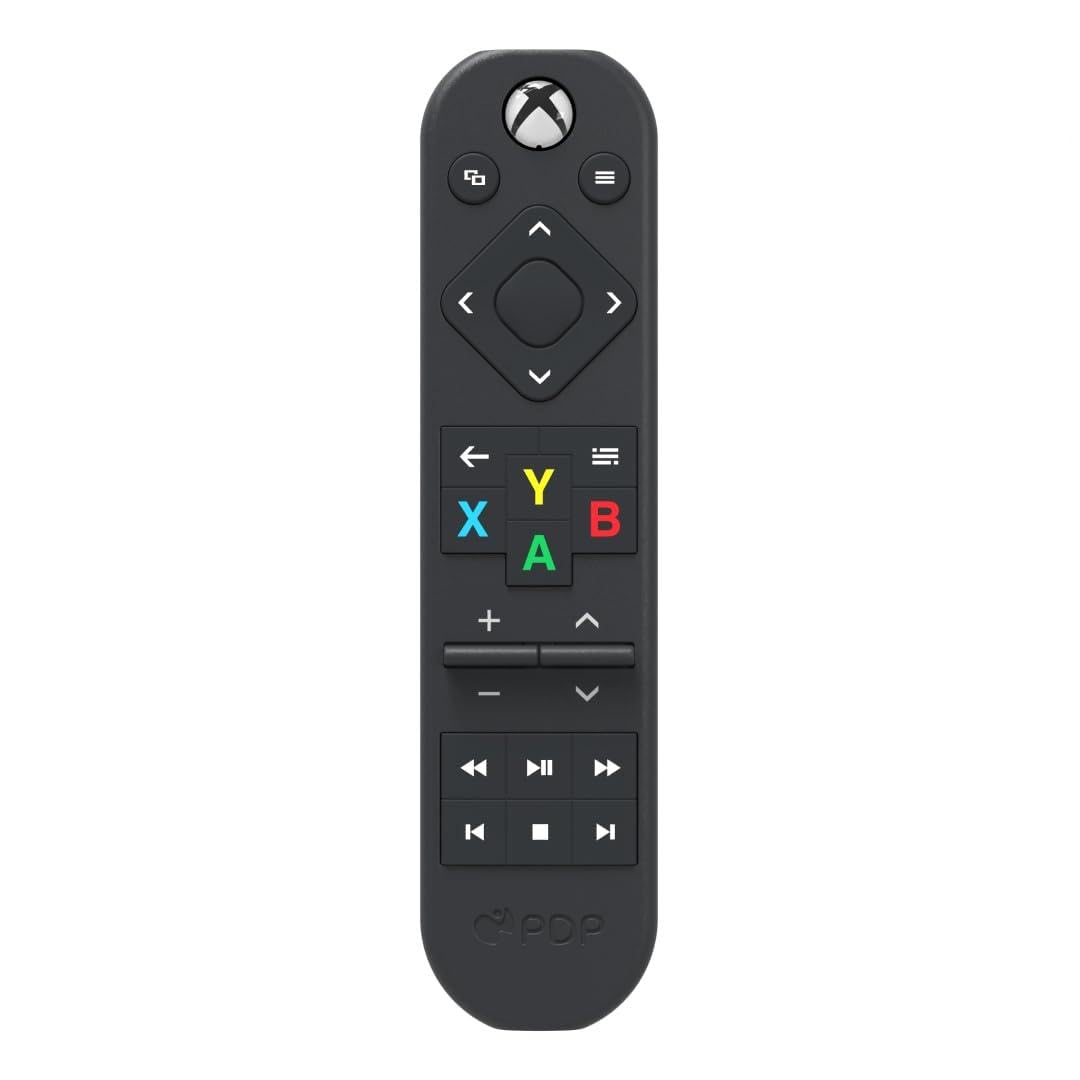
The only officially licensed remote here, and the only one you never feed batteries.
Solar plus USB-C charging is the headline, and it is a real one: you can top this remote up under light or plug it in, and you stop buying AAAs altogether. PDP builds it from 50 percent recycled plastics, and Xbox has licensed it officially. Fifteen buttons cover A, B, X, Y, volume and power, and the motion-activated backlight means the keys glow when you reach for it in the dark.
That backlight is the part people actually praise — it stays lit long enough to find your way around a dark room. Compare the weight to the Nyko above: 3.52 ounces versus 1.6 ounces, so this is the heaviest remote in the list.
The honest catch is reliability. Missed Xbox commands and awkward volume and channel presses are recurring themes, so this is the pick to buy for the charging design and the license badge, not for out-and-out dependability. Ten feet of range is also the shortest reach here. If a solar remote is the dream, it delivers; if one-press certainty matters more, weigh it carefully.
What earns the premium spot
- Solar and USB-C charging — no batteries to buy
- Officially licensed by Xbox
- Built from 50% recycled plastics
- Supports up to three devices
What you accept in return
- Reliability is the weak point — commands sometimes do not register
- Volume and channel keys feel awkward on some presses
- 10-foot range is the shortest of the bunch
The match: the buyer who hates batteries and values the official Xbox license over everything else.
Look elsewhere: if a remote that misses a press would drive you up the wall.
6. Media Remote Control Xbox One Blue
Maximum Range
The range figure is quoted for open air, so treat it as a rough ceiling. The remotes here span 10 feet on the PDP Solis to 15 feet on the SENBOMA, with 9 metres to 10 metres on the Nyko, 8Bitdo and Tyadas. In a normal living room that is plenty. In a long room where the console sits across the floor, pick the longer-quoted remote — the SENBOMA and the 8Bitdo lead on reach.
Button Count and Layout
More keys mean more controls in your hand without hunting. The 8Bitdo carries 20, the Tyadas 16, the PDP Solis 15, the UBay 14 and the SENBOMA 10. What matters is whether the extra keys include the ones you use — A, B, X, Y, playback, volume and the guide. Fewer keys means a cleaner pad for a casual viewer; more keys suit the person who lives in the apps.
Battery and Charging
Most remotes here want two AA or AAA batteries you supply, and how long they last varies. A rechargeable model with solar and USB-C charging, like the PDP Solis, removes the battery run entirely. If you would rather not restock batteries, the Solis’s charging is worth the extra spend; otherwise add a pack of alkalines to the same order.
Common Questions
Will this remote work with both Xbox One and Xbox Series X|S?
Do I need to pair or programme the remote before it works?
Why does my Xbox media remote miss presses?
Does the remote turn the Xbox on and off?
Can I control my TV volume and power from the Xbox remote?
Do these remotes come with batteries?
How many buttons do I actually need?
Is the PDP Solis worth it if the button response is slow?
Are motion-activated backlights actually useful in the dark?
What is the difference between the 8Bitdo and the PDP Solis?
The Bottom Line
The xbox wireless remote winner here is the Nyko Media Remote, because it powers the Xbox on and off, controls your TV volume, and adds nothing between you and the app you opened. If you want every key on the pad and a backlight that lights the moment you grab it, the 8Bitdo Short Edition is the one to reach for, with the biggest button count on the list. And if you would rather never buy another AAA cell, the PDP Solis charges by sunlight or USB-C and wears the official Xbox licence. Pick any of those three knowing its one catch, and movie nights get easier.
How we choose
We do not accept paid placement. Every pick is matched to a real buyer and a real use-case; we do not hands-on test units.
Sources
Specifications: manufacturer listings and product documentation. Review insights: verified customer reviews, as of November 2026. Pricing: not shown on this page (it changes often); check the current price via the retailer link.
As an Amazon Associate, Tactical Gear Guy earns from qualifying purchases. This does not affect which products we feature.