Specs are compiled from manufacturer listings and verified buyer reviews and can change over time — please confirm the key details on the product page before buying.
Your first decision when buying a fight stick for Xbox is simple: a traditional joystick, or no stick at all (leverless)? That one choice shapes how your quarter-circles and dashes feel, how loud the stick is at night, and how often you open the case to tinker. The picks below cover both camps. All are officially licensed for Xbox, and all are built to survive long rank grinds.
This guide is built by comparing the manufacturers’ published specifications and the patterns across verified customer reviews, so you get each pick’s real strengths and trade-offs instead of marketing spin.
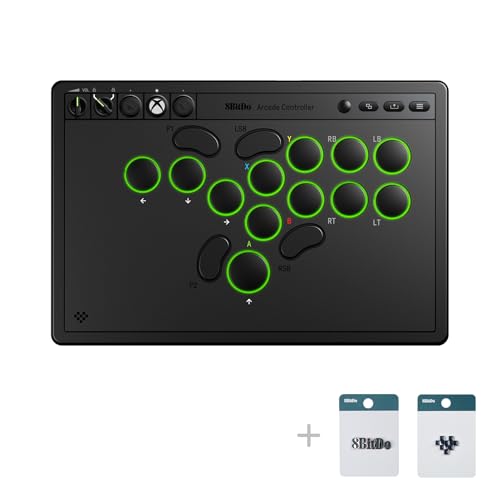
The crowd favorite is 8BitDo’s licensed stick, rated 4.5+ stars by 800+ owners. Its official license, 30-hour play time and 8-button layout make it the safest first buy in the Best Xbox Fight Stick conversation.
Top Picks


How To Choose The Best Xbox Fight Stick
Start with the layout, not the price tag. A fight stick with a joystick rewards the muscle memory you built in arcades. A leverless stick replaces that joystick with four direction buttons, so each direction becomes a clean press instead of a throw. Both work on Xbox and both can win matches — pick the layout your hands already know.
Leverless or traditional lever
Leverless designs promise speed, because a button press travels less distance than a stick throw. That precision comes with a learning curve: your left hand now taps directions like a keyboard player. Traditional levers feel natural on day one but take more room and make more noise. Pick leverless if you play from a desk or a couch with a lap board and you want quiet inputs. Pick a lever if you grew up on arcade cabinets and your quarter-circle motion is muscle memory.
Buttons, switches and modding
The buttons are where feel lives. Sanwa OBSF buttons are the arcade standard and show up across several picks here. Hot-swappable boards let you pull a switch and drop in a new one without soldering, which matters if you want a quieter or heavier click. If you plan to customize artwork or swap parts, look for a removable top plate and an accessible interior.
Xbox licensing, audio and connectivity
An officially licensed stick connects to Xbox Series X|S and Xbox One without a workaround adapter. Unlicensed sticks often need a controller plugged in to authenticate. A 3.5mm audio jack keeps your headset in the stick’s own port, so party chat stays in your ears during a set. Wired USB is the safe tournament choice. Wireless 2.4G is fine for casual play but check that the stick includes a receiver compartment so you do not lose it.
Side-by-Side Comparison
| Model | Best For | Layout | Buttons | Connectivity | Amazon |
|---|---|---|---|---|---|
| 8BitDo Arcade Stick for Xbox★ Best Overall | First-time Xbox stick buyers | Joystick lever | 8 | 2.4G wireless or USB | Amazon |
| MAYFLASH F500 FLATBest Platform Hopper | Multi-console households | All-button leverless | 14 | USB | Amazon |
| 8BitDo All-Button RGBSlimmest Build | Thin, portable leverless | All-button leverless | 16 | 2.4G wireless or USB-C | Amazon |
| MAYFLASH F300 Elite | Sanwa parts on a budget | Joystick lever | 9 | USB | Amazon |
| Razer Atrox | Heavy modding projects | Joystick lever | 10 | USB | Amazon |
| HORI Fighting Stick alpha | Opening the chassis often | Joystick lever | 21 | USB | Amazon |
| Nacon Daija | Tournament Sanwa lever setup | Joystick lever | 17 | USB-C (3m cable) | Amazon |
| Turtle Beach Victrix Pro KO | Serious leverless esports play | All-button leverless | 16 | USB-C (3m braided) | Amazon |
Detailed Reviews
1. 8Bitdo Arcade Stick for Xbox
Our pick — 4.5+★ from 850+ verified ratings; the strongest balance of quality and price.
The stick that made wireless fight sticks normal on Xbox — and stayed affordable.
If you want one fight stick that just works on your Xbox with no adapter in sight, this is the one. It was the first Xbox-licensed wireless arcade stick, and that license means you plug in or pair up and play on Xbox Series X|S, Xbox One or Windows 10 and above. No controller handshake required.
The wireless side runs on 2.4G (a low-latency radio link, not Bluetooth), and you get up to 30 play hours per charge with roughly 4 hours of charging time. That is enough for weeks of evening sessions between top-ups. When the battery runs low, a wired USB connection keeps you in the match. The 8-button layout and joystick feel right for fighters, and 8BitDo’s Ultimate Software lets you remap buttons per game, so a Tekken profile and a Street Fighter profile can live side by side.
The weight is the part owners notice without being told. At 2250 g it sits heavy in the lap and stays put when you yank a super motion, which is exactly what you want from a 2.4G wireless stick. For contrast: the MAYFLASH F500 FLAT is 2.6 kg, so the 8BitDo is the lighter of the two — which many players prefer for long sets. A 3.5mm audio jack and volume control live on the stick, so your headset cord never tangles across the coffee table.
What earns it the top spot
- Officially licensed for Xbox, so it pairs and plays without a workaround adapter.
- 30 hours of play per charge with a 4-hour recharge time.
- 2.4G wireless plus wired USB, so a dead battery never ends a session.
- Remappable buttons and profile settings through 8BitDo Ultimate Software.
- Built-in 3.5mm audio jack and volume control keep the headset off your lap.
Where it asks a little of you
- Button hardware is 8BitDo’s own, not Sanwa, so hardcore modders will want to swap.
- Wireless play still needs a charged battery, so charge-up nights do exist.
Your best starting point: anyone buying their first Xbox fight stick and wanting wireless freedom plus an audio jack.
Go Sanwa instead if: you already know you want arcade-standard parts and plan to swap buttons on day one.
2. MAYFLASH F500 FLAT All Button Arcade Controller
One flat slab that plays nice with nearly every console you own.
This is the pick for the player with a shelf full of hardware. It runs on PS4, PS3, Xbox Series S/X, Xbox One, Xbox 360, Switch, Switch 2, Windows, macOS, Android, Raspberry Pi, Steam Deck, NEOGEO mini and several SEGA mini consoles. That breadth is the whole pitch. If you already fight on a PC and occasionally plug into a friend’s Xbox, this stick travels with you.
It is an all-button, leverless design with 14 buttons, and it accepts Sanwa Denshi buttons if you want to upgrade later. The removable clear acrylic top plate lets you print your own artwork from MAYFLASH’s website template, which is the sort of personalization usually reserved for pricier builds. Turbo speed settings and a headset port for audio and chat on Xbox and PlayStation round out the feature list.
Here is the catch, and it is important. To play on PS4, Xbox Series S/X, Xbox One or Xbox 360, you must plug a wired PS4 or Xbox controller into the stick’s USB slot to authenticate it. That is how the multi-console magic works — one stick, one necessary dongle controller. Its 2.6 kg body and 14.17 x 9.06 x 1.97 inch footprint make it substantial and stable. Compared with the Razer Atrox at 4.96 x 14.96 x 10.31 inches, the F500 FLAT is the lower, flatter desk companion.
The multi-console trade-off: it works on an enormous list of systems, but the Xbox path requires a wired controller plugged into the stick.
The flat-panel upside: a low profile plus a removable acrylic top makes customization easy without paying premium money for it.
Worth it for: players who split time across Xbox, Switch, PC and Steam Deck and want one stick that follows.
Not for: anyone who refuses to keep a wired controller tethered to their fight stick.
3. 8BitDo All-Button Arcade Controller
A leverless pad barely thicker than a notebook — built for bags and travel.
Picture a leverless stick almost the size of an A4 sheet of paper. That is the headline here: it measures 1.6 cm thick, which 8BitDo describes as almost one third the thickness of its arcade stick. It slides into a backpack and takes up the space of a thin book. If you play at locals or travel to tournaments, that difference is the whole argument.
The button count is where it gets serious. At 16 buttons it doubles the 8-button layout on the standard 8BitDo lever stick, which gives you more programmable real estate for macros and extras. A hot-swappable PCB means you can swap switches without a soldering iron. Two programmable buttons with fast mapping, replaceable lock caps, magnetic foldable feet and an independent control panel are all included. There is also a built-in 3.5mm audio jack and volume control, matching the wired-or-wireless flexibility of a 2.4G radio link plus USB-C.
Competitive players get the features tournaments ask for: SOCD cleaning (which settles what happens when you press left and right at once) and a tournament lock, both esports-ready touches. Six RGB light modes run around the buttons for looks. Connectivity is the part that has earned the most confidence in the review pages, and it earns it — pairing registers cleanly on Xbox. The trade-off is real, though: low-profile switches feel shallower than arcade buttons, so players raised on deep Sanwa clicks will feel the difference on day one.
Travel-first design: 1.6 cm thin and A4-sized, so it disappears into a bag next to your laptop.
Built to be changed: a hot-swappable PCB plus replaceable lock caps and 16 buttons mean you tune it, not buy around it.
Pick it if: you play leverless, want tournament features like SOCD cleaning, and take your stick places.
Think twice if: you want the tall, deep click of traditional arcade buttons under your fingers.
4. MAYFLASH Arcade Stick F300 Elite
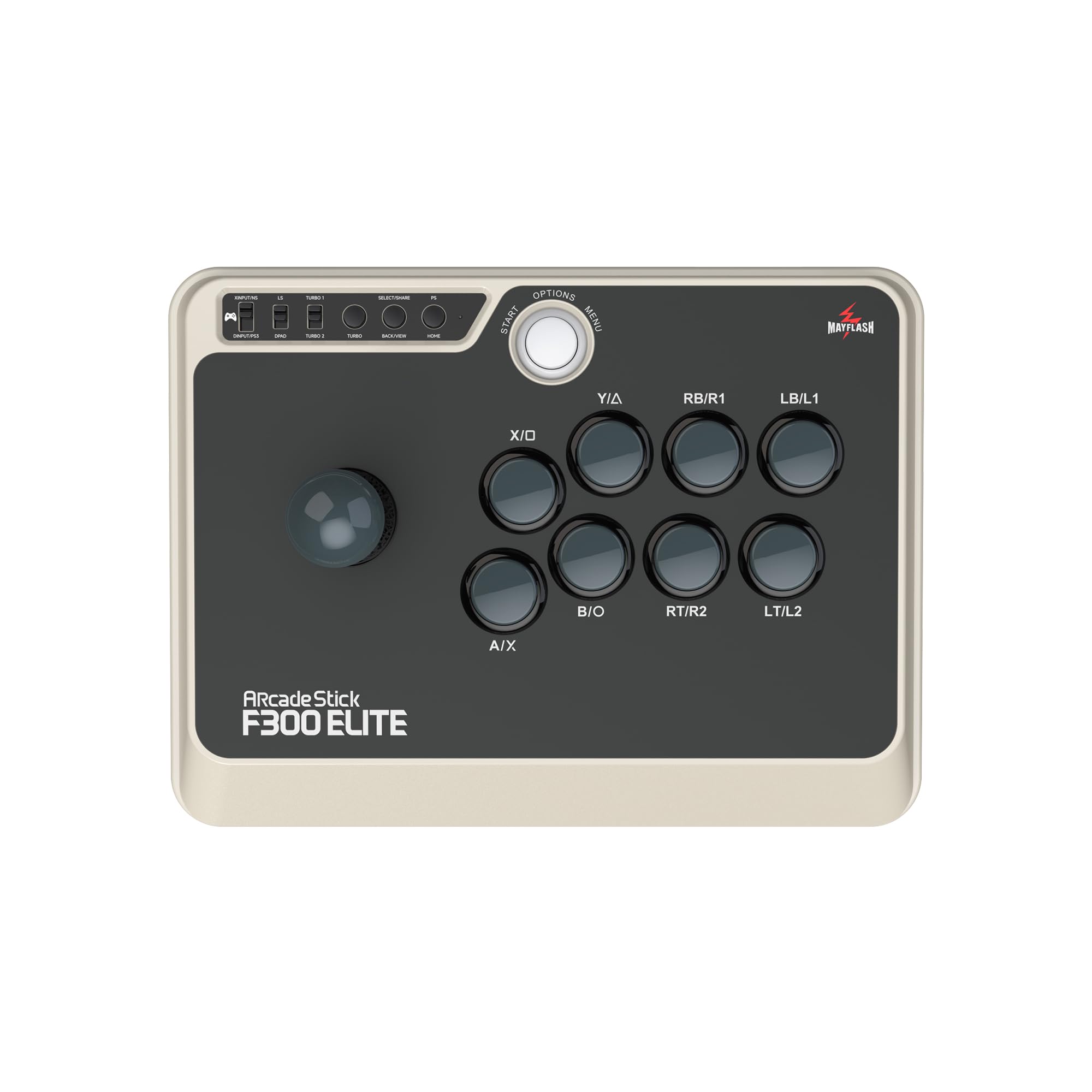
Genuine Sanwa parts at a price that leaves room for your own mods.
For a lot of fighting game players, the F300 Elite is the answer because it ships with the hardware they were going to buy anyway. Sanwa buttons and a Sanwa joystick come standard, and the chassis opens up so you can swap any of it to suit your playstyle. This is the stick for a modder who wants a solid base without paying premium money first.
The parts quality is what carries it. Owners consistently describe the build as solid with a nice even weight that feels substantial, and the 9-button layout and Sanwa lever give you arcade-authentic feedback. Compatibility stretches across Switch, Switch 2, Xbox Series X, Xbox One, Xbox 360, PS4, PS3, Windows, macOS, Steam Deck and Android, and it handles XINPUT and DINPUT on PC. Turbo is supported for burly mashing sessions.
Two honest caveats. First, there is no wireless here — it is USB only, so you are always tethered. Second, the 11.81 x 8.86 x 2.2 inch footprint is compact enough to sit on a desk but smaller than the wide tournament boards. PlayStation 5 play is possible but needs a MAYFLASH Magic-S Ultimate adapter or MagicBoots-S5 converter. Given what you pay, though, the mix of real Sanwa hardware and multi-platform reach is difficult to argue with.
Why modders start here
- Sanwa joystick and buttons fitted from the start.
- Interior is accessible for swaps, so customizing is straightforward.
- Wide platform list including Xbox Series X, Xbox One and Xbox 360.
- Turbo plus XINPUT and DINPUT support on PC.
What to plan around
- USB only, so no wireless option.
- PS5 play needs a MAYFLASH Magic-S Ultimate adapter or MagicBoots-S5 converter.
Reach for this if: you want authentic Sanwa feel and a chassis you plan to open and customize.
Look elsewhere if: wireless is a must-have for your setup.
5. Razer Atrox For Xbox One: Fully Mod-Capable Fight Stick
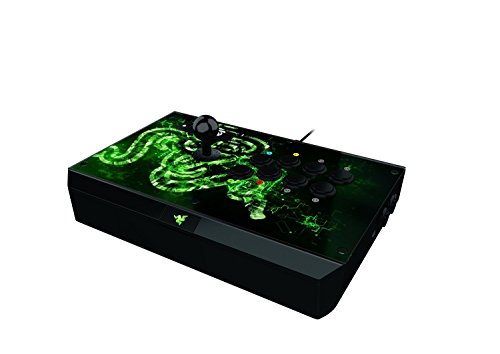
A battle station with a hidden compartment for your spare buttons.
Razer built this stop for people who tinker. The top panel pops open with a button press to reveal internal compartments built to store the detachable screw-lock cable, a screwdriver and two extra buttons. It is a portable workbench and a fight stick in one. The 10-button layout pairs with an 8-way Sanwa joystick, and the whole build is meant to be reconfigured.
A tournament gaming mode on the Atrox turns off the Start, Back and Xbox One Guide buttons, so a stray bump will not quit your ranked match. It also gives you an ergonomic design and Sanwa hardware (the brand of joystick and buttons many players prefer). At 3320 g it is one of the heaviest sticks here — 48% heavier than the 2250 g 8BitDo stick, which many players read as “it does not walk across the desk.” It is also big: 4.96 x 14.96 x 10.31 inches versus the MAYFLASH F500 FLAT’s 14.17 x 9.06 x 1.97 inches, so it takes up noticeably more desk space.
The honest part: this is an older Xbox One generation stick, and compatibility is the biggest thing to weigh. A section of buyers report trouble getting it recognized across every Xbox One title, and opinions split on whether it is worth the money. If you own a dedicated modding project and love the storage bay, it delivers. If you want a plug-and-play stick for Xbox Series X|S from the start, choose a licensed current-gen stick instead. Button durability also sits as a mixed point, so plan on replacing parts over time.
A fit for: the tinkerer who wants compartments, a screwdriver and spare buttons living inside the stick.
Pass if: you need guaranteed recognition across all your Xbox games with zero tinkering.
6. HORI Fighting Stick alpha Designed for Xbox Series X|S

The chassis flips open without a screwdriver — mods take seconds, not evenings.
Plug-in is fuss-free on HORI’s alpha: it is Microsoft-licensed for Xbox Series X|S, Xbox One and Windows 10. what separates it is the hinged chassis (a case that opens on a hinge): lift it and you can reach the inside for cleaning or customization. The top housing artwork is swappable too, so you can change your stick’s face whenever you like. If you like to clean or tweak your own parts, that build choice pays off.
A 21-button count dominates the spec sheet and includes assignable buttons, a Share button, a Profile button and Key Lock Mode. The Key Lock stops accidental presses mid-match. Build quality comes up as a strength in owner notes, and the overall experience is described as easy to open and mod. At 18.9 x 14.37 x 6.5 inches it is a wide, substantial board that takes up real desk space.
The catch is weight and feel. A portion of the feedback finds it light for the size, and some players wish it felt more planted. Value is also debated between those who see it as fair for a licensed, mod-friendly board and those who expected more heft. Button responsiveness is a mixed point in the reviews, so if you are fussy about tactile feedback, plan to trial buttons. It lands as a smart pick for the player who values easy access and official Xbox support over raw mass.
Access is the feature: a hinged chassis and swappable artwork make maintenance and restyling quick.
Heft is the question: a wide footprint but lighter feel than some players want for a tournament board.
Suits: Xbox players who like to open their stick, clean it and change the art without tools.
Skip if: you want a heavy, immovable board that resists every shove.
7. Nacon Daija Arcade Fight Stick Officially Licensed for XBOX

Built with pros for Street Fighter and Tekken, and packed with two lever heads.
The Daija was developed in collaboration with professional gamers for titles like Street Fighter, Tekken, Guilty Gear Strive and Mortal Kombat. Sanwa hardware sits under the fingers — a Sanwa joystick plus Sanwa action buttons, described as a premium standard among competitive players. It is officially licensed for Xbox Series X|S, Xbox One and Windows 10 and 11.
Nacon loaded the box with setup options. You get two different joystick heads to swap for the feel you like, three faceplate options to change the look, and two tools to do the customizing. A textured palm rest provides support for long sessions, a button lock function prevents accidental presses, and full button mapping runs through the Nacon Daija software so you can build game profiles. A 3.5mm audio jack connects a headset directly, and the 3 meter detachable USB-A to USB-C cable gives you real couch distance.
The honest caveat is the plexiglass faceplate: a portion of the feedback finds it scratches too easily, so a soft cloth and a protective sleeve are worth the small effort. Overall the response is that this is a solid, top-shelf Xbox option with the parts to back it up.
Pro collaboration on the build: Sanwa hardware, two joystick heads and three faceplates give you options from the start.
The scratch watch: plexiglass plates show marks, so a case or gentle handling keeps the face clean.
Right for: tournament players who want an official Xbox lever stick with swappable heads and a long 3 meter cable.
Hold off if: you are hard on gear and want a faceplate that shrugs off scuffs.
8. Turtle Beach Victrix Pro KO Leverless
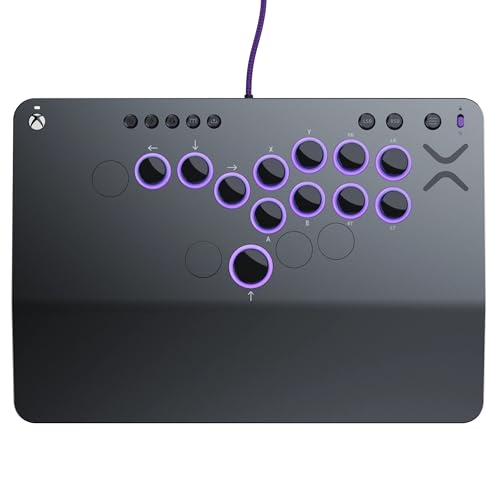
Cherry MX Speed Silver switches in a slab not much thicker than a phone.
This is the pick for the player who wants esports gear with swappable switches. Sixteen moveable and mappable buttons run on hot-swappable Cherry MX Speed Silver RGB switches, so you can match your feel and replace a failed switch yourself. That combination is why it took EVO Awards’ 2024 Best Tech Product recognition for innovation and industry leadership.
The design is built for travel. Its 9.25 x 13.2 x 0.88 inch frame is a slim one — the 0.88 inch thickness reads like a phone next to thicker boards — and a wired 3 m braided USB-C cable provides the connection. With a wired-only design and a braided cable, there are no batteries to charge and no receiver to lose. RGB light rings around the buttons can be adjusted either directly on the stick or through the Victrix Control Hub. It is tuned for fighting games like Street Fighter 6, Guilty Gear, TEKKEN 8, Fatal Fury and Dragon Ball, and it plays nice with beat ’em ups and shoot ’em ups too.
The consensus is that the buttons do exactly what you ask, and leverless players in particular praise how hard it is to miss an input. At 2.7 pounds it is the lightest board on this list, and that weight is deliberate travel-friendly engineering, not a shortage of heft. The honest limit: it is wired only and priced as premium gear, so couch players who want wireless will want a different stick. For a tournament bag, though, this is built for it.
Where the KO competes hardest
- 16 hot-swappable Cherry MX Speed Silver RGB switches, swappable and mappable.
- Slim 0.88 inch profile for travel and tournament bags.
- 3 m braided USB-C cable for a long, tidy run.
- RGB adjusted on the stick or through the Victrix Control Hub.
What you give up
- Wired only, so no wireless option for couch play.
- Premium-tier pricing, so this is a commitment rather than an impulse buy.
A perfect match for: a tournament-bound leverless player who wants hot-swappable switches and a slim travel footprint.
Look past it if: you want wireless freedom or a lower entry price.
Know the Specs
Leverless vs. Joystick Layout
A leverless stick replaces the joystick with four direction buttons, so each direction is a press rather than a throw. That variation is why leverless boards often feel faster for combos. A joystick layout rewards arcade muscle memory and feels familiar on day one. Neither is objectively better; pick leverless if you want faster presses, a lever if quarter-circles are already muscle memory.
Sanwa Buttons vs. Stock Buttons
Sanwa OBSF buttons are the arcade-standard switch used in many tournament cabinets. Sticks that ship with Sanwa hardware let you skip the upgrade step. Sticks with their own buttons still play well but may not match the exact click and travel a competitive player expects. If the board is hot-swappable or easily opened, you can swap to Sanwa later.
SOCD Cleaning and Tournament Lock
SOCD cleaning settles what happens when you press opposite directions at once — some games read it as neutral, some allow it. SOCD modes let you choose how that resolves. Tournament lock and key lock disable Start, Back and Guide buttons so a stray press does not quit a match. Both features are worth checking if you plan to compete.
Wireless vs. Wired
Wired USB delivers a constant connection with no battery to manage, which is why tournaments often require it. Wireless 2.4G offers freedom from a cable and lower latency than Bluetooth, while Bluetooth adds cable-free flexibility with a little latency risk. If you play casually, wireless is fine. If you travel to tournaments, wired is the safe pick.
Common Questions
Will a fight stick work on Xbox Series X and Xbox One?
Is a leverless fight stick better than a joystick for fighting games?
Do I need a special adapter to use a fight stick on Xbox?
What is SOCD cleaning and why does it matter in tournaments?
Can I swap the buttons on a fight stick?
How long does a wireless fight stick battery last?
Does a fight stick’s weight really matter for gameplay?
Can I use a fight stick’s headset jack for party chat?
Will a fight stick work with PC and Steam Deck as well as Xbox?
What is the difference between a lever stick and an all-button arcade controller?
The Bottom Line
For most players, the xbox fight stick winner is the 8BitDo Arcade Stick for Xbox. It is officially licensed, wireless with 30 hours of play, and has a 3.5mm audio jack (a standard headphone plug) — all in one stick. Want Sanwa parts and a case you can open to customize? Grab the MAYFLASH F300 Elite. For tournament play with hot-swappable Cherry MX Speed Silver switches (you can swap the switches without soldering), reach for the Turtle Beach Victrix Pro KO. One honest nudge: the 8BitDo board is rated 4.5+ stars by 800+ owners, which counts for something on your first stick.
How we choose
We do not accept paid placement. Every pick is matched to a real buyer and a real use-case; we do not hands-on test units.
Sources
Specifications: manufacturer listings and product documentation. Review insights: verified customer reviews, as of November 2026. Pricing: not shown on this page (it changes often); check the current price via the retailer link.
As an Amazon Associate, Tactical Gear Guy earns from qualifying purchases. This does not affect which products we feature.