Specs are compiled from manufacturer listings and verified buyer reviews and can change over time — please confirm the key details on the product page before buying.
If your Series S gets hot enough to worry you mid-match, the fix is a fan that pulls hot air out of that round rear vent instead of pushing more into a sealed case. The pick that balances quiet running, adjustable speed and a sane fit is the Mcbazel 3-speed RGB fan — the crowd favorite at 4.5+ stars across 900+ ratings. Below you get nine fans that actually fit the Series S, sorted by what each one solves.
This guide is built by comparing the manufacturers’ published specifications and the patterns across verified customer reviews, so you get each pick’s real strengths and trade-offs instead of marketing spin.
Most buyers get the wrong shape here. A fan made for the Series X will not sit right on the smaller S, and a stand with a built-in fan only helps if it lines up with the vent. The picks below split into vent-clamp fans and all-in-one charging stands, so you can pick the type before the model.
Your console runs hot during long sessions, so the right xbox series s fan needs to fit your vent, let you set the speed, and stay quiet while you play.
Top Picks

How To Choose The Best Xbox Series S Fan
The Series S is a small console with a single round exhaust vent on the back. That one detail decides most of your shopping. A fan either clamps onto that vent and draws air outward, or it sits under the console as part of a stand and blows upward through the base. Both work, but they are different products with different trade-offs.
Fit first: the vent, not the brand
Every fan on this list is built for the Series S only. They will not fit a Series X or an Xbox One. Check the listing text for the exact console name before you order, because the same maker often sells a near-identical Series X version. A fan that hangs loose or blocks the vent openings does more harm than good — the point is airflow, and a sloppy fit chokes it.
Speed control beats raw power
A single-speed fan running flat out is loud. Look for a fan with two or three speed levels you switch by hand or by touch. The low setting keeps things calm during quiet story games, and the high setting moves serious air during long sessions. Mounted stands on this list list their speeds in RPM (revolutions per minute — how fast the blades spin), so you can compare 1800 against 2200 directly.
The USB port question
These fans draw power from the console’s own USB socket, so no wall adapter is needed. That is convenient, but it also means the fan and its USB charging ports stop when the console is off or in standby. If you plan to charge a controller overnight while the console sleeps, know that the pass-through ports may not stay live. Read the listing for each fan’s behavior before you rely on it.
Charging stands pull double duty
Half the picks here are full stands: fan, controller charging dock, headset hook and RGB lighting in one footprint. They include two 1400mAh rechargeable batteries, which replace the AA cells in your controllers. That saves you buying disposables, but it only works with the supplied batteries or Xbox’s own rechargeable pack. Standard AA batteries will not charge in these docks.
Side-by-Side Comparison
| Model | Best For | Fan Speeds | RGB Modes | USB Ports | Amazon |
|---|---|---|---|---|---|
| Mcbazel 3-Speed RGB Fan★ Best Overall | Most buyers | 3 (low/medium/high) | 4 single + 3 gradient | 2 (1 charge, 1 data) | Amazon |
| Mcbazel RGB Cooling FanBest Value | Budget cooling | 3 levels | 7 | 2 (1 charge, 1 data) | Amazon |
| Allnice Wall Mount StandWall-Mount Pick | Wall-mount setups | 3 (1800/2000/2200 RPM) | 7 colors | 3 + 1 charge | Amazon |
| MENEEA 15 Mode Stand | Desk cooling + charging | 3 gears | 15 | 2 | Amazon |
| FYOUNG Vertical Stand | Two-controller dock | Built-in dual fans | LED charge indicator | USB 2.0 | Amazon |
| MENEEA Upgraded Stand | Compact desk tidier | Cooling fan | 15 | 1 extra | Amazon |
| Gorixer 6-in-1 Stand | All-in-one charging | Dual fans at 2,200 RPM | 15 | USB-C to console | Amazon |
| Klipdasse Cooling Stand | Value all-in-one | 3 adjustable speeds | 15 | 1 data, 1 charge | Amazon |
| MENEEA RGB Charge Stand | Full command center | Dual fans | 15 | 2 | Amazon |
Detailed Reviews
1. Mcbazel Cooling Fan for Xbox Series S
Our pick — 4.5+★ from 950+ verified ratings; the strongest balance of quality and price.
The vent-clamping cooler that does its one job quietly and gets out of the way.
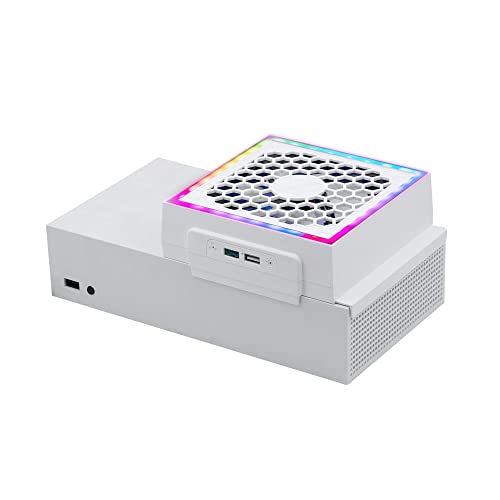
This is a fan that clamps over the round exhaust vent on the back of your Series S and draws hot air outward while you play. You get three speed levels — low, medium and high — picked by a touch control, with orange, blue and green lights showing which one you landed on. It weighs 0.4 kg and works whether your console lies flat or stands upright, so your existing layout stays put.
What wins people over is how little you notice it. The fan moves real air without turning into a hairdryer on low, and the reviewers consistently call the operation quiet and the LED colors vivid. The lighting is also on its own button, which sounds small until you want the fan on and the glow off during a late session. On low it moves real air without the hairdryer whine, and reviewers back that up.
The two USB ports are worth knowing about in detail. One is USB 2.0 for charging a controller or phone, and the other is a USB 3.0 data port for a keyboard, gamepad or controller adapter. The honest catch is that both stop when the console is off or in standby — so it is not an overnight charging dock. It also plugs only into the console’s 5V USB supply; a higher-voltage source can damage it.
Why it holds the top spot
- Three speeds from a touch control instead of a single noisy blast
- Independent light button so the RGB can be killed without touching fan speed
- Tool-free fit for horizontal or vertical consoles — no separate wall adapter
- One charge port and one data port, so a keyboard or adapter stays connected
What to weigh before ordering
- Fan and USB power cut out when the console is off or in standby
- Series S only — will not fit Series X or Xbox One
- No controller charging dock, so this is cooling only
Reach for this if: you want cooler air moving through your console without adding a whole charging rig to your desk.
Look elsewhere if: you need a dock that tops up two controllers while the console sleeps.
2. Mcbazel RGB Cooling Fan for Xbox Series S
A top-mounted dual fan with a dust cover, built to pull heat up and out.
This one sits on top of the console case and pulls running heat out instead of letting it pool inside, using a high-speed dual cooling fan. You get seven lighting modes and two USB ports — one charge-only, one that handles both charging and data, so you can plug in a keyboard. At 7 ounces it adds almost nothing to the console’s weight. The built-in ABS dust cover (a plastic grille that keeps dust and small objects out of the fan) keeps the blades clear while still letting heat pass through.
Where the budget saving shows is the light and sound. The brightness and noise both land in mixed territory — some find the fans genuinely quiet and the LEDs a nice touch, while others find the noise noticeable and the lights too bright at night. Those are preferences rather than faults, and if you game with a headset the fan noise tends to fade. For pure cooling per dollar, this is the entry point that still does the job.
Compare the lighting count honestly: this fan runs 7 modes, while the MENEEA stand further down runs 15. If you care about matching your room’s glow across lots of options, the bigger stand wins on variety. If you just want the console cooler with a splash of color, the Mcbazel does it for a lot less.
Value read: the dust cover and dual fan make this the smart cheap buy for a console sitting in a dusty room.
Best matched to: tight budgets and desks where a little fan noise disappears behind a headset.
One trade-off: the seven lighting modes are limited next to the 15-mode stands, so the light show is modest.
3. Allnice Wall Mount Cooling Stand for Xbox Series S
The one that lifts your console off the desk entirely and onto the wall.
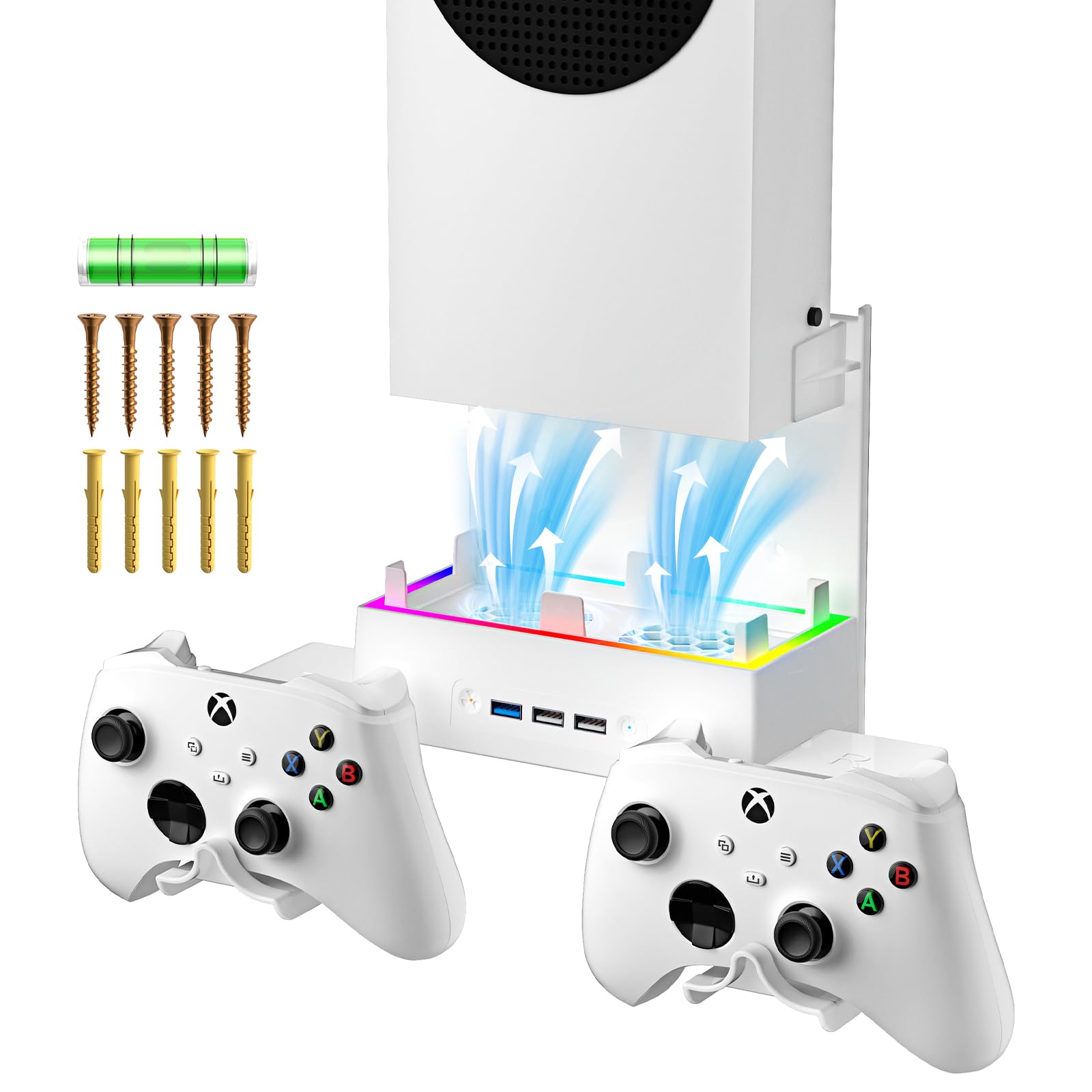
If your desk is already buried under a monitor, keyboard and headset, this mount does something the others do not — it takes the Series S off the surface and hangs it on the wall. The dual cooling fans run at three speeds: 1800, 2000 and 2200 RPM, switched by a button on the unit. It also holds a controller and headset, and gives you three USB ports plus a 2.0 charge port for the extra devices around your setup.
This fan runs 3 USB ports where the Mcbazel 3-speed fan above manages 2 — that extra front port matters if you keep a wired controller, a keyboard and something else all plugged in at once. The RGB has seven colors, red through white, that cycle on power-up before settling into single-color choice. The body is high-impact plastic built to resist twisting, so the console sits stable once it is fixed in place.
One thing to plan for: mounting is a small project, not a plug-in. You are attaching hardware to a wall or the side of a desk, which means checking your space before you buy. The charge port is DC 5V/1A (MAX) and mainly there for data transfer, so do not expect it to fast-charge anything. Set that expectation and the tidy, wall-hung setup is genuinely appealing.
Choose this if: wall space beats desk space and you want the console, controller and headset off your surface.
Heads up: the extended USB port is capped at DC 5V/1A (MAX) and is mainly for data, not quick charging.
4. Cooling Stand & Charging Station for Xbox Series S

The MENEEA stand that turns cooling, charging and lighting into one desk setup.
Here the fan sits at the bottom and pushes air upward while gaskets raise the console so its air intake has more room to breathe. Two bottom-mounted fans run three gears you switch separately, and the seven-petal blade design was shaped to cut the noise of turbulent airflow. You also get 15 RGB modes — 8 dynamic and 7 solid colors — with their own switch, so killing the fan does not kill the glow.
The charging side is what pulls people in. Two 1400mAh rechargeable batteries come included, and the dock is built with over-current, over-voltage and heat protection to fill each controller in 2-3 hours with a status light. Those replace disposable AAs, so over months the savings add up. The included headphone hook and two USB ports (one charge, one data) organize the rest of your kit.
There is a real honesty note here, because durability and charging both come back mixed, and reliability draws the most discussion of any topic on this product. The dock only charges the Xbox rechargeable packs or the included batteries, and battery install has a right way up — the text faces upward. Buy it understanding that, and the cooling, compatibility and lighting all land positive. Eight of the RGB modes are dynamic effects, and the monochrome set covers red through white for a steadier look.
Where it earns its place
- Two 1400mAh rechargeable batteries included — no more AA runs
- 15 RGB modes with an independent switch so lights run without the fan
- Bottom fans plus gaskets raise the intake for more breathing room
- Headset hook and two USB ports tidy a full desk
The honest catches
- Reliability is the most-discussed topic and lands mixed — treat the dock carefully
- Dock only charges Xbox packs or the supplied batteries, and install is orientation-sensitive
- Charging performance draws mixed feedback
This is your pick if: you want one unit to cool the console, charge two controllers and light the desk.
Think twice if: you expect plug-and-forget charging that never needs the battery seated a specific way.
5. FYOUNG Upgraded Vertical Cooling Fan Stand for Xbox Series S

Built to charge two controllers, cool the console and hold the headset at once.
The FYOUNG stand charges and displays two controllers while cooling the console through built-in dual fans, and a bracket holds your headset so the whole kit sits in one vertical tower. It ships with two 1400mAh rechargeable batteries that replace the AAs in your controllers, cutting the money you spend on disposables. LED indicators show charging status — red while charging, green when full — and you can lift a fully charged controller straight off without extra steps.
Functionality is the thing that draws the most praise, and the cooling gets a strong second nod. Buyers report the dual fans push noticeably more air through the case than the console manages alone. The two-battery charger runs alongside the fan, so a marathon session ends with both controllers topped up and ready.
The recurring gripe is noise — several mention the fan running loud, and a few report the batteries not seating cleanly. Treat it as a quiet-room consideration rather than a deal-breaker: if you play with a headset on, the fan sound tends to sit under the game audio. Beyond that, value is a matter of taste, and the organized tower earns its keep on a cluttered desk.
Real-world read: two 1400mAh batteries plus a headset stand make this a serious desk organizer, not just a cooler.
Fair warning: the fan noise is the most-discussed downside, so a silent room is the wrong home for it.
Worth it when: you own two controllers and want both charged off one compact vertical station.
Pass for now if: you game in quiet moments with the volume low and no headset.
6. Upgraded Cooling Fan Stand for Xbox Series S

A compact MENEEA stand that folds cooling, dual charging and 15 light effects into one footprint.
This stand combines a console cooling fan, a dual controller wireless charger, 15 RGB lighting effects, a headset hook and an extra USB port. The charger is built with over-current, over-voltage and heat protection and fills two controllers in under 3 hours, with green for full and red for charging so you read status at a glance. The RGB has a memory mode — press and hold the light button for 3 seconds to save your favorite look — so it comes back to your setting instead of resetting.
It is metal-bodied, which gives it more heft than the plastic-only stands, and it is meant to sit within arm’s reach so everything stays put. The cooling fan and the compact shape are the core sell: it takes the console, both controllers and your headset and stacks them vertically to reclaim desk space. On a small desk, stacking the console, two controllers and a headset vertically frees real surface area.
The one caveat you must check first: the dock only works with Xbox Series S/X original controllers using the original rechargeable battery, which is sold separately from the stand. If your controllers run on standard AAs, add the official rechargeable pack or the dock will not charge them. With the official pack fitted, the stand cools, charges both controllers and keeps the desk clear.
Go for it if: you already use Xbox’s own rechargeable packs and want a compact cooling dock to match.
skip it if: your controllers are on standard AA batteries — the dock needs the official rechargeable pack to charge.
7. Charging & Cooling Fan Stand for Xbox Series S

Six jobs in one tower, with dual 2,200 RPM fans under an aluminum base.
The Gorixer stand packs six functions into one piece: dual cooling fans, dual controller charging, 15 light modes, a headset holder, two 1400mAh battery packs and a USB-C connection. The twin fans spin at 2,200 RPM over an aluminum heat-dissipation base, and a bottom honeycomb air duct channels the airflow. The maker reports it cools faster than generic stands — treat that as a maker claim, not a lab number you can verify here.
On charging, two controllers fill simultaneously in about 4 hours over USB-C, and the two 1400mAh packs are rated for 5000+ cycles with overcharge, overheat and short-circuit protection. That cycle rating is the maker’s figure, but the concept is sound: rechargeables replace a stream of AA buys. The 15 lighting modes split into 8 dynamic patterns and 7 solid colors, with a stealth mode — hold the button 3 seconds to kill the lights, then bring your saved preset back.
It takes its power straight from the console over USB-C, so no wall brick is needed, and the vertical layout is meant to shrink the footprint your console and accessories take up. The trade-off sits with that same console power draw: when the console sleeps, the stand’s charging and cooling follow it. Plan your charging around play sessions and it fits neatly into a compact desk.
What makes it worth a look
- Dual fans at 2,200 RPM over an aluminum cooling base
- Two 1400mAh packs rated for 5000+ cycles keep you off AAs
- 15 light modes with a 3-second stealth mode that remembers your preset
- USB-C power from the console — no separate adapter
Before you commit
- Stand powers down with the console, so overnight charging needs the console awake
- Controller charges take about 4 hours — slower than some docks
- Vertically tall design is best on a desk with real clearance
Solid choice for: a compact desk where you want cooling and controller charging from one USB-C-powered tower.
Consider another pick if: you want the fastest controller top-ups rather than the full feature bundle.
8. Cooling Stand & Charge Station for Xbox Series S

The Klipdasse tower that handles cooling, two controller charges and 15 light effects.
Two built-in cooling fans run at three adjustable speeds here, switched separately, with an LED indicator showing which level you are on. Around that core sits a dual controller charging dock using Type-C ports that fill a controller in 2-3 hours, with green and red status lights. You also get 15 RGB bottom light modes — 7 solid colors and 8 running or blinking effects — plus a light-memory function that returns to your last setting after a power cycle. A headphone hook and two USB ports (one charge, one data) round it off.
With 750+ ratings and a 4.5+ score, this is the most-vouched-for all-in-one stand in the group. The strongest selling point is outright value and how well the whole package is organized — the tower form keeps the console, both controllers and the headset neatly stacked. The RGB set is generous at 15 modes, and the memory feature means you set your look once.
The honest caveat is temperature control, which comes back mixed — some say it keeps the console cool, others find it does not do enough. Part of that is expectation: a stand fan helps move air but it is not a replacement for clean vents and space around the console. Also note the dock only charges the two included 1400mAh packs or the Xbox original battery — do not drop standard AAs in and expect them to fill. At 750+ ratings and 4.5+ stars, it is still the best-value all-in-one here — as long as you expect airflow help, not a temperature fix.
Right for you if: you want the most complete cooling-and-charging package for the money and value a tidy tower.
Keep expectations real: the cooling is a mixed result, so do not count on it to fix a console in a stuffy corner.
9. Upgraded RGB Cooling Fan Charge Stand for Xbox Series S

Six functions stacked into one vertical tower, with a metal base doing the cooling work.
This MENEEA stand bundles a vertical console holder, two cooling fans, a dual Type-C charger for two controllers, 15 light modes, an earphone bracket and two 1400mAh battery packs. The fans sit at the bottom to speed air circulation through the console, and a metal base adds another layer of heat dissipation. An anti-slip rubber bottom keeps the whole tower planted, and a power button lets you kill the fans whenever you want.
Functionality is the headline, and value gets a strong second nod from owners. Two controllers charge in about 3 hours with green-and-red status lights, both fill at once, and the supplied 1400mAh packs last well between top-ups. The 15 lighting modes split into 7 solid and 8 running or blinking effects, and a 3-second long-press saves your preset and shuts the lights off.
Two practical notes to plan around. The extended USB port is charge-only and does not pass data, so it will not run a keyboard or adapter. And charging stops when the console is off — though the sleep mode still charges, so a powered-down-but-plugged-in console can still top up your controllers. It is Series S only, not for Xbox One S. Sorted that way, the tall tower keeps the whole gaming area neat.
Space-management win: holding the console, both controllers and the headset vertically clears the desk clutter the others only partly solve.
The catch: the extended USB port is charge-only, so no data devices through it.
Best for: players who want the full six-function stack and a metal base under the console.
Not for: anyone planning to run a data device off the extra USB port — it is charge-only.
Know the Specs
Fan Speed in RPM
RPM means revolutions per minute — how many times the fan blades spin in a minute. Mounted stands list speeds like 1800, 2000 and 2200 RPM across their levels. A higher RPM moves more air but can get louder, which is why a multi-speed fan with a low setting matters. Pick a low setting for quiet story games and step up to high during long sessions when the console is working hard.
1400mAh Rechargeable Batteries
These packs replace the AA cells in an Xbox controller. The number, 1400mAh (milliamp-hours — a measure of how much charge the battery holds), tells you the capacity sits at a level made for controller use. The catch is compatibility: the charging docks here only fill the supplied packs or Xbox’s own original rechargeable battery. Standard AA batteries will not charge in them, no matter what the slot looks like.
USB Pass-Through and Standby
These fans power from the console’s own USB socket, so you skip the wall adapter. That convenience comes with a rule: when the console is off or in standby, the fan and its USB charging ports usually stop too. If you depend on overnight controller charging, check each listing — some stands keep charging in sleep mode, but many cut out completely.
RGB Modes and the Light Button
The better fans give the lighting its own control, separate from the fan speed. That means you can run the fan at full tilt with the glow off, or leave the lights cycling while the fan rests. Mode counts range from 7 to 15, with dynamic running and breathing patterns alongside solid colors. A memory function saves your last look so it returns after a power cycle.
Common Questions
Will these fans fit the Series X or Xbox One?
Can I run a cooling fan and charge controllers at the same time?
What happens to my fan when the console is in standby?
Do the included 1400mAh batteries work in every controller?
How much noise should I expect from a console cooling fan?
Is 2200 RPM much louder than 1800 RPM?
Does a vertical stand actually cool the Series S better than a corner fan?
Can I plug a keyboard or controller adapter into the extra USB port?
Do I need a separate power adapter for these fans?
How long do the included rechargeable batteries take to charge?
The Bottom Line
For most people the safest buy is the Mcbazel 3-Speed RGB Fan, because it clamps the rear vent, runs quietly on three speeds and gives you a data port for a keyboard without adding a charging rig you may not need. If you want cooling and two-controller charging in one tower, the Klipdasse Cooling Stand bundles both with 15 light modes for the strongest value. And for a wall-hung setup that clears your desk entirely, reach for the Allnice Wall Mount Stand with its three USB ports and up-to-2200 RPM fans.
Whichever you pick, keep the vents clear and leave space around the console — no stand fan fixes a console wedged into a hot corner. Match the fan to how you play — vent clamp for cooling only, tower for cooling plus charging — and you buy once.
How we choose
We do not accept paid placement. Every pick is matched to a real buyer and a real use-case; we do not hands-on test units.
Sources
Specifications: manufacturer listings and product documentation. Review insights: verified customer reviews, as of November 2026. Pricing: not shown on this page (it changes often); check the current price via the retailer link.
As an Amazon Associate, Tactical Gear Guy earns from qualifying purchases. This does not affect which products we feature.