Specs are compiled from manufacturer listings and verified buyer reviews and can change over time — please confirm the key details on the product page before buying.
The Xbox One X pushes a lot of heat out of its top and back vents, and a clip-on cooler with three fans can keep the console quieter during long sessions. Every pick below physically attaches to the One X and uses built-in fans to push heat away. What separates these coolers is fan count, published noise in decibels, and whether the base stays stable on your shelf.
This guide is built by comparing the manufacturers’ published specifications and the patterns across verified customer reviews, so you get each pick’s real strengths and trade-offs instead of marketing spin.
You will see exactly which cooler adds USB ports, which one runs in an automatic temperature mode, and which ones wobble on a desk. Here is the honest breakdown of every xbox one x cooling fan worth considering for your setup.
Top Picks


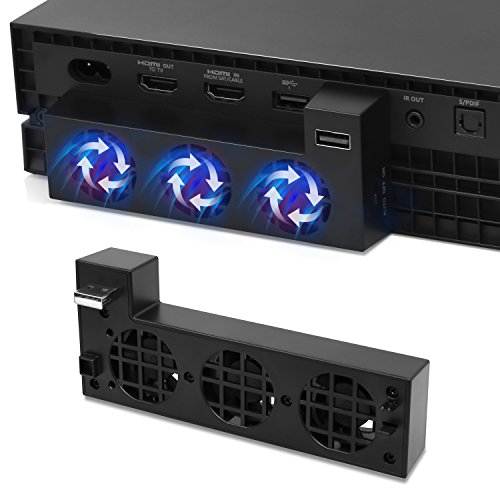
How To Choose The Best Xbox One X Cooling Fan
The One X vents its heat out of the top and back, which is why almost every cooler in this category either lifts the console upright or clips a fan bank onto the side. A vertical stand saves horizontal shelf space, while a side-clip fan adds no footprint and suits a console already sitting flat. Measure your media unit first, because a tower stand needs vertical clearance while a side-clip fan needs flat space and airflow around the vents.
Stand or clip-on: pick by your shelf, not by the photos
A vertical stand holds the console on its end and saves horizontal space, which matters if your media unit is shallow. A side-mounted cooler clips onto the console’s existing vents and takes up no extra footprint, but it works best when the console already sits flat with clearance around it. Neither type needs an extra power brick — they run off the console’s own USB port.
Fan count, speed and the noise you actually hear
Three fans is the standard across this category, and more fans do not automatically mean more noise. The published noise figures here range from 30 db (a quiet room hum) to 50 db (roughly the level of a normal conversation across a table). If the console sits within a few feet of your chair, the 30 db versus 50 db gap is the spec that matters most.
The USB ports are a bonus, not a hard drive dock
Several stands add USB 2.0 ports for charging a controller or plugging in a keyboard. Read the fine print: the makers of the FASTSNAIL and Mcbazel stands both state plainly that an external hard drive should not be plugged into the stand’s hub. Use those ports for controllers and accessories only, and keep game storage on the console’s own ports.
Automatic temperature modes explained
A few coolers add an AUTO setting that reads console temperature and switches the fans on and off by itself, typically around a 40℃ trigger point on the FYOUNG unit. That cycling is normal, and the maker even warns it may repeat a few times as heat builds back up. If you would rather control things yourself, the Mcbazel’s high/low/off switch and the XBERSTAR’s manual button skip the cycling entirely.
Side-by-Side Comparison
| Model | Best For | Type | Fans | Extra USB Ports | Amazon |
|---|---|---|---|---|---|
| FASTSNAIL Vertical Stand★ Best Overall | All-round pick with USB hub | Vertical tower stand | 3 | 3 (USB 2.0) | Amazon |
| Mcbazel Vertical Cooling StandSpace Saver | Space-saving vertical fit | Vertical tower stand | 3 | 3 (USB 2.0) | Amazon |
| FYOUNG USB Cooling FanAuto Mode Pick | Auto temperature control | Side-mount fan bank | 3 | 1 (USB 2.0) | Amazon |
| XBERSTAR One X Cooling Fan | Vertical storage with button control | Clip-on vertical stand | 3 | 2 | Amazon |
| Eboxer Cooling Fan | Lightweight plug-and-play | Side-mount fan bank | 3 | — | Amazon |
| V BESTLIFE Portable Fan | Compact travel setup | Side-mount fan bank | 3 | — | Amazon |
| Sanpyl Portable Cooling Fan | Simple heat-reducing side fan | Side-mount fan bank | 3 | — | Amazon |
| Zerone Cooling Fan Docking Station | Holder plus cooler in one | Docking stand | 3 | — | Amazon |
| OSTENT External USB Cooler | Temperature-triggered auto mode | Side-mount fan bank | 3 | 1 | Amazon |
Detailed Reviews
1. FASTSNAIL Vertical Stand with Cooling Fan
Our pick — 4.0+★ from 2,500+ verified ratings; the strongest balance of quality and price.
The stand that turns one USB cable into cooling, three spare ports and a lit-up console.
Three jobs in one plastic tower: it holds your One X upright, blows air across it with three built-in fans, and gives you three USB 2.0 ports for controllers, a keyboard, a phone or a tablet. One built-in cable powers the whole thing from the console itself, so there is no second wall plug fighting for space behind your TV. If your shelf is narrow and you are short on controller-charging ports, this covers both with one built-in cable.
Buyers keep praising how useful this stand is: it holds and cools the console without fuss. The cooling comes up so often in reviews that it reads as the main benefit, not a side feature. The green light bar also gets repeated mentions as an unexpected bonus that makes the console look sharper on the shelf. Value comes up a lot too, and that tracks: you get a stand, a cooler and a hub in one unit.
The catch is the base. Stability feedback is genuinely split — some setups sit rock solid, others report a wobble that needs a shim or a flatter surface. The fans also draw mixed remarks on noise, and the maker is clear that the ports are not for an external hard drive. Nothing here is a dealbreaker for a normal TV stand, but if your console lives somewhere it might get knocked, plan for a steady surface.
Where it earns its place
- One built-in cable powers stand, fans and hub together — no extra adapter
- Three USB 2.0 ports for controllers, keyboards, phones and tablets
- Light bar gives the One X a distinct look on the shelf
- Keeps the console vertical, which frees up horizontal shelf space
Where it asks for care
- Base stability is a split experience — some units wobble
- Fan noise divides opinion once the room goes quiet
- External hard drives are explicitly not supported on the hub
Reach for this if: you want cooling and extra USB ports handled by one vertical unit on a shelf you have already levelled.
Think twice if: the console sits somewhere unstable, or you need the hub to carry a game storage drive.
2. Mcbazel Vertical Cooling Stand
Same tower idea as the FASTSNAIL, but with a speed switch you set yourself.
The Mcbazel gives you three fan settings on a switch — high, low and off — so you can drop to low during a quiet cutscene and crank back up for a long session. That is more control than the FASTSNAIL, which gives you one fan behaviour. It still stands the console upright to reclaim shelf space, still carries a light bar, and still runs off USB 5V straight from the console with no separate adapter. Three USB 2.0 hubs cover controllers and other game accessories, with the same exclusion you should take seriously: no external hard drive on those ports.
What buyers talk about most here is fit — the console sits properly in the cradle, which is exactly what you want from a stand that has to hold a heavy box on its end. Cooling praise shows up right behind it, and the lock plus non-slip pad is doing real work pinning the console in place. It is a newer design than most of this list, and it reads like one: the polished finish and the sticky pad are small touches that make setup feel less like an afterthought.
Stability still gets a split verdict, and a wobbly report is the sort of thing that shows up on almost any tower stand — the sticky pad helps but does not turn a soft surface into concrete. Compared with the XBERSTAR further down, you lose the second USB port but gain a proper three-position speed switch, which is the more useful trade for most people.
Fit is the headline: the cradle holds the One X securely on its end, which is the whole point of a vertical stand, and the non-slip pad backs it up.
The honest limit: it is still a tower on a pad, so a wobbly surface will translate through — and the USB hub will not carry a storage drive.
Suits you if: you want to pick your own fan speed and save shelf space doing it.
Look elsewhere if: you need max USB ports — the XBERSTAR below adds a second one.
3. USB Cooling Fan
The fussiest cooler here: it reads temperature and decides when to spin.
This is the side-mount option for anyone who wants the fan to think for itself. Three cooling fans spin up to a published maximum of 5000 rpm, and the switch has three positions — ON, OFF, and AUTO. In AUTO, the fan starts when the console runs above 40℃ and stops when it drops back below 40℃. The maker even notes the fans may cycle on and off one to three times as residual heat builds and fades, which is normal behaviour rather than a fault.
Here is the part a spec sheet will not tell you. The whole point of a cooler is to move hot air out, and the feedback on that is genuinely divided — some setups run noticeably cooler, others describe the console feeling hotter with the fan attached. Noise is the bigger grumble, and reliability draws its share of criticism too. It has the largest audience of any pick on this list, which cuts both ways: plenty of people bought it, and plenty of opinions came with that.
If you like the idea of set-and-forget cooling, the AUTO logic is genuinely clever and the temperature trigger is clearly documented. Just go in knowing the outcome is not guaranteed on every console, and that a 5000 rpm fan bank is audible. Compared with the quieter OSTENT fan lower down, this one trades a calm room for hands-off control.
The clever bit: AUTO mode watches temperature and starts the fans above 40℃, so you are not flicking a switch every session.
The gamble: cooling results are split between owners, and this is one of the louder fan banks here.
Worth it if: automatic temperature control matters more to you than silence.
Skip the auto route if: your console sits beside your head and you want a quiet room.
4. One X Cooling Fan – External Intelligent Control for One s

A clip-on that matches the console’s lines and lets your thumb decide the fan.
Three fans, a button on the stand, and a body that traces the One X’s own contours. This one leans on looks as much as airflow — the design is meant to sit flush with the console’s decor rather than look bolted on. It also stores the console vertically, which saves the same shelf space the tower stands above do, but with a clip-on install rather than a full cradle.
At 1.5 pounds it has real substance to it, so it does not feel like a hollow shell clipped to the side of a heavy console. Two ports cover a controller and one accessory without turning the stand into a hub, and the manual button keeps you in charge of when the fans run — no temperature sensor deciding for you. If you have ever wanted a cooler you can just switch off mid-film, this is that cooler.
The trade is straightforward: fewer ports than the FASTSNAIL and the Mcbazel, and no automatic mode like the FYOUNG. What you get in return is a cleaner look and direct control. Its smaller following means less of a track record to lean on, so treat the fit and finish as the reason to pick it rather than overwhelming evidence.
Reasons to clip it on
- Design follows the One X lines, so it looks factory-fitted
- Button on the stand gives you direct fan control
- 1.5 pounds gives it a solid, non-hollow feel
- Vertical orientation frees up shelf space
What you give up
- Only two ports versus three on the tower stands
- No automatic temperature mode
Best match: someone who wants the cooler to look like part of the console and be switched by hand.
Not the one for: buyers who want three spare ports or hands-off auto cooling.
5. Cooling Fan for One X

At 2.11 ounces, this is the cooler you forget is clipped to the console.
Three fans, a USB plug and nothing else to wire up. The Eboxer weighs in at 2.11 ounces, which makes it the lightest unit on this list by a wide margin — nothing here pulls on the console’s vents or drags it off balance. Setup is genuinely one step: plug it into the USB port and it runs. The ABS plastic case is the same material nearly every cooler here uses, so it wipes clean and shrugs off shelf dust.
This is where the honesty matters. Functionality is the most-discussed topic in its feedback, and it comes out genuinely mixed — the USB port is the specific fault line, with some units working well and others not powering up properly. That is a real risk on a lightweight unit, and it is the thing to check the moment yours arrives rather than weeks later. Buy from a seller with a clear return window and you are covered either way.
For a second console in a spare room or a cheap way to add airflow without a whole new stand, the size and simplicity make sense. The V BESTLIFE below is a near-identical concept with published voltage and wattage figures, so compare those two closely before deciding.
The number that sells it: 2.11 ounces is light enough that the clip barely registers on the console.
The one to watch: USB power delivery is the weak point across the range of feedback — test it on day one.
Pick this for: a lightweight, no-fuss top-up fan where weight and simplicity beat extra features.
Look to the stands instead if: you want ports, a light bar or a cradle that holds the console upright.
6. Portable Heat Reducing USB External Cooling Fan
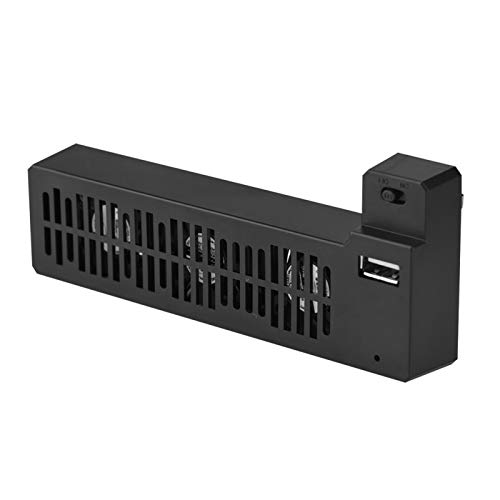
The numbers are all on the label here — 5 volts, 5 watts, three mini fans.
Most coolers in this category hide their electrical specs. This one publishes them: 5 volts and 5 watts over a USB connector, which tells you it draws its power entirely from the console’s own port and needs no adapter of any kind. Three mini fans handle the heat reduction, and the ABS plastic shell is the same durable material the rest of the field uses. Mount it to the side, plug it in, done.
Its footprint is genuinely small, so it slips onto a crowded media unit where a vertical tower stand simply will not go. The travel angle is real too — a side-mounted fan this compact is the easiest thing here to unclip and pack if the console moves between rooms. There is no hub, no light bar and no auto mode, so it is a pure airflow accessory and nothing more.
With a modest review base, this is a buy on specs rather than on a long track record. The published voltage and wattage figures are the reassurance — you know exactly what it draws and where it draws it from. If you want an uncomplicated side fan and the FYOUNG’s auto mode is more than you need, this is the cleaner choice.
Plain on purpose: 5V and 5W over USB, three fans, no extra hardware to buy or plug in.
Set your expectation: no ports, no lighting, no auto mode — this one just moves air.
Your pick if: shelf space is tight and you want a side fan with nothing extra attached.
Go bigger if: you also want the stand, the hub and the light bar in one box.
7. Sanpyl Portable USB External Cooling Fan

Three high-speed fans and a published 50 db — read that noise figure before you buy.
50 db is the loudest figure printed anywhere on this list, and it is worth understanding what that means. It sits around the level of a normal conversation across a table, so expect to hear it clearly from the sofa. In exchange, three high-speed fans pump airflow through the console’s internal parts to keep it from overheating after long sessions. It runs on DC 5V over USB, so there is no extra power supply to find a socket for.
The design is the same compact side-mount layout as the V BESTLIFE — small footprint, easy to carry, nothing that needs a tool. ABS plastic keeps it light and wipeable. It is sold as a replacement-part kit too, so it suits someone patching airflow onto a console that is already set up rather than redesigning the whole shelf around a stand.
Compare it honestly with the OSTENT below: that one publishes 30 db versus this unit’s 50 db on paper. If noise matters more than anything else here, the numbers point one way. If you just want strong airflow from a small clip-on unit and you play with headphones on, this does the job.
What it brings
- Three high-speed fans aimed at internal airflow
- DC 5V USB power — no separate supply
- Compact side-mount body that saves space
- ABS plastic case wipes clean easily
What to weigh up
- 50 db is the loudest published figure in this field
- No USB hub or lighting built in
Fits your setup if: you game with headphones and want strong airflow over a quiet room.
Consider the OSTENT instead if: a 30 db rating sounds much better than a 50 db one.
8. Zerone Cooling Fan Docking Station

A docking stand that doubles as a holder for console and controller together.
Three mini fans, 5 watts over USB, and a body that acts as a stand rather than just a clamp. That extra function is the appeal: it holds the console and a controller steadily on the same base, which keeps your coffee table from becoming a pile of hardware. Plug it in over USB, clip the console on, and it dissipates heat while you play.
The build quality is the live question. Feedback splits between those who think it is well made and those who read it as cheaply built — a genuine difference of opinion rather than a settled verdict. Noise draws mixed comment too, though one recurring note is that the fans stay under the game audio, which is the standard most people actually judge a cooler by.
Treat this as a tidy-up accessory as much as a cooling one. If your goal is a single stand that organises console and controller and happens to move air, it fits that brief. If your only goal is airflow and quiet, the OSTENT below is the calmer, simpler route.
Two jobs, one base: it holds the console and a controller together while three fans work on heat — 5 watts off USB, nothing else needed.
The open question: build quality reads differently depending on who you ask, so judge the finish when it lands.
Right for you if: a single tidy base holding console and controller appeals more than a bare clip-on fan.
Pass it over if: build quality uncertainty bothers you more than the space saved.
9. OSTENT External USB Port 3 Built-in Cooling Fans Cooler
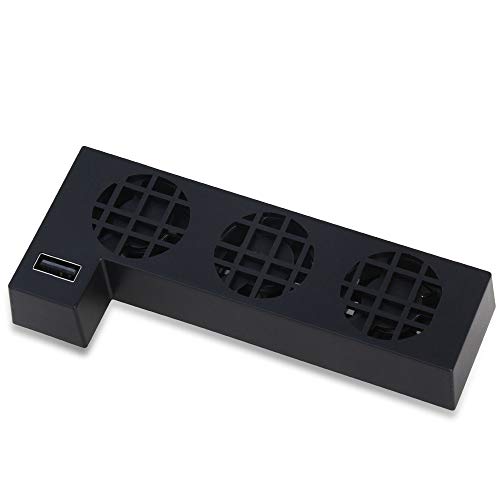
The quiet one on paper — 30 db with a three-key control strip.
At 30 db (a measure of loudness), this is the lowest noise figure published by any cooler in this guide. That makes it the first one to check if the console shares a room with the TV you actually watch. Three built-in high-speed fans push air over the One X, and the clip-on install takes no extra footprint. One added USB port covers controller charging or a USB stick without altering the console’s look.
The three-key control strip is more thoughtful than a plain on/off switch. ON runs the fans continuously, OFF shuts them down, and AUTO lets the fans adjust based on the console’s temperature. That gives you both styles — manual when you want it, automatic when you do not — from the same small unit. The plastic, clip-on format keeps installation to a single motion.
Its following is small, so weigh this one on the published specs rather than on volume of feedback. The 30 db figure is the strongest single argument on the page for quiet operation, and the AUTO mode gives it a feature the cheaper clip-ons lack. If silence is your priority and you like the idea of the fan reading the console’s heat, this is the logical stop.
The quietest published number: 30 db versus the Sanpyl’s 50 db on paper — the cleanest case for a living-room setup.
Take it on spec: a light review history means the 30 db rating and AUTO mode are the reasons to choose it.
Go with this if: a 30 db rating and a temperature-sensing auto mode are what you came looking for.
Look elsewhere if: you would rather buy on a long, loud track record than on a published noise figure.
Know the Specs
Noise level in decibels (db)
Decibels measure how loud a fan sounds from a normal listening distance. A 30 db fan reads as a soft hum in a quiet room, while a 50 db fan sits closer to a normal conversation across a table. On this list the OSTENT publishes 30 db and the Sanpyl publishes 50 db — a gap you will notice when the game audio drops. If the console sits beside where you sit, pick the lower number.
Fan count and rotational speed (rpm)
Most coolers here use three mini fans, which spreads airflow across a wider area of the console’s vents. Rotational speed is measured in rpm — revolutions per minute — and the FYOUNG publishes a maximum of 5000 rpm. Higher speed moves more air but usually costs you quiet. Three fans at a moderate speed are often the better balance for a living room.
USB power draw (volts and watts)
These coolers draw their power from the console’s own USB port, which is why none of them need a wall adapter. The published figures here are 5 volts and 5 watts on the V BESTLIFE and the Zerone. That small draw is what lets them run off the console itself, so your shelf stays free of one more plug.
Auto temperature mode and the 40℃ trigger
Some units add an AUTO setting that reads console temperature and switches the fans on and off by themselves. The FYOUNG documents a 40℃ trigger: fans start above it and stop below it. That cycling may repeat a few times as heat fades and rebuilds, which the maker flags as normal. If you dislike hearing fans start and stop, a manual ON/OFF switch is the calmer option.
Common Questions
Will a One X cooling fan work with an Xbox One S or Series X?
Do these cooling fans need a separate power adapter?
Can I plug an external hard drive into the USB ports on the stand?
How loud is a 50 db cooling fan compared with a 30 db one?
What does the AUTO mode on a One X cooler actually do?
Will a vertical stand really keep my One X cooler?
Is a side-mounted clip-on fan better than a vertical stand?
Do the fans on these coolers run all the time?
Will a cooling fan stop my One X from overheating completely?
The Bottom Line
For most people, the xbox one x cooling fan to start with is the FASTSNAIL Vertical Stand. It packs three fans, three USB 2.0 ports, one built-in cable and a light bar into a single tower that tidies the shelf while it cools. It has the largest and most consistent body of positive feedback here on the practical side: it holds, it cools, and it adds ports.
If you would rather set the fan speed yourself, the Mcbazel Vertical Cooling Stand adds that high, low and off switch for a similar footprint. And if quiet matters more than anything — the OSTENT’s 30 db rating is the lowest published figure in this whole group, and it comes with an AUTO mode that reads console temperature for you.
How we choose
We do not accept paid placement. Every pick is matched to a real buyer and a real use-case; we do not hands-on test units.
Sources
Specifications: manufacturer listings and product documentation. Review insights: verified customer reviews, as of November 2026. Pricing: not shown on this page (it changes often); check the current price via the retailer link.
As an Amazon Associate, Tactical Gear Guy earns from qualifying purchases. This does not affect which products we feature.