Specs are compiled from manufacturer listings and verified buyer reviews and can change over time — please confirm the key details on the product page before buying.
Most so-called wood PC cases are vinyl wrap over plastic, and you find out the moment the light hits them. The nine picks below all put real wood on the front or side of a case with the fan mounts and card clearance to cool a modern graphics card. If you want the short answer: the Fractal Design North is the one to beat, because it pairs a genuine walnut front with two included 140mm fans and a 355mm graphics card limit, and it is the crowd favorite at 4.5+ stars across 3,600+ owners.
This guide is built by comparing the manufacturers’ published specifications and the patterns across verified customer reviews, so you get each pick’s real strengths and trade-offs instead of marketing spin.
Wood panels change one thing about case shopping: airflow runs through slats and mesh instead of a solid face, so check that the slats are open and the radiator mounts are where you need them. Here is how each pick handles that, in a straightforward rundown of the best Woodgrain PC Case options you can actually build in.
Top Picks


How To Choose The Best Woodgrain PC Case
A woodgrain case is a cooling decision dressed up as a furniture decision, so read the fan mounts and clearance figures before the finish. The wood is the reason you are here, but the fan mounts, the graphics card length limit, and the radiator room decide whether your parts fit and stay cool. Lock in the fan mounts, card limit, and radiator room first, then pick the wood finish.
Check GPU length before anything else
Your graphics card is the longest part in the box, so the case’s card limit is the hard ceiling. The picks here range from 315mm up to 415mm of clearance, and the difference decides whether a triple-fan card slides in or gets returned. If you already own a big card, measure its length from the bracket to the far edge and match that number to the case’s GPU clearance spec.
Know your real wood from your wood trim
Genuine walnut front bars are a different product from a stained wood strip glued to the side of a glass tower. Both look good in a room, but a genuine wood front usually doubles as the intake, so its slats need to be open enough to feed the fans. Ask whether the wood is the intake panel or just decoration.
Count the fans and the radiator spots
Pre-installed fans save you a separate purchase and a wiring afternoon. Several of these cases ship with three, four, five, or even seven fans already mounted. Also check whether the top takes a 360mm radiator, because that is the common size for a liquid CPU cooler and the one spot most builders use.
Plan for the cable side
Hidden-connector motherboards (boards with their power plugs on the back) are showing up more often, and some of these cases cut openings to support them. If you run a standard board, those cutouts go unused and change nothing about your build. If you run a back-connect board, it is the difference between a clean build and a rat’s nest.
Side-by-Side Comparison
| Model | Best For | GPU Clearance | Included Fans | Internal Bays | Amazon |
|---|---|---|---|---|---|
| Fractal Design North★ Best Overall | Overall balance | 355 mm (300 mm with front 360mm radiator) | 2 × 140mm Aspect PWM | 2 | Amazon |
| MONTECH XRWoodBiggest Card Room | Big-card gaming builds | 410 mm | 3 × 140mm + 1 × 120mm ARGB | 4 | Amazon |
| Okinos Cypress 7Storage Champion | Storage and top radiator | 415 mm front / 390 mm rear | 4 × 120mm PWM | 5 | Amazon |
| FOIFKIN F600 | Panoramic glass look | 400 mm | 7 no-LED fans | 2 | Amazon |
| Antec Flux Wood | Dual 360mm radiators | — | 5 PWM (3 × P12, 1 × P12R, 1 × P14) | 3 | Amazon |
| ASUS ProArt PA401 Wood | Workstation quiet | 315 mm | 2 × 160mm ring fans | 2 | Amazon |
| Lian Li LANCOOL 217 | Front-fan airflow | — | 2 × 170mm, 2 × 120mm, 1 × 140mm | 5 | Amazon |
| Thermaltake View 380 WS | Fan-count maxing | 415 mm | 4 × 120mm ARGB Lite | 10 | Amazon |
| CORSAIR Frame 4000D Wood RS | Modular upgrades | — | 4 × RS120 PWM | 3 | Amazon |
Detailed Reviews
1. Fractal Design North Charcoal Black Tempered Glass Dark
Our pick — 4.5+★ from 3,500+ verified ratings; the strongest balance of quality and price.
The walnut-front case that made wood cool on a PC, and still the one to beat.
The front bars are cut from real walnut, and that is the whole pitch. Buyers describe a professional studio look rather than a gaming tower, and appearance is what wins people over here more than any other single thing. It fits ATX, mATX, and ITX boards, so you are not locked into one motherboard size.
Cooling is handled from the start by two included 140mm Aspect PWM fans, and the open front lets air straight through the wood. You can install a graphics card up to 355mm, or up to 300mm if you mount a 360mm radiator in the front. Seven bridgeless expansion slots give you room for add-in cards and a vertical mount.
Storage is two combined 3.5-inch/2.5-inch mounts plus two dedicated 2.5-inch mounts. Removing the side panels, unclipping the front, and popping the top is a toolless job with an integrated tab, and the clear tempered glass side is there for scratch resistance as much as the view. This one weighs 9.5 kg, which is heavier than the Okinos Cypress 7 at 6.45 kg — a real consideration if you move the tower often.
What sells it
- Real walnut front bars, not a printed texture
- Two 140mm PWM fans already mounted and wired
- 355mm card clearance, 300mm with a front 360mm radiator
- Toolless panel removal via an integrated tab
What to weigh first
- 9.5 kg is the heaviest in this group
- Only two internal bays, versus five on the Okinos
- Front radiator drops card clearance to 300mm
Reach for this if: you want genuine walnut on a proven ATX layout and two good fans in the box.
Think twice if: you run a card over 355mm or need more than a couple of drives mounted inside.
2. MONTECH XRWood ATX PC Case
Four hundred and ten millimeters of card clearance, with the wood and the fans already sorted.
If your graphics card is the reason your current case has a dented side panel, start here. The XRWood takes cards up to 410mm long, which is the second-largest limit in this group and enough for the long triple-fan models the maker calls out for the RTX 50 Series. An adjustable GPU support stand is included too, so a heavy card gets physical bracing instead of sagging on the slot.
Cooling comes build-ready with three 140mm ARGB fans in the front and one 120mm ARGB fan in the rear. That is four fans in the box before you buy anything else. An extra-large power supply shroud and expanded routing space are aimed at keeping the cable side tidy, and the front frame carries carbon print accents for a darker, more aggressive finish than the pure walnut-forward cases here.
The wood here is walnut set into a steel and plastic frame, so expect the grain to read as a styled accent rather than a full wood slab. Internal capacity covers four bays, and it is rated for 360mm AIO coolers and both 3.5-inch and 2.5-inch drives. At 14.3 pounds it is manageable to lift, though it is not the lightest option on the list.
Where the money goes: four ARGB fans, a GPU support bracket, and 410mm of clearance in one box is a lot of the parts list already covered.
The honest limit: the carbon-print and RGB styling leans gamer, which is not the warm furniture look some wood-case buyers are chasing.
Built for: long-card gaming builds that want the fan and bracket shopping done up front.
Not the pick for: a quiet, understated desk where RGB glow would feel out of place.
3. Okinos Genuine Walnut Wood PC Case Cypress 7
Five drive mounts, a top-mounted 360mm radiator, and walnut that earns its keep.
This is the case for the builder who has more drives than the average gamer and still wants wood on the desk. It holds up to five SSDs, and the case quality is what buyers call out first, closely followed by the look of the walnut grain. Four 120mm PWM fans come pre-installed and push airflow intake up to 200 CFM, so the wood front is not choking the intake.
The headline fit number is 415mm of GPU clearance with the front fan layout, or 390mm with the rear setup. A 360mm radiator mounts on top, and a side-mounted AIO can go up to 280mm. One thing to plan around: a 240mm water cooler on the right side can interfere with cards wider than 280mm, so check your card’s width against that.
Front I/O includes a Type-C 3.2 Gen 2 port rated at 10Gbps, two USB 3.0 ports, audio jacks, power, and reset. The tempered glass side is magnetic, which makes pulling it off for a quick look a one-second job. At 6.45 kg it is far lighter than the Fractal at 9.5 kg, and it holds more than twice as many internal bays — five against two.
The standout spec: 5 internal bays and a 10Gbps Type-C port put this well past what most wood-front mid-towers offer.
Check before you order: vertical graphics card mounting is not supported here, so plan a standard horizontal install.
Fits the builder who: runs multiple drives, wants a top 360mm radiator, and needs a lighter tower to move around.
Look elsewhere if: a vertical GPU mount is part of your plan.
4. FOIFKIN F600 PC Case
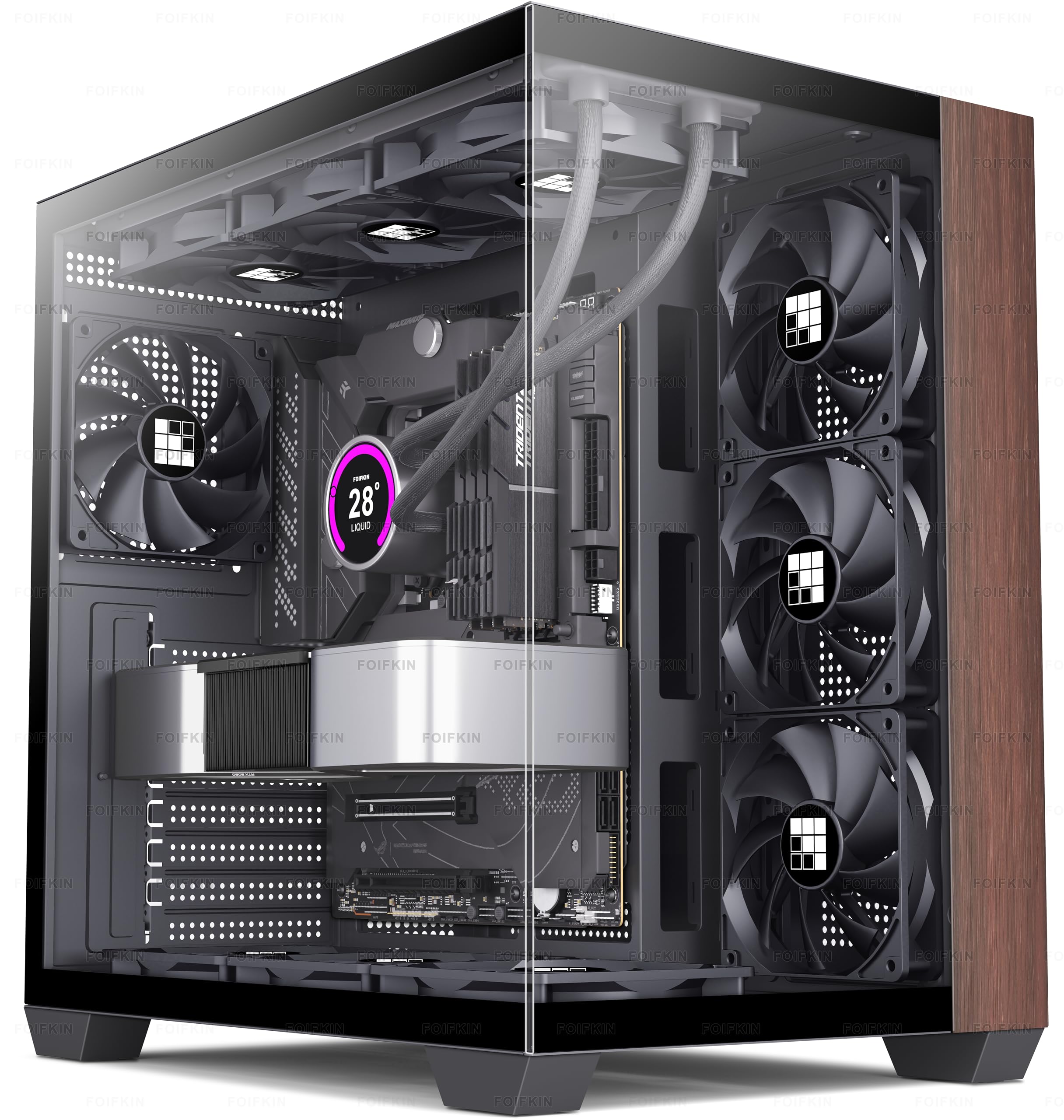
Seven fans and a wraparound glass wall, with the walnut taking a supporting role.
The F600 is the show-piece of this list. Its 270° double-cabin glass curtain wall wraps two sides of the build, and the design is what buyers call out most, with the appearance running a close second. Seven no-LED fans arrive already mounted, which means you do not spend the first evening of your build installing fans.
Cooling capacity runs deeper than the stock setup. The case can take up to 10 120mm fans across the sides, top, and power supply mounting points. The side glass is hinged and lifts off without tools, so swapping a fan or checking a cable is quick. Component room covers up to a 360mm cooler, a 170mm-tall CPU cooler, a 400mm graphics card, and an ATX power supply up to 220mm.
Front I/O is a Type-C 3.0 port, one USB 3.0, one USB 2.0, mic and audio, power, restart, and an LED switch. Cable management is where opinions split — plenty of room to work in, but the routing takes patience to get clean. It is also a shorter case than the Okinos, measuring 16.4″D x 11.8″W x 15.2″H against the Okinos at 18.74″D x 8.66″W x 19.13″H, so it trades height for width on your desk.
Why the glass sells: a 270° view with seven fans behind it turns the build into the centerpiece, and the wood keeps it from looking like a plain box.
The trade-off to accept: tucking cables behind a fully exposed cabin takes more time than a hidden-shroud case.
The right buy for: a builder who wants to show off every component and wants fans already installed.
Skip the glass if: you would rather hide the wiring than arrange it.
5. Antec Flux Wood Mid-Tower E-ATX PC Case

Two 360mm radiators at once, and five PWM fans doing the pushing.
Water-cooling builders get the most from this one. It supports a front 360mm radiator plus a top 360mm radiator at the same time, or a front 420mm plus a top 280mm. That is dual-radiator room in a mid-tower, which is unusual in a wood-front case. Case quality is the thing buyers praise most, with airflow running second.
Five PWM fans ship pre-installed: three P12 at the front, one P12R reverse fan at the power supply chamber, and one P14 at the rear. The case itself can hold up to nine fans. Its multi-directional vent design feeds a dedicated airflow channel through the frame, and it supports back-connect motherboards widely. The wood is blended with metal and glass for a mixed-material look, and it weighs 9.27 kg.
Internal storage covers three bays. The noise story is mixed — some builds run quiet, while front 120mm fans have been noted rattling in others, which is the sort of thing worth checking on arrival. If a fan does rattle, a swap or a remount is a five-minute fix, not a reason to pass on the case.
Its real strength: dual 360mm radiator support plus five PWM fans makes this the most liquid-cooling-ready wood case in the group.
Set expectations: the front 120mm fans can rattle on some units, so listen closely during the first boot.
The pick for: a dual-radiator custom loop or a heavy liquid build that needs the extra cooling ceiling.
Weigh the fan noise: if a dead-silent front is non-negotiable from day one, budget for replacement fans.
6. ASUS ProArt PA401 Wood Edition

Two oversized ring fans move serious air, and the wood is certified sustainable.
This is the workstation case of the group. Two 160 x 32mm front ring fan blades deliver up to 138cfm of airflow, and big slow-spinning fans are how you get air movement without a scream. The front panel is made of material certified by the Forest Stewardship Council for sustainability, which matters if you care where the wood came from.
Compatibility is deliberately tighter than the gaming towers here. It takes ATX, micro-ATX, and mini-ITX boards, supports a 240mm radiator, and clears graphics cards up to 315mm. That card limit is the smallest on this list, so a long triple-fan card will not fit — check your card’s length before you commit. Buyers have flagged the size as tighter than expected, and that tracks with the 315mm ceiling.
The I/O is the standout for a work machine: a USB Type-C 20Gbps port, plus power and reset lockout and two-section PWM control you can set from the front. Build-friendly touches include a left-side panel lock, a detachable power supply bracket, and integrated rear cable clips. The enclosure blends ABS, alloy steel, tempered glass, and wood into one finish.
Where it shines: 138cfm from two 160mm fans and a 20Gbps front port make this a strong workstation anchor.
The ceiling to respect: a 315mm graphics card limit and 240mm radiator support are the tightest figures here, so plan the parts around the case.
Made for: a professional or editing rig with a mid-length card and a 240mm cooler.
Measure first if: your graphics card runs long — 315mm is a firm wall.
7. Lian Li LANCOOL 217 ATX Mid-Tower

Two 170mm front fans that can aim straight at your CPU on command.
Big front fans are the LANCOOL 217’s whole identity. It ships with two 170x30mm front fans, two 120mm reversed-blade fans, and a 140mm rear fan — five fans, no shopping required. In the default setup the 170mm pair feed both the CPU and the graphics card. Raise both fans into CPU mode and they redirect that airflow specifically toward the processor, which is a level of tuning most cases leave you to solve yourself.
The wood is genuine, and you pick the finish: dark walnut or light beech. Buyers like how the wood and metal panels sit together, and the buildability — especially cable routing — draws steady praise. It holds five internal bays, and it supports power supplies up to 220mm with two mounting positions, front-facing or rotated for easier cable work.
Back-connect motherboards get support, which keeps the cables hidden and the airflow clean. There are also two power buttons, so a tower placed on the floor or off to the side still has a reachable switch. At 10.5 kg it is the heaviest case here, heavier than the Fractal at 9.5 kg, so it wants to live where you place it rather than travel.
Why it earns the airflow label
- Five fans included, led by two 170mm front units
- Fans can be raised into a CPU-targeted mode
- Choice of dark walnut or light beech real wood
- Dual power buttons for flexible placement
Honest drawbacks
- 10.5 kg is the heaviest in the group
- Large front fans suit air builds more than slim front radiators
Best matched with: an air-cooled build that wants maximum airflow and zero extra fan shopping.
Reconsider for: a small desk or a plan to move the machine often.
8. Thermaltake View 380 WS ARGB

Ten-fan capacity and 415mm of card room, with a stained wood strip on the side.
Read the wood label carefully here. The View 380 WS uses a stained wood trim on the side rather than a full wood front panel, so the wood is an accent on a glass-and-mesh tower. The design is what buyers respond to most, with spaciousness running a close second. If you want the wood to be the star, the Fractal or Okinos will feel more like furniture.
Space is not the problem. It takes up to ten 120mm fans, with 360mm radiator support on both the top and the bottom of the chassis. Four 120mm ARGB Lite fans come pre-installed — three as intake, one as exhaust. A 415mm graphics card clearance gives you room for the longest cards, which is the same 415mm figure the Okinos Cypress 7 offers with its front fan layout.
Hidden-connector support covers ASUS BTF, MSI Project Zero, and GIGABYTE Project Stealth boards, so the cables can disappear behind the tray. Cable management is the one split decision — the space is there, but some builds take more arranging than others. At 18.9 pounds it is a heavy tower, so plan its spot on the desk or floor before you build.
The plain case for it: 415mm of card clearance and room for ten fans give you headroom to grow the build later.
Know what you are buying: the wood is a trim, not a full front panel, and the tower runs heavy.
For the builder who: wants maximum fan and card room and treats the wood as a finish, not the feature.
Not for: anyone shopping for a genuine wood front panel first.
9. CORSAIR Frame 4000D Wood RS

A case you can rebuild part by part, starting with walnut slats you can swap out.
The FRAME system is what makes this one different. The front panel carries walnut slats certified by the Forest Stewardship Council, and those front panels are designed to be swapped, along with the power supply shroud and even the motherboard tray. Build quality is what buyers praise most, with appearance second. If you keep a case for years and want to change its look, this is the one built for that.
Four CORSAIR RS120 PWM fans come pre-installed in the front and rear. They daisy-chain on 4-pin PWM connections and support Zero RPM mode, so a light load can run with the fans stopped. The InfiniRail mounting system slides along steel rails, letting you position fans up to 200mm in the front, or 140mm in the roof, wherever you want them instead of in fixed holes.
Cooling room is generous for a mid-tower, with three 360mm radiator locations on the front, roof, and side. Hidden-connector support covers ASUS BTF, GIGABYTE Project Stealth, and MSI Project Zero boards. The wood front is open enough to feed airflow while keeping the slat look, which is the balance this case is chasing. It weighs 9.7 kg, so it sits a touch heavier than the Fractal at 9.5 kg.
The long-game value: swappable panels and a sliding fan rail mean the case can change with your build instead of aging out of it.
The ceiling to note: buyers have flagged the size as bigger than expected, so confirm your desk or shelf has the room.
Suits the upgrader: someone who rebuilds over time and wants a case that changes with the parts.
Measure the space if: your desk is snug, since this one runs large.
Know the Specs
GPU clearance
This is the maximum length of graphics card the case will physically hold. The number matters because a card that is 10mm too long will not seat no matter how good the wood looks. Card limits here run from 315mm up to 415mm, and the figure can shrink when you add a front radiator — the Fractal drops from 355mm to 300mm with a 360mm front radiator installed. Measure your card before you pick a case.
Radiator support
A radiator is the metal block a liquid CPU cooler uses to shed heat, and 360mm is the common size for a big cooler. The case needs dedicated mounting points, usually up top or in the front. Some picks here mount a top 360mm radiator, and the Antec Flux Wood can run two 360mm radiators at once. Match the radiator size to the mounting spots, or you will be buying a smaller cooler.
Internal bays
Bays are the mounting spots for 2.5-inch SSDs and 3.5-inch hard drives. A gamer might use one or two, but a builder with a media library wants more. The spread here goes from two bays up to five on the Okinos and ten on the Thermaltake. Count your drives before you settle, since a bay is the one thing you cannot add later without an adapter.
Included fans
Pre-installed fans save you a purchase and an evening of cable routing. They come in sizes, and bigger fans move more air at lower speed, which usually means less noise. The Lian Li LANCOOL 217 leads here with two 170mm front fans, while the FOIFKIN F600 installs seven fans from the start. Check whether the fans are PWM, which lets the board control their speed automatically.
Common Questions
Will a 360mm liquid cooler fit in a woodgrain case?
Is real walnut better than a wood-print vinyl wrap?
How do I know if my graphics card will fit?
Does a wood front panel block airflow?
What is a hidden-connector motherboard and does it matter here?
How many fans do I actually need in an air-cooled build?
Can I mount my graphics card vertically in these wood cases?
Will a wood case be noisier than a metal one?
How many storage drives can a woodgrain mid-tower hold?
Do I need a special motherboard for a wood case?
The Bottom Line
The woodgrain case worth starting with is the Fractal Design North, because its genuine walnut front, two included 140mm PWM fans, and 355mm card clearance balance looks and cooling better than any other pick here. If you run a long graphics card, the Okinos Cypress 7 gives you 415mm of card room plus five internal bays. For a dual-radiator liquid build, the Antec Flux Wood is the one to reach for. And if you plan to rebuild over the years, the CORSAIR Frame 4000D Wood RS is built to swap panels as your parts change. Whichever you pick, match the card and cooler limits to your parts list first, and the wood finish becomes the easy part of the decision.
How we choose
We do not accept paid placement. Every pick is matched to a real buyer and a real use-case; we do not hands-on test units.
Sources
Specifications: manufacturer listings and product documentation. Review insights: verified customer reviews, as of November 2026. Pricing: not shown on this page (it changes often); check the current price via the retailer link.
As an Amazon Associate, Tactical Gear Guy earns from qualifying purchases. This does not affect which products we feature.