Specs are compiled from manufacturer listings and verified buyer reviews and can change over time — please confirm the key details on the product page before buying.
Buying a Z-Wave module goes wrong in one predictable way: you pick the device before you check your hub. A relay, plug, or USB stick can be perfectly built and still refuse to show its settings, because most Z-Wave controllers only recognise the advanced features they have drivers for. So the first question is not “which module is best” — it is “what does my hub actually support?”
This guide is built by comparing the manufacturers’ published specifications and the patterns across verified customer reviews, so you get each pick’s real strengths and trade-offs instead of marketing spin.
Below you will find mid-range relays and plugs that handle the everyday jobs, USB sticks that turn a spare computer into a controller, and premium in-wall options for a whole-house build. Every pick is a genuine Z-Wave or Z-Wave Plus device, and the one that suits you depends on what your hub can talk to. That single check is the difference between a clean setup and a week of tinkering with a z-wave module.
Top Picks


How To Choose The Best Z-Wave Module
Three things decide whether a Z-Wave module works in your home: the hub you already own, the job you want it to do, and whether the wiring at that spot can support it. Everything else — chip generation, antenna, relay count — is detail layered on top of those three.
Hub compatibility comes before anything else
A Z-Wave module is a radio that talks to a controller; it does not think for itself. That controller — a Z-Box, SmartThings, Hubitat, Home Assistant, HomeSeer, or similar — is what runs your schedules and scenes. Some in-wall devices only expose their full feature set on hubs the maker has tested, and a few state plainly that they will not be recognised correctly elsewhere. Read that compatibility line on the listing before you look at the price tier.
Match the module type to the job
A dry-contact relay switches a circuit without sending voltage to it, which suits garage doors, fireplaces, sprinklers, and doorbells. A plug-in outlet module simply sits in a wall socket and powers whatever you plug into it. A USB stick is not a switch at all — it turns a computer or hub into a Z-Wave controller. Buying the wrong type is the most common return reason in this category, regardless of build quality.
Neutral wires, power, and load limits
In-wall switches usually need a neutral wire in the box, so check that before you order. Relay modules are often powered separately, by USB C or a low-voltage supply, and the maker will state clearly what not to feed them. Load ratings matter too — a switch rated for 15A can run lights, fans, and small motors, while a plug module rated at 15A and 125V handles ordinary household appliances.
Side-by-Side Comparison
| Model | Best For | Chip Generation | Load / Power Rating | Form Factor | Amazon |
|---|---|---|---|---|---|
| Zooz ZEN16 MultiRelay★ Best Overall | Garage doors and multi-device automation | 800 Series (800LR) | 15A / 15A / 20A relays | Wall-mount relay | Amazon |
| Minoston Zwave Outlet Mini (MP31Z)Best Value | Compact plug-in control in tight sockets | 800 Series | 15A, 125V, up to 1875W | Plug-in outlet | Amazon |
| Minoston MP21Z Smart PlugCompact Pick | Lamps and small appliances with voice control | 800 Series | 15A, 125VAC, up to 1875W | Plug-in outlet | Amazon |
| SONOFF Z-Wave 800 Dongle Plus | Building a controller on a PC or mini PC | 800 Series (EFR32ZG23) | Not a load device | USB dongle | Amazon |
| HomeSeer SmartStick G8 | Migrating an existing Z-Wave network | 800 Series | Not a load device | USB stick | Amazon |
| Aeotec Z-Stick 7 Plus | Raspberry Pi and small-board controllers | 700 Series | Not a load device | USB stick | Amazon |
| Zooz ZEN32 Scene Controller | One-touch scenes on the wall | 800 Series (800LR) | 15A, up to 150W LED on main | In-wall switch | Amazon |
| Leviton Decora Smart Switch ZW15S | Replacing a single wall switch | 800 Series | 15A, 3/4 HP | In-wall switch | Amazon |
| Home Assistant Connect ZWA-2 | Whole-house range on Home Assistant | 800 Series | Not a load device | USB antenna/adapter | Amazon |
Detailed Reviews
1. Zooz Z-Wave Long Range MultiRelay ZEN16 800LR
Our pick — 4.5+★ from 500+ verified ratings; the strongest balance of quality and price.
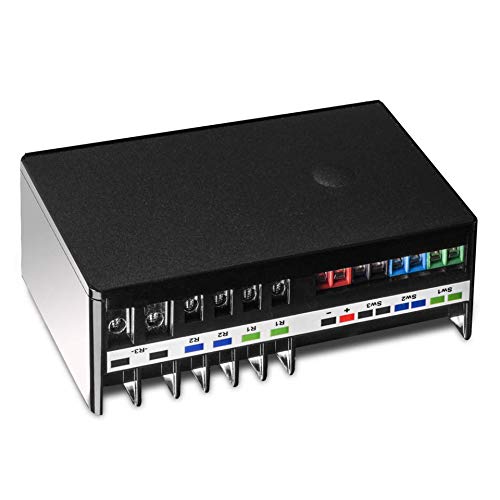
Three separate relays on one wall plate is a lot of automation for the money
If your project involves more than one thing that clicks or opens, this is the module to look at first. The ZEN16 packs three independent dry-contact relays into one unit, rated at 15A, 15A and 20A — so you can run a garage door, a gas fireplace, and a set of sprinklers from a single device instead of three. Zooz lists up to three garage doors on one MultiRelay, which is the kind of headroom you usually only get from commercial hardware.
Power comes from either a 12-24V AC/DC source or a standard USB C cable with a 5V supply — note that the adapter and cable are not in the box, and the listing is explicit that USB chargers and Apple accessories should not be used. The critical safety line is written in capitals on the listing for a reason: never feed it 110V, and never apply voltage to the switch input terminals, because those are dry contact only. Get that right and the install is a straightforward wall-mount job.
On the radio side you get the 800 series chip with S2 security and SmartStart, plus Z-Wave Long Range if your hub is ZWLR-ready. It also remembers and restores on/off status after a power cut and can run auto-on and auto-off timers when your hub exposes advanced settings. The honest catch is hub support: it is at its best on the Z-Box Hub and tested with Hubitat and Home Assistant, while SmartThings needs a custom edge driver from Zooz. ADT Pulse, Vivint, Wink, and Ring give only partial control — one relay or all at once, with no settings access.
What makes it the top pick
- Three independent relays at 15A, 15A and 20A in one housing
- 800 series chip with S2 security, SmartStart, and Z-Wave Long Range ready
- Restores on/off status after a power failure and supports auto-on/auto-off timers
- Doubles as a signal repeater in a mesh network
Where it asks more of you
- Power adapter or USB C cable is not included
- SmartThings needs a custom edge driver; some alarm panels offer only partial control
- Needs an open Z-Wave hub before it will do anything
Built for: anyone automating a garage door, fireplace, or irrigation zone who wants one module to cover several jobs.
Think twice if: your hub is one of the partially supported alarm panels — you will lose per-relay control and settings.
2. Minoston Zwave Outlet Mini (MP31Z, 800 Series)
A plug that leaves your second socket free and still switches 15A
Two rectangular plugs fighting over one wall outlet is the small annoyance that makes people give up on smart plugs. This Minoston unit solves it by shrinking to 2.4 ounces, so a second module fits beside it. Compare that with the MP21Z further down the list at 1.92 ounces and you can see the trade — this one is a touch heavier and wider at 2.52 inches across, but it buys you the pass-through space most people actually need.
Inside is the 800 series Z-Wave chip, which brings S2 authenticated security and SmartStart pairing, and the listing claims wireless coverage up to 1300ft when your hub supports Long Range. It is a 125V 15A socket rated to 1875W, so lamps, fans, and most household appliances are well within range. Group control lets you fire several plugs on one command, and timers can repeat daily or weekly.
Setup is where this one earns its fans — pairing on SmartThings is close to instant, and the reliability of the connection is what people talk about most. The recurring trade-off is signal reach: several note the range runs short, which is worth knowing if the outlet sits far from your hub. It also cannot connect directly to an Echo Plus, so you still need a Z-Wave controller in the mix.
Straight from the pattern: reliability is the theme — buyers describe the connection as dependable once paired, and the compact body earns the pass-through point.
Set expectations honestly: treat the built-in repeater as a bonus rather than a fix for a weak mesh. If that outlet is in a far corner, plan for a repeater closer by.
Reach for this if: you have a double outlet and want both sockets usable while one stays smart.
Look elsewhere if: the plug will sit far from your hub — the short range is the one thing that comes up repeatedly.
3. Minoston MP21Z Smart Plug, 15A Mini Z-Wave 800 Series Socket
The smallest body here, and the one that brings voice control into the mix
The MP21Z is the lighter sibling of the outlet above — 1.92 ounces against 2.4 ounces, and 1.14 inches deep against 1.18. Both are 15A, 125VAC units rated to 1875W, so neither wins on power. What tips this one is that the listing states voice control through a compatible assistant, which the smaller outlet listing does not spell out. If Alexa or Google commands are part of your plan, that line matters.
Setup follows the same 800 series playbook: SmartStart, QR code integration, and S2 security. You personalise device names, schedules, and automation preferences through your hub. The one cable note is that this plug cannot connect directly to an Echo Plus, so a Z-Wave certified hub is still mandatory — the voice control comes through that hub, not around it.
Owners find it quick to pair on Hubitat Z-Wave systems and like the size, but connection stability is the split point — some report it dropping off the network. That is a pattern worth planning around rather than a reason to pass: place it where your mesh is strong and it behaves. For a lamp or a small appliance near your hub, it is a tidy little switch.
The everyday read: this is a small, quick-pairing plug for a lamp, a fan, or a seasonal appliance. Nothing about it is overbuilt, and nothing needs to be.
Keep in mind: the strength of your mesh decides how well this one stays connected. Give it good coverage and the drop-off reports stop being your problem.
Suits: a lamp or appliance near your hub where you want voice commands working through a proper Z-Wave controller.
Not for: a distant outlet or anyone without a Z-Wave hub — it will not work standalone.
4. SONOFF Z-Wave 800 Dongle Plus (Dongle-PZG23)
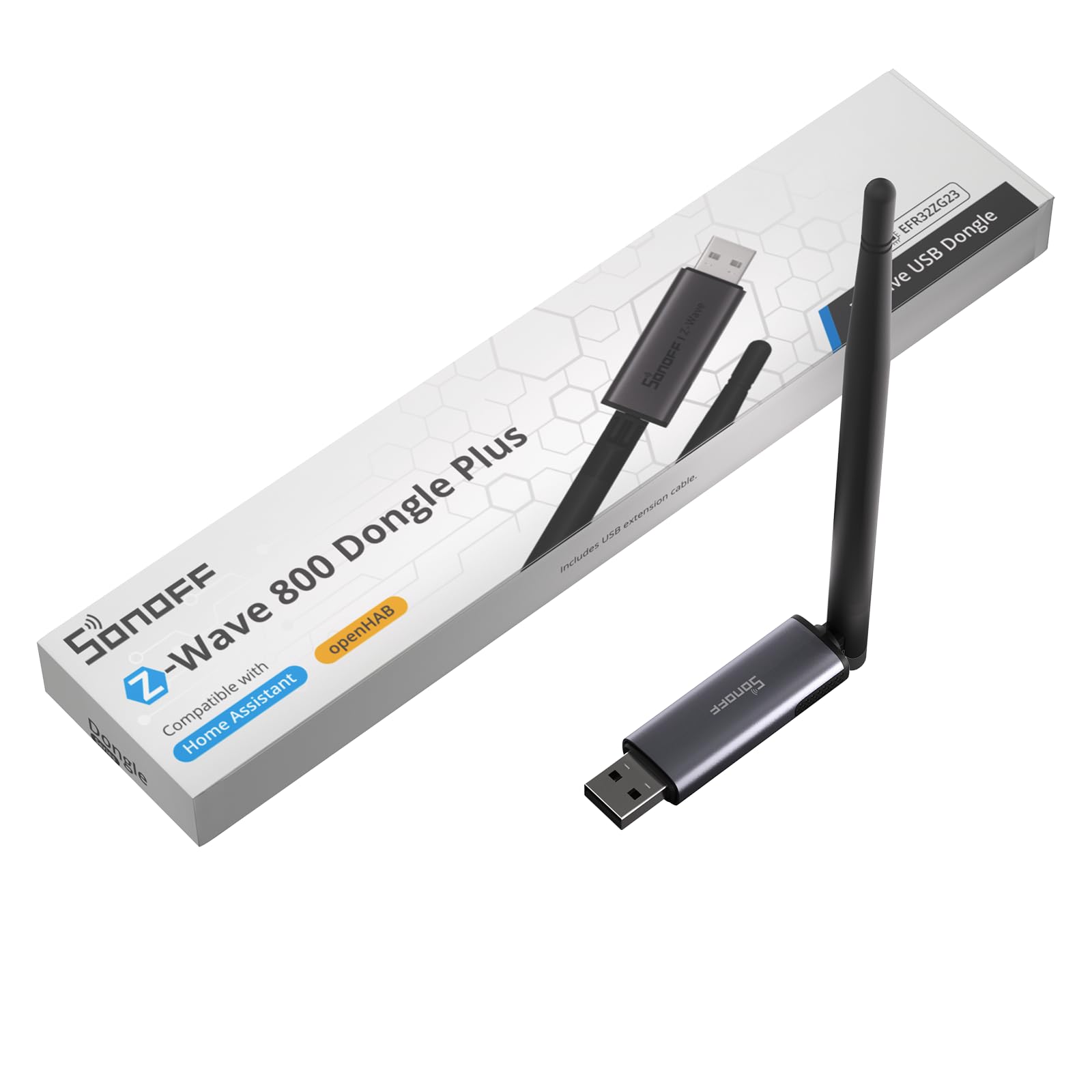
An adjustable 2dBi antenna is the difference when your controller lives in a metal case
If you are building your own controller on a mini PC or a home server, the antenna is the part that decides your coverage. This SONOFF dongle runs the EFR32ZG23 800 series chip and pairs it with a 2dBi external antenna on an adjustable mount, so you can angle the signal away from the chassis instead of accepting whatever a stub antenna manages. A USB extension is included for the same reason — keep the stick away from interference and let it sit where it hears best.
It supports Z-Wave Long Range for direct point-to-point links to distant devices, and S2 security is on board. Plug and play is not a marketing phrase here: you plug it into a USB port and the compatible platform picks it up. It works with Home Assistant and openHAB, and it is compatible with most Z-Wave frequencies used worldwide.
The limitation is stated plainly by the maker and worth repeating: this dongle speaks Z-Wave only. It does not handle Zigbee or Thread, so it is one tool in a multi-protocol build, not a universal radio. It also lists Linux-based operating systems as its supported family, with Debian, Ubuntu, and Linux Mint versions named — check that against your install before you commit.
Why it earns its place
- External 2dBi antenna with adjustable angles for direction control
- USB extension included to move it away from interference
- EFR32ZG23 800 series chip with S2 security and Long Range support
- Compatible with Home Assistant, openHAB, and most global Z-Wave frequencies
The fine print that matters
- Z-Wave only — no Zigbee and no Thread, by design
- Supported operating systems are Linux-family; Windows and Mac are not named
Pick it when: your controller box is metal or crowded and you want to aim the antenna rather than hope.
Pass if: you need one stick to handle Zigbee or Thread too — this one is deliberately single-protocol.
5. HomeSeer Z-Wave SmartStick G8

The upgrade path for anyone already running a Z-Wave network
Most USB sticks make you start over. This one is built around not starting over. SmartStick G8 handles a migration from a 500, 700, or 800 series controller through Z-Wave JS UI version 9.9.0 or later, so your existing network of paired devices travels with you. That single feature is why it holds a place on this list even though several other sticks do similar work.
It runs 800 series technology and manages standard mesh devices and Long Range devices at the same time, so you can mix both in one home. The range figure the maker quotes is up to 1 mile, which requires LR-compatible software and hubs plus devices that support Z-Wave LR and are added as LR devices. Firmware ships at version ZDK 7.22.2 with update support as new versions land.
Read the warnings before you buy, because two of them are unusual. It is not a standalone hub — it needs software on a computer or a compatible hub such as a HomeTroller or Home Assistant Green. And the listing says not to use other migration methods like PC Controller, since they could make the stick unusable. Follow the documented path and the swap is clean; improvise and you risk a dead stick.
What owners say works: it adds Z-Wave devices easily and pairs quickly with hardware like a Honeywell Pro panel when driven by the right software. The effectiveness of the radio is the part people come back to praise.
One caveat to internalise: this is a component, not a finished product. Your software does the thinking, and the migration instructions are the whole ballgame.
Right call for: an existing Z-Wave household that wants a newer controller without re-pairing every device.
Wrong call for: a first-time setup — there is nothing to migrate, so the main advantage is wasted.
6. Aeotec Z-Stick 7 Plus (700 Series)

A 700 series stick that earns its keep on Raspberry Pi builds
Not every controller needs the newest chip. The Z-Stick 7 Plus runs Aeotec’s 700 series generation and works with Raspberry Pi, Windows, Mac, and Linux to turn any of them into a Z-Wave controller. It is a 3.5-gram stick with a plastic body, and it carries SmartStart and S2 security — the two features that make pairing modern devices painless. On paper the maker quotes up to 250% further transmission in open space and an 18% faster CPU over the previous generation.
Compatibility is the reason it stays relevant: it works with Z-Wave enabled home automation software including Home Assistant and Indigo 7. No software is included, which is normal for this class of stick — the platform you install does the work. If you are running Home Assistant on a Pi 4, this is a known-good combination.
The honest picture here is a mixed one, and worth saying plainly. Performance draws praise when the stick behaves, but reliability reports split — some setups run without issue while others report it not working at all. Compatibility and setup feedback is similarly divided. That does not make it a bad stick; it makes it a stick to buy from a seller with a clear return path, and to pair with software the community has already documented.
Straight read: on a Raspberry Pi build with a well-documented software stack, this is a small, capable 700 series controller. The size is genuinely nothing in your hand.
Where caution is fair: because reliability and setup experiences vary, budget time for troubleshooting and keep the packaging until it is running.
Works well for: Pi-based Home Assistant or Indigo users who want a compact 700 series stick with SmartStart.
Consider the 800 series picks instead if: you want Long Range and the newest chip — this one stops at 700 series.
7. Zooz 800 Series Z-Wave Long Range Scene Controller ZEN32 800LR

Five buttons on one wall plate, and each one can fire a whole scene
Most wall switches do one thing. This one does seven. The main button can control a 120V fixture up to 150W for LEDs, or run as a wireless-only trigger with up to seven button presses available. Below it sit four remote buttons, each programmable to launch a scene or switch other devices — hit one on the way out to arm Away mode, or kill every light in the house before bed with a single click. That gives you a physical scene panel on the wall with no screen involved.
The install is friendlier than the feature list suggests. There are no side tabs and the body is just 1.1 inches deep, so it fits shallow and crowded boxes. It works as a direct 3-way solution with regular 3-way switches when a neutral is present — no add-on switch to buy. It also runs fine as a single pole switch. Neutral wire is required, and the listing says to check that before ordering.
Here is the gate that stops most disappointed buyers before they order: scene programming needs an advanced hub. It is supported on SmartThings with the included custom driver instructions, plus Hubitat, Home Assistant, and HomeSeer, and Zooz says outright not to buy it if your hub is not on that list. The 800 series chip brings S2 security, SmartStart, Long Range support alongside traditional mesh, and it ships ETL certified with a one-year warranty that extends to five years when you register.
Why it stands out on the wall
- Main button plus four programmable scene buttons in one gang box
- Only 1.1 inches deep, so it fits crowded switch boxes
- Direct 3-way solution with regular switches when neutral is present
- 800 series with S2, SmartStart, and Long Range support
Before you order
- Neutral wire required and must be confirmed first
- Scene programming needs a listed advanced hub — basic Z-Wave systems cannot run it
Built for: a household that wants physical scene control and already runs Hubitat, Home Assistant, HomeSeer, or SmartThings with the custom driver.
Not compatible with: basic Z-Wave hubs — Zooz is direct that it will not be recognised correctly.
8. Leviton Decora Smart Switch ZW15S-1RW, Z-Wave 800 Series

One switch that handles lights, ceiling fans, and small motors at 15A
If you just want to swap a plain wall switch for a smart one, this Leviton is a straight replacement. It switches loads up to 15A and 3/4 HP, which covers lights, ceiling fans, exhaust fans, motors, and pumps — a wider brief than most lighting-only switches. The 800 series chip brings SmartStart enrollment, S2 security, and over-the-air updates, so firmware improvements arrive without pulling the switch out of the wall.
The wiring is where it shines on paper: wire leads and a slim design are meant to make the swap straightforward, and it works as single pole or 3-way when paired with the DD0SR wired companion switch. It also acts as a repeater to strengthen your mesh and is backwards compatible with any Z-Wave network. Optional faceplates come in six colours if the white does not match your room.
Owners find the compatibility side solid, with SmartThings setups working as expected. The mixed note is the rocker itself — some report it not always engaging the off position cleanly. That is worth knowing if you plan to put this on a high-traffic switch; it is a mechanical feel point, not a radio problem. It is also fully hub-dependent: scheduling, remote access, and voice control all run through a compatible Z-Wave controller.
Where the value sits: the 3/4 HP rating lets one switch do duty a lighting-only module cannot, which matters if you have a ceiling fan or a pump on that circuit.
The catch to weigh: the rocker feel is the split point, so treat a heavily used switch position with a little care.
Choose it for: a straight switch replacement on a circuit with a fan, motor, or pump.
Look at the Zooz scene controller if: you want programmable buttons rather than a single on/off paddle.
9. Home Assistant Connect ZWA-2
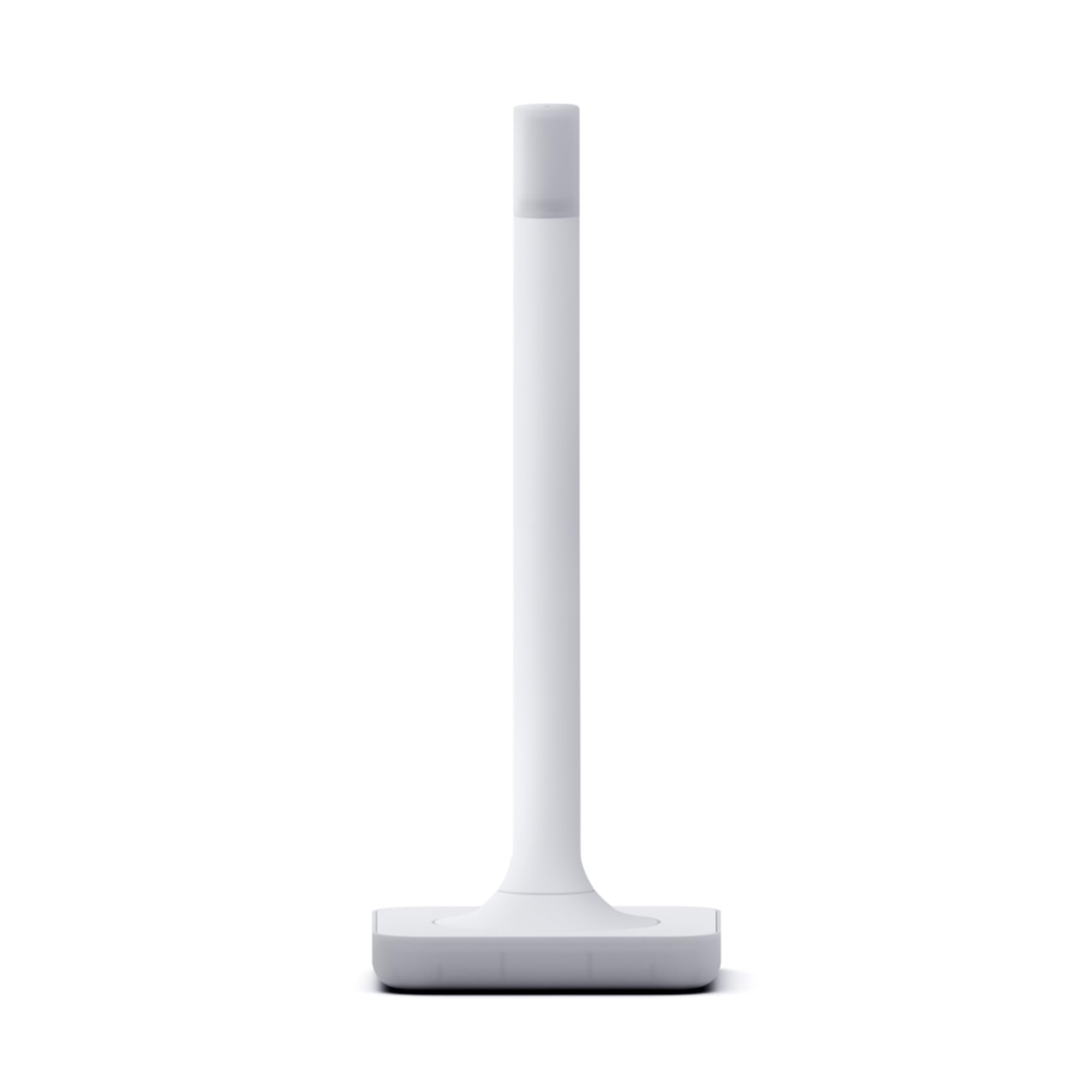
The one device here built by the people who write the software
Range is the reason people move to a dedicated antenna, and this is the most purpose-built answer on the list. The antenna and base are tuned to Z-Wave’s wavelength as a pair, which is why it looks like a small candle rather than a dongle. It ships with a 4.9ft USB cable, runs the latest 800 series chipset, and supports Z-Wave and Z-Wave Long Range only. Built by the team behind Home Assistant and Z-Wave JS, it carries a start-up wizard and one-click firmware updates.
What buyers consistently describe is reach. Buyers report the antenna reaches spots where a previous stick dropped off. Setup is described as easy, and the migration from most other adapters is said to take a couple of clicks. Z-Wave runs on a sub-GHz band, so it meets less Wi-Fi interference than 2.4GHz devices.
Two things to check before committing. First, this is Home Assistant hardware — you need a running Home Assistant system to connect and control devices, so it is not a fit for SmartThings, Hubitat, or a Z-Box household. Second, the physical size is the one criticism that shows up, so plan where the candle-shaped body will live. If you are on Home Assistant and your mesh has a stubborn dead zone, this is the premium answer.
What earns the premium tier
- Antenna and base tuned together for reliable range, with a 4.9ft USB cable included
- Start-up wizard and one-click firmware updates from the Home Assistant team
- Migration from most other adapters done in a couple of clicks
- Latest 800 series chipset supporting Z-Wave and Long Range devices
Fits where and who
- Home Assistant only — not usable as a general hub for other platforms
- The candle-shaped body is larger than a stick, so placement needs thought
The pick if: you run Home Assistant and want the strongest range the platform’s own hardware can give you.
Not for you if: your smart home lives on SmartThings, Hubitat, or a Z-Box — this adapter will not talk to them.
Know the Specs
Dry Contact vs Plug-In vs USB
A dry contact relay switches a circuit without putting voltage on the trigger side, which is why the Zooz MultiRelay can operate a garage door or a fireplace without feeding power into the switch input. A plug-in outlet simply sits in a wall socket and powers whatever you plug in, rated by amperage and wattage. A USB stick is not a switch at all — it is the radio that turns a computer into a Z-Wave controller.
800 Series and Z-Wave Long Range
The 800 series chip is the newest generation in this list and brings S2 authenticated security and SmartStart pairing as standard. Long Range is a separate mode that lets a controller talk directly to distant devices instead of hopping through the mesh — but only when your hub supports ZWLR and the device is added as an LR device. Several picks here quote coverage figures in the hundreds of feet or up to a mile, and those numbers only apply when the whole chain supports it. If your hub does not, the module still works as a standard mesh device.
Common Questions
Will a Z-Wave module work without a hub?
Is the Zooz ZEN16 safe to wire into a garage door or fireplace?
What is the difference between the Minoston MP31Z and the MP21Z?
Does the ZEN16 MultiRelay work with SmartThings?
Which controller stick should I buy for Home Assistant?
Do I need a neutral wire for the Zooz ZEN32 or the Leviton switch?
What does Z-Wave Long Range actually require?
Can I use a Z-Wave plug outdoors?
Does the Home Assistant Connect ZWA-2 work with SmartThings or Hubitat?
Why does my Z-Wave stick need firmware updates?
The Bottom Line
For most people building out a Z-Wave home, the z-wave module that earns the top spot is the Zooz ZEN16 MultiRelay. Three independent relays at 15A, 15A and 20A in one device is a rare thing at any tier, and the 800 series chip with S2 security and power-failure restore makes it a set-and-check-once install. Just confirm your hub first — it needs an open Z-Wave controller, and SmartThings buyers will want the custom edge driver ready.
If your need is simpler, the Minoston Zwave Outlet Mini is the easy plug-in answer, sized so the second socket stays usable. And if range is the problem you have been fighting, the Home Assistant Connect ZWA-2 is the premium fix for Home Assistant households — it costs more, but it is the one pick purpose-tuned to reach the corners a stick cannot.
How we choose
We do not accept paid placement. Every pick is matched to a real buyer and a real use-case; we do not hands-on test units.
Sources
Specifications: manufacturer listings and product documentation. Review insights: verified customer reviews, as of November 2026. Pricing: not shown on this page (it changes often); check the current price via the retailer link.
As an Amazon Associate, Tactical Gear Guy earns from qualifying purchases. This does not affect which products we feature.