Specs are compiled from manufacturer listings and verified buyer reviews and can change over time — please confirm the key details on the product page before buying.
Stick drift is the reason most Xbox pads get retired — a character that walks on its own, a camera that pans without your thumb. The good news is that a drifting stick is usually a worn analog module, not a dead controller, and the right kit gets the pad centering properly again. Below are the nine kits worth your bench time, sorted by what they actually fix.
This guide is built by comparing the manufacturers’ published specifications and the patterns across verified customer reviews, so you get each pick’s real strengths and trade-offs instead of marketing spin.
Some kits swap parts without a soldering iron, while others replace the whole analog module and ask for real bench skills. Either way, you should know what is inside before you buy — which is exactly what this breakdown of the xbox controller repair kit covers.
Top Picks

How To Choose The Best Xbox Controller Repair Kit
Start with one question: what exactly is broken? A sticky left stick, a bumper that clicks on and off, and a cracked shell are three completely different jobs. Each one needs different parts, and each one needs a different amount of skill. Buying a kit before you know the fault is the fastest way to end up with parts that do not fit the job.
Parts kit or tool kit — and why you probably need both
A parts kit gives you the replacement piece — the thumbstick, paddle, bumper switch, or shell. A tool kit gives you the thing that gets the shell open in the first place. Many parts kits throw in a basic screwdriver, but few include a prying tool and tweezers as well. Check the package list before you buy, because the tools are the part most buyers end up ordering separately.
The two screws that matter most
An Xbox controller shell is held together by Torx screws — T6 for the inner screws and T8H for the security screws on the outside. A T8H is a Torx bit with a hollow center that fits around a small pin in the screw head. A plain T8 will spin in the hole and round the head off. Any kit worth buying names both bits explicitly.
Match the kit to your exact controller model
The Elite Series 2 is not the same inside as a standard Xbox One pad, and a Series X|S pad is different again. Some kits fit everything except the Elite Series 2. Some fit only the Elite Series 2. Read that compatibility line carefully — a part that fits the wrong model will not seat correctly, and you will be returning it.
Decide up front whether you will solder
On some controllers, you can swap a thumbstick cap without any tools. But replacing the analog module itself, or a bumper switch, means desoldering the old part and soldering the new one in place. If you have never held a soldering iron, pick a kit that includes a tutorial video and price out a repair shop before you commit.
Side-by-Side Comparison
| Model | Best For | Compatible With | What You Get | Soldering | Amazon |
|---|---|---|---|---|---|
| VANPARK Elite Series 2 Metal Thumbsticks & Paddles Kit★ Best Overall | Elite Series 2 owners replacing worn caps and paddles | Xbox One Elite Series 2 (Model 1797) | 6 metal thumbsticks, 4 paddles, 2 D-pads, 1 adjustment tool | No | Amazon |
| eXtremeRate Heaven Blue Thumbsticks (4 PCS)Budget Champion | Budget color swap plus a basic driver | Xbox Series X|S, One S/X, One standard, Elite V1 | 4 thumbsticks with screwdriver | No | Amazon |
| eXtremeRate T6 T8H Screwdriver SetThe Opener | Opening the shell for any Xbox controller | Xbox Series X|S, One, One S/X, Elite 1 and 2, Xbox 360 | 16 pieces including spare screws, tweezers, prying tool, brush | No | Amazon |
| SOSS GAMING Analog Joystick Repair Kit (6 Pack) | Fixing actual stick drift on a standard pad | All Xbox One controllers except Elite Series 2 | 6 replacement analog joysticks plus tutorial link | Yes | Amazon |
| GuliKit TMR Joystick Replacement | Permanent drift fix on Series X|S or Elite Series 2 | Xbox Series X|S, Elite Series 2 (not Xbox One or 360) | 2 magnetic TMR stick modules plus KK Ring caps | Yes | Amazon |
| SOSS GAMING Tactile Switch Repair Kit (10 Pack) | Dead or mushy RB/LB bumpers | Xbox One base, S, X, Elite Series 1 and 2 | 10 tactile switches, T6 and T8 drivers, prying tool | Yes | Amazon |
| iFixit Repair Toolkit Compatible with Xbox | One general toolkit for console and controller work | Xbox consoles and controllers, including Elite | Precision bit driver, 4 mm bits, spudgers, tweezers, picks, brush, wrist strap | No | Amazon |
| KOOWOD 13 in 1 Elite Series 2 Component Pack | Building a custom Elite Series 2 feel | Xbox Elite Wireless Controller Series 2 and Series 2 Core | 2 D-pads, 6 thumbsticks, 4 paddles, 1 tool | No | Amazon |
| BSUZUN Front and Back Housing Shell Kit | Refurbishing a scuffed or cracked Elite Series 2 shell | Xbox One Elite Series 2 (Model 1797) only | Front shell, back shell, T2, T6 and T8 drivers, tweezers, prying tool | No | Amazon |
Detailed Reviews
1. VANPARK Accessories Kit for Xbox Elite Series 2 Controller
Our pick — 4.5+★ from 650+ verified ratings; the strongest balance of quality and price.
Click new heads on like magnets and never touch a screwdriver.
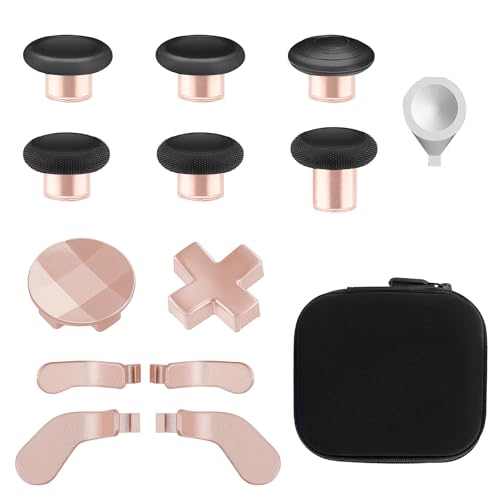
If your Elite Series 2 still works fine but the thumbsticks are shiny, loose, or worn smooth, this is the kit that fixes it in the least amount of time. The heads are built to swap straight on, so you pop the old stick off and press the new one down — no controller teardown at all. You get 6 black metal Mod Swap thumbsticks, 4 gold paddles in two lengths, 2 gold D-pads, and one silver adjustment tool in the box.
The metal thumbsticks, paddles and D-pads are the reason this one holds the top spot. The thumbsticks are made of silicone and metal, and the paddles and D-pads are metal, so the surfaces you grip every session are the durable ones. What wins people over is the build quality of those components — the fit and finish land right where the stock parts do. The gold paddles and D-pads also change how the pad looks, which owners mention more than you would expect.
Here is the honest trade-off. The rubber and the long-term build quality draw divided opinions, and a handful of owners have seen the rubber start to peel with heavy use. That does not stop this being the sensible buy for a working Elite Series 2 — it just means you are buying wear parts, and wear parts wear. The dimensions also make it a desk-drawer kit rather than a travel one, at 4.7 x 4.3 x 1.25 inches.
Where it earns its place
- Swaps on without opening the shell — no tools, no risk of stripping screws
- Six thumbsticks plus four paddles and two D-pads in one box
- Metal paddles and D-pads hold up to repeated presses
- Adjustment tool included for dialing in stick tension
What to weigh first
- Fits the Elite Series 2 only — not a standard Xbox One or Series X|S pad
- Rubber on the sticks can peel under heavy use
- Nothing here fixes drift — this replaces caps, not the analog module
The call: Buy it if you own an Elite Series 2 with tired caps, and this is the crowd favorite at 4.5+ stars across 600+ ratings.
But note: it will not cure a drifting stick, because the module underneath stays the same.
2. eXtremeRate Replacement Controller Joystick
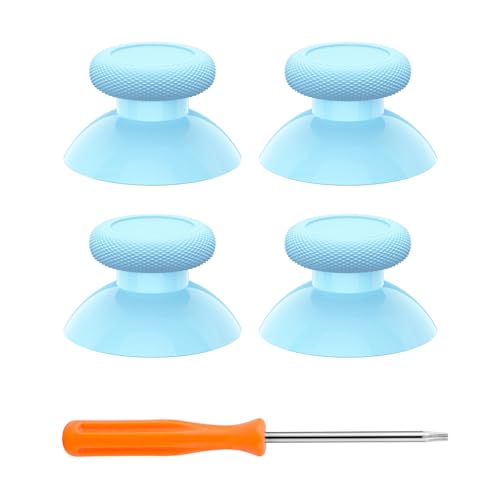
Four caps in a bright blue, plus the driver you need to fit them.
This is the four-pack for anyone whose original sticks have gone smooth and grey. Each cap is molded from PC and TPE plastic — polycarbonate for the hard structure, a softer rubberized plastic for the grip surface — so they feel close to stock rather than slippery.
Compare it to the VANPARK kit above and the difference is purpose, not quality: that one is a metal upgrade set for the Elite Series 2, while this is a straightforward color and grip replacement. The 4 piece count also means you get spares. If a cap goes shiny again in a year, you are not buying another kit.
The catch is the compatibility list, and it is a narrow one. These fit Xbox Series X/S, the Xbox Core controller (Model 1914), the Xbox One standard (Model 1537/1697), the Xbox One X/S (Model 1708), and the Xbox One Elite V1 (Model 1698). They do not fit the Xbox Elite Series 2, so check your model number before ordering.
Best used for: a standard Xbox One or Series X|S pad with worn caps and no drift. Open the shell with the included driver, pop the old caps, press the new ones on, close it up.
Skip if you will not open the shell: these need internal fitting, so it is a five-minute job, but a job all the same.
Reach for this if: you want a cheap color change and spare caps for a standard pad.
Look elsewhere if: you own an Elite Series 2 — the fit list excludes it.
3. eXtremeRate T6 T8H Screwdriver Set Opening Tools Repair Kit
The 16-piece toolkit that gets the shell open, then puts it back together.
Every other kit in this guide assumes you can already get inside the controller. This one is the way in. You get magnetized T6 and T8H drivers (screwdrivers that hold the screws so they do not fall into the shell) with rubberized grips and a rotating handle cap, a full set of spare T6 and T8H screws for the Xbox One controller, an ESD-coating tweezer (a tweezer with a static-safe coating), a standard and a triangle prying stick, and a cleaning brush.
Controller screws are small, they strip, and they vanish into carpet. Having a full replacement set in the same box means a rounded screw never ends your repair halfway through. The two prying sticks let you work the seam open without gouging the plastic, and the ESD-coating tweezer is there to protect the board from static while you are inside.
The kit covers a wide range of hardware — Xbox Series X/S, Xbox One, Xbox One Elite, Xbox Elite Series 2, Xbox One S/X, and even the Xbox 360. The one thing to keep in mind is that this is tools, not parts. It will not fix a drifting stick on its own; it is what you need before you fit a stick. At 3.94 x 0.79 x 0.79 inches and 50 g, it also packs into a drawer without taking up room.
Why it belongs in the drawer: 16 pieces including spare screws, tweezers, two prying tools, and a cleaning brush. Compare the 16 items here to the 2 stick modules in the GuliKit kit — completely different jobs, and this is the one you reach for first.
Honest note: the quality draws split opinions, and the drivers feel more like a good budget set than a bench-grade one. Treat the bits as precision tools, not pry bars.
The one to buy first: if you have never opened a controller, start here — nothing else works until the shell is off.
Not a fix on its own: pair it with a parts kit for the fault you actually have.
4. SOSS GAMING Genuine Analog Joysticks Repair Kit (6 Pack)
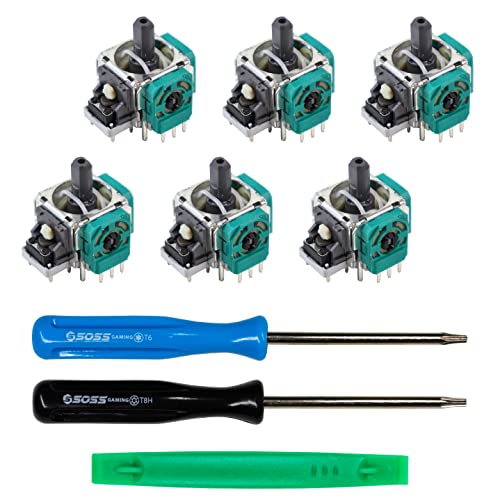
Six replacement analog sticks for the pad that walks on its own.
This is the kit for the actual fault, not the symptom. A drifting stick is usually a worn analog module underneath the cap, and replacing the cap will not help. Here you get 6 genuine analog joysticks that replace that module. The list of things it handles is long: stick drift, creeping, stuttering, blind spots, dead zones, no click, non-centered sticks, broken and loose joysticks.
The catch is up front in the listing — you need basic soldering skills plus soldering tools to fit these analog modules. There is no way around it with a genuine analog replacement. The package includes a link to a full tutorial video, which is the difference between a hopeful attempt and a repair that actually works. If you have never soldered, watch that video before you buy, not after.
Six sticks in the pack means you can fix one pad and still have spares, or fix several. Their quality is what owners bring up most, and it ranks above everything else in this listing. That said, the drift question is genuinely divided — plenty of buyers report a clean fix, and some find it creeps back over time. Which one you get depends largely on how well the solder joint goes in.
Where the money goes
- Six modules in one pack — enough for one pad plus spares
- Covers drift, dead zones, loose sticks and no-click faults
- Full tutorial video linked from the package
- Fits every Xbox One controller except the Elite Series 2
Before you commit
- Soldering required — this is not a drop-in part
- Drift returning after a while is a real possibility
- Skilled installation is what decides the result
Best for the confident tinkerer: a standard Xbox One pad with a clearly drifting stick and an iron already on the bench.
Think twice if: you have never soldered — a pro bench may be the cheaper route.
5. GuliKit TMR Joystick Replacement

Contactless magnetic sensing that kills drift at the source, not the symptom.
Most replacement sticks are the same design that wore out in the first place. These are not. GuliKit’s TMR module — Tunnel Magnetoresistance, which reads the stick position through a magnetic field instead of a physical contact pad — has no wiper to wear, so there is nothing to grind down into a drift. The design also adds an anti-interference structure to stop the magnetic triggers on the controller from disturbing the reading.
The kit fits Xbox Series X|S and Elite Series 2 controllers, and it is a 2-module set. That 2 count is where the headline comparison sits: GuliKit ships two modules against the 16 separate items in the eXtremeRate tool set, because one is a fixed pair of parts and the other is a full toolkit. You still need a professional tool set and soldering skills to install these, and neither comes in the box.
Elite Series 2 owners get a specific warning worth reading twice. After installation, only the thumbscrew caps that come with this kit will fit — the originals are not compatible because they screw on rather than press on. Once it is in, you recalibrate through the Xbox console or the Xbox Accessories app on PC. The smoothness is the thing that sells it; the durability question is the thing to watch, with some finding it lasts and others finding it comparable to cheaper sticks.
The real change: contactless magnetic sensing removes the wear part entirely, which is why drift stops rather than resets. Calibration is the finishing step and it is straightforward.
Where it bites: soldering is mandatory, and Elite Series 2 owners lose their original caps for good.
Worth the bench time: for a Series X|S or Elite Series 2 pad you plan to keep for years.
Not for beginners: desoldering and soldering both need to go cleanly, or the fix will not hold.
6. SOSS GAMING Tactile Switch Repair Kit (10 Pack)

Ten tiny switches for the bumper that stopped clicking.
A bumper that needs to be mashed to register, or that only works every other press, is a failed tactile switch. This kit replaces it. Ten switches come in the pack, and each one fixes a single bumper button, so the box covers a lot of failed presses before you need to reorder. The full package also includes a T8 security Torx driver, a T6 Torx driver and a prying tool — the tools to get the shell open and back down again.
Compatibility is broad here, which is unusual for a parts kit. It fits the Xbox One base, S, X, Elite Series 1 and Elite Series 2, so almost any Xbox pad with a dead bumper is covered. If your pad has two failing bumpers, you use two switches from the same pack.
The honest limit is the same as the analog joystick kit: basic soldering skills and soldering tools are required. The switch has to be desoldered from the board and the replacement soldered in. Once it is in, the bumper clicks properly again instead of feeling mushy or requiring extra force.
Fit and completeness: owners mention the switches fit the board correctly and the included drivers handle the shell, so you are not hunting for a T8H separately.
One thing to plan for: if you are new to an iron, practice on a dead board first — a lifted pad on a controller board is hard to recover.
Buy this when: the shell is fine, the sticks are fine, and only the shoulder button has given up.
Hold off if: the fault is drift rather than a click — you need the joystick kit instead.
7. iFixit Repair Toolkit Compatible with Xbox

A precision bit driver that reaches past the controller into the console.
Where the eXtremeRate set is built for the controller, this toolkit is built for anything with an Xbox badge on it. The precision bit driver plus 4 mm bits covers the Torx screws in both consoles and controllers. The rest of the kit is the part that matters for careful work: a spudger, a metal spudger, tweezers, opening picks, an ESD-safe brush and an anti-static wrist strap.
The anti-static wrist strap is the detail most cheap kits leave out. Wear it while you are working near the board and static has a path to ground instead of through the components. That, plus the shielding on the cable work this kit enables, is why it suits people doing more than one repair. The listed uses run from storage and hard drive replacement through fan removal, vent cleaning, and controller repair and cleaning including Elite controllers.
Two things to know. First, this is tools, so it does not include a replacement joystick or bumper — it opens things, it does not replace things. Second, it weighs 5.9 ounces and the carrying size is 10.02 x 4.11 x 1.36 inches, so it lives in a drawer or a bag rather than a pocket. The lifetime guarantee is the backstop that makes the outlay sensible for a long-term bench kit.
The long view: one toolkit that opens controllers and consoles, with the anti-static wrist strap and ESD-safe brush included rather than sold separately.
What it will not do: replace a part. Pair it with a parts kit for the actual fault.
The keeper: for someone who fixes more than one thing a year and wants tools that outlast the console.
Not the quick fix: a one-off stick swap is cheaper with a dedicated parts kit.
8. KOOWOD 13 in 1 Replacement Component Set

Two D-pads, six thumbsticks and four paddles in one component pack.
The part count is the whole pitch: 13 components, laid out so you can rebuild the feel of an Elite Series 2 from scratch. Two interchangeable D-pads — one standard, one faceted. Six thumbsticks across four shapes: two standard, two classic, one tall, one dome. Four paddles in two medium and two mini sizes. Plus the tool to fit them.
That shape spread is why it earns a place over the VANPARK set for some buyers. The VANPARK kit gives you six black metal sticks and gold accents; this one gives you a tall concave stick for precision aiming and a dome for fast direction changes, all in charcoal black. If you play more than one genre and you tune your pad per game, the taller and domed options are the reason to pick this one.
The mixed part is the fit. Most owners find the parts press on cleanly, and the feel has that solid, heavy metal quality that matches the stock Elite components. A smaller group finds the fit is not quite right on their pad, so it is worth doing one component at a time and testing before you commit the whole set.
The case for the 13-piece set
- Six thumbstick shapes — the widest spread in this guide
- Both standard and faceted D-pads included
- Medium and mini paddles cover both grip styles
- Solid, heavy metal feel that matches the original components
The counter-argument
- Elite Series 2 only — no fit on standard or Series X|S pads
- Fit is not guaranteed on every unit and draws split reports
- Replaces caps and paddles, not the analog module
Made for the tinkerer: an Elite Series 2 owner who wants a tall stick for shooters and a dome for racing without buying two kits.
The trade: more shapes, but a higher chance one piece does not seat as well as you hope.
9. BSUZUN Front and Back Housing Shell Kit

New front, new back, and every driver you need to get there.
Some Elite Series 2 pads still work perfectly but look like they have been through a war — glossy plastic scuffed at the grips, corners polished smooth. That is the job this kit does. You get 1 front shell, 1 back shell, and the full tool set to swap them over: a T2 screwdriver, a T6, a T8, tweezers and a prying tool. No hunting for the T2, which is the bit most kits skip.
Fit is strict and worth repeating: this is for the Xbox One Elite Series 2 (Model 1797) and nothing else. Not a standard Xbox One, not a Series X|S pad, not the Elite Series 1. The glossy finish is designed to restore the touch and feel of the original, and the shell is listed as durable and wear-resistant. The controller itself and the other internal parts are not in the box, so this is a cosmetic and structural refresh, not a rebuild.
The durability question is the honest one. Reports split between shells that hold up well and incidents of stripping during reassembly, so work slowly and torque the screws gently. The quality of the shell itself and how close it looks to the original are what owners like most about it. A tutorial video on the product page walks the whole swap.
What you are really buying: the T2 driver and prying tool as much as the plastic. Two shells plus five tools for a cosmetic refresh is the value case.
Go easy on reassembly: stripped screw threads on a new shell are the one way this job goes wrong.
For the scuffed-but-working pad: stick with it if your Elite Series 2 is mechanically sound and just looks tired.
Not a fix: if the sticks drift or the bumpers fail, this shell will not help.
Know the Specs
T6 and T8H Torx Bits
An Xbox controller uses Torx screws, which have a six-point star head rather than a cross. The T6 size handles the smaller internal screws and the T8H handles the outer security screws. That H matters: it stands for a hole in the center of the bit, which fits around the pin in the screw. A plain T8 will not seat. Any kit that names both sizes is the one that gets the shell off cleanly.
Analog Module vs Thumbstick Cap
These two parts fail differently and get confused constantly. The cap is the plastic and rubber piece your thumb rests on. The analog module is the part underneath that senses position. A worn cap feels smooth and looks shiny, and you can swap it in minutes. Drift — a character moving with no thumb on the stick — is the module, and replacing the cap will not touch it. Identify which one has failed before you order.
Soldering: When You Actually Need It
Caps, paddles, D-pads and shells all press or screw into place. Genuine analog modules and bumper switches are soldered to the board. If the listing says soldering required, budget for a soldering iron, some practice, and time. If it does not say it, the part is likely a swap-in. Buying a soldered part when you wanted a swap-in is the most common way a kit sits in a drawer unused.
Model Numbers and Why They Decide Everything
The Elite Series 2 is Model 1797, the Xbox One standard covers Models 1537 and 1697, the Xbox One X/S is Model 1708, and the Series X|S Core controller is Model 1914. Kits list their fits by these numbers because the plastic and the internals differ between them. Check the model number on the back of your pad before ordering anything — it is the single line that prevents a wrong purchase.
Common Questions
What is the difference between a repair kit for stick drift and one for a broken thumbstick cap?
Will a repair kit for the Xbox Elite Series 2 fit a standard Xbox One controller?
Do I really need soldering skills to fix stick drift?
What is a T8H screwdriver and can I use a regular T8 instead?
How do I know which model of Xbox controller I have before I order a kit?
Can an anti-drift magnetic stick really stop drift coming back?
Is it worth repairing a controller instead of replacing it?
What tools do I need outside of what comes in these kits?
Why does my Elite Series 2 lose its original thumbstick caps after a magnetic stick upgrade?
How long should a replacement analog stick last compared to the original?
The Bottom Line
For most people hunting a xbox controller repair kit, the VANPARK Accessories Kit is the right first buy — it swaps on without opening the shell, so an Elite Series 2 with worn caps is back to feeling new inside a minute. If the problem is genuinely drift, reach for the GuliKit TMR modules, because contactless magnetic sensing (a sensor that reads the stick without touching it) removes the wear part instead of replacing it. And if the only fault is a dead bumper, the SOSS GAMING tactile switch pack is the kit that targets it directly.
One thing worth doing before you order anything: write down the model number from the back of the pad. That model number decides which of these nine kits actually fits, and it is the difference between a repair evening and a return label.
How we choose
We do not accept paid placement. Every pick is matched to a real buyer and a real use-case; we do not hands-on test units.
Sources
Specifications: manufacturer listings and product documentation. Review insights: verified customer reviews, as of November 2026. Pricing: not shown on this page (it changes often); check the current price via the retailer link.
As an Amazon Associate, Tactical Gear Guy earns from qualifying purchases. This does not affect which products we feature.