Specs are compiled from manufacturer listings and verified buyer reviews and can change over time — please confirm the key details on the product page before buying.
Buying an Xbox-style pad for PC play is mostly a question of one thing: does it wake your console or PC when you press the guide button, and does the stick still track true after a few months of shooters? The shortlist below answers both, then explains in plain words what each spec actually does for you during a session. The DOOM edition holds a 4.5+ rating from 600+ owners.
This guide is built by comparing the manufacturers’ published specifications and the patterns across verified customer reviews, so you get each pick’s real strengths and trade-offs instead of marketing spin.
The picks are grouped by what they solve rather than by what they cost, because a PC player chasing a precise stick wants a different answer than someone who just wants a familiar pad that pairs without fuss. Here is the honest breakdown of the xbox pad wireless pc shortlist, sorted so you can see the trade-offs at a glance.
Top Picks


How To Choose The Best Xbox Pad Wireless PC
A controller built for Xbox and a controller built for PC are usually the same shape, but the connection path is where buyers get caught out. Get that wrong and you spend your first evening fiddling with pairing instead of playing.
2.4GHz receiver or Bluetooth — which one your PC needs
A 2.4GHz dongle is a small USB plug that creates its own dedicated wireless link between the pad and your machine. Several pads on this list need that receiver and will not connect over Bluetooth at all, so check the listing before you assume it will pair with a laptop the way a phone does. Bluetooth is the more convenient path when it is actually supported, because it skips the dongle entirely — but it only shows up on some models.
Stick technology: what stops drift
Drift is the slow creep where your character walks on its own because the stick has worn. A Hall Effect stick uses a magnet and a sensor instead of two physical contacts rubbing together, so there is no surface to wear down. TMR sticks are a newer type that the makers describe as combining the precision of older designs with the long life of Hall Effect, and you will see the term on the premium picks here.
Polling rate in Hz and what it does for aiming
Polling rate is how many times per second the controller reports its position to your machine, measured in hertz (Hz). A higher figure means your stick movement reaches the game sooner, which matters in fast shooters more than in slow games. Two picks here advertise 1000Hz, and one advertises up to 8000Hz on PC specifically.
Back buttons, triggers, and the grip question
Rear buttons let you map an action you would normally need to lift a thumb for, which keeps your aim steady during a jump or a reload. Dual-mode triggers switch between a short, clicky pull and a longer travel for racing games. Neither feature is essential, but both are the reason pro-tier pads exist.
Side-by-Side Comparison
| Model | Best For | Connection | Stick Tech | Battery Claim | Amazon |
|---|---|---|---|---|---|
| Xbox Wireless Controller DOOM: The Dark Ages Limited Edition★ Best Overall | Collectors and PC players who want an official pad | Xbox Wireless and Bluetooth | Standard analog | — | Amazon |
| SZDILONG Wireless 2.4GHz ControllerBudget Contender | Budget PC setup with a dongle | 2.4GHz receiver only | Hall Effect sticks | 1000mAh, 10–14 hours | Amazon |
| SZYUYU Wireless 2.4GHz Controller (Purple)Comfort Pick | Grip comfort and colour | 2.4GHz receiver only | 360° analog | 1000mAh, 10–14 hours | Amazon |
| NINIFEI For Xbox One Controller | Red-themed budget build | 2.4GHz receiver, USB-C | Standard analog | Battery not included | Amazon |
| XBOX Wireless Gaming Controller | Carbon Black | Everyday console and PC play | Xbox Wireless, Bluetooth, USB-C | Standard analog | — | Amazon |
| PowerA FUSION Pro Wireless with Lumectra | Customisable look and thumbstick height | Wireless USB adapter | Hall Effect modules | — | Amazon |
| GameSir G7 Pro (Wuchang: Fallen Feathers Edition) | Fast polling with a charging dock | 2.4GHz dongle, USB-C, Bluetooth 5.3 | Mag-Res TMR sticks | 1200mAh | Amazon |
| ASUS ROG Raikiri II | Premium PC-first build with travel case | 2.4GHz RF, Bluetooth, USB-C | Anti-drift TMR joysticks | 50H | Amazon |
| Razer Wolverine V4 Pro | Competitive players chasing the lowest latency | 2.4GHz HyperSpeed, Bluetooth, USB-C | Capacitive anti-drift | — | Amazon |
Detailed Reviews
1. Xbox Wireless Controller DOOM: The Dark Ages Limited Edition
Our pick — 4.5+★ from 600+ verified ratings; the strongest balance of quality and price.
An official Xbox pad dressed as the DOOM Slayer’s armor, and the highest-scoring pick here.
It tops the list because it is the genuine first-party Xbox pad: it is the real Xbox first-party pad underneath the armour theme, so it pairs over Xbox Wireless and Bluetooth with supported consoles, PCs, and cloud-enabled devices. You get nine buttons and a familiar layout, which means zero relearning if you already play on console and want the same feel on a PC monitor.
What wins people over is the finish. The top case carries 3D silver helmet spikes and plated sheathing, the grips have a rubberized leather-like feel, and the red thumbstick is matched to the Slayer’s chest port — those design details are the most-discussed part of the whole package. The green ABXY buttons are lettered in the Sentinel alphabet, and you also get the DOOM Slayer Executioner Skin downloadable content for DOOM: The Dark Ages, with the game sold separately.
The catch is what the finish costs you. This is a collectible run, and the leather-feel grips and plated top case are not the simplest surface to keep clean over years of play. It also carries no Hall Effect or TMR stick technology, so it behaves like a standard analog pad — precise when new, but without the wear resistance the pro-tier picks below advertise. For a themed official controller you will be proud to leave on the desk, that is a fair trade. It holds 4.5+ stars across 600+ owner reviews.
Why it takes the top slot
- Official Xbox build with Xbox Wireless and Bluetooth for console, PC, and cloud play
- Rubberized grips with a leather-like feel that stay comfortable through long sessions
- Includes the Executioner Skin DLC for DOOM: The Dark Ages
- Nine-button layout that PC and console players already know by muscle memory
Where it asks you to compromise
- Standard analog sticks rather than Hall Effect or TMR, so no wear-resistance claim
- Limited-edition finish is a display piece, and textured grips need care
- It is a collectible, so availability is tied to that run
Buy it if: you want an official Xbox pad for PC and console that doubles as a shelf piece.
Look past it if: your priority is drift-proof stick hardware over themed design.
2. SZDILONG Wireless 2.4GHz Controller
The entry-level pad that still puts Hall Effect sticks under your thumbs.
Here is the fact that decides it for a lot of PC players: Hall Effect sticks at the entry level. Most budget pads use standard analog sticks that wear over time, so finding a magnetic-sensor stick design this low in the range is the reason this one earns its spot. It also folds in seven-colour RGB lighting with four lighting modes if you like your desk glowing.
The battery claim is concrete. A built-in 1000mAh lithium battery charges over Type-C in 2-3 hours and is rated for 10-14 hours of play, which covers a long evening session with room to spare. The 2.4GHz link is rated for delay-free play within 33 feet, and there is a 3.5mm stereo jack for headphones and a mic. Programmable ML and MR buttons on the back map to the basic face and shoulder keys.
Read the connection note carefully before you buy. This pad needs the bundled 2.4G receiver — it has no Bluetooth — and it is not compatible with a TV or a phone. On the reliability side, the feedback splits: plenty of buyers get one that runs fine, and others hit a unit that stops behaving, so buy it as a value pick and test it in the return window. Size-wise it is a compact 3.94 x 3.15 x 1.97 inches against the 6.91 x 5.61 x 2.76 inches of the DOOM pad above.
Where the money goes: Hall Effect sticks, a 1000mAh battery, Type-C charging, RGB lighting, and back buttons — a rare combination at this tier, and the stick tech is the headline.
The honest trade-off: dongle-only connection with no Bluetooth, no TV or phone support, and a reliability record that reads mixed rather than settled.
Reach for this if: you want Hall Effect sticks on a tight budget and have a free USB port for the receiver.
Pass if: you need Bluetooth pairing or want to use it on a phone.
3. SZYUYU Wireless 2.4GHz Controller
A purple pad whose grip and finish carry the day, even if the wireless link has opinions.
Comfort is the headline here. The dual vibration motors add weight to weapon and impact feedback, and the 360° joystick is tuned for a quick rebound that keeps small corrections crisp.
Charging and lighting are straightforward. A 1000mAh built-in battery takes 2-3 hours on Type-C and is rated for 10-14 hours of use, and the RGB setup gives you seven colours across four lighting modes — constant on, breathing, and a running marquee you set with the light key. Programmable ML and MR rear buttons map to A/B/X/Y/LB/RB/L3/R3/D-PAD for 1-16 combination keys, and a 3.5mm jack handles headset audio with the mic.
The wireless side is the part to weigh up. Connection issues are the recurring complaint — some units pair and hold fine, others frustrate — and the battery experience splits between owners who get a normal evening of play and those who report it draining far sooner. The same dongle rule applies: no Bluetooth, no TV or phone. If you want a colourful, comfortable pad and can live with a dongle, this is a reasonable value buy; if a rock-solid link is non-negotiable, look at an official Xbox pad instead.
Who it suits: players who rank grip comfort and a distinctive colour above a bulletproof wireless link.
Who should skip: anyone who needs Bluetooth or has had bad luck with dongle-only pads in the past.
4. NINIFEI For Xbox One Controller

A red-finished pad with sixteen buttons and a pairing routine you need to follow closely.
This one is for the player who wants a specific look — a red shell that stands out on a desk — and does not need silent pairing. The 2.4G wireless adapter lets you switch between an Xbox One X|S, Xbox Series X|S, Xbox One, and a Windows PC, and the USB-C port takes a direct plug-and-play connection to console or PC when you want a wire. Sixteen buttons is generous for the tier, and the 3.5mm headset jack handles your mic and audio.
You will need your own batteries. The pad is battery powered with the cells not included, so plan for that on day one. The maker’s instructions are also unusually specific: fit the batteries, press the reset button on the back, then re-pair with the charger and console, and repeat the same steps for PC. If it does not connect, the listed fix is to plug the receiver into the console, press the button on the receiver, then press HOME on the pad until both lights flash together.
That pairing friction shows up in the feedback. Connectivity is the most-talked-about subject and the tone there is negative, with disconnects and failed connections the recurring theme, and functionality splits between buyers who get a working pad and those whose unit quits. Durability, stick performance, and button response also draw negative notes. It is a red-themed option for a secondary setup, not the pad to build your main competitive rig around.
The draw: a 16-button layout, a bright red finish, a 2.4G adapter for switching between Xbox and PC, USB-C plug-and-play, and a 3.5mm headset jack.
The part to plan around: batteries are not included, the reset-and-repair routine has to be followed exactly, and connectivity is the least settled part of this pad.
Consider it for: a spare red pad on a secondary console or PC where the colour is the point.
Not the one for: a primary competitive setup where a dropped link costs you a match.
5. XBOX Wireless Gaming Controller | Carbon Black
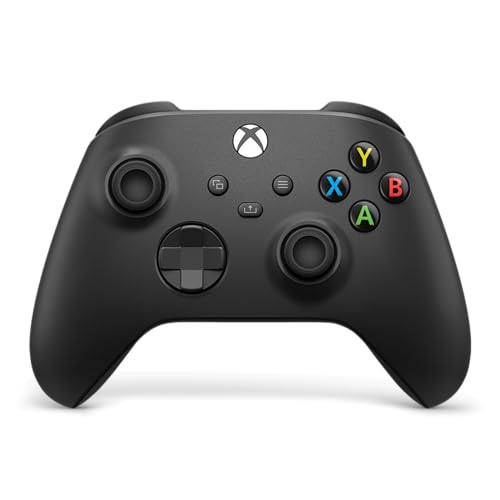
The pad most PC players should start with: official, predictable, and a familiar shape.
Three connection paths solve nearly every setup. You can plug in over USB-C for instant plug-and-play on console or PC, or pair wirelessly over Xbox Wireless and Bluetooth and switch between supported devices. For a PC player this is the difference between a controller that just works and an evening of receiver troubleshooting — and reliability is exactly the thing buyers single out most about this pad.
The design has been smoothed out since the older shape, with sculpted surfaces and updated geometry aimed at comfort across long sessions. Textured grips run across the triggers, bumpers, and back case so your hands do not slide in the middle of a firefight. The hybrid D-pad gives you a firmer feel for fighting games, and the dedicated Share button captures screenshots and clips without a keyboard shortcut. A 3.5mm jack takes a compatible headset for voice chat, and the Xbox Accessories app lets you remap buttons and build profiles per game.
Be honest about what it is not. There are no back paddles and no Hall Effect or TMR sticks, so a competitive player chasing maximum configurability will outgrow it. The 19-button count covers the layout, not extra hardware you can program. Reliability is its strongest suit, while opinions on the finish and the outlay divide — some feel it is exactly right, others expect more for a first-party pad. Compared with the SZDILONG above, it trades Hall Effect sticks for a connection that pairs without a dongle headache.
What makes it the safe buy
- USB-C, Xbox Wireless, and Bluetooth in one pad, so PC pairing is rarely a fight
- Sculpted geometry with textured triggers, bumpers, and back case
- Hybrid D-pad, Share button, 3.5mm headset jack, and remapping in the Xbox Accessories app
- Owners single out its reliability more than any other trait
The limits worth knowing
- No rear buttons and no Hall Effect or TMR sticks
- Standard analog sticks will eventually wear like any conventional pad
- Finish and value opinions split between buyers
The easy call: buy it if you want one pad that pairs over USB-C, Xbox Wireless, or Bluetooth without drama.
The other side: if back paddles and drift-proof sticks are on your list, the pro-tier picks below deliver them.
6. PowerA FUSION Pro Wireless Controller with Lumectra

Hidden RGB art on the shell and thumbsticks you can raise mid-match with a twist.
The a neat extra here is the light show: activate the RGB LED lighting and a hidden design appears on the shell, with six lighting modes across four customizable zones. It is the kind of pad you show off before a session, and the looks land well with buyers. Under the LEDs it is a serious piece of kit, with contact-free magnetic sensors in the thumbsticks — Hall Effect modules — for a fluid pro-level feel that resists the wear of standard sticks.
Adjustability is the other draw. Each thumbstick has three height settings you change with a simple twist rather than swapping parts, so you can tune reach for a shooter and then dial it back for a racer. Four mappable buttons on the back program on the fly, mid-game, with no system settings to dig through. The included Wireless USB Adapter gives you low-latency wireless on Xbox Series X|S, Xbox One, and Windows 10/11, and the pad itself carries 17 buttons. It measures 6.14 x 4.21 x 2.56 inches.
Weigh the reliability question before you commit. Random disconnects and units that quit working come up in the feedback, stick drift is mentioned, and the battery is reported as holding less than 5 hours by some owners — a short window if you play in long stretches. The lighting and the twist-adjust sticks are genuinely useful, but this is a pad to buy from a seller with an easy return path, and to pair with a charging routine rather than relying on marathon wireless sessions.
The features that sell it: six lighting modes across four zones, three thumbstick heights per stick, Hall Effect modules, four on-the-fly back buttons, and an included wireless USB adapter for Xbox and Windows 10/11.
The trade-off to size up: connection drops, drift reports, and a battery that some owners find short — keep a cable nearby.
Best for: players who want a customisable, eye-catching pad and will tinker with stick height mid-session.
Think twice if: you need a pad that holds a wireless link through long, uninterrupted play.
7. GameSir G7 Pro Wireless Gaming Controller
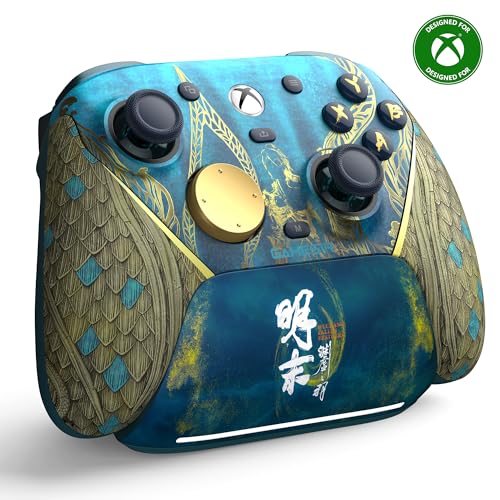
GameSir’s first wireless Xbox pad, built for a fast link and a dock that charges on contact.
The spec that earns this one its place is the 1000Hz polling rate, which means the pad reports its position to the game a thousand times a second — so stick input reaches the screen almost the instant you move. Pair that with the Mag-Res TMR sticks, which the maker describes as blending the precision of traditional potentiometer sticks with the long life of Hall Effect, and you have a pad built to stay accurate after months of play.
Connection is flexible in a way the budget picks are not. On Xbox and PC you use the 2.4G wireless dongle or a USB-C cable for a lag-free link, and on Android you pair over Bluetooth 5.3. A one-press wake-up turns the console on with the pad. The Hall Effect analog triggers use a mechanical micro-switch for a tactile pull, and a Hair Trigger Mode — held via M+LT/RT — shortens the pull when you want a faster shot. There are four programmable buttons and a 12-button layout.
Charging is where it pulls ahead of most of this list. A 1200mAh battery works with a smart charging station that starts topping up the moment you set the pad down, and the station has a built-in compartment to hold or extend the reach of the wireless receiver. Owners praise its four programmable buttons and report no stick drift, plus a grip texture that stays put during play. Note the shape: at 2.28 x 5.98 x 4.09 inches and 9.6 ounces it is a compact, light pad rather than a heavy one.
Pick this if: you want a fast-polling pad with a charging dock and don’t mind dongle use on PC.
Only hesitation: the only real caveat is dongle-only 2.4G on PC — just confirm your PC setup has a free USB port for the 2.4G dongle.
8. ASUS ROG Raikiri II Xbox Wireless Gaming Controller
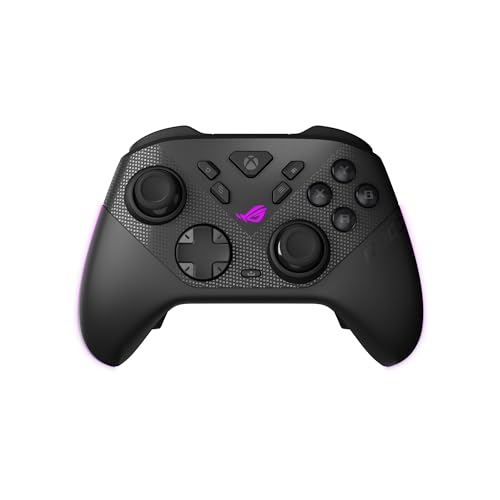
A PC-first pad with a travel case, a charging stand, and swap-in stick caps.
The ROG Raikiri II is built like a PC accessory first. Low-latency 2.4GHz RF, Bluetooth, or wired USB-C gets you onto a PC and the ROG Xbox Ally, and the pad is certified for Xbox over USB-C and 2.4GHz RF. The 1000Hz polling rate delivers ultra-low latency in both wired and 2.4GHz wireless modes on PC, with ROG SpeedNova Wireless technology backing the wireless side.
The hardware is where the money shows. Anti-drift TMR joysticks are pitched as more accurate and less power-hungry than Hall Effect sticks, and four fully programmable rear buttons sit where your fingers naturally rest. Dual-mode triggers switch between micro-switch triggers with short travel and TMR sensor triggers with full travel, which is the difference between a snappy shot and a smooth throttle. The D-pad, ABXY, rear buttons, and bumpers all use micro-switches for instant actuation, and the grip is finished with an anti-slip, skin-friendly feel. The maker lists a 50H battery figure.
Bundle value is real: you get a portable protective case that charges the controller while it sits inside, a charging stand, and two detachable joystick caps. The trade-off is the connection record — disconnect issues come up repeatedly in the feedback, and build impressions split between well-built and flimsy. At 9.6 ounces and 6.1 x 4.1 x 2.6 inches it carries a little more mass than the GameSir above. Buy it for the case-and-stand bundle and the PC focus, and keep the wired option ready if the wireless link gets moody.
The package: tri-mode connection, 1000Hz polling, TMR anti-drift sticks, dual-mode triggers, four rear buttons, a charging case, a stand, and two spare caps.
The catch: wireless drops are the recurring gripe, so plan to use the USB-C path for ranked play.
Suited to: PC players who want a case-and-dock bundle and a pad tuned for desktop play.
Reconsider if: a stable wireless link is the one thing you refuse to compromise on.
9. Razer Wolverine V4 Pro Wireless Controller

The latency specialist: up to 8000Hz polling on PC and six mappable buttons.
If you play competitive shooters on a PC, the headline is up to 8000Hz HyperPolling on PC via Razer HyperSpeed Wireless — a reporting rate far above the 1000Hz pads above, aimed squarely at shaving the delay between your thumb and the screen. Capacitive anti-drift thumbsticks use contactless sensors for consistent aiming, and interchangeable caps let you tune the feel.
The control hardware is deep. Four removable mouse-click back buttons and two claw grip bumpers let you fire commands without lifting a thumb, and adjustable Pro HyperTriggers switch between an instant mouse-click pull and full-range analog travel for racing sims. A magnetic faceplate and four onboard profiles let you set up per game, with deeper tuning in Razer Synapse 4 and the Razer Controller app. The layout carries 18 buttons across a 14.72-ounce body at 2.65 x 6.17 x 4.14 inches.
Know what you are buying into. This is the top of the range, and the 8000Hz figure is a PC-only advantage — on Xbox you are not getting that ceiling. It is also the heaviest pad in this group, which some players will feel in a long session. For a buyer chasing the lowest possible input latency on a desktop and willing to pay for the configurability, it is the cleanest expression of that goal. If you mostly play on console, the money is better spent on the GameSir or the official Xbox pad.
Worth it for: PC competitive players who want the highest polling rate on this list and six mappable buttons.
Overkill for: console-only play, where the 8000Hz ceiling does not apply.
Know the Specs
What polling rate in Hz actually means
Polling rate is the number of times per second your controller sends its stick position to your machine, measured in hertz. A 1000Hz pad reports a thousand times a second; Razer’s V4 Pro advertises up to 8000Hz on PC. Higher is better for fast aiming because your input arrives sooner, but it only helps where the rest of your setup keeps up — and the 8000Hz figure applies to PC, not Xbox.
Hall Effect and TMR sticks explained
A Hall Effect stick senses movement with a magnet instead of two contacts rubbing together, so there is no wear surface to grind down. TMR is a newer sensor type that makers describe as combining precision with long life. Either one is a better long-term bet than a standard analog stick if you play a lot and want to avoid the slow drift that makes your character creep on its own.
2.4GHz dongle vs Bluetooth
A 2.4GHz receiver is a small USB plug that makes its own dedicated link, and several pads here need it — they have no Bluetooth at all. Bluetooth skips the dongle but is only present on some models. Check which one your chosen pad supports before you buy, because a dongle-only pad will not pair with a phone or a TV.
Battery mAh and charge time
Milliamp-hours (mAh) measures battery capacity, so a 1000mAh cell holds more than a smaller one at the same draw. The budget picks pair a 1000mAh battery with 2-3 hours of Type-C charging and a 10-14 hour rating, while the GameSir runs a 1200mAh battery on a charging dock. A dock means you top up between matches rather than hunting for a cable.
Common Questions
Will a dongle-only controller work on my PC?
Is Bluetooth or a 2.4GHz dongle better for PC gaming?
What is stick drift and do Hall Effect sticks stop it?
Can I use these controllers on Xbox and PC with the same pad?
How long does the battery last on a wireless Xbox pad?
Do I need to install drivers to use these on Windows?
What does a 1000Hz polling rate give me over a standard controller?
Can I plug headphones into these controllers for game audio?
Are back buttons worth it for PC shooters?
Will a limited-edition controller like the DOOM pad work the same as a standard one?
The Bottom Line
For most PC players the answer is the Xbox Wireless Controller – DOOM: The Dark Ages Limited Edition, because it pairs over Xbox Wireless and Bluetooth with no dongle fuss and looks unlike anything else on your desk. If you want the stick technology that resists wear without stretching to the top of the range, the GameSir G7 Pro brings TMR sticks, a 1200mAh battery, and a charging dock together. And for pure PC latency chasing, the Razer Wolverine V4 Pro and its up-to-8000Hz HyperPolling is the one to reach for.
One honest nudge: the Carbon Black Xbox pad has the most consistent reliability feedback in this group, so if you would rather buy once and stop researching, that is the low-risk move.
How we choose
We do not accept paid placement. Every pick is matched to a real buyer and a real use-case; we do not hands-on test units.
Sources
Specifications: manufacturer listings and product documentation. Review insights: verified customer reviews, as of November 2026. Pricing: not shown on this page (it changes often); check the current price via the retailer link.
As an Amazon Associate, Tactical Gear Guy earns from qualifying purchases. This does not affect which products we feature.