Specs are compiled from manufacturer listings and verified buyer reviews and can change over time — please confirm the key details on the product page before buying.
You want to aim with a mouse on your Xbox One, and the honest answer is simpler than most people expect: a plain USB keyboard and mouse set often works on the console, but the set you pick decides whether you get smooth control or a fight with dropped keys. This guide breaks down key count, anti-ghosting, wired versus wireless, and battery size so you can pick once and get back to playing.
This guide is built by comparing the manufacturers’ published specifications and the patterns across verified customer reviews, so you get each pick’s real strengths and trade-offs instead of marketing spin.
Below you will find a full kit for beginners, compact tenkeyless boards for tight desks, a mechanical 60% option, and one set built around a console adapter. Every pick here is chosen for the same job — getting mouse-and-keyboard control working on an Xbox One without guesswork, which is exactly what the xbox one keyboard and mouse shortlist below is built to do.
Top Picks


How To Choose The Best Xbox One Keyboard and Mouse
The first thing to understand is that your console only accepts a keyboard and mouse in games that support it — the hardware is half the job, the game setting is the other half. Once you accept that, the shopping gets much easier, because you are really choosing between wired reliability, wireless freedom, and how much desk space the board eats.
Wired or wireless first
A wired USB set plugs straight in and needs no charging, which is why it suits players who hate a dead mouse mid-match. A 2.4GHz wireless set uses a small USB receiver and, in the best cases, sends a response the makers describe as comparable to a wired keyboard. The trade-off is charging: you are now responsible for topping up a battery.
How many keys can you hold at once
Anti-ghosting is the feature that lets several keys register at the same moment — think strafing, crouching, and firing together. A board with 26 anti-ghosting keys covers every key your left hand and right hand are likely to hold in a shooter. A board with 19 still covers the common gaming cluster, but the ceiling is lower. This is the spec that separates a genuinely playable set from one that eats your inputs.
Layout and desk space
A full-size board has 104 keys including the number pad. A tenkeyless (TKL) board drops the number pad for 87 keys and gives your mouse a wider sweep. A 60% board goes further, cutting to 61 keys and removing the function row, which is the tightest footprint you can buy in this group. On a coffee table in front of the TV, an 87-key or 60% board leaves room for mouse sweeps that a 104-key board eats up.
Check the console caveat before you buy
Several sets in this list are made primarily for PC and list Xbox as a compatible device rather than a designed-for feature. That does not make them bad — it means you should confirm the game you play supports keyboard and mouse input. One set here ships with its own converter box, which is the only one built around console play from the ground up.
Side-by-Side Comparison
| Model | Best For | Connection | Key Count | Anti-Ghosting | Amazon |
|---|---|---|---|---|---|
| CHONCHOW 4-in-1 Combo★ Best Overall | One-box starter kit | USB wired | 104 | 26 keys | Amazon |
| CHONCHOW Wired LED ComboBudget Champion | Tightest wired budget | USB wired | 104 | 19 keys | Amazon |
| CHONCHOW 2.4GHz Wireless RGBCordless Full Size | Cordless full-size typing | 2.4GHz wireless | 104 | — | Amazon |
| Recharge LED Combo | Portable cordless setup | 2.4GHz wireless | 87 | — | Amazon |
| BlueFinger 60% Mechanical | Mechanical feel, small desk | USB wired | 61 | — | Amazon |
| FELICON Converter Set | Console-first with adapter | USB wired | 39 | All keys | Amazon |
Detailed Reviews
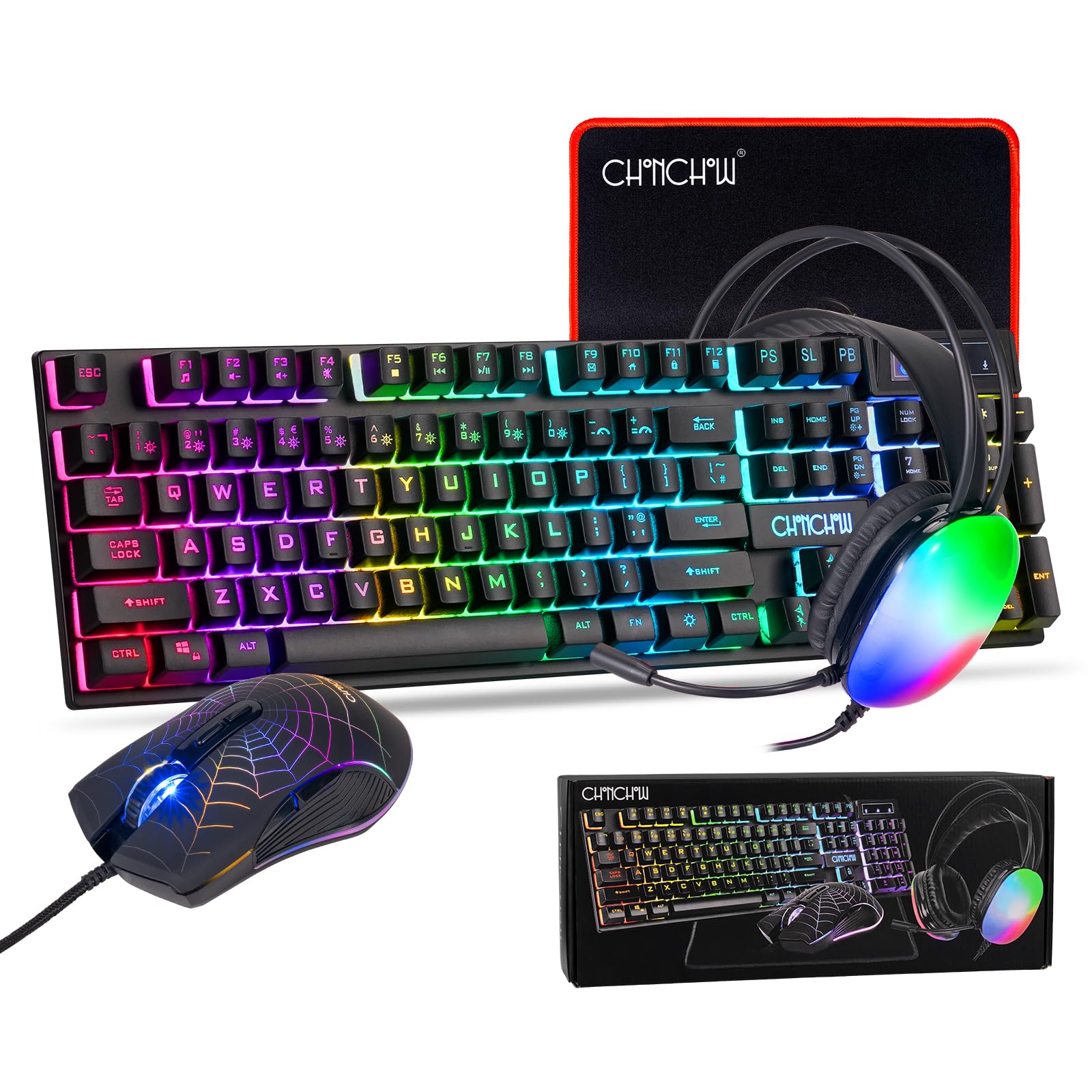
1. Gaming Keyboard and Mouse Headset Mouse Pad Combo
Our pick — 4.5+★ from 350+ verified ratings; the strongest balance of quality and price.
Four pieces in one box, and the keyboard alone carries 26 anti-ghosting keys.
Setting up mouse-and-keyboard on an Xbox One normally means buying a board, a mouse, and something to rest them on. This CHONCHOW bundle skips all of that and hands you a 104-key RGB keyboard, a 7-color breathing mouse, a LED headset with a 360° omnidirectional microphone, and a 290mm x 250mm x 3mm mouse pad in a single box. For anyone building a first console desk, that is the whole job done in one order.
The number that matters is 26. That is how many keys can be held down at once without the board dropping an input — enough to cover every key your hands are likely to press together in a shooter. Compare it to the 19 anti-ghosting keys on the wired budget combo further down, and you can see where the extra money goes. The board also gives you 10 RGB backlight modes with 5 brightness and speed levels, so it stays readable in a dark room.
Buyers consistently single out the build quality and value, and the double-shot injection moulding on the keycaps means the lettering will not wear off. The honest catch is reliability on the long run: a portion of buyers report units that quit after a couple of weeks. Most keep working, but treat the first fortnight as your test window rather than assuming it will live on your desk for years.
Where it earns its keep
- 26 anti-ghosting keys — the highest count on this list
- 104 full-function keys with a QWERTY layout and 12 multimedia shortcuts
- Mouse gives you 4 DPI steps: 800, 1600, 2400, 3200
- Headset, mouse pad, and both peripherals arrive together
Where it asks patience
- Reliability is the recurring complaint — a minority fail early
- Wired USB only, so nothing goes cordless
- The headset is a bonus, not the reason to buy
Buy it for: the fastest route from an empty desk to a working Xbox One mouse-and-keyboard setup, with a headset and pad thrown in.
Look past it if: you want a cordless board, because this entire kit is USB wired.
2. Wired LED Gaming Keyboard and Mouse Combo
A full 104-key wired board that lets you paint the lighting zone by zone.
The purple keycaps are the visual hook, and behind them sits a proper layout — 104 keys, 12 multimedia keys, and 19 anti-ghosting keys covering the input pattern most players actually use. The mouse adds 6 speed levels across 1200, 2400, 3600, 4800, and 7200.
The lighting controls here go further than the price suggests. You get 8 lighting zones, 7 color choices, 7 preset light effects on FN+1 through FN+7, and 3 brightness levels. The mouse brings 13 light modes of its own. Note the keyboard count against the top pick — 19 anti-ghosting keys against 26 — because that is the real gap between the two CHONCHOW wired boards.
The trade-off is the same one every budget wired set carries: the plastics are honest rather than plush, and there is no headset or pad in the box. What you do get is a 30-day refund or replacement window and a 12-month warranty on quality issues, which is a straightforward safety net for a first console peripheral.
Best read on it: a low-risk entry ticket to mouse-and-keyboard Xbox play, with more lighting control than the price tier normally offers.
The honest limit: 19 anti-ghosting keys is a lower ceiling than the 26 on the bundle above, and there is no bundled headset.
Go with this one if: you already own a headset and pad and just need a solid wired board and mouse.
Reach higher if: you want the widest anti-ghosting coverage in a wired set.
3. CHONCHOW USB Wireless Gaming Keyboard and Mouse Combo
Full-size keys, two rechargeable batteries, and one shared USB receiver for both.
A couch setup lives and dies on the cable. This combo cuts it: both the keyboard and the mouse run on a 2.4GHz wireless connection and share a single USB adapter, with an effective distance of 10 meters. That is enough to sit back on the sofa with the console across the room. The makers describe the response as comparable to a wired keyboard, which is the claim worth testing in your own living room.
Battery capacity is where this one separates itself. The keyboard carries a 2500mAh cell and the mouse a 500mAh cell, and together they run for 10 hours of continuous use with the light on. An energy-saving mode puts both to sleep after 5 minutes of no input, and any key wakes them. Charge it with a 5V2A charger and you will not be hunting for the cable mid-session.
Owners genuinely like how it looks and feels, but the average experience is more mixed than the wired picks above. Battery life draws divided feedback — some get a solid run, others find the charge does not hold as long as they expect, and a few keyboards stop working within a few weeks. It is a fine set for casual sessions, but the split battery reports make it a risky pick for a tournament night.
The case for cordless: a 2500mAh keyboard battery and 10-meter range make it the easiest full-size board to live with away from the console.
What works in its favour
- Shared USB adapter — one receiver runs both devices
- 10-hour continuous run with the backlight on
- 3 adjustable brightness and breathing speeds
What to weigh up
- Battery reports are split between strong and short
- A minority of units quit within weeks
- Must be charged with a 5V2A supply
Suits: the sofa player who wants a full 104-key board without a cable running across the floor.
Not for: anyone who wants zero charging duties — the two cells here are your responsibility.
4. CHONCHOW G112

The set that slips into a backpack and still has keys lit for the dark.
Portability is the story here. The 87-key layout drops the number pad and measures 13.5 by 5.5 by 1.2 inches, which is small enough to carry in a bag and take to a friend’s house. The keyboard holds a 2000mAh battery and the mouse a 500mAh battery, both fed by the included charging cable, so you are not buying loose batteries.
Wireless behavior is well thought out for a couch. Both halves share a USB adapter but can also run separately, and the effective range is 10 meters. Sleep timing differs between the two: the keyboard naps after 60 seconds of no input and the mouse after 10 minutes, and any key wakes them. Note the keyboard battery — 2000mAh here against the 2500mAh in the G112 above — if longest possible runtime is the deciding factor for you.
The look and the soft backlit design are what buyers respond to most. Connectivity is where the reports divide: plenty of owners find it easy to pair and go, while others hit trouble getting it recognized on a PS5. If you are planning to use it on an Xbox One, confirm your game supports keyboard input before you commit — the maker states that console support depends on the game’s own settings.
Worth knowing: at 0.8 kg for the pair and a compact 87-key frame, this is the set to grab when the console is not staying in one room.
Reach for it if: you move between rooms or houses and want one bag-friendly set with rechargeable batteries.
Think again if: you want plug-in-and-done simplicity — this one asks you to verify console support per game first.
5. BlueFinger 60% Mechanical Gaming Keyboard and Mouse Combo

61 keys, red mechanical switches, and a cable you can unplug and pocket.
This is the one for a player who wants the click-and-thud feel of a mechanical board without giving up the desk to it. The 60% layout strips the number pad and the function row, leaving 61 keys in a minimalist footprint that clears space for wide mouse movement. Under the keycaps sit Red mechanic switches with RGB rainbow backlighting across a gray and black body.
The number gap is real: 61 keys here versus 104 on the full-size wireless boards above. That is a deliberate cut, not a shortfall — the missing keys are the ones a controller-first player rarely touches anyway. The detachable Type-C cable is the feature that earns the travel mentions, since it detaches cleanly for transport and reconnects without fuss.
The trade-off worth naming: going compact means relying on function-layer shortcuts to reach keys that used to be physical, and a 60% board takes a session or two to relearn. If you type long documents on it as well as game, this is the pick that fights you slightly. If your hands mostly live on WASD and the keys around it, the 61-key frame pays off immediately.
Why the small frame earns it
- 61-key 60% layout frees desk space for mouse sweeps
- Red mechanical switches for tactile key presses
- Detachable Type-C cable for transport
- RGB rainbow backlighting across the board
What the cut costs you
- No number pad and no function row
- Wired USB only, so no cordless freedom
- Worth checking Xbox game support before you buy
Built for: players who want mechanical key feel and a tiny footprint on a shared or crowded desk.
Skip if: you need a number pad or a full function row within easy reach.
6. FELICON Gaming Keyboard and Mouse Combo

The only set here built around a converter box made for consoles.
Every other pick on this list lists Xbox as a compatible device. This one is designed around it. The kit pairs a 39-key portable keyboard, an RGB mouse, and a LED-backlit converter that the maker says supports Xbox One, Xbox One S, Xbox One X, Xbox 360, PS4, PS4 Slim, PS4 Pro, PlayStation 3, and Nintendo Switch. It is the one buy here where the adapter is part of the package rather than an assumption.
The board is a one-handed design with full-key anti-ghosting and an integrated palm rest, aimed at keeping your WASD hand supported during long sessions. The maker mentions it as a fit for FPS titles like Fortnite, PUBG, APEX Legend, and COD. You can remap keys without downloading software, following the included instructions. At 39 keys it is by far the smallest board on this list.
Honesty matters most on this pick, because the feedback is the roughest in the group. Compatibility is the loudest complaint — a significant share of owners mention it would not work with the Switch, and the instructions draw criticism for being unclear. The adapter is not tied to specific games, which means setup is on you. If tinkering is not your thing, the wireless sets above need no converter or key remapping.
The genuine draw: a packaged converter that covers Xbox One, One S, and One X alongside PS4 and Switch, so you are not guessing about console support.
The real caveat: compatibility and instruction clarity are the recurring frustrations, so budget time for setup and follow the key-mapping steps carefully.
The right buyer: a tinkerer who wants an all-in-one console adapter kit and does not mind following setup steps to get it working.
The wrong buyer: anyone who wants true plug-and-play — the paperwork here demands patience.
Know the Specs
Anti-Ghosting Key Count
Anti-ghosting is the feature that decides how many keys you can hold at once without the board dropping one of them. Think of strafing left, crouching, and shooting in the same breath — a low count means the board may ignore one of those. The bundle in the top spot lists 26 anti-ghosting keys, while the wired budget combo lists 19. Both cover the common gaming cluster; the higher number simply leaves more headroom for unusual key combinations.
2.4GHz Wireless Range
A 2.4GHz connection is a short-range radio link that uses a small USB receiver, and the sets here list a 10-meter effective distance. That is enough to reach from a console under the TV to a sofa across the room. The catch is that the receiver must be plugged in for anything to work — several sets hide it on the back of the mouse, so check there first if the keyboard seems dead. Charging needs a 5V2A supply on most of these wireless boards.
Keyboard Layout: 104 vs 87 vs 61 vs 39 Keys
A 104-key board is full size with a number pad. An 87-key TKL board removes the number pad to free mouse room. A 61-key 60% board also drops the function row, leaving a minimalist block. A 39-key one-hand board is built for a WASD hand and a mouse, nothing more. Smaller layouts save desk space and travel better; larger ones keep more keys physical instead of hidden behind shortcuts.
Battery Capacity in mAh
mAh (milliamp-hours) is the size of a rechargeable battery — a bigger number generally means a longer run between charges. The wireless boards here range from 2000mAh on the rechargeable combo to 2500mAh on the G112 and the full-size RGB set, and each pairs with a smaller mouse cell around 400mAh to 500mAh. Sleep modes stretch that further by cutting power after a period of no input. Always charge these with the supply the maker specifies.
Common Questions
Will any of these keyboards and mice work on an Xbox One?
Do I need the included adapter box to use a keyboard on a console?
Where is the USB receiver hidden on these wireless sets?
How long does the battery last on the wireless combos?
What charger should I use for a rechargeable keyboard and mouse?
Is a 60% mechanical keyboard like the BlueFinger harder to get used to?
Does anti-ghosting really matter for console play?
Do these combos include everything I need to start playing?
Can I use the keyboard and mouse separately?
What is the difference between the TKL and 60% layouts here?
The Bottom Line
If you want the shortest path to a working console desk, the CHONCHOW 4-in-1 bundle is the one to order — it brings the keyboard, mouse, headset, and pad, and its 26 anti-ghosting keys are the highest count on this list. For a tight desk with a mechanical feel, the BlueFinger 60% board delivers 61 keys and Red switches. And if you want the console-first option with its own converter, the FELICON kit is the one built for it — just go in ready to follow the setup steps.
Whatever you pick, confirm your game supports keyboard and mouse input before you order, and keep a 5V2A charger nearby for any wireless set.
How we choose
We do not accept paid placement. Every pick is matched to a real buyer and a real use-case; we do not hands-on test units.
Sources
Specifications: manufacturer listings and product documentation. Review insights: verified customer reviews, as of November 2026. Pricing: not shown on this page (it changes often); check the current price via the retailer link.
As an Amazon Associate, Tactical Gear Guy earns from qualifying purchases. This does not affect which products we feature.