Specs are compiled from manufacturer listings and verified buyer reviews and can change over time — please confirm the key details on the product page before buying.
A wall mount is the fastest way to get your Xbox Series S off the floor and behind a TV, and the right one holds it with metal instead of hope. What matters most is a bracket that fits the Series S body exactly, keeps the vents open so the console can breathe, and holds steady on drywall without wobble. Every pick below fits the Series S specifically, not the Series X or the older One S. The overall winner is the TotalMount, which pairs a metal-and-plastic frame with ventilation channels and a built-in level.
This guide is built by comparing the manufacturers’ published specifications and the patterns across verified customer reviews, so you get each pick’s real strengths and trade-offs instead of marketing spin.
Some mounts are a plain steel cradle, others add cooling fans, RGB lighting, or a controller hook. The picks below split into those two camps so you can decide how much extra hardware your setup actually needs, which is the whole point of a good Xbox Series S Wall Mount.
Top Picks


How To Choose The Best Xbox Series S Wall Mount
The Series S is a small, flat-sided console, so the mount has to grip that exact body shape and leave the vents clear. Skip anything sold as a one-size bracket for multiple Xbox models — the Series X and One S are different sizes, and a loose fit means a rattling console. Below are the points that actually change how a mount feels day to day.
Fit comes before features
A mount cut to the Series S body holds the console snug against the wall with no shifting when you plug in a cable. Some brackets are shaped 1:1 to the console’s own dimensions, and one maker notes the side silicone pads can be removed if the fit feels tight. That snugness is the whole reason these exist — a universal shelf lets the console slide and wobble.
How the vents stay open
The Series S pulls air in and pushes heat out, and a flat panel against the wall can choke it. Look for a mount with a hollow or open base, or channels cut under the console, so air keeps moving. A ventilated base is the single most common cooling feature across these brackets, and it costs nothing extra on most of them.
Mounting method and wall type
Screw-in brackets use anchors for drywall or go straight into a stud for the firmest hold. A drill-free option that only needs a screwdriver is handy for renters or anyone who does not want holes in a stud. One thing to check before you buy: if you plan to mount under a desk instead of on a wall, the tabletop needs to be thick enough to anchor — one under-desk bracket asks for at least 0.78 inches of table thickness.
Side-by-Side Comparison
| Model | Best For | Material | Weight | Extra Features | Amazon |
|---|---|---|---|---|---|
| TotalMount for Xbox Series S★ Best Overall | Most buyers | Metal, Plastic | — | Built-in level, ventilation channels | Amazon |
| Chanvoo Steel Wall MountSteel Value | Steel build with controller hook | Alloy Steel | 0.45 kg | Controller & headphone holder | Amazon |
| Monzlteck Wall Mount HolerTwo-Step Install | Simple two-step install | Metal | 14.4 ounces | Vent opening for heatsink | Amazon |
| Josmimic Wall Mount | Heavy-load hold | Metal | 0.53 kg | 30 lb capacity, silicone padding | Amazon |
| Bylitco All Metal Bracket | Wall or under-desk mounting | Solid metal | 1.5 pounds | 3-year warranty | Amazon |
| Mcbazel Wall Mount Kit | Cooling fans and RGB | ABS plastic | 1.21 pounds | Dual fans, 3 USB ports, RGB | Amazon |
| Allnice Cooling Stand | Adjustable fan speeds | ABS | — | Dual fans, RGB, 3 USB ports | Amazon |
| HIDEit Mounts Series S | Flush steel wrap | Cold-rolled steel | 1.2 pounds | Full vent and port access | Amazon |
| HIDEit Series S + Controller Bundle | Console plus controller | Cold-rolled steel | 1.79 pounds | Controller mount included | Amazon |
Detailed Reviews
1. TotalMount for Xbox Series S
Our pick — 4.5+★ from 2,000+ verified ratings; the strongest balance of quality and price.
The mount that treats cooling and leveling as part of the job, not an afterthought.
If your TV is already on the wall and the console is still sitting on the floor, this bracket closes that gap. The frame is metal and plastic, and it’s shaped specifically for the Xbox Series S — the listing is clear that it does not fit the Xbox One S, Series X, or One X. Owners consistently describe it as a quality piece, and the built-in level means you are not guessing whether the bracket sits straight.
Cooling is where this one earns its keep. Ventilation channels under the console keep an airflow path open, so heat has somewhere to go during a long session instead of sitting trapped behind a flat panel. And it fits neatly behind a wall-mounted TV, which is exactly the spot most buyers are trying to fill. The install runs about ten minutes, and one owner reports it hasn’t bent or broken after three days of use.
It doesn’t hold a controller. If you want the console and a pad mounted together, a bundle is the better fit. It sits at 4.5+ stars across 2,000+ owners.
What earns it the top spot
- Built-in level takes the guesswork out of a straight install
- Ventilation channels keep air moving behind the console
- Fits all Series S models, including newer ones
- Trim enough to tuck behind a wall-mounted TV
Where it holds back
- Pricier than plain steel cradles
- No controller or headset holder included
- Not compatible with Series X, One S, or One X
Best for: the buyer who wants a straight, cool-running fit behind a wall-mounted TV with the least fuss.
Look elsewhere if: you need a controller hook built into the same bracket.
2. Xbox Series S Wall Mount Steel
Steel, a 1:1 body fit, and a place to hang your controller and headset.
Here is the direct comparison worth knowing: this mount weighs 0.45 kg against the Josmimic’s 0.53 kg, so it is a touch lighter on the wall. It’s made from alloy steel with strong deformation resistance, and the bracket is shaped to the Series S body in a 1:1 ratio to keep the console from shifting. If the fit feels very tight going in, the maker’s own note is that the silicone strip on the side can be removed.
The base is hollowed out to match the Series S’s bottom vent, so air circulation carries on during long sessions. Soft rubber pads sit in front and behind the bracket, absorbing shocks and keeping the console’s shell free of scratches.
Install is quick, a few minutes with the included screws. Keep in mind this is a newer listing still building its review base, and it carries a six-month warranty rather than a multi-year one. If you want a steel bracket with hooks and you are fine being an early adopter, this is a sensible grab.
The build story: alloy steel, a 1:1 body fit, and rubber pads front and back — protection from scratches and movement in one go.
Worth knowing: the warranty is six months, shorter than the multi-year coverage on some rivals.
The match: a steel cradle with hooks for a controller and headset in one bracket.
Hold off if: you want a long warranty term or a deep review history behind your pick.
3. Wall Mount Holer for Xbox Series S
Two steps, one solid metal cradle, and a heatsink opening so the console can exhale.
The install here is as simple as it gets: screw the holder to the wall, then drop the Series S in. The holder is solid metal, weighs 14.4 ounces, and its dimensions run 6.1 x 2.8 x 4 inches — compare that to the Josmimic’s 2.9 x 6.3 x 4 inches and you’re looking at a markedly different shape for a very similar job. Mounting quality is the thing buyers talk up most, and one notes it gives two additional anchor points for extra security.
It’s built to be space-efficient, hiding the console and its cables so you get a tidier game space back. The opening is cut over the Xbox heatsink so heat dissipates fast during play, which matters if the TV wall is tight against a corner. Power button access on the left or right keeps the console usable without unmounting it.
The trade-off is that it’s a bare metal cradle — no fans, no USB ports, no controller perch. For someone who picked the Series S partly because it’s small and quiet, that simplicity is the point, not a flaw. If you want a mount that just holds the thing and disappears, this is a clean answer.
Why it suits a minimal setup
- Two-step install with no template fuss
- Heatsink opening keeps airflow honest
- Power button stays reachable left or right
- Solid metal with a proven mounting base
What it does not do
- No controller or headset holder
- No fans or USB ports
- Not built for Series X, One S, or One X
Choose it for: the cleanest possible hold — a metal cradle that puts the console up and gets out of the way.
Pass if: you were hoping for built-in cooling hardware or a controller perch.
4. Wall Mount for Xbox Series S

A matte black metal bracket rated to 30 lb, with silicone where it contacts the console.
This mount is the heaviest of the plain cradles here at 0.53 kg, and that heft ties to its load rating: it holds up to 30 lb without bending or shaking. For a Series S that’s a generous margin — the console is light, and a rigid metal bracket rated far above it feels overbuilt on purpose. The dimensions run 2.9 x 6.3 x 4 inches, so it’s a tall, slim shape against the TotalMount’s 3.3 x 6.3 x 4.3 inches.
The open base lets air flow freely under the console, and silicone pads at the key contact points stop scratches and keep the console from sliding. Mounting screws and anchors are in the box for drywall or studs. The look is a matte black finish that owners appreciate, so it won’t clash with a black TV wall.
One limitation: it’s plain — no controller hook, no fans, no USB. And if your wall has a lot of texture, the rigid metal frame does not flex to accommodate it, so a stud or a solid anchor matters. For a firm, high-capacity hold on a smooth wall, it’s a smart pick.
The strength play: a metal bracket rated to 30 lb with a matte finish and silicone contact pads — the console stays put and stays unscratched.
The honest note: rigid metal needs a solid anchor on a smooth wall, and there are no extras in the box.
Ideal if: you want a heavy-duty hold and a matte black look that fits a black entertainment wall.
Not for you if: you want built-in fans, USB ports, or a controller hook.
5. Bylitco All Metal Wall and Under Desk Bracket
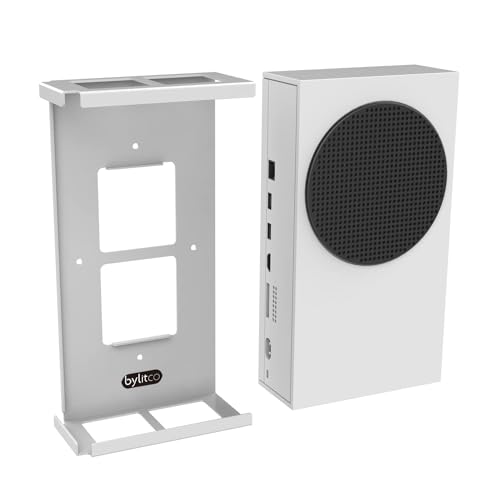
The bracket that does not care whether you call it a wall mount or a desk organizer.
Most mounts here assume a wall. This one lets you choose: wall, underside of a desk, or behind the TV. That flexibility is the reason to read this pick carefully — the maker asks that your tabletop be at least 0.78 inches thick so the screws can anchor properly. Get that right and the console hangs under the desk, freed from your gaming surface.
It’s all metal with a white powder-coat finish that resists rust and chipping, and it installs with four screws. Four drywall anchors come in the box. Buyers report a stable hold under a desk, with one buyer noting it doesn’t fall out. At 1.5 pounds it is substantial for a small bracket.
Here is the part worth weighing: a limited 3-year manufacturer warranty backs this one, which is longer than most. The catch is the under-desk route needs that table thickness, so measure before you drill. If you game at a desk and want the console out of the way, this is the most versatile option on the list.
The flexibility advantage
- Mounts to wall, desk underside, or behind the TV
- Solid metal with rust-resistant powder coat
- Limited 3-year manufacturer warranty
- Stable hold under a desk, per owners
Measure before you commit
- Under-desk install needs a tabletop at least 0.78 inches thick
- At 1.5 pounds, one of the heavier brackets here
- No fan, USB, or controller holder built in
Made for: desk gamers who want the console hidden under a tabletop instead of stuck to a wall.
Check first: that tabletop thickness — the under-desk route needs at least 0.78 inches to anchor.
6. Mcbazel Wall Mount for Xbox Series S

Two fans, three speeds, seven lighting modes, and a hub’s worth of ports on one bracket.
This is the first pick on the list that turns the mount into hardware. It runs two built-in fans behind a vent-enhancing baffle, and the speed switches across three settings: 4600 RPM (orange light), 4800 RPM (blue light), and 5000 RPM (green light). The color tells you the fan speed at a glance. It pulls power straight through the console’s USB, so there’s no extra adapter to plug in — but the fan and charging only work while the console is awake, not in sleep or power-off.
The port count is the practical draw: one USB 3.0 for fast charging or data and two USB 2.0 for controllers, so you skip a separate hub. Two detachable holders keep your controller and headset within reach. And the RGB strip offers seven modes — waterflow, horse running, breathing, and four monochrome colors — switched or switched off with a single touch.
The build is ABS plastic rated to support up to 10kg and fixed to the wall with four screws. Drilling is required, so this is not a renter-friendly drywall option. If you want your mount to be a lighting-and-cooling station, this is the one.
What it adds: dual fans at 4600/4800/5000 RPM, three USB ports, two holders, and seven RGB modes — a hub, a light show, and a mount in one.
The trade-off: drilling is required, and the fans only run while the console is on.
Reach for this if: you want the wall spot to double as a fan-cooled, RGB-lit docking hub with controller storage.
Look elsewhere if: you cannot drill holes or you want the fans running while the console sleeps.
7. Allnice Wall Mount Cooling Stand
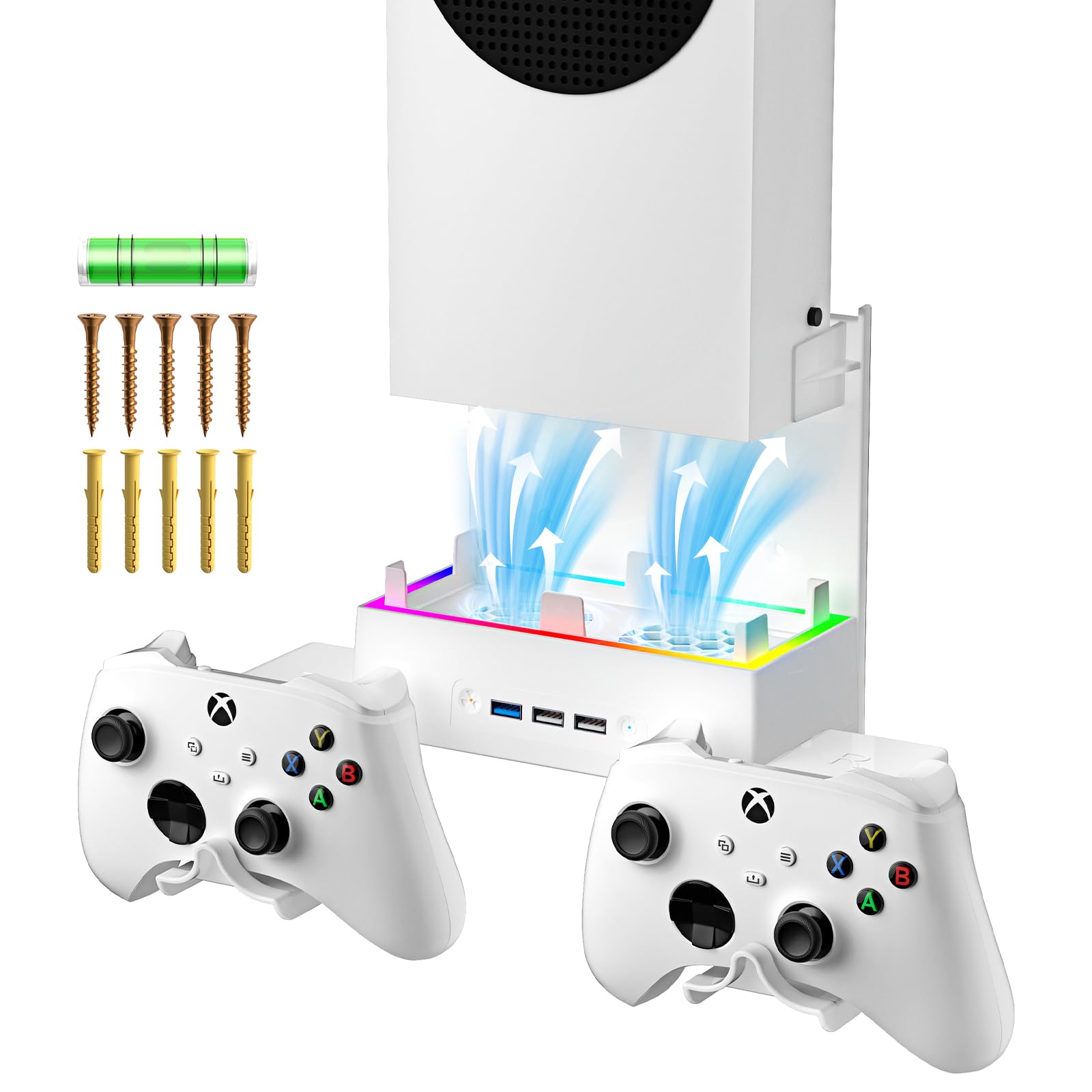
Dual fans tuned low for quiet play, with three speeds and seven colors on tap.
Where the Mcbazel spins up to 5000 RPM, this stand’s dual fans step through 1800 RPM, 2000 RPM, and 2200 RPM on a switch button — a lower, quieter range by design, aimed at heat dissipation without fan whine cutting into your game audio. The maker leans on a high-efficiency, low-noise build, and for someone who plays late with a headset off, that quieter tuning is the differentiator.
The front carries three USB ports for a mouse, keyboard, wired controller, or other gear. Note the limit the maker states: the extended USB interface only outputs DC 5V/1A (MAX), mainly for data transfer — so treat it as a connectivity extender, not a fast charger for a phone. The RGB cycles seven colors, starting with a seven-color fast switch on power-up, then an automatic breathing cycle, then a single-color pick, then off.
The mount is ABS with a strong anti-deformation build, and assembly is a simple matter of joining the components, so a first-timer can get it up fast. A controller and headset holder rounds out the station. If quiet cooling and clean cable organization matter more than maximum airflow, this one suits.
Why the quieter tuning works
- Dual fans at 1800/2000/2200 RPM for low-noise cooling
- Three USB ports for wired peripherals
- Seven RGB colors with an automatic breathing cycle
- Simple component assembly for quick setup
The limits to know
- USB output capped at DC 5V/1A, mainly for data
- Lower RPM range than the Mcbazel’s fans
- Not a fast charger for phones or tablets
Suits you if: you want fan cooling that stays quiet and ports for wired gear at the same spot.
Think again if: you expect those USB ports to fast-charge a phone.
8. HIDEit Mounts Wall Mount for Xbox Series S

A patented steel wrap that lets the console sit flush without choking its vents.
HIDEit’s approach is a wrap design: heavy-gauge, cold-rolled steel folds around the Series S to hold it flush against the wall. The wrap leaves full access to the vents and ports, so the console keeps breathing even while it’s tucked flat. That flush profile is the reason people pick it — it reads as part of the wall rather than a bracket bolted to it.
The powder-coat finish resists rust and chipping and shields the console’s shell from scratches. It comes from an American company, and the steel build feels like the priority over extras. Owners praise how straightforward it is to hang and the tidy look it creates.
At 1.2 pounds it’s a mid-weight steel bracket, heavier than the Chanvoo’s 0.45 kg but built for a different purpose: a flush wrap, not a cradle. The honest catch is that you get no fan, USB, or controller hook — the money goes into the steel and the wrap. If a low-profile steel look is the goal, this delivers.
The flush advantage: a patented steel wrap with full vent and port access, so the console sits tight to the wall without overheating.
The caveat: it’s a hold-only bracket — no cooling fans, ports, or controller perch.
Great match for: anyone who wants the console to sit flush and nearly disappear against the wall in steel.
Skip past it if: you need added cooling hardware or a controller mount in the same unit.
9. HIDEit Mounts for Xbox Series S and Controller
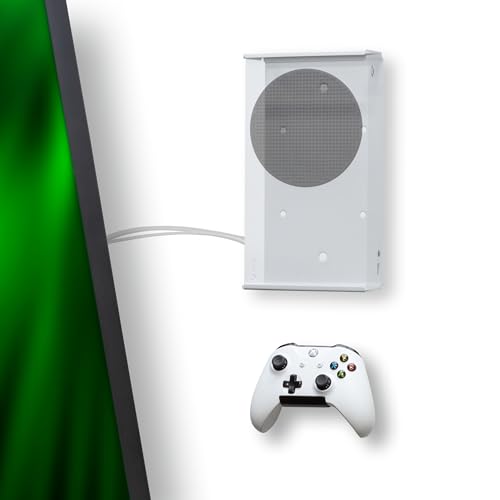
The same steel wrap, now with a rubber-dipped home for your controller.
This bundle takes the flush steel wrap and adds a second piece: a rubber-dipped controller mount that goes on the wall beside the console. The console mount leaves full access to vents and ports just like the single version, so cooling is not compromised. It’s made in the USA from heavy-gauge, cold-rolled steel, and the powder coat resists rust, chipping, and scratches on the console shell.
Install is billed as three easy steps with no template and no drill required, and stud mounting is optional — handy if you’d rather not commit to a stud location. The rubber-dipped controller holder keeps the pad off the floor and within reach. At 1.79 pounds it’s the heaviest bracket on the list.
What you give up is flexibility on the drop — this is the most you’ll spend here, and it is a hold-only pair with no fans or USB ports. If your controller lives on the floor now and you want everything on the wall, the extra mount is the reason to pick it over its single-mount sibling.
Two mounts, one tidy wall
- Console wrap plus a rubber-dipped controller mount
- Full vent and port access preserved
- No drill required, stud mounting optional
- USA-made cold-rolled steel with powder coat
What the bundle leaves out
- The priciest pick on the list
- No cooling fans or USB ports
- At 1.79 pounds, the heaviest bracket here
Pick this for: a matching wall home for both the console and the controller, with no drill needed.
The trade-off: it is a hold-only bundle with no fans or ports, at the top of this list’s spend.
Know the Specs
Load rating and material
A load rating is how much weight the bracket is built to hold. The Josmimic lists up to 30 lb, and the Mcbazel’s ABS build supports up to 10kg. Since the Series S is light, these ratings are about rigidity — a stiff metal or rated-plastic bracket resists shaking when you plug in a cable. Steel and alloy steel show up most often here; ABS plastic appears on the fan-and-RGB kits.
Ventilation design
Ventilation is how the bracket lets air move around the console instead of sealing it to the wall. Common approaches are a hollowed base that lines up with the console’s bottom vent, channels cut over the heatsink, or full access to vents and ports. A tight flat panel with no vent path is the thing to avoid — it turns the wall into a heat trap during long sessions.
Fan speed in RPM
RPM means revolutions per minute — how fast a fan spins. The Mcbazel’s fans step through 4600, 4800, and 5000 RPM, while the Allnice’s run 1800, 2000, and 2200 RPM. Higher RPM typically moves more air; lower RPM tends to run quieter. Both kits switch speeds with a button, so you can pick the balance of airflow and noise.
Install method and anchors
Screw-and-anchor installs grip drywall or a stud and hold firm. Drill-free brackets need only a screwdriver, which helps renters. If you plan to mount under a desk, the tabletop thickness matters — the Bylitco asks for at least 0.78 inches so the screws can anchor. Check your wall or table before you drill either way.
Common Questions
Will a Series S mount work with the Xbox Series X?
Do I need to drill holes to mount my Series S?
Does a wall mount block the Series S vents?
Are the cooling fans worth adding to a wall mount?
Can I mount the Series S under a desk instead of on a wall?
How heavy is the Series S and does the bracket need a high load rating?
Do the USB ports on a cooling stand charge a phone?
Will a mount hold the Series S securely without scratching it?
Is a steel mount better than a plastic one?
Where should I put the console on a wall with a mounted TV?
The Bottom Line
For most buyers, the xbox series s wall mount winner is the TotalMount for Xbox Series S because it combines ventilation channels, a built-in level, and a metal-and-plastic frame that fits every Series S model — and it backs that up with 4.5+ stars across 2,000+ owners. If you want the console and a controller on the wall together, grab the Chanvoo Steel Wall Mount for its detachable holder kit. And for a desk setup where the console hangs under the tabletop, the Bylitco All Metal Bracket is the one to reach for. For pure flush steel, the HIDEit wrap keeps the vents open and the profile low.
How we choose
We do not accept paid placement. Every pick is matched to a real buyer and a real use-case; we do not hands-on test units.
Sources
Specifications: manufacturer listings and product documentation. Review insights: verified customer reviews, as of November 2026. Pricing: not shown on this page (it changes often); check the current price via the retailer link.
As an Amazon Associate, Tactical Gear Guy earns from qualifying purchases. This does not affect which products we feature.