Specs are compiled from manufacturer listings and verified buyer reviews and can change over time — please confirm the key details on the product page before buying.
You want to sit down, grab a controller, and find it charged — not scrambling for AA batteries mid-match. A dual dock solves exactly that: it holds two Xbox pads and tops them up through rechargeable packs, so one is always ready while the other plays. The trick is picking a dock whose battery covers match your controller generation and whose charging contacts hold up night after night — the two points where cheap docks fail.
This guide is built by comparing the manufacturers’ published specifications and the patterns across verified customer reviews, so you get each pick’s real strengths and trade-offs instead of marketing spin.
The picks below sort by controller generation, battery capacity, and how cleanly the dock seats a pad, and the guide closes with the specs that actually matter when you are shopping for the best Xbox Dual Charging Station.
Top Picks

How To Choose The Best Xbox Dual Charging Station
A dual dock decides whether you ever hunt for AA batteries mid-match again. Match the battery door to your controller and the pack seats flush. Get either wrong and the pack will not close or will not charge.
Match the battery door to your controller
The rechargeable pack replaces the AA tray, so it needs the right door to snap flush. Series X|S controllers take a different door shape than Xbox One, One S, One X, and Elite pads. Most kits ship four covers — two of each — which is why they list multiple compatible models. Check the included-media line before you buy, because a pack with only one door type will not close on the other generation.
Read capacity in mWh, not mAh
Battery packs here are rated in mWh (milliwatt-hours, a measure of total stored energy) or mAh (milliamp-hours, a measure of charge at a set voltage). Higher numbers mean more playtime per charge, so compare like with like. A 5280mWh pack and a 6200mWh pack are not the same animal over a weekend of play.
Look at the charging contacts
Drop-and-charge docks seat the pad on metal contacts, and that mating point is where cheap units wear out. Magnetic contacts and weighted bases hold the controller steady. A loose seat means intermittent charging, which is the single most common way these docks disappoint.
Side-by-Side Comparison
| Model | Best For | Battery Packs | Rated Playtime | Charge Time | Amazon |
|---|---|---|---|---|---|
| DINOSTRIKE Charger Station with 2x5520mWh★ Best Overall | All-round dual dock | 2 × 5520mWh | 18–25 hours | 4 hours | Amazon |
| Fosmon Dual 2 MAXLongest-Running Kit | Long-term reliability | 2 × 5280mWh (2200mAh) | Up to 40–45 hours | — | Amazon |
| Venom Twin Charging DockExtra Port Pick | Extra USB port | 2 × 850mAh | Up to 15 hours | — | Amazon |
| Hori Dual Charging Station | Official licensing | 2 battery packs | Up to 20 hours | — | Amazon |
| 8Bitdo Dual Charging Dock | Magnetic seating | 2 × 1100mAh | — | — | Amazon |
| Froncha Controller Charger Station (2x6200mWh) | RGB lighting | 2 × 6200mWh | 25–30 hours | 3–3.5 hours | Amazon |
| Froncha 4-in-1 Quad Charger | Four battery packs | 4 × 6880mWh | 18–25 hours | 3–4 hours | Amazon |
| KEKUCULL Dual Dock | Simple setup | 2 × 1100mAh | Up to 15 hours | — | Amazon |
| Nyko Charging Station | Budget entry | 2 × 1100mAh | Up to 15 hours | — | Amazon |
Detailed Reviews
1. Charger Station with 2x5520mWh Rechargeable Battery Pack
Our pick — 4.5+★ from 600+ verified ratings; the strongest balance of quality and price.
Two 5520mWh packs, a four-hour refill, and a dock that hides your spares underneath.
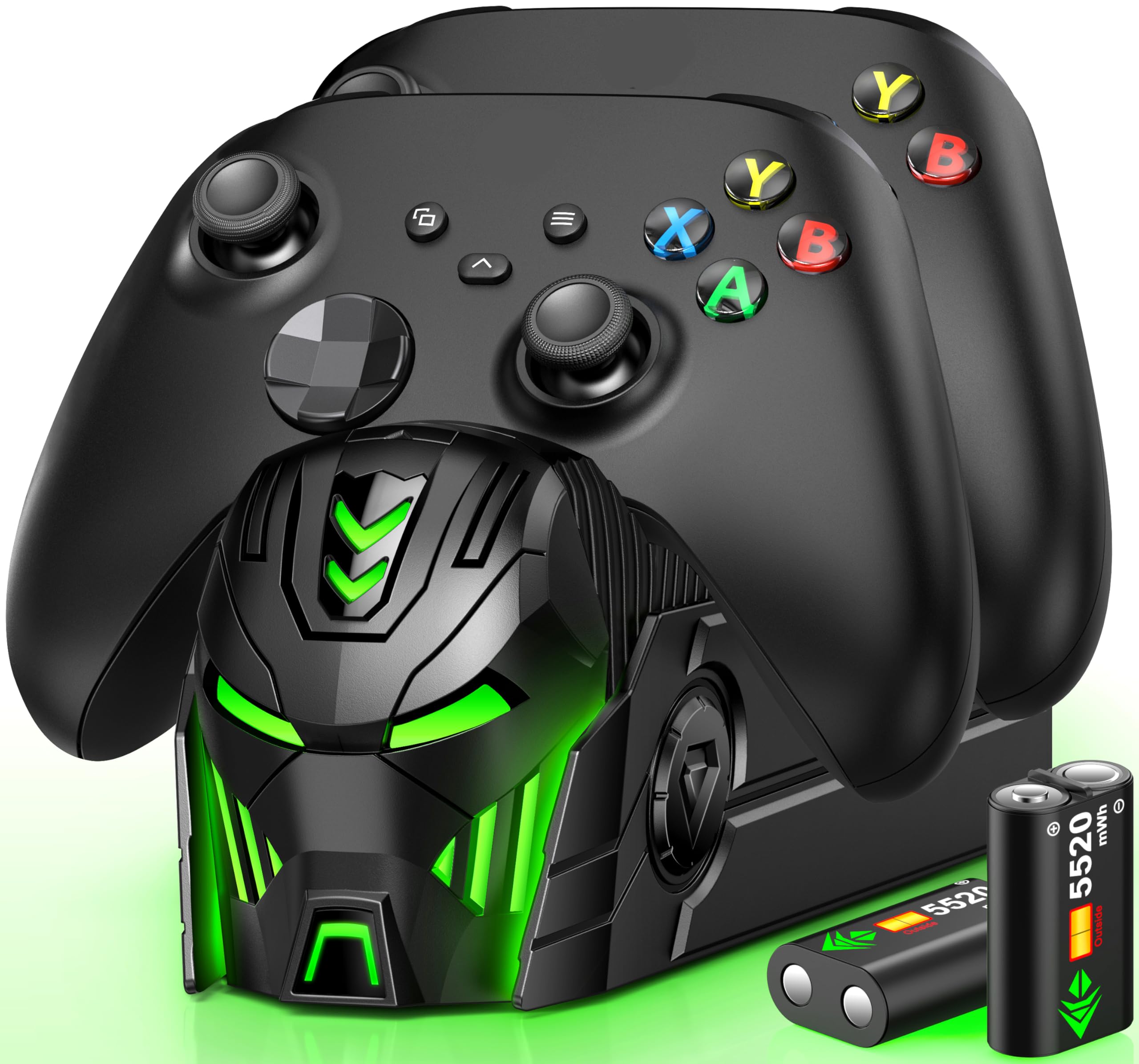
This is the dock to buy if you want one kit to cover both a Series X|S pad and an older Xbox One controller. Two 5520mWh battery packs (a milliwatt-hour rating of stored energy) ship with four battery covers — two for Xbox One/One S/One X and two for Series X|S — so both generations get a cover that closes flush. You get a charging station for two controllers, two spare packs, a USB-C charging cable, and the covers. Controllers are not in the box.
A full charge takes about 4 hours and delivers 18–25 hours of play. That is the difference against the Fosmon above: this kit charges in 4 hours to 18–25 hours of playtime, while the Fosmon’s 5280mWh packs are quoted at up to 40–45 hours. The packs are rated for 2000 recharge cycles, which is the figure the Froncha 4-in-1 tops at 3000+. Owners praise the reliability: the dock seats a pad and starts charging without fiddling. Charging speed and battery life earn steady praise too, and the front panel’s robot-helmet styling glows nicely in a dark room, with a top button to kill the lights if you game late.
The catch is compatibility: the listing carries a mixed note on which controllers mate cleanly, and the warranty is thin compared with Fosmon’s lifetime cover. Buy it for a two-controller household that spans console generations. If every pad in the house is a Series X|S, a simpler kit does the same job.
What earns the top spot
- Two 5520mWh packs plus four covers cover both controller generations in one box
- Roughly 4-hour refill and 18–25 hours of play per charge
- Spare-battery storage built into the base of the dock
- Indicator lights switch red while charging, green when full, with an on/off button
Where it needs care
- Fitting is the recurring gripe — check your controller generation against the cover list
- No lifetime warranty like the Fosmon offers
Buy it for: a household mixing a Series X|S pad with an Xbox One controller, where one dock should serve both.
Think twice if: every controller you own is a Series X|S — you are paying for covers you will never use.
2. Fosmon Fast Charging for Xbox Controller Charger Station Dock
The dock with the track record — and the biggest battery number on this list.
Fosmon’s Dual 2 MAX has been the default recommendation for Xbox pads for years, and it says why on the box: two 5280mWh (2200mAh) NiMH packs, quoted for up to 40–45 hours of play per charge. That is the longest-rated playtime here, well ahead of the 18–25 hours quoted for the DINOSTRIKE in the top slot.
The build is SGS-certified (a third-party safety certification) with overheating and short-circuit protection, and the charging board stops automatically when the packs are full. Two LED indicators track each slot separately, so you can see which controller is done. Drop a pad on the metal conductor and it starts charging; leave both pads seated and the dock doubles as a stand. A limited lifetime warranty backs it, which is rare in this category.
The honest trade-off is that the battery quality is not uniform across every unit. Packs that stop accepting charge after a couple of months do show up, and some sit on the dock all day rather than filling quickly. The lifetime warranty is the safety net there, so register the product when it arrives.
The stamina argument: 5280mWh per pack and up to 40–45 hours quoted means a full weekend of play without a recharge.
Where it asks patience: charging speed is not this dock’s strength — expect to leave pads on overnight rather than grabbing a quick top-up before a match.
Made for: players who sink whole evenings into a game and want the dock to keep up without recharging between sessions.
Not the one if: you want a pad topped up in a hurry — this dock trades speed for capacity.
3. Venom Twin Charging Dock with 2X Rechargeable Battery Packs
A dock that gives one port back instead of taking one away.
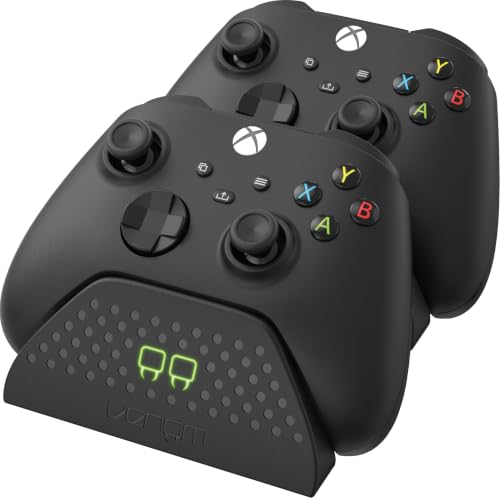
Most dual docks eat a USB slot on your console. This one hands you a rear USB port so you can charge something else — a headset, a phone — while both controller slots are busy. The cable is detachable and runs 2 meters, which gives you room to place the dock somewhere better than on top of the console.
You get up to 15 hours of play from each of the two 850mAh packs (850mAh is the battery’s capacity rating). That is the lowest playtime figure among the major picks here, well under the Fosmon’s up to 40–45 hours. So this dock suits players who finish a session and drop the pad back on, not marathon runners. Front LEDs run red while charging and green when done, so a glance tells you which pad is ready. Setup is simple because it runs off the console’s USB. Buyers talk about charging performance most, then how little fuss the setup takes.
The sticking point is fit on the battery packs: some controllers close cleanly over the pack, others do not, so match the pack to your pad generation before you commit. Value is debated for the same reason. If your setup already has spare USB ports, the extra one is not worth paying for.
Worth it when: your console is short on free USB ports and a 15-hour pack matches how long you actually play.
Pass if: you need long per-charge playtime — the 850mAh packs sit at the bottom of this list for stamina.
4. Hori Microsoft Xbox Series X|S Dual Charging Station

The one with Microsoft’s name on the licensing line, not just the compatibility list.
Hori’s dock is officially licensed by Microsoft, which is the reassurance you buy here — the pack and covers are built to the platform holder’s spec rather than reverse-engineered. It charges two controllers and/or battery packs at once, ships with two battery packs and four battery covers, and sits on a rectangular base in red. It weighs 120 g, light enough to sit on a shelf or the top of the console without a wobble.
Battery life is quoted at up to 20 hours per full charge. Hori flags that this varies significantly with vibration, headsets, and other accessories — realistic, and worth knowing if you play with rumble on and a headset plugged in. Compatibility runs wide: Series X|S wireless controllers, Xbox Elite wireless controllers, and Xbox One wireless controllers all work.
It carries the lowest rating of any dock in this guide. Given the licensed build and wide compatibility, the sensible read is that it is a solid dock that has not won over as many owners as its rivals. If Microsoft’s official licensing is worth something to you, this is the pick. If you want the safest consensus choice, the DINOSTRIKE or Fosmon give you more headroom.
The licensing case: Microsoft’s official badge plus Elite and Series X|S controller support in one dock is a combination few others here offer.
The realistic limit: up to 20 hours per charge drops fast when rumble and a headset are in play, so treat it as a shorter figure in practice.
Pick this if: official licensing and Elite controller support matter to you more than a longer battery rating.
Look elsewhere if: you want maximum playtime per charge — the Fosmon and Froncha both go higher.
5. 8Bitdo Dual Charging Dock for Xbox Wireless Controllers

Magnets hold the pad down, so a bumped shelf does not kill the charge.
8Bitdo’s answer to the loose-contact problem is a magnet: the magnetic contacts pull the controller onto the dock’s charging points and hold it there. That is a real difference from a plain gravity seat — the pad cannot drift off the conductor mid-charge. Two 1100mAh packs and four battery doors ship in the box, and the dock is officially licensed by Xbox for Series and Xbox One wireless controllers.
The lighting is the other half of the pitch. Amber means charging, white means full, and the ambient glow has a touch pad that cycles bright, medium, and dim, so you can turn it down in a dark room without killing it entirely. It runs off 5 volts over USB.
The catch is per-side charging. The recurring report is that one side of the dock can stop charging properly while the other keeps working — check both slots during your first week so you catch it inside the return window. Buy this for the magnetic hold and the dimmable light. If you want a flat, proven performer, the Fosmon’s record is longer.
Why it holds a slot here
- Magnetic contacts lock the controller to the charging points
- Amber-to-white LED status plus a three-step dimmer
- Two 1100mAh packs and four battery doors included
What to watch
- One-side charging failures are the recurring complaint — test both slots early
Reach for this if: your dock lives somewhere it gets knocked, and magnetic seating would save you a dead controller.
Skip the upgrade if: a plain gravity dock has never given you trouble — the magnet is the whole reason to pay more.
6. Froncha Controller Charger Station with 2x6200mWh Rechargeable Battery Packs
The biggest capacity-per-dollar kit here, wrapped in nine lighting modes.
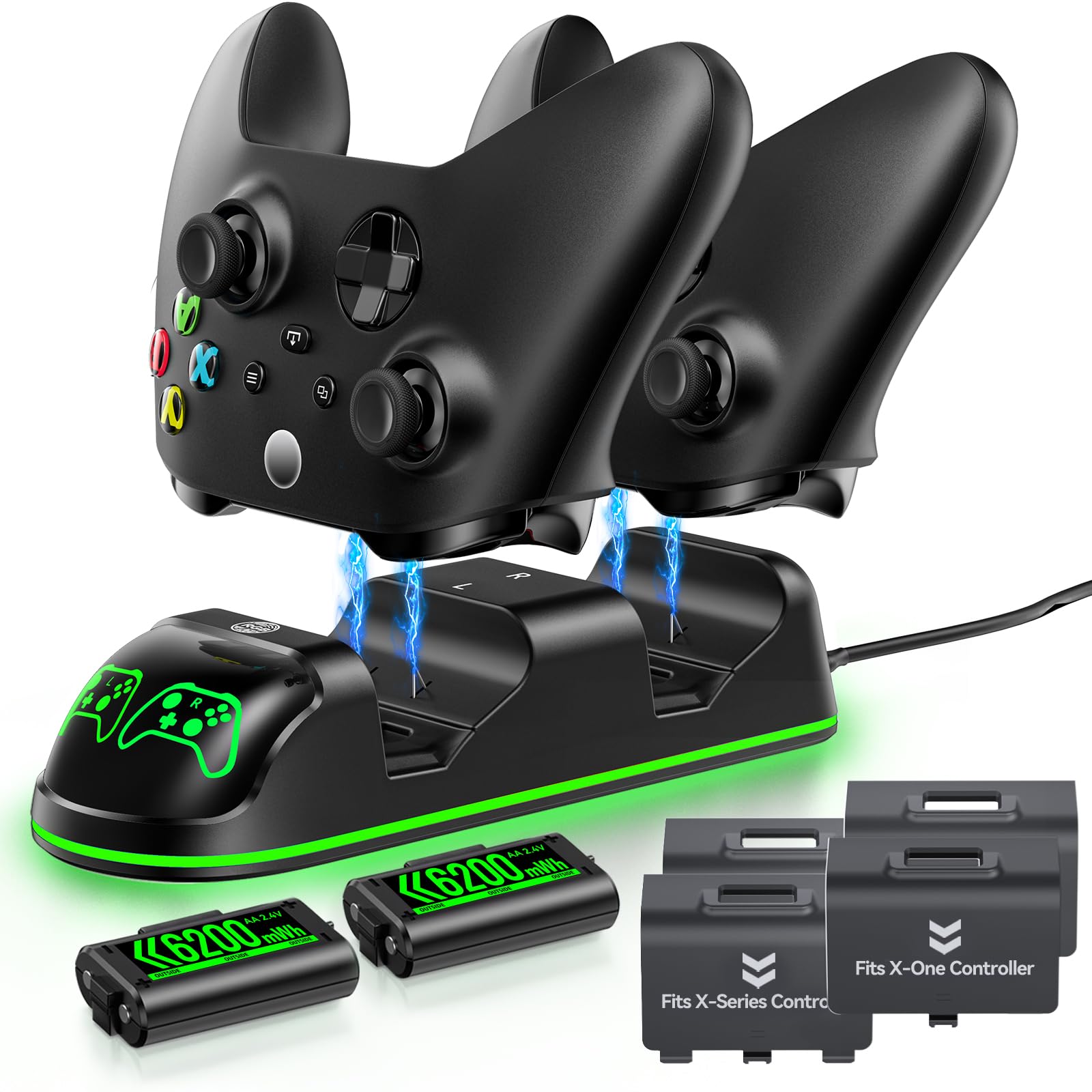
Two 6200mWh packs is the largest battery rating on this list alongside the 4-in-1 below — and against the 5520mWh packs in the DINOSTRIKE up top, you are getting 6200 mWh versus 5520 mWh in the same box. A full charge lands in 3–3.5 hours and returns 25–30 hours of play, which beats the Fosmon’s 4-hour refill on time and the Hori’s 20-hour ceiling on stamina.
Lighting is the fun part: 9 total modes, made up of 2 multi-color cycling options and 7 single colors (red, orange, yellow, green, cyan, blue, purple), switched with a touch and switched off with a long press. The dock handles Xbox One, One X, One S, Elite, Series X, and Series S, with four covers split across the two door styles.
Battery endurance gets mixed feedback — some owners see strong runs, others less. The dock also doubles as a display stand when the pads are off it. It is the pick if you want the longest playtime per charge and a setup that glows. If you would rather not pay for lighting, the plain DINOSTRIKE does the core job for less.
The number that sells it: 6200mWh packs (mWh is a measure of stored energy), a 3–3.5-hour refill, and 25–30 hours of play give it the best capacity-to-charge-time balance in this guide.
Set expectations: how long each pack actually lasts varies by unit, so do not count on the top of that range every session.
Built for: players who want maximum playtime between charges and a dock that doubles as a lit display stand.
Not for you if: the RGB modes add nothing to your setup — you can get the same charging for less elsewhere.
7. Froncha 4-in-1 Charger for Xbox Series/One X|S Controllers
Four 6880mWh packs, two controller slots, and two spare-battery bays.
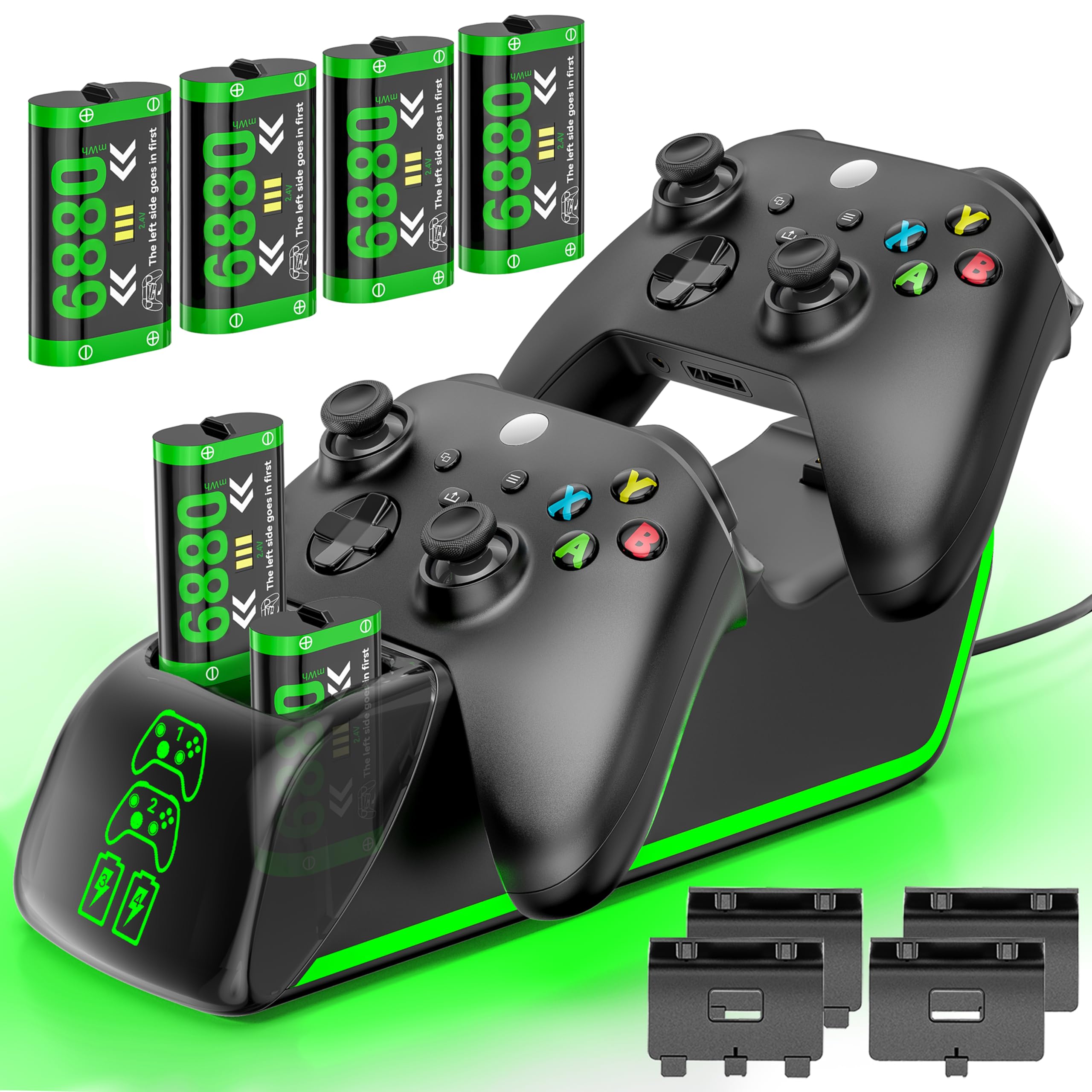
This is the kit for the four-controller house. It charges 2 Xbox batteries and 2 Xbox remotes at the same time, or any of them individually, so nobody waits for a slot. Four 6880mWh packs ship in the box — the largest per-pack rating here — plus 2 battery covers for Series X|S, 2 covers for Xbox One X|S/Elite, the charging station, and a 4.9ft USB-C charging cable.
You get 18–25 hours of play on a 3–4 hour refill. That sits in line with the DINOSTRIKE’s 4-hour/18–25-hour figures rather than the 25–30 hours of the 6200mWh Froncha above. The packs are rated for 3000+ recharge cycles, the highest figure in this guide. An intelligent charging board adds overheating and short-circuit protection. The LED indicators run red while charging and green when full or standing by, with a button to switch the color modes and a power switch that can shut off charging separately.
It costs the most in this guide, so the value case rests on whether you actually have four controllers to fill it. For a two-player household, the extra packs are nice spares rather than a need. For a family living room with four pads in rotation, it is the only dock here built to keep up.
Where it earns its keep
- Four 6880mWh packs — enough spares for a four-controller household
- Charges two pads and two batteries at once, or any one on its own
- 3000+ recharge rating and short-circuit protection on the charging board
The honest caveat
- Highest outlay here, and the surplus packs only pay off with four controllers in play
- 18–25 hours per charge trails the 25–30 hours of the 6200mWh Froncha above
Best match for: a family or share-house where four Xbox pads get passed around and none can wait for a slot.
Overkill if: you own two controllers — the surplus packs will sit in the base untouched.
8. KEKUCULL Dual Dock Charging Station for Xbox Series X/S

A white two-slot dock that asks nothing of you but to set a controller down.
KEKUCULL keeps it plain: two slots, two 1100mAh packs, a high-fit seat so the controller lines up with the contacts, and independent charging indicators on both sides. You lower a pad and it charges — no button, no sequence. The two packs are rated for 2000 recharges, and each is quoted for up to 15 hours of play.
The compatibility list is the broadest kind of insurance: Series X/S, Xbox One, One S, One X, and Elite controllers, with four battery covers in the box split across the two door styles. Input runs at 5 volts over USB-C, and the unit weighs 0.32 kg, light enough to slide around a shelf as you tidy up. Built-in protection covers short circuit, overcharge, overvoltage, and overheat.
Battery life splits opinion — some find the packs a lifesaver, others find they fall short of the rating, so treat 15 hours as the ceiling rather than the norm. It is the right dock if you want a no-frills setup and already know your controllers match the cover list. If playtime per charge is your priority, the Froncha kits go much higher.
Choose it for: an affordable white dock that seats any Xbox pad in your house without adjustment.
Look past it if: 15 hours quoted per charge bothers you — several docks here rate far higher.
9. Nyko Charging Station for Xbox Series XS

The cheapest way onto this list — two slots, a spare USB, and green glow.
Nyko’s dock is the entry point: a dual drop-and-charge base that takes Xbox Series X/S and Xbox One controllers. It runs off a USB port and includes a USB-C charging cable plus an extra USB port for something else. It pulls 3 A (amps, the current it draws), the highest amperage rating in this guide, so pads refill quickly. The green LEDs make a tidy display when the pads are docked. Two 1100mAh packs are included, each quoted for up to 15 hours per charge.
Setup is where it shines — place the controller and charging starts, no alignment fuss. That convenience is the reason it earns a slot despite the lowest price here. Compare the charging current with the 6200mWh Froncha above at 0.03 A and the gap is enormous on paper, but the Nyko’s 15-hour packs are the real-world limit rather than the amperage.
The honest split is reliability: some docks recharge quickly and keep going, others arrive failing to charge at all. Treat the return window as part of the purchase price and test both slots the day it lands. Buy it if you want a cheap dock for a spare setup or a second room. If this is your main console, the DINOSTRIKE or Fosmon will cause you less grief.
Why it is on the list: a drop-and-charge dual dock plus an extra USB port, at the lowest outlay of any kit here.
Test it early: charging reliability is hit and miss on this model, so confirm both slots work before the return window closes.
Buy it if: you want a cheap second dock for a spare room or a backup setup and can handle a dud unit.
Pay more if: this is the dock under your main TV — reliability matters more than the lowest outlay there.
Know the Specs
mWh vs mAh capacity
Milliwatt-hours (mWh) measure total stored energy; milliamp-hours (mAh) measure charge at a set voltage. Packs here range from 850mAh up to 6880mWh, and higher numbers mean longer play per charge. Compare like with like — a 1100mAh pack and a 6200mWh pack are not close in stamina.
Recharge cycles
This is how many times a pack can be refilled before it fades. The kits here quote 2000, 3000, and 3000+ cycles. More cycles means the batteries keep going longer before you replace them, which matters if you dock nightly.
Battery covers and door fit
A pack only closes if the door matches the controller generation. Series X|S pads use a different door shape than Xbox One, One S, One X, and Elite. Kits that ship four covers include two of each; check that list before you buy.
Charging current and charge time
Amperage (A) sets how quickly a pack refills. The dock here rated at 3 A is the highest current on this list, while one lists 0.03 A. Charge times in the data run from 3–3.5 hours to 4 hours — that gap is what you feel on a busy evening.
LED status and lighting modes
Red means charging, green means full on most docks here. Some add dimmable ambient light and multi-color modes with an on/off switch. Useful if the dock sits in a dark room; irrelevant if it lives in a drawer.
Connector and port count
Most docks run off USB-C; a couple use plain USB and give an extra port back. If your console is short on free slots, the port count on the dock itself matters as much as the charging spec.
Common Questions
Will a dual charging station work with both a Series X|S and an Xbox One controller?
Do I need the rechargeable battery packs, or can I use AA batteries in the dock?
How long does a full charge last on these docks?
Why do some kits quote mAh and others mWh?
Is a magnetic dock better than a drop-and-charge dock?
How many times can the battery packs be recharged?
Can I leave my controllers on the dock all the time?
Do these docks need their own power adapter?
Will a charging dock scratch or damage my controller?
What should I check first if a dock stops charging one controller?
The Bottom Line
For most people, the xbox dual charging station that makes the most sense is the DINOSTRIKE 2x5520mWh kit. It ships four covers that fit both controller generations, refills in about 4 hours, and stores the spares in its own base. If raw playtime per charge is what you chase, the Fosmon Dual 2 MAX leads the group on capacity and backs it with a limited lifetime warranty. And for a household juggling four pads, the Froncha 4-in-1 is the only dock here that charges two controllers and two spare batteries at once.
How we choose
We do not accept paid placement. Every pick is matched to a real buyer and a real use-case; we do not hands-on test units.
Sources
Specifications: manufacturer listings and product documentation. Review insights: verified customer reviews, as of November 2026. Pricing: not shown on this page (it changes often); check the current price via the retailer link.
As an Amazon Associate, Tactical Gear Guy earns from qualifying purchases. This does not affect which products we feature.