Specs are compiled from manufacturer listings and verified buyer reviews and can change over time — please confirm the key details on the product page before buying.
A wooden monitor stand is the cheapest way to stop hunching toward your screen. Lifting the panel about 4 inches puts its top edge at eye level, so you stop folding your neck down all day. Wood and bamboo versions do that job while looking like furniture instead of office gear, and most of them arrive ready to drop on your desk. The real question is which board fits your screen count, keyboard thickness, and desk depth — that is what this breakdown answers.
This guide is built by comparing the manufacturers’ published specifications and the patterns across verified customer reviews, so you get each pick’s real strengths and trade-offs instead of marketing spin.
You will see how each board holds up under real weight, how much room it frees underneath, and which designs suit a single screen versus a pair. By the end you can match a board to your exact desk setup without guessing, and the right wooden monitor stand will be obvious.
Top Picks


How To Choose The Best Wooden Monitor Stand
Most people buy a stand for the wrong reason. They buy for the tidier desk, then find the real payoff is a neck that stops aching by mid-afternoon. Get three things right and the rest is cosmetic: how high it lifts the screen, how much room it leaves underneath, and how much weight it will carry.
Height and viewing angle come first
A stand that raises your monitor about 4 inches puts the top edge near eye level for most desk setups. That 4-inch lift lets you sit up straight instead of dropping your chin toward the screen. If you are tall or your chair sits high, look for two-position legs or an angled shelf you can tilt toward you. A fixed low board can actually make things worse if your monitor ends up below your sightline.
Clearance underneath is the hidden spec
The gap between the board and your desk is where the stand earns its keep. A little over 3 inches of clearance tucks a slim keyboard and a mouse out of the way. Deeper shelves give you room for a full keyboard plus a tablet or notebook. Measure your keyboard’s thickness before you buy, because a board that sits too low just turns into a shelf your keyboard cannot slide under.
Load capacity and material
Wood stands range widely here, from boards rated for 22 pounds up to pieces built to carry 88 pounds. A single monitor usually sits far below any of those numbers. The capacity matters when you plan to stack a laptop, a printer, or a second screen on top. Bamboo is dense and rigid; MDF boards are smooth and easy to wipe but heavier. Either holds up fine for daily monitor duty.
Desk width and screen count
A 22-inch board covers one monitor plus a speaker. For two screens you want a board in the 40-inch-and-up range, ideally one with hinges so you can angle the side shelves around a corner. If you work on a narrow desk, a compact single-level board keeps the footprint tight while still lifting your screen to a comfortable height.
Side-by-Side Comparison
| Model | Best For | Load Capacity | Levels | Material | Amazon |
|---|---|---|---|---|---|
| loukin Monitor Stand Riser★ Best Overall | Single screen, zero setup | 22 pounds | 1 | Wood (MDF) | Amazon |
| FITUEYES Dual Monitor Stand RiserTop Performer | Twin screens on a budget | 55 pounds | 1 | Wood (MDF) | Amazon |
| AFOOYO LED Light Wood StandBest Display | Mood lighting on a desk | 33 pounds | 1 | Wood + acrylic legs | Amazon |
| Nnewvante Bamboo Dual Stand | Three screens, corner desks | 64 kilograms | 3 | Bamboo | Amazon |
| KIRIGEN Solid Wood Stand | Hidden drawer storage | 50 lbs | 1 | Solid wood | Amazon |
| ROCDEER Bamboo + Acrylic Stand | Small desks, light look | 130 Pounds | 1 | Bamboo | Amazon |
| WALI 42 inch Dual Stand | Big desks, heavy gear | 88 pounds | 2 | Wood (particle board) | Amazon |
| KIVY Dual Monitor Riser | Walnut looks, metal shelf | — | 2 | Walnut wood | Amazon |
Detailed Reviews
1. loukin Monitor Stand Riser 22.4″
Our pick — 4.5+★ from 350+ verified ratings; the strongest balance of quality and price.
The board you unbox and use in the same minute, no screws involved.
Here is the number that makes this the top pick: 4.5+ stars across 300+ owners. That kind of consistency on a desk accessory usually means nothing about it annoys people after a month. The loukin arrives as one solid piece, so you lift it from the start and set it down. No pre-drilled holes, no wobbling legs to level, no instruction sheet.
What wins people over is the look. The natural wood finish is the most-praised trait in the reviews by a wide margin, and it photographs like real furniture rather than office equipment. The matte surface is described in the listing as water-resistant, which means a stray coffee ring wipes clean instead of soaking in. At 22.4 × 8.2 inches, the MDF platform is roughly 7 inches wider than a typical riser, so a monitor, a tablet, and a small speaker all sit up top together.
Sturdiness holds up in use — 4 non-slip ABS legs (soft plastic feet that grip the desktop) keep it from skating, and the board carries up to 22 lbs. The open bottom leaves room for a keyboard and mouse, and reviewers with different keyboard sizes confirm they slide underneath without a fight. It also pulls double duty as a laptop stand or printer stand when your setup changes. The honest catch is height: this is a single fixed level, so you get one viewing position and no tilt. If your monitor needs to come up higher or angle toward you, an adjustable board suits you better.
Where it delivers
- Arrives fully assembled — nothing to screw together
- 22.4 × 8.2 in platform fits a monitor plus a tablet
- Carries up to 22 lbs on four non-slip legs
- Water-resistant surface wipes clean fast
Where it stops short
- One fixed height with no tilt adjustment
- 22 lb capacity rules out stacking heavy gear
Made for: anyone who wants their screen raised today with zero fiddling and a wood finish that suits a living room or home office.
Think twice if: you need an angled shelf or a taller lift to hit eye level from a high chair.
2. FITUEYES Dual Monitor Stand Riser Oak
It stretches to 42.7 inches and bends around the corner of your desk.
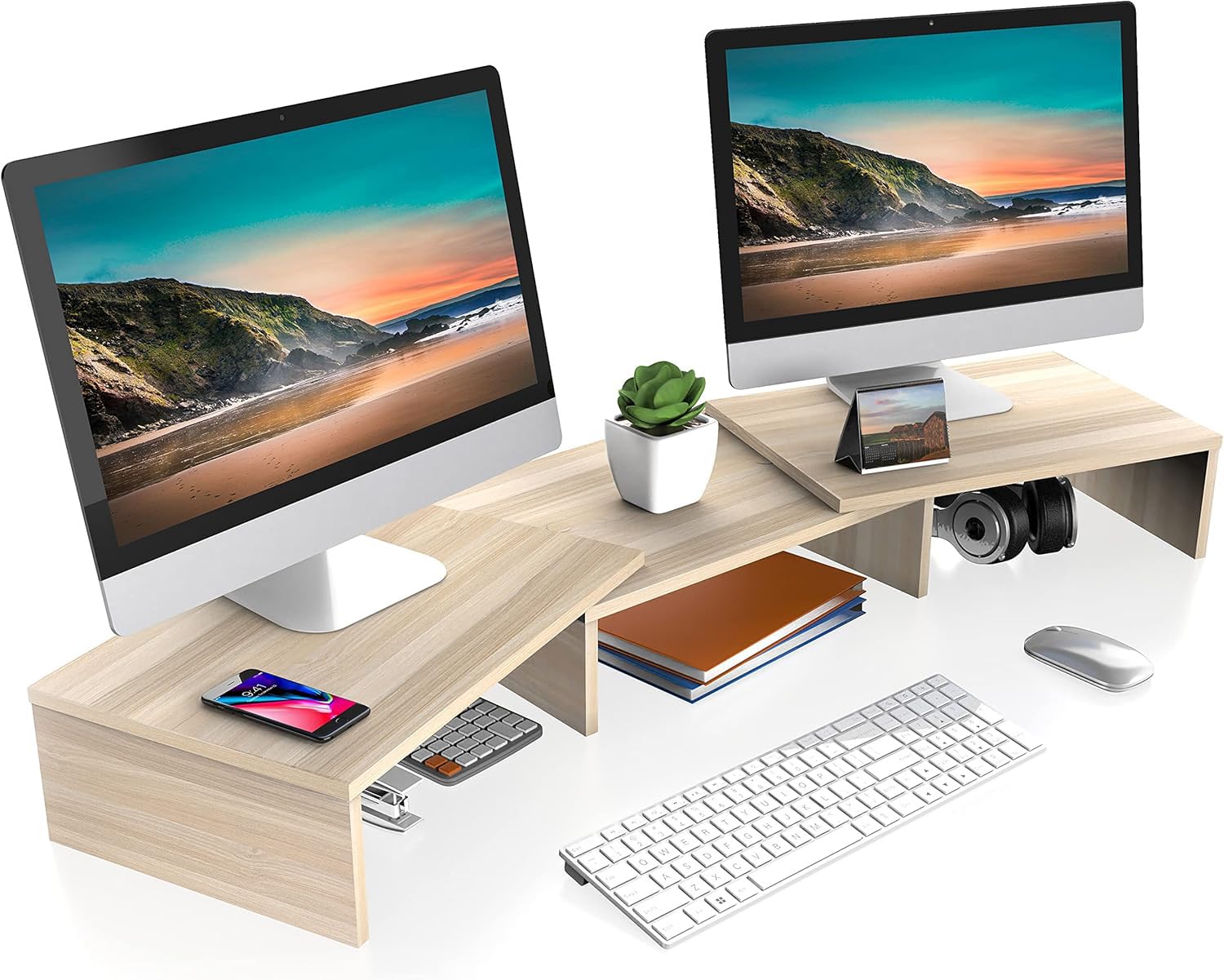
The FITUEYES solves a problem the compact boards cannot: two screens and nowhere to put them. Its three shelves hinge together, so you can run it straight across the desk or fold the ends forward to wrap a corner setup. Fully extended it reaches 42.7 inches wide. The middle section gives you a spot for a speaker or a dock, and the listing notes screens larger than 25 to 27 inches fit comfortably on each side.
Assembly is deliberately simple. The holes come pre-drilled, and the listing says one person can finish it in 5 minutes — buyers report the same, so it is not a marketing claim you have to take on faith. The board is 15mm MDF and rated for 55 lbs, which leaves plenty of headroom for two monitors or a printer. Rubber skids under the legs keep it planted instead of sliding when you bump the desk.
Quality is the trait owners talk about most, and it shows in the oak grain finish that reads far warmer than the price would suggest. Clearance underneath swallows a keyboard, a mouse, and whatever small clutter you want out of sight. One honest note: at 7.3 pounds this board has real heft, so rearranging it is a two-hand job rather than a quick slide. The length adjustability more than makes up for that if your desk changes shape.
What earns the spot
- Folds from a straight 42.7-inch run to a corner-friendly shape
- 55 lb rating covers dual monitors and a printer
- Five-minute assembly with pre-drilled holes
- Rubber skids stop it sliding on the desktop
What to weigh
- 7.3 pounds of board makes it awkward to reposition
- Hinged sections mean you are adjusting angles, not a fixed set-and-done board
The smart buy: a two-screen desk worth more than the going budget rate for a single riser.
Look elsewhere if: you want a low-profile board that never needs re-angled.
3. AFOOYO Monitor Stand Riser 31.5-Inch
A monitor riser with a light show built into the shelf edge.
Most stands are silent furniture. This one has a USB-powered LED strip tucked along the board, and the light runs 24 colors and 4 lighting effects — a genuine glow for a gaming corner or a dim room. The board itself is 31.5 inches wide, so a single large monitor and a few accessories all sit comfortably up top. The acrylic legs come in two positions: 2.75 inches or 1.57 inches. That gives you a choice between a higher lift and a tighter, lower profile.
The black painted wood suits a darker desk, and the acrylic legs keep the whole thing looking open rather than blocky. Assembly is straightforward with pre-drilled holes and included instructions.
The catch is worth knowing before you buy: the LED connector is directional, so if the strip stays dark after you plug in the USB cable, you flip the connector and try again. Reviews split on the light and on long-term stability, so this is the pick for someone who wants the visual effect and will treat the legs with a little care. If a plain board and rock-solid footing matter more than atmosphere, look at a different stand.
Design angle: the acrylic legs and 24-color light turn the stand into a light feature, not just a lift — and the 2.75-inch height setting lifts your screen clear of a low desk.
Treat it gently: feedback on stability over time is mixed, so seat the leg connections firmly when you assemble and avoid dragging the board around by the top.
The right call if: your desk doubles as a gaming or media station and you want a glow along the shelf edge.
Second-guess it if: you plug things in once and never look again — the directional LED connector is one more thing to get right.
4. Nnewvante Monitor Stand Riser 60 inch

Three shelves that stretch out to 60.7 inches for a true multi-screen desk.
If your desk looks like a control station, this is the board built for it. Three shelves make up the stand, and the whole run grows from about 43.3 inches to 60.7 inches as you move the sections. Each shelf surface is 21.7 × 9.8 inches, and each one has a front tablet slot sized for a phone or pencils. The left and right shelves tilt independently, so you can angle them to a corner desk or toward your seat. That is 3 levels against the single level on the loukin above.
The bamboo is the real deal — dense, sturdy, and available in black, bamboo, or walnut, with boards 0.59 inch thick. Load capacity is listed at 64 kilograms, and the listing is upfront that a stable structure and good load capacity should drive your decision. There is also a cutout at the back so cables route cleanly instead of tangling between the shelf and the wall, and the leg bases carry anti-slip mats.
Assembly is well-liked, helped by the metal tools in the box rather than the wood dowels some rivals use. The one recurring gripe is screw length — a few owners found the supplied screws short for a comfortable fit, so keep a longer set handy if you have them. At 5 kg the whole thing is substantial, which is exactly what you want under three screens. It does eat desk length, though, so measure first if your setup is tight.
Why it earns a spot
- Adjusts from roughly 43.3 to 60.7 inches across three shelves
- Each 21.7 × 9.8-inch shelf holds a 27-inch monitor
- Front tablet slots plus a rear cable cutout
- 0.59-inch-thick bamboo boards with anti-slip leg mats
What to plan around
- Supplied screws run short for some setups
- At 5 kg it is heavy and needs a wide desk
Built for: three-monitor desks, corner workstations, and anyone who wants phone and pencil slots built into the shelf.
Not for: a narrow desk where 60.7 inches of overhang would swallow the whole surface.
5. KIRIGEN Solid Wood Monitor Stand PMJ-DBR
Solid wood, real drawers, and it walks onto your desk already built.
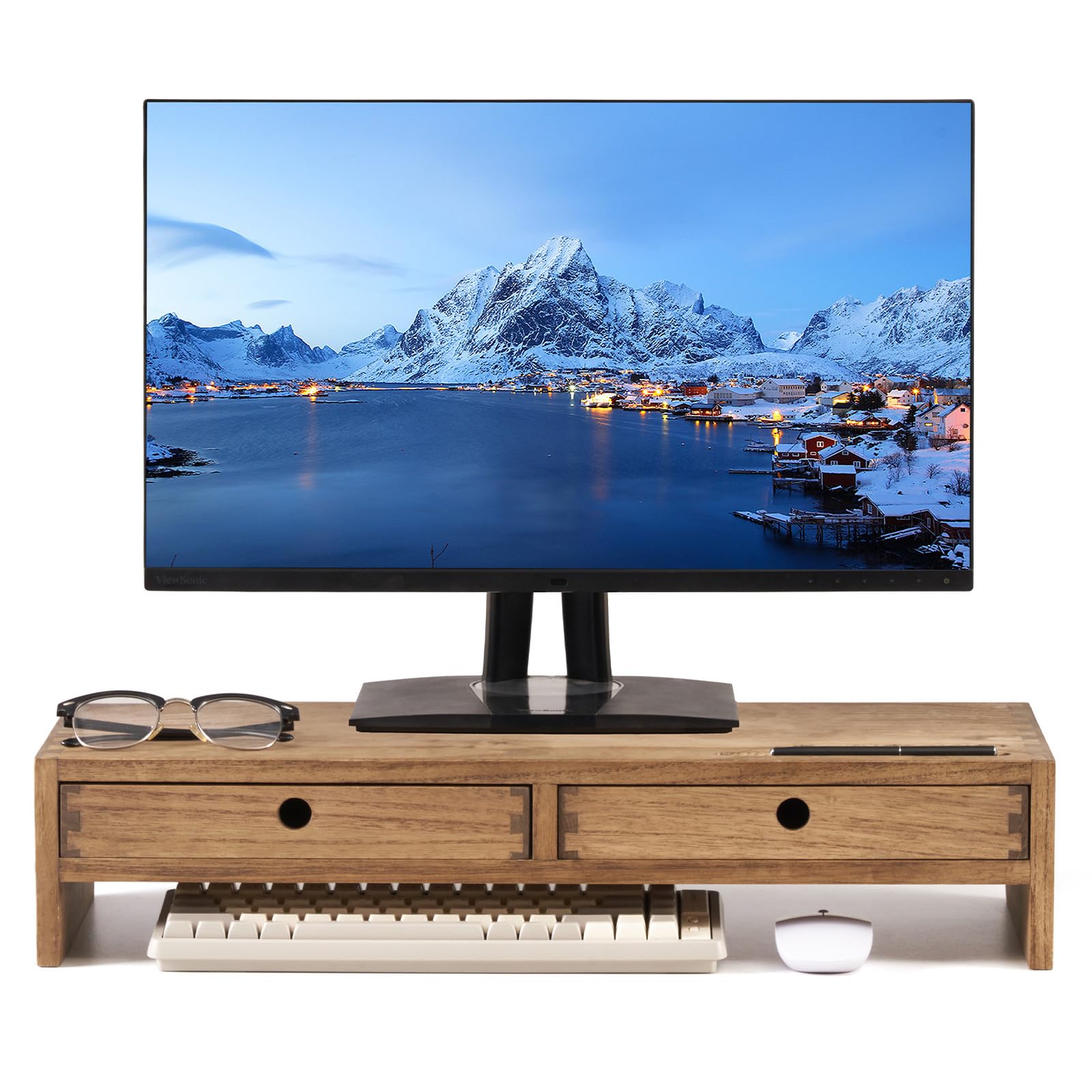
The KIRIGEN gives you a stand that looks like a small piece of furniture, not a slab under your screen. It is built from selected solid wood with visible grain and a polished dark brown finish. The mortise-and-tenon style joinery (interlocking joints that slot into each other) holds up to years of daily use without a row of visible metal brackets. Owners mention the wood tone reads close to white oak or American ash, a warmer look than a painted MDF board can pull off.
Build quality is what people notice first, and the two shallow drawers are the reason to pick this one. They quietly absorb pens, sticky notes, clips, chargers, mail, remotes, and makeup, clearing the clutter you would otherwise see every time you look up from the screen. Two pen slots on top keep writing tools within reach, and a rear cable opening keeps the back edge from turning into a nest of cords. The 23.62 × 9.45-inch platform holds a monitor, laptop, or small TV while staying within standard desk depth, and it carries up to 50 lbs.
It ships fully assembled, so there is no hardware to hunt down and no wobble from a bad build. That stout solid-wood construction costs you one thing: at 2.54 kg it is heavier than a slim MDF riser, so it stays put once placed rather than being easy to slide around. There is no height adjustment either. If you want drawers and a finish that looks bought-not-assembled, this delivers both.
Storage payoff: two drawers plus two pen slots turn the space under your screen into usable organizer space — a home-office fix for a desk that never has room for supplies.
Set-in-place piece: the solid wood body and 50 lb capacity suit a permanent workstation, not a desk you reconfigure weekly.
Choose this: if you want a fixed, furniture-grade riser with real drawers and a wood grain you can see.
skip it if: you need to raise and angle your screen differently day to day — the height is locked.
6. ROCDEER Bamboo Monitor Stand Riser

A bamboo top on clear legs that makes your desk look bigger, not busier.
Clear acrylic legs let your desk surface show through instead of hiding it behind a solid wood block. The 0.47-inch-thick transparent legs hold the bamboo top up while light passes through, so the board floats rather than dominates your desk. The top is 100% natural bamboo with an FSC certification (the Forest Stewardship Council mark for responsibly sourced wood). It carries a listed load capacity of 130 pounds — well beyond what a monitor and laptop will ever demand.
The footprint is 31.5 × 7.87 inches, sized for desktops in the 40 to 55-inch range and a single large monitor. Underneath, 3.3 inches of clearance gives you room to slide a keyboard, mouse, or a stack of supplies out of sight. Lacquered finish and a natural tone keep it easy to wipe down after a coffee spill.
Unlike the wide hinged boards built for two or three screens, this one is deliberately compact — that is the point. It is a light 2.3 kg, so you can shift it if you reshuffle your desk. It has one fixed height and no tilt, so your comfort depends on your desk and chair already sitting at the right level. For a small workstation that wants to feel airy, that is a trade worth taking.
Visual trick: the acrylic legs and thin bamboo top clear visual space, so a compact desk feels less crowded even with a monitor box on it.
Single-screen fit: 31.5 inches wide suits one large monitor well — for two screens you want a longer, hinged board.
Fits best: a small or shared desk where a solid wooden block would feel heavy and shut-in.
Wrong pick if: you need multiple screens or an adjustable angle — this one holds one view, fixed.
7. WALI 42 inch Dual Monitor Stand Riser

A full 42 inches of shelf rated for 88 pounds — this is a workstation, not a riser.
The surface here is the story. At roughly 42 inches across, the WALI board takes dual monitors, laptops, printers, or a TV, and the high-density particle board is stain-resistant — a single wipe clears a coffee ring. Capacity sits at 88 lbs, the highest on this list, so a pair of monitors plus a printer is not a stretch. Quality and easy no-tools assembly are the traits owners bring up most, and the stand rises to your sightline without the fuss of loose hardware.
Three height options let you dial in the viewing level rather than living with one fixed lift. The open lower shelf keeps a keyboard and accessories tucked under, maximizing vertical space when your desk footprint is fixed. Manufacturers call it a multi-tasking platform; realistically it is a broad shelf that also works as a vanity organizer or a printer stand when you need to move it.
What you give up is portability. A 42-inch board rated for 88 lbs is a permanent fixture once it is on your desk, and it needs the width to sit flat. Narrow desks will find it dominates the whole surface. If your setup is large and you want one piece that swallows everything, the size is the appeal, not the limitation.
Strong points
- 42-inch surface holds dual monitors, laptops, printers, or a TV
- 88 lb capacity is the highest on this list
- Three height settings adjust the viewing angle
- Stain-resistant particle board wipes clean in one pass
Weigh before you buy
- Full-width footprint needs a wide, deep desk
- Particle board construction is heavier and bulkier to move than slim MDF risers
One to beat: large dual-monitor desks and anyone stacking heavy gear who wants the highest load rating here.
Consider smaller: if your desk is narrow — a 42-inch board will run the entire width.
8. KIVY Dual Monitor Riser

Hand-finished walnut with a metal shelf tucked underneath — the showpiece of the bunch.
The KIVY is the pick for someone who wants the stand to look like it came from a furniture showroom. Each shelf is made by hand from high-quality hardwood in walnut, with an unfinished matte finish that keeps the grain visible and gives each piece a one-of-a-kind look. An integrated aluminum shelf runs underneath as a second level, adding workspace rather than just raising the monitor — the listing puts that gain at up to 50% more usable surface.
The walnut build is what people praise most, and the quality reads as furniture-grade rather than office-supply. Assembly is quick, with no extra tools needed for the wood stand, so it is on your desk in minutes. It is built for two monitors or a large wide screen, and it raises the screen to a healthier viewing angle for long sessions.
The honest caveat: durability feedback is mixed, with some owners finding scratches and chipped edges on arrival or in use. Treat the walnut as you would any finished furniture — avoid dragging it and lift it when you move it. That single note is the reason it sits behind the higher-rated picks. If you want the best-looking board on the desk and will handle it with care, this is the one.
Looks-first pick: hand-worked walnut in an unfinished matte finish, plus an integrated aluminum shelf that adds a second level of usable space.
The trade-off: mixed reports of scratches and chipped edges mean this one rewards careful handling — lift rather than slide it.
Pick it for: the walnut finish and the two-tier design, if appearance outranks a plain painted board.
Fair warning: handle it like furniture — a knocked edge on a hand-finished piece shows more than on an MDF riser.
Know the Specs
Load Capacity
This is the weight a board is built to hold, and it ranges from 22 pounds on a slim MDF riser up to 88 pounds on a wide dual-screen stand. A single monitor usually sits far below any of those numbers. Capacity matters when you plan to stack a laptop, a printer, or a second screen on the shelf, because the board and its legs have to carry the total without bowing or wobbling. Check the number against your whole setup, not just the monitor.
Clearance Underneath
Clearance is the vertical gap between the board and your desk. Roughly 3 inches tucks away a slim keyboard and mouse; more room handles a thicker mechanical keyboard plus a tablet. This is the spec that decides whether the stand doubles as storage or just becomes a shelf your keyboard can never slide under. Measure your keyboard’s thickness and match it to the clearance on the board you are considering.
Number of Levels
A single-level stand gives you one raised surface and one clear view. Two- and three-level designs add shelves or hinged sections, which is what lets you spread across dual or triple monitors, angle the sides toward you, or tuck small items on a second tier. More levels mean more organization, but also more footprint and more assembly. Match the level count to how many screens and accessories you run.
Material and Finish
Bamboo is dense and rigid, and it holds up well under a monitor. MDF and particle board are smooth, easy to wipe, and often finished with a water-resistant or stain-resistant surface. Solid hardwood gives you visible grain and a furniture look but asks for more careful handling to keep edges clean. The finish mostly affects cleaning and appearance — a matte or lacquered top wipes down fast after a spill, while an unfinished wood surface needs a gentler touch.
Common Questions
Will a wooden monitor stand hold more than one monitor?
How high should a monitor stand raise my screen?
Can I fit my keyboard underneath the stand?
Is bamboo better than MDF for a monitor stand?
Do these stands come assembled?
Will a wooden stand scratch my desk?
How much weight can a wooden monitor stand carry?
Can I use a monitor stand for a laptop or printer instead?
Does a stand with a LED light need a separate power source?
Will a wide dual-monitor stand fit a small desk?
The Bottom Line
The pick most people should start with is the loukin Monitor Stand Riser. It arrives assembled, lifts your screen on four non-slip legs, and wears a wood finish that holds up in a room you actually sit in. That crowd favorite standing at 4.5+ stars across 300+ owners is the justification — it is the most consistently well-liked board here. If you run two screens and want the length and hinge flexibility to fit a corner, the FITUEYES at 42.7 inches and 55 pounds is the one to grab. And if you want drawers that swallow your desk clutter in solid wood, the KIRIGEN is the fix.
How we choose
We do not accept paid placement. Every pick is matched to a real buyer and a real use-case; we do not hands-on test units.
Sources
Specifications: manufacturer listings and product documentation. Review insights: verified customer reviews, as of November 2026. Pricing: not shown on this page (it changes often); check the current price via the retailer link.
As an Amazon Associate, Tactical Gear Guy earns from qualifying purchases. This does not affect which products we feature.