Specs are compiled from manufacturer listings and verified buyer reviews and can change over time — please confirm the key details on the product page before buying.
Most wooden mice sell you a nice grain and forget the part that matters — the sensor, the buttons, the connection. If you are shopping for a wooden computer mouse, buy for the shell last and the internals first: a real 2.4GHz USB receiver, adjustable DPI you can actually change, and a shape your palm can rest on for a full workday. Below are the three models worth your attention, sorted so the strongest overall pick sits first.
This guide is built by comparing the manufacturers’ published specifications and the patterns across verified customer reviews, so you get each pick’s real strengths and trade-offs instead of marketing spin.
You will see which bamboo shell feels best under a sweaty palm, which sensor settings you can change mid-task, and where each of these three units falls short. The short version: none of these wooden mice is a gaming-grade tool, so read this plain-English breakdown of the best wooden computer mouse before you click buy.
Top Picks
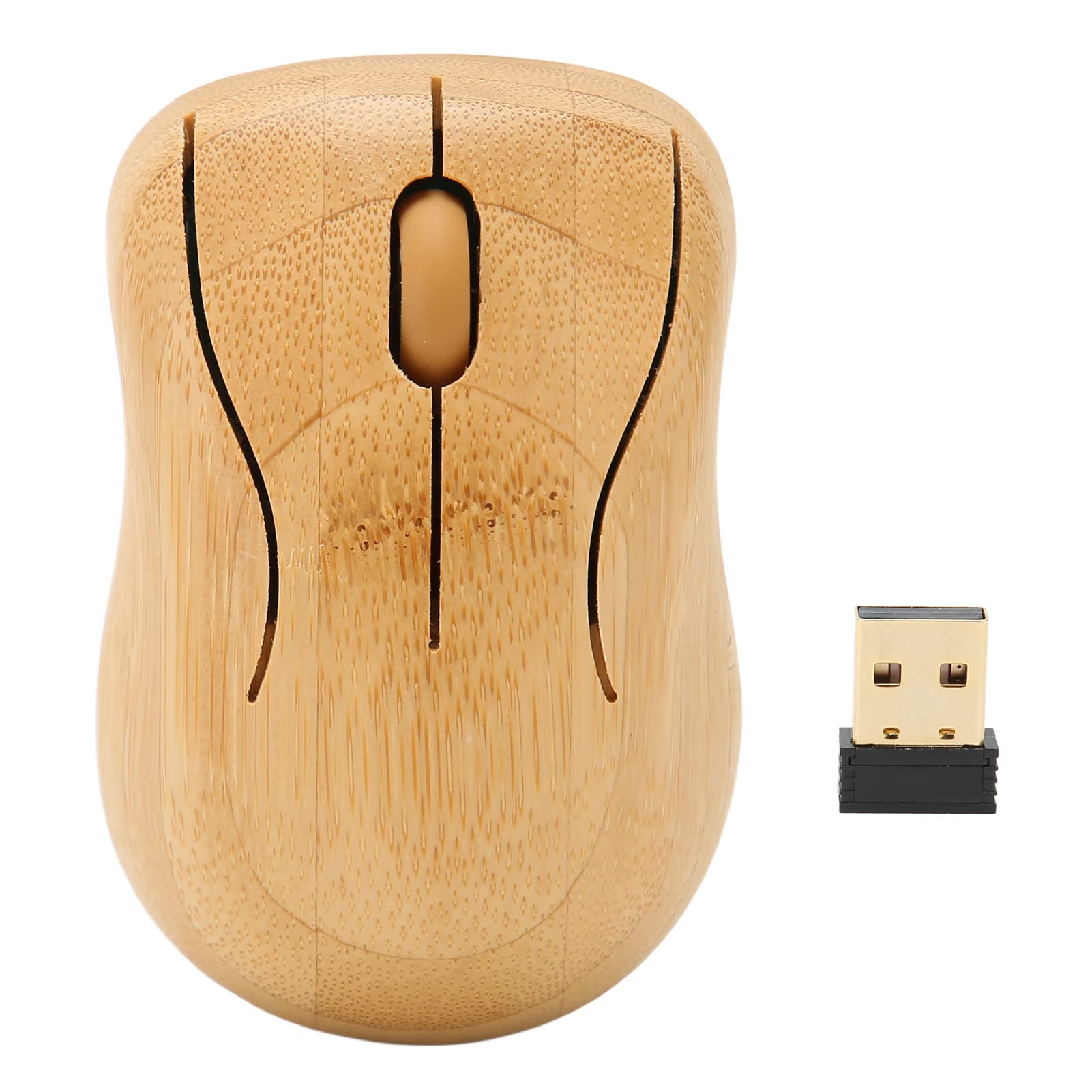
How To Choose The Best Wooden Computer Mouse
The wood is the easy part to judge — you can see the grain in a photo. What you cannot see is whether the click survives month six, whether the receiver is buried somewhere in the packaging, and whether the palm rest actually ventilates. Here is what to weigh before you pick one of these three.
Shell material: bamboo plies versus bamboo plus aluminum
A bamboo shell is the whole point of this category, so check how it is built. Some models use multi-layer bamboo plies cut by CNC machining (a computer-controlled cutting process that keeps the grain aligned), which shows the wood grain clearly. Others pair bamboo with an aluminum alloy body, which adds a cooler, heavier feel in the hand. Both are genuinely wood-family exteriors — neither is a plastic shell with a wood-look print.
DPI levels and what changing them actually does
DPI (dots per inch) is how far the cursor travels for every inch you move the mouse. A mouse with four adjustable levels — 800, 1200, 1600 and 2400 — lets you slow the cursor for precision work and speed it up for a large monitor. If you only ever see one DPI figure quoted, the cursor speed is fixed and you live with it.
Connection range and the USB receiver
These mice connect over 2.4GHz radio frequency through a small USB receiver you plug into your computer. The stated range on the models here reaches 32.8ft to 33ft, which covers a laptop on your desk or a PC tower under it. Keep in mind the receiver often ships tucked inside the mouse — open the cover before you assume it is missing.
Silent clicking and palm ventilation
A noiseless click matters if you share an office, a library table or a bedroom with a light sleeper. Check the side design too: a hollowed-out profile lets air reach your palm, which keeps a three-hour session comfortable instead of sweaty.
Side-by-Side Comparison
| Model | Best For | Connection Range | DPI Settings | Shell Material | Amazon |
|---|---|---|---|---|---|
| Bamboo Keyboard and Mouse Combo (ciciglow)★ Best Overall | Desk setups that want a matching bamboo keyboard | 32.8ft | 1200DPI | Bamboo wood | Amazon |
| Icemouse Wireless Bamboo Mouse (Rechargeable) | Sweaty-palm users who want ventilation | 33ft | 800/1200/1600/2400 | Bamboo and aluminum | Amazon |
| Icemouse Portable Bamboo Mice (Silent) | Shared offices and travel bags | 33ft | 800/1200/1600/2400 | Bamboo and aluminum alloy | Amazon |
Detailed Reviews
1. Bamboo Keyboard and Mouse Combo
Two bamboo pieces on one receiver — a matching keyboard and mouse for one desk.
This is the only pick here that ships as a pair. You get a compact bamboo keyboard with a QWERTY layout (the standard key arrangement you already type on) plus a matching bamboo mouse, both running off a single 2.4GHz USB radio connection that reaches 32.8ft. For anyone building a warm, wood-toned desk, having the keyboard match the mouse is the reason to choose this one over the two standalone Icemouse mice.
Setup is the easiest part. It is plug and play with no driver install, so you put the USB receiver into your computer and the set works — the maker also lists it as compatible with a gaming console and a personal computer. The mouse detects movement optically and the shell is ambidextrous, meaning the shape is built so either hand can use it. The mouse carries one stated resolution of 1200DPI, so cursor speed is fixed rather than selectable.
The honest catch is the mouse alone is not the star. If what you actually want is four switchable DPI levels or a rechargeable battery, the standalone Icemouse options below cover that territory. Come to this one because you want the bamboo keyboard to match the bamboo mouse on the same desk, and treat the mouse as the bonus half of the set.
The case for the pair
- Keyboard and mouse match in the same bamboo finish — one look, one receiver
- Plug and play with no driver required, so it works minutes after unboxing
- 2.4GHz connection stated to reach 32.8ft
- Ambidextrous shell works in either hand
Where it gives ground
- Mouse resolution is fixed at 1200DPI — no switching levels mid-task
- No rechargeable battery listed; it runs on the receiver-based wireless setup
- The bamboo keyboard is compact, so it suits a smaller desk footprint
Reach for this if: you want a wood-toned keyboard and mouse that arrive together and just work.
Look elsewhere if: the mouse alone is your priority — the standalone picks give you switchable DPI.
2. Icemouse Wireless Bamboo Mouse

A hollow-sided bamboo shell that lets your palm breathe through a long afternoon.
The design choice that separates this one is the hollow side profile. Both flanks are cut away so air moves through the mouse, and the bamboo surface is built to keep your palm from getting sweaty. It pairs a multi-layer bamboo ply body — CNC-machined so the grain stays visible — with aluminum, and the sides curve gently around a broad palm rest.
On the technical side you get four selectable DPI levels at 800, 1200, 1600 and 2400, so you can drop the cursor speed for detail work and raise it for a wide monitor. The 2.4GHz wireless link is quoted at 33ft, and the sensor is built for noiseless clicking. It also charges over the included cable rather than running on a swappable cell, and it ships with the receiver, manual and a gunny bag. The maker lists compatibility across Windows 7/8/10/XP/Vista, Linux, Mac OS X and Chrome OS. The hand orientation is listed as right-handed.
Here is the trade-off worth knowing before you commit. Reliability is the recurring theme in owner feedback — several owners say it hardly works, and build quality splits opinions sharply both ways. Treat this as a good-looking, comfortable desk mouse to handle gently, not a workhorse to toss in a backpack.
Why the shell earns its place: the hollow sides plus a genuine bamboo ply surface are what make long sessions comfortable, and the four DPI steps cover both precise and fast cursor work.
Where to set expectations: reliability is the most-discussed topic across feedback, and several owners say it hardly works — so buy this for the feel and the look, and handle it with care.
Suits you if: sweaty palms and a stiff hand are your daily complaint, and you want a rechargeable bamboo mouse with four DPI steps.
Think twice if: you expect years of rough handling — this is a desk companion, not a road warrior.
3. Icemouse Wireless Mouse for Laptop

Bamboo and aluminum alloy in a thin, silent body built to slide into a laptop bag.
The standout here is the power-saving sleep mode. Leave the mouse untouched for 10 minutes and it drops into sleep mode on its own, then any click wakes it instantly — that behavior is the reason this one suits a bag that spends half its life shut. The body is bamboo paired with aluminum alloy, listed as lightweight and portable, and the shape keeps an ergonomic curve with a free-flowing outer line.
Its specs line up with the sibling Icemouse above on paper: a 2.4GHz USB link quoted at 33ft, four adjustable DPI levels at 800, 1200, 1600 and 2400, a noiseless sensor, and the same compatibility list across Windows 7/8/10/XP/Vista, Linux, Mac OS X and Chrome OS. It is a three-button, right-handed mouse that comes with the receiver, a manual and a gunny bag. One practical note from the maker: the USB receiver hides under the top cover, and if the light does not come on, rotating the battery brings it to life.
Appearance is what wins people over on this one — owners consistently point to how it looks and how it feels in the hand, and quality gets a fair share of praise too. The counterweight is reliability, which is the single most-discussed topic in the feedback and reads mixed rather than glowing; the right button is the specific complaint that surfaces. Material feedback is also divided. Go in expecting a striking, silent, portable mouse for light travel use and you will be well served.
What makes it a bag companion
- Thin, lightweight bamboo-and-aluminum body that travels easily
- Automatic sleep after 10 minutes idle, with instant wake on a click
- Four DPI levels — 800, 1200, 1600 and 2400 — for precise or fast cursor work
- Silent clicking for shared offices and quiet rooms
Keep this in mind
- Reliability is the most-debated point, with the right button named as the weak spot
- The receiver sits under the top cover, which trips up first-time setup
Pick this one when: you want the best-looking bamboo-and-aluminum mouse with silent clicks and a power-saving nap built in.
The honest asterisk: the right button is the part feedback keeps circling back to, so this is a travel companion to treat kindly.
Know the Specs
2.4GHz wireless and the USB receiver
The 2.4GHz figure is the radio band these mice use to talk to your computer through a small USB receiver — no pairing menu, no Bluetooth handshake. The stated ranges here reach 32.8ft to 33ft, which comfortably covers a laptop on your desk or a tower PC under it. Plug the receiver in and the mouse is live; the usual snag is forgetting the receiver ships tucked inside the mouse body, so open the battery cover first before you conclude it is missing.
DPI levels and cursor speed
DPI is dots per inch — the distance your cursor moves across the screen for every inch you physically slide the mouse. On the two Icemouse models you can switch between 800, 1200, 1600 and 2400. Lower settings suit photo editing and spreadsheet cells where you want fine control; higher settings cover a large monitor without lifting your wrist. The ciciglow combo mouse is fixed at 1200DPI, so there is no switching — a perfectly usable middle setting, just not adjustable.
Silent click and sleep mode
A noiseless click removes the sharp report of a standard mouse button, which matters in a shared office or a room with someone asleep nearby. Sleep mode is the battery guard: the portable Icemouse drops into it after 10 minutes untouched and wakes on your next click. That behavior is not a fault — it is the mouse conserving power when you walk away.
Bamboo plies, aluminum and real wood grain
A genuine wooden mouse is built from bamboo plies or bamboo paired with aluminum, which is why the grain is visible and the surface feels distinct from plastic. CNC machining (computer-controlled cutting) keeps that grain aligned across the shell. Bamboo is listed as renewable and recyclable on these models, and pairing it with aluminum reduces the plastic in the body — the practical effect is a cooler, slightly heavier feel that some buyers prefer and others find less grippy than textured plastic.
Common Questions
Will a bamboo mouse work with my MacBook?
Why can’t I find the USB receiver in the box?
Is a wooden mouse heavier than a plastic one?
What does 1200DPI mean and is it fast enough?
Do these bamboo mice make a clicking noise?
How long does the battery last on the rechargeable Icemouse?
Is a real bamboo mouse shell actually wood or just a print?
Will a wooden mouse work on a glass desk?
Can I use a bamboo mouse with a gaming console?
Does the sleep mode mean my mouse is broken?
The Bottom Line
For most desks the strongest move is the ciciglow Bamboo Keyboard and Mouse Combo — one bamboo finish, one USB receiver, and a keyboard that matches the mouse you are buying. If comfortable long sessions are the priority, take the rechargeable Icemouse Bamboo Mouse with its hollow vented sides and four DPI steps. And for a laptop bag, the portable Icemouse Bamboo Mice adds silent clicking and a sleep mode that wakes on your next click. Whichever you choose, buy it for the bamboo shell and the DPI settings, and treat the right button gently — that is where owner feedback most often reports trouble.
How we choose
We do not accept paid placement. Every pick is matched to a real buyer and a real use-case; we do not hands-on test units.
Sources
Specifications: manufacturer listings and product documentation. Review insights: verified customer reviews, as of July 2026. Pricing: not shown on this page (it changes often); check the current price via the retailer link.
As an Amazon Associate, Tactical Gear Guy earns from qualifying purchases. This does not affect which products we feature.