Specs are compiled from manufacturer listings and verified buyer reviews and can change over time — please confirm the key details on the product page before buying.
You want extra buttons on the back of your Xbox pad so your thumbs never leave the sticks — and the good news is you no longer need to pay flagship money to get them. The real question is which rear-paddle layout actually fits your hands and your games. Some pads hide two slim back buttons behind the grips; others bolt on four paddles plus claw bumpers. That difference decides whether your jump-and-aim combo feels natural or clumsy.
This guide is built by comparing the manufacturers’ published specifications and the patterns across verified customer reviews, so you get each pick’s real strengths and trade-offs instead of marketing spin.
Below you will find paddles, remappable rear buttons, Hall Effect sticks, and trigger switches sorted into plain-English picks, so you can skip the spec fog and choose a controller that fits how you actually play. Read on for the xbox one controller with buttons on the back picks worth your time.
Top Picks

How To Choose A Controller With Buttons On The Back
Back buttons are only useful if they land where your fingers already rest. The whole point is keeping your right thumb on the aim stick while you jump, crouch, or reload. So the layout of the rear inputs matters more than the raw count of them. Here is what actually separates a pad you will love from one that sits in a drawer.
Two buttons or four paddles
A pair of rear buttons is enough for most players — jump and crouch cover the two actions that most often yank your thumb off the stick. Four paddles give you reload and ping as well, which helps in fast competitive shooters. More paddles also mean more chances to press the wrong one by accident, so pick the count that matches your muscle memory.
Hall Effect sticks and drift
Hall Effect sticks use a magnetic sensor instead of physical contact, so the stick does not wear down into that creeping drift where your aim wanders on its own. That is the single biggest reason a modern pad outlasts an older one. If you play ranked modes for hours, this is the spec to check before anything else.
Trigger switches for shooters and racers
Some pads let you switch a trigger between a short “mouse-click” press and a full-range analog pull. The short click fires faster in shooters, while the analog pull gives you throttle and brake control in racing games. A pad with both modes covers more of your library without buying two controllers.
Side-by-Side Comparison
| Model | Best For | Rear Inputs | Sticks | Connectivity | Amazon |
|---|---|---|---|---|---|
| FLYDIGI Vader 5S★ Best Overall | All-round competitive play | 6 remappable buttons (rear + shoulder) | Hall Effect, adjustable tension | Wired | Amazon |
| GameSir G7 SEBest Value | Budget competitive setup | 2 programmable back buttons | Hall Effect | Wired USB | Amazon |
| Nonbliep WirelessBudget Wireless | Wireless on a tight budget | PL/PR mappable buttons | Sensitive joystick | Wireless | Amazon |
| Hyperkin The Competitor | Lightweight symmetrical feel | 2 programmable rear buttons | Hall Effect, symmetrical | Wired USB-C | Amazon |
| 8BitDo Ultimate 3-mode | Wireless with charging dock | 2 Pro back paddle buttons | Hall Effect | 2.4G, USB, Bluetooth | Amazon |
| PowerA FUSION Pro Wireless | RGB and adjustable sticks | 4 mappable buttons | Hall Effect modules | Low-latency wireless | Amazon |
| SCUF VALOR PRO | Four-paddle esports grip | 4 embedded rear paddles | Hall Effect thumbsticks | Wired USB-C | Amazon |
| Razer Wolverine V4 Pro | High-polling-rate precision | 4 mouse-click back buttons + 2 claw bumpers | Capacitive anti-drift | Bluetooth, USB-C, 2.4 GHz | Amazon |
| Victrix Pro BFG Reloaded | Modular layout swapping | 4 mappable quick-action buttons | Hall Effect modules | Wired + wireless | Amazon |
Detailed Reviews
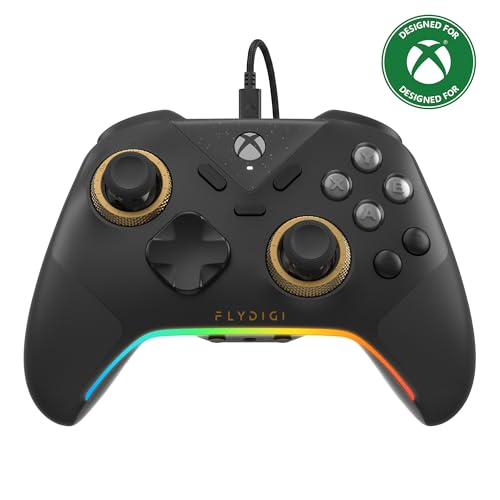
1. FLYDIGI Vader 5S Wired Controller
Our pick — 4.0+★ from 600+ verified ratings; the strongest balance of quality and price.
The pad that lets you tighten your own aim — literally, by twisting the stick.
The Vader 5S earns the top spot on one very specific trick: you can physically adjust the joystick tension from 40gf to 100gf on the fly, where gf means grams of force it takes to move the stick. Light tension gives you fast flick shots in a shooter. Tighten it and racing and sports games steer with more resistance. You do this without opening software, which is the kind of thing most players only dream about on a stock pad.
It carries 17 buttons in total, and six of them are remappable — the rear and shoulder inputs where you can park jump, crouch, or ping so your thumbs stay put. The sticks themselves use Hall Effect sensors, which means magnetic contact-free tracking so you get no stick drift even after long sessions. Four vibration motors sit across the triggers and grips, so recoil and road feel land in your hands rather than a generic rumble.
What wins people over is sheer build quality — it is the most-praised thing about this pad, and the value for money runs a close second because you are getting pro-pad features without flagship money. Comfort is well liked too, helped by textured grip on the handles. Set against the featherweight Hyperkin below, this is a heavier, more substantial pad at 450 g versus 200 g, so it feels planted rather than floaty. The catch to know is connectivity: this is a wired-only controller, so plan for a cable across the room. A few also find the setup needs a little patience before everything clicks. It still holds 4.0+ stars across 600+ ratings, and at this feature set it is the pick I would hand most competitive players first.
Where it earns the crown
- Adjustable stick tension from 40gf to 100gf without any software
- Hall Effect sticks built to resist drift over years of play
- Six remappable rear and shoulder buttons for faster reactions
- 4-motor vibration for real recoil and road feel
- Works across Xbox Series X|S, Xbox One, and Windows 10/11
What to weigh first
- Wired only — no wireless option here
- At 450 g it is the substantial end of the scale
- The customization depth takes a little learning to open up fully
Reach for this if: you want drift-free sticks, swappable trigger feel, and six remappable buttons on a pad that stays plugged in at your desk.
Look elsewhere if: you need to sit back on the couch untethered — the wired connection rules that out.
2. GameSir G7 SE Officially Licensed Xbox One Controller
An officially licensed pad that gives you back paddles and drift-free sticks without the flagship bill.
The number that matters here is 1000Hz — the polling rate, which is how many times per second the controller reports your inputs to the console. A higher rate means your button press registers faster, and GameSir pairs it with a 0 dead zone setting so your aim responds the instant you move the stick. For a budget-friendly pad, that is genuinely competitive-grade responsiveness.
You get two additional back buttons that map on the fly, with or without software, so you can assign jump or crouch and keep your thumbs on the sticks. The Hall Effect sticks and Hall Effect triggers deliver smooth, consistent tracking that resists drift. A magnetic paint-friendly faceplate lets you swap the look, and the GameSir Nexus app handles button mapping, D-pad diagonal tweaks, and trigger and stick zone adjustments.
It is officially licensed by Xbox and works across Windows 10/11, Xbox One, and Xbox Series X/S. A 3.5mm headphone port means you can plug in a headset directly. The honest limit is volume of feedback: this is a newer listing with 4.0+ stars across 40+ ratings, so the track record is shorter than the Vader 5S or Hyperkin. Nothing in the specs suggests a weakness, it just lacks the long crowd history. If you want two clean back buttons and a high polling rate at a value-tier position, this is a smart, low-risk entry.
The speed argument: 1000Hz polling with a 0 dead zone makes this feel quicker than its value-tier billing suggests, and the two back buttons map instantly mid-game.
The one to note: it is wired USB, and the review base is still small, so you are trusting the spec sheet more than a long owner history.
Best for: a first back-button pad for a competitive player on a value budget who wants fast inputs and drift-free sticks.
Think twice if: untethered couch play is a must — this connects by USB only.
3. Nonbliep Wireless Controller
A cut-price wireless pad with mappable PL/PR buttons — if you know what you are walking into.
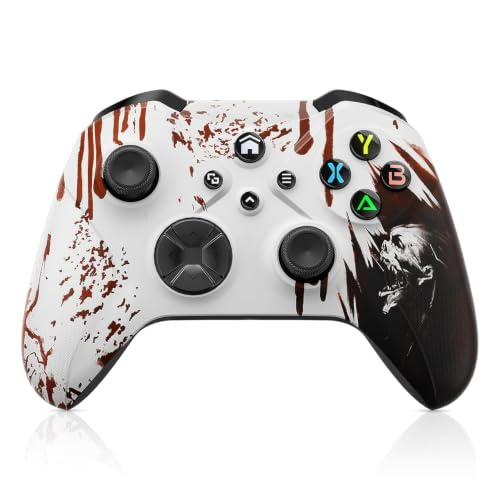
This is the one for a player who wants wireless freedom and rear buttons on a tight budget, and who reads reviews before buying. The PL/PR mappable advanced buttons let you program actions, and a turbo button toggles combos. You can clear the programming by holding “Set” for three seconds and pressing PL/PR, which is a handy reset. A six-axis gyroscope and dual vibration round out the feature list, and it works across Xbox Series X|S, Xbox One, iOS, Mac, Android, and Windows.
Here is the straight talk: the owner consensus is genuinely mixed. Some love it and consider it worth the money, while others find it does not work as expected. Battery life is the recurring concern — it runs on 2 AA batteries, which are not included and must be bought separately. The Bloody Zombie finish and sculpted, streamlined shape keep the weight down, so it does feel modern in hand.
This is not a pad to buy blind. It sits at 3.0+ stars, and the honest read is that quality and value land in the middle — some good units, some rough ones. If your priority is a cheap wireless entry to back buttons and you accept the battery arrangement, it can serve. If you want proven reliability, the GameSir above or the Hyperkin below are safer value picks.
Why some keep it: wireless play, mappable PL/PR buttons, turbo, and six-axis gyro make the feature list generous for an entry-tier pad.
Why to be careful: owner opinion splits down the middle on reliability, and AA battery life runs short — budget for rechargeables.
Worth a look if: wireless plus back buttons at the lowest tier is exactly what you need and you accept a mixed-quality gamble.
Safer elsewhere if: reliability is your top priority — the GameSir G7 SE carries more consistent owner feedback for similar money.
4. Hyperkin The Competitor Wired Controller
Strangely light in the hand at 200 g, with a smoother stick feel than its shape hints at.
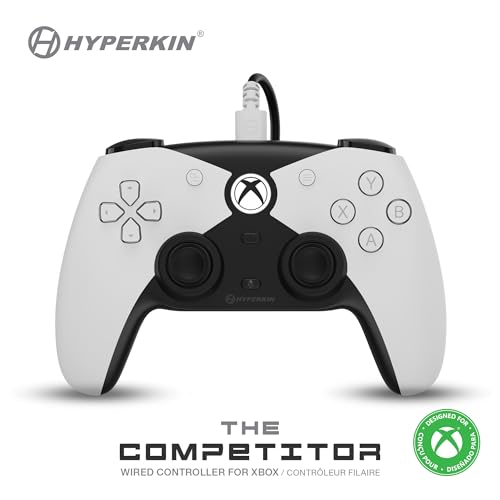
At 200 g this is the lightest controller on the list, and that 200 g against the Vader 5S’s 450 g is a real difference you feel the moment you pick it up. Some players love that featherweight feel because it tires the hands less over long sessions. The symmetrical analog sticks sit side by side rather than offset, which some thumb positions find more balanced. Hall Effect joysticks and impulse triggers deliver smooth, drift-free movement with magnetic sensors.
Two programmable rear buttons give you the back inputs you came for, and they customize on the fly. A translucent traditional D-pad and four precision action buttons handle the core controls. It is officially licensed by Xbox and carries a futuristic shell with a high-tech look. The layout and weight make it a natural fit for players who dislike a heavy pad pressing on their palms.
The symmetrical stick layout also divides players — some find it ideal, others are locked into the offset feel. What wins people over is the smooth, buttery joystick feel and the lightweight build, and it holds 4.0+ stars across 600+ ratings. Elegant, light, and priced in the value-to-mid range, it suits a player who wants uncomplicated rear buttons.
The weight win: 200 g makes it the lightest pick here, and the symmetrical Hall Effect sticks feel balanced under the thumbs.
The trade-off: 15 buttons total is the leanest count on this list, and the symmetrical layout is a love-it-or-leave-it feel.
Pairs well with: long sessions where a lighter pad spares your hands, and players who like symmetrical sticks with two rear buttons.
Pass if: you want four paddles or maximum button mapping — 15 buttons leaves less room to assign.
5. 8BitDo Ultimate 3-mode Wireless Controller

Pick it up, play, drop it back — the charging dock solves the dead-battery scramble.
The standout here is the integrated charging dock: your controller rests charged and ready, and it automatically reconnects the moment you lift it out. That one habit change is what owners tend to love most, because you never hunt for a cable mid-session. This is 8BitDo’s first 2.4G wireless Xbox controller, and it is officially licensed by Xbox and Rare Ltd.
You get two Pro back paddle buttons, Hall Effect joysticks, and Hall Effect triggers for drift-free, smooth control. Connectivity is broad: 2.4G wireless or wired USB to Xbox and PC, or Bluetooth to Apple and Android devices. Impulse triggers and vibration work on Xbox and Windows. A golden metal tactile D-pad, a 3.5mm audio jack, and three custom profiles through the Ultimate Software X round out the package.
The honest note is that the 2.4G Xbox link is what matters most for console play, and that aspect draws criticism across this pad’s owners — some report connection quirks. Everything else lands well: button response is snappy, the Rare anniversary look draws plenty of admiring glances, and reliability is otherwise well liked. It holds 4.0+ stars across 500+ ratings and sits in the upper-mid range. If you mainly play on PC or a mix of devices and love a display-worthy controller, the dock makes it a joy to live with.
Reasons it stays on the stand
- Integrated charging dock keeps it topped up and reconnects on pick-up
- Hall Effect sticks and triggers resist drift
- Three connection modes across Xbox, PC, Apple, and Android
- Two Pro back paddles plus three saved profiles
- Rare 40th Anniversary finish with a golden metal D-pad
Where to set expectations
- The 2.4G wireless link on Xbox is the least-loved part
- Impulse triggers and vibration only work on Xbox and Windows
Made for: players who split time across PC and console and want a dock that kills the battery worry.
Rethink if: rock-solid Xbox wireless is your whole priority — the 2.4G link is the shakier part of an otherwise lovely pad.
6. PowerA FUSION Pro Wireless Controller

A light show with four mappable buttons — just watch the battery.
Ghost RGB LED lighting with 6 modes across 4 customizable zones reveals a hidden design when it lights up, and if you like a pad that glows on the shelf, this delivers. More practically, the Quick-Twist thumbsticks let you adjust height mid-game with a simple twist — three height settings per stick, no parts to swap. Four mappable buttons program on the fly mid-game, with no system menu needed to set them up.
The sticks use Hall Effect modules — magnetic contact-free sensors for a fluid, precise feel that resists wear. Low-latency wireless runs on the included USB adapter across Xbox Series X|S, Xbox One, and Windows 10/11. A generous 17-button count matches the Vader 5S. The ergonomic magnetic Hall sensor setup rounds out a very configurable pad.
The catch is real, though. This one lands at 3.5+ stars across 500+ ratings, and the recurring theme is reliability — the connection drops and the pad occasionally quits on its own. Battery life is the second honest limit: buyers report under 5 hours per charge, so keep a cable nearby. Stick drift also comes up. For a player who prizes the RGB and the adjustable thumbsticks and can live with babysitting the charge, it is a joy to customize. If reliability matters most, look at the Vader 5S or the 8BitDo instead.
The fun factor: six RGB modes, twist-to-adjust thumbstick height, and four on-the-fly mappable buttons make it the most customizable pad on this list.
The honest flaw: connection drops and short battery life put reliability on the back foot — it is a tinkerer’s pad, not a set-and-forget one.
Pick this for: a player who loves RGB flair and wants to dial stick height and four buttons to their own taste.
Not for you if: dropped connections or battery anxiety would drive you up the wall.
7. SCUF VALOR PRO Wired Performance Xbox Controller
Four embedded rear paddles built for the player who wants everything under their fingers.
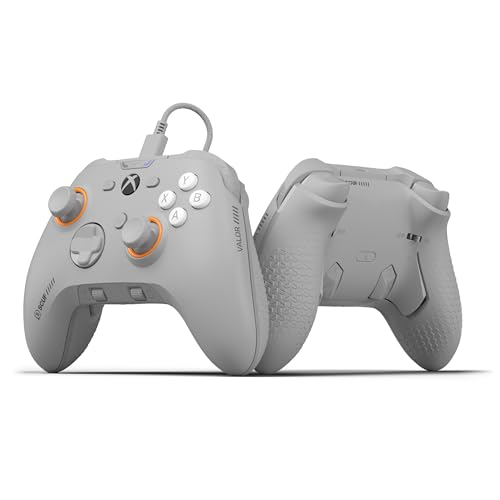
SCUF built its name on rear paddles, and the VALOR PRO carries four embedded rear paddles you can configure up to 16 functions. The Instant Triggers cut trigger pull to shave milliseconds off your reaction time. New wraparound bumpers give more surface area for faster movements, and a performance grip delivers non-slip comfort drawn from the brand’s long experience in paddles. With 24 buttons total, it is the second-highest count on this list.
The audio control system lets you change volume on the fly, and you can save three remapping configurations and switch with a flip of a switch. Faceplate and thumbsticks swap out so you can customize the look and feel. Hall Effect thumbsticks resist drift, and it connects by USB-C to PC, Xbox One, and Xbox Series X|S.
What wins people over is the quality — it is the most-praised trait, with ergonomics close behind. The pad feels good in hand and the triggers respond sharply. The trade-off is spread across reliability and value: connection drops surface in owner feedback, and at 9.12 ounces it is on the heavier side. It holds 4.0+ stars across 900+ ratings. For a wired competitive player who wants four paddles and a comfortable grip, it is a serious choice — just weigh the connection reports and the wired-only tether against the paddle count.
The competitive case
- Four embedded rear paddles configurable up to 16 functions
- Instant Triggers cut pull for faster reactions
- Three saved remapping profiles on a switch
- Hall Effect thumbsticks and non-slip performance grip
The caveats
- Connection drops appear in owner feedback
- Wired USB-C only, and fairly heavy at 9.12 ounces
Built for: wired esports players who want four paddles, instant triggers, and a comfortable grip they can tune.
Weigh carefully if: you need wireless, or the reported connection drops would frustrate you.
8. Razer Wolverine V4 Pro Wireless Controller

The fastest-feeling pad here — up to 8000 Hz polling and six mappable action buttons.
The marquee number is up to 8000 Hz HyperPolling on PC, which means the controller reports your inputs up to 8000 times a second for ultra-low latency. Paired with Razer HyperSpeed Wireless, that is the kind of responsiveness a competitive player chases. The thumbsticks are capacitive anti-drift units with contactless sensors for reliable, consistent aiming.
You get four removable mouse-click back buttons plus two claw grip bumpers — six mappable action buttons in all, so your thumbs stay glued to the sticks while you fire commands. Razer Pro HyperTriggers let you switch between instant mouse-click activation and full-range analog control, so one pad covers FPS and racing. Interchangeable thumbstick caps, a magnetic faceplate, and four onboard profiles make the fit your own, with customization through Razer Synapse 4 and the Controller app.
The caveat is that this is a very new listing — 4.5+ stars across just 30+ ratings, so the owner history is thin compared with the SCUF or Victrix. Nothing in the specs signals a flaw; it simply lacks the deep feedback trail of the older picks. It carries 18 buttons and all three connection routes — Bluetooth, wired USB-C, and 2.4 GHz. If you play competitively on PC and want the highest polling figure on this list, it leads the pack on raw speed.
The speed play: 8000 Hz polling on PC plus six mappable back and bumper inputs is the most aggressive latency setup here, and Pro HyperTriggers switch between click and analog.
Where caution sits: only 30+ ratings so far, meaning you are buying on spec and track record has not built up yet.
The right fit for: PC-first competitive players who want the fastest polling and switchable triggers with six mappable buttons.
Wait or look on if: you want a long, proven owner history before you commit.
9. Turtle Beach Victrix Pro BFG Reloaded Wireless Gaming Controller
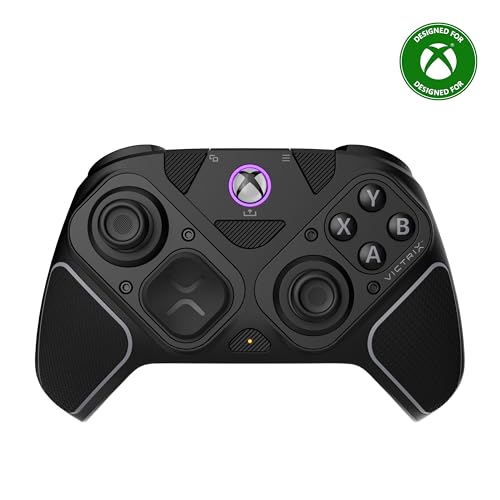
The shape-shifter of the group — swap the whole layout to suit the game.
This is the modular one. Three customizable modules with built-in Hall Effect technology let you reconfigure the stick and button layout, and an ergonomically enhanced six-button Fightpad module with Kailh microswitches flips the whole pad into a fighting-game setup. With 11 interchangeable components, you are effectively buying several controller types in one shell.
The rear inputs come as four mappable quick-action buttons. Five-stop Hall Effect clutch triggers with a hair-trigger mode let you shorten the pull for shooters and lengthen it for nuanced control. A built-in 3.5mm audio jack comes with a lifetime subscription to Dolby Atmos, and the pad runs wired or wireless with up to a 20-hour rechargeable battery. A carrying case and module tool are included, and it is officially licensed by Xbox.
What wins people over is controller quality — it is the most-praised trait, with the customizability close behind and the grip well liked too. The honest catch: button responsiveness and the triggers draw some mixed feedback, with a few finding the extra buttons get in the way during regular play. At 4.0+ stars across 400+ ratings and the premium end of the range, it rewards a player who genuinely wants to reconfigure. If you mostly want simple rear buttons, the extra modules may be more than you need.
Why the tinkerers love it: three swappable modules, 11 components, a Fightpad module with Kailh microswitches, and clutch triggers make it the most adaptable pad here.
The fair warning: a few find the extra buttons intrusive during regular play, and button responsiveness splits opinion.
Choose it if: you play several genres and want one pad you can rebuild — fightpad for fighters, standard for shooters.
Skip if: you just want two or four rear buttons with no fuss — the modular depth is overkill.
Know the Specs
Rear Paddles vs. Back Buttons
The terms get mixed up. Back buttons are typically flush or slim inputs behind the grips; paddles are longer levers that sit where your middle and ring fingers rest. Paddles let you press without shifting your grip, which is why esports players favor four-paddle layouts. Buttons suit players who want one or two extra actions. Both keep your thumbs on the sticks — the choice is about how many actions you want to reach and how much accidental pressing you can tolerate.
Polling Rate
Polling rate is how often per second the controller sends your input to the console or PC, measured in Hz. A higher figure means a faster response — a 1000Hz pad reports a thousand times a second, and a pad rated up to 8000Hz reports far more often on PC. You will not consciously notice the gap, but in a fast shooter an earlier input can be the difference between landing and missing a flick shot.
Hall Effect Sensors
Hall Effect sensors read stick position with magnets instead of physical contact, so there is nothing scraping away over time. That is why Hall Effect sticks resist the creeping drift where your aim drifts on its own even when you let go of the stick. It is the spec that most affects how long a controller stays accurate under heavy play.
Wired vs. Wireless
Wired connections avoid battery life and signal drops and are the choice for desk and competitive setups. Wireless frees you to sit back on the couch, but it introduces a battery to manage and, on some pads, connection quirks. Decide where you actually play before you fall in love with a feature list, because a beautiful wireless pad with a shaky link helps nobody on the sofa.
Common Questions
Do back buttons work on an Xbox One console or only Xbox Series X|S?
How many back buttons do I actually need for shooters?
What is stick drift and does Hall Effect stop it?
Can I remap the back buttons without installing software?
Is a wired controller better than wireless for competitive play?
Which controller on this list is best for PC gaming?
Do these controllers have a headphone jack for a headset?
Will a wired controller reach my couch?
What triggers do I want for racing games?
Are these controllers officially licensed by Xbox?
The Bottom Line
If you want the most useful set of back buttons for the money, the FLYDIGI Vader 5S is the pick — six remappable inputs, drift-free Hall Effect sticks, and joystick tension you can tighten by hand make it the most complete competitive pad here, and it carries 4.0+ stars across 600+ ratings. If you want a faster, cheaper wired start, grab the GameSir G7 SE with its 1000Hz polling and two clean back buttons. And for a wire-free couch setup that never runs flat, the 8BitDo Ultimate and its charging dock is the one to reach for.
How we choose
We do not accept paid placement. Every pick is matched to a real buyer and a real use-case; we do not hands-on test units.
Sources
Specifications: manufacturer listings and product documentation. Review insights: verified customer reviews, as of November 2026. Pricing: not shown on this page (it changes often); check the current price via the retailer link.
As an Amazon Associate, Tactical Gear Guy earns from qualifying purchases. This does not affect which products we feature.