Specs are compiled from manufacturer listings and verified buyer reviews and can change over time — please confirm the key details on the product page before buying.
Your Xbox pushing hot air out of its vents after an hour of play is normal. Your Xbox shutting itself down mid-match, or the fan screaming like a hairdryer, is not. A clip-on or stand-mounted cooling fan sits right over the console’s exhaust and pulls that trapped heat away faster than the internal fan can alone, and the best ones do it without adding a new noise problem. The short answer: the Mcbazel Cooling Fan for Xbox Series S is the pick most people should start with, because it cools, lights up, and adds two USB ports without needing its own power brick.
This guide is built by comparing the manufacturers’ published specifications and the patterns across verified customer reviews, so you get each pick’s real strengths and trade-offs instead of marketing spin.
Cooling is only half the job here. You also have to match the fan to the exact console you own, because a Series S cooler will not seat on a Series X and the other way round. Below you will find the fit, the fan speeds, the noise trade-offs, and the extra ports laid out plainly, so picking the right xbox cooling fan takes about two minutes.
Top Picks


How To Choose The Best Xbox Cooling Fan
The first decision is not about fans at all. It is about which console sits under your TV. A cooler built for the Xbox Series S is shaped for that smaller white box, and a cooler built for the Series X is shaped for the taller black tower. Get that wrong and nothing else matters, because the unit will not seat, the airflow will not line up, and you will be packing it back up.
Match the fan to the console, not the brand
Read the compatibility line before anything else. Several units here are Series S only, several are Series X only, and one handles both. If your household has a Series S and a Series X in different rooms, buy for the console you actually play most, or pick a model that lists both.
Decide if you want cooling alone or a full stand
A plain cooling fan clips on or sits under the console and does one job. A cooling stand adds controller charging, a headset hook, and game storage, which tidies a desk but adds more parts that can go wrong. If you already have a charging dock you like, a simple fan is the cleaner buy.
Weigh fan speed against noise
Higher revolutions per minute, or RPM (how many times the blades spin each minute), move more air. They also make more sound. A fan with two or three selectable speeds lets you run low for quiet late-night sessions and crank it high during a long session. A fixed-speed fan gives you no escape hatch.
Side-by-Side Comparison
| Model | Best For | Console Fit | Fan Speed Control | Extra Ports | Amazon |
|---|---|---|---|---|---|
| Mcbazel Cooling Fan for Xbox Series S★ Best Overall | Most buyers, first pick | Xbox Series S only | 3 levels | 1x USB 3.0, 1x USB 2.0 | Amazon |
| KOVA LED Display Auto Cooling FanSmart Auto Control | Hands-off auto cooling | Xbox Series X only | Auto plus 3 manual | USB hub at 5V/2A | Amazon |
| Mcbazel Wall Mount with Cooling FanWall Setup Pick | Wall-mounted setups | Xbox Series X only | 3 speeds up to 2100RPM | 1x USB 3.0, 2x USB 2.0 | Amazon |
| Gorixer Charging & Cooling Fan Stand | Series S owners charging two pads | Xbox Series S only | Dual fans at 2,200 RPM | USB-C to console | Amazon |
| MENEEA RGB Cooling Fan with Dust Filter | Dust protection plus cooling | Xbox Series X only | Auto plus 3 speeds | 1x USB 2.0 data, 1x USB 2.0 charge | Amazon |
| KEPLUG Dual Cooling Fan Stand | Series X and Series S households | Xbox Series X/S | 2 gears (3500 / 5000 RPM) | 3 USB ports | Amazon |
| MENEEA Cooling Stand & Charging Station for Series S | Charging two pads quietly | Xbox Series S only | 3 gears | 2 USB ports | Amazon |
| Klipdasse Cooling Stand & Charge Station | Tidy all-in-one desk setup | Xbox Series S only | 3 adjustable air speeds | 1 USB data, 1 USB charging | Amazon |
| MENEEA RGB Charging Stand for Series X | Disc storage and charging | Xbox Series X only | Button-controlled fan | 2 USB ports | Amazon |
Detailed Reviews
1. Mcbazel Cooling Fan for Xbox Series S
Our pick — 4.5+★ from 950+ verified ratings; the strongest balance of quality and price.
Three speeds, two USB ports, and a price that leaves room for a game.
If you own the small white Series S, this is the fan to put on it. It mounts on the console in either the vertical or horizontal position, draws its 5 volts straight from the console’s own USB port, and skips the power brick entirely. That means one less cable behind the TV and nothing extra to unplug when you move the console.
The three speed levels are the part that earns its keep. You can run it low during a late session when the room is quiet and click it up when the console is working hard. Two extra ports ride along — one USB 3.0 and one USB 2.0 — so a controller adapter, a keyboard, or a charging cable for your phone has somewhere to live without you crawling behind the TV.
The lighting is a genuine mood-setter rather than a single glow. You get 4 colors and 3 combined lighting modes, so the console shelf can shift color with the game. On the honest side, the auto-off behavior is where expectations split. The unit is powered by the console, so it behaves like an accessory rather than an independent device, and buyers who expected it to switch itself on and off cleanly found that part of the experience uneven. It does what it says on the cooling side; the automation is the loose thread.
What lands well
- Three selectable fan speeds let you trade noise for airflow on demand
- Runs off the console’s 5V USB supply, so no separate adapter
- Adds a USB 3.0 and a USB 2.0 port where there were none
- Fits vertical or horizontal placement on the Series S
Where to set expectations
- Series S only — it will not fit a Series X or any Xbox One model
- The automatic on/off behavior is the inconsistent part of the package
- Plastic body means it feels light rather than substantial
Start here if: you have a Series S and want cooling plus extra ports without another wall plug.
Look elsewhere if: you need the fan to power itself on and off with zero input from you.
2. KOVA LED Display Auto Cooling Fan for Xbox Series X
It reads the console’s temperature and decides for you, with a screen showing the number.
For a Series X owner who does not want to fiddle with a switch mid-match, this is the smarter arrangement. A small display on the unit shows live console temperature, switchable between Fahrenheit and Celsius, and the fan reads that number and picks its own speed. Below 96.8℉ (36℃) the fan is off or low. Between 96.8℉ and 107.6℉ (36℃-42℃) it steps to low, between 107.6℉ and 118.4℉ (42℃-48℃) to medium, and anything over 118.4℉ (48℃) pushes it to high.
If you would rather be in charge, a fan button switches you out of auto and into manual low, medium, or high. Unlike the Mcbazel fan above, which asks you to pick a speed and leave it, this one hands the decision to a sensor until you choose otherwise. The rest of the stand earns its place too: a USB hub that charges controllers or a headset at 5V/2A, an anti-slip silicone headset hook, and a compact body.
The lighting runs 9 presets — 7 colors plus 2 dynamic effects — and a three-second hold saves your favorite and shuts the lights off. Owners describe it as looking factory-installed rather than bolted on, which is high praise for a console add-on. The trade-off is weight and footprint: at 0.36 kg it is a desk ornament as much as a cooler, and the auto logic only helps if the sensor placement lines up with your console’s actual hot spot.
The auto-mode case: set-and-forget cooling with a temperature readout you can glance at between rounds is a genuinely useful combination for a Series X sitting in a warm room.
What it asks of you: trust the sensor, and accept a bigger desk presence than a plain clip-on fan.
The right call for: Series X owners who want the console to cool itself and like seeing the number move.
Think twice if: your desk is tight — this is a stand, not a slim clip-on.
3. Mcbazel Wall Mount for Xbox Series X with Cooling Fan
Gets the console off the shelf and cools it from underneath at the same time.
This is the pick for anyone who has run out of shelf and wants the Series X on the wall. Dual fans sit beneath the console and pull air through the mount while it hangs vertically, running at three touch-selected speeds up to 2100RPM. Speed and lighting both change by touch, with no app and no remote to lose down the back of the couch.
The build is the reassuring part. The body is ABS plastic rated to 10kg, with three removable hooks for controllers and a headset, and screws are supplied. Fitting is what buyers talk about most, and it is the mount’s strongest card — the console snaps into place and the install is straightforward. A mixed note runs through the fit conversation: a few owners found the hold less solid than they wanted, so it is worth using wall anchors suited to your actual wall rather than driving screws into plasterboard alone.
The light bar switches off entirely with a touch, which matters in a bedroom where a glowing shelf all night is a nuisance rather than a feature. One USB 3.0 port handles data and two USB 2.0 ports top up controllers, a headset, or a phone. Note the honest limit: the fans, the lights, and the ports all draw from the console, so none of them run while the console is asleep or switched off.
Best for: a Series X that needs to live on a wall and stay cool while it is there.
Skip if: you want accessories that keep working with the console powered down.
4. Gorixer Charging & Cooling Fan Stand for Xbox Series S
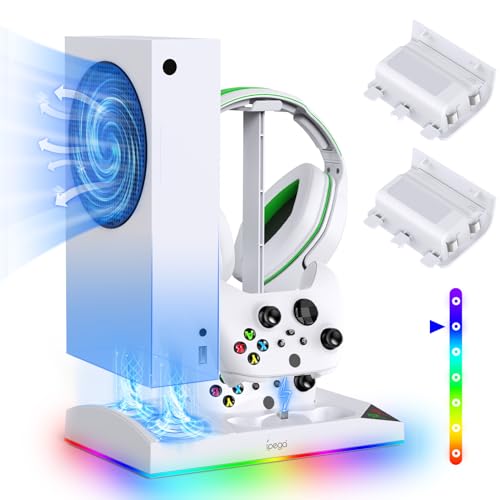
Six jobs in one white stand, and two spare batteries thrown into the box.
Count what this holds at once: the Series S, two controllers, a headset, and a light show. Dual fans run at 2,200 RPM over an aluminum base with a honeycomb air duct, and the metal thermal base is a real step up from an all-plastic floor.
Charging is where the value stacks. Two controllers fill at once in about four hours over USB-C, and the box includes two 1400mAh rechargeable batteries rated for 5000+ charge cycles, with FCC/CE-certified protection against overcharge, overheating, and short circuits. For a Series S household where both pads are always dead, that alone can replace a separate dock.
The lighting stretches further than most: 15 modes split between 8 dynamic effects and 7 static colors, with a memory function that brings your preset back after a long-press stealth mode. It also tucks the whole setup into a smaller footprint, with hidden cable management and a direct USB-C connection to the console so there is no external power supply. The catch is fit — this is Series S only, and the charging dock expects the included batteries. Older Xbox One S controllers are not welcome here.
Reasons it earns shelf space
- Charges two controllers in 4 hours while it cools the console
- Two 1400mAh batteries included, rated for 5000+ charge cycles
- Aluminum heat base and honeycomb duct under the fans
- 15 light modes with a memory preset
Reasons it may not fit
- Series S console only, and not for Xbox One S hardware
- Charging relies on the supplied batteries
Worth grabbing if: you run two controllers on a Series S and are tired of hunting for charged ones.
Pass on it if: your controllers are older models that need a different dock.
5. MENEEA RGB Cooling Fan for Xbox Series X with Dust Filter

Cools the console and stops the dust that clogs it in the first place.
Dust is what quietly chokes your console’s airflow over time. This stand fights it from both sides: a sliding cover opens to move more air and closes to keep dust and moisture out, and you also get two sets of dust covers plus a set of silicone dust plugs (soft rubber caps) to seal the USB and HDMI ports. If your Series X sits near a carpet or a window, that dust protection does more long-term good than a fan alone.
The fan itself runs a smart chip that senses outlet air temperature and sets its own speed, with a green indicator in auto mode. Touch the switch and you take over: medium shows blue, high shows orange, and a third touch turns the fan off. That is the same three-speed arc the Mcbazel Series S unit offers, just wrapped in auto logic here.
Cooling is what this one is known for, and it is the most-cited thing about it across the listing. The 7 RGB modes — running lights, water running lights, breathing lights, and red, green, blue, and cyan statics — are a close second in owner affection, and a long-press saves your preset. Two USB 2.0 ports handle data and charging. The honest wrinkle is sound: noise is the most-divisive topic on this unit, with the quieter crowd and the louder crowd both well represented, and a few found the remote less responsive than expected.
Set the fan to medium and leave it and most people will be happy. The sliding cover is also the flat top you can set things on, which is a small bonus in a cramped entertainment center.
The dust advantage: covers and plugs for the ports plus a sliding intake cover make this the pick for a dusty room, and the airflow benefit is the thing owners single out most.
The honest catch: this fan is not the quietest at high speed — match the speed to the room and the complaint fades.
Reach for this if: your Series X lives in a dust-prone spot and you want protection plus cooling in one unit.
Look elsewhere if: whisper-quiet at full tilt is your top priority.
6. KEPLUG Dual Cooling Fan and Cooling Stand

The only stand here that welcomes both the Series X and the Series S.
Most coolers in this category are locked to one console. This one lists both Series X and Series S, which makes it the practical answer for a household with one of each, or for anyone who might trade up later. Two fans sit under the stand and run at two gears, 3500 RPM or 5000 RPM — the highest fan figure in this group, so expect more air movement and correspondingly more sound at the top gear.
Lighting goes past the usual presets: 16 modes across 7 static, 5 dynamic, and 4 musical settings, controllable through a Bluetooth app or by hand. Powered by Bluetooth app control, it is the only pick here that lets you change the mood from your phone. Below the lights, Type-C charging ports fill two controllers with LED status lights — green when full or idle, red while charging — and three USB hubs add 5Gbps data transfer for moving clips or saves.
The build is what buyers like most, described as sturdy and well-fitting, with quiet fans and a strong sense of value for what you get. The one area to watch is the charging: the charging capability is the most-mixed subject in its own reviews, with a slice of buyers finding their controllers did not take a charge. KEPLUG backs it with a two-year quality guarantee, so a faulty unit has a clear return path.
What it does better than most
- Works with both Series X and Series S consoles
- Two fan gears at 3500 and 5000 RPM
- 16 lighting modes with Bluetooth app control
- Three USB ports with 5Gbps data transfer
What to keep in mind
- Controller charging is the least consistent part per its own reviews
- Top fan gear is loud by nature at 5000 RPM
- App-based lighting adds a pairing step some will skip
Built for: the two-console household that wants one stand to cool and charge everything.
Not the one if: you would rather not involve a phone app for light control.
7. MENEEA Cooling Stand & Charging Station for Xbox Series S

Blades shaped to move more air with less of the whooshing that distracts.
Noise is the reason this one earns a spot. The dual bottom fans use a seven-petal bionic blade shaped around fluid dynamics, aimed at moving air with less turbulent noise. Frame it as a design claim, but the low-noise approach is real, and it means game dialogue stays audible instead of being drowned by a fan.
The rest is a tidy Series S base. The fan pushes air upward through the vents, and a bottom air hole with a gasket lifts the intake to enlarge the opening and draw cooler air. Three fan gears have their own switch, and the RGB strip has its own separate switch, so you can kill the fan and keep the lights or the other way around. A 15-mode strip covers 8 dynamic and 7 monochrome options.
Charging fills two controllers in 2-3 hours with over-current, over-voltage, and over-heat protection, and the box includes two 1400mAh batteries rated for 1500 charges and up to 40 hours per charge. A headphone hook and two USB ports finish the package, with an anti-slip silicone base so a pet cannot tip it. Reliability is the subject that draws the most attention across its reviews, and it reads mixed rather than glowing — buy from the seller with the warranty and keep the order details.
What wins people over: it cools quietly and the included batteries mean no separate controller-charging purchase.
Where to be careful: reliability is the most-discussed topic on this stand and the view is split, so a unit that arrives off should go straight back under warranty.
An easy yes for: a Series S owner who values quiet cooling and included rechargeable batteries.
Hold off if: you want the most airtight reliability track record in the group.
8. Klipdasse Cooling Stand & Charge Station for Xbox Series S

The do-everything white tower that turns a messy corner into a display.
If the goal is a single object that cools, charges, stores, and glows, this is the most complete package for a Series S. Two high-speed fans run at three adjustable air speeds with an LED indicator showing which level you are on, and low-noise blades are aimed at keeping the console cool without burying game sound. A memory function saves your light mode through a power-off, so it comes back on exactly as you left it.
The lighting offers 15 effects — 7 monochrome and 8 running or blinking patterns — with a light memory that snaps back on power-up. Two Type-C charging ports fill controllers in 2-3 hours with red and green status lights, and the box includes two 1400mAh batteries plus a headset hook. A USB data port and a separate USB charging port round out the connections.
What owners value most is plain function — it does a lot of jobs at once and it looks good doing it. Cooling is the more debated subject: some say it keeps the console cool, and some say it does not move enough air to matter. Treat it as a support cooler rather than a fix for a console that is already running hot in a stuffy cabinet. One compatibility note before you buy: the dock only works with the supplied batteries or the official Series S or Series X rechargeable pack.
Fits best in: a Series S setup that needs tidying as much as cooling.
Not ideal if: you are chasing maximum airflow and nothing else.
9. MENEEA RGB Charging Stand with Cooling Fan for Xbox Series X

A six-in-one tower with room for ten discs beside the console.
If you still buy games on disc, this stand earns its place by clearing your whole setup off the floor. It packs cooling, dual controller charging, 15 lighting modes, two 1400mAh batteries (rechargeable packs that replace AAs), ten game disc slots, a headset stand, and an extra USB port into one vertical footprint. The fan placement is the unusual part: instead of sitting under the console, the fan sits on the side and pushes air through the console’s internals, and the metal base has four vents so hot air can rise out of the top without being blocked.
Charging fills two Series X controllers at once within 3.5 hours, using a smart chip for over-current, over-voltage, and over-heat protection, and you have to use the batteries in the box. A button turns the cooling fan on or off any time, and the 15 lighting effects split into 7 static and 8 adjustable patterns with a three-second long-press to save and shut down. Owners describe the LEDs as subtle enough not to distract during play, which is the right balance for a room where you are trying to focus.
Space management is the real payoff — console vertical, controllers docked, headset hung, discs stored, all in one place. Two USB ports handle the console connection and charging a keyboard or phone, though the extended port does not pass data and the charger stops when the console is off. Fit is the honest soft edge: the fit receives mixed feedback across reviews, so check the seating carefully once it is assembled.
What makes it stand out
- Ten disc slots keep physical games within reach
- Side-mounted fan with a vented metal base
- Two controllers charge in 3.5 hours with protection circuitry
- Subtle LEDs that owners say do not distract
Where it falls short
- Fit is the most debated point across its own reviews
- The extended USB port is charging only, no data
- Charging stops when the console powers off
Pick this for: a Series X disc collection that needs a home alongside the console and pads.
Give it a miss if: you are all-digital and will never use the ten disc slots.
Know the Specs
Fan Speed in RPM
RPM counts how many times the blades spin in a minute. Higher numbers move more air and make more noise. The two figures to know are the quiet end and the loud end — the Mcbazel wall mount reaches up to 2100RPM, while the KEPLUG stand runs at 3500 or 5000 RPM. A higher top figure is not automatically better; it means more forced draft and more sound, which matters if the console sits in the room you sleep in.
Auto Temperature Mode
An auto mode uses a sensor to read the console’s outlet temperature and pick the fan speed for you. On the KOVA fan, speeds step up at 96.8℉ (36℃), 107.6℉ (42℃), and 118.4℉ (48℃). The benefit is that the fan idles when the console is cool, so you are not listening to it during a paused game. Manual mode still exists as an override on most of these units.
USB Pass-Through Ports
These convert one console USB port into several, letting you charge a controller or phone, or connect a keyboard or adapter, without reaching behind the TV. Watch the number and the type: a USB 3.0 port handles data, a USB 2.0 port typically charges. Some units include one of each, and one stand here offers three ports with 5Gbps data transfer.
Controller Charging and Batteries
Several stands include 1400mAh rechargeable battery packs and Type-C docks that fill two controllers at once, generally in 2-4 hours depending on the unit. These docks typically only charge the supplied batteries or the official rechargeable pack, not third-party battery packs. If your controllers already have batteries you like, that feature is dead weight and you can choose a plain cooling fan instead.
Common Questions
Will a Series S cooling fan fit my Series X console?
Does an Xbox cooling fan need its own power adapter?
How noisy is a console cooling fan at high speed?
Do the included controller batteries work in any Xbox controller?
Will a cooling stand actually stop my Xbox from overheating?
Can I keep using my own charging dock if I buy a cooling fan?
How long do the included rechargeable batteries last per charge?
Is a dust filter worth having on a cooling fan?
Do RGB lights on a cooling stand distract during gaming?
The Bottom Line
For most people shopping for the best xbox cooling fan, the Mcbazel Series S unit is the safest starting point, because it cools, adds two USB ports, and lights up without a separate power adapter. If your console is a Series X and you want it to look after itself, the KOVA auto fan is the one to grab. And if your Series X hangs on a wall, the Mcbazel wall mount with its dual fans to 2100RPM is the obvious reach. One honest nudge: the Series S cooler has the deeper track record in this group, so if you are torn between two and one is a Series S model, the crowd has done the legwork for you.
How we choose
We do not accept paid placement. Every pick is matched to a real buyer and a real use-case; we do not hands-on test units.
Sources
Specifications: manufacturer listings and product documentation. Review insights: verified customer reviews, as of November 2026. Pricing: not shown on this page (it changes often); check the current price via the retailer link.
As an Amazon Associate, Tactical Gear Guy earns from qualifying purchases. This does not affect which products we feature.