Specs are compiled from manufacturer listings and verified buyer reviews and can change over time — please confirm the key details on the product page before buying.
Buying a Bluetooth pad for an Xbox is mostly about one question: will it pair with your PC, phone, or console without a dongle and stay connected through a whole session? The short answer is that the official Xbox pads do that best, and the third-party options win on extra buttons and adjustable triggers. Below are the nine pads that actually hold a Bluetooth connection, sorted so you can pick in a couple of minutes.
This guide is built by comparing the manufacturers’ published specifications and the patterns across verified customer reviews, so you get each pick’s real strengths and trade-offs instead of marketing spin.
Each pick below is judged on battery hours, button mapping, and price. Every pick here pairs over Bluetooth, so you are never stuck tethering a cable to your console just to play. Here is the honest shortlist for the best Xbox One Controller Bluetooth setup you can buy right now.
Top Picks


How To Choose The Best Xbox One Controller Bluetooth
The first thing to get straight is that a pad can talk to your Xbox in two ways. “Xbox Wireless” is Microsoft’s own radio, and it connects straight to a console with no dongle. Bluetooth is the open standard that lets the same pad talk to a Windows PC, a tablet, or an Android phone.
Most buyers want both. You play on the console at the TV, then carry the same pad to a laptop or phone for cloud streaming. Check the listing names both, because a wired-only pad will not do either job wirelessly.
Battery life in hours, not vibes
A pad that dies mid-match is the most common complaint in this category. Look for the quoted hour figure — up to 40 hours is the number the official Xbox pads print, and that is measured with normal play, not max rumble. Pads that run on AA batteries let you swap in fresh cells instantly instead of waiting on a charge.
Stick wear and the drift question
Thumbsticks are the part that fails first on any pad. Standard analog sticks wear a resistive track inside, and over time the stick reports movement when your thumb is still — that is “drift”. Hall Effect sticks use a magnetic sensor instead of physical contact, so the part that wears out is removed from the design. If you play several hours a day, that difference matters more than RGB lighting.
Back buttons, trigger stops, and profiles
Extra rear buttons let you keep your thumbs on the sticks while jumping or reloading. Trigger stops shorten the pull so a shot fires sooner. Both are genuine advantages in shooters and racing games. They also add cost, so decide whether you will actually map them before you pay for them.
Side-by-Side Comparison
| Model | Best For | Battery | Buttons | Connection | Amazon |
|---|---|---|---|---|---|
| XBOX Wireless Controller | Ice Breaker Special Edition★ Best Overall | Console and cloud play with style | Up to 40 hours | 19 | Xbox Wireless, Bluetooth, USB-C | Amazon |
| Dinosoo Wireless ControllerBudget Contender | Turbo and macro on a budget | — | — | Bluetooth | Amazon |
| Gamrombo Wireless ControllerSmart Renewed Buy | Macro users who like rear buttons | — | — | Bluetooth, WiFi, wired | Amazon |
| Turtle Beach Rematch Wireless RGB | Precision sticks and rear buttons | Rechargeable, 10ft charge cable | 14 | USB transmitter, Bluetooth (BLE) | Amazon |
| XBOX Elite Series 2 Core | Competitive tuning and profiles | Up to 40 hours | 15 | Xbox Wireless, Bluetooth, USB-C | Amazon |
| Xbox Core Wireless Controller 2-Pack | Two players in one go | — | — | Xbox Wireless, Bluetooth | Amazon |
| Nacon Revolution X Unlimited | Deep physical customisation | Up to 10 hours | 29 | Bluetooth, USB-A, 2.4GHz wireless | Amazon |
Detailed Reviews
1. XBOX Wireless Gaming Controller Ice Breaker
Our pick — 4.5+★ from 700+ verified ratings; the strongest balance of quality and price.
Forty hours per charge and two radios built in — this is the pad that just works everywhere.
It carries Xbox Wireless for the console, Bluetooth for your PC and phone, and USB-C for plug-and-play when the battery is flat. Xbox quotes up to 40 hours of battery life, which is the number that keeps you playing through a weekend without hunting for a cable. The 3.5mm jack takes any wired headset, so your game audio and chat run through the pad.
The Ice Breaker finish is the draw for anyone tired of plain black. It mixes iced and frosted blues and sits in the Breaker special edition series, so it looks different on the shelf. Under the paint it is the same shape you already know, with textured triggers and a hybrid D-pad that gives you clean diagonals in fighting games. Rubberised grips on the back cases keep your palms planted during long sessions.
Two things to weigh before you commit. At 14.08 ounces it is heavy for a standard pad — the plain Xbox Wireless Controller – Black comes in at 9.88 ounces, so this one sits noticeably denser in the hand. And the durability reports are mixed, with a subset of buyers saying it only lasted 5 months. What wins people over is build quality overall, and the style is the next thing they talk about, so the majority are happy; treat this as a pad to buy for the look and the battery, not the toughest shell on the list.
Why it earns first place
- Up to 40 hours of battery life from one charge
- Xbox Wireless, Bluetooth, and USB-C all in one pad
- Textured triggers, hybrid D-pad, and rubberised rear grips
- Share button for screenshots and clips without menus
What to weigh first
- 14.08 ounces is heavier than the 9.88-ounce standard black pad
- Durability is the mixed signal — a small share report failure around 5 months
- AA batteries are not the setup here; you charge over USB-C
Go for it if: you want one official pad that switches between console, PC, and cloud gaming without a dongle.
Think twice if: you prefer a light pad on the sticks or you want swappable AA cells.
2. Dinosoo Wireless Controller for Xbox Series X|S/One/PC
Four vibration motors, turbo and macro, and a Bluetooth radio — an entry point for tinkerers.
If you want turbo and macro functions without premium-tier money, this is the entry point. It runs over Bluetooth to Xbox One, Series S, Series X, and Steam on PC, and it carries turbo and macro functions plus four vibration motors so the rumble lands in more than one spot. The 3.5mm jack takes a headset, and the red shell is not subtle.
The reputation that carries this pad is reliability — it holds the connection and runs Steam games without fuss. For a budget Bluetooth pad, a connection that holds is the whole job. Quality feedback splits both ways, and the value question is the honest sticking point, because some buyers feel it does not justify what it costs next to an official pad.
Treat it as a second pad for a spare room or a macro experiment, not your main controller. The macro and turbo layer is genuine and the Bluetooth link works, but you are trading official-build polish for extra programmability. Confirm the pairing steps for your platform before you buy, because Bluetooth setup differs between console and PC.
Where it fits: a budget-friendly pick for Steam players and anyone who wants macro keys without paying premium-tier money.
The trade-off: quality and value both draw split verdicts, so go in expecting a functional pad rather than a premium one.
Reach for this if: macro buttons and four rumble motors at entry-level money is exactly the trade you want.
Look elsewhere if: you want the tightest build quality available and would rather pay for an official pad.
3. Xbox Wireless Controller – Velocity Green (Renewed)
Two rear buttons you can program, plus a wireless range that clears the average living room.
Gamrombo’s pitch is macro control, and the hardware backs it up: two back mappable buttons that can hold mappings of up to 16 buttons onto the PR/PL keys. Press one and a whole combo fires. That is a real advantage in fighting games and skill-heavy titles, and it takes the wear off your face buttons over time. The wireless range is quoted at over 30 feet, which covers a couch-to-console setup with room to spare.
It pairs across Xbox One, Xbox One S, Xbox One X, Series X, Series S, Android, iOS, and Windows 11/10/8/7 over Bluetooth, WiFi, or wired. The shell is streamlined with an anti-slip finish on both sides, and there is a 3.5mm headphone jack for a headset.
Here is the honest limit: there is very little owner feedback accumulated on this model yet, so you are buying on the spec sheet rather than a proven track record. The macro feature is the whole reason to pick it over the official pad — if you will not use rear buttons, the value case drops away. Test the button mapping early, since programmed macros vary by game.
The macro case
- Two back buttons mappable to up to 16 inputs
- Wireless range over 30 feet
- Bluetooth, WiFi, and wired modes in one pad
- Anti-slip finish on both sides for long sessions
The honest limits
- Very few owner reviews to lean on yet
- Macro value only pays off if you actually map it
- Less proven build record than the official pads
Pick this if: rear macro buttons are the feature you came for and you want them without premium-tier spend.
Skip the idea if: you want a large body of owner experience behind your purchase.
4. Turtle Beach Rematch Wireless RGB Gaming Controller
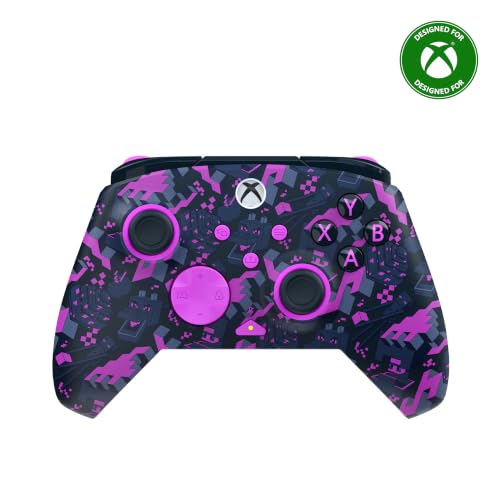
Hall-Effect hair triggers and TMR sticks — the parts that usually wear out are the parts upgraded here.
Turtle Beach went after the two failure points first. The thumbsticks are ultra-sensitive TMR (a magnetic-sensing stick design), and the triggers are Hall-Effect hair triggers with three-way trigger stops for a shorter, faster pull. If drift has killed a pad on you before, TMR sticks and Hall-Effect triggers are the reason to look here. Dual rumble motors and impulse triggers handle the feel, and two mappable quick-action back buttons cover the extra inputs.
At 8.48 ounces it is lighter than the Ice Breaker’s 14.08 ounces, and it carries 14 buttons to that pad’s 19. Connectivity is a little different from the rest: it plays wirelessly on Xbox and Windows 10/11 through a USB transmitter, and it adds Bluetooth (BLE) for compatible Android and streaming devices. There is a built-in rechargeable battery with a 10ft USB-C play-and-charge cable, and a 3.5mm jack with on-board audio controls.
The catch is that Bluetooth here is not the console path. Console play runs through the USB transmitter, so if Bluetooth-to-Xbox is your only requirement, this is a different animal than the official pads. It is also officially licensed by Xbox and Mojang, which is why the Minecraft design and RGB lighting are part of the package. Owner feedback is thin so far, so you are weighing specs and the licensing rather than a long record.
What the hardware brings
- Hall-Effect hair triggers with 3-way stops
- TMR thumbsticks aimed at drift resistance
- 8.48 ounces — lighter than the Ice Breaker at 14.08 ounces
- 10ft USB-C play-and-charge cable and 3.5mm jack
Where it stops short
- Console wireless is via USB transmitter, not Bluetooth
- Limited owner feedback so far
- 14 buttons — fewer than the 21 on the black Xbox pad
Standout spec: Hall-Effect triggers and TMR sticks make this the wear-resistance play.
Not for you if: you want a single Bluetooth link from pad to console with nothing plugged in.
5. XBOX Wireless Gaming Controller Elite Series 2 Core

Tension-adjustable sticks, hair trigger locks, and three saved profiles you switch mid-game.
The Elite Core is about tuning your aim rather than adding colours. Adjustable-tension thumbsticks let you set how stiff the stick feels, which is the dial competitive players obsess over. Wrap-around rubberised grips keep it locked in your hands, and shorter hair trigger locks shorten the pull for faster shots. The Xbox Accessories app gives exclusive button mapping options, including picking the colour the Xbox button lights up with.
Three custom profiles sit on the controller itself, so you can swap setups between games without opening an app. It carries Xbox Wireless, Bluetooth, and an included USB-C cable for Xbox Series X|S, Xbox One, and Windows devices, and Xbox states up to 40 hours of battery life. The Core box has just the essentials — controller, USB-C cable, one D-pad, two standard thumbsticks, and a thumbstick-adjustment tool. Extra components from the Complete Component Pack are sold separately.
Be clear-eyed about the record here: quality, reliability, and value all draw split verdicts across a huge owner base. Some players call it the best controller made and others hit failures. That spread usually tells you the pad is loved when it is right and frustrating when it is not, so buy with an eye on the return window. What it does better than the standard pads is the tuning — stick tension and profile switching are not available elsewhere in this roundup.
For the tinkerer: adjustable stick tension, hair trigger locks, and three on-board profiles put real control in your hands.
The honest split: quality and reliability produce divided verdicts, so this is a pad to validate early rather than assume flawless.
Choose it if: you want to tune stick tension and swap game profiles without a menu.
Reconsider if: you expected the full accessory kit — the Core bundle is deliberately minimal.
6. Xbox Core Wireless Controller 2-Pack

Two Carbon Black Core pads in one box — one for you, one for whoever grabs the second seat.
Splitting a two-pack makes the maths simple for a couch co-op household. Each pad carries the hybrid D-pad, textured grip on the triggers, bumpers, and back-case, and a Share button for clips. Both run Xbox Wireless to the console and Bluetooth to Windows 10, Android, and iOS, with USB Type-C for a wired connection. Switching between your console and a laptop is a pairing change, not a cable swap.
The 3.5mm stereo jack accepts any compatible headset, and button mapping works through the app. The bundle ships with Microsoft’s warranty, which is the reassurance for anyone worried about a second pad sitting in a drawer between sessions.
The mixed note is on connectivity and long-term function — a small share of feedback mentions a unit failing within a couple of weeks, and there are reports of pairing trouble with a Series S. With the volume of happy owners far outnumbering those, this stays a solid buy; just register the pads and test both on arrival, since a bundle doubles the chances one unit misbehaves. Quality and value are what buyers praise most here.
Why the bundle works
- Two full Core controllers in Carbon Black
- Xbox Wireless to console, Bluetooth to PC, Android, and iOS
- Hybrid D-pad plus textured trigger and bumper grip
- Share button and app-based button mapping
What to watch
- Connectivity verdicts are mixed, including a Series S pairing note
- A bundle doubles your exposure to a single faulty unit
Made for: two-player households that want matching official pads and a shared Bluetooth backup for PC.
Skip if: you only ever need one pad — a single controller is the smarter buy.
7. Nacon Revolution X Unlimited Precision Wireless Controller
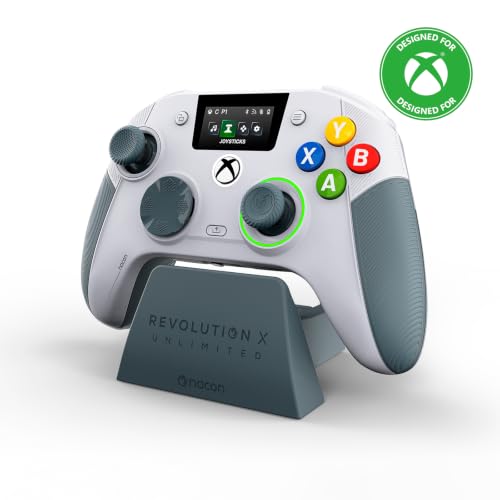
Sixty-plus customisation options, Hall Effect sticks, and a charging station on the desk.
This is the pad for the player who treats a controller like a race car setup. It carries 29 buttons and more than 60 customisation options, including a 4-way and 6-way directional pad, 3 sets of weights, 3 sets of joystick heads in concave, convex, and high-dome shapes, and 2 sets of joystick rings in medium and large. All of it travels in the included storage case. The joysticks and triggers use Hall Effect magnetic technology, which removes the physical contact that causes joystick drift.
On connection it covers a lot: a 2.4GHz wireless transmitter, Bluetooth for compatible Android devices, and a wired mode with the included 3m braided cable. There is a built-in LCD screen for mapping and audio mixing, plus six mappable shortcut buttons. Battery life runs up to 10 hours, and the charging station means you drop it on the stand instead of finding a cable.
The clear trade-off is battery — 10 hours is a fraction of the 40 hours the official Xbox pads quote, so heavy players will be docking it often. Wired PC mode is where the latency numbers land, at 1ms wired and 2ms wireless, and there is a gyroscope for aiming. Owner feedback is limited, and the customisation is only worth the premium-tier outlay if you will actually swap weights and stick heads. Buy it only if you will actually swap the weights and stick heads; casual players can skip it.
For setup obsessives: 3 weight sets, 3 stick head shapes, and 2 ring sizes let you dial in feel precisely.
The real cost: up to 10 hours per charge versus 40 on the official pads means more time docked.
Suits you if: you want Hall Effect sticks plus physical tuning and you play near a charging station.
Not worth it if: you want one pad, one setup, and long stretches between charges.
Know the Specs
Xbox Wireless vs Bluetooth
Xbox Wireless is Microsoft’s own radio and connects straight to an Xbox console with no dongle. Bluetooth is the open standard that lets the same pad talk to a Windows PC, tablet, or Android phone. A pad that lists both can hop between your console and your computer. Some third-party pads skip Bluetooth on console and use a USB transmitter instead, which is a different setup entirely.
Battery life in hours
Battery is quoted as a maximum hour figure, and that number assumes normal play rather than constant full rumble. The official Xbox pads state up to 40 hours, while some third-party designs state up to 10 hours. Pads that take AA batteries let you swap cells instantly; rechargeable pads need a cable or a dock before you play again.
Hall Effect sticks and drift
Standard analog sticks use a physical contact track that wears over time, and once it wears the stick reports motion when your thumb is still. Hall Effect sticks use a magnetic sensor with no contact to wear, which addresses that specific failure. You will see the term on two picks here, aimed at players who log long hours.
Button count and back paddles
Button quantity tells you how many inputs a pad has to map. A standard pad sits in the high teens to low twenties, and heavier customisation pads reach into the high twenties. Rear buttons and trigger stops are the features that let you act without moving your thumb off the stick, which is why competitive players chase them.
Common Questions
Do these controllers connect to an Xbox One over Bluetooth?
How long does an Xbox controller battery last on one charge?
What are Hall Effect sticks and do they stop stick drift?
Can I use these pads with Steam on a PC?
Is a renewed Xbox controller worth buying?
How do macro and back buttons help in games?
Do these controllers have a headphone jack?
Which controller is best for competitive shooters?
Will the 2-pack pads work as a second controller on PC?
What is the difference between the Elite Core and the full Elite kit?
The Bottom Line
For most players, the xbox one controller bluetooth winner is the Ice Breaker Special Edition because it carries Xbox Wireless, Bluetooth, and USB-C in one pad with up to 40 hours of battery life. If you want the lightest official option, grab the Xbox Wireless Controller – Black at 9.88 ounces. And for drift resistance, the Turtle Beach Rematch is the one to reach for with its Hall-Effect triggers and TMR sticks. One last nudge: the Ice Breaker’s style and build quality are what pull the crowd in, and that combination is why it tops this list.
How we choose
We do not accept paid placement. Every pick is matched to a real buyer and a real use-case; we do not hands-on test units.
Sources
Specifications: manufacturer listings and product documentation. Review insights: verified customer reviews, as of November 2026. Pricing: not shown on this page (it changes often); check the current price via the retailer link.
As an Amazon Associate, Tactical Gear Guy earns from qualifying purchases. This does not affect which products we feature.